















Image Overlay - app for displaying reference photos on top
Operating System(s): Windows XP, Windows Vista
License: This is licensed for commercial or non-commercial use.
Product Notes
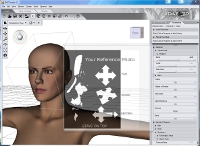
ImageOverlay - Windows application for displaying a scaled/deformed reference photo with varying degrees of transparency. Maintains position as the topmost window allowing interaction with the CG tool displayed under it.(Requires Windows (XP SP2 or above) with the .NET Framework 3.5 - if you need it download it from Microsoft here: http://www.microsoft.com/net/download.aspx)Updated to Version 2:* Added optional GUI controls to interact with the form and the image* Rebuilt to use .NET 3.5 making it compatible with XP SP2* Mouse is now able to 'fall through' allowing interaction with applications underneath when desired* Accepts command line parameters to control the above
On-Sale Items in the Marketplace


Comments
I used an earlier version of this program back when my computer was still running Windows 7. I found it very useful for referencing character photos, pose sets, or clothing. Having the original figure, person, or prop in front of you as a step-by-step guide can be very helpful. I have not so far been able to configure it in Windows 10 so that it runs the way it is supposed to. After reading the notes on .NET framework 4, I will try downloading and installing that and see if Image Overlay will start performing for me again.
I would use it to open an image from command line, and overlay it on a video, based on schedule. It looks it is not possible to open a file by command line argument, right? :( Thank you
For clarification: this needs .NET framework 4, and hence WIndows XP SP3 or later. Although you can install .NET on SP2, this applications doesn't function. A pity, it would have been very useful - I'll keep it ready for my next OS upgrade.
Similar to the Foreground Reference Utility that has been available for a couple of years. http://www.digitalartistguild.com/misc/UtilityExplain/UtilityExplain.html I do like the way you have used hot keys and kept the form clean. I would suggest making it so that the user can lock the ImageOverlay utility on top then work in the background app without having to dial down the transparency.
Finally! I hate having to bounce back and forth between reference and DAZ... So time consuming! Glad someone finally created something that fixes that issue! Thank you so much!
Great program. I was looking all over for something like this! Thank you very much.
Amazing idea and very useful application!
Hi, Thanks for the comments. This was originally created for my own use for my latest project but I thought other people may benefit from it, hence the somewhat primitive interface; since people seem to like it I'll make a more user friendly V2 :D. avara - Hit ALT+F4 while the window has focus. This shortcut closes any Windows application.
Once running, how do you stop it?
Awesome. Been looking for something like this to use in Daz Studio for years.
What a wonderfully simple and useful idea! The best use of GUI alpha blending I've ever seen. You should include a link to the .NET download. And the interace is a little confusing a few small buttons in one corner wouldn't hurt.

Pretty cool app to have. I love this app. Its fabulous.You can get all apps and games for free on Android and iOS devices using TopStore. [Download Top Store](https://topstorevip.com/) app and enjoy all latest apps and games for free.