

















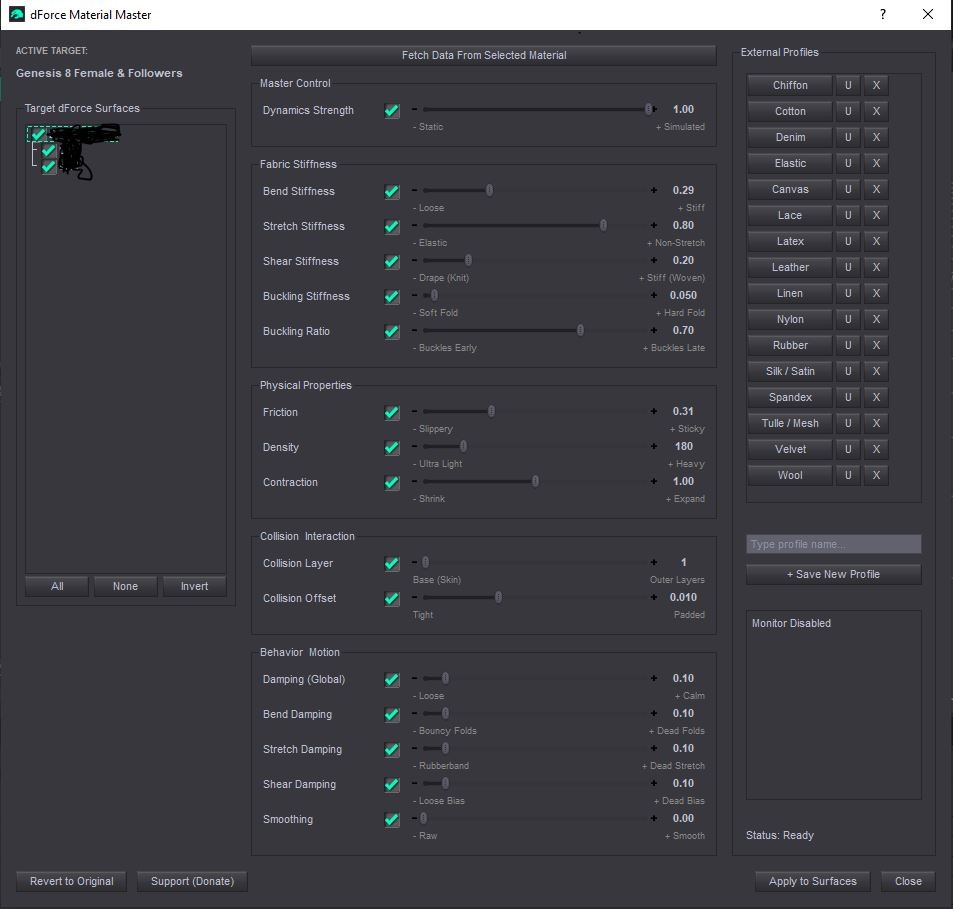
dForce Material Master - Updated
Operating System(s): Windows 10
Softwares: Daz Studio 4
License: This is licensed for non-commercial use only.
Product Notes
dForce Material Master with Presets for use in DAZ studio 4.24
Batch Editing: Apply physics adjustments to multiple surface zones simultaneously, bypassing the tedious DAZ Surfaces tab.
One-Click Profiles: Instantly convert a generic mesh to "Silk," "Denim," or "Rubber" using pre-made fabric presets.
Centralized Dashboard: Access all relevant dForce settings (Stiffness, Physics, Behavior) in one clean, uncluttered interface.
Zero Guesswork: Use "Fetch Data" to instantly load a material's existing physics values to establish a perfect baseline.
Selective Application: Tweak specific properties (like only increasing Friction) across multiple surfaces without overwriting their other unique settings.
Restore original material setting with a single click.
Let me know if you face any issues in comments.
On-Sale Items in the Marketplace


Comments
I've just updated the script and uploaded the new version
That is great to hear! I'm glad you were able to get it working by adjusting your scaling to 100%. The good news is that I have fixed this issue on my end! I have adjusted the script's UI layout to be much more compact, so the buttons should stay visible even if you prefer keeping your laptop at 125% scaling. You won't have to use your 100% scaling workaround for long—please keep an eye out for the next update, which I will be uploading soon.
Thank you!!
Thank you for your reply, vinayredk123456. I have checked and the display setting is 1920 x 1080 but the laptop set the scaling on 125% and that's why I couldn't see the apply button. If i use a 100% scaling instead, I can see it. So thank you because now, I know what I have to do to use your excellent script. :)
i am using 1920 x 1080 without any issues speculoos check your display settings
I can't use the script because I can't see the apply and close buttons on the screen of my laptop (1920 x 1080) since the script window is too big and can't be scaled down...

Thank you!