
Renderosity Forums / Poser - OFFICIAL
Welcome to the Poser - OFFICIAL Forum
Forum Moderators: RedPhantom Forum Coordinators: Anim8dtoon
Poser - OFFICIAL F.A.Q (Last Updated: 2026 Jun 21 10:24 am)

Subject: Morph Cleanup Script

Quote - Oh the shorts are not forgotten. I have been trying to work out why it is proving so difficult for me to create useable JCMs for them. I looked at the shorts you made based on Antonia's topology, which seem to work fine with one JCM.
I hacked Antonia 122 CR2 to make the hip2 and thigh morphs independant from the thigh bends. If I apply the spread morph with Antonia joints zeroed there is some very sharp deformation of Antonia's mesh around the backside at spread -60. These obviously work well for Antonia, but I think the approximation which is happening with 'morphing clothes' trying to replicate the sharp deformation of Antonias mesh for 'spread', into the quite different topology of the my shorts is resulting in a morph which doesn't really do what is required of it.My experiments were interupted with a three day ITIL course and exam, so I had to put 3D out of my mind for a few days. ( my old brain doesn't multitask as well as it used too ).
In the Brad thread, phantom3d has commented that the design of the mesh is much more important for good bending than any joint settings. My shorts, being derived from Antonia's mesh, follow the curves of her mesh in the stretch and crunch areas for the joints. I think you're right about the topology. Clothes for Antonia may require either a mesh with a topology which flows like hers, or more elaborate JCM setups. :unsure: I'm increasingly amazed that those I made worked. :lol: I cheated. :lol:
I'm eager to see yours when they're ready! :woot:
===========================sigline======================================================
Cage can be an opinionated jerk who posts without thinking. He apologizes for this. He's honestly not trying to be a turkeyhead.
Cage had some freebies, compatible with Poser 11 and below. His Python scripts were saved at archive.org, along with the rest of the Morphography site, where they were hosted.
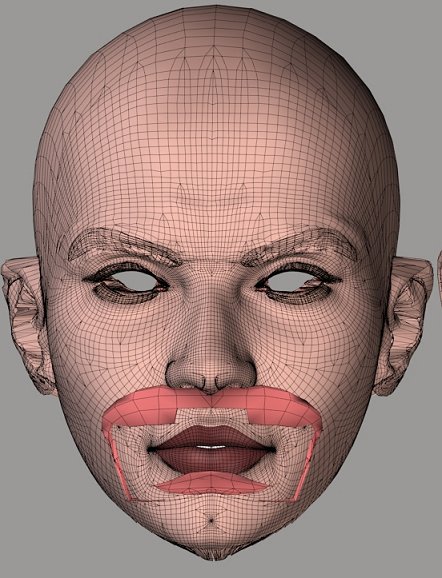
Quote - The final "hit points" would end up being closest vertices averaged positions, but those could be generated with only the tri weights. If all hits are generated this way, they should be compatible with one another. The results won't match those of the pure raycasting, but look at the pure raycasting's limitations, in this test.
Actually, the hit points wouldn't be the same as those given by closest vertices. The ray direction would be set using those points, but the hitpoints would be wherever the ray intersects a triangle. Since we'd be using normals, the potential problems with mismatches or missed matches might still exist. And the possibility of the "lumpy" or pseudo-lumpy problem noted above. The approach should remove the oversampling error seen on the right in the image I posted, where the lips have been pulled apart and the tops of the ears are shrunken, because of too many influences being used. It would also generate mostly tri-weights.
===========================sigline======================================================
Cage can be an opinionated jerk who posts without thinking. He apologizes for this. He's honestly not trying to be a turkeyhead.
Cage had some freebies, compatible with Poser 11 and below. His Python scripts were saved at archive.org, along with the rest of the Morphography site, where they were hosted.
===========================sigline======================================================
Cage can be an opinionated jerk who posts without thinking. He apologizes for this. He's honestly not trying to be a turkeyhead.
Cage had some freebies, compatible with Poser 11 and below. His Python scripts were saved at archive.org, along with the rest of the Morphography site, where they were hosted.

HI Cage,
Thanks for the additional tests... First off, I agree with most of your assessment of what's going on in those images (minus any doom-n-gloominess type conclusions :lol:). My comments below...
- the eyebrows (which I assume were relatively poorly matched up and/or shaped differently to start with) are clearly handled better with the closest-vert method than ray-casting - if that was the only concern, you could run them as a separate close-vert only pass, so we have a way to address that particular issue.
- the circled (above/outer brow, head-mesh) areas also clearly seem to be an issue for ray-casting at least in this setup (I'd need to look at the Antonia mesh used to figure out why that's happening for sure, but I have an idea).
- Interestingly, the 2008 (ray-cast only) handled the lips the best, given that setup (at least the lip->headskin connections).
- most of the "false hits" you see in the 2008 (ray-cast only) image look like neck/nostril/eye-socket vertices... I'd note that most (maybe even ALL) of those would go away with a simple 'tolerance' test on the distance (they'd just become failed hits... which is probably appropriate for the neck ones... things like nostrils and eye-sockets could be run using a close-vert-only pass).
- a general note... this is an UpHill test and so yours and my observations about the relative merrits of the various methods (in this particular case) may not apply to DownHill situations.
...as to whether (or to what degree) these two methods are compatible with each other as a Hybrid method - I agree with your comments about the issues seen above, but I'm not yet ready to write it off. Keep in mind that this was only a first proof of concept attempt. I had already anticipated a few of these situations and have a few things that I'd like to try. One of which - are you sitting down? - is to monkey with the normals of the target mesh! :lol:.
I am going to be afk for most of the day, but I'll play around with this some tonight. In the meantime, I think I have sufficient UpHill test info to go on, so if you get anxious (and have time) for any other testing, I'd be interested to see that same setup, but done the other direction (transfering the shape or morphs from V3 to Antonia with the 3 different methods).
Cinema4D Plugins (Home of Riptide, Riptide Pro, Undertow, Morph Mill, KyamaSlide and I/Ogre plugins) Poser products Freelance Modelling, Poser Rigging, UV-mapping work for hire.

This version has a new routine that not only checks the single closest vertex's polygons, it checks the polygons of the entire list of closest verts. This should pick up a few more 'hits' that were being missed with the previous code (there are some pathological cases where the 'closest' vertex's polygons were not necessarily the right ones, but this code will check the other close verts as well).
To use this new code, simply replace this line:
hitpoint = mesh2.mesh.CorrelateVertToNearSurface( vi, mesh1.mesh, close_index[0] )
...with this line:
hitpoint = mesh2.mesh.CorrelateToNearVertList( vi, mesh1.mesh, close_index )
...note that the only difference is the name of the routine and passing in the entire list, instead of the first vertex from that list.
I have other things I want to try, but this is the first step.
Cheers,
Keith
Cinema4D Plugins (Home of Riptide, Riptide Pro, Undertow, Morph Mill, KyamaSlide and I/Ogre plugins) Poser products Freelance Modelling, Poser Rigging, UV-mapping work for hire.
My bad. Not good data. Please carry on as before. Proper results soon.
===========================sigline======================================================
Cage can be an opinionated jerk who posts without thinking. He apologizes for this. He's honestly not trying to be a turkeyhead.
Cage had some freebies, compatible with Poser 11 and below. His Python scripts were saved at archive.org, along with the rest of the Morphography site, where they were hosted.
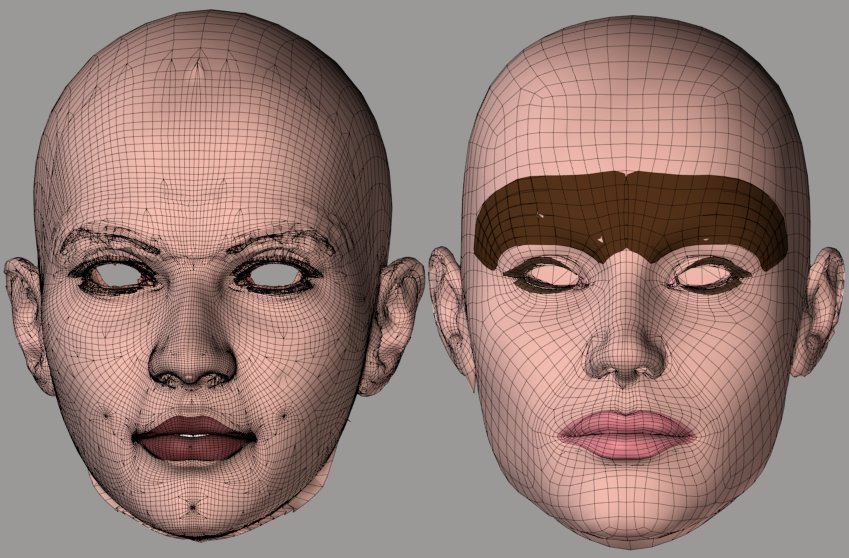
Going uphill, the results are definitely better in the lips. They're coming closer to favoring the raycasting results in the upper eyebrows, for good or ill. Otherwise, very similar results, at least eyeballing it.
Going downhill, the results are improved in some areas but possibly worsened in others. The ears have come out a bit better with this new .pyd. The backs of the nostrils are a bit worse. Both of these areas were not very well lined up for the comparison. One single vertex in the right ear is now being dropped altogether and not weighted. It was being caught by the previous .pyd.
Results are better if the number of influences is raised, particularly going uphill.
===========================sigline======================================================
Cage can be an opinionated jerk who posts without thinking. He apologizes for this. He's honestly not trying to be a turkeyhead.
Cage had some freebies, compatible with Poser 11 and below. His Python scripts were saved at archive.org, along with the rest of the Morphography site, where they were hosted.

Cage, FYI: the list feature is on the bottom line of the editor, right next to the link button. The two buttons are for numbered and bulleted lists.
______________
Hardware: AMD Ryzen 9 3900X/MSI MAG570 Tomahawk X570/Zotac Geforce GTX 1650 Super 4GB/32GB OLOy RAM
Software: Windows 10 Professional/Poser Pro 11/Photoshop/Postworkshop 3

Just drop in the new .pyd file and continue to call the newer CorrelateToNearVertList() routine - the changes are internal to that.
Cinema4D Plugins (Home of Riptide, Riptide Pro, Undertow, Morph Mill, KyamaSlide and I/Ogre plugins) Poser products Freelance Modelling, Poser Rigging, UV-mapping work for hire.
Quote - This is fantastic . It seems to me it is already very useable, and you guys are pushing it toward perfection :-). They do say that last few percent of a project takes a lot of the effort, and you guys are sure putting a lot of effort into it. I will definitely study the tutorials.
I have tried looking at the program but it is difficult for me to get my head around it, especially since I am not up to speed on Python. Is there a flowchart in existence for the program?
I think a flowchart would help me to understand the program flow and therefore assist with understanding the code. I know you guys are super busy though, so please consider it a low priorty wish. I'm sure I will be able to get great results from this program whether I understand how it ticks or not ;-).Cheers and kudos to you guys.
Ian
Hi Ian,
Cage described the actual code/flow pretty well. Much of it is just utility routines to figure out file naming and build various lists and such, so there's only a few core routines that do the grunt work (mesh correlation, weight generation, etc).
The general/overview process is to try to determine a correlation between 2 similarly shaped meshes, that have different polygonal topologies. More specifically (and ultimately), which vertices of the source mesh (the one with morphs in it) should affect each vertex in the target mesh (the one we're trying to transfer morphs to) - and, by how much...
Since the vertices don't have a 1:1 relationship between the 2 meshes (they have different topologies and potentially different densities), the vertices in the source mesh are assigned "weight values". So... each target mesh vertex is correlated to 1 or more (up to the number of Influences setting on the match script) vertices of the source mesh and each of those influence the target mesh vertex by the weight value (specific to the relationship between those two vertices).
These correlations/relationships and weight values can then be used to effectively transfer morphs between the 2 meshes, or alternatively, transfer the current shape of one mesh to the other, as a morph.
If you're just interested in operating the scripts (instead of understanding the code itself), then the tutorials on Cage's homepage are a great way to learn. It sounds like you're interested in the code itself, but I just wanted to point that out for anyone else reading this - a lot of this thread deals with geeky technobabble that most people don't need to follow if they just want to use the tools.
Cinema4D Plugins (Home of Riptide, Riptide Pro, Undertow, Morph Mill, KyamaSlide and I/Ogre plugins) Poser products Freelance Modelling, Poser Rigging, UV-mapping work for hire.
Quote - Ok, I didn't get a lot of time to mess with this tonight, but I'm currently getting really good results using this one with your tutorial V2->Antonia setup (in both directions). I'd be interested to see if it's doing any better in UpHill tests, if you get a chance...
Just drop in the new .pyd file and continue to call the newer CorrelateToNearVertList() routine - the changes are internal to that.
I'm eager to test it! :woot: Thank you. Adding a secret process to the .pyd only has minimal utility, however. This will need to be ported to mere Poser Python before any process can be fully integrated into the script. Can you explain what changes have been made?
I'm not being down on the .pyd, of course. It's simply wonderful! :thumbupboth: It just can't be used by everyone and it will break for everyone when Poser changes its version of Python. Making the process fully reliant on the .pyd is not really a good idea, unless maybe Smith Micro would want to include the .pyd with Poser and a commitment was made to make sure it would always work. I don't see that happening. :lol: Wish it would. Poser really should have a built-in, compiled vector and matrix library for Python. Numeric doesn't do everything, and recent versions of Poser don't even distribute the linear algebra module which Numeric requires for some applications.
I'm babbling. You recognize all of this already. Need more coffee. :lol:
Thanks for all the work on this, Spanki. :thumbupboth: You're really moving this forward! Seriously, don't let this interfere with your busy life.
I'll give it the uphill test with V3.
===========================sigline======================================================
Cage can be an opinionated jerk who posts without thinking. He apologizes for this. He's honestly not trying to be a turkeyhead.
Cage had some freebies, compatible with Poser 11 and below. His Python scripts were saved at archive.org, along with the rest of the Morphography site, where they were hosted.
Quote - Cage, FYI: the list feature is on the bottom line of the editor, right next to the link button. The two buttons are for numbered and bulleted lists.
Ooh! Thanks, Believable3D!
I'd never tried that, because:
- Cage is not tremendously observant, much of the time.
- Cage is somewhat frightened of the 'Rosity response editor.
- Some third point, just to make it a decent sequence worthy of bullet points.
It works! Huzzah! :lol:
===========================sigline======================================================
Cage can be an opinionated jerk who posts without thinking. He apologizes for this. He's honestly not trying to be a turkeyhead.
Cage had some freebies, compatible with Poser 11 and below. His Python scripts were saved at archive.org, along with the rest of the Morphography site, where they were hosted.
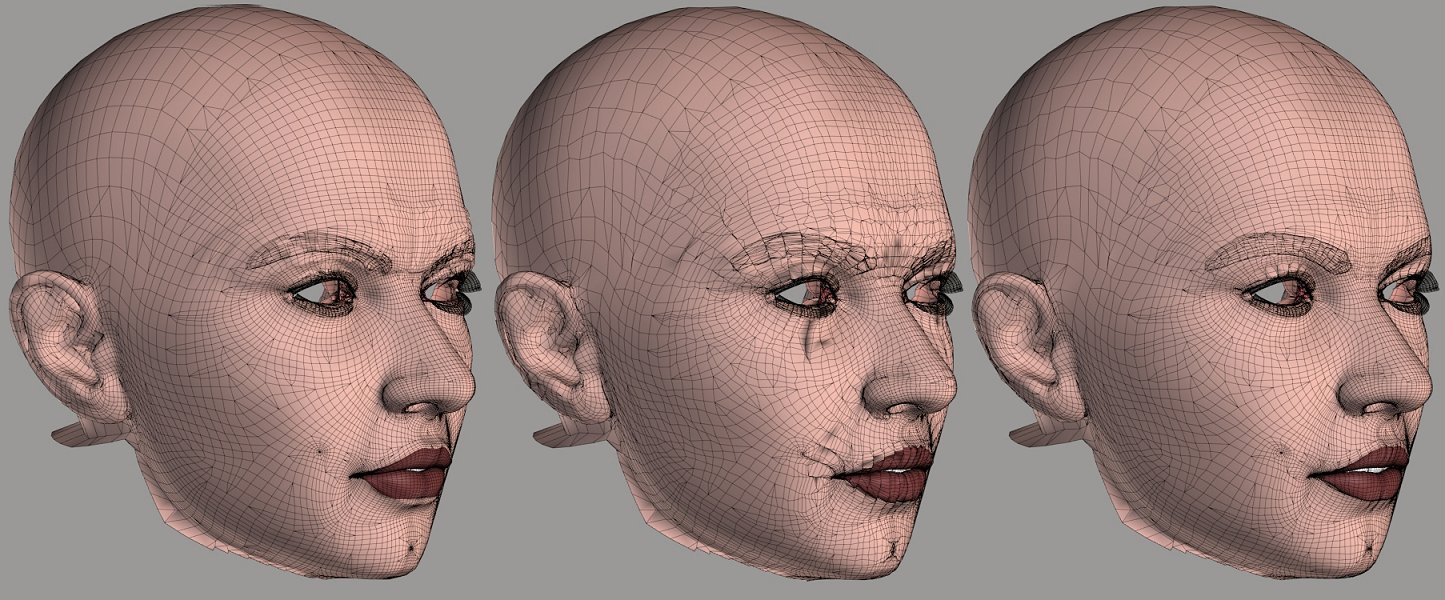
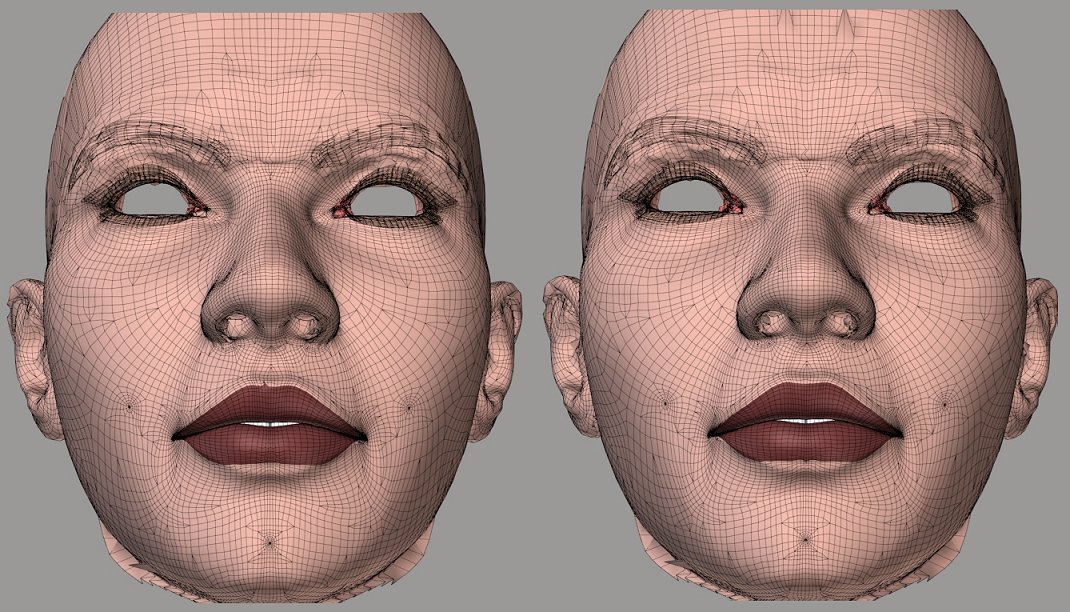
On the left, the new .pyd results. Looking very good indeed, in most areas. The upper eyebrows are much improved. The lips have one bad vertex which spikes up, as it did with the last .pyd, but they otherwise look quite good. There are a few spots in the ears which are a bit ragged, but they're not bad. The forehead looks like it's having some lumpy-jaggy problems, and the lumpies noted on the sides of the brow yesterday are still present. These are excellent results, particularly when compared to the middle image.
In the middle, a comparison run using the same settings for Distance Cutoff and Number of Influences as the one on the left, but the raycasting step was omitted. With only five weights for most of the vertices, the results are jagged, with much piggybacking. The raycasting was able to adapt the data which created these results and achieve the much cleaner results seen on the left. Excellent! :woot:
On the right, the same comparison, this time run with the max Number of Influences code in use and still without raycasting. Most of the vertices here have ended up with 12 weights, which was the max value. There's still under-sampling in some areas and over-sampling in others.
The results are looking much better than I would have anticipated. Excellent work, Spanki-sir! :woot:
===========================sigline======================================================
Cage can be an opinionated jerk who posts without thinking. He apologizes for this. He's honestly not trying to be a turkeyhead.
Cage had some freebies, compatible with Poser 11 and below. His Python scripts were saved at archive.org, along with the rest of the Morphography site, where they were hosted.
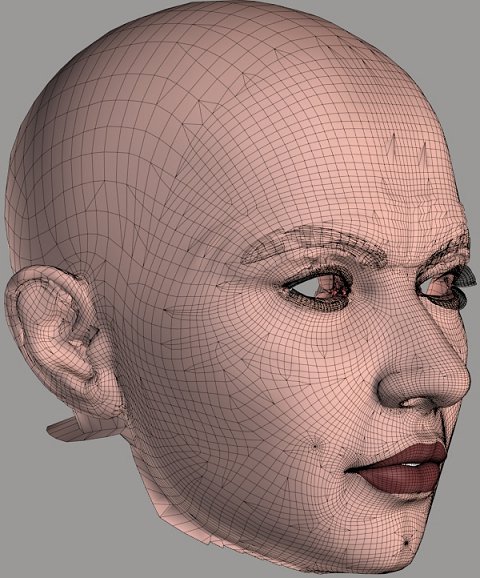
The current results with the upper eyebrows are difficult to clean up with Restore Detail. Some areas end up beneath the surface of the underlying skin, unless RD settings are raised high enough to undermine the re-shaping while cleaning up the result.
===========================sigline======================================================
Cage can be an opinionated jerk who posts without thinking. He apologizes for this. He's honestly not trying to be a turkeyhead.
Cage had some freebies, compatible with Poser 11 and below. His Python scripts were saved at archive.org, along with the rest of the Morphography site, where they were hosted.
===========================sigline======================================================
Cage can be an opinionated jerk who posts without thinking. He apologizes for this. He's honestly not trying to be a turkeyhead.
Cage had some freebies, compatible with Poser 11 and below. His Python scripts were saved at archive.org, along with the rest of the Morphography site, where they were hosted.
Quote - I'm eager to test it! :woot: Thank you. Adding a secret process to the .pyd only has minimal utility, however. This will need to be ported to mere Poser Python before any process can be fully integrated into the script. Can you explain what changes have been made?
Yeah, yeah - but can't a guy have some fun? :lol: As mentioned earlier, I don't recommend porting this to the python code just yet, but at some point it could be.
The changes this time were... monkeying with the normals :). The normal of the target mesh vertex (and thus the ray being cast) is averaged with the normals of all the closest vertices of the source mesh. This is similar to an earlier suggestion you made, but instead of aiming at the 'position' that that method generates, it skews the ray more in the (average) 'direction' that that (cummulative) surface faces.
One thing to note about all of this is that - due to the tiny distances involved with very closely lined up meshes - the ray doesn't travel very far (in whatever general direction it's heading) before it hits the other surface, so the affect will be different if one of the meshes were scaled slightly (for example) - which might actually be an interesting test, btw.
I'm actually a little suprised at how well the brows worked out, but we already know that the non-ray-cast method works best on those, so they can be done as a separate pass.
As for the lumpiness in the forehead and outer-brow areas... I'm pretty sure that it's a general "UpHill" issue (hires vs lowres mesh). I'm still trying to come up with some way to address that but one of the problems is (as mentioned way back in the start of the previous thread), at the level where decisions are made, "shape" of surfaces/vertices are fairly indistinguishable from "smoothness" of said shape. Having said that, I'm still a bit confused on why it's more "lumpy" than "flattened, to the lower-res polys", as I expoected.
Cinema4D Plugins (Home of Riptide, Riptide Pro, Undertow, Morph Mill, KyamaSlide and I/Ogre plugins) Poser products Freelance Modelling, Poser Rigging, UV-mapping work for hire.
BTW, I'm also confused why apparently 'some' vertices end up with zero correlations (from either method, using the Hybrid scheme).
Cinema4D Plugins (Home of Riptide, Riptide Pro, Undertow, Morph Mill, KyamaSlide and I/Ogre plugins) Poser products Freelance Modelling, Poser Rigging, UV-mapping work for hire.
Quote - Yeah, yeah - but can't a guy have some fun?
As mentioned earlier, I don't recommend porting this to the python code just yet, but at some point it could be.
The changes this time were... monkeying with the normals :). The normal of the target mesh vertex (and thus the ray being cast) is averaged with the normals of all the closest vertices of the source mesh. This is similar to an earlier suggestion you made, but instead of aiming at the 'position' that that method generates, it skews the ray more in the (average) 'direction' that that (cummulative) surface faces.
One thing to note about all of this is that - due to the tiny distances involved with very closely lined up meshes - the ray doesn't travel very far (in whatever general direction it's heading) before it hits the other surface, so the affect will be different if one of the meshes were scaled slightly (for example) - which might actually be an interesting test, btw.
I'm actually a little suprised at how well the brows worked out, but we already know that the non-ray-cast method works best on those, so they can be done as a separate pass.
As for the lumpiness in the forehead and outer-brow areas... I'm pretty sure that it's a general "UpHill" issue (hires vs lowres mesh). I'm still trying to come up with some way to address that but one of the problems is (as mentioned way back in the start of the previous thread), at the level where decisions are made, "shape" of surfaces/vertices are fairly indistinguishable from "smoothness" of said shape. Having said that, I'm still a bit confused on why it's more "lumpy" than "flattened, to the lower-res polys", as I expoected.
Interesting. Normal-monkeying has apparently helped, but there's still some messiness. Have you tried using the normalized delta between the Target vert position and its weighted match destination? It's a similar idea, but I'd think it would be more controlled. :unsure: That may be because I can visualize it better. :lol: I mean, we know where the vertices end up, after a shape match, and we know that's the direction in which we want to steer results, to some extent. I'd expected that the results would improve as the number of influences increases, just as they do for the close verts process.
I tried to adapt the idea I posited myself, using the available .pyd functions, but: - It was slower than muck
- It didn't work
(Ha ha. I have the power of bullets. :lol: I abuse my power.)
Yeh, it didn't work. If you add the option to send a normal to the new .pyd function, it opens up possibilities.
I've been beginning to hope we wouldn't need any separate passes. :lol: Are there more possibilities to test? Or it this the best possible result? It's still going to need some cleanup, and I'll need to do some testing with morph transfer to be sure the results are cleaner than the shape transfer.
I'm used to dropped correlations with raycasting. :lol: Is it possible that there was a false positive for the "if hitpoint" test? Any case in which a hitpoint could be detected but then not valid somehow? I didn't track down the vertex index so I could look it up in the .vmf file, so I'm not actually sure there was no weight. I know that there was no discernible delta created for the vertex.
I guess the lumpies are a good reason to keep Restore Detail around, then. :lol:
===========================sigline======================================================
Cage can be an opinionated jerk who posts without thinking. He apologizes for this. He's honestly not trying to be a turkeyhead.
Cage had some freebies, compatible with Poser 11 and below. His Python scripts were saved at archive.org, along with the rest of the Morphography site, where they were hosted.
Aha! The lumpies I'm seeing are a result of my own error. I forgot my own lessons from the tutorials: de-select any brow overlay geometry on the Source actor. The lumpies seem to have been interference between the Antonia brow and skin materials. These average out with the closest vertices, but the raycasting selects one of the candidate polys in a bad set of candidates, and goes to the correct or incorrect surface, apparently at random.
I also notice that the lacrimals are going blooey now. I think this is a result of using averaged normals to steer the normal we send. A normalized delta should steer us more carefully. I suspect this probably lies behind the noise which is still cropping up between the eyelids and brows. It's a guess, of course. But all of the places where I'm seeing noise now are those where the mesh curves back in on itself, creating concavities. I suspect this is a cue that the normals are at cause. In most places the averaged normal would end up being similar to the delta vector I keep going on about, but these would be places where it might not be.
===========================sigline======================================================
Cage can be an opinionated jerk who posts without thinking. He apologizes for this. He's honestly not trying to be a turkeyhead.
Cage had some freebies, compatible with Poser 11 and below. His Python scripts were saved at archive.org, along with the rest of the Morphography site, where they were hosted.
Are you dot-checking the normals before you average them? We can't be sure which way the normals of the candidate vertices will point. The close vertices may be pointing in the wrong direction, and depending on the vertex locations they may be over-represented in the average, distorting it. This averages out, for coordinate positions (but may also contribute to some of the inaccuracy seen in the closest vertices method). For the normals, I'm not sure it would average out as desired. We're determining one path with these, which will settle on the target tripoly. It needs to be steered with care. :lol: I think it would be okay for convex surfaces, and less likely to be a problem when the mesh density is lower. The trouble would show up in high-density, concave mesh regions, which is where I'm seeing it in Vicky 3, going uphill.
I should say "you", and not "we", but then it sounds like an accusation. 
===========================sigline======================================================
Cage can be an opinionated jerk who posts without thinking. He apologizes for this. He's honestly not trying to be a turkeyhead.
Cage had some freebies, compatible with Poser 11 and below. His Python scripts were saved at archive.org, along with the rest of the Morphography site, where they were hosted.
I'm just passing through at the moment and you've covered a lot of ground, so I won't reply to all of it until I've had a chance to think about it and / or look into it...
With that said...
re: Lumpiness
Aha - that makes sense... so most of that goes away if you don't include the brows in that pass?
re: Best we can do
That would imply that we're out of ideas... are you? :) I'm not, so no.
re: dot-checking Normals
No - I assumed that the script was (of course it's an 'option' on the script, but I always enable that).
Cinema4D Plugins (Home of Riptide, Riptide Pro, Undertow, Morph Mill, KyamaSlide and I/Ogre plugins) Poser products Freelance Modelling, Poser Rigging, UV-mapping work for hire.
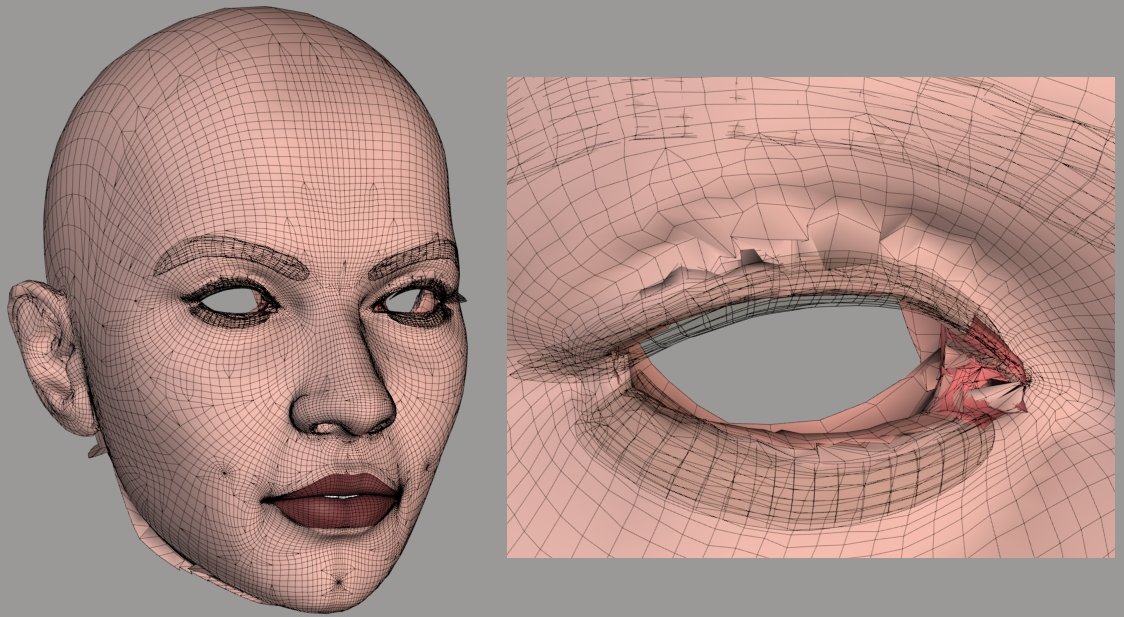
But look at the area above the eyelid, and the lacrimal. These are worse here than in closest vertices. The lacrimals explode in almost any comparison using pure raycasting, which comes down to the reliance on their normals.
I'll leave it alone for a bit, now. :lol: Looking very good!
===========================sigline======================================================
Cage can be an opinionated jerk who posts without thinking. He apologizes for this. He's honestly not trying to be a turkeyhead.
Cage had some freebies, compatible with Poser 11 and below. His Python scripts were saved at archive.org, along with the rest of the Morphography site, where they were hosted.
Quote - re: Best we can do
That would imply that we're out of ideas... are you? :) I'm not, so no.
re: dot-checking Normals
No - I assumed that the script was (of course it's an 'option' on the script, but I always enable that).
Not out of ideas. :lol: Good. Okay.
The script may or may not be checking normals, depending on user settings. I was, but there are still problems in some of these areas. I'm not sure the normals would have to vary by 90 degrees or more to interfere with the average. That's the threshold point at which they're screened using the normals test for the overall function. It depends, too, on how closely the surfaces are aligned at the time of comparison. An average which is askew because of over-sampling in a creased concave (looking at the above image, maybe convex creased areas, too) area would be increasingly off-course, the further it had to travel. Sort of like that sentence. Hmm.
I really will stop harping on this. You know these things better than I do, and you know quite well what you're doing. :lol: The averaging of normals could possibly benefit from its own dot product screening. Maybe. I mean, it's simpler than building the destination points for the target vertices and it might help clean up the results in certain areas. I'm on about this because this is now really the only problem I'm seeing in the results. It seems like, after more than three years, we might be there. But not quite. Almost. So I'm sort of wound up. Sorry. :lol:
===========================sigline======================================================
Cage can be an opinionated jerk who posts without thinking. He apologizes for this. He's honestly not trying to be a turkeyhead.
Cage had some freebies, compatible with Poser 11 and below. His Python scripts were saved at archive.org, along with the rest of the Morphography site, where they were hosted.
I hadn't had a chance to think about or look into your other suggestions, but I'm quite pleased (and relieved) to see the forehead lumps go away - cool beans (at the same time, that should have been obvious - I'm finding it hard to believe that it didn't occur to me :lol: ).
The only other comment at this point is... I might be missing something, but I can't think of ANY case where it would be preferable to disable the dot-check on those normals (do you know of any?) - I'm all for options, but only if it's benificial as an option.
Cinema4D Plugins (Home of Riptide, Riptide Pro, Undertow, Morph Mill, KyamaSlide and I/Ogre plugins) Poser products Freelance Modelling, Poser Rigging, UV-mapping work for hire.
Quote - The only other comment at this point is... I might be missing something, but I can't think of ANY case where it would be preferable to disable the dot-check on those normals (do you know of any?) - I'm all for options, but only if it's benificial as an option.
It should be on by default. It's optional because... I'm very into options. :lol: With the averaging which takes place in the pure closest vertices method, it's a less obvious problem to disuse it. But you're probably right, and there aren't many (if any) cases where it helps rather than just introducing noise into the weights list. It wasn't present in the original, and everything new has been added as an option.
Speaking of options, I think the entire comparison script would be improved if one could use pure raycasting, pure close verts, or the hybrid. With recent discussion and the revelation that my misgivings about raycasting were based on problems in the .pyd, I've come to think that it could be as valuable as any other option, in the right contexts. Like comparing the ball and the box. :lol: Seriously. It's useful in its own right, and should still be one of the tools. I'm going to have to revise or expand upon some tutorials, though.
The bit with the forehead is embarassing for me. But it reveals the sensitivity of the current raytracing process to unwanted noise from bad match candidates. Looking at the problems in the closeup of the eye, above, they show all the characteristic signs of being "false hits" from over-shooting normals. This is true of the spike in the lip, too, which is connecting with the area above. Tighten up the tripoly selection process or add more control to the normals directions and we should finally have the perfect process. :woot: One which tolerates loose shape matches, like the close verts method, but still renders clean results and only (or predominantly) tri-weights, like the raycasting.
What is up with 'Rosity, the past few days? It's running like Poser 8, before the first SR. :lol:
===========================sigline======================================================
Cage can be an opinionated jerk who posts without thinking. He apologizes for this. He's honestly not trying to be a turkeyhead.
Cage had some freebies, compatible with Poser 11 and below. His Python scripts were saved at archive.org, along with the rest of the Morphography site, where they were hosted.
Just to clarify a bit... I AM still dot-checking the ray with the intersecting polygon normal, so it's not like the code is suddenly choosing opposite-facing polygons.
Speaking of which, 2 things...
-
on the "if hitpoint:" test... just to verify that, you might want to spell it out more as "if hitpoint.Valid:" - that does an explicit test of the variable that should only be true if the data is valid (the other way should be doing that internally, but... who knows).
-
some of the current "poor matches" (or poor weighting) may be where the ray-cast fails, so it's mixing in some of the close-vert method weights. Without looking up the actual vertex indices, one way of testing that might be to:
if the ray-cast test fails, instead of falling through to the close-vert weighting code, comment that out for now and just set up a known condition (in other words, assign all of those to the first vertex of the mesh, with a 1.0 weight) - then you can see which ones are falling through the ray-cast test... are the ones in the eyelids falling through? how about the ears? etc.
Cinema4D Plugins (Home of Riptide, Riptide Pro, Undertow, Morph Mill, KyamaSlide and I/Ogre plugins) Poser products Freelance Modelling, Poser Rigging, UV-mapping work for hire.
Quote - Speaking of options, I think the entire comparison script would be improved if one could use pure raycasting, pure close verts, or the hybrid. With recent discussion and the revelation that my misgivings about raycasting were based on problems in the .pyd, I've come to think that it could be as valuable as any other option, in the right contexts. Like comparing the ball and the box. :lol: Seriously. It's useful in its own right, and should still be one of the tools. I'm going to have to revise or expand upon some tutorials, though.
I meant to comment on this as well... I think an option between close-vert & hybrid makes sense, but I'm not sure ray-cast alone does much good as an option. Other things that we're adding/trying now could also be options for the ray-cast part of the hybrid code (like whether or not to average the normals, etc).
Cinema4D Plugins (Home of Riptide, Riptide Pro, Undertow, Morph Mill, KyamaSlide and I/Ogre plugins) Poser products Freelance Modelling, Poser Rigging, UV-mapping work for hire.
Quote - I meant to comment on this as well... I think an option between close-vert & hybrid makes sense, but I'm not sure ray-cast alone does much good as an option. Other things that we're adding/trying now could also be options for the ray-cast part of the hybrid code (like whether or not to average the normals, etc).
No good? Umm. Okay. 
You don't think it might allow the script to be used in a wider range of contexts?
I mean, sure. Okay. I was trying to think about how to create a tabbed GUI for the various options. :lol: So it's probably better that you give me a reason not to do that. My more elaborate Tkinter efforts tend to be less stable. :lol:
===========================sigline======================================================
Cage can be an opinionated jerk who posts without thinking. He apologizes for this. He's honestly not trying to be a turkeyhead.
Cage had some freebies, compatible with Poser 11 and below. His Python scripts were saved at archive.org, along with the rest of the Morphography site, where they were hosted.
Quote - Just to clarify a bit... I AM still dot-checking the ray with the intersecting polygon normal, so it's not like the code is suddenly choosing opposite-facing polygons.
Speaking of which, 2 things...
on the "if hitpoint:" test... just to verify that, you might want to spell it out more as "if hitpoint.Valid:" - that does an explicit test of the variable that should only be true if the data is valid (the other way should be doing that internally, but... who knows).
some of the current "poor matches" (or poor weighting) may be where the ray-cast fails, so it's mixing in some of the close-vert method weights. Without looking up the actual vertex indices, one way of testing that might be to:
if the ray-cast test fails, instead of falling through to the close-vert weighting code, comment that out for now and just set up a known condition (in other words, assign all of those to the first vertex of the mesh, with a 1.0 weight) - then you can see which ones are falling through the ray-cast test... are the ones in the eyelids falling through? how about the ears? etc.
I think I'm trying to test too many different things in one script, and not getting enough sleep. :lol:
What a mess! In trying to test your points from the above quote, I found one dumb error after another. I really need to get more sleep. Sigh.
It looks like you are very definitely correct. :woot: The uglies are coming from the close verts results which haven't been modified by the raycasting. Which is actually bad, overall, I guess. But it's good for the current .pyd raycasting process. It means the only error I'm finding in it is that it fails to catch those areas I've mentioned. Unfortunately no change I can make to available settings alters that fact. Why it misses these areas, I'm not sure. I probably shouldn't do any more guessing until I've had a solid eight hours' sleep.
The uphill results with close verts alone have been coming out worse than I realized. The area between the top of the eye and the eyebrow has been collapsing down toward the top of the eye, which effect isn't obvious unless the morph is dialed up, instead of having the 1.0 setting entered into the field on the parm dials. The lacrimals have a tendency top go blooey. I'd been looking for piggybacking as an indication of close verts failures. Things going blooey is something I've tended to associate with raycasting, from years of experience. :lol: But, of course, close verts can make it happen too, in its own way.
So. I'm glad you made me look at this. Can you note any other significant errors or shortcomings that I may be overlooking? 
I'm still seeing a lot of dropped verts, but now I've seen them with the pure close verts approach, too. I need to start working with a pristine copy of the last posted script, I think. I've made too many testing edits to this one, and I'm afraid something I'm not seeing is in error. Hopefully that will solve the dropped vertices. If not... I don't know. I'd never seen them before I started this recent testing, but I was also only rarely working uphill before I started with this testing.
So, again. The only evident problem is that the raycasting is not catching the vertices in the problem areas I cited above. Any idea why that could be?
===========================sigline======================================================
Cage can be an opinionated jerk who posts without thinking. He apologizes for this. He's honestly not trying to be a turkeyhead.
Cage had some freebies, compatible with Poser 11 and below. His Python scripts were saved at archive.org, along with the rest of the Morphography site, where they were hosted.
Thanks again for the testing and results... I'd really rather not comment much more until I've had some time (later tonight) to sit down with this again - all my comments so far have just been from drive-bys at the computer :).
I hadn't really looked into the dropped verts issue yet either... could it be coming from the screening code or something? Maybe they're not being checked at all.
Go ahead and take some time to get some sleep so you don't burn yourself out :).
Cinema4D Plugins (Home of Riptide, Riptide Pro, Undertow, Morph Mill, KyamaSlide and I/Ogre plugins) Poser products Freelance Modelling, Poser Rigging, UV-mapping work for hire.
Quote - Thanks again for the testing and results... I'd really rather not comment much more until I've had some time (later tonight) to sit down with this again - all my comments so far have just been from drive-bys at the computer :).
I hadn't really looked into the dropped verts issue yet either... could it be coming from the screening code or something? Maybe they're not being checked at all.
Go ahead and take some time to get some sleep so you don't burn yourself out :).
The dropped verts are strange. Previous experience with the close verts approach, almost a month's worth, suggests that it shouldn't be happening. It crops up in strange ways, and inconsistently. Raising the number of influences going uphill seems to make it more likely, but not always in the same places. But it's also cropped up going downhill, at least once. Which is really surprising. Screening code is a likely suspect. I'll start with a new copy tomorrow.
I'm glad to do the testing. I really should work on the next tutorial, but it almost seems moot, with the hybrid developments. The script is in transition, and the existing tutorials may not fit the tool set soon. Hmm.
===========================sigline======================================================
Cage can be an opinionated jerk who posts without thinking. He apologizes for this. He's honestly not trying to be a turkeyhead.
Cage had some freebies, compatible with Poser 11 and below. His Python scripts were saved at archive.org, along with the rest of the Morphography site, where they were hosted.
Yeah, I think the tutorials you have there now should give people a good general idea of how to use the tools. Some of the more advanced stuff is stuff that we don't even know yet :).
I've seen what appear to be dropped verts even in the V2->Antonia comparisons, so it might be easier for me to track those down when I get some time.
Cinema4D Plugins (Home of Riptide, Riptide Pro, Undertow, Morph Mill, KyamaSlide and I/Ogre plugins) Poser products Freelance Modelling, Poser Rigging, UV-mapping work for hire.
Quote - I've seen what appear to be dropped verts even in the V2->Antonia comparisons, so it might be easier for me to track those down when I get some time.
You've seen them on your end? That would rule them out in my more recent code alterations. Have you seen them without the raycasting in use? If they're due to raycasting, I don't see how it happens, unless the hitpoint is accepted by the code and rayhit is set, but then the hitpoint doesn't end up setting up weights as it should. I'm not sure these are dropped altogether. There may be .vmf listings for them, but the weights aren't adding up to 1.0 or something. Seems unlikely....
Speaking of advanced stuff, can you add the option to send a normal to the current hybrid function? Or is it premature for that? :lol: I like to have options to tweak. Makes me feel like play is actually useful work. :lol:
===========================sigline======================================================
Cage can be an opinionated jerk who posts without thinking. He apologizes for this. He's honestly not trying to be a turkeyhead.
Cage had some freebies, compatible with Poser 11 and below. His Python scripts were saved at archive.org, along with the rest of the Morphography site, where they were hosted.
I think it's a bit premature, but I'll add that to give you something to play with... my concern is that you'll fixate on doing the Capsule mapping or something - which gave decent results in your earlier test (especially with closely aligned meshes, where the ray doesn't travel far), but will fall flat (as it were) for things like the top of the nostrils - the ray needs to head in a generally downward direction to hit the top of the nostril, but it's Cylindrical path (in that zone) will cause it to head sideways, instead (for example).
Cinema4D Plugins (Home of Riptide, Riptide Pro, Undertow, Morph Mill, KyamaSlide and I/Ogre plugins) Poser products Freelance Modelling, Poser Rigging, UV-mapping work for hire.
Erm.. just to clarify the above... I'm certainly not opposed to trying Capsule mapping (or any other form of Normal altering methods) in the Hybrid setup - we might even learn something from it. I just don't want to get side-tracked on it while ignoring any additional problems it might cause/have (or side-tracked on fixing those problems, for that matter :lol: ).
Cinema4D Plugins (Home of Riptide, Riptide Pro, Undertow, Morph Mill, KyamaSlide and I/Ogre plugins) Poser products Freelance Modelling, Poser Rigging, UV-mapping work for hire.

I went ahead and just added a separate routine (not stand-alone... it's a member of the Mesh class, like the others):
CorrelateToNearVertListByRay( vertIndex, correlateMesh, nearVertIndexList, rayNorm )
... have fun.
Cinema4D Plugins (Home of Riptide, Riptide Pro, Undertow, Morph Mill, KyamaSlide and I/Ogre plugins) Poser products Freelance Modelling, Poser Rigging, UV-mapping work for hire.
Ok, I found the dropped verts problem...
What's the functional difference in these 2 cases (aside from one being for shape transfer and one being for morph transfer):
if (abs(delta[0]) > FLT_EPSILON) and (abs(delta[1]) > FLT_EPSILON) and (abs(delta[2]) > FLT_EPSILON):
parm.SetMorphTargetDelta(vi, delta[0], delta[1], delta[2])
...and...
if abs(tmorph[0]) > FLT_EPSILON or abs(tmorph[1]) > FLT_EPSILON or abs(tmorph[2]) > FLT_EPSILON:
parm.SetMorphTargetDelta(i, tmorph[0], tmorph[1], tmorph[2])
...hint: the first one drops verts from being included in the shape-transfer when they should be included :lol:.
Cinema4D Plugins (Home of Riptide, Riptide Pro, Undertow, Morph Mill, KyamaSlide and I/Ogre plugins) Poser products Freelance Modelling, Poser Rigging, UV-mapping work for hire.
Quote - Ok, I found the dropped verts problem...
What's the functional difference in these 2 cases (aside from one being for shape transfer and one being for morph transfer):
if (abs(delta[0]) > FLT_EPSILON) and (abs(delta[1]) > FLT_EPSILON) and (abs(delta[2]) > FLT_EPSILON):
parm.SetMorphTargetDelta(vi, delta[0], delta[1], delta[2])...and...
if abs(tmorph[0]) > FLT_EPSILON or abs(tmorph[1]) > FLT_EPSILON or abs(tmorph[2]) > FLT_EPSILON:
parm.SetMorphTargetDelta(i, tmorph[0], tmorph[1], tmorph[2])...hint: the first one drops verts from being included in the shape-transfer when they should be included
Good eye! Would I even have looked there? Maybe after a few days. :lol:
I really need more sleep. :lol: My tendency toward bumble-headed mistakes is worsened when I don't get enough. Coffee alone does not solve this problem.
I had been using a simple "if delta" check, until the recent update, for the shape transfer. I began to wonder if that might create problems without the .pyd. The standards applied by Numeric for that test don't seem to be as rigorous as those used by the .pyd.
I'll fix it. Many thanks! :woot:
===========================sigline======================================================
Cage can be an opinionated jerk who posts without thinking. He apologizes for this. He's honestly not trying to be a turkeyhead.
Cage had some freebies, compatible with Poser 11 and below. His Python scripts were saved at archive.org, along with the rest of the Morphography site, where they were hosted.
Quote - I think it's a bit premature, but I'll add that to give you something to play with... my concern is that you'll fixate on doing the Capsule mapping or something - which gave decent results in your earlier test (especially with closely aligned meshes, where the ray doesn't travel far), but will fall flat (as it were) for things like the top of the nostrils - the ray needs to head in a generally downward direction to hit the top of the nostril, but it's Cylindrical path (in that zone) will cause it to head sideways, instead (for example).
Many thanks, for adding the function! :woot: I promise not to fixate on one approach. What this does, though, is open up the possibility of optional settings, both for development testing and for the final script.
What's needed now is more refined "steering" of the normals, not any kind of blanket approach like spherical or capsule-shaped normals. That would be less refined. The little test I posted was just to illustrate that one needn't be reliant on the existing normals of the mesh, as well as to illustrate that the main complaint I've long had about the Classic TDMT method is actually that very reliance on the existing paths of the normals. What we basically end up doing here is using the closest vertices results to screen candidate tripolys and refine the paths of the normals for the raycasting. Which is fantastic. I wish we'd thought of something like this three years ago. :lol:
I'm really glad to have you contributing to this again! :woot: But, again, don't let it interfere with any obligations you might have, if you're busy.
===========================sigline======================================================
Cage can be an opinionated jerk who posts without thinking. He apologizes for this. He's honestly not trying to be a turkeyhead.
Cage had some freebies, compatible with Poser 11 and below. His Python scripts were saved at archive.org, along with the rest of the Morphography site, where they were hosted.
Quote - > Quote - Ok, I found the dropped verts problem...
What's the functional difference in these 2 cases (aside from one being for shape transfer and one being for morph transfer):
if (abs(delta[0]) > FLT_EPSILON) and (abs(delta[1]) > FLT_EPSILON) and (abs(delta[2]) > FLT_EPSILON):
parm.SetMorphTargetDelta(vi, delta[0], delta[1], delta[2])...and...
if abs(tmorph[0]) > FLT_EPSILON or abs(tmorph[1]) > FLT_EPSILON or abs(tmorph[2]) > FLT_EPSILON:
parm.SetMorphTargetDelta(i, tmorph[0], tmorph[1], tmorph[2])...hint: the first one drops verts from being included in the shape-transfer when they should be included
Good eye! Would I even have looked there? Maybe after a few days. :lol:
I really need more sleep. :lol: My tendency toward bumble-headed mistakes is worsened when I don't get enough.
I had been using a simple "if delta" check, until the recent update, for the shape transfer. I began to wonder if that might create problems without the .pyd. The standards applied by Numeric for that test don't seem to be as rigorous as those used by the .pyd.
I'll fix it. Many thanks! :woot:
Hey.. just to be clear, the problem is using "and" instead of "or" in the above.
Cinema4D Plugins (Home of Riptide, Riptide Pro, Undertow, Morph Mill, KyamaSlide and I/Ogre plugins) Poser products Freelance Modelling, Poser Rigging, UV-mapping work for hire.
Quote - What's needed now is more refined "steering" of the normals, not any kind of blanket approach like spherical or capsule-shaped normals. That would be less refined. The little test I posted was just to illustrate that one needn't be reliant on the existing normals of the mesh, as well as to illustrate that the main complaint I've long had about the Classic TDMT method is actually that very reliance on the existing paths of the normals. What we basically end up doing here is using the closest vertices results to screen candidate tripolys and refine the paths of the normals for the raycasting. Which is fantastic. I wish we'd thought of something like this three years ago. :lol:
...and, from an earlier message....
...For the normals, I'm not sure it would average out as desired. We're determining one path with these, which will settle on the target tripoly. It needs to be steered with care...
...I just wanted to comment on this, because your first assumption (for the second comment, above) was that the ray-cast was generating those bad eyelid results, but don't forget that it was where the ray-cast failed, in that case. My point is that you seem to think (or it can be misread) that the current averaging may not be desired (or may even be specifically NOT desired)... my opinion is that it IS helping. In other words, it IS being done with some care and in an attempt to refine the situation.
Feel free to try whatever you want now though - I'm anxious as always to see any results (and also curious to see if any of those poor results were actually just dropped verts).
Cinema4D Plugins (Home of Riptide, Riptide Pro, Undertow, Morph Mill, KyamaSlide and I/Ogre plugins) Poser products Freelance Modelling, Poser Rigging, UV-mapping work for hire.
Quote - Hey.. just to be clear, the problem is using "and" instead of "or" in the above.
Correct. I didn't explain well. I added the FLT_EPSILON testing to that function only recently, because the if/not validity test may not return the same results for the .pyd and for Numeric arrays used as vectors.
===========================sigline======================================================
Cage can be an opinionated jerk who posts without thinking. He apologizes for this. He's honestly not trying to be a turkeyhead.
Cage had some freebies, compatible with Poser 11 and below. His Python scripts were saved at archive.org, along with the rest of the Morphography site, where they were hosted.
Quote - ...I just wanted to comment on this, because your first assumption (for the second comment, above) was that the ray-cast was generating those bad eyelid results, but don't forget that it was where the ray-cast failed, in that case. My point is that you seem to think (or it can be misread) that the current averaging may not be desired (or may even be specifically NOT desired)... my opinion is that it IS helping. In other words, it IS being done with some care and in an attempt to refine the situation.
Feel free to try whatever you want now though - I'm anxious as always to see any results (and also curious to see if any of those poor results were actually just dropped verts).
It's very obviously helping. I still wonder how sensitive the averaged normals may end up being to sampling errors for a vert in an odd position near a crease, either concave or convex. Depending on the mesh structure in that area (and any comparison re-shaping in use), the candidate set of close vertices may contain too many normals which point one way or the other, so they don't cancel out and point in the middle, but in one direction or the other. This wouldn't be disastrous if the surfaces are closely matched, but an askew normal will be increasingly off-course the further it travels. I confess that I still wonder if this is why the raycasting is missing the current vertices.
I didn't mean to suggest that you were being careless, no. I just don't trust the inherited normals, if there's any possibility of controlling the vector path we use for the normal, as with my suggested use of the delta as a normal. I'm not sure we can expect normals and coordinate positions to average out equally well.
I'm not being critical. I'm trying to think about ways that the process can be more tolerant of imprecise surface matches. The current approach is great. :thumbupboth: Can it be better? That's what I'm wondering.
===========================sigline======================================================
Cage can be an opinionated jerk who posts without thinking. He apologizes for this. He's honestly not trying to be a turkeyhead.
Cage had some freebies, compatible with Poser 11 and below. His Python scripts were saved at archive.org, along with the rest of the Morphography site, where they were hosted.
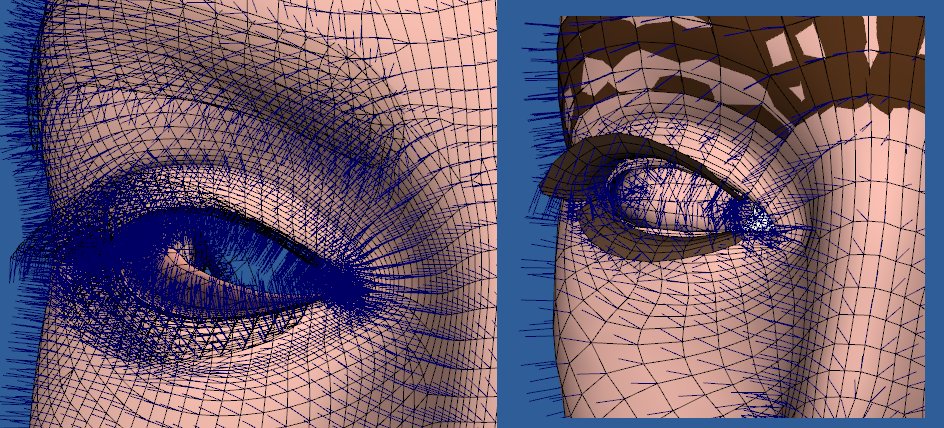
The problem area, where the raycasting is missing tripolys, is where the mesh on Antonia begins to thin out, above the eyelid. We're near a crease, albeit a shallow one. The normals aren't anywhere near 90 degrees apart, but they point in conflicted directions. Because of the varying mesh density, the close verts returned for a Vicky vertex near the crease above the eyelid will likely contain more vertices in the eyelid rather than the area above. This shows up in the pure close verts shaping as the area being pulled downward. With the averaged normals, they'll be more likely to point upward. (Maybe the average of the delta I propose with the averaged normals in use might be more likely to point in the middle, in a case like this? That is, if we can assume it should point more toward the middle.)
The shapes aren't perfectly aligned in this area, for the comparison, so the ray being cast is traveling farther than in other parts of the comparison. Any normal path which is pointing up too much because of the sampling error noted above will be more likely to miss one of the tripolys in the current candidate set.
This would explain why the raycasting isn't working in this area, for this comparison. If there's a way to enable the process to tolerate this kind of situation, the script is pretty definitely improved. This might involve trying to control the ray path somehow or increase the tripoly candidate set. This is only a hypothesis, but one which hasn't been tested, as far as I know.
Apologies for the image. UV Pro resets the 3D view when a new model is loaded, so I didn't get the same angle both times.
===========================sigline======================================================
Cage can be an opinionated jerk who posts without thinking. He apologizes for this. He's honestly not trying to be a turkeyhead.
Cage had some freebies, compatible with Poser 11 and below. His Python scripts were saved at archive.org, along with the rest of the Morphography site, where they were hosted.
Hmm. Looking at the normals more closely, maybe they are closer to 90 degrees apart. Which maybe could be the problem, too. If they're being screened by the dot product test, perhaps the ray normal can still end up skewed somehow.
It's just an idea. :lol: All I really know is that the raycasting isn't finding a match in the area.
===========================sigline======================================================
Cage can be an opinionated jerk who posts without thinking. He apologizes for this. He's honestly not trying to be a turkeyhead.
Cage had some freebies, compatible with Poser 11 and below. His Python scripts were saved at archive.org, along with the rest of the Morphography site, where they were hosted.
I don't think the new function likes me. :lol:
I'm trying to test it, and I'm getting the following error. I've had the script print the inputs I'm using and their types, before it throws the error.
Quote -
delta: Vector at <1B2B8F40> = (0.000203347, 0.000223982, -0.000447271)
normalized delta: Vector at <1B2B8F60> = (0.376589, 0.414803, -0.828323)
norm length: 1.0
vi: 0 <type 'int'>
mesh1.mesh: Mesh at <17F2B720> <type 'Mesh'>
close_index: [3143, 218, 4710, 1830, 207, 4379] <type 'list'>
norm: Vector at <1B2B8F60> = (0.376589, 0.414803, -0.828323) <type 'Vector'>
hitpoint = mesh2.mesh.CorrelateToNearVertListByRay( vi, mesh1.mesh, close_index, norm )Exception in Tkinter callback
Traceback (most recent call last):
File "C:Program Filese frontierPoser 7RuntimePythonliblib-tkTkinter.py", line 1345, in call
return self.func(*args)
File "C:Program Filese frontierPoser 7RuntimePythonposerScriptsTDMTfilesspanki_vector11TDMT_Match5f2.py", line 1069, in handleRun
goodrun = run(actS,actT,path,distEpsilon,matsT,matsS,dot,dot2,influences,digits=5)
File "C:Program Filese frontierPoser 7RuntimePythonposerScriptsTDMTfilesspanki_vector11TDMT_Match5f2.py", line 42, in run
close_verts_weights(mesh1,mesh2,threshold,matsT,matsS,dotnorms,num_influences=num_influences)
File "C:Program Filese frontierPoser 7RuntimePythonposerScriptsTDMTfilesspanki_vector11TDMT_Match5f2.py", line 438, in close_verts_weights
hitpoint = mesh2.mesh.CorrelateToNearVertListByRay( vi, mesh1.mesh, close_index, norm )
_tdmt.error: requires: vertIndex, correlateMesh, correlateVertList, rayNorm]
I'm not sure what the _tdmt.error being thrown represents. It acts like it's receiving the wrong type somewhere, but the types are verified. The normal is a proper normal. :lol: It's being called using the mesh2.mesh, as with the other ray-casting functions.
Any ideas?
===========================sigline======================================================
Cage can be an opinionated jerk who posts without thinking. He apologizes for this. He's honestly not trying to be a turkeyhead.
Cage had some freebies, compatible with Poser 11 and below. His Python scripts were saved at archive.org, along with the rest of the Morphography site, where they were hosted.

CorrelateToNearVertList( vertIndex, correlateMesh, nearVertIndexList[, opt_average_norms = 1] )
Cinema4D Plugins (Home of Riptide, Riptide Pro, Undertow, Morph Mill, KyamaSlide and I/Ogre plugins) Poser products Freelance Modelling, Poser Rigging, UV-mapping work for hire.
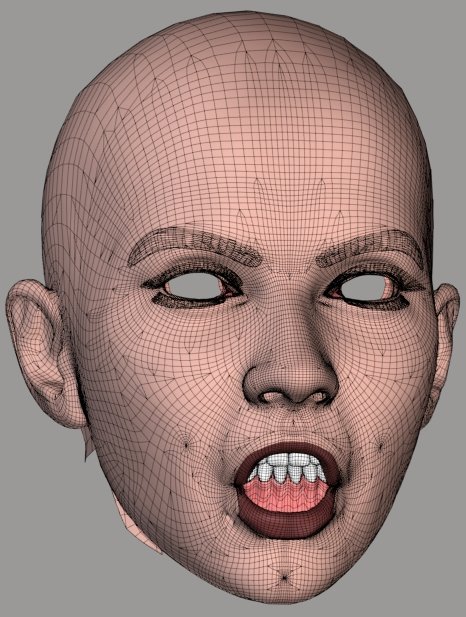
In all of my focusing on the errors in my test case and thinking about causes or fixes, I'm failing to emphasize how great this new hybrid approach is already. The attached shows a very successful uphill correlation between V3 and Antonia. The only shortcomings here are due to the places where the closest vert routine still shows itself, which is a vertex under the mouth, and the lacrimals. I've cleaned it up with Restore Detail here, but it only needed it in the places where that seems inevitable with shape transfers, such as the ears.
The results are remarkable. This is already quite a success. In the midst of testing, I haven't considered optimal workflow. When going uphill, the initial comparison can be run downhill, where flaws are less likely to show up, either with the hybrid or the closest vertices. A shape transfer can then be run and possibly cleaned with Restore Detail. This matched shape can then be used for the final comparison going uphill, with much better comparison conditions and very closely aligned mesh surfaces.
And the results are really great. :woot:
===========================sigline======================================================
Cage can be an opinionated jerk who posts without thinking. He apologizes for this. He's honestly not trying to be a turkeyhead.
Cage had some freebies, compatible with Poser 11 and below. His Python scripts were saved at archive.org, along with the rest of the Morphography site, where they were hosted.

Privacy Notice
This site uses cookies to deliver the best experience. Our own cookies make user accounts and other features possible. Third-party cookies are used to display relevant ads and to analyze how Renderosity is used. By using our site, you acknowledge that you have read and understood our Terms of Service, including our Cookie Policy and our Privacy Policy.
This bit is wrong. The odf code will screen out Source vertices, not Target vertices. At the point in the process where I have the quoted line listed, odf's screening code gathers data about the Source vertex which will be used to screen out many, if not most, of the Target vertices.
===========================sigline======================================================
Cage can be an opinionated jerk who posts without thinking. He apologizes for this. He's honestly not trying to be a turkeyhead.
Cage had some freebies, compatible with Poser 11 and below. His Python scripts were saved at archive.org, along with the rest of the Morphography site, where they were hosted.