
Renderosity Forums / Poser - OFFICIAL
Welcome to the Poser - OFFICIAL Forum
Forum Moderators: RedPhantom Forum Coordinators: Anim8dtoon
Poser - OFFICIAL F.A.Q (Last Updated: 2026 Jun 06 6:06 pm)

Subject: Morph Cleanup Script

===========================sigline======================================================
Cage can be an opinionated jerk who posts without thinking. He apologizes for this. He's honestly not trying to be a turkeyhead.
Cage had some freebies, compatible with Poser 11 and below. His Python scripts were saved at archive.org, along with the rest of the Morphography site, where they were hosted.
===========================sigline======================================================
Cage can be an opinionated jerk who posts without thinking. He apologizes for this. He's honestly not trying to be a turkeyhead.
Cage had some freebies, compatible with Poser 11 and below. His Python scripts were saved at archive.org, along with the rest of the Morphography site, where they were hosted.
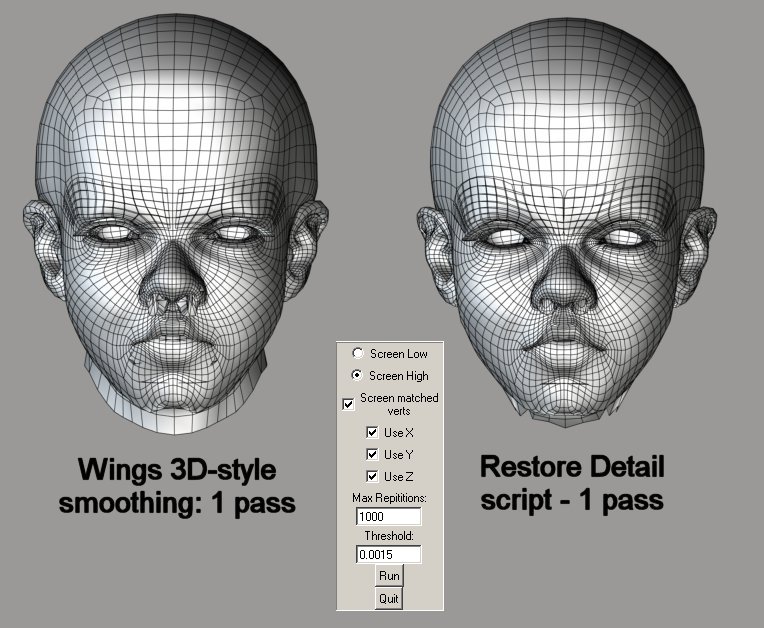
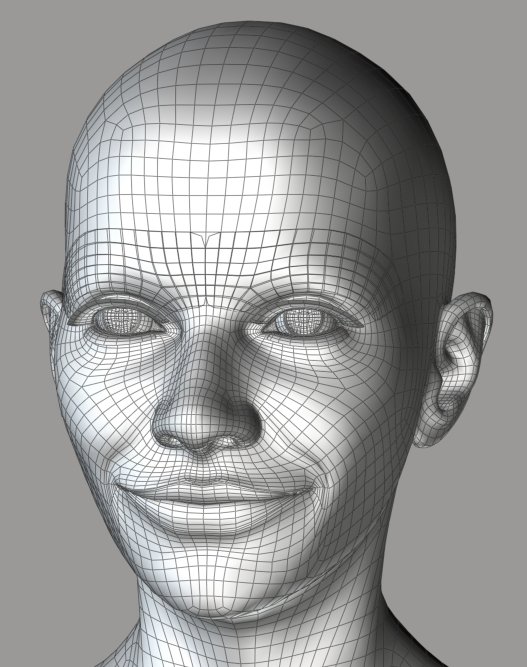
Standard smoothing has made some progress, but not enough. In order for standard smoothing to clean up the extreme areas of this morph, it would have to ruin the good areas. The restore detail script, however, has made the morph potentially useable with one button-click. :woot:
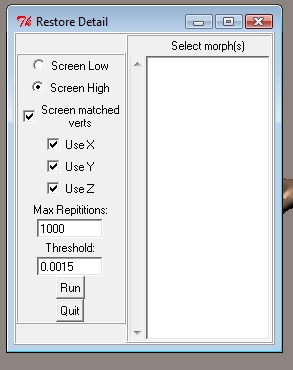
Script settings used are shown in this image.
===========================sigline======================================================
Cage can be an opinionated jerk who posts without thinking. He apologizes for this. He's honestly not trying to be a turkeyhead.
Cage had some freebies, compatible with Poser 11 and below. His Python scripts were saved at archive.org, along with the rest of the Morphography site, where they were hosted.
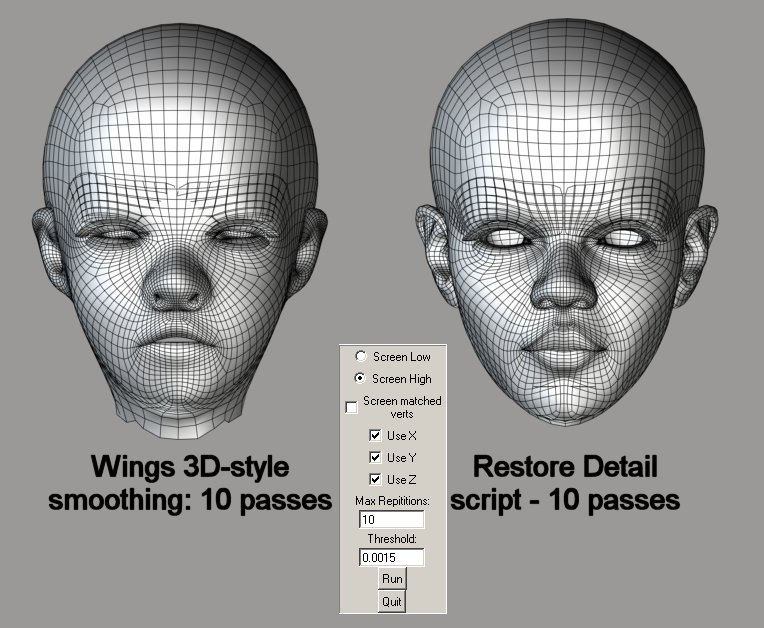
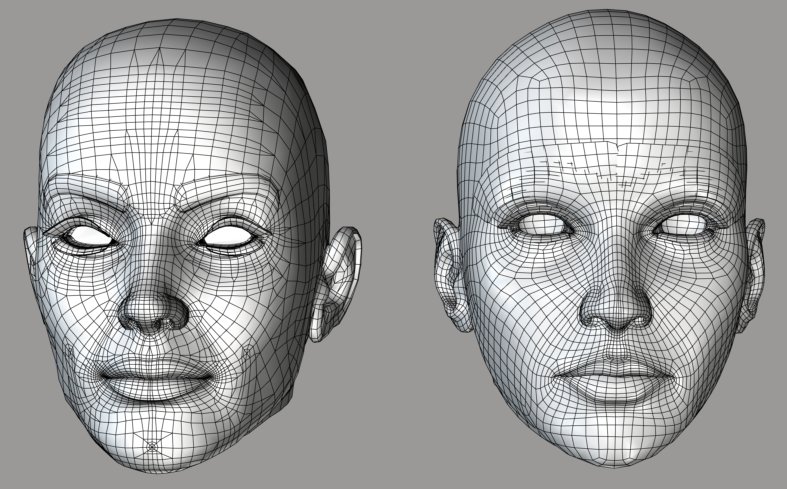
On the left, ten passes of the restore detail script posted at the top of the thread. We've come closer, with each pass, to the original vertex relationships. The mesh becomes cleaner, without losing altogether the shaping of the morph.
Again, script settings for ten passes are shown.
===========================sigline======================================================
Cage can be an opinionated jerk who posts without thinking. He apologizes for this. He's honestly not trying to be a turkeyhead.
Cage had some freebies, compatible with Poser 11 and below. His Python scripts were saved at archive.org, along with the rest of the Morphography site, where they were hosted.
Anyway, I've found this incredibly useful since I stumbled upon the method, pretty much accidentally. :lol: I hope someone else can find this useful, as well.
===========================sigline======================================================
Cage can be an opinionated jerk who posts without thinking. He apologizes for this. He's honestly not trying to be a turkeyhead.
Cage had some freebies, compatible with Poser 11 and below. His Python scripts were saved at archive.org, along with the rest of the Morphography site, where they were hosted.


 I wish I had had a script like that when I made the JCMs for Antonia, and I'm almost certain it will come in handy for expression morphs.
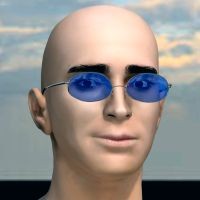
Intriguing, thanks.
Quote - This looks like it'll be useful if I can ever find a copy of your TDMT script. Where have you hidden it?:biggrin:
The link is in Cage's signature - or if you have sigs turned off, here.
Attached Link: http://www.renderosity.com/mod/forumpro/showthread.php?thread_id=2677445&page=41
Oops, I didn't think to check it. I'd noticed that cage had moved his page, but the scripts are still hosted at Kuroyume's. Sorry, cage, we're talking about you as if you weren't here. :)The TDMT script is still available in the thread linked - I'm assuming that one in the last post is the most recent.

I get some pretty interesting results when i run the script twice on a morphed face.
After putting the original morph to zero and using "restore_detail" and "restore_detail_1" as the only morphs the character gets a much better face then my original morph :-)
The intended function works very nicely also.

Quote - Patents pending or can one steal the idea?
This is absolute freeware. Use it however you like, borrow the code, use or alter the algorithm in your own software. No problem. If anyone should use or improve the idea in a script or program, it'd be cool to see the results and know what might have changed. But that's not anything I'd demand. No restrictions. :D
Quote - This looks like it'll be useful if I can ever find a copy of your TDMT script. Where have you hidden it?
Umm. It looks like I didn't correct my links when I moved my website to Phantom 3D's place. D'Oh!  I'll try to fix that today. If you'd like a copy more promptly, PM me. Sorry about that. :blushing:
Quote - I get some pretty interesting results when i run the script twice on a morphed face.
After putting the original morph to zero and using "restore_detail" and "restore_detail_1" as the only morphs the character gets a much better face then my original morph :-)The intended function works very nicely also.
Cool! I probably haven't used the script in every way it could be used. Can you post an image of your results?
Quote - Cage:
Do these scripts only work on the face/head or do they also work on the body?
lmk
The restore detail script works on the the current actor, be it body part or prop, or probably camera or light or deformer, if you tried (I wouldn't advise it - who knows what Poser might do if a morph is attempted on one of these).
I should also point out that the script works on the current (worldspace) shape of the actor, and it may be better on an actor which is not transformed (no trans, rot, scale). A zeroed figure is best, because Poser's bending will get mixed into the "restoration" morph, otherwise.
I should have posted basic explanations of the GUI functions, too, I guess. Give me a while, here. Need more coffee. :lol:
===========================sigline======================================================
Cage can be an opinionated jerk who posts without thinking. He apologizes for this. He's honestly not trying to be a turkeyhead.
Cage had some freebies, compatible with Poser 11 and below. His Python scripts were saved at archive.org, along with the rest of the Morphography site, where they were hosted.
Quote - You do so much for this forum. Thank you!
You should expose a public wishlist, just in case some one feels generous.
lmk
Thanks, lkendall! :D I wish more of my contributions worked as effectively as I've found this script to work. :lol:
To be honest, what I'd wish for right now would be a Poser 8 that doesn't keep crashing on me. :lol: Aside from that, odf and Phantom 3D are fulfilling my Poser wishes by developing and sharing figures which actually pose well.
I sort of wish Morphing Clothes would work on faces. I wish someone would create a utility which creates "rope" loops around a user-defined cross-section of a geometry, because I can't seem to swing it. I wish the Hair Room tools didn't look like a fish but steer like a cow.
I guess most things I'd wish for, Poser-wise, are either strange or unlikely. :lol:
It's sort of good that my script links are dead, because I actually would need to update the TDMT.zip which was uploaded, to reflect a much improved file structure which places the TDMT folder inside of poserScripts, where it belongs. I'll start getting the zip together, and post a GUI outline for restore detail.
I think the restore detail script could actually benefit from the ability to screen "split" edges of a geometry, or "zero delta" vertices which haven't been re-shaped. I should add these features, which I've been applying as post-processing on morphs, using another script.**
**
===========================sigline======================================================
Cage can be an opinionated jerk who posts without thinking. He apologizes for this. He's honestly not trying to be a turkeyhead.
Cage had some freebies, compatible with Poser 11 and below. His Python scripts were saved at archive.org, along with the rest of the Morphography site, where they were hosted.
Quote - You do know that there is a product wish list here at Renderosity, and that specific products can be made public, and viewed at your "Store" on your home page?
lmk
Yes, thank you. I've never browsed the marketplace much, but I'll consider it! I was just joking, above. Most of what I want from Poser involves software functionality. I'll bet there are some great things in the market that I don't even know about, though. :D
===========================sigline======================================================
Cage can be an opinionated jerk who posts without thinking. He apologizes for this. He's honestly not trying to be a turkeyhead.
Cage had some freebies, compatible with Poser 11 and below. His Python scripts were saved at archive.org, along with the rest of the Morphography site, where they were hosted.
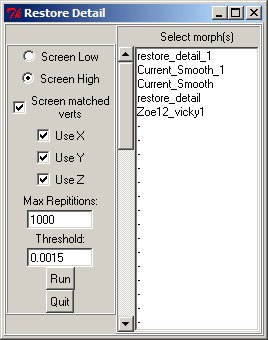
- Select Morph(s) listbox: The script works on the current deformed shape of the selected actor. By default, the shape is restored toward the base geometry. However, you can select any combination of morphs in the listbox to modify the shape toward which it will be smoothed. So listbox selections essentially morph the base shape, for the purpose of the script's corrections.
Note that if you select the currently active morph(s) - assuming they're at 1.0 value - in the listbox, the script won't do much of anything because it's trying to move the current shape back toward itself.
-
Screen matched verts checkbox: If checked, the script will stop processing a vertex once that vertex's distance from its neighbors reaches the "Threshold" value. This may create faster processing times, by avoiding potentially redundant processing of a vertex which is already as close as you'd like to a corrected position.
-
Threshold entry box: This is the distance value which will be used by screening with "Screened matched verts", as well as the "Screen High"/"Screen Low" radio buttons.
-
Screen High/Screen Low radio buttons: Screen High will exclude vertices whose distance is greater than or equal to the threshold value. Screen Low will exclude vertices whose distance is less than or equal to the threshold value. ("Distance" is distance from neighbor vertices.)
-
Max Repititions entry box: If "Screen matched verts" is checked, the script will keep repeating its processing loop on the mesh until all vertices are screened out or it reaches the maximum number of repitiions, defined here. If "Screen matched verts" is unchecked, the script will continue processing until it has run the maximum number of repititions. (Which is either not a word, or Firefox's spell-checker doesn't know it is. Hmm.)
So with screening, keep the max value high enough for the script to potentially reach the point where it can have screened out all vertices. It probably won't run anywhere near 1000 reps on an mesh, with screening. The default value is simply intended to be high. Without screening, the script will run all repititions, so it's probably best to keep this value lower. I've never used more than 10, usually 4, without screening. Theoretically the script could keep running for a long time, if you give it a max which is too high, without screening.
- Use X/Use Y/Use Z checkboxes: Processing can exclude any of the three dimensions of a coordinate's location from all vertices while processing. If you uncheck all three, the script will screen everything and do nothing.
===========================sigline======================================================
Cage can be an opinionated jerk who posts without thinking. He apologizes for this. He's honestly not trying to be a turkeyhead.
Cage had some freebies, compatible with Poser 11 and below. His Python scripts were saved at archive.org, along with the rest of the Morphography site, where they were hosted.
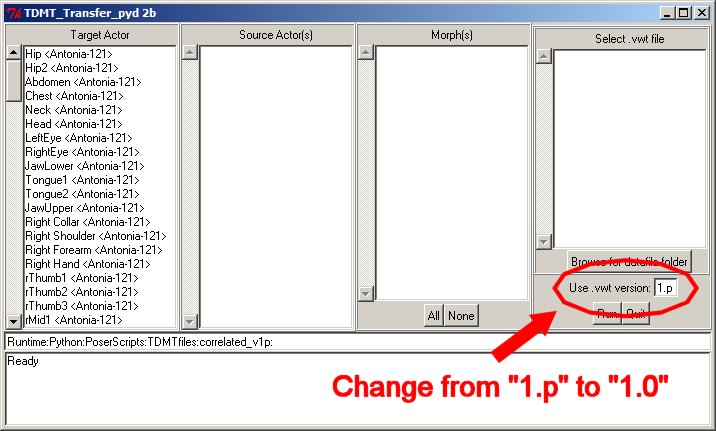
Okay. The links on my scripts page have been corrected and a new version of the TDMT package has been uploaded.
http://www.the.cage.page.phantom3d.net/scripts/scripts.html
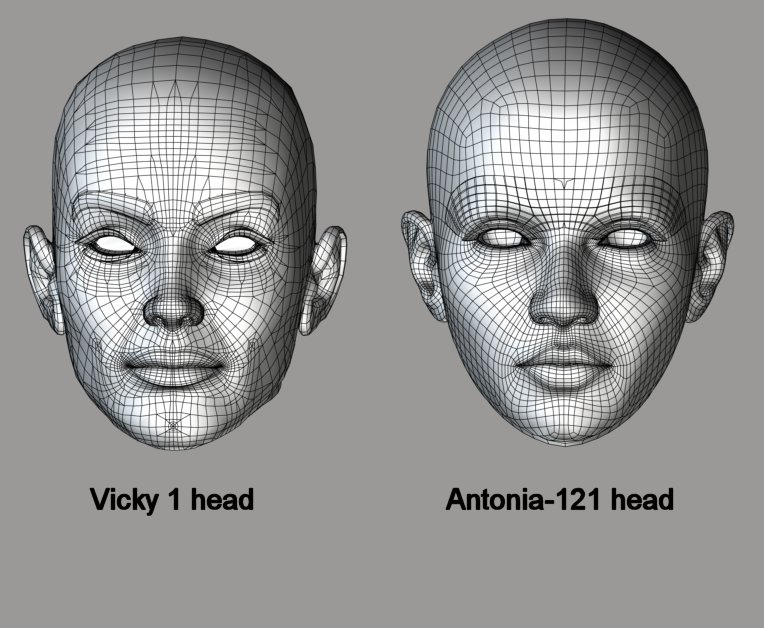
And here is part of a newer version of TDMT. This is just the transfer script. I've included with it the .vwt comparison files I used above to port the morph to Antonia.
http://www.the.cage.page.phantom3d.net/TDMT/TDMT_Transfer.zip
I've actually just tested it, and it looks like it could be used to port the V1 phoneme morphs to Antonia-121, probably subject to some cleanup with restore detail. The resulting morphs can't be shared, as far as I know, but Vicky 1 can now be obtained for free at Daz.
To use this, place the .vwt file using the folder structure in the zip. The script can go anywhere.
The transfer-only script can also be used with .vwt files generated using the version of TDMT on my scripts page, but the version number needs to be changed, as shown in the attached image. (Version 1.p .vwt files are only generated by the version of TDMT which requires Spanki's tdtm.pyd PoserPython extension, which won't work on Mac or versions of Poser other than 7, 8, or Pro.)
===========================sigline======================================================
Cage can be an opinionated jerk who posts without thinking. He apologizes for this. He's honestly not trying to be a turkeyhead.
Cage had some freebies, compatible with Poser 11 and below. His Python scripts were saved at archive.org, along with the rest of the Morphography site, where they were hosted.
===========================sigline======================================================
Cage can be an opinionated jerk who posts without thinking. He apologizes for this. He's honestly not trying to be a turkeyhead.
Cage had some freebies, compatible with Poser 11 and below. His Python scripts were saved at archive.org, along with the rest of the Morphography site, where they were hosted.
===========================sigline======================================================
Cage can be an opinionated jerk who posts without thinking. He apologizes for this. He's honestly not trying to be a turkeyhead.
Cage had some freebies, compatible with Poser 11 and below. His Python scripts were saved at archive.org, along with the rest of the Morphography site, where they were hosted.
Cage, that's really neat. Very impressive work!
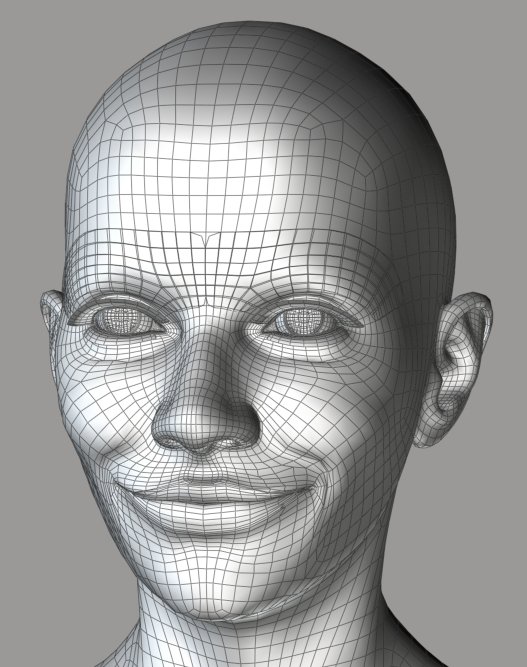
Since this is a "full face" smile, I think the cleanup may have been a bit over-active around the eyes in this case. But the little squint should be easy enough to add back manually, so that's no biggie. The effect on the mouth, on the other hand, is just lovely.
Obviously, next on the ever-increasing wish-list would be a way to apply the cleanup effect selectively. :laugh:
-- I'm not mad at you, just Westphalian.

The restore_detail morph can be used at a lower setting, which might balance detail versus correction. One could try different script settings, too. I've run restore detail here using the default settings. Screening low instead of high could offer different results. Maybe.
I'm planning on porting some screening functions from my Smoother script, which can include screening by materials or groups. The group screening is a bit clumsy, though, and could use some work.
Actually, if you're running Windows and Poser 7, 8, or Pro, you can use the Smoother script with Spanki's .pyd. That offers a variety of Wings-style smoothing options and morph trimming options.
If you can run it, the .pyd is here: http://skinprops.com/files/tdmt_pyd.zip
And I've attached the Smoother script.
===========================sigline======================================================
Cage can be an opinionated jerk who posts without thinking. He apologizes for this. He's honestly not trying to be a turkeyhead.
Cage had some freebies, compatible with Poser 11 and below. His Python scripts were saved at archive.org, along with the rest of the Morphography site, where they were hosted.
Quote - Thanks so much Cage, it's really very generous :o).
If you can use it, I'm happy. :D It's nice to make something useful, now and then.
Quote - Now to see if I can pass my Kena face onto Antonia...hehehehe.
Be aware that the script will transfer the deltas, so you won't get the exact shape, because of the difference in shape between Antonia's head and Vicky's. Also, the .vwt comparison file I've generated doesn't include the lashes for either figure (extremely hard to do lashes with TDMT) or the inner mouth bits, or Antonia's scalp material. And the ears don't match very well (ears may be harder than lashes, even).
But I'm working on an adjustment to the transfer script which should be able to transfer the shape of the source geometry, which could be cleaned up and mixed with the transferred deltas to get closer to the original shape.
===========================sigline======================================================
Cage can be an opinionated jerk who posts without thinking. He apologizes for this. He's honestly not trying to be a turkeyhead.
Cage had some freebies, compatible with Poser 11 and below. His Python scripts were saved at archive.org, along with the rest of the Morphography site, where they were hosted.

If you can run the .pyd, you can use the original form of the restore detail script, which I've attached here. It's faster than the one at the top of the thread, which just uses regular PoserPython.
===========================sigline======================================================
Cage can be an opinionated jerk who posts without thinking. He apologizes for this. He's honestly not trying to be a turkeyhead.
Cage had some freebies, compatible with Poser 11 and below. His Python scripts were saved at archive.org, along with the rest of the Morphography site, where they were hosted.
Cage:
Does one rename restore_detail_full2e_ppy.txt to restore_detail_full2e_ppy.py?
Where do you put the python script?
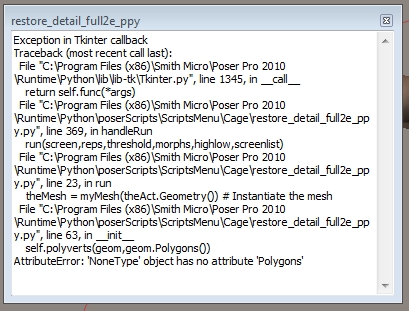
I have tried to run it in Poser Pro 2010, but it does not seem to find the loaded figure, and it only returns error messages.
lmk
Probably edited for spelling, grammer, punctuation, or typos.
Change the extension to .py, yes. You should be able to place the script anywhere in your Runtime, but it's customary to use Runtime:Python:poserScripts as a base location for the script, where you can place sub-folders. I use ...poserScripts:Cagedrei or ...poserScripts:TDMTfiles as base locations for my own scripts. This script has no unusual dependencies, so there shouldn't be a problem with any location.
I don't know anything about Poser Pro 2010. Are they making any known changes to Python for that version? What are the error messages?
===========================sigline======================================================
Cage can be an opinionated jerk who posts without thinking. He apologizes for this. He's honestly not trying to be a turkeyhead.
Cage had some freebies, compatible with Poser 11 and below. His Python scripts were saved at archive.org, along with the rest of the Morphography site, where they were hosted.

Quote - lkendall: My guess would be that the script expects you to select a body part, such as the head. If you select the figure itself, a.k.a. the BODY actor, the script won't find a geometry to work on.
I think lesbentley is correct. The script works on the currently selected actor. It looks like the current actor in this case is returning Python "None" for the actor.Geometry(). If Body is selected, or a ghost actor without geometry, you'd get that error. Try selecting the head, for instance, then running the script.
Quote - Very impressive! Keep up the good work.
Thanks, les! I hope it proves useful to others. As odf has pointed out, it does, unfortunately, impose a certain amount of smoothing of the morph as it moves toward the base mesh relationships. Maybe someone smarter than I (which is most of you :lol:) will have some idea how to improve upon that.
===========================sigline======================================================
Cage can be an opinionated jerk who posts without thinking. He apologizes for this. He's honestly not trying to be a turkeyhead.
Cage had some freebies, compatible with Poser 11 and below. His Python scripts were saved at archive.org, along with the rest of the Morphography site, where they were hosted.
Oh, dangit. That was odf, not les! Odf was correct, above. Not that lesbentley isn't usually correct. Sorry, guys. I got mixed up.
The shape-transfer process can basically work, but I'm going to have to monkey around a bit to create a comparison file others can use. I'm having a lot of trouble with Antonia's lips being distorted, inside the mouth. Hmm.
===========================sigline======================================================
Cage can be an opinionated jerk who posts without thinking. He apologizes for this. He's honestly not trying to be a turkeyhead.
Cage had some freebies, compatible with Poser 11 and below. His Python scripts were saved at archive.org, along with the rest of the Morphography site, where they were hosted.
Quote - > Quote -
I think lesbentley is correct.
Oh, dangit. That was odf, not les! Odf was correct, above. Not that lesbentley isn't usually correct. Sorry, guys. I got mixed up.
I felt flattered, so it's all good. Just as long as you don't call him Olaf. :lol:
PS: Hey, you made a Vickie-shaped Antonia. That's so cool. Can your program do Miki, as well?
-- I'm not mad at you, just Westphalian.
Quote -
PS: Hey, you made a Vickie-shaped Antonia. That's so cool. Can your program do Miki, as well?
Short answer: Yes, but.... :lol:
Long answer. TDMT can compare any two geometries, but the quality (and usefulness) of the results depends on how well their shapes match up when they're compared. I can do Antonia and Vicky 1 fairly easily because my initial effort with Antonia was recreating a Vicky 1 character morph I'd been using. Insofar as I succeeded (mostly, sort of) with the Antonia character morph, I now have a common shape shared by the Vicky 1 and Antonia heads, and this can be used as the basis for a comparison. The Vicky 1 and Vicky 3 heads are fairly similar, so if I can match the V1 shape on Antonia, I should be able to compare to V3, as well.
But I don't have Miki, and I'm not sure how her face is shaped. With some effort (sometimes an awful lot), it should be possible to create a fairly good comparison shape on one or the other of the heads.
===========================sigline======================================================
Cage can be an opinionated jerk who posts without thinking. He apologizes for this. He's honestly not trying to be a turkeyhead.
Cage had some freebies, compatible with Poser 11 and below. His Python scripts were saved at archive.org, along with the rest of the Morphography site, where they were hosted.
Cage: Thanks for the explanation. I did realize how TDMT worked. Not quite as magically as I thought, apparently. :laugh: That you would need a reference shape first makes complete sense to me, now that I'm thinking about it.
So the quality of the transfer will depend critically on how well the reference shape/morph has been prepared, correct?
-- I'm not mad at you, just Westphalian.
Quote - Cage: Thanks for the explanation. I did realize how TDMT worked. Not quite as magically as I thought, apparently. :laugh: That you would need a reference shape first makes complete sense to me, now that I'm thinking about it.
So the quality of the transfer will depend critically on how well the reference shape/morph has been prepared, correct?
Correct. Morphing Clothes has similar limitations. The two figures need to match in shape as closely as possible, for effective morph transfers. Or so the MC docs say. I haven't tried to push the boundaries of that program.
TDMT also uses the vertex normals of an object, when calculating comparisons. This is an area (one of many, probably) where the approach of Morphing Clothes is quite superior. Because TDMT uses normals, any part of the mesh which doesn't point outward (inside of mouth, inside of nose, lacrimals, eyesockets, backs of ears, etc.) runs a heightened risk of being correlated with the wrong part of the target geometry. Restore Detail can help compensate, but messiness from this sort of thing is almost inevitable and the resulting morphs usually need fairly extensive cleanup. If Morphing Clothes did faces, I'd probably stop futzing around with TDMT. Sigh.
A way to compensate is to screen certain materials on both the Source and Target actors, when comparing with TDMT.
Overall, the comparison process is complicated and imprecise, but sometimes the results can make it worth the effort.
===========================sigline======================================================
Cage can be an opinionated jerk who posts without thinking. He apologizes for this. He's honestly not trying to be a turkeyhead.
Cage had some freebies, compatible with Poser 11 and below. His Python scripts were saved at archive.org, along with the rest of the Morphography site, where they were hosted.
http://www.the.cage.page.phantom3d.net/TDMT/TDMT_Transfer_Shape.zip
Here's a version of the TDMT Transfer script which can handle transfer of the base geometry shape. This can be used to port over the (approximate) shape of the Vicky 1 (or 2) head, which can then be mixed with the transferred morphs, to more closely approach the original shape on V1.
This part of the process is really more helpful with full face morphs or character morphs, and may not prove useful for simpler morph transfers like expressions.
A pose is included to help properly position Vicky 1 for the shape transfer. The readme in the zip has basic instructions for the process.
This contains a new TDMT .vwt comparison file, which omits the inner lips of Antonia's face. They kept mis-correlating and creating distortion which was hard to remove. I think cleanup with Restore Detail should be easier with any morphs created using this .vwt than with the one posted earlier.
To clean up the transferred Vicky 1 head shape, I used the "ten passes" setting of Restore Detail, as shown in the fourth image I posted near the top of the thread.
===========================sigline======================================================
Cage can be an opinionated jerk who posts without thinking. He apologizes for this. He's honestly not trying to be a turkeyhead.
Cage had some freebies, compatible with Poser 11 and below. His Python scripts were saved at archive.org, along with the rest of the Morphography site, where they were hosted.
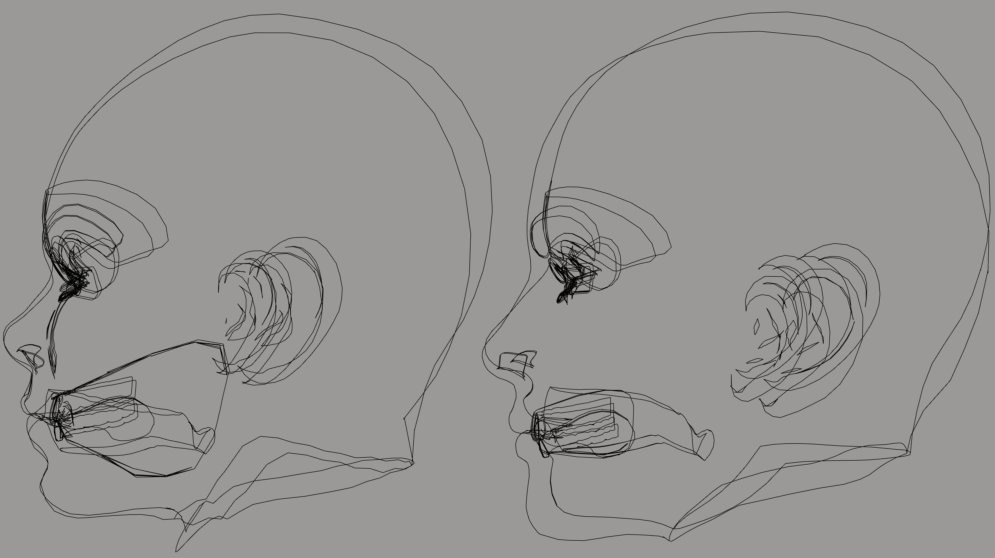
I'm not sure what you mean by "reference shape", now that I think about it. The two geometries need to have adequately compatible shapes at the time TDMT compares them. It then creates a .vwt file, which stores the correlations of vertices to polygons, for later use in transfers. So ultimately there's a reference file, in the .vwt. The shapes need to be a "common point of reference", perhaps, for comparison purposes.
Feel like I'm not explaining well. In the attached image, the outlines on the right show the V1 and Antonia heads without any special shaping. Even when carefully lined up, they're still not going to be easy to compare unless at least of of them is reshaped. On the left, the two heads have been shaped using the morphs I've mentioned. They correlate fairly well. Most of the time, it's probably easier just to shape one of the heads for the comparison. This case was unusual because I already had decent morphs handy.
===========================sigline======================================================
Cage can be an opinionated jerk who posts without thinking. He apologizes for this. He's honestly not trying to be a turkeyhead.
Cage had some freebies, compatible with Poser 11 and below. His Python scripts were saved at archive.org, along with the rest of the Morphography site, where they were hosted.
Come to think of it, the normals problem might be overcome by trying to apply what might be the Morphing Clothes approach. I think that samples a number of closest vertices, mixing their deltas using weighting based on distance, using a falloff zone to restrict where it looks for matches. I'm guessing, of course. I'll have to tinker with the idea. I've been drawn in by the lure of transferring face morphs to Antonia. :lol:
And I run the risk of turning this thread into the TDMT thread, part 2.
===========================sigline======================================================
Cage can be an opinionated jerk who posts without thinking. He apologizes for this. He's honestly not trying to be a turkeyhead.
Cage had some freebies, compatible with Poser 11 and below. His Python scripts were saved at archive.org, along with the rest of the Morphography site, where they were hosted.

Quote -
I've actually just tested it, and it looks like it could be used to port the V1 phoneme morphs to Antonia-121, probably subject to some cleanup with restore detail. The resulting morphs can't be shared, as far as I know, but Vicky 1 can now be obtained for free at Daz.
Personally, I would use Miki2's phonemes if you have her. The DAZ phonemes/expressions have always made me wince :/
Thanks as always for the awesome scripts :D
Cage:
Nothing out there right now (except your work) can accomplish a transfer of facial and expressions morphs between dissimilar figures. I can easily borrow body morphs from figures supported by WW2 using Morphing Cloths. Actually, I’m not sure if CrossDresser by EvilInnocence can transfer facial/expression/phoneme morphs or not. The point is, if you can create a file that will allow the facial morphs to be to be borrowed from one figure to another, almost any figure can enter the market with some support.
Hopefully, Antonia will get WW2 support as soon as she is finished enough to be stable. I can understand why PhilC would be reluctant to commit at this point.
I don’t think anyone minds if this thread morphs into a TDMT thread, or you start another thread for it. The subject is remarkably engaging. Please continue to develope the scripts, and keep us informed.
LMK
Probably edited for spelling, grammer, punctuation, or typos.
R_Hatch: I hope you can use the scripts! Unfortunately, I don't have Miki but I'll consider buying her in the future so I can try to develop a transfer file, particularly if I can work out a more effective comparison method for TDMT.
lkendall: Thank you for the comments. :D I think perhaps people are more proprietary about facial morphs than body morphs, which may be why no one like PhilC or Dimension 3D has tried to tackle this problem before. Possibly a script or program for sale which could transfer face morphs might run up against copyright challenges somehow. It should be obvious that any transferred morphs can't be shared, but I don't think there's any problem with sharing the tools that can help others accomplish the transfer.
Comparing faces is also difficult to automate. Both Wardrobe Wizard and Morphing Clothes seem to work from the base shape of a figure, when running comparisons. But faces vary widely in shape and need to be carefully altered in order to effectively compare the shapes. Maybe someone with the skill could write something that combines the methods of a Face Shop with the morph transfer potential of a Morphing Clothes. Otherwise, faces have to be altered manually in Poser to enable the comparison, which makes a utility more difficult and less user-friendly.
I think I've read that Cross Dresser doesn't handle faces either. That may come down to one of the reasons I present above. What about the Tailor? I've never used it.
But I'm thinking about how TDMT could be improved a bit, now. Have to see if the ideas work.
===========================sigline======================================================
Cage can be an opinionated jerk who posts without thinking. He apologizes for this. He's honestly not trying to be a turkeyhead.
Cage had some freebies, compatible with Poser 11 and below. His Python scripts were saved at archive.org, along with the rest of the Morphography site, where they were hosted.

Privacy Notice
This site uses cookies to deliver the best experience. Our own cookies make user accounts and other features possible. Third-party cookies are used to display relevant ads and to analyze how Renderosity is used. By using our site, you acknowledge that you have read and understood our Terms of Service, including our Cookie Policy and our Privacy Policy.

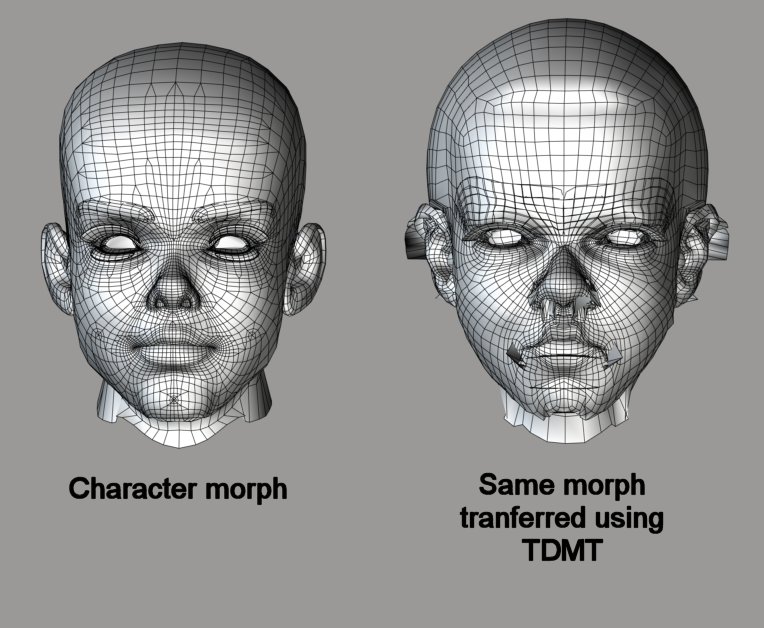
This is a Python script which I've been finding extremely useful and I thought I'd post it so others can use it too.The script works on a morphed actor and applies a smoothing method which, instead of averaging vertex positions, moves the vertices back toward the distance relationships they had in the unmorphed mesh.
The result is rapid cleanup of a morph which might otherwise take hours of work by hand. Basic shaping changes are retained while basic vertex relationships present in the original mesh are restored.
The example I provide here (attached images) is intentionally extreme. But the script is useful for minor adjustments. Magnets can easily be used to create morphs which are incompatible with other morphs on an actor. (Example, a magnet-derived character morph disagreeing with expression morphs on a head.) This script pulls the morphed shape back toward the base shape, making it more likely that morphs will cooperate.
===========================sigline======================================================
Cage can be an opinionated jerk who posts without thinking. He apologizes for this. He's honestly not trying to be a turkeyhead.
Cage had some freebies, compatible with Poser 11 and below. His Python scripts were saved at archive.org, along with the rest of the Morphography site, where they were hosted.