
Renderosity Forums / Poser - OFFICIAL
Welcome to the Poser - OFFICIAL Forum
Forum Moderators: RedPhantom Forum Coordinators: Anim8dtoon
Poser - OFFICIAL F.A.Q (Last Updated: 2026 Jun 06 6:06 pm)

Subject: Morph Cleanup Script

Quote - Very nice. Can you do a test for me? Just below this line:
hitpoint = mesh2.mesh.CorrelateToNearVertList( vi, mesh1.mesh, close_index )
...try adding these 2 lines....
if not hitpoint.Valid:
hitpoint = mesh2.mesh.CorrelateToNearVertList( vi, mesh1.mesh, close_index, 0 )...in other words, if it fails with the averaged normals, try again without averaging, then just let it fall through as usual. The idea is that the non-averaged normal might get a hit where the averaged ones are failing. If this gives better results on the eyelid area, I can do the multiple testing internally.
I tested the above and the results didn't noticeably change, compared to not using it. I tested with influences = 5 and influences = 12. The results worsened at the higher level. This would be true when the second pass is not in use too, however.
I tested fully disabling the normals averaging, and the results weren't pretty. :lol: It missed the area above the eyelids, and it missed more of the vertices in that area. Raising the influences may have helped a bit here, but not much. The averaging is helping in this area, generally.
I tested my idea with the delta as normal, and it didn't turn out well. So I can now stop dwelling on it. I have closure. :lol: Thank you for giving me the opportunity to achieve that.
One thing I did test which seemed to help was turning off "Test Normals". It looks like this helped on sharp convex creases (back of ears, edges of eyes), exactly where the normals dot test would be screening out vertices. Unfortunately it didn't help with the area above the eyelid.
===========================sigline======================================================
Cage can be an opinionated jerk who posts without thinking. He apologizes for this. He's honestly not trying to be a turkeyhead.
Cage had some freebies, compatible with Poser 11 and below. His Python scripts were saved at archive.org, along with the rest of the Morphography site, where they were hosted.

Ahh - thanks for the additional info. And btw - yeah, I'm pretty pleased with that test you show above - it's come quite a long way since our beginings :). So, does the Restore Detail iron out the eyelids ok? The ears look surprisingly good.
Cinema4D Plugins (Home of Riptide, Riptide Pro, Undertow, Morph Mill, KyamaSlide and I/Ogre plugins) Poser products Freelance Modelling, Poser Rigging, UV-mapping work for hire.
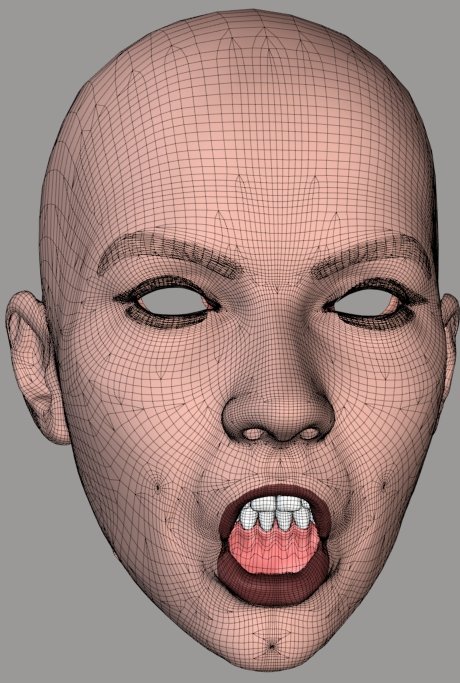
A very long way, particularly when you consider the very start. :lol:
Restore Detail can clean up the results well enough, in any case. I'm having trouble finding the best settings. The script was developed with Vicky 1 and I've largely been using it on V1 and Antonia. Because it works with distances between vertices, the Threshold value needs to change depending on mesh density. I haven't yet found the optimal settings for V3. I think I may grab the average distance for the mesh and insert that as the default for any case. Hmm.
But, yes. RD helps, it can clean up any mess we're creating. The only trouble is if and when problems show up in the morph transfers as well as the shape transfers. Unfortunately, that one bad vertex below the mouth, in the image a few posts up, is showing up in the morph.
We could use a Restore Detail script for the .vmf weights, to try to clean them up. I can't imagine how that could possibly work, though. :lol:
The attached image shows one of the messy transfers I've been mentioning, after cleanup with RD. It's just as good as the other and, in this case, there's no bad vertex in the morph.
===========================sigline======================================================
Cage can be an opinionated jerk who posts without thinking. He apologizes for this. He's honestly not trying to be a turkeyhead.
Cage had some freebies, compatible with Poser 11 and below. His Python scripts were saved at archive.org, along with the rest of the Morphography site, where they were hosted.
Well, it's an extra step, but there's no reason that you can't use RD on morphs... you just have to save the RD'd mesh as a replacement morph.
It's really odd that it's missing that particular vert on the chin though, I think I might have even seen that here when I was messing with V3. I may play around with that some tonight.
Cinema4D Plugins (Home of Riptide, Riptide Pro, Undertow, Morph Mill, KyamaSlide and I/Ogre plugins) Poser products Freelance Modelling, Poser Rigging, UV-mapping work for hire.
Quote - Well, it's an extra step, but there's no reason that you can't use RD on morphs... you just have to save the RD'd mesh as a replacement morph.
It's really odd that it's missing that particular vert on the chin though, I think I might have even seen that here when I was messing with V3. I may play around with that some tonight.
What do you mean, about saving the RD morph? 
Edit: Oh, I see you mean mix the morphs and save as a new one. The trouble is that if a vertex like this is showing up on morphs and you want to transfer dozens of them, that's a lot to clean up. I may want to think about batch handling for RD, or something, or integrating it into the transfer script as an option, if need be. Hmm.
Possibly this bad vertex is similar to the problem I was seeing with the upper brow. The vertex may be correlated with a tripoly in the inner mouth material. Hmm. It's embedded, as though that were the case, but I would have expected the normals-facing handling to block such a correlation. I had it activated when I ran the comparison.
If the inner mouth is interfering, that might explain the vertex at the top of the lips which keeps ending up badly correlated, as well.
Come to think of it, what if the problem with the area above the eyelid could be interference with the inner eye region? That's one I can test. I'll see what happens.
Edit: That would be a "no", on the upper eyelid area. Dang.
===========================sigline======================================================
Cage can be an opinionated jerk who posts without thinking. He apologizes for this. He's honestly not trying to be a turkeyhead.
Cage had some freebies, compatible with Poser 11 and below. His Python scripts were saved at archive.org, along with the rest of the Morphography site, where they were hosted.
How are you determining the set of candidate tripolys for the ray-casting? Is it just the vpolys for the closest vertex?
If so, might it help to get neighbor polys, as well, to extend the outer ring, as it were? Maybe as an optional setting.
===========================sigline======================================================
Cage can be an opinionated jerk who posts without thinking. He apologizes for this. He's honestly not trying to be a turkeyhead.
Cage had some freebies, compatible with Poser 11 and below. His Python scripts were saved at archive.org, along with the rest of the Morphography site, where they were hosted.
Aha. Okay. That wouldn't help much, then, since you're already doing it and then some. :lol: If we're still missing all of those, something is presumably pretty far off the mark. In the test case I've been using, that would probably be due to the fact that the surfaces aren't aligned very well.
Hmm. You asked if we were out of ideas. I think I may be there, with respect to the ray-casting step. :lol: Hmm.
===========================sigline======================================================
Cage can be an opinionated jerk who posts without thinking. He apologizes for this. He's honestly not trying to be a turkeyhead.
Cage had some freebies, compatible with Poser 11 and below. His Python scripts were saved at archive.org, along with the rest of the Morphography site, where they were hosted.
I'm testing creating the ray-casting normal using the closest vert weights. This can give slightly better results in many areas, in my uphill test, at lower number of influence settings. As the number of influences is increased, however, the current process begins to return better results.
That's all I've got, today. Not a very productive day. :lol:
I can't think of much else that could be tried, with the hybrid process. So far it's passing every test and coming out ahead of anything else I try. :thumbupboth:
===========================sigline======================================================
Cage can be an opinionated jerk who posts without thinking. He apologizes for this. He's honestly not trying to be a turkeyhead.
Cage had some freebies, compatible with Poser 11 and below. His Python scripts were saved at archive.org, along with the rest of the Morphography site, where they were hosted.

Cinema4D Plugins (Home of Riptide, Riptide Pro, Undertow, Morph Mill, KyamaSlide and I/Ogre plugins) Poser products Freelance Modelling, Poser Rigging, UV-mapping work for hire.
...you'll note that I'm still passing in a PYD Mesh class... and extracting some additional info from it. You may already have some of those needed lists in your MyMesh class (and if not, you could add them), so I'd recommend changing the code to use one of those, instead.
Cinema4D Plugins (Home of Riptide, Riptide Pro, Undertow, Morph Mill, KyamaSlide and I/Ogre plugins) Poser products Freelance Modelling, Poser Rigging, UV-mapping work for hire.
Oh, one other thing of note...
As mentioned, the routine loops through and checks for intersections with the "tripolys associated with the list of vertices passed in"... but it currently makes no attempt to screen that list of tripolys for duplicates, so it actually ends up testing each of those tripolys multiple times (since each tripoly likely has some of those vertices in common).
With the C++ code, it didn't really matter (for now), so I didn't bother doing that optimization yet, but at some point, it would be best to add some code for that (particularly in the Python version).
Cinema4D Plugins (Home of Riptide, Riptide Pro, Undertow, Morph Mill, KyamaSlide and I/Ogre plugins) Poser products Freelance Modelling, Poser Rigging, UV-mapping work for hire.
Quote - I did get a start on porting the code over to Python (see attached). It's not complete [...]
Just checking here - this implies that eventually, those of us who have older versions of Poser which won't run the PYD will be able to use the same algorithmic goodness? If that's right, then whoo-hoo. And, of course, many thanks for your efforts. :)
Hi EB...
Yeah, only the latest Hybrid method hasn't been fully ported yet... that's what the above snippet is a start on. I think Cage can probably finish working that in without too much trouble.
Just curious... so you're not using P7 or later yet?
Cinema4D Plugins (Home of Riptide, Riptide Pro, Undertow, Morph Mill, KyamaSlide and I/Ogre plugins) Poser products Freelance Modelling, Poser Rigging, UV-mapping work for hire.
Just as an aside... the original ray-casting method needed to do a lot of list-building (getting normals, triangulating the mesh, lists of tripolys per vertex, etc) that the closest-vert method doesn't normally need anymore, so a lot of that old (list building) code may no longer be part of the current script (the PYD encapsulated a lot of that into it's own classes/structures)... so to get a non-PYD version of the Hybrid method working (most of the remaining porting work) will be making sure that the code can still supply some of that info and fixing up some of the remaining reliances on the PYD.
Cinema4D Plugins (Home of Riptide, Riptide Pro, Undertow, Morph Mill, KyamaSlide and I/Ogre plugins) Poser products Freelance Modelling, Poser Rigging, UV-mapping work for hire.
Cage,
On my way to hit the sack, I just noticed that the routine is currently set up to try to return the Vertices that make up the tripoly that was hit... should be returning the Indices of those verts, not the verts themselves (the file-writing code wants the indices). I kinda left the return value up in the air anyway... I just wanted to point that out so you can fix that as well :).
Cinema4D Plugins (Home of Riptide, Riptide Pro, Undertow, Morph Mill, KyamaSlide and I/Ogre plugins) Poser products Freelance Modelling, Poser Rigging, UV-mapping work for hire.
BTW, I have confirmed that your get_weights() routine is broke... I also know why it's broke - I just don't know the fix yet (I need to think about it a little).
The bug can be found here:
    for di in
range(len(dists)):       <br></br>
        dist =
dists[di]       <br></br>
        val = (dmax - dist) /
(dmax - dmin)<br></br>
...remember that 'dmax' is essentially 'dmax = max(dists)', so ONE of the distances ('dist' in the code above) within that array == dmax. Which means... (dmax - dist) will = 0.0 and zero divided by anything is zero.
How it's affecting the current close-vert method...
Currently, you're basically fooling the code by throwing in an additional distance - if there ARE any extras - when you have extras, that's ok, because dmax will end up matching that extra (it's the furtherst distance away) and it gets dropped later on. But when there's less than 'num_influences', you don't end up adding an extra one, so one of the few that you do have ends up getting dropped (if you started with 5, you end up with 4, if you only had 3, you end up with 2, etc). In other words, this could be contributing to some of the piggy-backing.
Anyway, I'm pretty sure that once we get that routine fixed, it can also be used to compute the weights from the 3 vert indices returned by the ray-cast code, so it would only need to return the indices (simplifying things a bit).
Cinema4D Plugins (Home of Riptide, Riptide Pro, Undertow, Morph Mill, KyamaSlide and I/Ogre plugins) Poser products Freelance Modelling, Poser Rigging, UV-mapping work for hire.
Quote - BTW, I have confirmed that your get_weights() routine is broke... I also know why it's broke - I just don't know the fix yet (I need to think about it a little).
The bug can be found here:
    for di in
range(len(dists)):       <br></br>
        dist =
dists[di]       <br></br>
        val = (dmax - dist) /
(dmax - dmin)<br></br>
...remember that 'dmax' is essentially 'dmax = max(dists)', so ONE of the distances ('dist' in the code above) within that array == dmax. Which means... (dmax - dist) will = 0.0 and zero divided by anything is zero.
How it's affecting the current close-vert method...
Currently, you're basically fooling the code by throwing in an additional distance - if there ARE any extras - when you have extras, that's ok, because dmax will end up matching that extra (it's the furtherst distance away) and it gets dropped later on. But when there's less than 'num_influences', you don't end up adding an extra one, so one of the few that you do have ends up getting dropped (if you started with 5, you end up with 4, if you only had 3, you end up with 2, etc). In other words, this could be contributing to some of the piggy-backing.
Anyway, I'm pretty sure that once we get that routine fixed, it can also be used to compute the weights from the 3 vert indices returned by the ray-cast code, so it would only need to return the indices (simplifying things a bit).
Yes. Exactly! I've looked at the weighting code a few times recently, as it's become clear that the script can be improved for uphill comparisons, and had arrived at the same basic assessment of the problem. I can't find anything online, however, relating to weighting a set of coordinates based on distance. I have no idea how to fix it. One could set an arbitrary max value (notice that the default value is 100, if no argument for max is sent), but I think that's probably just as incorrect, or worse. I did some searches on the math behind falloff zones, wondering if the ideas (or at least terminology) used by Morphing Clothes might point somewhere useful, but I could find nothing online. Google fails me. :lol: Kuroyume might know something about falloff zones. I think he worked with those a lot in his Poser to C4D script/program/whatever you C4D folks call such things. Hmm.
I'm glad you're looking at this and thinking about it. :thumbupboth: I've had surprising luck with some things, but I still lack advanced math skills. So I can only take things so far, alas. :lol:
===========================sigline======================================================
Cage can be an opinionated jerk who posts without thinking. He apologizes for this. He's honestly not trying to be a turkeyhead.
Cage had some freebies, compatible with Poser 11 and below. His Python scripts were saved at archive.org, along with the rest of the Morphography site, where they were hosted.
Quote - Just checking here - this implies that eventually, those of us who have older versions of Poser which won't run the PYD will be able to use the same algorithmic goodness? If that's right, then whoo-hoo. And, of course, many thanks for your efforts. :)
The ray-casting hybrid will be available to everyone. It will be slower, unfortunately, just as the closest vertices alone is slower without the .pyd. Poser Python really, really, really needs a compiled vector and matrix library. Numeric can help, but it's put together sideways, it can't do everything (point distance?), some things it does more slowly than mere Python code (dot products), and Poser distributions no longer include the linear algebra module, so Numeric can't be put to full use anyway. Stewer, someone, anyone who's on the Poser team: pleeeeease! Please consider the value of adding some kind of improved 3D math support to Poser Python. It will bring Poser closer to being a true professional tool.
===========================sigline======================================================
Cage can be an opinionated jerk who posts without thinking. He apologizes for this. He's honestly not trying to be a turkeyhead.
Cage had some freebies, compatible with Poser 11 and below. His Python scripts were saved at archive.org, along with the rest of the Morphography site, where they were hosted.
Quote - Attached File: correlate_snippet.txt (16.3 kilobytes)
Hey... I didn't do much more experimenting, but I did get a start on porting the code over to Python (see attached). It's not complete, but/so please be sure to read my comments at the top of the routine at the bottom (the first 2 functions are moslty grabbed from some older scripts).
Ooh! Excellent! Thank you. I was prepared to try to do it myself, which would probably involve making a horrid, hacked-up mess of your 2007 ray-casting code. :lol: I'm glad you've done this. Thank you. :thumbupboth: You are the ray-casting guy and, as I've said before, the brains of the outfit. :woot: :lol:
I'll start adding this in.
I'm wondering if the use of the close weights-generated average for the normal might help for a second ray-casting pass. I didn't check it yesterday to see if it's still failing in the same areas as the current ray-casting, but its results do differ in those areas, which suggests that it may be catching them. If so, it could be a useful process in cases like the one I've been testing, with a complex uphill comparison in which some surfaces aren't very well-aligned at comparison time. That's really the only thing I'm still chasing after now, improved tolerance of surface mis-matches going uphill.
===========================sigline======================================================
Cage can be an opinionated jerk who posts without thinking. He apologizes for this. He's honestly not trying to be a turkeyhead.
Cage had some freebies, compatible with Poser 11 and below. His Python scripts were saved at archive.org, along with the rest of the Morphography site, where they were hosted.

Quote - So if I use Modo's vertex map transfer to copy morphs between characters, would I be able to use this to clean up any minor errors that may creep up after doing so or does it all need to be done within this utility?
That's a good question. I have Modo 301 but know almost nothing about it, aside from the use of the 3D paint features. :lol: What does the vertex map transfer do, and what sort of flaws might creep in, and is the feature included with 301? I can test it if it's in the version I have.
If the Modo function can help shape one geometry like another, that could help when using this script. I don't know enough about the Modo process to say anything else, at this point.
===========================sigline======================================================
Cage can be an opinionated jerk who posts without thinking. He apologizes for this. He's honestly not trying to be a turkeyhead.
Cage had some freebies, compatible with Poser 11 and below. His Python scripts were saved at archive.org, along with the rest of the Morphography site, where they were hosted.
Quote - Just as an aside... the original ray-casting method needed to do a lot of list-building (getting normals, triangulating the mesh, lists of tripolys per vertex, etc) that the closest-vert method doesn't normally need anymore, so a lot of that old (list building) code may no longer be part of the current script (the PYD encapsulated a lot of that into it's own classes/structures)... so to get a non-PYD version of the Hybrid method working (most of the remaining porting work) will be making sure that the code can still supply some of that info and fixing up some of the remaining reliances on the PYD.
I was considering trying to duplicate the basic features of the .pyd, in some ways at least, for the Poser Python port. Creating a HitPoint class which will contain the weights and the validity of the hit, etc, and returning that to the sending function, or a TriPoly class. The myMesh class currently in use can be used as a container for the non-PYD versions of the necessary lists and arrays.
Screening out duplicate vpolys isn't to difficult. That's something I can handle. :lol:
Quote - #-----------------------------------------------------------------------------------
# looks like we still need the math error fix (also on the test above), though I'm
# guessing that this only happens when testing identical meshes. Hopefully it doesn't
# come back to bite us.
#
#if (t < -0.00000022) or ((s+t) - 1.0 > 0.00000006): continue # point is outside T
if (t < -0.00000022) or ((s+t) - 1.0 > 0.00000006):
#print vi,(t < -0.00000022),((s+t) - 1.0 > 0.00000006)
continue # point is outside T
#-----------------------------------------------------------------------------------
#if (t < 0.0) or ((s+t) - 1.0 > 0.0): continue # point is outside T
Is the above something we may still need to worry about, in this port of the ray-casting back to PPy?
===========================sigline======================================================
Cage can be an opinionated jerk who posts without thinking. He apologizes for this. He's honestly not trying to be a turkeyhead.
Cage had some freebies, compatible with Poser 11 and below. His Python scripts were saved at archive.org, along with the rest of the Morphography site, where they were hosted.
Quote - > Quote - #-----------------------------------------------------------------------------------
# looks like we still need the math error fix (also on the test above), though I'm
# guessing that this only happens when testing identical meshes. Hopefully it doesn't
# come back to bite us.
#
#if (t < -0.00000022) or ((s+t) - 1.0 > 0.00000006): continue # point is outside T
if (t < -0.00000022) or ((s+t) - 1.0 > 0.00000006):
#print vi,(t < -0.00000022),((s+t) - 1.0 > 0.00000006)
continue # point is outside T
#-----------------------------------------------------------------------------------
#if (t < 0.0) or ((s+t) - 1.0 > 0.0): continue # point is outside TIs the above something we may still need to worry about, in this port of the ray-casting back to PPy?
Uhm.. that code is already inside the code_snippet that I posted - it's basically part of the point_in_triangle() test, which is built-right in to that routine, for speed. I provided the fastest (and most correct) version of that code in the snippet. In other words, I removed the associated comments, because the code, as it is in there, is correct. If you prefer some other point_in_triangle() routine, you'd be replacing that code anyway.
Cinema4D Plugins (Home of Riptide, Riptide Pro, Undertow, Morph Mill, KyamaSlide and I/Ogre plugins) Poser products Freelance Modelling, Poser Rigging, UV-mapping work for hire.
Erm, answered another way.. the code needs to be the way it is in the snippet.. but there's no need to "worry about it" :).
Cinema4D Plugins (Home of Riptide, Riptide Pro, Undertow, Morph Mill, KyamaSlide and I/Ogre plugins) Poser products Freelance Modelling, Poser Rigging, UV-mapping work for hire.
Quote - Uhm.. that code is already inside the code_snippet that I posted - it's basically part of the point_in_triangle() test, which is built-right in to that routine, for speed. I provided the fastest (and most correct) version of that code in the snippet. In other words, I removed the associated comments, because the code, as it is in there, is correct. If you prefer some other point_in_triangle() routine, you'd be replacing that code anyway.
Okay. I haven't gotten beyond reading the comments in the snippet code yet. I don't think there's any reason to consider replacement with another point-in-tri process. I tested three approaches in 2008, one of which was just a slight variant on the one you use, and your code was the fastest. It's good stuff! :woot:
Quote - Erm, answered another way.. the code needs to be the way it is in the snippet.. but there's no need to "worry about it" :).
Worry is my favorite emotion. :lol:
I wasn't planning on changing any of your code, except in areas where it remains incomplete. I wouldn't change any processes. The only changes I ever made to your core 2007 functions were the addition of some gui interactions and printing of results. If it works, and it does, there's no need to monkey with it. :thumbupboth:
===========================sigline======================================================
Cage can be an opinionated jerk who posts without thinking. He apologizes for this. He's honestly not trying to be a turkeyhead.
Cage had some freebies, compatible with Poser 11 and below. His Python scripts were saved at archive.org, along with the rest of the Morphography site, where they were hosted.
Quote - ...I'm wondering if the use of the close weights-generated average for the normal might help for a second ray-casting pass....
I'm not sure I understand the question... the ray-casting code (the snippet that I posted) is averaging the normals of the passed in list of close vertices and using THAT as the ray direction for the ray-cast... and yet, it sounds like that's what you're asking about / suggesting??
Or am I misunderstanding?
Cinema4D Plugins (Home of Riptide, Riptide Pro, Undertow, Morph Mill, KyamaSlide and I/Ogre plugins) Poser products Freelance Modelling, Poser Rigging, UV-mapping work for hire.
Quote - I'm not sure I understand the question... the ray-casting code (the snippet that I posted) is averaging the normals of the passed in list of close vertices and using THAT as the ray direction for the ray-cast... and yet, it sounds like that's what you're asking about / suggesting??
Or am I misunderstanding?
I guess I haven't been explaining well.  :lol: I've tested a process (mentioned in my only post on Sunday), which returns slightly better results under some circumstances.
What I do is use the closest vertices weights to average the normal, rather than just adding up all the normals and then dividing by the number of normals. This seems to give more precision (less influence by distant vertices), and that helps when the number of influences is lower. But it also introduces more of the sampling error problems of the closest vertices method, as the number of influences is increased.
However, it looks like this approach may be catching the places where the current averaged normals aren't making hits, at least at the lower influences setting. I'm going to check whether it is, then test using that as a second pass, in hopes of at least getting tri-weights for all cases.
===========================sigline======================================================
Cage can be an opinionated jerk who posts without thinking. He apologizes for this. He's honestly not trying to be a turkeyhead.
Cage had some freebies, compatible with Poser 11 and below. His Python scripts were saved at archive.org, along with the rest of the Morphography site, where they were hosted.
Quote - Okay. I haven't gotten beyond reading the comments in the snippet code yet....
Ahh - gotcha. Yeah, that's already in there.
Quote - ...I wasn't planning on changing any of your code, except in areas where it remains incomplete...
Feel free to ask questions once you've had a chance to look it over, but when I said something about "routines that may no longer be in the current script" I was mostly just referring to things like:
vecsub()
vector_dotproduct()
vector_normalize()
etc.
...(which all may in fact still be there - I just didn't look). The things that still need to be detached from the PYD are anything that starts with "sourceMesh.SomePydRoutine()" (you can search for "sourceMesh." ) and some of the code dealing with the TriPoly class.
As mentioned in the notes, there's some left-over values being set at the end of the code (where the HitPoint used to be filled in by the C++ code before returning)... not all of that is needed.
Cinema4D Plugins (Home of Riptide, Riptide Pro, Undertow, Morph Mill, KyamaSlide and I/Ogre plugins) Poser products Freelance Modelling, Poser Rigging, UV-mapping work for hire.
Quote - ...What I do is use the closest vertices weights to average the normal, rather than just adding up all the normals and then dividing by the number of normals. This seems to give more precision (less influence by distant vertices)...
Ahh - gotcha. I didn't really know what you were doing :). So you're creating a weighted-average Normal.. hmm... it sounds interesting/promising, but I'd need to see your code, I think. One potential difference (aside from the obvious) is that I was also including the target vertex's Normal in the averaging, to help keep it from casting off in some too-diverse angle.
Cinema4D Plugins (Home of Riptide, Riptide Pro, Undertow, Morph Mill, KyamaSlide and I/Ogre plugins) Poser products Freelance Modelling, Poser Rigging, UV-mapping work for hire.
Quote - Feel free to ask questions once you've had a chance to look it over, but when I said something about "routines that may no longer be in the current script" I was mostly just referring to things like:
It looks pretty straightforward, but I'll definitely ask if I find anything confusing as I go along. It's a safe bet that I will, once I start looking more closely. :lol:
Quote - Ahh - gotcha. I didn't really know what you were doing :). So you're creating a weighted-average Normal.. hmm... it sounds interesting/promising, but I'd need to see your code, I think. One potential difference (aside from the obvious) is that I was also including the target vertex's Normal in the averaging, to help keep it from casting off in some too-diverse angle.
Aha! That, I did not know. I'll see how it works out if that's averaged in with the weighted version.
I thought I was making a weighted average. I've avoided calling it that because, in my Googling to try to find a more correct approach for the weighting, I found a (presumably incorrect) reference to a regular, run-of-the-mill average as a "weighted" average. I grew confused about the proper use of the term, and have eschewed its use since. :lol:
===========================sigline======================================================
Cage can be an opinionated jerk who posts without thinking. He apologizes for this. He's honestly not trying to be a turkeyhead.
Cage had some freebies, compatible with Poser 11 and below. His Python scripts were saved at archive.org, along with the rest of the Morphography site, where they were hosted.
Well, dang. The weighted average comparison really only helps catch a few of the vertices which are missed by the existing averaging process. Not enough to make much of a difference. Between this and the fact that it introduces greater risk of oversampling problems with some settings, I don't think it's worth troubling with as a second pass.
Plugins. They're called C4D plugins. Like it says in Spanki's signature. :lol:
===========================sigline======================================================
Cage can be an opinionated jerk who posts without thinking. He apologizes for this. He's honestly not trying to be a turkeyhead.
Cage had some freebies, compatible with Poser 11 and below. His Python scripts were saved at archive.org, along with the rest of the Morphography site, where they were hosted.
Okay. The ray-casting has been added to the Comparison script. I've uploaded the new script, the first full hybrid release, to the site. The Transfer script has also been updated, with a fix for the dropped vertex bug in shape transfer, and a couple of lesser tweaks.
The Comparison script has had file compression and dot product testing for normals turned on by default. It has also had some commenting added to the status update box. Among other things, the script will now assess whether a comparison is uphill or downhill and make a basic comparison recommendation based on that.
The non-.pyd version of the ray-casting process seems to take slightly less than twice as long as the .pyd version. Unfortunately, this slowdown doesn't seem avoidable. It's much faster than most previous non-.pyd versions of TDMT, however. I'm running the Antonia-V3 comparison at around two minutes, 15 seconds with the .pyd and roughly three minutes, 45 seconds without it.
Huge applause for Spanki, for writing the wonderful new ray-casting process. :thumbupboth:
If anyone tries the script and encounters an error, please report the error to this thread. Should any crop up, I'd like to fix them as quickly as possible.
===========================sigline======================================================
Cage can be an opinionated jerk who posts without thinking. He apologizes for this. He's honestly not trying to be a turkeyhead.
Cage had some freebies, compatible with Poser 11 and below. His Python scripts were saved at archive.org, along with the rest of the Morphography site, where they were hosted.
Attached Link: _tdmt.pyd Archive
Great - thanks. I've looked over the code and tested it a bit and it seems to be working as expected. I didn't see any screening of the tripolys for duplicates (?) but that optimization can be done later if it's not already there. Nice work.I finally went ahead and updated the readme file and updated the archive (link above). It's the same filename as before, so the link on your site doesn't need to be changed.
As I have some time, I'll see if I can come up with a fix for that close-vert weighting code.
Cinema4D Plugins (Home of Riptide, Riptide Pro, Undertow, Morph Mill, KyamaSlide and I/Ogre plugins) Poser products Freelance Modelling, Poser Rigging, UV-mapping work for hire.
Quote - Great - thanks. I've looked over the code and tested it a bit and it seems to be working as expected. I didn't see any screening of the tripolys for duplicates (?) but that optimization can be done later if it's not already there. Nice work.
I finally went ahead and updated the readme file and updated the archive (link above). It's the same filename as before, so the link on your site doesn't need to be changed.
As I have some time, I'll see if I can come up with a fix for that close-vert weighting code.
Oh! I forgot about the vpolys screening. :lol: I'll do that today. That should help speed it up a bit. I also ended up building the vertex normals for the Target using the tripoly-preparation code, but that isn't correct. The vertex normals for the triangulated mesh may not be identical to the regular normals, depending on the shaping of the mesh when the triangulation is applied. The normals shouldn't vary too much, but the process should still be fixed. All of the tripoly lists are also unnecessary for the Target mesh.
Ooh! Thank you for the formal update of the _tdmt.pyd download! Excellent. :woot:
The weighting code isn't a high priority, but fixing it should help matters, hopefully. I'll do more web-searching and see if I can find anything. Possibly the Blender source code could help. Blender has an option for sphere-driven joints using falloff zones, and can generate vertex weights based on the placement of the sphere zones. The method used for that might at least help point in some useful direction. I'll see what I can find. If you get a chance to do anything with it, that would be great! :woot:
Do you think there's any chance that trying another triangulation method might help? The fanning method is the easiest, but possibly not the best. In most cases, particularly since were largely dealing with quad-polygons, it probably doesn't make much difference. I'm wondering whether it could, though, at least in some cases.
===========================sigline======================================================
Cage can be an opinionated jerk who posts without thinking. He apologizes for this. He's honestly not trying to be a turkeyhead.
Cage had some freebies, compatible with Poser 11 and below. His Python scripts were saved at archive.org, along with the rest of the Morphography site, where they were hosted.
Quote - Do you think there's any chance that trying another triangulation method might help? The fanning method is the easiest, but possibly not the best. In most cases, particularly since were largely dealing with quad-polygons, it probably doesn't make much difference. I'm wondering whether it could, though, at least in some cases.
It might help in some cases - just as much as it might hurt in some cases. It might slightly alter some normals (due to non-planar quads), but you're just as likely to 'break' as many hits as you gain from doing that. In other words, IMO, it's not worth changing, The normal averaging is already addressing that to some degree.
Cinema4D Plugins (Home of Riptide, Riptide Pro, Undertow, Morph Mill, KyamaSlide and I/Ogre plugins) Poser products Freelance Modelling, Poser Rigging, UV-mapping work for hire.

I think I may have solved the problem with the weights. I was making it too complicated. The attached is a quick test of a new function. It seems to be generating the correct weights, but it couldn't hurt to have someone who knows his math look at it. :lol:
Change the .txt extension to .py, to run the script.
===========================sigline======================================================
Cage can be an opinionated jerk who posts without thinking. He apologizes for this. He's honestly not trying to be a turkeyhead.
Cage had some freebies, compatible with Poser 11 and below. His Python scripts were saved at archive.org, along with the rest of the Morphography site, where they were hosted.
Yep, that seems to give roughly (if not exactly) the same answer as before. A little re-arranging of the terms comes up with this:
def get_weights2(dists):<br></br>
    total = 0.0<br></br>
    result = [0.0 for i in dists]<br></br>
    for di in range(len(dists)):<br></br>
        result[di] = 1.0 /
dists[di]<br></br>
        total += result[di]<br></br>
    for i in range(len(result)):<br></br>
        result[i] = result[i] /
total<br></br>
    return result<br></br>
...although it's not too likely, I think I'd add back some divide-by-zero checking (at least on the original dists[] list).
Cinema4D Plugins (Home of Riptide, Riptide Pro, Undertow, Morph Mill, KyamaSlide and I/Ogre plugins) Poser products Freelance Modelling, Poser Rigging, UV-mapping work for hire.
BTW, I checked using that weight-generation code for use with the TriPoly verts returned from the ray-cast method... it gives an answer (if you don't mind running the Restore Details script), but it's not a good replacement for the ray-cast weight-generation code (in other words, it's best to keep using get_raycast_weights() when ray-casting).
Cinema4D Plugins (Home of Riptide, Riptide Pro, Undertow, Morph Mill, KyamaSlide and I/Ogre plugins) Poser products Freelance Modelling, Poser Rigging, UV-mapping work for hire.
I end up with this, then:
def get_weights(dists):<br></br>
    """Calculate weights for
correlated vertices, by distance."""<br></br>
    dmax = max(dists)<br></br>
    if dmax <= FLT_EPSILON: # Float division
error protection.<br></br>
        return [1.0/len(dists)
for i in dists]<br></br>
    total = 0.0<br></br>
    result = [0.0 for i in dists]<br></br>
    for i in range(len(dists)):<br></br>
        result[i] = 1.0 /
dists[i]<br></br>
        total += result[i]<br></br>
    if total <= FLT_EPSILON: # Float division
error protection.<br></br>
        return [1.0/len(dists)
for i in dists]<br></br>
    for i in range(len(result)):<br></br>
        result[i] = result[i] /
total<br></br>
    return result
I think the second zero-division test is probably unnecessary, now that it no longer generates zero weights.
Is the difference in the result a matter of it being more correct, or just differently incorrect? :lol: I mean, should I keep looking for a better solution, or is this what we need?
===========================sigline======================================================
Cage can be an opinionated jerk who posts without thinking. He apologizes for this. He's honestly not trying to be a turkeyhead.
Cage had some freebies, compatible with Poser 11 and below. His Python scripts were saved at archive.org, along with the rest of the Morphography site, where they were hosted.
Quote - BTW, I checked using that weight-generation code for use with the TriPoly verts returned from the ray-cast method... it gives an answer (if you don't mind running the Restore Details script), but it's not a good replacement for the ray-cast weight-generation code (in other words, it's best to keep using get_raycast_weights() when ray-casting).
That's sort of expected, I guess. Your weighting method for the ray-casting returns wonderfully precise results.
===========================sigline======================================================
Cage can be an opinionated jerk who posts without thinking. He apologizes for this. He's honestly not trying to be a turkeyhead.
Cage had some freebies, compatible with Poser 11 and below. His Python scripts were saved at archive.org, along with the rest of the Morphography site, where they were hosted.
Your new code above is just checking the MAX distance for zero - if the dists are always positive (non-negative values), then you should be checking the MIN distance, instead (and since the list is presumably already sorted, you'd really only need to test the first/closest one). Otherwise, you should check all of them (the code is attempting to divide by each one).
Once you run the above check, then you probably don't need to do the check on the total (although it doesn't hurt).
As for the difference... for all intents and purposes, the results "look" like (exactly the same as) what the other code was giving - I just didn't check the numbers (and the new code doesn't toss out a value, so that hack would have to be removed before a direct comparison of values could be done).
Relative to the ray-cast weight-generation code, the difference is worse, but no worse than the old code (I was thinking that once we got the weight code fixed, we might be able to use it for the ray-cast verts, but get_raycast_weights() does a much better job on those).
Cinema4D Plugins (Home of Riptide, Riptide Pro, Undertow, Morph Mill, KyamaSlide and I/Ogre plugins) Poser products Freelance Modelling, Poser Rigging, UV-mapping work for hire.
My thought was that if the MAX value is too low, we can just return 1.0 / dist for all dists, avoiding any further processing. But I see what you mean. It could still throw a fit if the lower values are too low. I'll fix it.
The results are definitely a bit imprecise. I I'm wondering whether there's theoretically any hope of finding a more precise method, even if that precision still falls short of the ray-casting results.
===========================sigline======================================================
Cage can be an opinionated jerk who posts without thinking. He apologizes for this. He's honestly not trying to be a turkeyhead.
Cage had some freebies, compatible with Poser 11 and below. His Python scripts were saved at archive.org, along with the rest of the Morphography site, where they were hosted.
Actually, when I checked that code on the ray-cast verts, the dists[] list I was generating was based on the distance from the target vertex (just as your other code does)... I suspect that if I changed it to the distance from the intersection/hit point, you'd get valid results. I might test that - just for yuks - at some point, but it's mostly acedemic at this point, since we know that the current code works :).
Cinema4D Plugins (Home of Riptide, Riptide Pro, Undertow, Morph Mill, KyamaSlide and I/Ogre plugins) Poser products Freelance Modelling, Poser Rigging, UV-mapping work for hire.
Quote - The results are definitely a bit imprecise. I I'm wondering whether there's theoretically any hope of finding a more precise method, even if that precision still falls short of the ray-casting results.
I don't know... I think the new / fixed weight code is a generally good solution for the close-vert method, but I'll keep thinking about it. At the very least, it no longer tosses out verts, so there should be less piggy-backing.
Related to that issue, I think I'd look at changing your close-vert-gathering code to never cut off less than 3 vertices - regardless of the tolerence value - that should help avoid some of the more extreme piggy-backing. WIth only a single vert, it's going to use that vert's location. With 2 verts, you'll end up on the edge between those 2 verts somewhere. With 3 verts you get some play off of that edge and each target vertex is going to be a different distance from those 3 verts (even when they come up with the same 3 verts as thier 'closest'), so there's less clumping.
[EDIT: the above paragraph is relative to the close-vert method and/or when the ray-cast method fails and falls through to that... in other words, any time that weight-generation code gets used, it would be best to have at least 3 verts/distances to work with]
Cinema4D Plugins (Home of Riptide, Riptide Pro, Undertow, Morph Mill, KyamaSlide and I/Ogre plugins) Poser products Freelance Modelling, Poser Rigging, UV-mapping work for hire.
Quote -
Related to that issue, I think I'd look at changing your close-vert-gathering code to never cut off less than 3 vertices - regardless of the tolerence value - that should help avoid some of the more extreme piggy-backing. WIth only a single vert, it's going to use that vert's location. With 2 verts, you'll end up on the edge between those 2 verts somewhere. With 3 verts you get some play off of that edge and each target vertex is going to be a different distance from those 3 verts (even when they come up with the same 3 verts as thier 'closest'), so there's less clumping.
I understand your logic, but I'm not sure how to force that result in all cases. If a Target vertex only finds one Source vertex within the threshold distance submitted, then there's only the one vertex within that range. Are you suggesting that the process should try to extend the range and loop again if fewer than three matches are found? Or that the user be prevented from entering a Number of Influences setting of less than 3?
I could see a reason to keep the option for only 1 influence per vertex. If you want to transfer morphs between two identical meshes, when one of them has ended up with a different vertex order or something, a Number of Influences = 1 setting will match the identical vertex locations properly for transfer of identical morphs.
I guess I'm not altogether sure what you're proposing, although I can see how it would be beneficial to always have at least three weights per vertex.
===========================sigline======================================================
Cage can be an opinionated jerk who posts without thinking. He apologizes for this. He's honestly not trying to be a turkeyhead.
Cage had some freebies, compatible with Poser 11 and below. His Python scripts were saved at archive.org, along with the rest of the Morphography site, where they were hosted.
Quote - I understand your logic, but I'm not sure how to force that result in all cases. If a Target vertex only finds one Source vertex within the threshold distance submitted, then there's only the one vertex within that range.
I'm suggesting that the range/tolerance be (internally) extended - however that's accomplished - until at least 3 vertices are found.
Quote - I could see a reason to keep the option for only 1 influence per vertex. If you want to transfer morphs between two identical meshes, when one of them has ended up with a different vertex order or something, a Number of Influences = 1 setting will match the identical vertex locations properly for transfer of identical morphs.
Even with identical meshes, one of those 3 vertices would end up with (essentially) a 1.0 weight and the other 2 would end up with (essentially) a 0.0 weight, so it still works fine. No need to have any option.
So... the question is how to force / implement the issue...
One idea would be to maintain a separate list of vertices that failed the input tolerance (but were maybe still within a 3x or 5x tolerance distance (for example)) and if you come up with less than 3, sort that other list and grab the first 1 or 2 (or 3?) needed to meet the requirement. If you end up with none (or fewer than needed) within 3x or 5x tolerance, then so be it.
Cinema4D Plugins (Home of Riptide, Riptide Pro, Undertow, Morph Mill, KyamaSlide and I/Ogre plugins) Poser products Freelance Modelling, Poser Rigging, UV-mapping work for hire.
Erm.. I guess the above would ALSO mean limiting the user-input to 3 at a minimum, but you might also let them enter 1 or 2 and use that info to determine just "how far" outside of the tolerance value to look for the total of 3 :). (ie. if they input 1, maybe just double the tolerance range. If they input 2, then tripple it and if they input >= 3, quadruple it, etc.).
Cinema4D Plugins (Home of Riptide, Riptide Pro, Undertow, Morph Mill, KyamaSlide and I/Ogre plugins) Poser products Freelance Modelling, Poser Rigging, UV-mapping work for hire.

Privacy Notice
This site uses cookies to deliver the best experience. Our own cookies make user accounts and other features possible. Third-party cookies are used to display relevant ads and to analyze how Renderosity is used. By using our site, you acknowledge that you have read and understood our Terms of Service, including our Cookie Policy and our Privacy Policy.
Very nice. Can you do a test for me? Just below this line:
hitpoint = mesh2.mesh.CorrelateToNearVertList( vi, mesh1.mesh, close_index )
...try adding these 2 lines....
if not hitpoint.Valid:
hitpoint = mesh2.mesh.CorrelateToNearVertList( vi, mesh1.mesh, close_index, 0 )
...in other words, if it fails with the averaged normals, try again without averaging, then just let it fall through as usual. The idea is that the non-averaged normal might get a hit where the averaged ones are failing. If this gives better results on the eyelid area, I can do the multiple testing internally.
Cinema4D Plugins (Home of Riptide, Riptide Pro, Undertow, Morph Mill, KyamaSlide and I/Ogre plugins) Poser products Freelance Modelling, Poser Rigging, UV-mapping work for hire.