
Renderosity Forums / Poser - OFFICIAL
Welcome to the Poser - OFFICIAL Forum
Forum Moderators: RedPhantom Forum Coordinators: Anim8dtoon
Poser - OFFICIAL F.A.Q (Last Updated: 2026 May 16 5:18 am)

Subject: Morph Cleanup Script

Aha! As is often the case, I'm not thinking about the terms in play the same way you are. :lol: I'm literally interpreting "hitpoint" as "the point where the ray has hit the tripoly". Which it is, from one perspective. As you're looking at it, yes, the new approach has a hitpoint. It's just that the term no longer makes any sense to me in the new context. :lol: There's a point, sure, but what's being hit?
My apologies for being so confusing like this. :lol: I tend to think about things too literally, especially once I have an image fixed in my mind which helps me visualize them.
Quote - I went back to the other thread to refresh my memory and... we had decided to convert this into a 'delta' value when saving it to the .vwt file (this preserves the relationship of the vertex->hitpoint location, regardless of the current world-space position of the mesh).
As illustrated by the 4-part image up there, the stored hitpoint location doesn't have the same utility for shape transfer. The current format does require specific worldspace positioning of the Source actor, but is otherwise much more flexible with more potential uses. The stored hitpoints limit one to the shape at the time of comparison, which can be useful, but not in the same way.
Quote - In order to use this info (for shape-transfer or no-poke code and maybe other applications), it should be saved to the file (as a delta).
I don't see any gain from storing the information for use in shape transfer, as I explain above. No poke is something I'll have to think about. It's actually outside the scope of the current script and I'm not sure it's worth complicating the current script to accommodate the possibility for application of the data in a no poke routine.
Quote - the Closest Vertex method has this same info, it's just not called a hitpoint
Nor, I think, should it be, as the context has changed. :lol: There is no hitpoint location stored by the current form. A hitpoint can be reconstructed using the indices and weights, but the current locations of those indexed vertices must be taken in at runtime. I don't see why this represents a problem, frankly. The current technique has been showing more versatility, as I've experimented with it, than the earlier technique.
I think the raycasting can make a good option. In spite of precision of the procedure, I fought with the flaws for three years and found it tremendously frustrating. The new method has been a great relief, and the results so far have been more flexible and much easier to work with. Given enough time to work with these results, I may begin to find flaws in the newer process and come to place greater importance on the technical accuracy which raycasting can offer. I'm not ready to begin revising the whole process at this point. I may get there. So far it seems like one could say, "If it ain't broke, don't fix it." Which may be an offensive attitude of "Good enough!" Dunno. 
As noted on the TDMT site, anyone who wants to change the code can feel free to do so.
===========================sigline======================================================
Cage can be an opinionated jerk who posts without thinking. He apologizes for this. He's honestly not trying to be a turkeyhead.
Cage had some freebies, compatible with Poser 11 and below. His Python scripts were saved at archive.org, along with the rest of the Morphography site, where they were hosted.
Musing about a "no poke" routine, derived from the current .vmf data.
It seems to me that one could expand upon the current shape transfer to include the averaged normal of all the weighted vertices stored in the data file. Move along this normal and you've moved outside the surface which the mere shape transfer would have defined.
I haven't tried it. It might be wrong-headed. But it seems to me that a no poke method could be made to work with only the data currently at hand. :unsure:
===========================sigline======================================================
Cage can be an opinionated jerk who posts without thinking. He apologizes for this. He's honestly not trying to be a turkeyhead.
Cage had some freebies, compatible with Poser 11 and below. His Python scripts were saved at archive.org, along with the rest of the Morphography site, where they were hosted.
Aha. The value of a no-poke routine would be its selectivity. The idea above doesn't include a way to determine where no-poke may be needed. Hurm.
===========================sigline======================================================
Cage can be an opinionated jerk who posts without thinking. He apologizes for this. He's honestly not trying to be a turkeyhead.
Cage had some freebies, compatible with Poser 11 and below. His Python scripts were saved at archive.org, along with the rest of the Morphography site, where they were hosted.
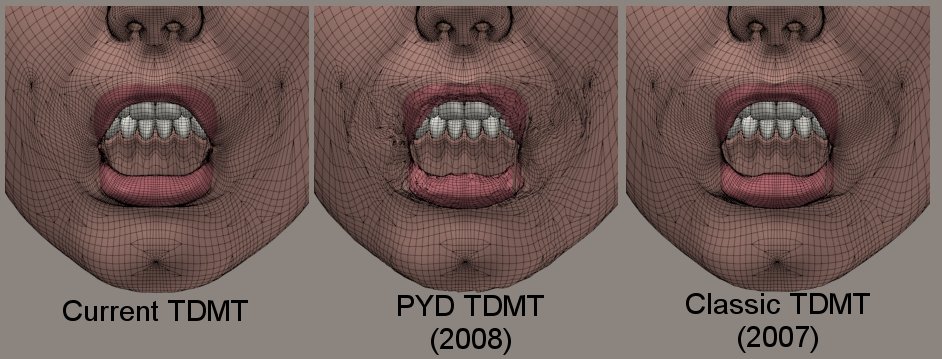
In the attached image, the same morph is transferred from Antonia to V3, using the three different versions of TDMT.
The current version has transferred a smooth morph, but because this comparison moves so steeply "uphill" (V3's mesh density is so much greater than Antonia's), I had to raise the Number of Influences to 10 to get smooth results in the lips.
The 2008 .pyd version has had some serious problems. This is the same kind of distortion which cropped up in the shape transfer tests, posted several posts earlier. It seems the .pyd version of TDMT has some bugs somewhere in the process of creating the data file information. It's a safe assumption that my implementation of a the .pyd for this purpose is flawed.
The 2007 "Classic" version, however, has done fairly well, once the inevitable mismatched vertices are taken into account. The results aren't as smooth as those from the current version, but they're only working from three weights per delta, and there's less likelihood of influence from inappropriate vertices in the morph. It's a pretty good transfer.
The outcome of this is that it becomes clear to me that most of my misgivings about the old process can likely be traced to whatever bug exists in the .pyd version of TDMT. I've used that version almost exclusively since 2008, and the obviously bad results have unjustly colored my opinions about the raycasting process.
Spanki, my apologies. The raycasting technique is not as intrinsically flawed as I'd come to believe. I don't think integrating it into the process runs the sort of risks I was worried about, up above. It gets high marks. :thumbupboth:
I'm going to have to try to fix this .pyd build, though. I've no idea what's happening with it. Hmm.
===========================sigline======================================================
Cage can be an opinionated jerk who posts without thinking. He apologizes for this. He's honestly not trying to be a turkeyhead.
Cage had some freebies, compatible with Poser 11 and below. His Python scripts were saved at archive.org, along with the rest of the Morphography site, where they were hosted.

I read your first reply above a while ago and have/had been trying to think of a 'tactful' way of telling you that you were wrong :) (..and most likely fixating on some bad test-cases). ... So I'm pleased (and relieved) to hear that you went back and looked again and discovered the problem!
Anyway, don't focus too much on finding the trouble with the .pyd version of the script... when I was reviewin the previous thread earlier, right near the end you reported a problem where apparently the weighting is messed up in the .pyd. It also looks like I never got around to looking into that, so I suspect that's where the problem is (you could take a look at your .vwt files - you might see all 0/1/0, 1/0/0, 0/0/1 weights, for example).
Cinema4D Plugins (Home of Riptide, Riptide Pro, Undertow, Morph Mill, KyamaSlide and I/Ogre plugins) Poser products Freelance Modelling, Poser Rigging, UV-mapping work for hire.
Quote - I read your first reply above a while ago and have/had been trying to think of a 'tactful' way of telling you that you were wrong :) (..and most likely fixating on some bad test-cases). ... So I'm pleased (and relieved) to hear that you went back and looked again and discovered the problem!
Anyway, don't focus too much on finding the trouble with the .pyd version of the script... when I was reviewin the previous thread earlier, right near the end you reported a problem where apparently the weighting is messed up in the .pyd. It also looks like I never got around to looking into that, so I suspect that's where the problem is (you could take a look at your .vwt files - you might see all 0/1/0, 1/0/0, 0/0/1 weights, for example).
Ah, I'm used to being wrong, most of the time. :lol: That's part of what makes me hesitant making major changes to something that's working. Part of the thrill of being me. :meh:
I'm afraid it's looking like the correlate by index lists functions may be broken, too. Hopefully not. I'm testing it. I wasn't using the .pyd for weighting. I was using a pyd-converted version or your weighting code from the earliest TDMT. I disused hitpoint.Weight when I discovered that bad data was being returned. The straight CorrelateTo functions work.
I know there's a divide-by-zero crash bug in mesh.GetWorldNormals(), too, but that one can be faked out if you add dummy entries into any empty slots in the vpolys list before calling the function.
===========================sigline======================================================
Cage can be an opinionated jerk who posts without thinking. He apologizes for this. He's honestly not trying to be a turkeyhead.
Cage had some freebies, compatible with Poser 11 and below. His Python scripts were saved at archive.org, along with the rest of the Morphography site, where they were hosted.

When I have some time, I'll try to look into those other routines that you think are broken - any additional info on those (how/when they fail, etc) might help.
Cinema4D Plugins (Home of Riptide, Riptide Pro, Undertow, Morph Mill, KyamaSlide and I/Ogre plugins) Poser products Freelance Modelling, Poser Rigging, UV-mapping work for hire.
Quote - I know there's a divide-by-zero crash bug in mesh.GetWorldNormals(), too, but that one can be faked out if you add dummy entries into any empty slots in the vpolys list before calling the function.
...can you tell me what you mean by "...if you add dummy entries into any empty slots in the vpolys list before calling the function" ? Why would there be empty slots?
Cinema4D Plugins (Home of Riptide, Riptide Pro, Undertow, Morph Mill, KyamaSlide and I/Ogre plugins) Poser products Freelance Modelling, Poser Rigging, UV-mapping work for hire.
Ok, I have a guess about the "bug" you think is happening with the CorrelateByIndex functions...
CorrelateByIndexTo( mesh, tripolylist, shrinkvertindexlist [, opt_shrinknorms [, opt_backface_cull = 1] ] )
...see that (optional) opt_shrinknorms param? The SIZE of that list needs to be the same size (same number of entries) as the number of vertices in the mesh - NOT a truncated list, the size of the (screening) 'shrinkvertindexlist' being passed in.
You think that's the problem? Is there any problem when you don't pass in an optional normals list?
Cinema4D Plugins (Home of Riptide, Riptide Pro, Undertow, Morph Mill, KyamaSlide and I/Ogre plugins) Poser products Freelance Modelling, Poser Rigging, UV-mapping work for hire.
Quote - ...can you tell me what you mean by "...if you add dummy entries into any empty slots in the vpolys list before calling the function" ? Why would there be empty slots?
[snip]
pgons = psrPolygonList(self.geom)
pnorms = PolyFaceNormals(pgons,verts)
vpolys = VertexPolys(pgons,self.mesh.NumVertices())
if vpolys.count([]):
app.status_update("Stray Vertex Found.")
for vi in range(self.mesh.NumVertices()):
if not vpolys[vi]:
vpolys[vi].append(0)
self.vnorms = PolyVertexNormals(pnorms,vpolys)
[/snip]
The above is from the current Comparison script, in the setup for the .pyd version of the normals test. I'm not sure PolyVertexNormals() has the same crash bug, but I put in the protection, just in case.
For more on my understanding of the problem, check the myMesh class in the smoother script, which is on the "Additional Python Scripts" page linked at the bottom of the TDMT site.
===========================sigline======================================================
Cage can be an opinionated jerk who posts without thinking. He apologizes for this. He's honestly not trying to be a turkeyhead.
Cage had some freebies, compatible with Poser 11 and below. His Python scripts were saved at archive.org, along with the rest of the Morphography site, where they were hosted.
Quote - I think I found/fixed the weights bug (a typo in the code)... see if this new version is now creating proper weights (just save the attached file as _tdmt.pyd).
When I have some time, I'll try to look into those other routines that you think are broken - any additional info on those (how/when they fail, etc) might help.
Sorry, Spanki. I'm really not trying to drag you into this or get you to work on the .pyd again. It's not that big a deal, honestly, and you've emphasized repeatedly how busy you are.
Thanks for checking it out, though, and debugging the code. I'll try it as soon as I can, here. :thumbupboth:
===========================sigline======================================================
Cage can be an opinionated jerk who posts without thinking. He apologizes for this. He's honestly not trying to be a turkeyhead.
Cage had some freebies, compatible with Poser 11 and below. His Python scripts were saved at archive.org, along with the rest of the Morphography site, where they were hosted.
Quote - Ok, I have a guess about the "bug" you think is happening with the CorrelateByIndex functions...
CorrelateByIndexTo( mesh, tripolylist, shrinkvertindexlist [, opt_shrinknorms [, opt_backface_cull = 1] ] )
...see that (optional) opt_shrinknorms param? The SIZE of that list needs to be the same size (same number of entries) as the number of vertices in the mesh - NOT a truncated list, the size of the (screening) 'shrinkvertindexlist' being passed in.
You think that's the problem? Is there any problem when you don't pass in an optional normals list?
No, it's not the optional normals. I tested that first by removing it when I called the function. The normals I'm sending also work well with the shrinkwrap and no poke scripts, but those just use the "correlate to" functions, and not the "correlate by lists". The function is basically working, as you can see from the images I've posted. It looks like it's just returning corrupt weights once it finds the correct tripolys. This could be the weighting code I adapted from the 2007 TDMT, or it could be corrupt information from the correlation function. I didn't get to test all of it last night. Had to get some sleep. :lol:
If you really want to see what's happening with the code, check the TDMT_pyd2b.py, on the Additional Scripts page mentioned above. The compute_weighting_pyd() function is on line 270 and the correlation is on line 221. Apologies in advance for the code, which strikes me as ugly, reading it now. :lol:
I really, really, have to finish these tutorials, though, before I go too deeply into anything else involving the old process. Once I'm done with the tutorials, I can focus on that. :thumbupboth: And don't put too much of your time into any of this. I'll bet you're busy with more important and more pressing matters than I am. :lol:
===========================sigline======================================================
Cage can be an opinionated jerk who posts without thinking. He apologizes for this. He's honestly not trying to be a turkeyhead.
Cage had some freebies, compatible with Poser 11 and below. His Python scripts were saved at archive.org, along with the rest of the Morphography site, where they were hosted.
Ok, just FYI, the weight-generating code in each/every CorrelateTo/CorrelateToSelf/CorrelateToByIndex/etc. was broken, so if it was just a weight problem, those should be fixed now (actually, I missed one of those in the file I posted a few messages back).
Cinema4D Plugins (Home of Riptide, Riptide Pro, Undertow, Morph Mill, KyamaSlide and I/Ogre plugins) Poser products Freelance Modelling, Poser Rigging, UV-mapping work for hire.

Cinema4D Plugins (Home of Riptide, Riptide Pro, Undertow, Morph Mill, KyamaSlide and I/Ogre plugins) Poser products Freelance Modelling, Poser Rigging, UV-mapping work for hire.
Quote - Ok, forget the earlier one I posted... test with this one (just save as _tdmt.pyd). It tries to address all issues mentioned, so let me know if anything is broke.
Quick test of your most recent .pyd post. It's still returning the bad weights. Most of them are now (0,1,0), but (1,0,0) and (0,0,1) crop up in the file.
Quote -
w 0 218 3049 4733 0.0 1.0 0.0....
w 1 1830 4733 2178 0.0 1.0 0.0....
w 2 1830 2178 478 0.0 1.0 0.0....
w 3 478 5073 1943 0.0 1.0 0.0....
w 4 1943 3949 477 0.0 1.0 0.0....
w 5 2999 4600 851 0.0 1.0 0.0....
w 6 858 5403 2192 0.0 1.0 0.0....
w 7 2192 5403 3169 0.0 1.0 0.0....
w 8 455 4706 3169 0.0 1.0 0.0....
w 9 455 4529 4706 0.0 1.0 0.0....
Thank you, though! :thumbupboth:
===========================sigline======================================================
Cage can be an opinionated jerk who posts without thinking. He apologizes for this. He's honestly not trying to be a turkeyhead.
Cage had some freebies, compatible with Poser 11 and below. His Python scripts were saved at archive.org, along with the rest of the Morphography site, where they were hosted.
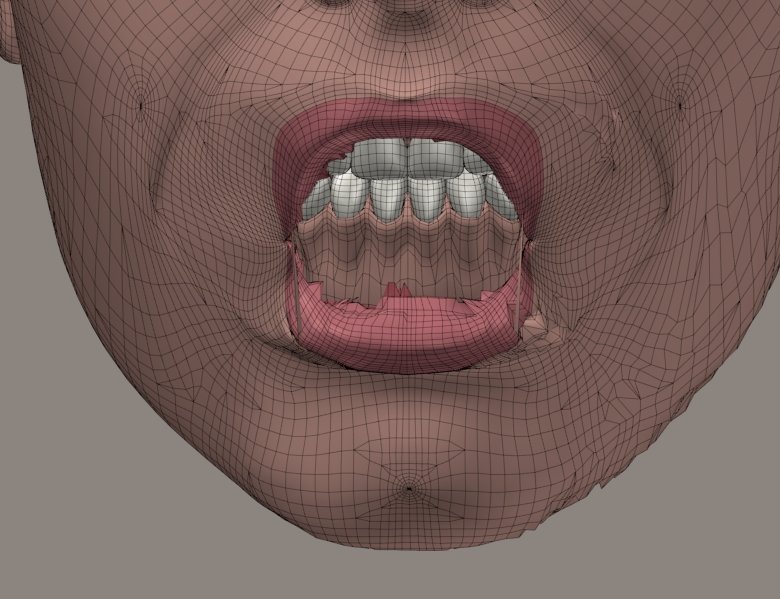
I'm betting I didn't! :lol:
You remember my tendency to forget that step, I see. Heh.
Your "D'Oh!" should probably be an accusative "Duh!". :lol:
Edit: Tested again with Poser re-started. The results are better than yesterday's, but still not coming out like those given by the non-pyd version. :crying:
I'm not sure whether this could be due to one of the lists I'm passing in. I don't see how it could be....
===========================sigline======================================================
Cage can be an opinionated jerk who posts without thinking. He apologizes for this. He's honestly not trying to be a turkeyhead.
Cage had some freebies, compatible with Poser 11 and below. His Python scripts were saved at archive.org, along with the rest of the Morphography site, where they were hosted.
Hmm... looking at that image, it looks like the left side (her right-cheek) worked fairly well, but the right side (her left cheek) was quite a bit worse. Am I missing something, or are you seeing the same thing?
Cinema4D Plugins (Home of Riptide, Riptide Pro, Undertow, Morph Mill, KyamaSlide and I/Ogre plugins) Poser products Freelance Modelling, Poser Rigging, UV-mapping work for hire.
Generally, that's true, aside from the lips. That effect is even more obvious in a shape transfer. She comes out looking like Two Face from Batman. :lol:
I don't see how that kind of left-right split could be coming from the lists I'm sending in, given that it doesn't show up with the old .pyd. :unsure:
Edit: It looks like the lips are worse on the right, but only back toward their border with the inner mouth - where the normals start to point inward on the mesh. I'm guessing, but it seems like:
outward-facing normals = bad actor left
inward-facing normals = bad actor right
But that's a guess....
===========================sigline======================================================
Cage can be an opinionated jerk who posts without thinking. He apologizes for this. He's honestly not trying to be a turkeyhead.
Cage had some freebies, compatible with Poser 11 and below. His Python scripts were saved at archive.org, along with the rest of the Morphography site, where they were hosted.
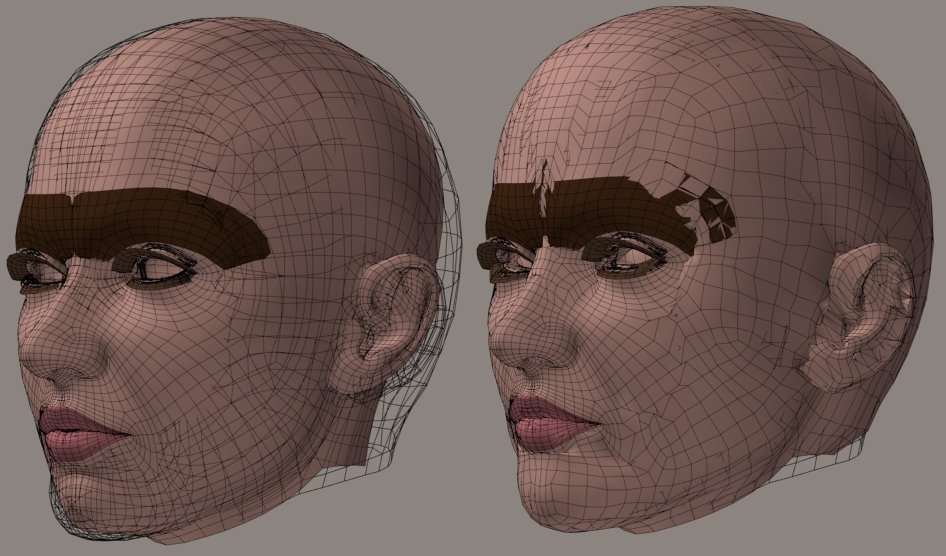
I'm not sure of the utility of this function, but it's a bit interesting....
Only Antonia's vertices which were inside Vicky's head have been displaced, in the attached.
Now back to tutorial-prepping. :lol:
===========================sigline======================================================
Cage can be an opinionated jerk who posts without thinking. He apologizes for this. He's honestly not trying to be a turkeyhead.
Cage had some freebies, compatible with Poser 11 and below. His Python scripts were saved at archive.org, along with the rest of the Morphography site, where they were hosted.

I found the (other) weight-computing bug, so if you see any more 1.0 0.0 0.0 type weights in the file, they should finally be "because that's what they need to be".
I should have also addressed any Normals issues with all the various routines.
Basically, anywhere you added code to "work around" some bug in the .pyd should no longer be necessary - let me know if you find otherwise. Oh and btw, you hereby have "Spanki-approval" for the "1.p" .vwt file version :).
Once I get the all-clear, I'll update the readme and zip file.
Cinema4D Plugins (Home of Riptide, Riptide Pro, Undertow, Morph Mill, KyamaSlide and I/Ogre plugins) Poser products Freelance Modelling, Poser Rigging, UV-mapping work for hire.
Quote - Basically, anywhere you added code to "work around" some bug in the .pyd should no longer be necessary - let me know if you find otherwise. Oh and btw, you hereby have "Spanki-approval" for the "1.p" .vwt file version :).
Once I get the all-clear, I'll update the readme and zip file.
Right on! :woot:
Thanks for doing this, Spanki. I hope you haven't put too much time into it. I honestly didn't want to drag you into anything. But a repaired _tdmt.pyd is a wonderulf thing! :thumbupboth:
I'll test it ASAP. You've gone above-and-beyond on this, and it deserves quick testing.
Oh, I left the 1.p version activated in the file upload, didn't I? Oopsie. I'll make that 1.1 or something. Who knows why I chose a "p", rather than a number. Hmm.
===========================sigline======================================================
Cage can be an opinionated jerk who posts without thinking. He apologizes for this. He's honestly not trying to be a turkeyhead.
Cage had some freebies, compatible with Poser 11 and below. His Python scripts were saved at archive.org, along with the rest of the Morphography site, where they were hosted.
I'll go ahead and add the distEpsilon distance threshold test used in the shrinkwrap and nopoke .pyd scripts to the TDMT .pyd script, then post that on the site.
Great to have this working! Thank you! :thumbupboth:
===========================sigline======================================================
Cage can be an opinionated jerk who posts without thinking. He apologizes for this. He's honestly not trying to be a turkeyhead.
Cage had some freebies, compatible with Poser 11 and below. His Python scripts were saved at archive.org, along with the rest of the Morphography site, where they were hosted.
The eighth tutorial has been added to the TDMT site. This one develops a comparison between Antonia and V3, using as a starting point the V2 morph for Antonia which was created in tutorial 7. The next one will show how to refine an existing comparison, using the same basic techniques which were initially used to generate it.
I've also added plans for four additional tutorials, covering a variety of topics which may be potentially helpful for users of the scripts.
The Comparison and Transfer scripts have both been updated. This is only a minor bug-fix update, like most of the recent ones. Hopefully a major update to the Comparison script, to add raycasting, will be ready soon, once the ninth tutorial has been posted.
For anyone with signatures turned off, the site link is here:
===========================sigline======================================================
Cage can be an opinionated jerk who posts without thinking. He apologizes for this. He's honestly not trying to be a turkeyhead.
Cage had some freebies, compatible with Poser 11 and below. His Python scripts were saved at archive.org, along with the rest of the Morphography site, where they were hosted.
Another nice tutorial Cage.
BTW, it just occured to me that the "Closest Vert" method has another inherent flaw/disadvantage... and that has to do with doing cross-group correlations and differing grouping/splits between meshes. In other words, where vertices in the target head mesh should be matching up with vertices (or surfaces) in the neck of the source mesh, or vise-versa.
The difference between the 2 methods being:
Ray-Cast: You either get a 'hit' or not in one of the compares (when you get no hit, that probably means that it should be matching a surface in the other body part anyway).
Closest-Vert: You can get 'false' hits, if your tolerance is too loose, but run the risk of poor quality matching if it's too tight... and in some cases, you'll get verts (correlations) from multiple body-part groups.
I guess that you can somewhat control this with the tolerance value (which can be a little tricky to use as a 'general' control on a mesh with dense vs sparse polygon areas anyway) and maybe some sort of more computational "merge" process could 'decide' which verts (the ones you got from the head-head compare? or the ones that you got from the head-neck compare?) are the better ones to use.
Of course most facial morphs keep away from the group seams anyway, so it may not be a problem until you get to other body parts - I just wanted to bring it up for future reference. If you do get a Hybrid method working, that should also help take care of things.
Cinema4D Plugins (Home of Riptide, Riptide Pro, Undertow, Morph Mill, KyamaSlide and I/Ogre plugins) Poser products Freelance Modelling, Poser Rigging, UV-mapping work for hire.

...then, here's a new / replacement code for the bottom of your close_verts_weights() routine - it goes right after and replaces eveything below these 2 lines...
sortdists = []
dists =
#------------------------- S N I P ------------------------------------------
indices = ""
sweights = ""#--------- spanki ---------------
rayhit = 0
if not no_pyd:
#-----------------------------------------------------------------------------------------
# New routine below just does a ray-cast on the (neighboring) tripolys associated with the
# predetermined (single/very) closest vertex. It returns a single HitPoint type, with the
# hit info (tripoly hit, weights, distance, deltas, etc).
#-----------------------------------------------------------------------------------------
hitpoint = mesh2.mesh.CorrelateVertToNearSurface( vi, mesh1.mesh, close_index[0] )
if hitpoint:
rayhit = 1
num_influences2 = 3 # only 3 weights (2 of which could possibly be 0.0, so that's checked below)
weights = hitpoint.Weights
tp = hitpoint.TriPolyHit
tpi = [tp.v0, tp.v1, tp.v2] # vertex indices of the hit tripoly
for ci in range(3):
if weights[ci] > FLT_EPSILON:
indices += " %s" %(tpi[ci])
sweights += " %.5f" %(weights[ci])
else:
num_influences2 -= 1 # Removing any zero weights.
#--------------------------------if not rayhit:
dmax = max(close_dist)
dmin = min(close_dist)
if dmin == dmax:
dmin = 0.0 # Float division error protection.
weights = get_weights(close_dist,dmin=dmin,dmax=dmax)
for ci in range(len(close_dist)):
if weights[ci] > FLT_EPSILON:
indices += " %s" %(close_index[ci])
sweights += " %.5f" %(weights[ci])
else:
num_influences2 -= 1 # Removing the extra zero weight. Why does it happen? Weighting code is wrong....
line = "w %s %s" %(vi,num_influences2)
line += indices
line += sweights
line += "n"
mesh2.lines[vi] = line#------------------------- S N I P ------------------------------------------
...bingo - instant Hybrid method implementation :).
Cheers,
Keith
Cinema4D Plugins (Home of Riptide, Riptide Pro, Undertow, Morph Mill, KyamaSlide and I/Ogre plugins) Poser products Freelance Modelling, Poser Rigging, UV-mapping work for hire.
In my testing so far (with V2->Antonia), the above seems to work really well, btw - no more (or at least a whole lot less) piggy-backing... much less for the Restore Details script to clean up.
Of course you might want to make it an option that can be disabled if desired. When you've had a chance to play with it, come back and tell me again why more than 3 weighted vertices are needed :) (speaking of which, if you look at the output files, you can pretty much tell which verts failed the ray-cast test... they'll be the ones listed with 5 influence verts instead of 3).
Cinema4D Plugins (Home of Riptide, Riptide Pro, Undertow, Morph Mill, KyamaSlide and I/Ogre plugins) Poser products Freelance Modelling, Poser Rigging, UV-mapping work for hire.
Hey, Spanki.
Wow, I'm impressed! I didn't expect this. :lol: Thank you. :woot:
My plan has been to integrate the raycasting as an option, experiment with the the utility of the approach versus the existing one, then decide whether to have the option on by default or not. It will be something which can be disabled, either way. It's just a question of script defaults. My current impression is that the closest vertices method has its strength in tolerating greater mismatches in surface alignment at the outset of the comparison process. My thought is that an initial comparison and shape transfer might be best as closest vertices. Then, once the meshes are more closely aligned, the raycasting can do what it does best. My expectation is that a final .vmf file probably would be generated using the raycasting, under most circumstances.
All of that would be dependent on the results of testing, though. If the hybridization really does offer the best of both worlds (allowing matching of eyelashes, for instance, while still returning the accurate tri-weights where possible), then the raycasting is a tremendously valuable addition, and should be treated as such.
The pyd version of the code is nice and slim. But what about the no_pyd? :lol: I think the linecast_loop code will need to be re-formatted a bit to be adapted to this.
I don't think I've offered the argument that more than three weights is inherently better. I often fail to express myself well, so that may have seemed to be my point. :lol: I've been seeing benefits to the averaging applied by the closest vertices method (as well as drawbacks, depending on the situation), and I see an advantage in the fact that a comparison between meshes is no longer reliant on the mesh normals, with close verts. I think most of my concerns about the raycasting process are probably well-addressed by a hybrid approach. :thumbupboth: Fewer weights is better, if the results are good. It's all about the results.
I'll test everything. :woot: Thanks for all of this. Golly. :thumbupboth:
===========================sigline======================================================
Cage can be an opinionated jerk who posts without thinking. He apologizes for this. He's honestly not trying to be a turkeyhead.
Cage had some freebies, compatible with Poser 11 and below. His Python scripts were saved at archive.org, along with the rest of the Morphography site, where they were hosted.
Quote - Another nice tutorial Cage.
BTW, it just occured to me that the "Closest Vert" method has another inherent flaw/disadvantage... and that has to do with doing cross-group correlations and differing grouping/splits between meshes. In other words, where vertices in the target head mesh should be matching up with vertices (or surfaces) in the neck of the source mesh, or vise-versa.
The difference between the 2 methods being:
Ray-Cast: You either get a 'hit' or not in one of the compares (when you get no hit, that probably means that it should be matching a surface in the other body part anyway).
Closest-Vert: You can get 'false' hits, if your tolerance is too loose, but run the risk of poor quality matching if it's too tight... and in some cases, you'll get verts (correlations) from multiple body-part groups.
I guess that you can somewhat control this with the tolerance value (which can be a little tricky to use as a 'general' control on a mesh with dense vs sparse polygon areas anyway) and maybe some sort of more computational "merge" process could 'decide' which verts (the ones you got from the head-head compare? or the ones that you got from the head-neck compare?) are the better ones to use.
Of course most facial morphs keep away from the group seams anyway, so it may not be a problem until you get to other body parts - I just wanted to bring it up for future reference. If you do get a Hybrid method working, that should also help take care of things.
I agree that one of the great weaknesses of the closest vertices approach is that is can lead to false hits. The raycasting also can give false hits, though, and in a more disastrous way. Nostrils. Ears. Eyelashes. Jagged bits where the vert has connected with a tri way over yonder somewhere. Use of normals brings pratfalls if the meshes aren't very well-aligned at comparison time.
I'm not sure about your assumption that a missed raycasting match is necessarily an adjacent actor. Possibly, yes. Possibly not. It depends on the circumstances of the comparison, like so much of all of this.
I'm not sure I'm following your argument, above. It sort of seems like you're tilting at windmills now, too. :lol: We'll have a mutant approach. We're not going back to the old way. I mean, the approach had a few years to be refined. We knew about its flaws. I wasn't able to fix them. You weren't interested, and then you were busy. The flaws weren't fixed, and they're still there. Right now the raycasting is inadequate on its own. It needs something else to fill in for it when it fails. A hybrid is a great idea. Fix the raycasting completely, and the script will use that fully. Until then, more options can only be good. :shrugs:
I really wish we could stop the back-and-forth about the absolute merits of one process or another. Both approaches have relative value. They evidently need each other. :lol: What are other possible approaches that could be used? Let's think about possibilities, rather than trying to poke holes in things. Think creatively, and move this thing forward, rather than slogging through the same discussion repeatedly. The thread has been very negative since late last week, much of the time, and it's spoiling my enthusiasm for the project. :(
I'll test the new .pyd and hybrid code. 
===========================sigline======================================================
Cage can be an opinionated jerk who posts without thinking. He apologizes for this. He's honestly not trying to be a turkeyhead.
Cage had some freebies, compatible with Poser 11 and below. His Python scripts were saved at archive.org, along with the rest of the Morphography site, where they were hosted.
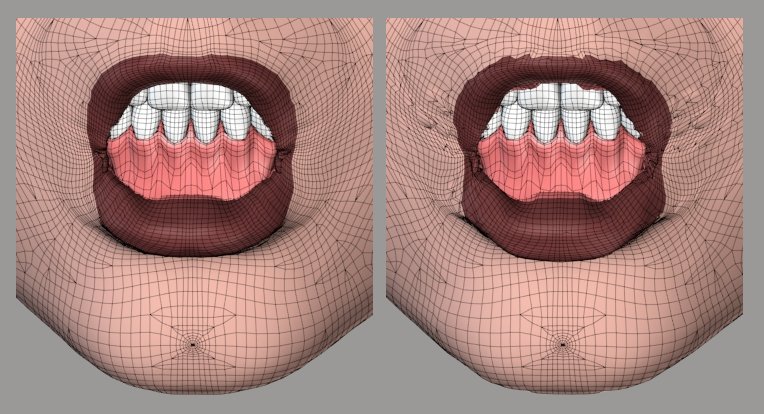
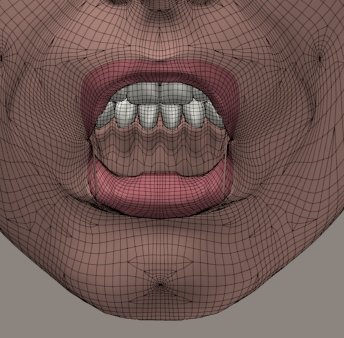
On the left, the closest vertices approach is seen, using some new code to adaptively raise the number of influences toward a max value, based on the distance of the closest match vertex. The results are a bit rough, and could be better with a higher max value. This may be something akin to the use of min and max falloff values in Morphing Clothes. Not sure. :unsure:
On the right, the new .pyd hybrid results. I'm surprised at the messiness. I would have expected results which are equivalent to those seen in the 2007 version .pyd test, in the recent image some posts up. I've checked to be sure I pasted the new function in properly, and I don't see any errors. But something's amiss. Any ideas?
I think this test is probably better than one using Vicky 2. Here, we're going sharply uphill, which provides a good stress-test for the procedures. Uphill is where closest vertices currently struggles. This test also works with a set of actors whose surfaces haven't already been closely matched using the closest vertices method. Those initial shape transfers for the best shape match are where most I'm concerned about the full effectiveness of the raycasting for the overall process.
===========================sigline======================================================
Cage can be an opinionated jerk who posts without thinking. He apologizes for this. He's honestly not trying to be a turkeyhead.
Cage had some freebies, compatible with Poser 11 and below. His Python scripts were saved at archive.org, along with the rest of the Morphography site, where they were hosted.
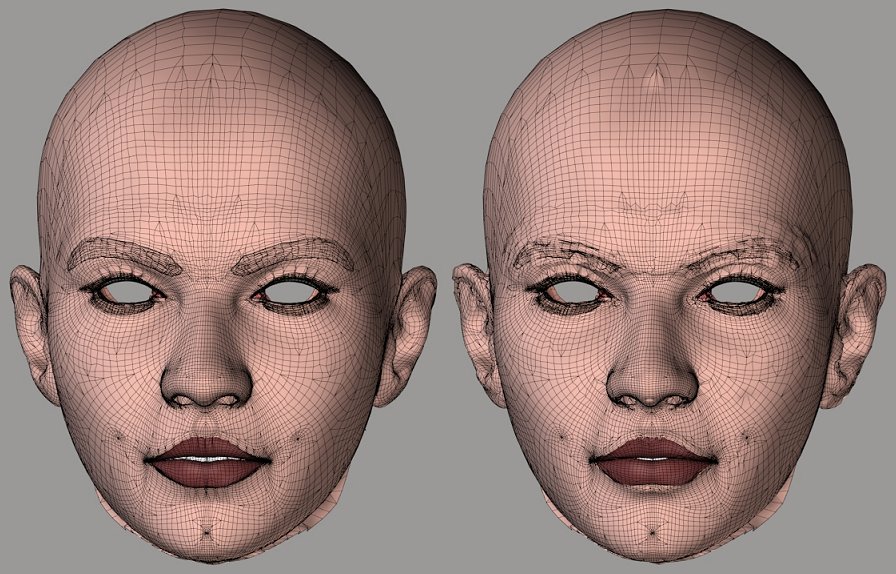
Both of these would require cleanup with Restore Detail, but they'd be fine afterwards. The real problem is the fact that the hybrid seems to be generating morph transfers which would require cleanup. As long as shape transfer cleanup is a special case, it's not too bad to need it. With morphs, though, it's a greater problem....
I think the hybrid should probably be returning much better results. I'll keep looking to see if I can find an error on my end.... 
===========================sigline======================================================
Cage can be an opinionated jerk who posts without thinking. He apologizes for this. He's honestly not trying to be a turkeyhead.
Cage had some freebies, compatible with Poser 11 and below. His Python scripts were saved at archive.org, along with the rest of the Morphography site, where they were hosted.
Quote - ...My plan has been to integrate the raycasting as an option, experiment with the the utility of the approach versus the existing one, then decide whether to have the option on by default or not. It will be something which can be disabled, either way. It's just a question of script defaults....
I agree 100% with the above.
Quote - My current impression is that the closest vertices method has its strength in tolerating greater mismatches in surface alignment at the outset of the comparison process. My thought is that an initial comparison and shape transfer might be best as closest vertices. Then, once the meshes are more closely aligned, the raycasting can do what it does best. My expectation is that a final .vmf file probably would be generated using the raycasting, under most circumstances.
I appreciate that you think that way - I just happen to disagree. There's really no reason (that I can think of) why the initial comparison shouldn't be the Hybrid approach. I guess I'm still not clear on what you mean by "tolerating greater mismatches in surface alignment".
Keep in mind that the Hybrid method still uses the closest vertex method to identify the closest vertex... if a ray-cast hit can be generated with some polygon connected to that vertex, shouldn't that generate "preferable" weight results? - and, while my comment above was presented in jest/jab form, it was also an honest request for you to try/test the Hybrid setup and then come back and tell me your thoughts.
Quote - All of that would be dependent on the results of testing, though. If the hybridization really does offer the best of both worlds (allowing matching of eyelashes, for instance, while still returning the accurate tri-weights where possible), then the raycasting is a tremendously valuable addition, and should be treated as such.
I agree 100% with the above (although symantically, I consider the closest vert process to be the "addition", but I don't want to be "negative", so I won't argue symantics :lol: ).
[BTW, there's a smiley face in the previous sentence for a reason - it's a joke - please don't take offense or as "an attack on your new method, requiring you to defend it" - more on this topic later...]
Quote - The pyd version of the code is nice and slim. But what about the no_pyd? :lol: I think the linecast_loop code will need to be re-formatted a bit to be adapted to this.
Yeah, it's basically the same process as the old linecase_loop() code, but it only considers a single vertex of the target mesh, casting rays at only the polygons (tripolys) connected to the single closest vertex of the source mesh.
I'd note that this is probably not the most efficient way of doing this process, but was written this way to accomodate your current script (which determines weights as it goes and doesn't keep the data around for post-processing... well, except in file form...).
At this point, I would not recommend coming up with a non-pyd version of that routine... I'd rather verify / validate the idea with testing first.
Quote - I don't think I've offered the argument that more than three weights is inherently better. I often fail to express myself well, so that may have seemed to be my point. :lol: I've been seeing benefits to the averaging applied by the closest vertices method (as well as drawbacks, depending on the situation), and I see an advantage in the fact that a comparison between meshes is no longer reliant on the mesh normals, with close verts. I think most of my concerns about the raycasting process are probably well-addressed by a hybrid approach. :thumbupboth: Fewer weights is better, if the results are good. It's all about the results.
Again, I agree with all of the above. The reason I joked about the 3 weight thing was because you made (what might be misconscrewed as) a derogatory comment about "only 3 weights" the other day... personally, I took your comment more as that you were surprised that it worked as well as it did "with only 3 weights". Likewise, I was similarly surprised, but more to the point is that when the weighting is for the correct 3 vertices (containing the surface that correlates to the vertex of the target mesh), that's all you need to get good (non-piggy-backing) results.
I'll address your other post in the next message.
Cinema4D Plugins (Home of Riptide, Riptide Pro, Undertow, Morph Mill, KyamaSlide and I/Ogre plugins) Poser products Freelance Modelling, Poser Rigging, UV-mapping work for hire.
Quote - I appreciate that you think that way - I just happen to disagree. There's really no reason (that I can think of) why the initial comparison shouldn't be the Hybrid approach. I guess I'm still not clear on what you mean by "tolerating greater mismatches in surface alignment".
Quite possibly the initial comparisons should use the hybrid. It all comes down to the effectiveness of it. I've never seen the 2007 approach give good results with eyelashes. That's one of the things I'm looking at closely. For all it's flaws, the current approach can handle things like eyelashes. That's basically what my garbled statement about tolerating mismatches is all about. Check the recent tutorial. I've provided files for anyone to quickly set up the same comparison conditions I use in the tutorial. In that comparison, the eyelashes are barely lined up. Yet they end up being close enough to turn out tolerably well, once Restore Detail is applied. I don't think the 2007 process can do that. That's all. Not trying to be insulting or offensive. I'm conflict averse, generally. :lol:
Sorry about the three weight comment. I don't think I intended to be derogatory. :unsure: If I did, my opinion changed once I realized that the 2008 .pyd code was returning buggy results. I'm fully behind the raycasting process, up until its weaker points become a problem. I will say the same for the closest vertices approach. I've not had to struggle with its shortcomings as much, so far. I still expect to end up doing so.
===========================sigline======================================================
Cage can be an opinionated jerk who posts without thinking. He apologizes for this. He's honestly not trying to be a turkeyhead.
Cage had some freebies, compatible with Poser 11 and below. His Python scripts were saved at archive.org, along with the rest of the Morphography site, where they were hosted.
Quote - I agree that one of the great weaknesses of the closest vertices approach is that is can lead to false hits. The raycasting also can give false hits, though, and in a more disastrous way. Nostrils. Ears. Eyelashes. Jagged bits where the vert has connected with a tri way over yonder somewhere. Use of normals brings pratfalls if the meshes aren't very well-aligned at comparison time.
Absolutely - I readily admit to the issues/flaws of the ray-cast method - we just talked about the pros and cons of each method a few days ago.
Quote - I'm not sure about your assumption that a missed raycasting match is necessarily an adjacent actor. Possibly, yes. Possibly not. It depends on the circumstances of the comparison, like so much of all of this.
Absolutely - I didn't mean to imply that that was the only reason it would get a miss - just that in the case that I was thinking about / discussing, it would get a miss and that would be the correct result, in that situation.
Quote - I'm not sure I'm following your argument, above. It sort of seems like you're tilting at windmills now, too. :lol: We'll have a mutant approach. We're not going back to the old way. I mean, the approach had a few years to be refined. We knew about its flaws. I wasn't able to fix them. You weren't interested, and then you were busy. The flaws weren't fixed, and they're still there. Right now the raycasting is inadequate on its own. It needs something else to fill in for it when it fails. A hybrid is a great idea. Fix the raycasting completely, and the script will use that fully. Until then, more options can only be good. :shrugs:
I really think you are misunderstanding my comments - I happen to agree with everything in the previous paragraph (except to say that ray-casting alone will never work for all cases, but you already know that :lol: )...
Quote - I really wish we could stop the back-and-forth about the absolute merits of one process or another. Both approaches have relative value. They evidently need each other. :lol: What are other possible approaches that could be used? Let's think about possibilities, rather than trying to poke holes in things. Think creatively, and move this thing forward, rather than slogging through the same discussion repeatedly. The thread has been very negative since late last week, much of the time, and it's spoiling my enthusiasm for the project. :(
...first off, late last week is when I entered the discussion, so I'll just assume that you're referring to me bringing the negativity and dragging the discussion down - so if you've taken my comments that way, I appologize.
My purpose here is to provide constructive opinions and offer solutions where possible to help come up with the best overall solution. I think my comments are viewed as "negative" whenever you think that I'm attacking the closest-vert method and that you need to "defend" it. Likewise, I think I view some of your comments (related to the ray-casting method) as an attack.
Again, my purpose is not to attack anyone's work - it's (at best) to have "spirited debate" about the merrits of various proceedures needed to come up with the best overall solution. I have no problem poking holes in any method (including ray-casting) if I think there's holes to be poked. You need to first identify the problems before you can work out solutions.
I also think that there's something else contributing to my (percieved) negativity... - We both worked for many many moons on this problem, a few years ago.
- When we started, the process was taking some 6-7 hours to even determine how bad the results were.
- As we worked on it, you seemed to get fixated (and discouraged) on multiple occasions, about things that I wasn't ready to address (cart->horse, etc).
- Similar to the above, in your state of discouragement, you tended to "write off" various aspects of the task and/or fixate on the negative results (generally leading you back to bring up a certain Fat Lady and a place in France... :lol: )
- I eventually bit the bullet and wrote the .pyd (dll) and over time we got the process "more or less validated" (down to known inherent flaws) and down into some number of seconds/minutes instead of hours.
- At the end of that thread, I got too busy to continue work and - most unfortunately (even devastating to my sense of pride and work ethic) - the .pyd was broken! It apparently had bugs that kept it from providing the results it was intended for in the first place (doing the correlation and coming up with proper weights).
- During the period between now and then - and discouraged by the inherent flaws of the ray-casting method - you've "gone back to the well" (as it were) and back to the original closest-vertex method.
...given all of the above, I was pretty sure (or may have overly assumed) that you had "written off" ray-casting as a solution, so I just didn't want you to throw out the baby with the bath water :lol:.
If I've overdone my "defense" of that method, I appologize, but I was trying to overcome some past-perceptions and/or any misconceptions - or fixations on poor results, potentially due to broken code (not just with you, but anyone else reading this thread). Both methods have thier pros and cons (inherent flaws), so while we need to indentify the problem areas, we also need to keep the pros in mind and combine them as needed.
Ok, having said all that, let me again re-iterate that I am quite impressed by what you've done with the close-vert process and - in particular - the Restore Details process that you've come up with. I'm not here to slam anything - just to have a discussion about what might be the best overall solution. In fact, that was my entire point / meaning by my post that got your response above - I was trying to "anticpate" other situations (ie. cross-group correlations) and realized that the closest-vertex method would have issues there, so I brought it up - for discussion and future reference (as stated) - not to poke holes in some method or another.
Anyway, I'll try to spread more smileys around or something - I certainly don't want you to get discouraged because of anything I said.
Cheers,
Keith
Cinema4D Plugins (Home of Riptide, Riptide Pro, Undertow, Morph Mill, KyamaSlide and I/Ogre plugins) Poser products Freelance Modelling, Poser Rigging, UV-mapping work for hire.
Quote - Quite possibly the initial comparisons should use the hybrid. It all comes down to the effectiveness of it. I've never seen the 2007 approach give good results with eyelashes. That's one of the things I'm looking at closely. For all it's flaws, the current approach can handle things like eyelashes. That's basically what my garbled statement about tolerating mismatches is all about.
Ahh - gotcha. That makes perfect sense. If the closest-vert method handles lashes well, then by all means, it should be used.
*[EDIT: of course I still think I'd use the Hybrid method - the ray-cast will either get hits (on very specific polygons), or it'll miss - in which case the closest-vert method gets used]
BTW, I see your other posts with the terrible results, but I won;t be able to look into that until later tonight... does the sample (tutorial) file(s) have the setup you used for those (v3, etc)? If so, I'll grab those and do some tests myself tonight.
Cinema4D Plugins (Home of Riptide, Riptide Pro, Undertow, Morph Mill, KyamaSlide and I/Ogre plugins) Poser products Freelance Modelling, Poser Rigging, UV-mapping work for hire.
Quote - BTW, I see your other posts with the terrible results, but I won;t be able to look into that until later tonight... does the sample (tutorial) file(s) have the setup you used for those (v3, etc)? If so, I'll grab those and do some tests myself tonight.
The tutorial setup files are a set of poses which will prep the figures, as well as a .ppz with all the magnets needed to adjust V3. Also a camera, should you want an identical view to that used in the tutorial.
I probably did misunderstand you. :lol: I tend to have that problem. With all of this, I'm simply after the best results possible, by whatever method. Given the complexity of what the script is trying to do, I don't think any single procedure will be perfect on its own. I mean, look at the professional Poser tools which do similar things with morph or shape transfer. Wardrobe Wizard can give very messy results, sometimes. I've managed to get bad results from Morphing Clothes and I was told, more or less, "yeah, the process might do that sometimes". :lol: Which is not to disparage either product. I love both, and the creators of both are wonderful people who are far smarter than I am. But they don't have perfect solutions, either. And both programs carefully avoid support for faces. TDMT is struggling with some serious challenges. It's almost shocking to me at times when the results are actually decent. :lol:
I should probably have warned you a long time ago, Spanki, that in me you're dealing with one who is not the brightest bulb in the lamp, and whose social skills are sadly limited. Sarcasm or sarcastically-toned humor will often confuse me and social ambiguities will send me into spirals of paranoia. Where I try to make up for these limitations is by being mind-bendingly obsessive. :lol: It doesn't always help matters, unfortunately.
You're good people, and well-intentioned and remarkably helpful and giving. :thumbupboth: It's just that Cage, here, has some issues. :lol: He's a work in progress.
I should prepare a tutorial on how to have a constructive discourse with Cage. :lol:
===========================sigline======================================================
Cage can be an opinionated jerk who posts without thinking. He apologizes for this. He's honestly not trying to be a turkeyhead.
Cage had some freebies, compatible with Poser 11 and below. His Python scripts were saved at archive.org, along with the rest of the Morphography site, where they were hosted.
I'm trying to do some brainstorming, here.
Is there theoretically any way to winnow the proper tripoly or polygon out of the point-cloud returned by the range of closest vertices influences? If so, can the equivalent of a hitpoint on that tri or poly be derived in any way from the final position represented by the collection of weights? I doubt the precision of raycasting could be recreated this way, but the best candidates among the returned variable might be able to be derived. (I guess this idea sort of bleeds into the last one listed, below....)
I've discarded any kind of closest polygon approach to all of this, because it seems like it would involve too many additional distance calculations, with polygon incenters and then the vertices of selected polygons. But perhaps something in that area could be used somewhere in a process to get results.
It occurs to me that the .vmf data can be trimmed or screened using the tools in the Morph Trimmer script. This could offer a decent tool set to enable the combining of select areas of different comparisons.
Are there any user-definable variables which could be used to help improve raycasting? All I can think of would be a cutoff threshold to block bad matches and possible alterations to the normals before running the process. Part of what makes closest vertices more accessible, IMO, is that there are more potential parameters which can be altered to try to improve results.
While considering hybrids, why couldn't we cast a ray between the original Target vertex and the weighted position found for it using closest vertices? That ray would intersect a tri of one of the vertices with which the current hybrid code can work, in the current form. Is there any reason that a ray cast along one normal is better than another? This approach might generate a tri correlation which is more likely to be compatible with any averaged results from closest vertices being used in neighboring areas of the mesh.
===========================sigline======================================================
Cage can be an opinionated jerk who posts without thinking. He apologizes for this. He's honestly not trying to be a turkeyhead.
Cage had some freebies, compatible with Poser 11 and below. His Python scripts were saved at archive.org, along with the rest of the Morphography site, where they were hosted.

In the meantime (assuming you haven't already gone to bed), I've linked the script I was testing with, just in case there was any problem pasting in the snippet I posted above, or some conflict with any new changes you might have made to your script. The one linked here was based on "TDMT_Match5e.py" from your site.
Cinema4D Plugins (Home of Riptide, Riptide Pro, Undertow, Morph Mill, KyamaSlide and I/Ogre plugins) Poser products Freelance Modelling, Poser Rigging, UV-mapping work for hire.
Just about to log of for the night. I looked at the script you've posted. The code is the same as that which I've been testing. I went through line by line. Pasting errors don't seem to be the cause of my results. I ran the same comparison again earlier, using the hybrid code, and it came out the same. I'll try it again tomorrow, just to verify the same results with the version you've posted.
===========================sigline======================================================
Cage can be an opinionated jerk who posts without thinking. He apologizes for this. He's honestly not trying to be a turkeyhead.
Cage had some freebies, compatible with Poser 11 and below. His Python scripts were saved at archive.org, along with the rest of the Morphography site, where they were hosted.
Quote - Here's a shape transfer test, using the same .vmf files used for the above morph transfers. Again, the closest vertices is on the left, the hybrid on the right.
Both of these would require cleanup with Restore Detail, but they'd be fine afterwards. The real problem is the fact that the hybrid seems to be generating morph transfers which would require cleanup. As long as shape transfer cleanup is a special case, it's not too bad to need it. With morphs, though, it's a greater problem....
I think the hybrid should probably be returning much better results.
First-thing's-first... I'm not trying to imply anything, but I would like to comfirm that for the image shown, you DID do a fresh matching for both methods, using the exact same setup... right? I don't doubt that you got poor results, I just want to make sure that we're comparing apple to apples here (I've seen crappy shape/morph transfers from both methods with poorly aligned meshes - with the hybrid method doing the better job, using fresh compares with the exact same setup).
Anyway, I've now looked at what you're "doing" with the weights (for both shape and morph transfers) and so now I'm at least more familiar with what's going on and have verified that (at least as far as the ray-cast method goes), the "Hitpoint" can be reliably recreated, using just that vertex/weight info. In other words, a day or two ago, I was concerned about the fact that you were no longer writing the xDelta info (the hitpoint, converted to deltas) to the file, but I see now that it's not really needed (or at least can be computed, as needed).
The above also implies/validates that... the weights generated by the closest-vert method can be used to generate the psuedo-hitpoint that that method uses (in fact, that's exactly what happens for both methods, when doing a shape-transfer).
Actually both statements above are 'obvious' (I assumed they were true and I'm sure you already knew it) - I just needed to verify it for myself. I know what the ray-cast "HitPoint" value is, so I could 'compute' one (using the same method you do in the shape-transfer routine) based on the weights and compare it to the original - they were exactly the same.
All of the above is just to say that it seems to be doing what it's supposed to be doing - of course that doesn't explain why it's not working well :lol:. It could just be a general UpHill problem, as you suggested.
More tests are underway...
Cinema4D Plugins (Home of Riptide, Riptide Pro, Undertow, Morph Mill, KyamaSlide and I/Ogre plugins) Poser products Freelance Modelling, Poser Rigging, UV-mapping work for hire.
...so, considering my response above, let me address a few of these...
Quote - I'm trying to do some brainstorming, here.
Is there theoretically any way to winnow the proper tripoly or polygon out of the point-cloud returned by the range of closest vertices influences? If so, can the equivalent of a hitpoint on that tri or poly be derived in any way from the final position represented by the collection of weights?
I'm sure there's a (tedious) way to come up with the proper tripoly or polygon, but you'd start with the psuedo-hitpoint that could be computed by the weights, not the other way around (and that would alleviate the need to find the polygon in the first place :lol: ).
Quote - I doubt the precision of raycasting could be recreated this way, but the best candidates among the returned variable might be able to be derived. (I guess this idea sort of bleeds into the last one listed, below....)
Addressing the second part of your question... what you're proposing is actually exactly what the current Hybrid method is attempting to do. (for review, ) The idea is this... - find the (single) source mesh vertex that is (the very) closest to the target mesh vertex.
- if the two meshes have simlar shapes (poly/vert normals), then the classic 'HitPoint' is (extremely) likely to be found in one of the polygons connected to that specific vertex - that's the vertex that's going to get the most weight using the closest-vertex method anyway, so it's the candidate to look at.
- If the ray-cast works on one of those polygons, then we now have more accurate vertex->surface correlation info - note that this can also turn a single or 2-vert correlation (small tolerance / large polygons in some area) into a 3-vert correlation, with additional weighting info for the additional vertices. This remedies what would otherwise be a "piggy-back" situation... this is particularly noticable on (for example) the upper and rear skull area.
- If the ray-cast fails, then we still have the array of closest verts/weights to fall back on.
...make sense?
Quote - I've discarded any kind of closest polygon approach to all of this, because it seems like it would involve too many additional distance calculations, with polygon incenters and then the vertices of selected polygons. But perhaps something in that area could be used somewhere in a process to get results.
In light of the above, there's no need to further complicate things with polygon centers - I agree.
Quote - It occurs to me that the .vmf data can be trimmed or screened using the tools in the Morph Trimmer script. This could offer a decent tool set to enable the combining of select areas of different comparisons.
Absolutely... having more/better datafile editing tools will always be a good thing. The goal has always been to "produce a good dataset" - good shape/morph transfer relies on it - we just haven't yet come up with the complete set of tools to produce/combine said data, but you've made some good progress with things like the current editor and the Restore Details scripts, among others.
Quote - Are there any user-definable variables which could be used to help improve raycasting? All I can think of would be a cutoff threshold to block bad matches and possible alterations to the normals before running the process. Part of what makes closest vertices more accessible, IMO, is that there are more potential parameters which can be altered to try to improve results.
Yes, in fact I meant to mention that earlier tonight - the returned hitpoint.HitDist value could be checked, but keep in mind that in the hybrid method, it's only checking the polygons connected to the very closest vertex to start with, so the classic 'false' hits shouldn't be happening anymore.
However, there may still be a use for it... for example, one idea would be to do the closest-vert weighting code first, then use that data to compute the psuedo-hitpoint of that method. You could then do the ray-cast and compare the 2 distances to see which hitpoint was closer and choose the appropriate set of weights based on that.
[My guess is that the ray-cast hitpoint will be closer in most cases, but it won't hurt my feelings or anything if it's not]
Quote - While considering hybrids, why couldn't we cast a ray between the original Target vertex and the weighted position found for it using closest vertices? That ray would intersect a tri of one of the vertices with which the current hybrid code can work, in the current form. Is there any reason that a ray cast along one normal is better than another? This approach might generate a tri correlation which is more likely to be compatible with any averaged results from closest vertices being used in neighboring areas of the mesh.
If you re-read all of the above, I think you'll find that this suggestion/brainstorm doesn't really lead anywhere that we're not already going :).
Cinema4D Plugins (Home of Riptide, Riptide Pro, Undertow, Morph Mill, KyamaSlide and I/Ogre plugins) Poser products Freelance Modelling, Poser Rigging, UV-mapping work for hire.
Quote - First-thing's-first... I'm not trying to imply anything, but I would like to comfirm that for the image shown, you DID do a fresh matching for both methods, using the exact same setup... right? I don't doubt that you got poor results, I just want to make sure that we're comparing apple to apples here (I've seen crappy shape/morph transfers from both methods with poorly aligned meshes - with the hybrid method doing the better job, using fresh compares with the exact same setup).
It can be easy to have the comparison conditions change on you, when you're testing processes which create morphs. But, yes. I did a fresh test with identical conditions. Twice. Results were the same. The .pyd results look an awful lot like the "lumpy morph" problem, which we saw when going uphill in 2007. I need to test again using the code you posted. Then I'll test yet again using the fixed .pyd version of TDMT.
===========================sigline======================================================
Cage can be an opinionated jerk who posts without thinking. He apologizes for this. He's honestly not trying to be a turkeyhead.
Cage had some freebies, compatible with Poser 11 and below. His Python scripts were saved at archive.org, along with the rest of the Morphography site, where they were hosted.
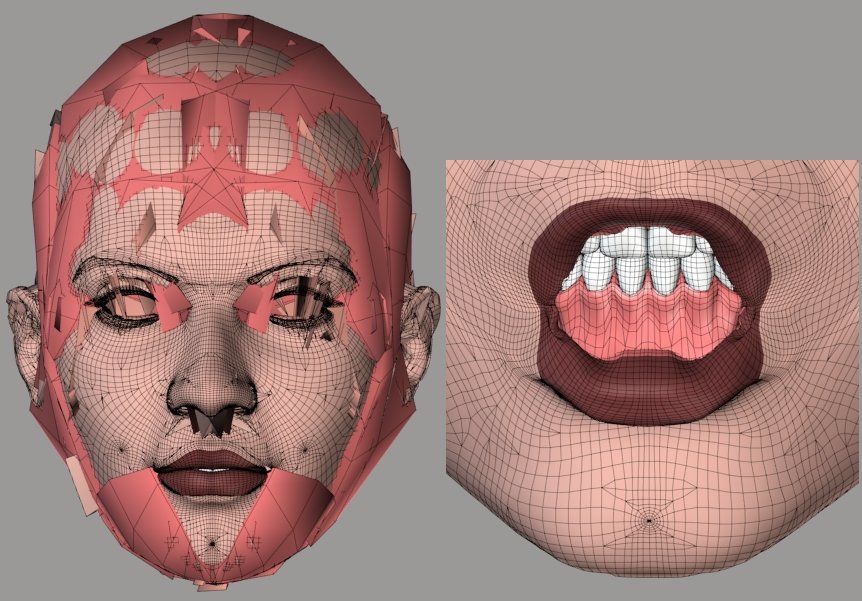
I tested the recently corrected .pyd TDMT code with the same comparison setup. As the attached shows, the morph transferred fairly well. I think the shape did, too, but it's hard to tell. :lol: The areas that did correlate successfully seem to have come out fairly well, aside from the upper eyebrows.
===========================sigline======================================================
Cage can be an opinionated jerk who posts without thinking. He apologizes for this. He's honestly not trying to be a turkeyhead.
Cage had some freebies, compatible with Poser 11 and below. His Python scripts were saved at archive.org, along with the rest of the Morphography site, where they were hosted.
I'm going to be going back to work on tutorials again. I'm still trying to explore the possibilities of the current process, and then teach them. Once this next tutorial is finished, I should be able to concentrate more fully on any issues relating to integrating the older process or developing a new one.
Thanks for all the time you're putting into this, Spanki. Don't let this cut into anything which should be more important. (Like Cage is doing. Sleep is supposedly kind of important, right? :lol:)
===========================sigline======================================================
Cage can be an opinionated jerk who posts without thinking. He apologizes for this. He's honestly not trying to be a turkeyhead.
Cage had some freebies, compatible with Poser 11 and below. His Python scripts were saved at archive.org, along with the rest of the Morphography site, where they were hosted.

This is fantastic . It seems to me it is already very useable, and you guys are pushing it toward perfection :-). They do say that last few percent of a project takes a lot of the effort, and you guys are sure putting a lot of effort into it. I will definitely study the tutorials.
I have tried looking at the program but it is difficult for me to get my head around it, especially since I am not up to speed on Python. Is there a flowchart in existence for the program?
I think a flowchart would help me to understand the program flow and therefore assist with understanding the code. I know you guys are super busy though, so please consider it a low priorty wish. I'm sure I will be able to get great results from this program whether I understand how it ticks or not ;-).
Cheers and kudos to you guys.
Ian
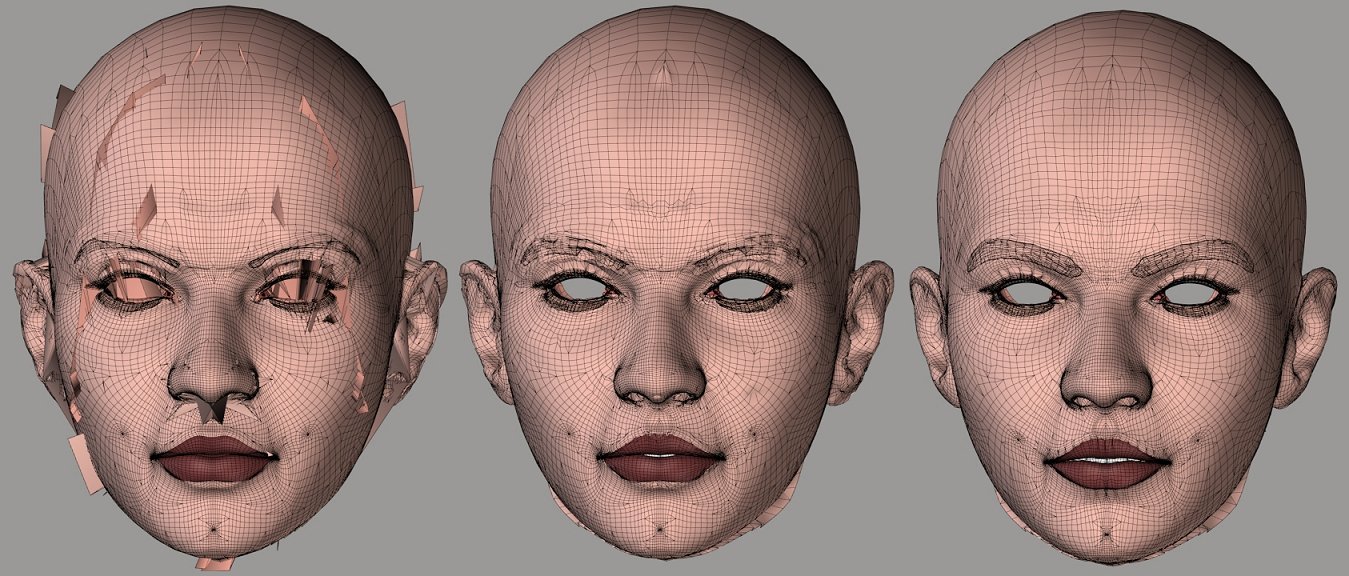
The left image is a slightly more charitable version of the kablooey mess posted above. :lol: Here, I've had to keep the process from handling lashes, lacrimals, and inner mouth. There are still many areas where it fails. This illustrates how much the raycasting method needs closest vertices to fill in the blanks.
Look at the upper eyebrows, particularly, on the left image. The results here are presumably the best we can expect from raycasting under these comparison conditions. Any hybrid code would need to be able to recognize that they represent results which are worse, not better. Look at the right image. The closest vertices method produces something we can clean up with Restore Detail. The left image distorts the shape so badly that I'm not sure RD can help.
Now look at the middle, still considering the upper eyebrows. This is how the initial hybrid sorts out the two methods being applied. I've tested RD with these results, and it didn't handle very well. It can clean up the basic mess, but some areas of the upper eyebrows end up beneath the skin and others are badly pinched. They're no longer scrambled, but they're still not a desirable outcome.
Assuming the new .pyd hybrid code being tested is bug-free, the middle image shows the essential problem with trying to merge these two approaches. The raycasting is returning accuracy where it's able to do so, but it can't do so everywhere, as seen in the left image (and, even more so, the one posted earlier). The middle image, assuming no code bugs, shows how greatly the results of the two processes vary. They may not be readily compatible. The averaging applied by the closest vertices method gives results which the more accurate raycasting doesn't like very well.
But the raycasting obviously needs the closest vertices method to fill in the gaps. Even if we judge "best match" cases, how do we rule out disasters like the upper eyebrows? And the raycasting can't help us at all with a best match in places where it's altogether unable to even generate a decent match.
My musings to which you respond above are attempts to think ahead about these problems. The raycasting can't do it alone. The closest vertices comes much closer to being able to do it alone, but there are numerous flaws. We can't make the closest vertices as accurate as the raycasting. To bring these methods together, the accuracy of the raycasting may need to wiggle. Hence the suggestion of modifying the raycasting normals to try to generate hit locations compatible with the closest vertices positions. It's the kind of thing you'll hate, the kind of thing which gets rejected apparently out-of-hand. But something like that may be necessary. The final "hit points" would end up being closest vertices averaged positions, but those could be generated with only the tri weights. If all hits are generated this way, they should be compatible with one another. The results won't match those of the pure raycasting, but look at the pure raycasting's limitations, in this test.
One almost hopes that the hybrid .pyd code is bugged. Apologies, Spanki. I only say that because it would mean a simple drop-in of one method might work out feasibly well. It really looks like the middle image just shows incompatibility, though.
===========================sigline======================================================
Cage can be an opinionated jerk who posts without thinking. He apologizes for this. He's honestly not trying to be a turkeyhead.
Cage had some freebies, compatible with Poser 11 and below. His Python scripts were saved at archive.org, along with the rest of the Morphography site, where they were hosted.
Quote - This is fantastic . It seems to me it is already very useable, and you guys are pushing it toward perfection :-). They do say that last few percent of a project takes a lot of the effort, and you guys are sure putting a lot of effort into it. I will definitely study the tutorials.
I have tried looking at the program but it is difficult for me to get my head around it, especially since I am not up to speed on Python. Is there a flowchart in existence for the program?
I think a flowchart would help me to understand the program flow and therefore assist with understanding the code. I know you guys are super busy though, so please consider it a low priorty wish. I'm sure I will be able to get great results from this program whether I understand how it ticks or not ;-).Cheers and kudos to you guys.
Ian
Hi, Ian! Have you been able to work on your shorts for Antonia? I've been eager to see how they turn out! :D (I'd use the "big grin" smiley, but it looks potentially sarcastic to me. I miss the emoticons I use at another forum, sometimes. :lol:) I'm glad to know someone is still reading the thread. :lol:
I think a flowchart would probably be useful, for people who know how to read them. Sadly, I'm not one of them. :lol: Unfortunately, that means I can't create one. :(
The current process is basically this (Spanki needs to teach me how to use bullet points in a forum post...):
-
User supplies certain parameters, including Source and Target actors.
-
Geometry information for selected actors is gathered. The most important is the vertex coordinates, which are loaded into arrays for easier processing.
-
User-supplied parameters are used to generate vertex exclusion lists for both the Source and Target geometries.
-
Script loops through all Target vertices. If they aren't being screened by the exclusion list, it will process them.
-
The screening code by odf is used to further restrict which Source vertices will be considered as we proceed.
-
For each Target vertex, the script loops through all Source vertices, only considering those which are not, themselves, being screened.
-
Distance between Target and Source vertices is calculated. If this is within the range submitted by the user (as Cutoff Distance), the distance is logged to a Python dictionary, using the distance as key and the index as value.
-
The normals between each Source and Target vertex are optionally tested. Any Source vertex with normals which don't pass the test is not logged to the distance dictionary.
-
After looping through all Source vertices for each Target vertex, the distance dictionary contains all potential candidate vertices for a match.
-
A new loop is run, to sort through the distance data gathered and generate the vertex weights and finally the data file. This starts by sorting the keys of the dictionary, placing the closest vertices at the top of the list.
-
A user-submitted number (Number of Influences) of listings from this sorted distance list is then processed to find the weights.
-
A string containing the weight listing is logged to a Python list.
-
Once all Target vertices are processed, the list containing the weights is written out as the final .vmf data file.
The raycasting process being tested is run after the distance sorting but before weight generation. The raycasting uses the normal of each Target vertex to cast a ray which is then checked to see whether it intersects any of the polygons of the closest vertex from the distance list. If so, a string containing the weights from the intersection with a triangle derived from the intersected polygon is logged to the final list of strings. If there is a raycasting hit, no further processing is applied for that Target vertex. Spanki may enjoy elaborating upon the raycasting technique and its weight-generation methods. I'm afraid I may misrepresent it somehow if I try to go in-depth. Hopefully I haven't been inaccurate, as it is.
===========================sigline======================================================
Cage can be an opinionated jerk who posts without thinking. He apologizes for this. He's honestly not trying to be a turkeyhead.
Cage had some freebies, compatible with Poser 11 and below. His Python scripts were saved at archive.org, along with the rest of the Morphography site, where they were hosted.
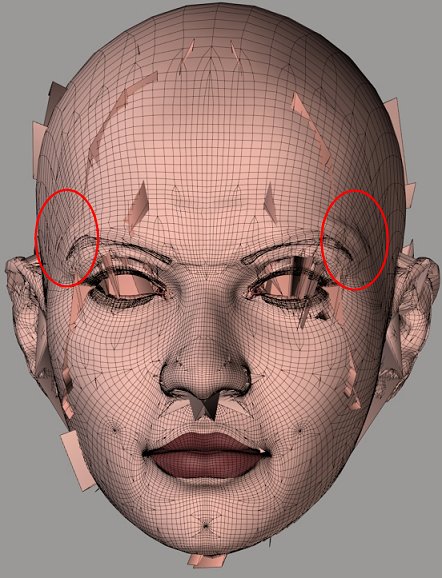
The circled areas on the TDMT 2008 .pyd shape transfer, here, look an awful lot like the old "lumpy morph" problem showing up. One would like to assume that the quality of Antonia's mesh is not the cause. :lol: These show up in the hybrid, too. Apparently the raycasting may do this at times.
I don't think lumpy areas would qualify as best results, any more than the upper eyebrows. A hybrid approach will need to be able to deal with this, presumably. I'm not sure we actually know why it's happening. Possibly due to the quality of the re-shaping on Antonia at the time of comparison, but the "long delta" thing shouldn't be happening. The morph has been through Restore Detail and the basic vertex relationships are generally not very wonky. :lol:
===========================sigline======================================================
Cage can be an opinionated jerk who posts without thinking. He apologizes for this. He's honestly not trying to be a turkeyhead.
Cage had some freebies, compatible with Poser 11 and below. His Python scripts were saved at archive.org, along with the rest of the Morphography site, where they were hosted.
Many thanks for the bullet point list Cage, I'll study that carefully. No worries on the flowchart.
--------------------------------------- the following is not related to morph transfer script ------------
Oh the shorts are not forgotten. I have been trying to work out why it is proving so difficult for me to create useable JCMs for them. I looked at the shorts you made based on Antonia's topology, which seem to work fine with one JCM.
I hacked Antonia 122 CR2 to make the hip2 and thigh morphs independant from the thigh bends. If I apply the spread morph with Antonia joints zeroed there is some very sharp deformation of Antonia's mesh around the backside at spread -60. These obviously work well for Antonia, but I think the approximation which is happening with 'morphing clothes' trying to replicate the sharp deformation of Antonias mesh for 'spread', into the quite different topology of the my shorts is resulting in a morph which doesn't really do what is required of it.
My experiments were interupted with a three day ITIL course and exam, so I had to put 3D out of my mind for a few days. ( my old brain doesn't multitask as well as it used too ).
-------------------- we return you to your regular discussion about morph transfer script :-) ---------------
Cheers
Ian

Privacy Notice
This site uses cookies to deliver the best experience. Our own cookies make user accounts and other features possible. Third-party cookies are used to display relevant ads and to analyze how Renderosity is used. By using our site, you acknowledge that you have read and understood our Terms of Service, including our Cookie Policy and our Privacy Policy.
re: Hitpoint
First off, just to review and clarify, the Hitpoint generated by the original Closest Surface method was basically the intersection of the ray cast along the Normal of a vertex with the polygon/surface of the other mesh.
I went back to the other thread to refresh my memory and... we had decided to convert this into a 'delta' value when saving it to the .vwt file (this preserves the relationship of the vertex->hitpoint location, regardless of the current world-space position of the mesh).
Also note that the hitpoint itself - while used to determine the 3 correlating vertices and the weights to use for those - is NOT needed or used for Morph Transfers (the correlating vertices and weight info is all that's needed for Morph Transfer)... the hitpoint location IS used for things like Shape Transfer and/or No-Poke routines, etc.
In fact, you could describe the hitpoint as "the position to move the vertex to, in order to shape-match the other mesh".
So, given the above, does the new Closest Vertex method have a "hitpoint" - yes... it's the position to move the vertex to, in order to shape-match the other mesh. In this case, it's (AFAIK) the average/center of the correlated vertices - that's being computed, but not (converted to a delta and) saved to the file - but there's no reason that it couldn't be... and if it was, then it would be "transparent" data as far as any shape-match or no-poke code was concerned.
...speaking of reasons not to... you have some concern about possible copyright issues, but for a lot of reasons, I have zero concern (relative to this) about that. I just don't see that as a problem at all - there's nothing copyrightable about that info.
So, just to wrap up...
re: Restore Detail
Yeah, restore code is working great - and is much more appropriate than any of the other type of smoothing routines for this application. Again, nice job on that.
Cinema4D Plugins (Home of Riptide, Riptide Pro, Undertow, Morph Mill, KyamaSlide and I/Ogre plugins) Poser products Freelance Modelling, Poser Rigging, UV-mapping work for hire.