
Renderosity Forums / Poser - OFFICIAL
Welcome to the Poser - OFFICIAL Forum
Forum Moderators: RedPhantom Forum Coordinators: Anim8dtoon
Poser - OFFICIAL F.A.Q (Last Updated: 2026 Aug 18 11:15 am)

Subject: Antonia - Opinions?

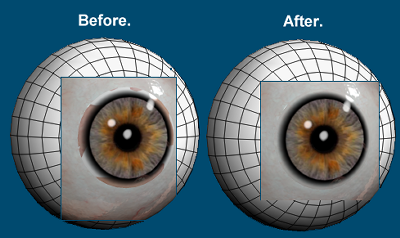
Quote - > Quote - I loaded SaintFox's new texture set. I can't get the old eye to look right - or maybe that's how it looks for everybody? I don't see any other closeup renders posted.
There are two different UV mappings for the eyes the "original" and the "MJ" mappings. If I remember right, the MJ UVs came in with 118, then in 121 odf reverted to the original eye mapping. I think that, at least in part, this was to try to be UV compatible with your eyes.
If you want the use the MJ UVs (118) eye textures on the 121 and 122 figures, you can install my "Eyes_MJ_UVs_121.zip", from the Texture Sets section of the antoniadevelopers site. This injects eye geometry with MJ's UVs, and scaled to fit the 121/122 eye sockets.
I presumed by "not right" BB meant the way the old eye looks in his render, i.e. the strange white rim around the iris and such.
-- I'm not mad at you, just Westphalian.

Quote - > Quote -
The closer eye is the new one. In this Poser 8 render I'm using IDL, which means I can't run the shaders at full gamma of 2.2. The result is the reflections are a bit weak. But the important thing I'm demoing is that the new eye fits right and the new shader produces a pleasing and believable transition from sclera to iris.
But if you were using pro2010, you could use the render setting at 2.2 gamma with IDL right? Or did I miss some post where you said not to use gamma 2.2 if using IDL?
Yes I could, but I was intentionally working with Poser 8 because most of you aren't going to be able to use these eyes in Poser Pro 2010 at the moment.
I want to make sure I have the shaders adjustable to work in all versions of Poser using all the different GC/IDL/Tone Mapping schemes.
Renderosity forum reply notifications are wonky. If I read a follow-up in a thread, but I don't myself reply, then notifications no longer happen AT ALL on that thread. So if I seem to be ignoring a question, that's why. (Updated September 23, 2019)
Quote - > Quote - > Quote - I loaded SaintFox's new texture set. I can't get the old eye to look right - or maybe that's how it looks for everybody? I don't see any other closeup renders posted.
There are two different UV mappings for the eyes the "original" and the "MJ" mappings. If I remember right, the MJ UVs came in with 118, then in 121 odf reverted to the original eye mapping. I think that, at least in part, this was to try to be UV compatible with your eyes.
If you want the use the MJ UVs (118) eye textures on the 121 and 122 figures, you can install my "Eyes_MJ_UVs_121.zip", from the Texture Sets section of the antoniadevelopers site. This injects eye geometry with MJ's UVs, and scaled to fit the 121/122 eye sockets.
I presumed by "not right" BB meant the way the old eye looks in his render, i.e. the strange white rim around the iris and such.
Quite right. My issue was not with UV mapping, as it is the same, but rather that I was surprised at how bad the 122 eye looks at that particular lighting angle. I didn't want people to think I had artificially set up an exaggerated comparison between my new eye and the 122 eye. So I made some attempt to make the 122 eye look as good as possible. You see the result.
Renderosity forum reply notifications are wonky. If I read a follow-up in a thread, but I don't myself reply, then notifications no longer happen AT ALL on that thread. So if I seem to be ignoring a question, that's why. (Updated September 23, 2019)

Quote - I want to make sure I have the shaders adjustable to work in all versions of Poser using all the different GC/IDL/Tone Mapping schemes.I want to make sure I have the shaders adjustable to work in all versions of Poser using all the different GC/IDL/Tone Mapping schemes.
That's good news! I'm still using P6, and it's nice to know I will not be left out.

Quote - > Quote - Hmmm, interesting.
Thanks for clearing the Daz thing up, doesn't explain much why the overlays don't appear to work in Poser.
well, i couldn't tell you without looking at them and seeing how you're using them. i don't have time to play with them, but if you tell me what you're doing to use them, i might be able to help.
Basically, the overlays are .psd's, you apply them over the original texture(Saintfoxes) in Photoshop and then I load this new texture in P8 via the Material Room. In the preview the blush shows up very clearly and yet Firelfy appears to ignore it when it renders.
CHEERS!
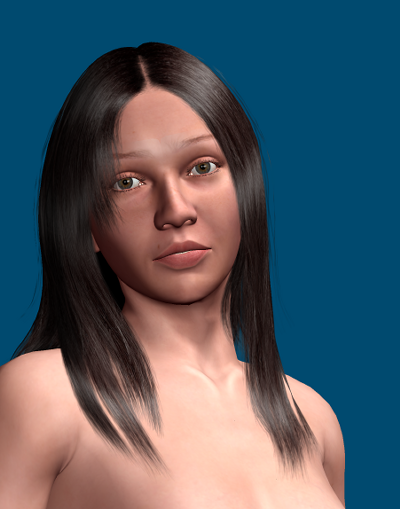
I have always had a thing for women with long hair, and I am quite pleased with the results.
Looks great! Just as there are hair fits to make hair work on characters it was not built for, last night I experimented with an eye shader that does a UV fit. I was able to use V4 eye textures on the new eye without changing its UVs, using math on the ImageMaps. It worked perfectly. Unfortunately, Poser preview does not pay attention to UV math and the preview looks absolutely ludicrous.
V4 eyes are arranged really strange - there are four sections on each map: left and right sclera, and left and right iris. I had to make the shader load the image map twice to get different offsets and scales for each part, but it did work great. I could tolerate the scary preview, but I'm sure most other people could not.
Renderosity forum reply notifications are wonky. If I read a follow-up in a thread, but I don't myself reply, then notifications no longer happen AT ALL on that thread. So if I seem to be ignoring a question, that's why. (Updated September 23, 2019)
Quote - ... an eye shader that does a UV fit. I was able to use V4 eye textures on the new eye without changing its UVs, using math on the ImageMaps. It worked perfectly. Unfortunately, Poser preview does not pay attention to UV math and the preview looks absolutely ludicrous... I could tolerate the scary preview, but I'm sure most other people could not.
This sounds useful. I don't suppose it is possible to have the shader use one texture for preview and a different one for the render? The problem is not only one of aesthetics, one needs to be able to see which way the eyes are pointing when composing the scene. I suppose one could always compose the scene with an eye texture that does work in preview, then change to the V4 texture for the final render.
Would it be feasible to implement this technique for a whole figure?
Whole figure - no. The technique for eye map transformation is simple - re-position and scale the map. Pretty much all figures basically map the eye as concentric circles, so transforming these is pretty straightforward. Not so with "pelt" maps used for skin. They are cut differently, rotated, and have completely different relative scales from one area to another. Coming up with a math formula to transform one to another is possible in theory but beyond difficult in practice.
Now it may be possible to use one map for preview and another for render. Hmmm. I'll check that.
Renderosity forum reply notifications are wonky. If I read a follow-up in a thread, but I don't myself reply, then notifications no longer happen AT ALL on that thread. So if I seem to be ignoring a question, that's why. (Updated September 23, 2019)
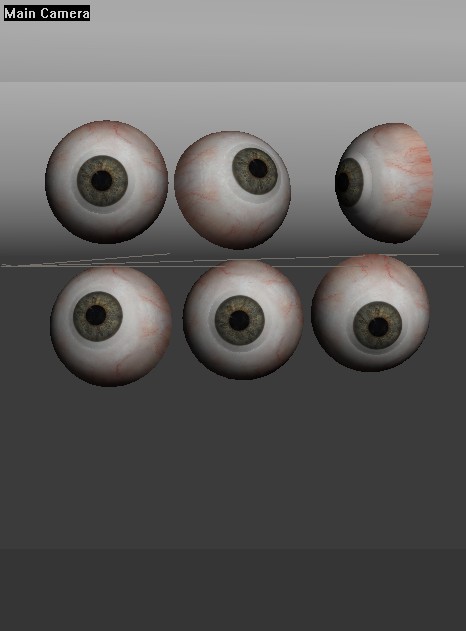
Renderosity forum reply notifications are wonky. If I read a follow-up in a thread, but I don't myself reply, then notifications no longer happen AT ALL on that thread. So if I seem to be ignoring a question, that's why. (Updated September 23, 2019)
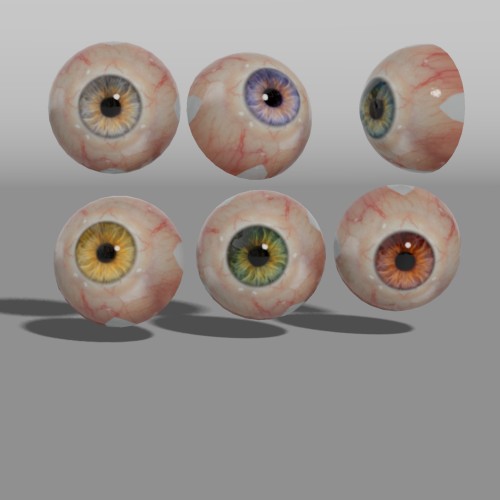
Renderosity forum reply notifications are wonky. If I read a follow-up in a thread, but I don't myself reply, then notifications no longer happen AT ALL on that thread. So if I seem to be ignoring a question, that's why. (Updated September 23, 2019)
Les,
I'm sure you want to get started assembling the pieces. I'd do it, but it took me hours before by hand because I don't have any cool scripts and don't understand the file format.
So - have at it.
I've uploaded the pieces to here:
http://sites.google.com/site/bagginsbill/file-cabinet/BBAntoniaEyeV2Pieces.zip
Inside you'll find:
Eye.obj - the eye geometry
Cover.obj - the cover geometry
Dilation.obj - the pupil dilation morph to load on the eye geometry
BBEyeW.mt5 - the eye shader (w for white)
BBEyeC.mt5 - the cover shader
and a couple PNG thumbnails for those shaders
I saved them with SaintFox's "toni-eyepr" texture that is my favorite. I don't know what eye map would be standard, but you could just erase that and leave them blank I suppose.
Renderosity forum reply notifications are wonky. If I read a follow-up in a thread, but I don't myself reply, then notifications no longer happen AT ALL on that thread. So if I seem to be ignoring a question, that's why. (Updated September 23, 2019)
Excellent! I can hardly wait to try them out (yet I will, since Les knows best how to get them injected into Antonia.)
As for cool scripts: you like them, I like them; but I get the impression that's pretty much it. I'm still making up the API as I'm going along, but if there's interest, I'd be happy to document the current state and add more examples to my github repository. Also, there's not much high-level stuff in there yet. You'd still have to know your way around Poser files. It just saves you the trouble of hunting for the "hidden" parameter in channel "Nose-pointy" within actor "head", because you can just write something like
doc("actor
head" "channels" ".* Nose-pointy"
"hidden")
instead, and the API does it for you.
-- I'm not mad at you, just Westphalian.
Quote -
I was wondering what Antonia would look like with long hair, so I made a new cr2 for Kozaburo's 'Long Hair_Evo_Jessi'. I used a morph to fit the hair to Antonia, then adjusted the joint centers and joint parameters to suit. I added some morphs to adjust for head/neck tilt and collar up-down.I have always had a thing for women with long hair, and I am quite pleased with the results.
Could this be put out as a freebie? I know 3Dream put out a lot of fits for Little One using hair that wasn't theirs.
CHEERS!
Bagginsbill:
I really like what you're doing with the eyes as there is a set of really nice eye textures that Daz did called Eye Maps: Generation 4 (http://www.daz3d.com/i/shop/itemdetails/?item=5117). You get great textures with these and you also get some neat reflection maps. Could these be incorporated?
CHEERS!
bagginsbill,
Quote - Les,
I'm sure you want to get started assembling the pieces. I'd do it, but it took me hours before by hand because I don't have any cool scripts and don't understand the file format.
So - have at it.
Excellent!
Hopefully I will have it finished by this evening. What do you want me to do with it when it is finished? I could either post it to the 'Files to Work On' section of the antoniadevelopers site, or if you IM me with your address I can email it directly to you, or both.
Whoops - correction has been made. I grabbed files from the wrong folder.
Renderosity forum reply notifications are wonky. If I read a follow-up in a thread, but I don't myself reply, then notifications no longer happen AT ALL on that thread. So if I seem to be ignoring a question, that's why. (Updated September 23, 2019)
Quote - Bagginsbill:
I really like what you're doing with the eyes as there is a set of really nice eye textures that Daz did called Eye Maps: Generation 4 (http://www.daz3d.com/i/shop/itemdetails/?item=5117). You get great textures with these and you also get some neat reflection maps. Could these be incorporated?
CHEERS!
Yes - any eye textures from V4 will work. In fact, you can mix and match. You can grab sclera from one texture and use an iris from another texture. They don't even have to be for the same figure. You can grab an Antonia sclera and use a V4 iris, or vice versa.
I'm planning to also do UV fits for other figures - there are lots of V3 eye maps that should work well too. Antonia will have more eye texturing options than any figure in history.
I did not build the shader to use reflection maps, but I'll change that so it can.
I assume you're not talking about painted-on reflections, but rather an environment map to use with the sphere-map node. I'm probably going to refuse to do painted-on reflections on the grounds that these eyes are all about realism and painted-on reflections are evil in that department.
[Edit] Just to be clear, I have not published the V4 eye fit shaders. The upload I did has only a standard shader for Antonia-type maps. I want to shake out the problems with the geometry and basic shader before I start dealing with variations.
Renderosity forum reply notifications are wonky. If I read a follow-up in a thread, but I don't myself reply, then notifications no longer happen AT ALL on that thread. So if I seem to be ignoring a question, that's why. (Updated September 23, 2019)
BB:
Yes, I was talking about spherical map reflections. Once Antonia is finalised I think it'd be nice if most of the third party stuff from the developer site could be uploaded to Renderosity as freebies so that all of us can get the most out of her.
ODF:
Do you know if joeglaine is working on incorporating his old face morphs into the newer mesh?
CHEERS!

Question:
As cool as it is to make the eye texture maps for different figures work through material room setups, wouldn't it be more efficient to remap the UV of the eyes to take these different maps and then inject the eyes into the figure like phantom3D is injecting different hip geometries with an insertion pose?
LMK
Probably edited for spelling, grammer, punctuation, or typos.
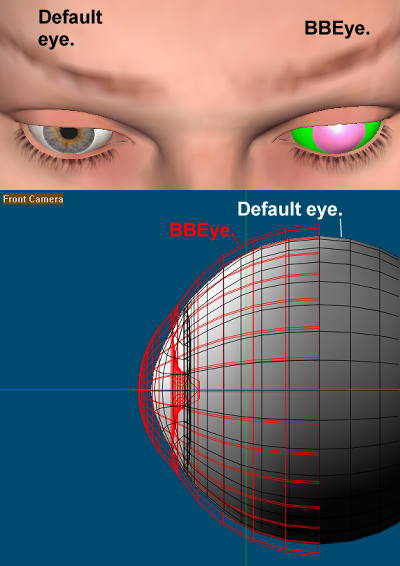
The eye object you provided is bigger that Antonia's default eyes. The default eyes are approx 0.010027 Poser Units from top to bottom (26.284885 mm). In a previous post you said "Thanks. I re-built it to that dimension". However your new Eye.obj is actually approx 0.010776 PU (28.246914 mm).
The bigger size may well be better than the default, as I felt that eyelids were too deep (thick) in the current version of the eye sockets, and your eye covers more of the lid making it look thinner. However there are two potential issues with your eyes at their current scale. They will probably cover more of the lachrymal leaving the lachrymals looking wrong. The lids may recess too far into the cornea which may also look bad. I think there may already be an issue with the lids recessing too far with the default eyes.
For the moment I will leave your eyes at their current scale. It will be a simple matter to rescale them later if that is desired. However I thought it best to raise these issues now, so that they can be given consideration before the final version.
odf,
I would also like to hear your opinion on all this.
Ahhhhh dang it. I'm such an idiot sometimes.
In my geometry builder script, at the top, it says this:
inch = 1/103.200005
#inch = 1/100.0
inch = 1/96.0
inches = inch
foot = 12 * inch
feet = foot
centimeter = inch / 2.54
millimeter = inch / 25.4
I forgot I had left the geometry builder set to old Poser PNU = 96 inches instead of the new PNU 103.200005. I did this because when I build real-world props like doors and windows, they just don't look right if we take Poser's definition of inch, when compared to the heights of practically every figure which were all designed around the premise that a PNU is 8 feet.
So - the result is the eye is too big by a factor of 103.2/96, resulting in a Poser-measured dimension of 28.25 mm, just as you reported.
Sorry about that.
You could just scale them to 93.203%. Or do you want me to re-build and re-post?
Renderosity forum reply notifications are wonky. If I read a follow-up in a thread, but I don't myself reply, then notifications no longer happen AT ALL on that thread. So if I seem to be ignoring a question, that's why. (Updated September 23, 2019)
(Sorry folks - I've been PM'ing with les and the PM's system don't work too good.)
Les I got like 6 copies of your PM in a row.
I hope you got my reply. There are two materials, not one. BBEyeW and BBEyeC.
Renderosity forum reply notifications are wonky. If I read a follow-up in a thread, but I don't myself reply, then notifications no longer happen AT ALL on that thread. So if I seem to be ignoring a question, that's why. (Updated September 23, 2019)
Les, I just got another PM from you, this time worded differently. You must be typing these over and over. Stop using PM. It isn't working right, and I don't like it anyway. It shows messages in the wrong order so I can't read and hit delete and read the next. I have to read them backward with many clicks. After 8 messages from you it's excrutiating.
You said 7 times that you want to know which part of the eye to apply "the" material file to. There are TWO MATERIAL FILES. There are TWO PARTS AND TWO MATERIALS.
The eye part gets BBEyeW. The cover part gets BBEyeC.
Renderosity forum reply notifications are wonky. If I read a follow-up in a thread, but I don't myself reply, then notifications no longer happen AT ALL on that thread. So if I seem to be ignoring a question, that's why. (Updated September 23, 2019)
OK, geom injection finally finished. The geom injection pz2 itself was quite easy, except I typed a normal brace where I should have typed a curly brace, then spent a lot of time wondering why half of the file did not work! The obj files were more difficult than I envisioned, a lot of fiddling to get them positioned correctly, but I got there in the end. There may be a bug in this version. I will say more about that in my next post.
I have posted the files to 'Files to Work On' section of the developers site, as "LB BBeys TEST-03.zip". There is no readme file at the moment. I will try to put one together over the weekend, and update the zip.
The main file to inject the geometry "LB BBeys TEST-03.pz2" will be placed in:
RuntimelibrariesPoseAntoniaLB BBeys TEST-03.pz2
You should be able to see where the others go by looking in the zip. I have not had much time for testing, and wanted to post this before going to bed. Everything on the injection side seems to be working, I will leave it up to you to decide if the shader is functioning correctly. It should be, the only things I changed were deleting the texture reference and assigning material names.
For those not familiar with the BBEyes, note that a new material will be added to the figure "Eye", and texture maps should be applied to that. There is also an EyeCover material but you should not need to touch that (as I understand it).
The BBEyes have an EyeCover actor. In preview this will be in Outline Display Style. You should NOT try to make it transparent! The EyeCover actor is hidden from the drop-down menu, but can still be selected via the Hierarchy Editor.
Please realise this is only a test, and some things may still need to be tweaked.
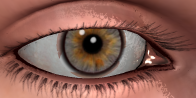
Above is the first and only render I have done with the injected eyes. I do not have the 'toni-eyepr.jpg', so I used Saint Fox's 'ToniPEyesGrayYellow.jpg'.
As you can see there is a problem where the sclera meets the cornea. A couple of possibility's spring to mind. When I rescaled the Eye I also rescaled the EyeCover by the same amount. Perhaps the cover was the right size to start with, or perhaps I got mixed up when applying the materials and applied them to the wrong actors.
It's very late now and I must go to bed. I will try to make time to have another look at it tomorrow , and see if I can find what is going wrong.

I seldom use Poser to render, mainly because DS is what I learned with and am comfortable with and my almost non-existent free time doesn't allow me to learn too many new things well, so I stick with what I know. For those who don't want to use overlays to modify the actual texture maps, there is this post in the DAZ forums explaining how to use them in Poser 7. I have not tried it though, and don't know how it works, nor if it has limitations in versions other than the one the poster used.

Quote - I seldom use Poser to render, mainly because DS is what I learned with and am comfortable with and my almost non-existent free time doesn't allow me to learn too many new things well, so I stick with what I know. For those who don't want to use overlays to modify the actual texture maps, there is this post in the DAZ forums explaining how to use them in Poser 7. I have not tried it though, and don't know how it works, nor if it has limitations in versions other than the one the poster used.
just so ya know what your missing buy not having all the cgi app's.
getting a new app, reading the manuel that was wrote by a 3rd party that has no idea
what vertices,polygones,uv maps,rigs even are.
reading in the manuel ah we don't cover this part see forms thay might know.
forms say RTFM , lol
reading manuels that are not joking 5000 pages long
learning to speack 3d so you know what you read.
the insanaty of taking a 3d object making it a flat for a uv map for texturing "mats"
making "injs" for a 60,000 polycount lol thank the gods of art for zbrush
my all time favorite moron rule of model all quads.
i'll stop here but i could go on for days.
============================================================
The
Artist that will fight for decades to conquer their media.
Even if you never know their name ,your know their Art.
Dark Sphere Mage Vengeance

LOL As soon as I find out how to achieve a likewise effect with DAZ Studio: Yes! Until then the "classic" material settings MAY be a solution.
And thanks a lot for summing the question of RorrKonn up, Rogerbee - I have to confess that I did not really understand where the problem was - but that may be just me and a foreign language.
I'm not always right, but my mistakes are more interesting!
And I am not strange, I am Limited Edition!
Are you ready for Antonia? Get her textures here:
The Home Of The Living Dolls
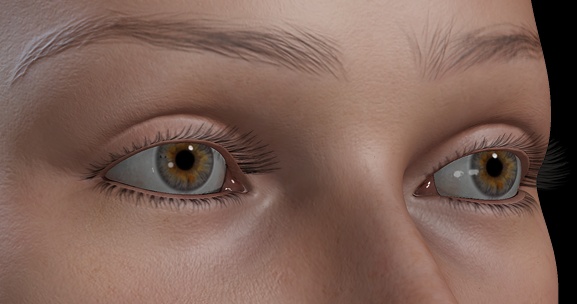
These eyes look so good, it's almost uncanny.
-- I'm not mad at you, just Westphalian.
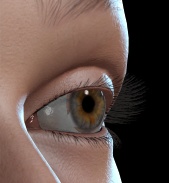
-- I'm not mad at you, just Westphalian.
odf,
 Phew! On the one hand I am very relieved to see that it is not a blunder on my part that is causing the artefacts around the cornea. On the other hand I'm very disappointed that it seems like this won't work in P6. Perhaps BB or someone else can come up with a P6 fix. Personally I know very little about render settings and shader trees, so I'll leave that side of things to the experts.
I think it might just be an inaccuracy in the P6 renderer. Try scaling up the eye cover a tiny bit without changing the eye or move the cover around slightly relative to the eye, and see how that affects the artifact.
(I would do it myself, but it's getting close to my bedtime.)
-- I'm not mad at you, just Westphalian.
The P6 issue interests me, especially when any issues can be fixed by upgrading to P8, which, right now, can be done quite cheaply. I do sometimes wonder why folk want to hang onto older versions.
That said, I will admit that I bought P8 completely on a whim and was quite happy with P7. Still, now I've gotten to grips with the advances that P8 brought with it, there's no way I'd go back. I can do things with lighting and rendering now that I could only dream of with P7. Sure, P8 has it's foibles, the library always annoys me in that it takes nearly 10 minutes to get itself together when you're eager to start work, but, this can be lived with when you see the quality of the renders.
CHEERS!
I'm very excited that others are able to try this out. Thanks Les.
Couple notes:
1) The Eyecover does need a color map texture, not just the main eye part, the but cover. The cover draws a white ring, the organ called the "limbus" that joins the cornea to the sclera. I need the color map for that part. If you don't load one, it may mess up. I never tried it without a map. Please load the same color map on both parts.
(Note: This is Poser's biggest architectural flaw, IMO. Maps should be separate from shaders. There should be a place to load eye maps on the figure ONCE, then all shaders would have access to those via a node.)
- Poser 6 was notorious for having ray bias problems in refraction. You might try:
- Adjusting the ray bias in the Refract node of the cover - decrease it, not increase. If you increase it, the cover will skip the eye and reveal the back of the head. If you see skin color, then raybias needs to be lower.
- At least for debugging purposes, please render without AO or shadows. Just enable raytracing and see what happens. Then work backward, try IBL+AO (if you were using that) and see if it causes the problem. And/or re-enable shadows ON ONE LIGHT and see what happens.
In general, when you get artifacts in Poser, it has something to do with ray bias, and can be the outcome of smoothing, displacement, shadows, AO, reflection, or refraction. You will chase your tail like crazy if you don't isolate it, so disable all those things and work forward one by one.
Sorry, but I will not be re-installing Poser 6 on my computers. grin I have enough with Poser 7 SR2, SR3, Poser Pro, Poser 8 (official), Poser 8 beta (next SR in progress), and several versions of Poser Pro 2010.
My experience with these eyes on Poser 8 and Poser Pro 2010 has been no problems except with smoothing.
Renderosity forum reply notifications are wonky. If I read a follow-up in a thread, but I don't myself reply, then notifications no longer happen AT ALL on that thread. So if I seem to be ignoring a question, that's why. (Updated September 23, 2019)
Oh goody,
An SR3 for P8, nice! So hopefully it now will close when we hit the X to close the window and not 5 minutes later. Libraries that are instantly available to us would also be a major help.
The one intriguing thing about P8 and Poser Pro is that they support the use of normal maps, however, nobody is using them that I know of. I'm all for innovation, but some use needs to be made of them otherwise it's a waste of that innovation.
CHEERS!
bagginsbill,
I'm going off the Antonia topic here, but given the huge contribution the BBEyes are making to Antonia, perhaps I can be forgiven.
The geometry injection files I made for the eyes are Antonia specific. This is because the way I did it, I had to make new obj files for the eyes and eyecovers that were positioned specifically for Antonia's base geometry.
I realise that you would like the eyes to be usable on other figures. The geom injection was only possible with Antonia because odf included EyeCover actors in the most recent cr2. As other figures do not contain EyeCover actors we are thrown back on to smart props. Of course this is no longer a one click fix, but it should provide an almost universal solution. There would be one pp2 smart prop. Additional per figure pose files could be provided to hide the default eyes and position and scale the eyes to the most popular figures. With other figures some manual user intervention would be necessary to scale and perhaps make fine adjustments to the position, and to hide the default eyes, but the BBEyes would still be usable on almost any figure with this bit of tweaking. I'm not promising to do this in the next few days, but I will get on to it and see what I can come up with.
In principle I think it should also be possible to use the technique of 'actor injection' (different from geom injection) to integrate the eyecovers into other figures as actors. However this would still not be a one click solution as both a pp2 and pz2 would need to be applied. Also this method would require figure specific pairs of Eye and EyeCover obj files. Whilst it might be slightly more convenient for the user, because they would only have one pair of eyes to cope with. I don't fancy the work of making all the obj files for different figures, so I will just go with the smart props.
Hi Les.
The cover material has a node labeled PM:Rim Shadow and the default is .4.
You control the strength of the limbus shadow with that number. (I know it's two numbers, but this is how I have to make parameters in nodes - there is no simple number node. Poser doesn't let me invent new nodes. It only lets me use existing types of nodes and name them whatever I wnat. I have to use a Math:Add node to control the Rim Shadow. Just leave Value_2 at 0.)
Now on your other topic. I can't remember how I did it, but I'm certain I made a one-click solution for Antonia, without your injection magic.
I have to go do stuff, but I'll post how later.
You're thinking too limited about pose file versus prop file. Files can call other files, so that when you load a prop, it also loads a pose, a figure, a light, etc. Look it up.
Renderosity forum reply notifications are wonky. If I read a follow-up in a thread, but I don't myself reply, then notifications no longer happen AT ALL on that thread. So if I seem to be ignoring a question, that's why. (Updated September 23, 2019)
Not that it actually matters to many people, but when the limbus area is white, or a milky/light grayish color, it is called arcus conealis or arcus senilis. It is most frequent in older people. If one wants to simulate an aged eye, the color change between the pale color of the limbus area and the iris should not be sharp.
LMK
Probably edited for spelling, grammer, punctuation, or typos.


Not me... :biggrin:
----------------------------------------------------------------------------------------
The Wisdom of bagginsbill:
"Oh - the manual says that? I have never read the manual - this must be why."“I could buy better software, but then I'd have to be an artist and what's the point of that?"
"The [R'osity Forum Search] 'Default' label should actually say 'Don't Find What I'm Looking For'".
bagginsbill's Free Stuff... https://web.archive.org/web/20201010171535/https://sites.google.com/site/bagginsbill/Home
She's an awsomely lifelike model... i'm very impressed... when will we see her mouth working so she can smile?... great job!
you managed to do well on the one part that i hate about most poser models.... her feet actually look right and don't look stupid and un-realistic when you pose them... very impressive... on most models the joint for the feet is set way too high above the ankle and too much of the shin deforms when you pose the feet... not to mention that their feet are often way too thin from top to bottom... and too small in scaling for the proportions of the rest of the figure (side note here to keep in mind... the lenght of the human foot from tip of toes to back of heel is the same as the length of the forearm from elbow to wrist roughly... check it out on your own feet sometime)
I can't wait for the finnal model and keep up the great work!

Privacy Notice
This site uses cookies to deliver the best experience. Our own cookies make user accounts and other features possible. Third-party cookies are used to display relevant ads and to analyze how Renderosity is used. By using our site, you acknowledge that you have read and understood our Terms of Service, including our Cookie Policy and our Privacy Policy.
bagginsbill, > Quote - I just got Antonia 122 - what eyes are on this figure? There is an eyecover like mine. odf - is this something new you made in a similar style?
The eyecover in 122 is just a ghost actor (no geometry). Its just there to facilitate testing your eyes in the current version of Antonia, when they are ready. In order to inject geometry, there needs to be an actor already there to inject it into. Odf added them at my suggestion. Of course, we don't have to go with the geom injection method, they are your eyes, so it's up to you what happens to them. I sent you an IM about it on 20/Feb/2010.
It all started with this post:
http://www.renderosity.com/mod/forumpro/showthread.php?thread_id=2753785&page=191#message_3605808
And was followed by these:
http://www.renderosity.com/mod/forumpro/showthread.php?thread_id=2753785&page=192#message_3606061
http://www.renderosity.com/mod/forumpro/showthread.php?thread_id=2753785&page=193#message_3607058
http://www.renderosity.com/mod/forumpro/showthread.php?thread_id=2753785&page=193#message_3607536
http://www.renderosity.com/mod/forumpro/showthread.php?thread_id=2753785&page=193#message_3607885
There are two different UV mappings for the eyes the "original" and the "MJ" mappings. If I remember right, the MJ UVs came in with 118, then in 121 odf reverted to the original eye mapping. I think that, at least in part, this was to try to be UV compatible with your eyes.
If you want the use the MJ UVs (118) eye textures on the 121 and 122 figures, you can install my "Eyes_MJ_UVs_121.zip", from the Texture Sets section of the antoniadevelopers site. This injects eye geometry with MJ's UVs, and scaled to fit the 121/122 eye sockets.