
Renderosity Forums / Modo
Welcome to the Modo Forum
Modo F.A.Q (Last Updated: 2024 Aug 27 11:07 am)
|
|
|
The basis
|
| -- Modo Gallery -- |
Checkout the Renderosity MarketPlace - Your source for digital art content!

Subject: Is there any way to preserve UVs when subdividing a mesh in Modo?


Thanks for the response, Tashar59. I'm very, very new, right now. At what point in the process should I use the D key? What I've done is select the whole mesh, then use the subdivision function. I tried each of the three available subdivision routines, and the all bolluxed the UVs nicely, unfortunately.
I'll be getting the Modo book that's out later this month. Unfortunately, I haven't had time to wade through the training videos. I need a book for reference. :D
===========================sigline======================================================
Cage can be an opinionated jerk who posts without thinking. He apologizes for this. He's honestly not trying to be a turkeyhead.
Cage had some freebies, compatible with Poser 11 and below. His Python scripts were saved at archive.org, along with the rest of the Morphography site, where they were hosted.


Thats one GREAT feature Modo has. It saves the UV Mapping when U subD the model. I found this out the hard way. I used to UV Map my Armor Cars after I cut it up and it makes it SOOO HARD to UV Map. Now i UV Map it before I cut up the model to make the hard edges, cuves, bumps, etc etc, and it keeps the UV Mapping without any issues.
As Tashas59 said, show an image of what U found and see where is the issue.
Thankx
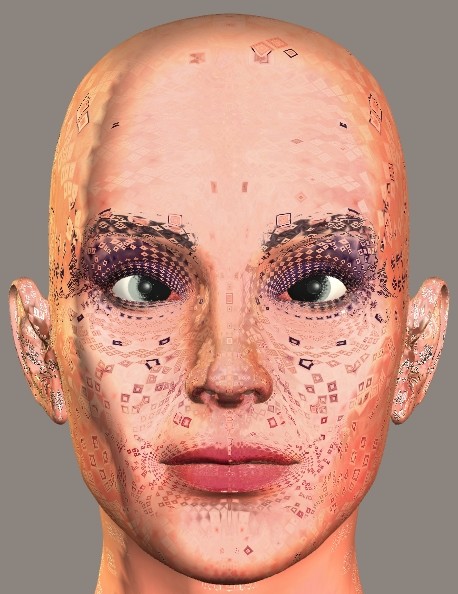
- Import Vicky 1 geometry into Modo.
- Select Items mode.
- Select the imported mesh.
- Under Commands: Subdivide, I've tried using SDS Subdivide, Smooth, and Faceted. All three give the same basic problem with UVs.
I'm not sure where any use of the D key should fall in the above process. or is the entire process incorrect? If anyone can help, please advise.
Oh, and I'm using Modo version 301-22855.
Thanks. :D
===========================sigline======================================================
Cage can be an opinionated jerk who posts without thinking. He apologizes for this. He's honestly not trying to be a turkeyhead.
Cage had some freebies, compatible with Poser 11 and below. His Python scripts were saved at archive.org, along with the rest of the Morphography site, where they were hosted.

I imported a Victoria 4 model, hit D and it turned out just fine. Couldn't reproduce your issues. Of course sculpting that high poly model was impossible to begin with (least on my machine). You probably want to look into image based sculpting. It's basically sculpting using displacement maps rather than sculpting right into the geometry. You can achieve details with this that would be impossible otherwise since you would need a far too dense mesh. Also this should get rid of your UV issue.
The modo In Focus videos have a nice intro to image based sculpting. Basically the same as sculpting geometry, just need to set up a vector displacement map first.
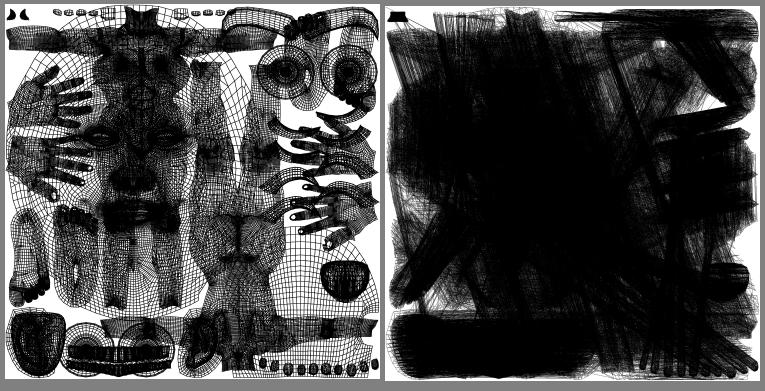
Is there any kind of update or patch for version 301? Or some alternate method of .obj export, perhaps using a script of some kind? Is there something I'm supposed to do within Modo prior to export, to somehow bake the UVs into place or bake the subdivision into the geometry? Or is the UV export handling for .obj format simply knackered and all SNAFUBAR, so Cage is just out of luck? What can I do to get correct UV export from Modo into Poser?
===========================sigline======================================================
Cage can be an opinionated jerk who posts without thinking. He apologizes for this. He's honestly not trying to be a turkeyhead.
Cage had some freebies, compatible with Poser 11 and below. His Python scripts were saved at archive.org, along with the rest of the Morphography site, where they were hosted.
http://forums.luxology.com/discussion/topic.aspx?id=23281
http://forums.luxology.com/discussion/topic.aspx?id=23517
It looks like this is a known bug. The solution is to avoid any "empty mesh layers" in Modo, when exporting. Apparently I have one such, but I'm not sure how to remedy that. I've opened a blank scene in Modo, then imported the Vicky 1 geometry without doing anything else. What is this empty layer, why is it there, and how do I rid myself of it? It sounds like that should fix the problem.
===========================sigline======================================================
Cage can be an opinionated jerk who posts without thinking. He apologizes for this. He's honestly not trying to be a turkeyhead.
Cage had some freebies, compatible with Poser 11 and below. His Python scripts were saved at archive.org, along with the rest of the Morphography site, where they were hosted.
http://forums.luxology.com/discussion/topic.aspx?id=21951&show=empty%20mesh%20item
http://forums.luxology.com/discussion/topic.aspx?id=21319&show=empty%20mesh%20item
http://forums.luxology.com/discussion/topic.aspx?id=21115&show=empty%20mesh%20item
[ http://forums.luxology.com/discussion/topic.aspx?id=18194&show=empty%20mesh%20item
](http://forums.luxology.com/discussion/topic.aspx?id=18194&show=empty%20mesh%20item)
More on the same problem, just FYI.
===========================sigline======================================================
Cage can be an opinionated jerk who posts without thinking. He apologizes for this. He's honestly not trying to be a turkeyhead.
Cage had some freebies, compatible with Poser 11 and below. His Python scripts were saved at archive.org, along with the rest of the Morphography site, where they were hosted.

Take a look at the object layers and delete any empty ones. Export your work as an obj. I've never had a problem with preserving uvs.
Download my free stuff here: http://www.renderosity.com/homepage.php?page=2&userid=323368
Thanks, Paloth. It looks like this bug is new with version 301 and will more easily occur when a mesh is imported (apparently an empty mesh item/layer is automatically created when you do that). So users of other versions or those who've built their geometries within Modo wouldn't encounter the problem, apparently.
I'm glad to have a solution, however! Thanks, everyone! :D
===========================sigline======================================================
Cage can be an opinionated jerk who posts without thinking. He apologizes for this. He's honestly not trying to be a turkeyhead.
Cage had some freebies, compatible with Poser 11 and below. His Python scripts were saved at archive.org, along with the rest of the Morphography site, where they were hosted.
Yes, importing puts the imported mesh, and any textures applied, in a new group in the item list. There's already an empty mesh there waiting for you to start modelling - it's just called mesh, and the label is greyed out to indicate that it's empty: right-click on that and select delete to get rid of it.
Wow. I didn't know I could use open for a non-native file type. I expected it to work like Wings, where you can open a Wings file but have to import .obj. Interesting. Cage, meet learning curve. 
Thank you! :D
===========================sigline======================================================
Cage can be an opinionated jerk who posts without thinking. He apologizes for this. He's honestly not trying to be a turkeyhead.
Cage had some freebies, compatible with Poser 11 and below. His Python scripts were saved at archive.org, along with the rest of the Morphography site, where they were hosted.

Privacy Notice
This site uses cookies to deliver the best experience. Our own cookies make user accounts and other features possible. Third-party cookies are used to display relevant ads and to analyze how Renderosity is used. By using our site, you acknowledge that you have read and understood our Terms of Service, including our Cookie Policy and our Privacy Policy.
Hello, I'm new to Modo and I'm just beginning to test some features. One thing I'd like to be able to so is subdivide a mesh while retaining the UV mapping. Wings 3D can do this, so perhaps I'm spoiled by that, but I was surprised to find that Modo doesn't seem to save the UVs. Is there any trick or script or something that can enable the desired result?
===========================sigline======================================================
Cage can be an opinionated jerk who posts without thinking. He apologizes for this. He's honestly not trying to be a turkeyhead.
Cage had some freebies, compatible with Poser 11 and below. His Python scripts were saved at archive.org, along with the rest of the Morphography site, where they were hosted.