
Renderosity Forums / Carrara
Welcome to the Carrara Forum
Forum Coordinators: Kalypso, Anim8dtoon
Carrara F.A.Q (Last Updated: 2026 Jul 11 2:50 am)
Visit the Carrara Gallery here.

Subject: Poser 6 to C5 Pro newbie question


A starting point for glossy/plastic skin is to go through the shader tree and turn down shininess to 1 or less in all of the skin (body part) shaders. There may be a way to do a mass update/change, or a drag and drop operation, but I just brute force it and change the shaders individually.
If your skin shader in Poser has a texture map in the bump channel, make sure it's in the bump channel on all the appropriate body parts in CS (check invert texture in the check box for it to match how Poser uses the texture). A bump map can really help, you can always borrow one from another character if the one your using doesn't have one.
__________________________________________________________
My Rendo Gallery ........ My DAZ3D Gallery ........... My DA Gallery ......

If your shaders are not set up in a layers list you will have to change them individually per domain. You can still save your adjusted shaders in a file by themselves, import and apply them.
Also, something I have not tried, but may be worth doing is using something like and anisotropic model instead of multichannel. I don't find poser's rendering bad, but it is not realistic to me.One thing is for sure you can setup the lighting and textures anyway you want. We do need the ability to group and apply shaders tho w/o having to use a layers list. The new setup w/ shading domains is better tho. Wanted to add that there is a huge amount you can do w/ lighting and this is very important just like in a real studio.
Message edited on: 02/14/2006 20:08
No need to think outside the box....
Just make it
invisible.
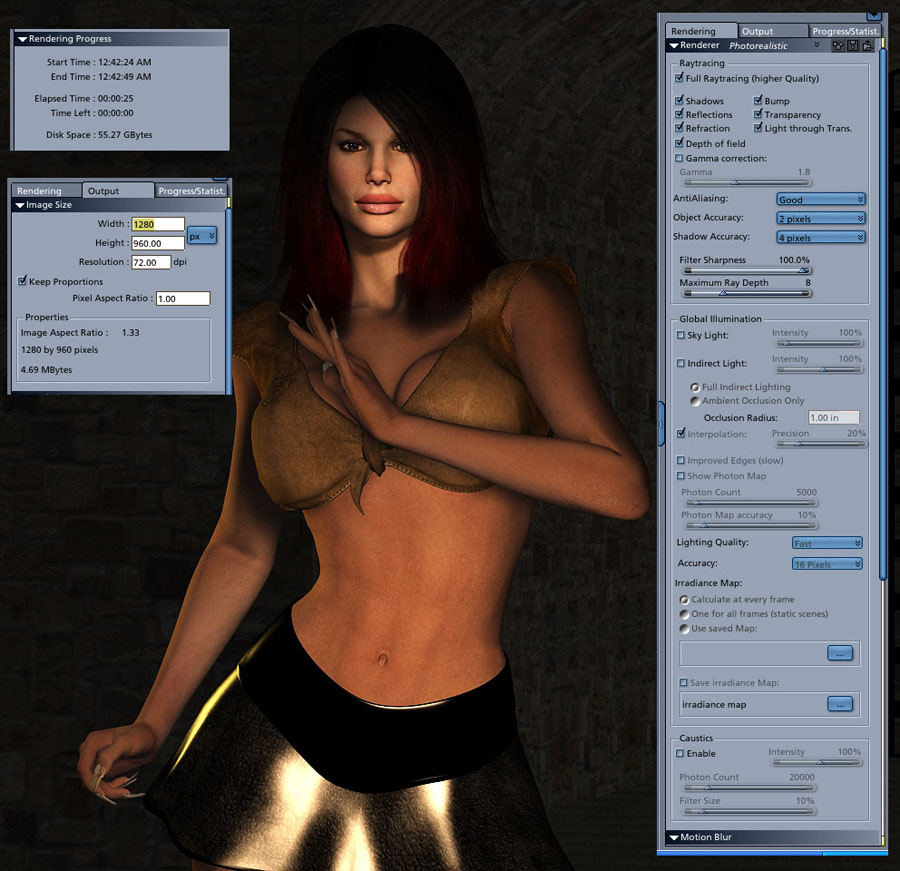
that's pretty damn terrific, especially for 25 seconds! What is the hair model? "I used 3 spots" did the lights come over from Poser or did you establish new lights in Carrara? I didnt touch any material shaders" Did you have shaders turned on in Poser, other than textures? Such as the face_off skin shaders? ::::: Opera :::::
The hair is Jada Hair from DAZ. No Poser Lights. C5's lights make so much more sense. No shaders from Poser either. Now that I'm looking at the image here I'm noticing it's not quite the same as my original. I toned down the size and quality in Photoshop to get it small enough to post. Minor differences in tone that is. I must say that I'm very happy with this little app. Especially considering that I've barely scratched the surface. It's very well thought out in terms of the UI and I'm quickly getting spoiled by the 16 undos... I'll still never leave Poser, but this is really the beez neez.
operaguy,
I didn't mean that as a criticism of poser per se. I understand your quest. I was in a similiar boat a couple months ago. The skills are with the user, of course. The 2 programs serve different purposes so I wouldn't try to compare. Realistic doesn't always mean studio beautiful.I just meant that alot of the lighting and texture in poser doesn't look accurate to me(many also feel this way). I do agree texture quality is vital.But you can setup shaders and lighting in carrara in amazing ways.BTW, the skin examples at the link above all are procedural...no image maps. I just don't think you can go wrong with the tools in c5. Also get this pack if you do.He just added a multipass manager and control that would probably be very nice for poser textures.The whole pack is very useful and dirt cheap. http://www.des-web.net/
Message edited on: 02/15/2006 02:57
No need to think outside the box....
Just make it
invisible.
The shaders at des-web look really cool. And I agree that Multi-pass manager and MultiPass Control looks as if they could be brought into play as skin shader contributors. " alot of the lighting and texture in poser doesn't look accurate " If by that you mean "there are a lot of images in the Poser galleries with poor texture and lighting" then I get it. Granted. But that is no reflection on Poser. If, however, you mean Poser is intrisically unable to create realistic skin and shadows and hair -- which seems to be the meaning of your sentence "I don't find poser's rendering bad, but it is not realistic to me" -- then you may have not yet learned how to do it. If you HAVE learned to produce highly realistic hair/skin/shadows in closeups in Carrara, please help us poor Poser refugees (we are chasing Carrara for speed and other goodies that are obviously superior) see them and keep passing on links to tools that make it happen. However, I am in a quest from the opposite direction. I am still looking for Carrara renders of tight closeups that equal the brilliance of an advanced Poser render for realism in hair, shadow and skin. The only one I've seen so far is a non-close up of Miki imported in with no hair and excellent GI, which is found here in the Rendo galleries by searching on Carrara+Realism. The tutorial linked in Post9 above indicates a direction; "Go down this road to achieve skin realism in Carrara." The results based on that one image at the bottom, however, do not approach Poser state of the art. Doubtless they could be taken further. For instance, there is SSS in Carrara, no? Where are samples of finished renders that blow your socks off with it? In galleries, if you search Poser + Realism, you will get 136 PAGES of images. Many are dreck. Many are really fine. A few examples (i tried to find ones that said no postwork): http://www.renderosity.com/viewed.ez?galleryid=1147212&Start=1&Artist=Shahara&ByArtist=Yes http://www.renderosity.com/viewed.ez?galleryid=1068240&Start=325&Sectionid=1&filter_genre_id=25&WhatsNew=Yes http://www.renderosity.com/viewed.ez?galleryid=845189&Start=19&Artist=Shahara&ByArtist=Yes http://www.renderosity.com/viewed.ez?galleryid=1143396&Start=37&Sectionid=1&filter_genre_id=25&WhatsNew=Yes http://www.renderosity.com/viewed.ez?galleryid=1093231&Start=217&Sectionid=1&filter_genre_id=25&WhatsNew=Yes http://www.renderosity.com/viewed.ez?galleryid=1091448&Start=235&Sectionid=1&filter_genre_id=25&WhatsNew=Yes That last one is by "FS", someone obsessed with Poser and realism. ::::: Opera :::::
jt411,
orion1167 makes some great stuff, and it works very well in Carrara, the only complaint I have is with the lips - the highlights are a part of the texture, as can be seen by the bright/light color on the bottom lip (but that can be easily fixed in an image editing program).
It's been a while since I used the character from orion1167 that I have, but as I recall, he includes bump maps with them. If not, you can use the regular texture map in the bump channel (check the invert box as I recall), and it will help to add a touch or realism to the render.
DR
__________________________________________________________
My Rendo Gallery ........ My DAZ3D Gallery ........... My DA Gallery ......

Operaguy, those Poser realism examples you gave are excellent, but do you honestly believe they would hold up to scrutiny in an animated situation? I mean, most of them seem to be using baked-on specularity and reflections for the eyes and skin. That last example in particular looks like the eyes are definitely postworked, even though he says no postwork. Not accusing him, of course, just my opinion. I'd have to see it animated like that to convince me otherwise. Also, none of them are using any noticable shadows. One in particular has teeth that appear to glow. In my opinion, these examples work nicelyu for stills, but most of that realism would fall apart quickly if animated for any prolonged length of time.
yeah, they are not great, but my point was to say that, despite the hobby throngs over at poser, and despite the sorry fact that many vendors paint highlights onto hair and skin textures, and despite the inept usage of said tools, the app itself is capable of resolving very fine details and very fine effects. You know, there are not many studios, from Dreamworks/Pixar on down to the one-person desktop, animating hyper-realism in-close. I'm about to render a new example, will post here beginning of the week or when done. Would welcome close and tough examination from you. ::::: Opera :::::
"You know, there are not many studios, from Dreamworks/Pixar on down to the one-person desktop, animating hyper-realism in-close" I'm not sure I get this, Operaguy. Surely there have been in-close shots during the FinalFantasy movies if I recall correctly that were extremely realistic. Why would anyone need to maintain an extreme close-up shot for longer than a few seconds during the course of telling a story anyway? Do you intend to shoot your entire movie with the camera on top of the character's faces and hair the whole time? As far as resolving fine details, I'm not sure I know of any renderers that aren't capable of doing that. If render settings are adequate, then details should be there.
Just dropping in a few things I've messed with in Carrara: added a little bump (when there was no bump map in the texture) using mostly the cellular generator. Dialed down highlight quite a bit. Used soft shadows on lights (and plentiful GI). I think the anisotropic effects of "fake fresnel" shaders have much promise. I've tried slotting them in to alter highlights, bump depth, and tone -- usually by cloning the skin texture and making a mixer shader out of two variations of it (controlled by fake fresnel). So far, though, I'm not getting great skin in Carrara. But then, I've never gotten great skin in Poser, so I think it's me, not the program.
Great skin depends first and foremost on great maps. I'm not talking about your run of the mill photo maps, I mean different maps for diffuse, bump, specular, SSS, and even blemishes. You rarely get proper bump maps with poser textures, let alone proper specular and SSS maps. Carrara has one immediate weakness over most other apps that use Subsurface Scattering, in that the new SSS feature is not able to be defined by a control map. It doesn't kill the feature's usefulness, just doesn't give you much control over where the SSS is, and how much of it is there. I've seen this is very much a useful feature mentioned a lot on CGTalk when they talk about Mental Ray's SSS Skin shader.
I was just saying that the shadows and textures I am seeing while nice, don't look real or accurate (again not intended to be a criticism and didn't mean to sidetrack your thread)They look more drawn to me. The technology used in the render part of poser doesn't claim to be 100% realistic anyway. I feel it is a major challenge to render accurate lighting quickly, but certainly worth attempting. You, of course are trying to get the best of both worlds w/ speed and accuracy. Seems like a laudible goal.Since I don't even own poser, atm (I use D|S, and very little), I wish I could contribute more. I think it is a valid excercise.I think the proper use of maps is very important and part of skill development in texturing. It is an area that should be covered more for carrara. On the note about sss in carrara I will say that I have been able to define sss settings independantly on seperate shaders in seperate domains.This doesn't give as much control,I don't think as control maps, but if you tweak each shader individually with the above mentioned maps in the different channels seems like you could get enough variation. Now how accurate it would be I don't know. If you are using a layers lists as many often do w/ poser figures, I donot believe you could do this. The key is seperate shaders for body parts defined in their own domains.I will say that hair coming into carrara doesn't look so great, I think an anisotropic lighting model might help also. I have seen that there is amazing options and work arounds for things tho...just have to figure them out. As far as I can tell tho, carrara channels are setup very well in comparison to some highend products, it's just you don't see, as skilled a user often, taking advantage of these channels.(Altho there is some superb carrara work at cgtalk.com, by some real pros)
No need to think outside the box....
Just make it
invisible.

Privacy Notice
This site uses cookies to deliver the best experience. Our own cookies make user accounts and other features possible. Third-party cookies are used to display relevant ads and to analyze how Renderosity is used. By using our site, you acknowledge that you have read and understood our Terms of Service, including our Cookie Policy and our Privacy Policy.
Hi all, I picked up C5 Pro yesterday. The Trans Poser works great, but my V3 characters' skin looks a little too much like plastic/rubber. I've only been using spots and bulbs. Is it in the lighting? Or maybe the textures themselves. (Too much specularity?) Any suggestions? Thanks