
-
Marketplace
-
Free Stuff
-
Galleries
-
Community
Forums General
- News
- Deals
- Poser
- Contact
Renderosity Forums / Poser Technical
Welcome to the Poser Technical Forum
Forum Moderators: Lobo3433, Staff Forum Coordinators: Anim8dtoon
Poser Technical F.A.Q (Last Updated: 2026 Mar 10 4:57 pm)
Welcome to the Poser Technical Forum.
Where computer nerds can Pull out their slide rules and not get laughed at. Pocket protectors are not required. ;-)
This is the place you come to ask questions and share new ideas about using the internal file structure of Poser to push the program past it's normal limits.
New users are encouraged to read the FAQ sections here and on the Poser forum before asking questions.
Checkout the Renderosity MarketPlace - Your source for digital art content!

Subject: Poser application data on a Mac

Report Post

If I'm not wrong: launch the finder, open up the menu "Go to", then use the Option key to make appear an option (Bibliothèque in French, prob. Library in English) as you can see below:
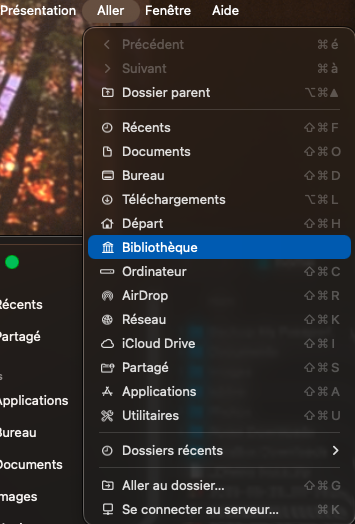
That will lead you to a place in which you should find "Application Support". Open it, scroll down to Poser and its corresponding subfolder (the version) or "Poser Pro"
𝒫𝒽𝓎𝓁
(っ◔◡◔)っ
👿 Win11 on i9-13900K@5GHz, 64GB, RoG Strix B760F Gaming, Asus Tuf Gaming RTX 4070 OC Edition, 1+2 TB SSD's, 6+4TB HD
👿 Mac Mini M2, Sequoia 15.5, 16GB, 500GB SSD
👿 Nas 10TB
👿 Poser 13 and 14 ❤️
-
- Renderosity Page
- Renderosity Communities
- Blender 3D
- iClone
- Poser Users
- Poser Software
- Become an Affiliate
- Memorials
-
About
- About Us
- Contact Us
- Team
- Policies
- Terms of Service
- Copyright Policy
- Refund Policy
- Licenses
- Standard License
- Extended License

Privacy Notice
This site uses cookies to deliver the best experience. Our own cookies make user accounts and other features possible. Third-party cookies are used to display relevant ads and to analyze how Renderosity is used. By using our site, you acknowledge that you have read and understood our Terms of Service, including our Cookie Policy and our Privacy Policy.
Poser application data on a Mac Where is it ? Currently running Poser 11 and have administrator privileges.