
mazzam opened this issue on Feb 19, 2026 · 3 posts
mazzam posted Thu, 19 February 2026 at 10:55 AM
Poser application data on a Mac Where is it ? Currently running Poser 11 and have administrator privileges.

Y-Phil posted Sat, 21 February 2026 at 4:02 PM
If I'm not wrong: launch the finder, open up the menu "Go to", then use the Option key to make appear an option (Bibliothèque in French, prob. Library in English) as you can see below:
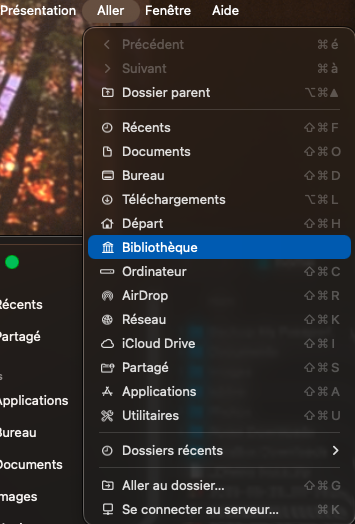
That will lead you to a place in which you should find "Application Support". Open it, scroll down to Poser and its corresponding subfolder (the version) or "Poser Pro"
𝒫𝒽𝓎𝓁
(っ◔◡◔)っ
👿 Win11 on i9-13900K@5GHz, 64GB, RoG Strix B760F Gaming, Asus Tuf Gaming RTX 4070 OC Edition, 1+2 TB SSD's, 6+4TB HD
👿 Mac Mini M2, Tahoe 26.4.1.2.3.4.5.6.7...., 16GB, 500GB SSD
👿 Nas 10TB
👿 Poser 13 and 14 ❤️
mazzam posted Sat, 21 February 2026 at 8:15 PM
I found it for some reason Poser 11 installs itself as shared.