
Renderosity Forums / Carrara
Welcome to the Carrara Forum
Forum Coordinators: Kalypso, Anim8dtoon
Carrara F.A.Q (Last Updated: 2026 Sep 09 4:39 am)
Visit the Carrara Gallery here.

Subject: Sub-Surface Scattering - can light pass through?


I know they're not the same thing, but as the SSS makes the incident light visible at the other side of the object, it seemed logical that some light might leave the object, esp if the shader was applied to the whole object and not just a skin layer.
I guess I was trying to avoid having to create transparency, as this does change the look of the object.
Thanks
R

Perhaps you can assign an Anything Glows attribute to it. Not sure how you would tie that in to the SSS pattern, though. I'm looking right now at my desk lamp. Typical case, the translucent plastic diffusor has a hotspot near the bulb, and that's where most of the light for the my room is coming from. Obviously, though, that's not gonna happen with current implementation of SSS. Probably have to fake it with a shader in a glow channel, or something similar.

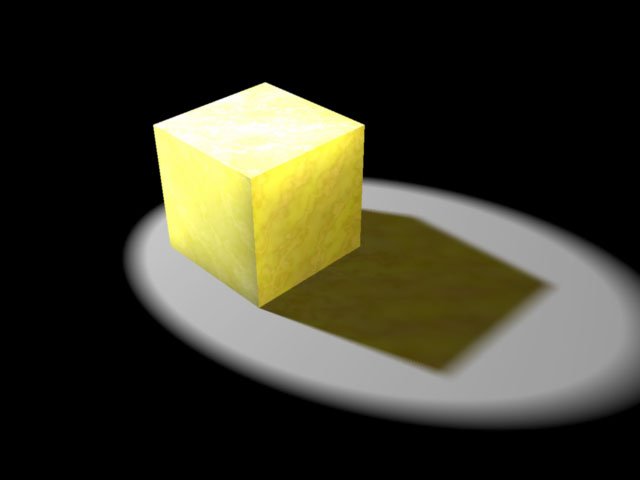
Thanks for replies. I wondered if I would have to fake it somehow. Your example does go some of the way towards it, and it could be improved further if the glow intensity faded with distance, to simulate the GI glow that occurs in the corners where objects meet.
If the SSS channel is using a greyscale shader to create the marbling, this could be copied to the translucency channel with an appopriate value to create something more realistic.
I haven't explored the Translucency channel yet - might that offer a solution? Am not sure how the light-transmitting properties of SSS might differ from Translucency in the relevent shader properties?
Thanks
Richard
The Translucency Channel is the solution. ;) Subsurface Scattering is only for the object itself, not the environment around it. Regarding your comment about lowering the intensity of the color in the shadow as it moves away, that is easily accomplished by mulitplying a gradient into the Translucency channel. Mark
This is as close as I can get, along the lines suggested.
I can't get any results from the Color Gradient. It only seems to make use of the color at one end of the gradient.
I have created a Mixer with the Colour Channel shader as Source 1, and a color gradient as Source 2, but cannot get any graduation at all. I can get an effect if I use "Brick" or something obvious like that.
Also I'm not sure why the "Color Gradient" requires a Color subshader.

Shader settings:


Still learning this package!
Thanks
R
Hi Richard, Sorry for the delayed response. The color gradient in Carrara probably behaves a little differently than you might expect. It's real purpose is to add color to grayscal operators (like marble or noise operators), not to actually be used like you use regular color in the color channel. That's why there is a shader sub channel - you pick an already made (by you) black and white shader that the color will be applied to. For an example, open up one of the stone shaders and examine how they've built the color channel. For the translucency channel you'll need to multiply in a grayscale gradient instead of a color gradient. Mark

Privacy Notice
This site uses cookies to deliver the best experience. Our own cookies make user accounts and other features possible. Third-party cookies are used to display relevant ads and to analyze how Renderosity is used. By using our site, you acknowledge that you have read and understood our Terms of Service, including our Cookie Policy and our Privacy Policy.
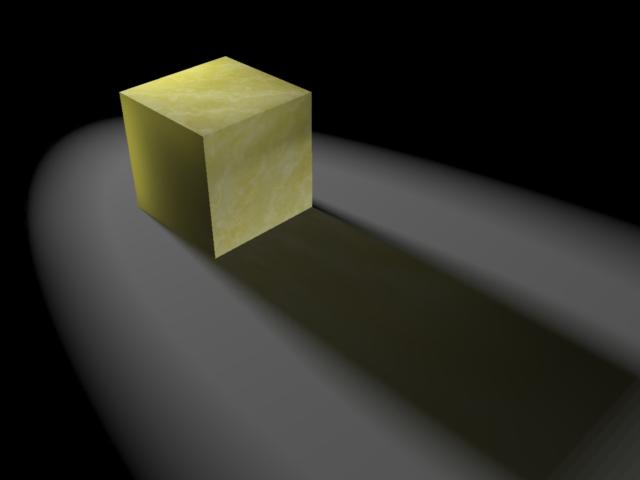
In Carrara 5.1, am shining a bright light at a default-sized cube which is shaded with the Preset "Marbled Wax" Sub-Surface Scattering (SSS) shader.
Rendering with GI and "Light Through transparency", I would expect some of the scattered light to leave the cube and go on to illuminate the next object, as happens with a transparent shader. But it is completely dark, as pic shows:
Does any light leave an object with an SSS shader which has Transparency set to 0?
Thanks
Richard