
Renderosity Forums / Poser Python Scripting
Welcome to the Poser Python Scripting Forum
Forum Moderators: Lobo3433, Staff Forum Coordinators: Anim8dtoon
Poser Python Scripting F.A.Q (Last Updated: 2026 Apr 22 10:09 am)
Check out the new Poser Python Wish List thread. If you have an idea for a script, jot it down and maybe someone can write it. If you're looking to write a script, check out this thread for useful suggestions.
Also, check out the official Python site for interpreters, sample code, applications, cool links and debuggers. This is THE central site for Python.
You can now attach text files to your posts to pass around scripts. Just attach the script as a txt file like you would a jpg or gif. Since the forum will use a random name for the file in the link, you should give instructions on what the file name should be and where to install it. Its a good idea to usually put that info right in the script file as well.
Checkout the Renderosity MarketPlace - Your source for digital art content!

Subject: An old problem with parenting props is still here in Poser 10.


I often use one of my own scripts to load and parent props to a figure. I'd also noticed that sometimes when I delete a figure the props remain. But I hadn't spotted the link between the two things till now. I'd be very interested to know if there's a script-based solution (but reading the OP I doubt it)
(I user Poser 6 and 9)
The 3Dcheapskate* occasionally posts sensible stuff. Usually by accident. And it usually uses Poser 11, with units set to inches. Except when it's using Poser 6 or PP2014, or when its units are set to PNU or something else.
*soon only to be available in two flavours - DAZ and Renderosity

Sorry for the thread necro. Running into the same problems. With script, Prop will parent to a body part but doesn't show as part of the figure.
Furthermore, parenting a prop to another prop (both standalone), the prop is parented but it isn't really "connected" in the scene.
Open the hierarchy editor and the props are still at the bottom, nothing parented. In both cases. Also filed a report.
This makes it seriously troublesome to do other things via python once you've used SetParent. You begin to get Nonetype references if you delete the figure and used SetParent to parent a prop. Eventually this gets fairly unstable.
.
The root cause of all this is that .cr2 file language has two ways of saying what is parented to what. The Parent (and inkyParent for IK-goals) lines in each prop or jointed part's long actor (and the on/off lines in the inkyChain sections), should have been enough. But instead they decided to "belt and braces" it and have the addChild tables also, and from that came all this complication.
Attached Link: http://www.renderosity.com/mod/forumpro/showthread.php?thread_id=2741202
Anthony,See the last post in this thread for a solution.
(attached, I'm not screwing with figuring out the code to get it to show up inline, too sleepy).
In the case of props, you can have your script write a temporary pose and then call it into the scene. Make sure the script selects the prop. You need to keep the "smartparent" bit even though you aren't "smart parenting". and you'd replace "UNIVERSE" with the actor's internal name, which you can get from python if you need.
You'll need a temp pose for each prop to be parented and you can iterate over the props you need to affect.
The SetParent command seems to work fine if you are parenting a figure to another figure's body part (for example parenting cr2 hair to a female's head)
.
I tried this, and, if I first select a prop which has been "half-parented" by a Python script, it should change it into proper full parenting. I DO NOT GUARANTEE ANYTHING :: test it first!!!
import poser
 import string
 import os
 import sys
 scn = poser.Scene()
 act = scn.CurrentActor()

 acts=scn.Actors()
 figs=scn.Figures()

 propin=ac.InternalName()
 propen=ac.Name()
 ac=scn.CurrentActor()
 if ac.IsProp():
     par=ac.Parent()
     parin=par.InternalName()
     paren=par.Name()
     print paren,"(",parin,") is parent of ",propen,"(",propin,"), now trying to parent it fully properly"
     libaddr=poser.Libraries()[0]
     fileaddr=libaddr+"RuntimeLibrariesPosezxcvbnm.pz2"
     print "writing temporary pose file to ",fileaddr
     pose=open(fileaddr,"w")
     pose.write("{ntactor $CURRENTnt{nttsmartparent "+parin+"nt}n}n")
     pose.close()
     scn.LoadLibraryPose(fileaddr)
     print "re-parented"
 else:
     print "FAILED:", propin," is not a prop"
 poser.ProcessCommand(1559)
 scn.DrawAll();
I'll have to give that a try...
The 3Dcheapskate* occasionally posts sensible stuff. Usually by accident. And it usually uses Poser 11, with units set to inches. Except when it's using Poser 6 or PP2014, or when its units are set to PNU or something else.
*soon only to be available in two flavours - DAZ and Renderosity
Oops. It should be:-
import poser
import string
import os
import sys
scn = poser.Scene()
acts=scn.Actors()
figs=scn.Figures()
ac=scn.CurrentActor()
propin=ac.InternalName()
propen=ac.Name()
if ac.IsProp():
par=ac.Parent()
parin=par.InternalName()
paren=par.Name()
print paren,"(",parin,") is parent of ",propen,"(",propin,"), now trying to parent it fully properly"
libaddr=poser.Libraries()[0]
fileaddr=libaddr+"RuntimeLibrariesPosezxcvbnm.pz2"
print "writing temporary pose file to ",fileaddr
pose=open(fileaddr,"w")
pose.write("{ntactor $CURRENTnt{nttsmartparent "+parin+"nt}n}n")
pose.close()
scn.LoadLibraryPose(fileaddr)
print "re-parented"
else:
print "FAILED:", propin," is not a prop"
poser.ProcessCommand(1559)
scn.DrawAll();
This is a go at making it into a Python routine:-
def parentprop(ac,par):
scene = poser.Scene()
if ac.IsProp():
scene.SelectActor(ac)
propin=ac.InternalName()
propen=ac.Name()
parin=par.InternalName()
paren=par.Name()
print "parenting",propen,"(",propin,") to ",paren,"(",parin,")"
libaddr=poser.Libraries()[0]
fileaddr=libaddr+"RuntimeLibrariesPosezxcvbnm.pz2"
print "writing temporary pose file to ",fileaddr
pose=open(fileaddr,"w")
pose.write("{ntactor $CURRENTnt{nttsmartparent "+parin+"nt}n}n")
pose.close()
scn.LoadLibraryPose(fileaddr)
print "re-parented"
else:
print "FAILED:", propin," is not a prop"
Cheers Anthony! A minor correction, and a replacement of Poser.Libraries with something that works in Poser 6, and I can confirm that the props loaded via script are now deleted along with the figure. (I just tried it in the script-based freebie I uploaded a day or so ago here http://www.renderosity.com/mod/forumpro/showthread.php?thread_id=2879764 )
def parentprop(ac,par):
scn = poser.Scene()
if ac.IsProp():
scn.SelectActor(ac)
propin=ac.InternalName()
propen=ac.Name()
parin=par.InternalName()
paren=par.Name()
print "parenting",propen,"(",propin,") to ",paren,"(",parin,")"
sTmp = os.path.join('Runtime','Libraries','Pose','3DCheapskate','TempPose.pz2')
poserpath=os.path.split(poser.AppLocation())
fileaddr = os.path.join(poserpath[0],sTmp)
print "writing temporary pose file to ",fileaddr
pose=open(fileaddr,"w")
pose.write("{ntactor $CURRENTnt{nttsmartparent "+parin+"nt}n}n")
pose.close()
scn.LoadLibraryPose(fileaddr)
print "re-parented"
else:
print "FAILED:", propin," is not a prop"
Edit: saving the figure works too - when you load the figure back the props are there correctly parented (from a qquick visual inspection and waggle of the arms)
P.S. Poser 6 simply overwrites the temporary file when you try a second prop - no warning or confirmation. Which is good in some ways, bad in others...
The 3Dcheapskate* occasionally posts sensible stuff. Usually by accident. And it usually uses Poser 11, with units set to inches. Except when it's using Poser 6 or PP2014, or when its units are set to PNU or something else.
*soon only to be available in two flavours - DAZ and Renderosity
Oh dear - I've always had problems posting backslashes here... (editing a post with backslashes is/was worst iirc - but it's past the edit cut-off time on that post anyway)
The 3Dcheapskate* occasionally posts sensible stuff. Usually by accident. And it usually uses Poser 11, with units set to inches. Except when it's using Poser 6 or PP2014, or when its units are set to PNU or something else.
*soon only to be available in two flavours - DAZ and Renderosity
I've only just realized that the workaround (writing and then applying a temporary pose file that smartparents the prop to the appropriate body part) which worked fine in PP2014, no longer works in Poser 11. In Poser 11 the prop is positioned so that it's correct for the figure's default/zero pose, not the figure's current pose. So the 'smart' part of 'smartparent'... isn't.
Does anybody know offhand whether the original bug was fixed in Poser 11 ?
The 3Dcheapskate* occasionally posts sensible stuff. Usually by accident. And it usually uses Poser 11, with units set to inches. Except when it's using Poser 6 or PP2014, or when its units are set to PNU or something else.
*soon only to be available in two flavours - DAZ and Renderosity

FVerbaas posted at 2:34PM Tue, 29 September 2020 - #4400505
I do not know if the original bug is fixed, but I think chances are low.
To fix the 'smart' part you could try to apply the world transformation of the parent actor (parentactor.WorldMatrix()) to the prop to be parented.
It looks like I might have to do that - yet another conditional 'if PoserVersionX do A elif ...' !
~ ~ ~
I've just done a quick (definitely not thorough or conclusive) Poser 11 test using actor.SetParent(parent,inheritbends,realign) with all four possible combinations of the two booleans (i.e. inheritbends and realign) instead of the workaround parentprop(ac,par) function in my 2 Apr 2014 post.
If I delete the figure after running the script then the prop also disappears, so the original problem has definitely been at least partially fixed (I haven't checked saving a CR2 or PZ3 yet).
However, the prop is NOT correctly positioned/oriented (unless the figure is in the default/zero pose), regardless of which of the four boolean permutations is used - each permutation seems to put the prop in a different incorrect position/location.
So Poser 11 actor.SetParent() does NOT appear to be correctly smartparenting props.
(I can't recall whether the smartparenting bit of SetParent() was working in previous Poser versions - I need to go and test on PP2014 on another machine.)
The 3Dcheapskate* occasionally posts sensible stuff. Usually by accident. And it usually uses Poser 11, with units set to inches. Except when it's using Poser 6 or PP2014, or when its units are set to PNU or something else.
*soon only to be available in two flavours - DAZ and Renderosity
A better test - Andy + ball + box + cone + cylinder, all at origin, unparented, and Andy in a non-zero pose
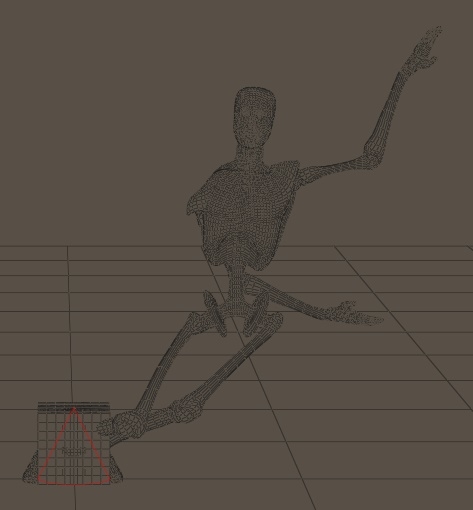
Anthony's simple script, slightly modified:
import poser
scn = poser.Scene()
hand = scn.Actor("Left Hand")
box = scn.Actor("box_1")
ball = scn.Actor("ball_1")
cone = scn.Actor("cone_1")
cylinder = scn.Actor("cyl_1")
box.SetParent(hand,0,0)
ball.SetParent(hand,0,1)
cone.SetParent(hand,1,0)
cylinder.SetParent(hand,1,1)
POSER PRO 2014 FIRST AS A BASELINE
Run script in PP2014. Only the ball's origin is still at the world origin. The cone/cylinder origins have moved to Andy's hand:
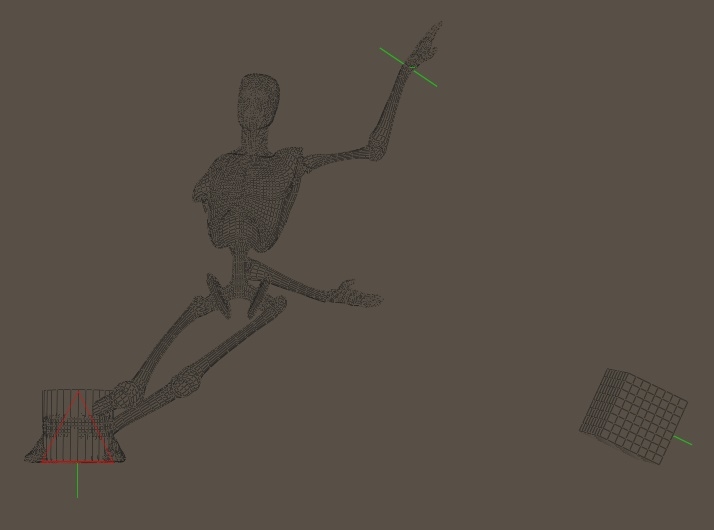
Move Andy to check parenting:
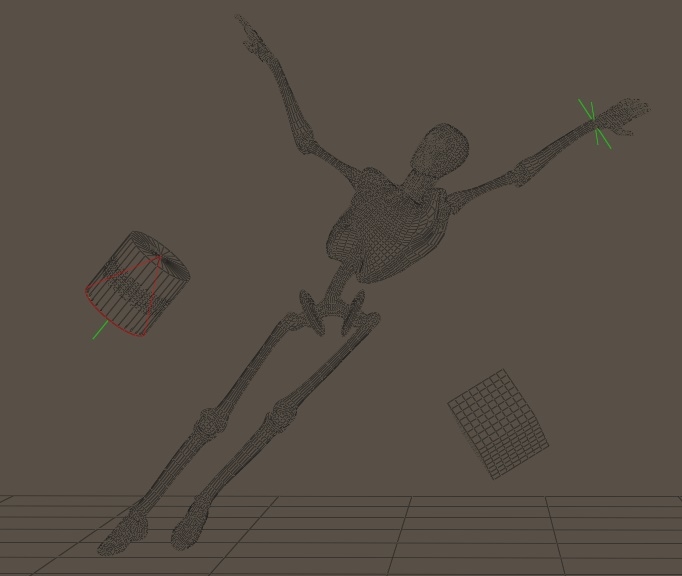
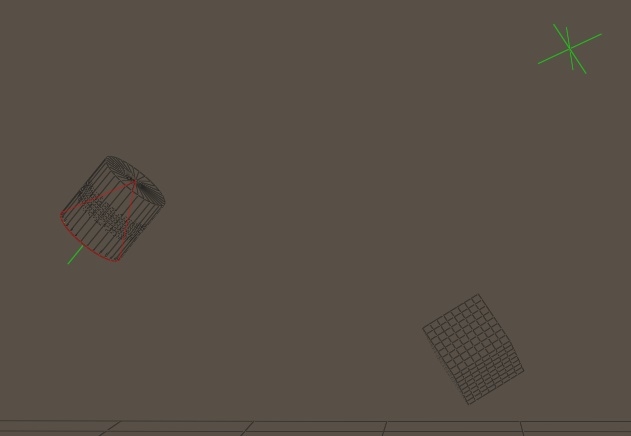
Delete Andy - props aren't deleted. That was the main symptom of the original bug:
The 3Dcheapskate* occasionally posts sensible stuff. Usually by accident. And it usually uses Poser 11, with units set to inches. Except when it's using Poser 6 or PP2014, or when its units are set to PNU or something else.
*soon only to be available in two flavours - DAZ and Renderosity
NOW THE SAME IN POSER 11
Initial Poser 11 setup (loaded the same PZ3):
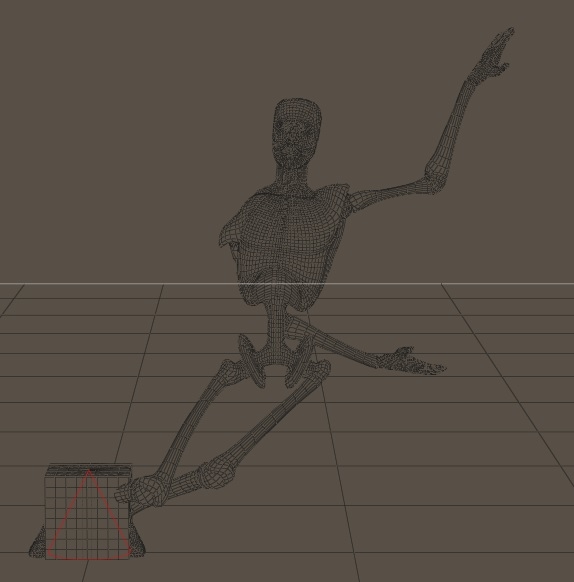
Run the script. Positions of cylinder/cane are significantly (even though the amount is small) different . theit origins are still at the world origin (I think - not 100% sure I checked that):
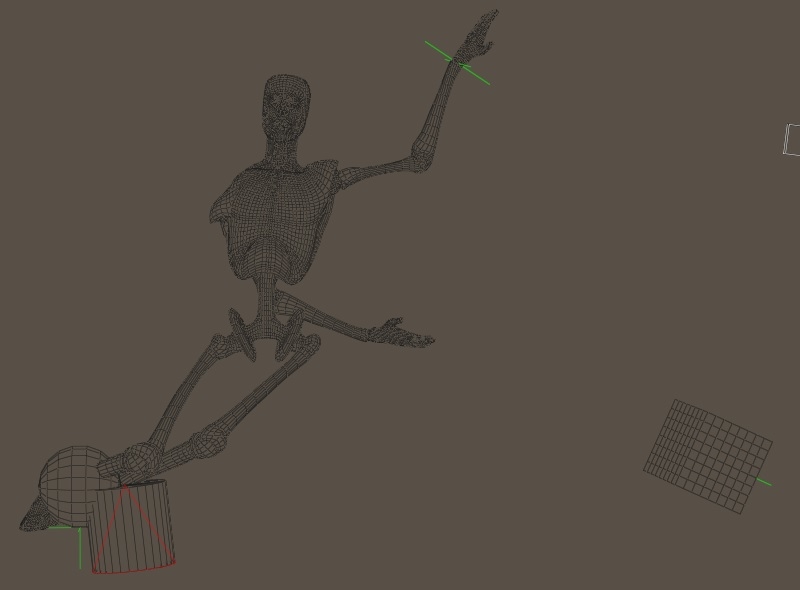
Move Andy.
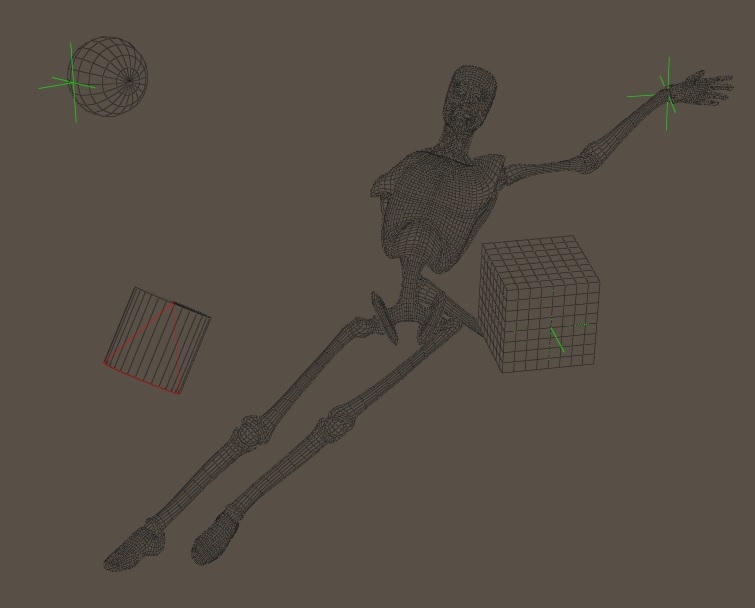
Delete Andy. All four props are deleted too, so that part of the original bug seems to be fixed.

The 3Dcheapskate* occasionally posts sensible stuff. Usually by accident. And it usually uses Poser 11, with units set to inches. Except when it's using Poser 6 or PP2014, or when its units are set to PNU or something else.
*soon only to be available in two flavours - DAZ and Renderosity
I'm wondering why do the cone/cylinder behave differently in Poser 11 ? Looking at the script they both have the 'inheritbends' boolean set true, so it must be something to do with that.
I also noticed that using twist/bend/side-side on Andy's left hand has no effect on the cone/cylinder. Would 'inheritbends' explain that ?
The 3Dcheapskate* occasionally posts sensible stuff. Usually by accident. And it usually uses Poser 11, with units set to inches. Except when it's using Poser 6 or PP2014, or when its units are set to PNU or something else.
*soon only to be available in two flavours - DAZ and Renderosity
Also just confirmed that if I save Andy as a CR2 it includes the addChild() statements:
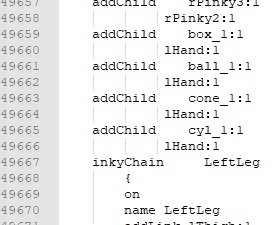
And when I load that CR2 the four props are present and correctly parented.
So it looks as if that bug is actually fixed now ! (No idea which version of Poser 11 that happened in)
So I wonder if the changed behaviour of 'inheritBends' is also part of this fix, but something we hadn't noticed ?
(And contrary to what I said in an earlier post, smartparenting does appear to be working. See next post)
The 3Dcheapskate* occasionally posts sensible stuff. Usually by accident. And it usually uses Poser 11, with units set to inches. Except when it's using Poser 6 or PP2014, or when its units are set to PNU or something else.
*soon only to be available in two flavours - DAZ and Renderosity
3dcheapskate posted at 6:22PM Tue, 29 September 2020 - #4400577
...However, the prop is NOT correctly positioned/oriented (unless the figure is in the default/zero pose), regardless of which of the four boolean permutations is used - each permutation seems to put the prop in a different incorrect position/location.
So Poser 11 actor.SetParent() does NOT appear to be correctly smartparenting props....
Please ignore that bit - I appear to be talking out of my @r$£ ! :D
All four props were originally at the origin with their own origins at the origin. So of course Andy's bodypart rotations will move them to strange places !
The 3Dcheapskate* occasionally posts sensible stuff. Usually by accident. And it usually uses Poser 11, with units set to inches. Except when it's using Poser 6 or PP2014, or when its units are set to PNU or something else.
*soon only to be available in two flavours - DAZ and Renderosity
Easier to see what's happening in Poser 11 if I position the props as if they're sitting on Andy's head and change the script to parent to Andy's head, not hand.
import poser
scn = poser.Scene()
head = scn.Actor("Head")
box = scn.Actor("box_1")
ball = scn.Actor("ball_1")
cone = scn.Actor("cone_1")
cylinder = scn.Actor("cyl_1")
box.SetParent(head,0,0)
ball.SetParent(head,0,1)
cone.SetParent(head,1,0)
cylinder.SetParent(head,1,1)
Here's the initial positioning of the unparented props compared to a zeroed Andy.
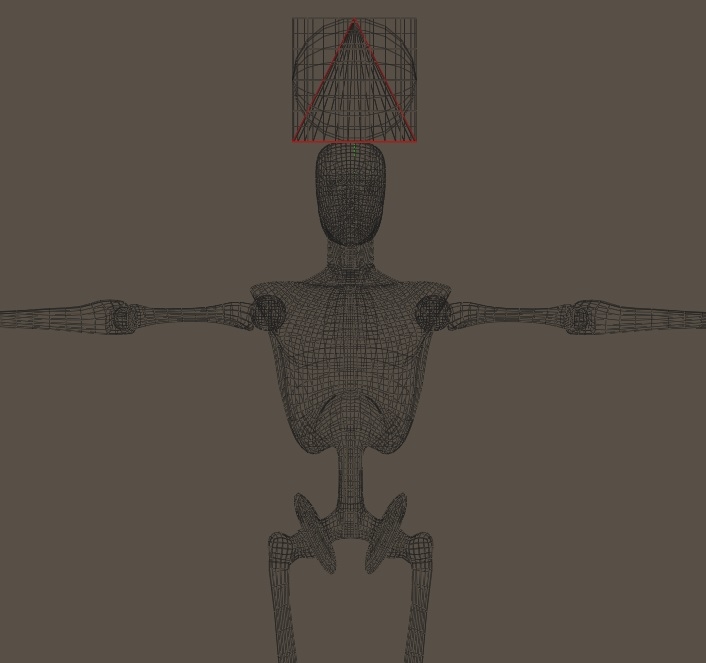
I reposition Andy:
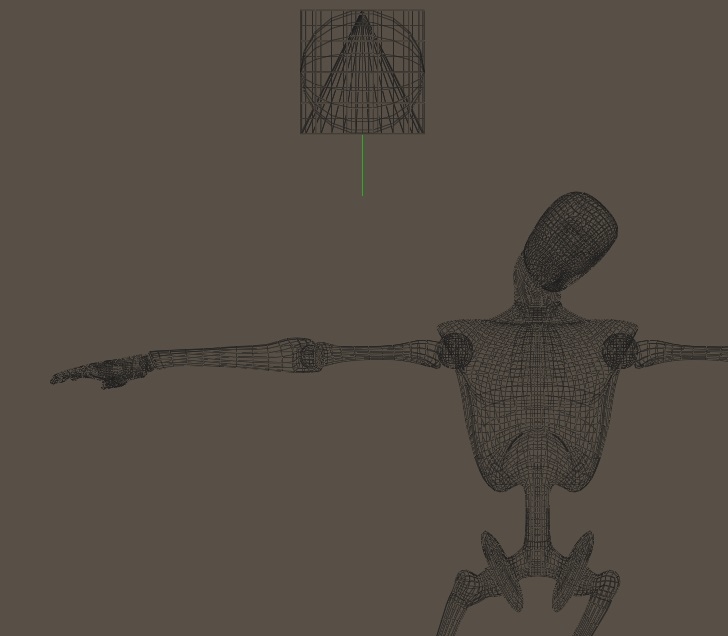
And then run the script:
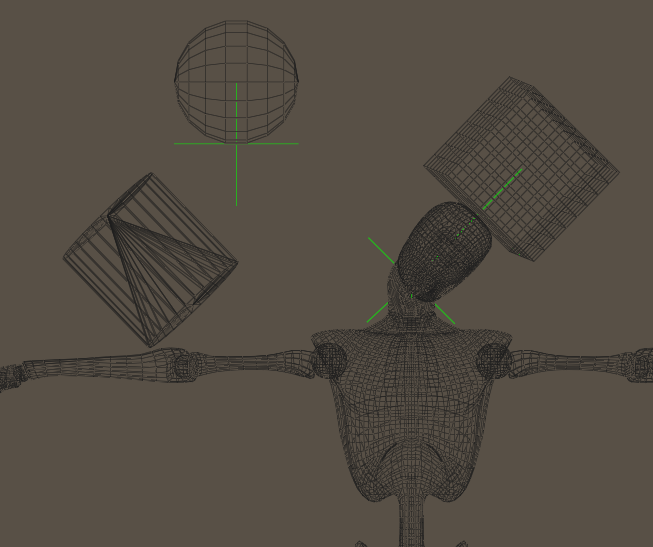
The box is the only thing in the correct position/orientation, so it's actor.SetParent(parent,0,0) or simply actor.SetParent(parent) (i.e. DON'T inheritbends, DON'T realign) to smartprop the prop. And it looks to me (purely visual check) that the ball actor.SetParent(parent,0,1) ( (i.e. DON'T inheritbends but DO realign) is in about the correct position for a zeroed Andy.
I also noticed that if I waggle Andy's head around then the cone and cylinder both deform. This must be something to do with 'inherirtbends'.
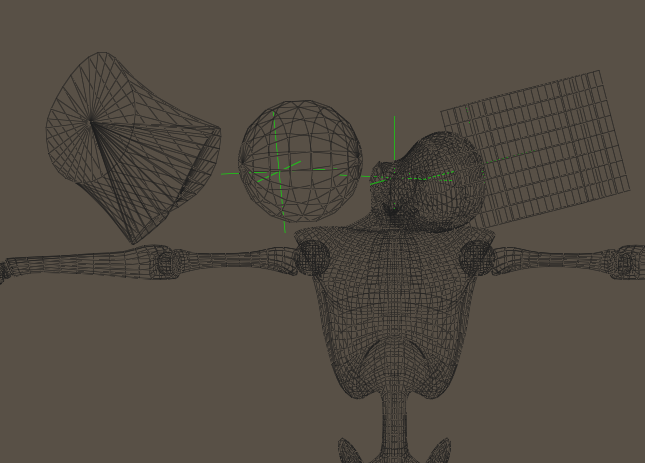
Not knowing what inheritbends and realign are meant to do (the PoserPython Manual is useless there) I can't tell whether this is the correct behaviour.
The 3Dcheapskate* occasionally posts sensible stuff. Usually by accident. And it usually uses Poser 11, with units set to inches. Except when it's using Poser 6 or PP2014, or when its units are set to PNU or something else.
*soon only to be available in two flavours - DAZ and Renderosity

Privacy Notice
This site uses cookies to deliver the best experience. Our own cookies make user accounts and other features possible. Third-party cookies are used to display relevant ads and to analyze how Renderosity is used. By using our site, you acknowledge that you have read and understood our Terms of Service, including our Cookie Policy and our Privacy Policy.
In my Poser 10 I set up a scene containing the Casual Man (named "man"), and a box and a ball and a cone and a cylinder (not parented to him). I then ran a Poser Python script containing these statements:-
chest = scn.Actor("Chest")
box = scn.Actor("box")
ball = scn.Actor("ball")
cone = scn.Actor("cone")
cylinder = scn.Actor("cylinder")
box.SetParent(chest,0,0)
ball.SetParent(chest,0,1)
cone.SetParent(chest,1,0)
cylinder.SetParent(chest,1,1)
This parented the 4 props to the man, and when I moved the man, the props moved with him. OK so far. But:-
If I parent a prop to a character using Poser, the prop disappears when I delete the character, and when I save the character to library, the prop saves to library along with him, and the parentage is stated in a "parent" statement in the prop's actor AND in an addChild statement.
If I parent a prop to a character using setParent() in Python, even now in Poser 10, the prop does not disappear when (using Poser directly) I delete the character, and when (using Poser directly) I save the character to library, the prop does not save to library along with him; if I save the result to a .pz3 file and examine it with a text editor, I find that the prop parented by Python does not appear in an addChild statement, but its actor contains a correct "parent" statement. That is, parenting by Python only does part of the job of parenting.
This bug has hampered my Poser Python programming since as soon as Poser (not the "Pro" versions) has had Python, and I am surprised to find it still present in Poser 10.
(Python gets it right when parenting a character to a character.)
Please how can I make Poser or Python finish the job of parenting a prop to a character?