
Renderosity Forums / Poser - OFFICIAL
Welcome to the Poser - OFFICIAL Forum
Forum Moderators: RedPhantom Forum Coordinators: Anim8dtoon
Poser - OFFICIAL F.A.Q (Last Updated: 2026 Jun 04 5:51 pm)

Subject: One-sided face/mesh problems, tricks, workarounds, stumbling blocks, etc..

An interesting link that bagginsbill posted about Rendering single faced polygons differently on the back facing side
The 3Dcheapskate (also available in DAZ and HiveWire3D flavours) occasionally posts sensible stuff. Usually by accident.
And it usually uses Poser 11, with units set to inches. Except when it's using Poser 6 or PP2014, or when its units are set to PNU.

I went over all the threads you posted... Waaay beyond my understanding of some of the intricacies of Poser's Material Room and Firefly Renderer. :)
But, there are simple, either free or very cheap, stand-alone utilities that will create double-sided meshes for you from an original .obj. The simpler the object, the better, of course. I used to have one, but it's on an old, dead, hard-drive at the moment. (There's also a stand-alone utility specifically for Poser that will make double-sided meshes single-sided, I think. I don't know if it's reversible.)
That doesn't address the issue of taking a Material Room hammer and beating the crap out of Firefly in order to make it do what you want, but a quick Google around might help someone who wants a "right-now" solution.
Alternative lateral-thinking options like that are a superb idea ! I'm all for alternative options and different ways of looking at a problem. :)
Does anybody have recommendations (and links) for stuff that does that? (Most modelling software I guess...)
(The comment also reminds me that double-sided faces/meshes have their own problems. And what exactly do people mean when they talk about double-sided meshes? I know in Blender 2.49b that if you have a 4-vertex 1-face plane with the 'double-sided' button selected and you export it you get an OBJ with a single face. So is the double-sided/single-sided distinction actually in the software, not in the OBJ?)
I assume that you're talking about something that would convert an OBJ file like this simple 1-face 4-vertex example...
v 1.000000 -0.000000 -1.000000
v 1.000000 0.000000 1.000000
v -1.000000 0.000000 1.000000
v -1.000000 -0.000000 -1.000000
f 1 4 3 2
...to this (if it simply creates an additional face with an inverted normal using the same vertices)...
v 1.000000 -0.000000 -1.000000
v 1.000000 0.000000 1.000000
v -1.000000 0.000000 1.000000
v -1.000000 -0.000000 -1.000000
f 1 4 3 2
f 1 2 3 4 ...or this (if it extrudes the face to give it some thickness - normals may be wrong on this one)...
v 1.000000 -0.000000 -1.000000
v 1.000000 0.000000 1.000000
v -1.000000 0.000000 1.000000
v -1.000000 -0.000000 -1.000000
v -1.000000 0.100000 -1.000000
v -1.000000 0.100000 1.000000
v 1.000000 0.100000 1.000000
v 1.000000 0.100000 -1.000000
f 1 4 3 2
f 3 4 5 6
f 4 1 8 5
f 1 2 7 8
f 2 3 6 7
f 6 7 8 5
I know that the middle version (with the two faces, which I think is what most people would call "double-sided') causes problems in Poser Firefly (random black rectangular patches on the face).
The 3Dcheapskate (also available in DAZ and HiveWire3D flavours) occasionally posts sensible stuff. Usually by accident.
And it usually uses Poser 11, with units set to inches. Except when it's using Poser 6 or PP2014, or when its units are set to PNU.
"But, there are simple, either free or very cheap, stand-alone utilities that will create double-sided meshes for you from an original .obj. [...] I used to have one, but it's on an old, dead, hard-drive at the moment."
You're probably thinking of Objaction Twoface, by Maz, who appears to be no longer around. His Mover and Scaler are popular downloads which have been preserved elsewhere, but as 3dcheapskate notes, double-sided zero-thickness meshes became persona non grata with the advent of Firefly and I don't think anybody's bothered mirroring it. I can reunite you with it if you really want. :)
"But, there are simple, either free or very cheap, stand-alone utilities that will create double-sided meshes for you from an original .obj. [...] I used to have one, but it's on an old, dead, hard-drive at the moment."
You're probably thinking of Objaction Twoface, by Maz, who appears to be no longer around. His Mover and Scaler are popular downloads which have been preserved elsewhere, but as 3dcheapskate notes, double-sided zero-thickness meshes became persona non grata with the advent of Firefly and I don't think anybody's bothered mirroring it. I can reunite you with it if you really want. :)
Ah, you're right! I have it, somewhere, stored safely away in the Poser-bin-of-forgotten-utilities-that-no-Poser-user-can-be-without... :) Since you named it, I will now be able to find it. Poser/firefly hates double-sided faces. With good reason, at least at the time. But, there are ways and then there are ways to make "double-sided" faces. For instance, in some older Poser assets, I noticed that they're made traditionally, with true duplicate meshes with reversed normals joined to the original mesh, much like a "thicken" algorithm will simply make brand new geometry and merge it with the existing geometry. ie: A single plane with one face and four verts becomes a box with six planes and eight verts. The key in algorithms that do this is the separation distance. As I understand it, Firefly has issues with faces with very small separation distances when calculating certain effects. So, doubling+ the geometry of a prop/figure in order to get some kind of material effect, that can be somewhat faked with other means, just isn't very efficient and is probably not really wanted.
But, hey, if you just gotta have that one material effect, it's an option for "gotta have it now" users, I suppose.
Now, I'm off to split some verts and torture Firefly with displacement maps slapped on them... :) Maybe I should make them Fifty-Shades of Grey, for added spite? :D
I've just done a couple of quick checks to remind myself of the basics. First, I imported the following 4 vertex/1 face OBJ into Poser 9, scaled it at 50% and move it up a bit set up with just two infinite lights (no shadows) top and bottom, took preview pane screenshots with wireframe and textured display mode, and then rendered at default settings.
Here's the OBJ:
mtllib 4vertexNface.mtl
v 1.000000 -0.000000 -1.000000
v 1.000000 0.000000 1.000000
v -1.000000 0.000000 1.000000
v -1.000000 -0.000000 -1.000000
vt 1.000000 1.000000
vt 1.000000 0.000000
vt 0.000000 0.000000
vt 0.000000 1.000000
usemtl MaterialA
f 1/1 4/4 3/3 2/2
Here's the material (Material B is for the next test):
newmtl MaterialA
Ns 96.078431
Ka 0.000000 0.000000 0.000000
Kd 1.000000 0.000000 0.000000
Ks 1.000000 1.000000 1.000000
Ni 1.000000
d 1.000000
illum 2
newmtl MaterialB
Ns 96.078431
Ka 0.000000 0.000000 0.000000
Kd 0.000000 0.000000 1.000000
Ks 1.000000 1.000000 1.000000
Ni 1.000000
d 1.000000
illum 2
Here's the results:
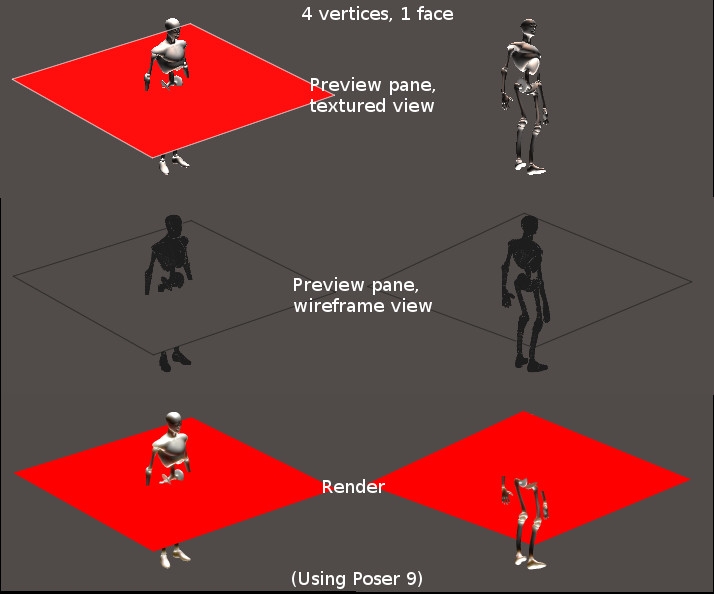 The main thing to note is that it appears in the render regardless of which side you look at it, but if you look at it from the 'wrong' side in the preview pane you only see it in wieframe display mode.
(Note that we have identical lights top and bottom - so this test doesn't indicate which light you're seeing the effect of.)
(may behave differently in other versions of Poser or with different lighting)
The 3Dcheapskate (also available in DAZ and HiveWire3D flavours) occasionally posts sensible stuff. Usually by accident.
And it usually uses Poser 11, with units set to inches. Except when it's using Poser 6 or PP2014, or when its units are set to PNU.
Same thing but with a 4 vertex/2 face OBJ.
Here's the OBJ:
mtllib 4vertexNface.mtl
v 1.000000 -0.000000 -1.000000
v 1.000000 0.000000 1.000000
v -1.000000 0.000000 1.000000
v -1.000000 -0.000000 -1.000000
vt 1.000000 1.000000
vt 1.000000 0.000000
vt 0.000000 0.000000
vt 0.000000 1.000000
usemtl MaterialA
f 1/1 4/4 3/3 2/2
usemtl MaterialB
f 1/1 2/2 3/3 4/4
Here's the material (same as before):
newmtl MaterialA
Ns 96.078431
Ka 0.000000 0.000000 0.000000
Kd 1.000000 0.000000 0.000000
Ks 1.000000 1.000000 1.000000
Ni 1.000000
d 1.000000
illum 2
newmtl MaterialB
Ns 96.078431
Ka 0.000000 0.000000 0.000000
Kd 0.000000 0.000000 1.000000
Ks 1.000000 1.000000 1.000000
Ni 1.000000
d 1.000000
illum 2
One face is red, the other is blue. From the previous test the red face should be facing upwards.
Here's the results:
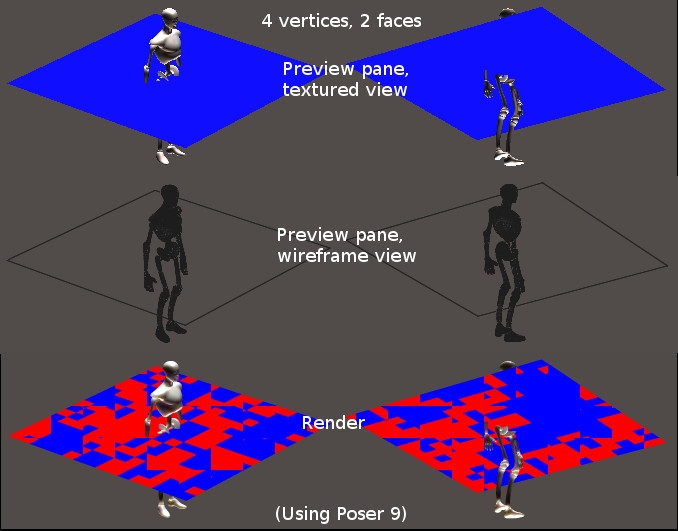 Poser doesn't seem to like two faces occupying exactly the same space but facing in opposite directions.
The plane shows up in the preview pane in any display mode when viewed from either side. But I was surprised that in the textured preview it appeared blue from both sides.
(may behave differently in other versions of Poser or with different lighting)
The 3Dcheapskate (also available in DAZ and HiveWire3D flavours) occasionally posts sensible stuff. Usually by accident.
And it usually uses Poser 11, with units set to inches. Except when it's using Poser 6 or PP2014, or when its units are set to PNU.
(and just out of curiosity I tried importing both OBJs into DAZ Studio 4.6, the latest I have installed. Two identical distant lights top and bottom)
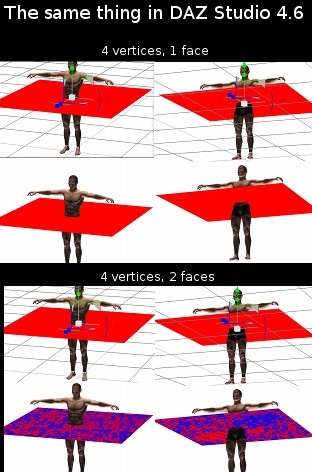 Only two differences I can see:
-
it shows the 4-vertex/1-face in preview mode from both sides.
-
the 4-vertex/2-face plane appears red from both sides in preview mode
The 3Dcheapskate (also available in DAZ and HiveWire3D flavours) occasionally posts sensible stuff. Usually by accident.
And it usually uses Poser 11, with units set to inches. Except when it's using Poser 6 or PP2014, or when its units are set to PNU.
When I imported the 4-vertex/1-face OBJ into Poser 9 and rendered with default lights (Four lights: One Diffuse IBL with AO; Two spots with depth-mapped shadows and AO; One infinite with depth-mapped shadows) I got an odd effect:
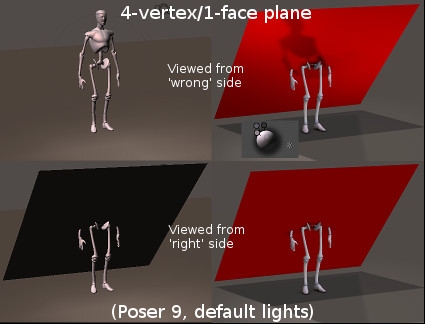 The plane seems to be translucent when viewed from the 'wrong' side - this appears to be what bagginsbill referred to on page 3 of the "waxy leaf" thread - to paraphrase, the completely ordinary lighting of the built-in diffuse node (or any diffuse node) conveys front lighting to the back. (but does NOT convey back lighting to the front).
Here's what we see looking at the 'right' side of the setup where I see the shadow:
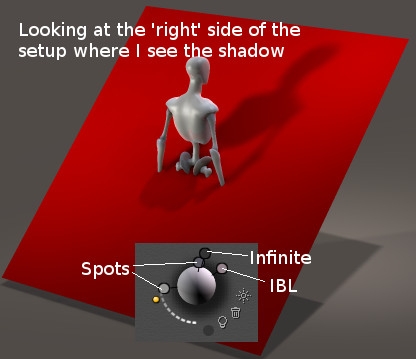 I think we only get see two shadows here from the infinite and the spot close to it. It looks like we saw both those shadows when viewing from the 'wrong' side earlier.
The 3Dcheapskate (also available in DAZ and HiveWire3D flavours) occasionally posts sensible stuff. Usually by accident.
And it usually uses Poser 11, with units set to inches. Except when it's using Poser 6 or PP2014, or when its units are set to PNU.
"But, there are simple, either free or very cheap, stand-alone utilities that will create double-sided meshes for you from an original .obj. [...] I used to have one, but it's on an old, dead, hard-drive at the moment."
You're probably thinking of Objaction Twoface, by Maz, who appears to be no longer around. His Mover and Scaler are popular downloads which have been preserved elsewhere, but as 3dcheapskate notes, double-sided zero-thickness meshes became persona non grata with the advent of Firefly and I don't think anybody's bothered mirroring it. I can reunite you with it if you really want. :)
Ah, you're right! I have it, somewhere, stored safely away in the Poser-bin-of-forgotten-utilities-that-no-Poser-user-can-be-without... :) Since you named it, I will now be able to find it. Poser/firefly hates double-sided faces. With good reason, at least at the time. But, there are ways and then there are ways to make "double-sided" faces. For instance, in some older Poser assets, I noticed that they're made traditionally, with true duplicate meshes with reversed normals joined to the original mesh, much like a "thicken" algorithm will simply make brand new geometry and merge it with the existing geometry. ie: A single plane with one face and four verts becomes a box with six planes and eight verts. The key in algorithms that do this is the separation distance. As I understand it, Firefly has issues with faces with very small separation distances when calculating certain effects. So, doubling+ the geometry of a prop/figure in order to get some kind of material effect, that can be somewhat faked with other means, just isn't very efficient and is probably not really wanted.
But, hey, if you just gotta have that one material effect, it's an option for "gotta have it now" users, I suppose.
Now, I'm off to split some verts and torture Firefly with displacement maps slapped on them... :) Maybe I should make them Fifty-Shades of Grey, for added spite? :D
I thought I knew what "double-sided" meant, but It's a lot more complicated than I thought. :D (I remember it was one the first things I ever posted about, back around 2009 - and EnglishBob gave me the lowdown. But I can't find that thread now) As it turns out I don't even really know what I mean myself when I used the phrase ! :oS I do recall that using displacement was a possible workaround for the two opposite-facing-faces-with-identical-vertices (I'm trying to avoid saying 'double-sided'!) problem.
Extruding (i.e. turning a zero-thickness square plane into a flattened cube) wouldn't really work if the plane was transmapped would it? I'm thinking leaves, etc. The four 'sides' of the extruded flattened cuboid would need to be transparent, so it'd be just as if you had two opposite-facing-faces-slightly-separated.
The 3Dcheapskate (also available in DAZ and HiveWire3D flavours) occasionally posts sensible stuff. Usually by accident.
And it usually uses Poser 11, with units set to inches. Except when it's using Poser 6 or PP2014, or when its units are set to PNU.
Do all the main Poser light types (spot, infinite, point, and diffuse IBL) and shadow types (none, ray-traced, and depth mapped) automatically give this translucent effect when you're looking at the 'wrong' side of single face that's only lit from the opposite side?
I tested each of the four light types with each of the three shadow types using my 4-vertex/1-face OBJ.
The answer seems to be yes.
(I also tried IDL using just bagginsbill's EnvSphere, no lights. Doesn't seem like IDL will give this effect - bagginsbill already mentioned that IDL glowing props don't produce this effect.)
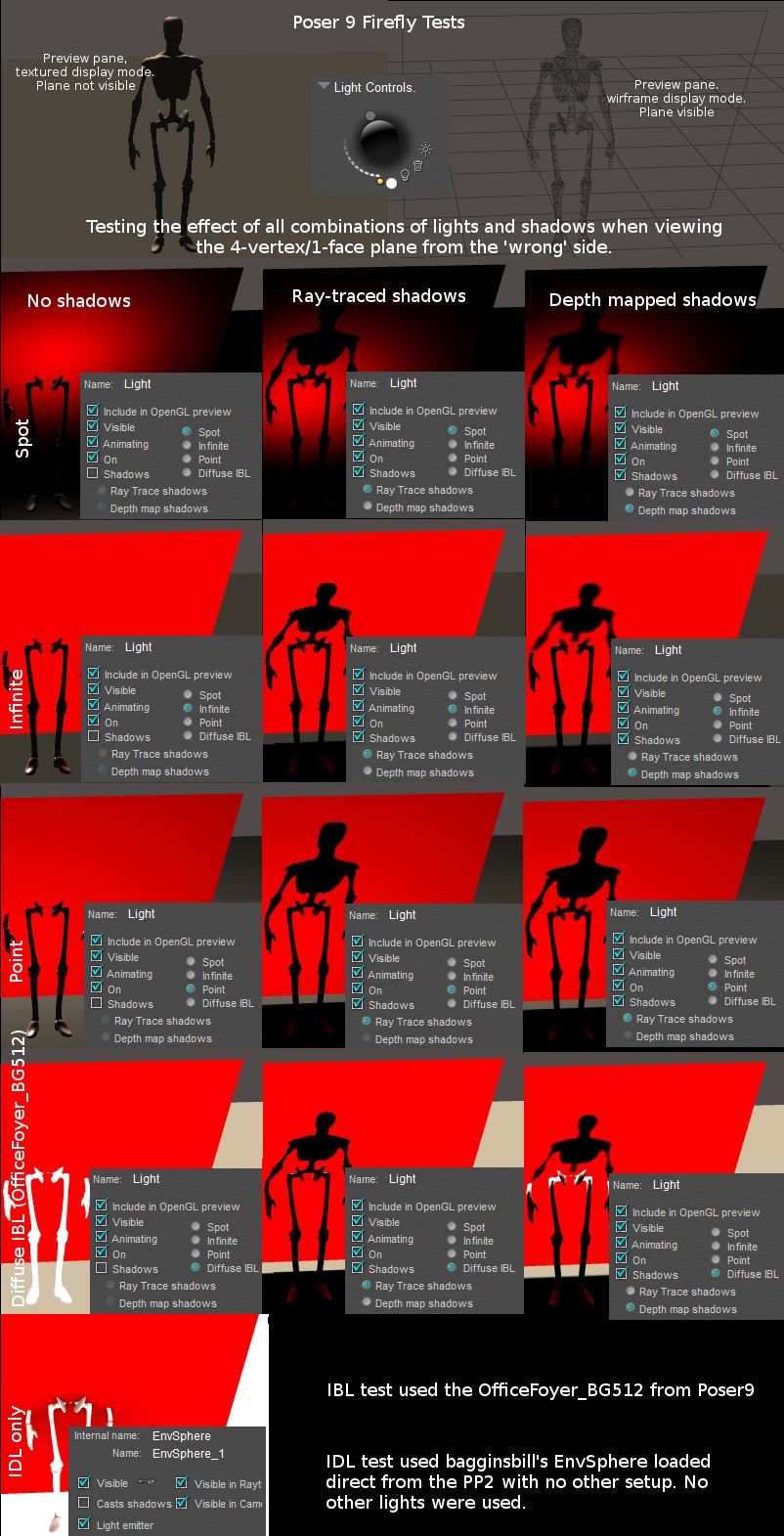
The 3Dcheapskate (also available in DAZ and HiveWire3D flavours) occasionally posts sensible stuff. Usually by accident.
And it usually uses Poser 11, with units set to inches. Except when it's using Poser 6 or PP2014, or when its units are set to PNU.

UVMapper will also create two sided meshes.
Laurie
I assume that's the full version of UV Mapper, not the free one?
The 3Dcheapskate (also available in DAZ and HiveWire3D flavours) occasionally posts sensible stuff. Usually by accident.
And it usually uses Poser 11, with units set to inches. Except when it's using Poser 6 or PP2014, or when its units are set to PNU.
Now, I'm off to split some verts and torture Firefly with displacement maps slapped on them...
I don't think I'd ever really tested displacement maps on 'double-sided' faces. So I loaded my 4-vertex/2-face OBJ and tried a couple of things. In each case I applied the same displacement setup to each material, red and blue. 1) First, a fixed displacement of 1", so the faces should end up 2" apart. This looks okay, so displacement is a way round it:
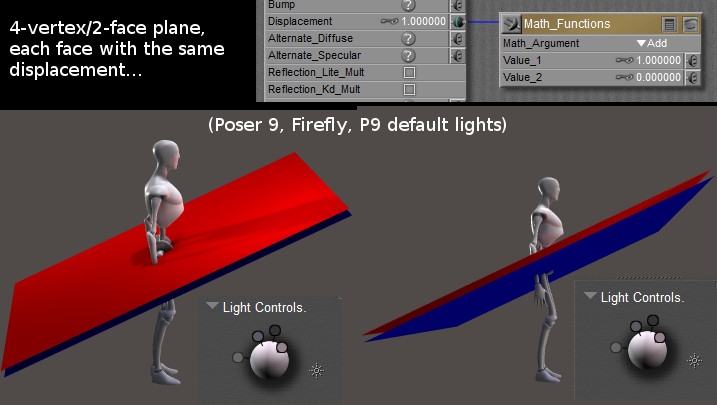
- Then something more wiggly. I think the Wave2D node must create output values between -1 and +1 because it causes the two now-wiggly faces to intersect. And the areas where they intersect (i.e. edges between red and blue) aren't 'clean', so the separation distance at these points is probably too small.
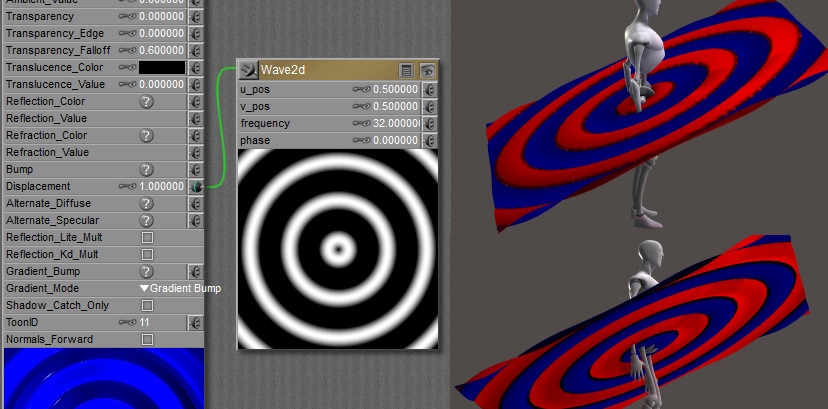 3) I then adjusted things with an extra math node to make the range of displacement vales 0 to +1. The two faces should be touching each other at some points, but I don't see any artifacts.
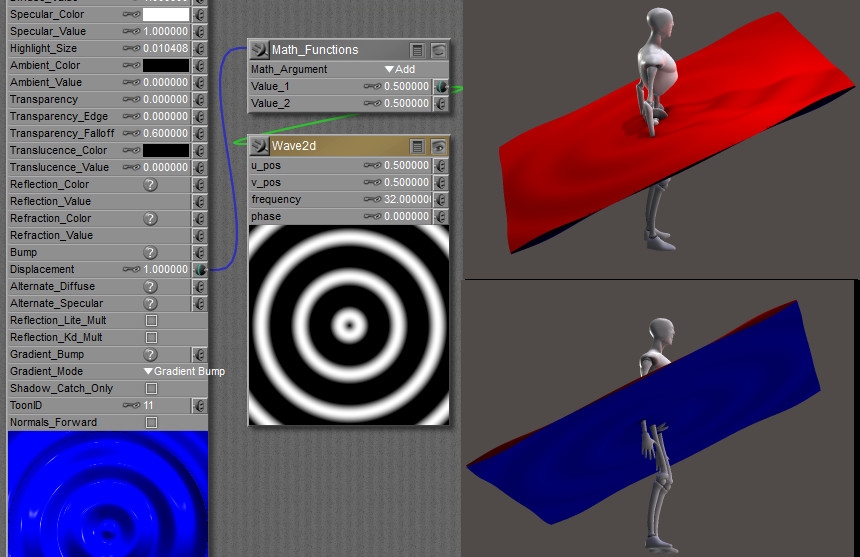 No conclusions, just trying things out.
The 3Dcheapskate (also available in DAZ and HiveWire3D flavours) occasionally posts sensible stuff. Usually by accident.
And it usually uses Poser 11, with units set to inches. Except when it's using Poser 6 or PP2014, or when its units are set to PNU.
"I assume that's the full version of UV Mapper, not the free one?"
Yes, only UVMapper Pro can do that.
"The two faces should be touching each other at some points, but I don't see any artifacts."
To answer that, you'd probably need to be the developers of Firefly; and if you are, how come you haven't fixed it yet? :) You see my point, I think.
In general it seems all right for surfaces to be in close proximity to each other as long as it isn't extensive. We know they can intersect without harm, after all. Looking at the blocky nature of the coincident facet artefacts might lead one to believe that the facets had to be coincident over a certain minimum area before anything bad occurred; and further thought suggests that changing some render settings or other might cause this minimum to vary. This is pure hypothesis at the moment.
What I'd really like is proper WYSIWYG preview of single-sided mesh, and we aren't likely to get that here. Many's the time I've set up my perfect camera angle, only to find that there's a single-sided wall that I'd overlooked and my render shows only the backside of said wall. At least such a viewpoint renders quickly. :)
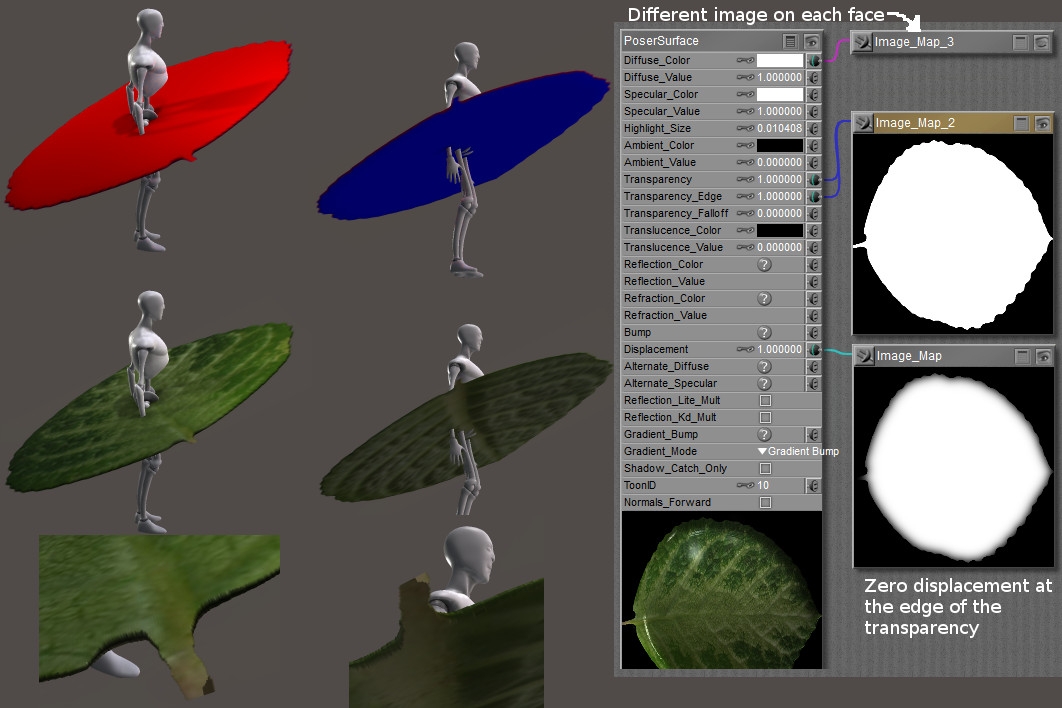
So how about using displacement and transparency together on a double-sided face to get different textures images on each side. You'd have to make sure to get zero displacement around the edge of the transparency, and non-zero displacement wherever it's opaque. And remember that we get artifacts if the displaced faces are too close together. But the basic idea seems to work. It's an option...
The 3Dcheapskate (also available in DAZ and HiveWire3D flavours) occasionally posts sensible stuff. Usually by accident.
And it usually uses Poser 11, with units set to inches. Except when it's using Poser 6 or PP2014, or when its units are set to PNU.
Now would scatter, SSS, and all that sort of stuff work on a double-displaced two-faced plane? I'm thinking specifically of bagginsbill's waxy leaf shader and his comment (1) here that "The leaves are one-sided and facing down. Since they have no thickness, scatter doesn't really do its job"
The 3Dcheapskate (also available in DAZ and HiveWire3D flavours) occasionally posts sensible stuff. Usually by accident.
And it usually uses Poser 11, with units set to inches. Except when it's using Poser 6 or PP2014, or when its units are set to PNU.
"I assume that's the full version of UV Mapper, not the free one?"
Yes, only UVMapper Pro can do that.
"The two faces should be touching each other at some points, but I don't see any artifacts."
To answer that, you'd probably need to be the developers of Firefly; and if you are, how come you haven't fixed it yet? :) You see my point, I think.
In general it seems all right for surfaces to be in close proximity to each other as long as it isn't extensive. We know they can intersect without harm, after all. Looking at the blocky nature of the coincident facet artefacts might lead one to believe that the facets had to be coincident over a certain minimum area before anything bad occurred; and further thought suggests that changing some render settings or other might cause this minimum to vary. This is pure hypothesis at the moment.
What I'd really like is proper WYSIWYG preview of single-sided mesh, and we aren't likely to get that here. Many's the time I've set up my perfect camera angle, only to find that there's a single-sided wall that I'd overlooked and my render shows only the backside of said wall. At least such a viewpoint renders quickly. :)
LOL I still do that all the time. Only now I don't usually spend hours and hours trying to work out what's gone wrong.... Usually.... Last time I got caught I spent ages trying to work out what these odd semi-transparent grey splotches were - I must've nudged the carefully positioned (orbiting) camera, pushing it's Y value negative and ending up with shadows from a shadowcatcher-only groundplane in my render.
Maybe it's not as simple as there being a "minimum separation distance" to avoid these artifacts? Maybe as you suggest it's a combination of render settings, other settings, and how extensive the area of proximity is. I was surprised that the intersecting wiggly waves seemed to show artefacts, whereas the gently tangentially caressing wiggly waves (see, I'm part poet at heart!) didn't seem to show any...
The 3Dcheapskate (also available in DAZ and HiveWire3D flavours) occasionally posts sensible stuff. Usually by accident.
And it usually uses Poser 11, with units set to inches. Except when it's using Poser 6 or PP2014, or when its units are set to PNU.

"The two faces should be touching each other at some points, but I don't see any artifacts."
I can explain that.
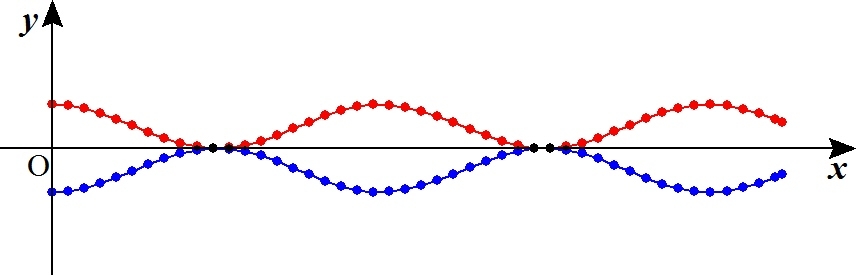
Your node is producing a sine wave - if this wave were literally being plotted by the renderer, then you would indeed have surfaces that touch. But they would only touch where the displacement is 0. How "wide" is the area of contact? It is 0 width - it isn't any area of contact at all - it's only a single point of contact.
The renderer doesn't deal in points - it deals in polygons, or more specifically, micropolygons. The size of these micropolygons are chosen by your render setting for shading rate. The micropolygon vertices are being sampled at discrete locations along the sine curve - it is not at all drawing a sign curve. It is drawing a series of connected quadrangles, whose vertices are determined by the sine wave, but the face of each micropolygon is not at all coincident with the true sine wave.
I will illustrate in 2D - hopefully you can imagine how this extends to 3D.
Here is a diagram of your two displaced surfaces. The continuous lines show the track of your micropolygons. The dots indicate the vertices of those micropolygons.
 Next: This is a zoomed-in view of where the two surfaces come closest together.
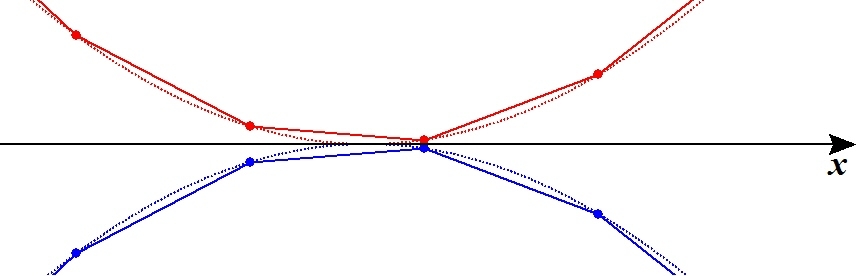 The dashed line represents the true curve of your wave node. The dashed lines actually touch. The solid lines show the micropolygons created to approximate that curve by the rendering engine. As your shading rate goes up or down, those dots (vertices) are sampled farther apart or closer together, making larger or smaller micropolygons as needed.
It should be clear that the red and blue micropolygons cannot touch at all, unless you were to get extremely lucky and take a vertex sample exactly at the lowest point in the wave. Even then, the contact would be brief - it would have zero surface area as only the vertices would be touching, not the faces.
Far more likely is that each vertex is near the minimum or contact point, but not exactly at it. No matter how small the miss, the resulting separation (combined displacement) between the two surfaces is going to be greater than zero, everywhere. This means you don't have overlapped micropolygons anywhere at all. Therefore, no artifacts.
In your original situation, lacking any displacement, all the micropolygons were lined up exactly. The renderer would choose red vs blue based on tiny numerical errors or based on arbitrary decisions resulting from the internal data structures of the renderer.
If you do another experiment where you reduce the amount of displacement to ever smaller values, you should be able to find the point at which numerical errors creep in and the renderer starts picking the wrong micropolygon to draw, even though they're still separated.
Renderosity forum reply notifications are wonky. If I read a follow-up in a thread, but I don't myself reply, then notifications no longer happen AT ALL on that thread. So if I seem to be ignoring a question, that's why. (Updated September 23, 2019)
Thank you bagginsbill, another excellent explanation - now at least that little oddity makes sense!
The 3Dcheapskate (also available in DAZ and HiveWire3D flavours) occasionally posts sensible stuff. Usually by accident.
And it usually uses Poser 11, with units set to inches. Except when it's using Poser 6 or PP2014, or when its units are set to PNU.
This is more a 'reminder to self' than anything else. I just found my very first thread here, where I first asked about single-sided v. double-sided. It's the last post (Nov 2009) of this thread:
Pointers to useful threads in the 3D Modeling Forum for a relative beginner
The 3Dcheapskate (also available in DAZ and HiveWire3D flavours) occasionally posts sensible stuff. Usually by accident.
And it usually uses Poser 11, with units set to inches. Except when it's using Poser 6 or PP2014, or when its units are set to PNU.

Privacy Notice
This site uses cookies to deliver the best experience. Our own cookies make user accounts and other features possible. Third-party cookies are used to display relevant ads and to analyze how Renderosity is used. By using our site, you acknowledge that you have read and understood our Terms of Service, including our Cookie Policy and our Privacy Policy.
One-sided face/mesh problems, tricks, workarounds, stumbling blocks, etc..
This thread is for ANY discussions on the subject.
It's also a continuation of the discussions started on infinity10's "any thread discussing waxy leaf surface shader ?" thread that are more specific to one-sided face/mesh than to shaders for realistic leaves. Here's the point in that discussion (part way down page 5) when this new thread was created, and here's the point (near the bottom of page 2) where I reopened that thread and started on about one-sided transmapped leaves.
The 3Dcheapskate (also available in DAZ and HiveWire3D flavours) occasionally posts sensible stuff. Usually by accident.
And it usually uses Poser 11, with units set to inches. Except when it's using Poser 6 or PP2014, or when its units are set to PNU.