
3dcheapskate opened this issue on Jul 05, 2015 · 23 posts
bagginsbill posted Wed, 08 July 2015 at 12:21 PM
"The two faces should be touching each other at some points, but I don't see any artifacts."
I can explain that.
Your node is producing a sine wave - if this wave were literally being plotted by the renderer, then you would indeed have surfaces that touch. But they would only touch where the displacement is 0. How "wide" is the area of contact? It is 0 width - it isn't any area of contact at all - it's only a single point of contact.
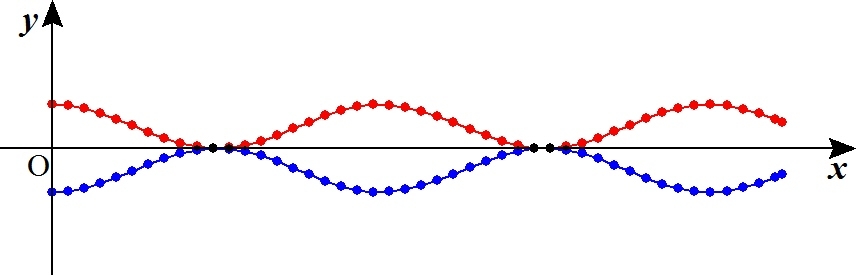
The renderer doesn't deal in points - it deals in polygons, or more specifically, micropolygons. The size of these micropolygons are chosen by your render setting for shading rate. The micropolygon vertices are being sampled at discrete locations along the sine curve - it is not at all drawing a sign curve. It is drawing a series of connected quadrangles, whose vertices are determined by the sine wave, but the face of each micropolygon is not at all coincident with the true sine wave.
I will illustrate in 2D - hopefully you can imagine how this extends to 3D.
Here is a diagram of your two displaced surfaces. The continuous lines show the track of your micropolygons. The dots indicate the vertices of those micropolygons.
 Next: This is a zoomed-in view of where the two surfaces come closest together.
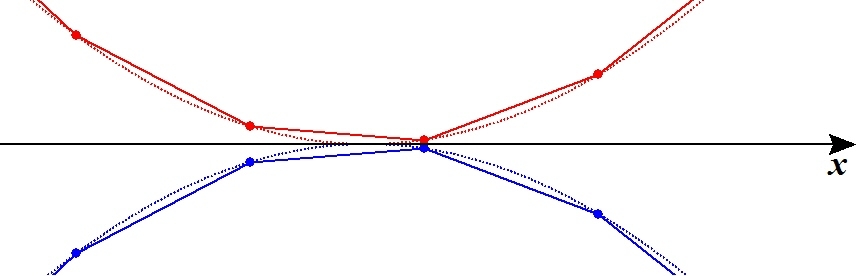 The dashed line represents the true curve of your wave node. The dashed lines actually touch. The solid lines show the micropolygons created to approximate that curve by the rendering engine. As your shading rate goes up or down, those dots (vertices) are sampled farther apart or closer together, making larger or smaller micropolygons as needed.
It should be clear that the red and blue micropolygons cannot touch at all, unless you were to get extremely lucky and take a vertex sample exactly at the lowest point in the wave. Even then, the contact would be brief - it would have zero surface area as only the vertices would be touching, not the faces.
Far more likely is that each vertex is near the minimum or contact point, but not exactly at it. No matter how small the miss, the resulting separation (combined displacement) between the two surfaces is going to be greater than zero, everywhere. This means you don't have overlapped micropolygons anywhere at all. Therefore, no artifacts.
In your original situation, lacking any displacement, all the micropolygons were lined up exactly. The renderer would choose red vs blue based on tiny numerical errors or based on arbitrary decisions resulting from the internal data structures of the renderer.
If you do another experiment where you reduce the amount of displacement to ever smaller values, you should be able to find the point at which numerical errors creep in and the renderer starts picking the wrong micropolygon to draw, even though they're still separated.
Renderosity forum reply notifications are wonky. If I read a follow-up in a thread, but I don't myself reply, then notifications no longer happen AT ALL on that thread. So if I seem to be ignoring a question, that's why. (Updated September 23, 2019)