
3dcheapskate opened this issue on Jul 05, 2015 · 23 posts
3dcheapskate posted Mon, 06 July 2015 at 11:21 PM
I've just done a couple of quick checks to remind myself of the basics. First, I imported the following 4 vertex/1 face OBJ into Poser 9, scaled it at 50% and move it up a bit set up with just two infinite lights (no shadows) top and bottom, took preview pane screenshots with wireframe and textured display mode, and then rendered at default settings.
Here's the OBJ:
mtllib 4vertexNface.mtl
v 1.000000 -0.000000 -1.000000
v 1.000000 0.000000 1.000000
v -1.000000 0.000000 1.000000
v -1.000000 -0.000000 -1.000000
vt 1.000000 1.000000
vt 1.000000 0.000000
vt 0.000000 0.000000
vt 0.000000 1.000000
usemtl MaterialA
f 1/1 4/4 3/3 2/2
Here's the material (Material B is for the next test):
newmtl MaterialA
Ns 96.078431
Ka 0.000000 0.000000 0.000000
Kd 1.000000 0.000000 0.000000
Ks 1.000000 1.000000 1.000000
Ni 1.000000
d 1.000000
illum 2
newmtl MaterialB
Ns 96.078431
Ka 0.000000 0.000000 0.000000
Kd 0.000000 0.000000 1.000000
Ks 1.000000 1.000000 1.000000
Ni 1.000000
d 1.000000
illum 2
Here's the results:
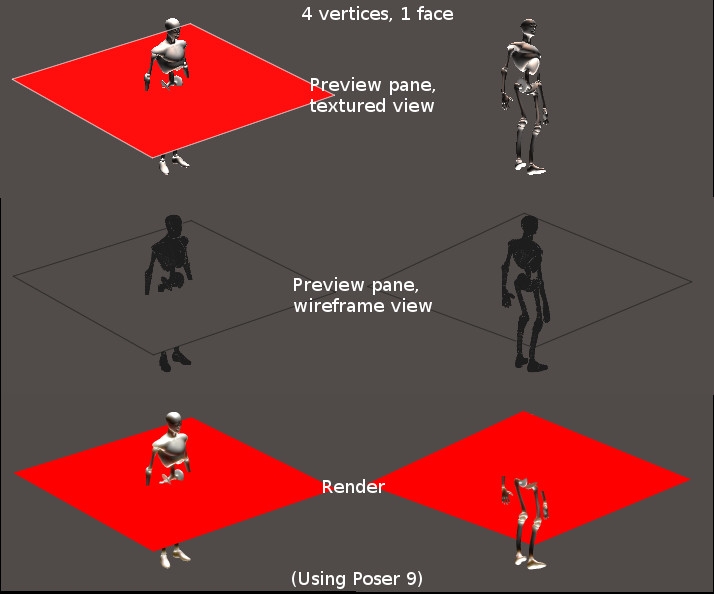 The main thing to note is that it appears in the render regardless of which side you look at it, but if you look at it from the 'wrong' side in the preview pane you only see it in wieframe display mode.
(Note that we have identical lights top and bottom - so this test doesn't indicate which light you're seeing the effect of.)
(may behave differently in other versions of Poser or with different lighting)
The 3Dcheapskate (also available in DAZ and HiveWire3D flavours) occasionally posts sensible stuff. Usually by accident.
And it usually uses Poser 11, with units set to inches. Except when it's using Poser 6 or PP2014, or when its units are set to PNU.