
3dcheapskate opened this issue on Jul 05, 2015 · 23 posts
3dcheapskate posted Mon, 06 July 2015 at 11:28 PM
Same thing but with a 4 vertex/2 face OBJ.
Here's the OBJ:
mtllib 4vertexNface.mtl
v 1.000000 -0.000000 -1.000000
v 1.000000 0.000000 1.000000
v -1.000000 0.000000 1.000000
v -1.000000 -0.000000 -1.000000
vt 1.000000 1.000000
vt 1.000000 0.000000
vt 0.000000 0.000000
vt 0.000000 1.000000
usemtl MaterialA
f 1/1 4/4 3/3 2/2
usemtl MaterialB
f 1/1 2/2 3/3 4/4
Here's the material (same as before):
newmtl MaterialA
Ns 96.078431
Ka 0.000000 0.000000 0.000000
Kd 1.000000 0.000000 0.000000
Ks 1.000000 1.000000 1.000000
Ni 1.000000
d 1.000000
illum 2
newmtl MaterialB
Ns 96.078431
Ka 0.000000 0.000000 0.000000
Kd 0.000000 0.000000 1.000000
Ks 1.000000 1.000000 1.000000
Ni 1.000000
d 1.000000
illum 2
One face is red, the other is blue. From the previous test the red face should be facing upwards.
Here's the results:
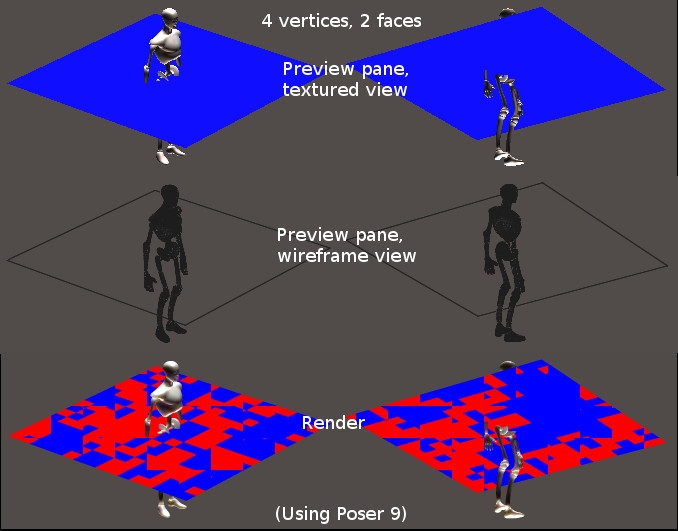 Poser doesn't seem to like two faces occupying exactly the same space but facing in opposite directions.
The plane shows up in the preview pane in any display mode when viewed from either side. But I was surprised that in the textured preview it appeared blue from both sides.
(may behave differently in other versions of Poser or with different lighting)
The 3Dcheapskate (also available in DAZ and HiveWire3D flavours) occasionally posts sensible stuff. Usually by accident.
And it usually uses Poser 11, with units set to inches. Except when it's using Poser 6 or PP2014, or when its units are set to PNU.