Filter: Safe | Sat, Aug 8, 10:50 AM CDT

Renderosity Forums / Carrara


Welcome to the Carrara Forum

Forum Coordinators: Kalypso, Anim8dtoon

Carrara F.A.Q (Last Updated: 2026 Jul 30 8:26 pm)


Visit the Carrara Gallery here.

Carrara Free Stuff here.

 
Visit the Renderosity MarketPlace - Your source for digital art content!


Subject: Probably elementary


pisaacs ( ) posted Wed, 07 February 2007 at 8:26 PM · edited Sat, 08 August 2026 at 10:47 AM

file_368268.jpg

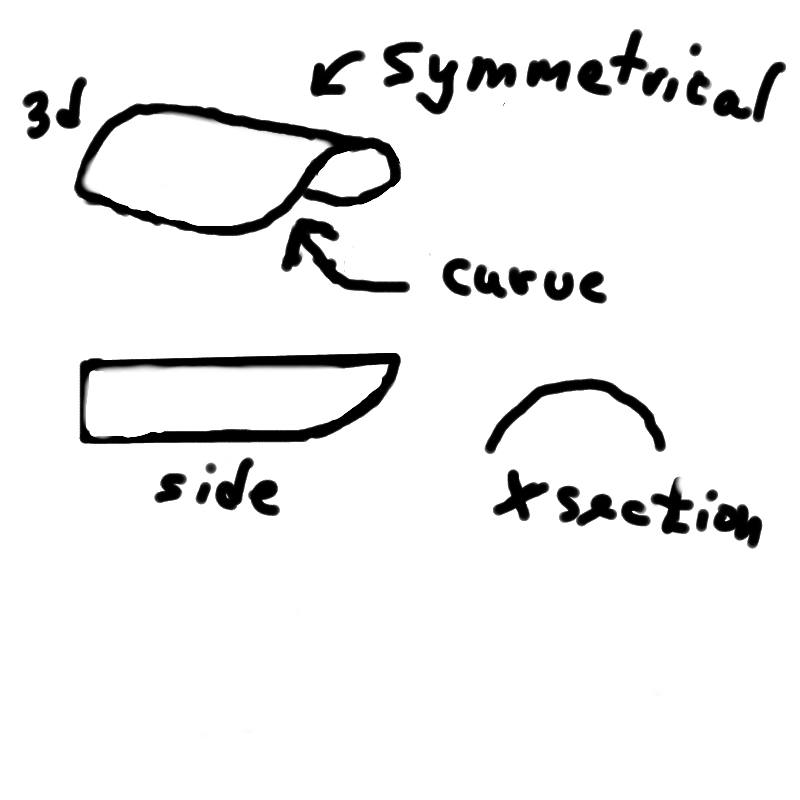
I'm trying to make a spline shape with Carrara5 but having no luck. Imagine a 180 degree awning coming out over the sidewalk at the entrance of a hotel, like 1/2 a tube. One end is attached to the flat sided building. The other end, however, is a curve sweeping up from the side to the top. Every time I try to shape the side into the cut-out curve the whole shape moves. I just want to know if it is possible or not to do this shape with a spline extrusion and which method, symmetrical, symmetrical plane, or free.


MarkBremmer ( ) posted Wed, 07 February 2007 at 9:05 PM · edited Wed, 07 February 2007 at 11:08 PM

file_368272.gif

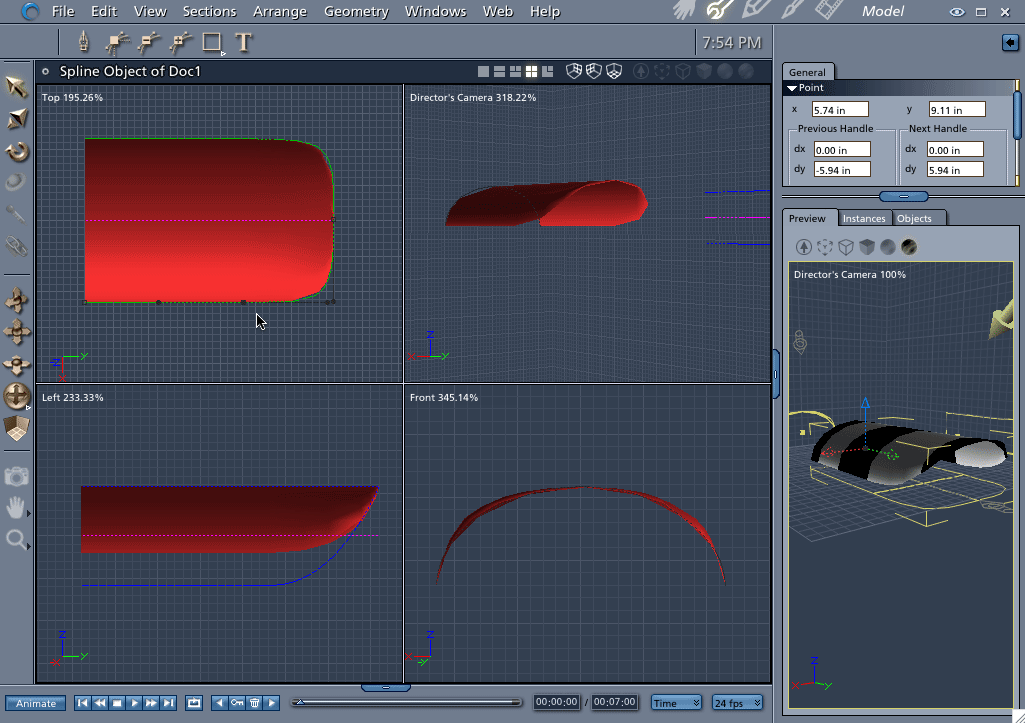
Click image to make larger. Hi pisaacs, There is nothing ever simple about compound curves. ;-) There are several ways to do this shape in either the Vertex or Spline Modeler. Since you asked about the Spline version here is how you do it. 1) Draw your cross section shape and then choose "Symmetrical in Plane" for the extrusion option. 2) Draw the Extrusion Envelope from the top position. 3) Change the extrusion method to "Free" (Yes, you can change in mid-model - just be careful. Doing changes in the wrong order will un-do work - The order is Symmetrical, Symmetrical in Plane and then Free. "Free" should always be last) 4) From the Left View, grab the end point on the bottom of the extrusion envelope and drag upwards until it looks right. Notice that my envelope only has three points. In doing shapes like this, the less points on the envelope, the better. Hope that helps! Mark


bwtr ( ) posted Wed, 07 February 2007 at 11:41 PM · edited Wed, 07 February 2007 at 11:42 PM

file_368285.jpg

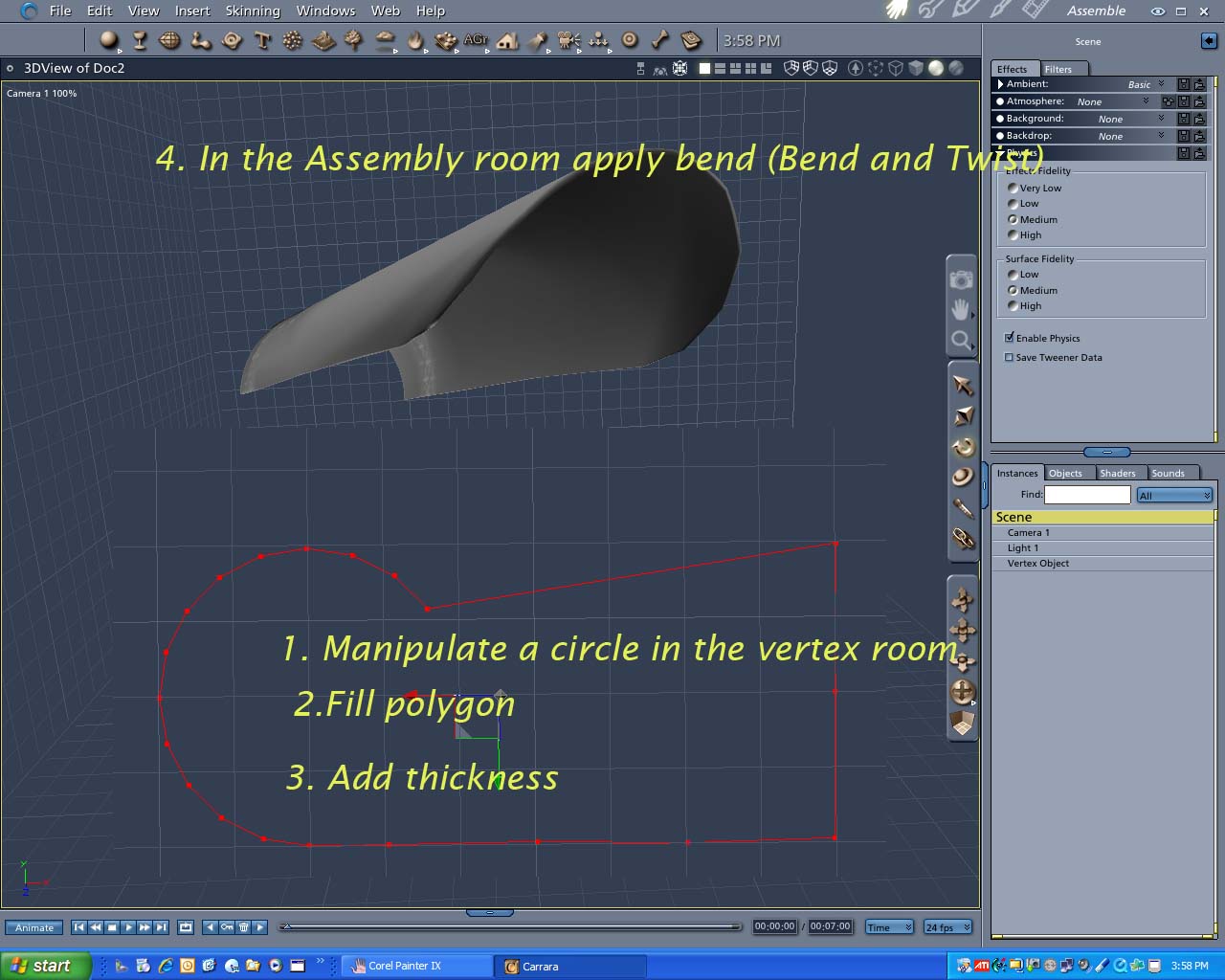
I am no fan of the spline room. Here is how I would do it in the Vertex room.


Lets know if it's not clearly explained.

bwtr


pisaacs ( ) posted Thu, 08 February 2007 at 5:33 AM

I haven't done Mark's vertex tutorials yet so I'm trying to do this with splines (it's actually for the 'hood' of the light shade for a rr x-ing light signal that I've been modeling using the spline modeler for all the pieces). For the hood I already tried using a combination of the different spline modelers and then tried again after seeing Mark's response, but although closer now apparently I'm just not using the right sequence of points/movements. Will try again tonight after work. Thanks guys.

Paul


pisaacs ( ) posted Thu, 08 February 2007 at 7:27 PM

OK, I did it pretty well now. After I finish the x-ing signal with the spline method I'll try it again using the vertex modeler.


sparrownightmare ( ) posted Fri, 09 February 2007 at 11:19 AM

Looks good.  What I always have problems with are windshields for ground vehicles.  They always end up too round and too thin at the top.


MarkBremmer ( ) posted Fri, 09 February 2007 at 11:32 AM

Car windows are a perfect use of the Coons mesh creator in the Vertex Room. If you haven't played with it, give it a try. Pretty cool. :)


sparrownightmare ( ) posted Fri, 09 February 2007 at 11:36 AM

I hardly ever go into the vertex room except to clean up imported poser content.  I have just never been able to get the hang of the tools in there.  Almost everything I do is in the spline modeler.   I'll give it one last try I guess.


Privacy Notice

This site uses cookies to deliver the best experience. Our own cookies make user accounts and other features possible. Third-party cookies are used to display relevant ads and to analyze how Renderosity is used. By using our site, you acknowledge that you have read and understood our Terms of Service, including our Cookie Policy and our Privacy Policy.