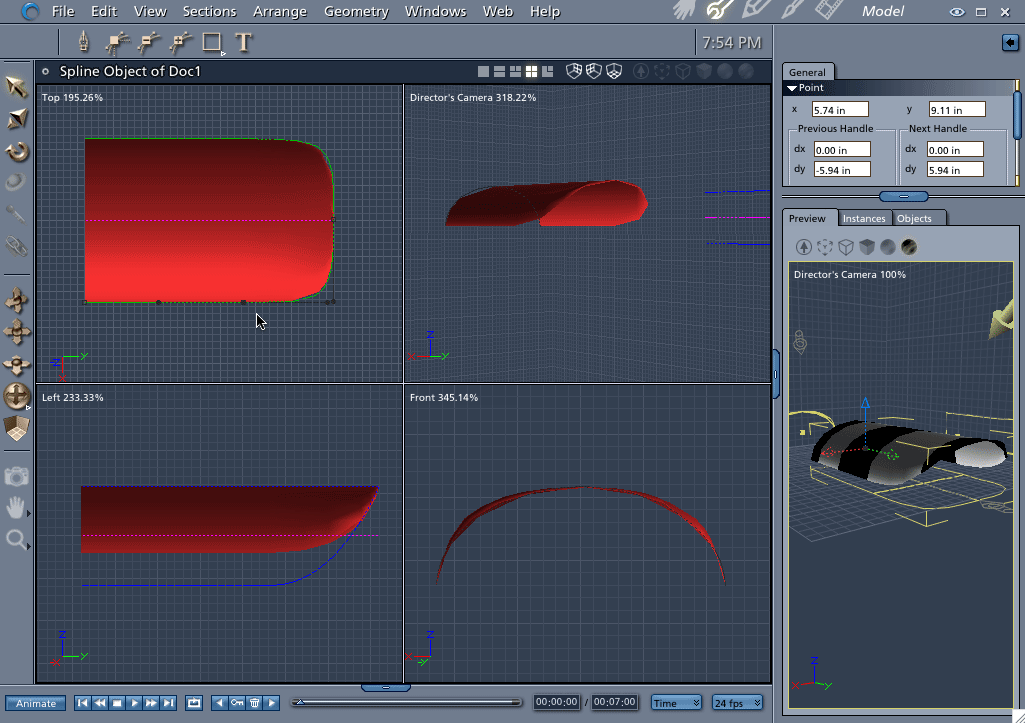
Click image to make larger. Hi pisaacs, There is nothing ever simple about compound curves. ;-) There are several ways to do this shape in either the Vertex or Spline Modeler. Since you asked about the Spline version here is how you do it. 1) Draw your cross section shape and then choose "Symmetrical in Plane" for the extrusion option. 2) Draw the Extrusion Envelope from the top position. 3) Change the extrusion method to "Free" (Yes, you can change in mid-model - just be careful. Doing changes in the wrong order will un-do work - The order is Symmetrical, Symmetrical in Plane and then Free. "Free" should always be last) 4) From the Left View, grab the end point on the bottom of the extrusion envelope and drag upwards until it looks right. Notice that my envelope only has three points. In doing shapes like this, the less points on the envelope, the better. Hope that helps! Mark
