
Renderosity Forums / Poser - OFFICIAL
Welcome to the Poser - OFFICIAL Forum
Forum Moderators: RedPhantom Forum Coordinators: Anim8dtoon
Poser - OFFICIAL F.A.Q (Last Updated: 2026 Oct 03 7:44 am)

Subject: Working on a thing...

Is that good? I dunno. I'm still working on it. I've been working on auto-scaling, as well as symmetry adjustments. The Poser tests showed me that some of my scaling assumptions were wrong. I've been reducing the face sizes, when I need to enlarge them slightly. Anyway, working on the tools.
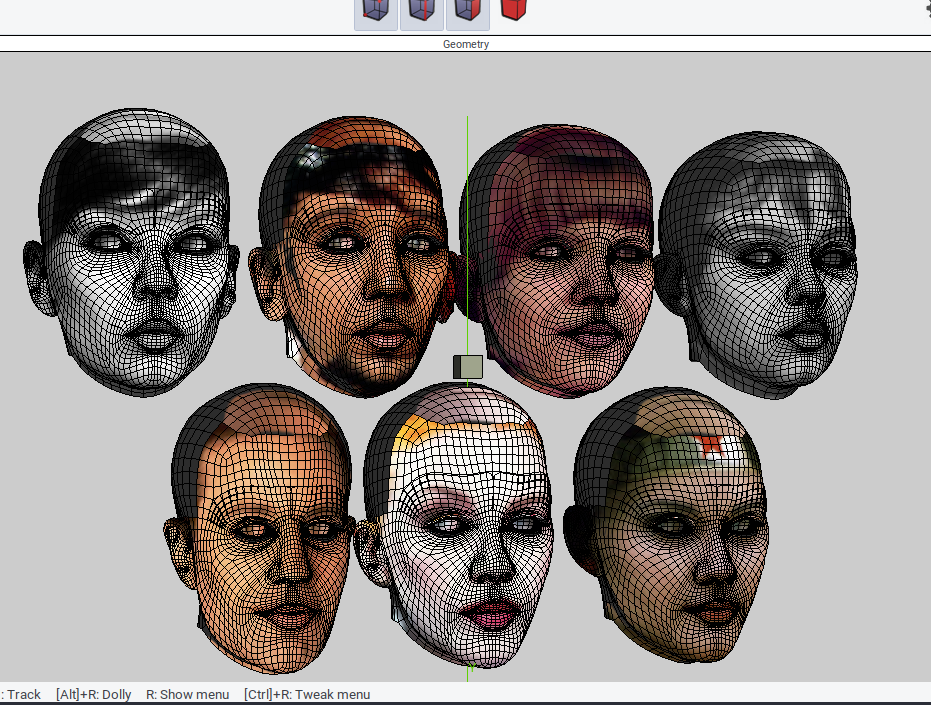
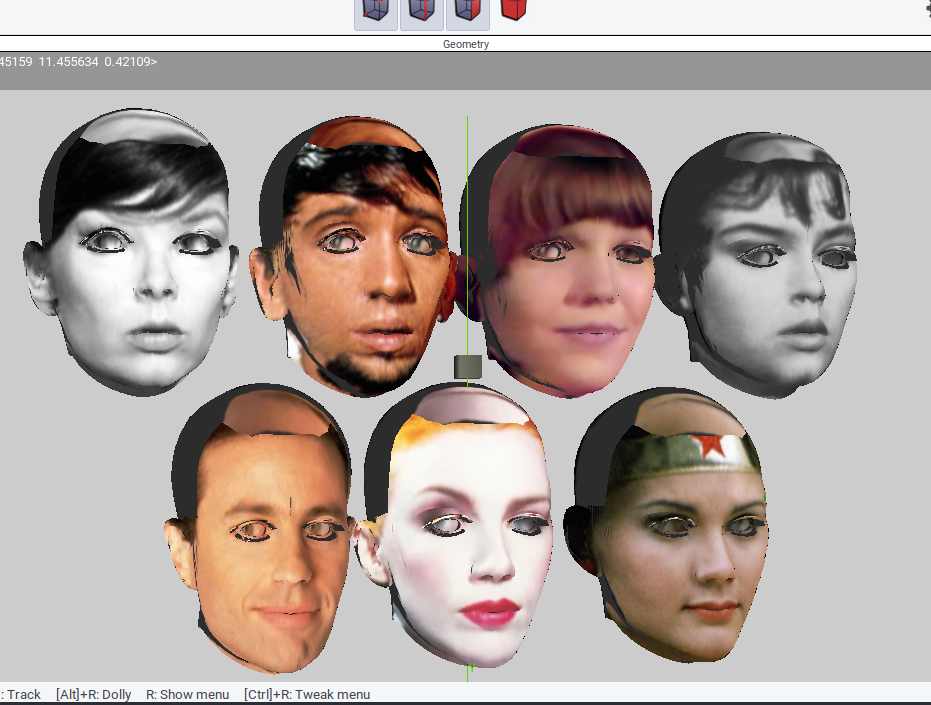
Since I only post when I have something to say, these are a few comparisons I screen-capped.
===========================sigline======================================================
Cage can be an opinionated jerk who posts without thinking. He apologizes for this. He's honestly not trying to be a turkeyhead.
Cage had some freebies, compatible with Poser 11 and below. His Python scripts were saved at archive.org, along with the rest of the Morphography site, where they were hosted.

Thanks. I think it's getting to be withing measurable distance of its end. I'm wrapping up the morph brush and 3D paint feature sets and beginning to think about how to approach distribution.
If anyone knows anything about using pip with Poser's Python installation, will they please stand up and wave their arms or something. I searched for it here on the forums and found a few hints, but not much. Mainly, that search surprised me with a 2007 thread about the initial release of the Quasimodo Freakshow Face Thing to which I referred at the top of the thread. What a flame-fest! Apparently there is a history of trouble, relating to programs like these, and now that I've learned about the controversy I do have some qualms about this project. My internet skills are badly degraded in recent years, along with my google-fu, and I would not be able to handle any kind of flamewar anything.
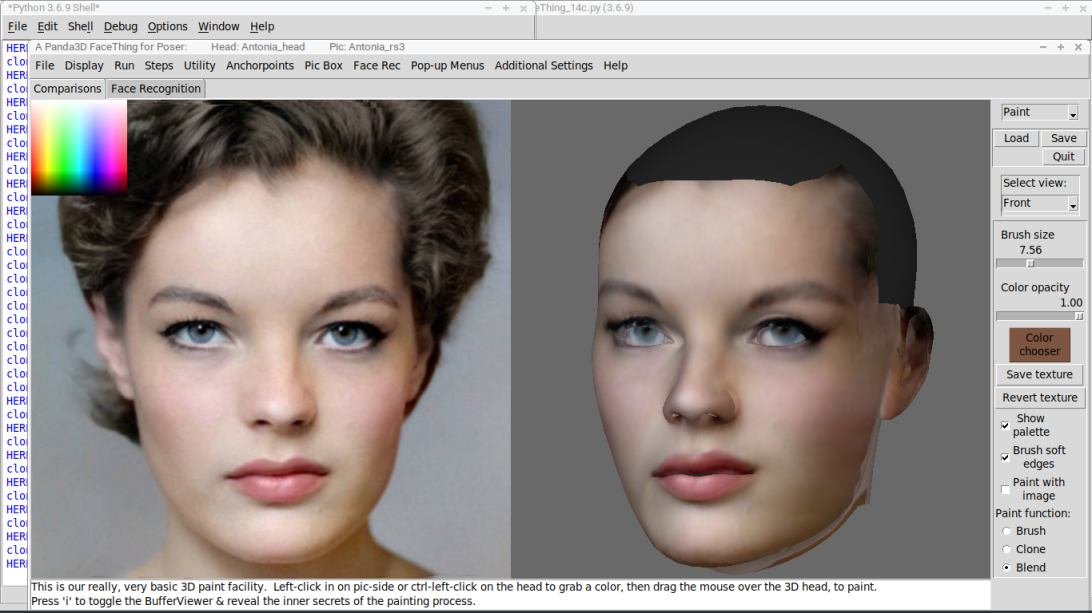
Here are more screengrabs that don't really show much that's useful, since I seem to have a knack for those.
===========================sigline======================================================
Cage can be an opinionated jerk who posts without thinking. He apologizes for this. He's honestly not trying to be a turkeyhead.
Cage had some freebies, compatible with Poser 11 and below. His Python scripts were saved at archive.org, along with the rest of the Morphography site, where they were hosted.


a lot of the old troublemakers have disappeared or retired or moved on so maybe it'll be better now. most of the arguments here these days are about AI anyway.
i'd say ask about pip in the python forum but that's been pretty quiet lately. might be worth a shot though.
still lost in the wilderness
Poser 13 Superfly pretty much only these days
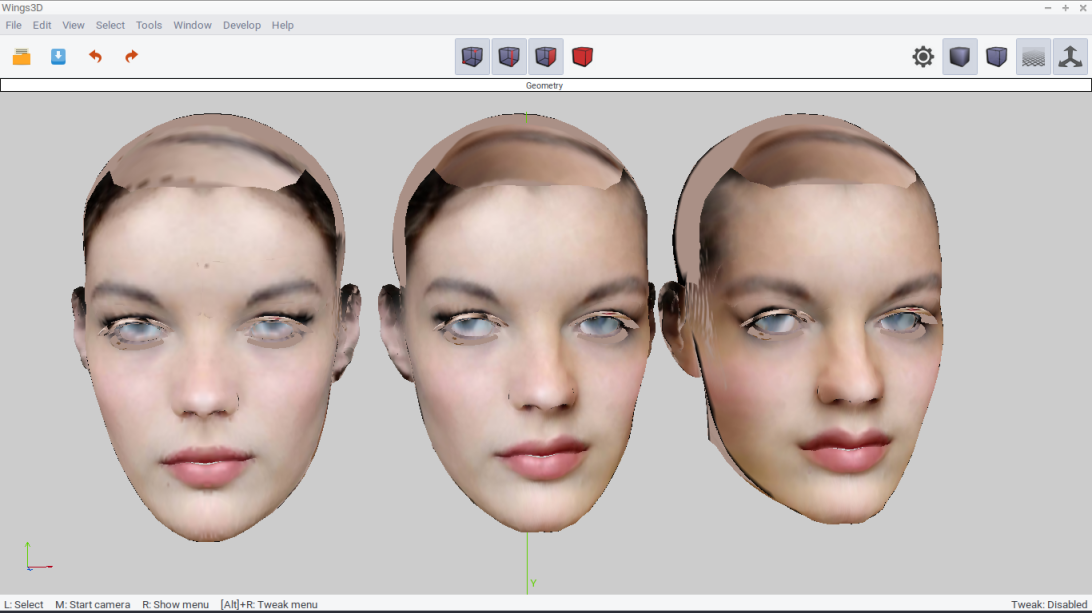
I guess I neglected to mention that the reason for bothering to add 3D paint tools is that I worked out how to enlarge the projected textures. They are no longer locked into a default 256x256 size and can now be as large as you like. I've only set it up to handle up to 1024, reasoning that a 600 square source image can only be usefully enlarged so much, but a user can add blank templates as png to enable larger sizes.
I don't know if that manages to make any of the resulting textures useful to anyone, but with that possibility in mind, I've added symmetry tools for the projected texture and those paint tools. Here's a quick glimpse of sym-tests for 1024 textures.
===========================sigline======================================================
Cage can be an opinionated jerk who posts without thinking. He apologizes for this. He's honestly not trying to be a turkeyhead.
Cage had some freebies, compatible with Poser 11 and below. His Python scripts were saved at archive.org, along with the rest of the Morphography site, where they were hosted.
I have a working Windows exe build, finally. It uses Python 3.6 and will run on my Windows 7 device. I assume that indicates desirable backwards-compatibility, more than it suggests some likely failure on more recent versions of WIndows. The whole thing is 136 MB zipped, currently with no manual or guide. I have a manual started but... it got away from me a bit. I got through all of the "the Blargis-twaddler twaddles the Blargis" stuff, and once I got to the point of needing to outline procedures clearly and concisely, the whole thing degenerated into worse gibberish than this sentence. I am no Anthony Hernandez, if he was the one who worked on the Curious Labs Poser manual way back when. Was he? Anyone?
Anyway, this is not too huge-big, but neither is it small. I'm not sure how anyone is supposed to distribute anything, nowadays. It also has not been tested for bugs by anyone but me, and I figure we all know how bad the programmers can be at finding all of their own bugs.
Thoughts, suggestions, anything?
===========================sigline======================================================
Cage can be an opinionated jerk who posts without thinking. He apologizes for this. He's honestly not trying to be a turkeyhead.
Cage had some freebies, compatible with Poser 11 and below. His Python scripts were saved at archive.org, along with the rest of the Morphography site, where they were hosted.
Usually you will find bugs immediately after you release software. ;)
Is your objective to sell it? In that case, you need to find some testers to try it out, and maybe someone to edit/rewrite your instructions. It's possible to sell software on this site of course.
If your objective is to give it away, you could put it up using whatever web space or file sharing site, post the link, and just tell people it is a very early alpha release. They will undoubtedly find bugs.
Not sure how much free time I have, but I have done technical writing and editing etc.
Do they still make affordable web spaces and file sharing sites? I thought those had vanished, as part of the cultural impact of the 2020-ish period.
This is going to be free and open source, and the source code will be up on Github, eventually. One of the key parts of the process using Dlib comes with a restriction against its use in commercial projects. So apparently I wouldn't be able to take money from folks, even if I were inclined to do so. See, the whole manual is like this, babble-headed argle-bargle.
But it does sound like the process is not significantly different than in the past. Just that the available resources have changed. I'll have to hunt around.
Thank you, ChromeStar.
===========================sigline======================================================
Cage can be an opinionated jerk who posts without thinking. He apologizes for this. He's honestly not trying to be a turkeyhead.
Cage had some freebies, compatible with Poser 11 and below. His Python scripts were saved at archive.org, along with the rest of the Morphography site, where they were hosted.

I can try to compile a Mac version, but I have no way to test one, and I have no way of knowing how to debug effectively for Mac. Panda3D works on Mac, the process I've used with Panda can produce a Mac build. At the very least, one should be able to load Panda3D, Dlib, Numpy, and Pillow (PIL) onto that Mac, and run it as a Panda script. Assuming DLib works on Mac.
Basically, I have no idea. The Windows build took a fair amount of debugging, to find little things that WIndows didn't like, with several hours of going back and forth between debugging and compiling on a laptop, then testing on a Windows 7 device across the room. But there's no Mac there, on the other-other side of that room! Just... I dunno. I assume I would need a very, very patient, dedicated, and knowledgeable Mac-user as a beta-tester and collaborator.
===========================sigline======================================================
Cage can be an opinionated jerk who posts without thinking. He apologizes for this. He's honestly not trying to be a turkeyhead.
Cage had some freebies, compatible with Poser 11 and below. His Python scripts were saved at archive.org, along with the rest of the Morphography site, where they were hosted.
Cage posted at 9:08 AM Tue, 5 May 2026 - #4506068
I sure would appreciate it if you could pull off a Mac version or find an experienced Mac user/programmer to make the build; I would love it even more if it were backwards compatible with Python 2.7 as I'm using Poser 11 Pro and have been for years now. I do have Poser 13 but it's not installed yet on my 2010 5,1 Mac Pro tower because I'd have to upgrade the OS to Monterey at the very least and it requires jumping through quite a few hoops to make the upgrade. I'm too faint of heart to jump through those hoops ...I can try to compile a Mac version, but I have no way to test one, and I have no way of knowing how to debug effectively for Mac. Panda3D works on Mac, the process I've used with Panda can produce a Mac build.
Basically, I have no idea. The Windows build took a fair amount of debugging, to find little things that WIndows didn't like, with several hours of going back and forth between debugging and compiling on a laptop, then testing on a Windows 7 device across the room. But there's no Mac there, on the other, other side of that room! Just... I dunno. I assume I would need a very, very patient, dedicated, and knowledgeable Mac-user as a beta-tester and collaborator.
What is Panda3D? I've never heard of it.
Panda3D is a free, open source 3D game-programming system that can be programmed using C++ or Python. https://www.panda3d.org/ I have programmed this whole thing using Python 3.6, so there's no way to make it work with 2.7. Just to be clear, this is not a Poser plugin or PoserPython script. This is a standalone project that has been built for use with Poser. It helps create morphs for grouped heads from obj geometries. That's useful for Poser, and I don't even know it's compatible with how Daz does things nowadays, so I figure it's just good for Poser.
The easiest route to using the thing on Mac would be to install a version of Python >= 3.6, then install Panda3D into that Python installation. The script can run as plain, un-compiled Python, and it can run without Dlib, although that does make parts of the process less user-friendly. I've been running as plain Python on Linux.
If you're adventurous, you can try to install Cmake on your Mac and see if you can build Dlib. https://stackoverflow.com/questions/54719496/how-to-install-dlib-for-python-on-mac I haven't seen reports of anyone managing it, but it is hypothetically possible.
My experience with Apple products began in 1983 and ended in 1985, aside from running a Mac emulator on Raspberry Pi once or twice, in 2017. Everything in that realm is a mystery to me. I could help guide someone through the basics of Python and Panda3D on a Mac, insofar as it wouldn't be too different from what I've been doing, but anything OS-specific is an unknown.
===========================sigline======================================================
Cage can be an opinionated jerk who posts without thinking. He apologizes for this. He's honestly not trying to be a turkeyhead.
Cage had some freebies, compatible with Poser 11 and below. His Python scripts were saved at archive.org, along with the rest of the Morphography site, where they were hosted.
Apparently another possibility is WineBottler. https://winebottler.kronenberg.org/ When I used Wine on Linux, it would run some things, like PPro14, but would not run other programs. A couple of my Poser side-utilities just wouldn't run, and I could only get 3DCoat to work by locating a Linux version of the program.
===========================sigline======================================================
Cage can be an opinionated jerk who posts without thinking. He apologizes for this. He's honestly not trying to be a turkeyhead.
Cage had some freebies, compatible with Poser 11 and below. His Python scripts were saved at archive.org, along with the rest of the Morphography site, where they were hosted.
Couldn't you just put the installation files themselves on Github then?Do they still make affordable web spaces and file sharing sites? I thought those had vanished, as part of the cultural impact of the 2020-ish period.
This is going to be free and open source, and the source code will be up on Github, eventually. One of the key parts of the process using Dlib comes with a restriction against its use in commercial projects. So apparently I wouldn't be able to take money from folks, even if I were inclined to do so. See, the whole manual is like this, babble-headed argle-bargle.
I dunno. I'll have to check Github policy. I thought it was more for source code, not for compiled programs. I might be wrong about that!
===========================sigline======================================================
Cage can be an opinionated jerk who posts without thinking. He apologizes for this. He's honestly not trying to be a turkeyhead.
Cage had some freebies, compatible with Poser 11 and below. His Python scripts were saved at archive.org, along with the rest of the Morphography site, where they were hosted.

Well, that makes things much more approachable. That is good to know. Thank you.
===========================sigline======================================================
Cage can be an opinionated jerk who posts without thinking. He apologizes for this. He's honestly not trying to be a turkeyhead.
Cage had some freebies, compatible with Poser 11 and below. His Python scripts were saved at archive.org, along with the rest of the Morphography site, where they were hosted.
I've been distracted from the distribution aspect by another wave of debugging and the addition of some new tools. I moved the 'fix fisheye' tool to a new section Postwork with a few similarly-conceived functions.
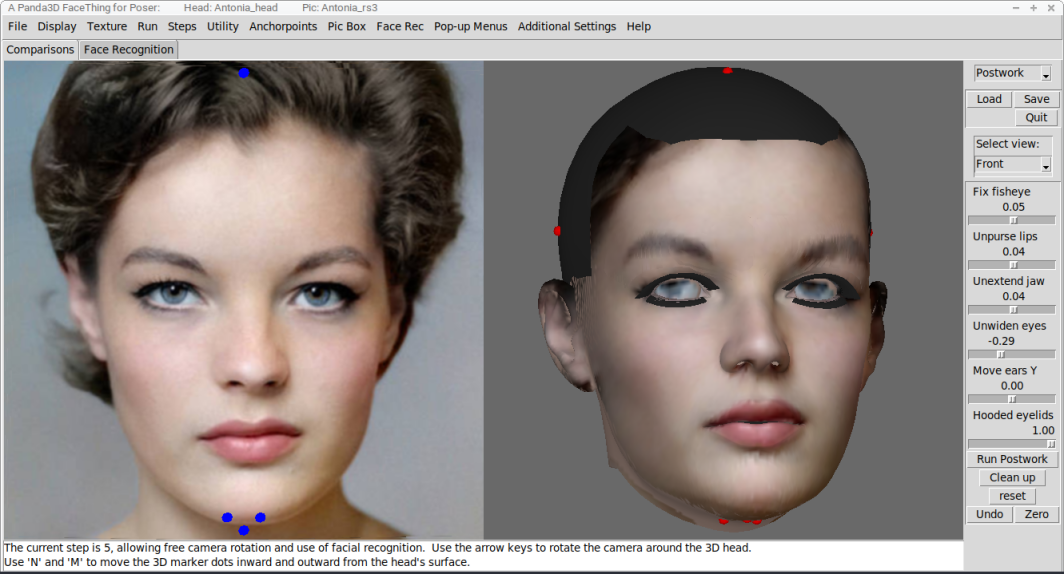
And while I've still been too chicken to fully set up anything at Github, I do have some compiled testing files for Mac, in my Rosity file locker. If you are running Mac OSX 10_13... whatever '10_13' means, here... you are welcome to try these files. There is no guarantee that they will work. I've used the same Panda3D featureset that successfully compiled the Windows version I mentioned earlier, but that's no guarantee that it will work, apparently. Still, theyt might, and you can try them, if you're so inclined. If you wanted to go further and tell me about what happens when you try them, that's helpful for debugging and development.
https://www.renderosity.com/filelocker/57475/download?key=4050
These are required support files.
https://www.renderosity.com/filelocker/57473/download?key=9497
Note that the files needed to compile Dlib for Mac are not available -- Mac users who want Dlib need to compile it on their own target devices -- but I've set this up to work without Dlib. Some basic instructions:
Once you've unzipped everything, the three folders provided should be placed together with the app, in the same directory. You should place the whole thing in some location on your computer where you have write access, because this script will try to write temp files to one of those three folders.
If the app runs for you, perhaps the best thing is to go into the "Face Recognition" tab and the "File" menu, then "load files according to tab", near the bottom. Then browse for a "pic" ini and a "head " ini and load them, Once you have those in place, you can futz about with the tools and examine how things work. Your head should probably be the Antonia Head ini, as the Posette, V1, and Pauline example head files will require you to browse for an obj. Keep it simple, at the start.
Without Dlib, the complications will come with the process of setting up a new head obj or pic-set. Not too-too 'complicated', but with fewer time-saving conveniences. I guess that comes later, if you're still interested, and assuming the whole thing is working for you.
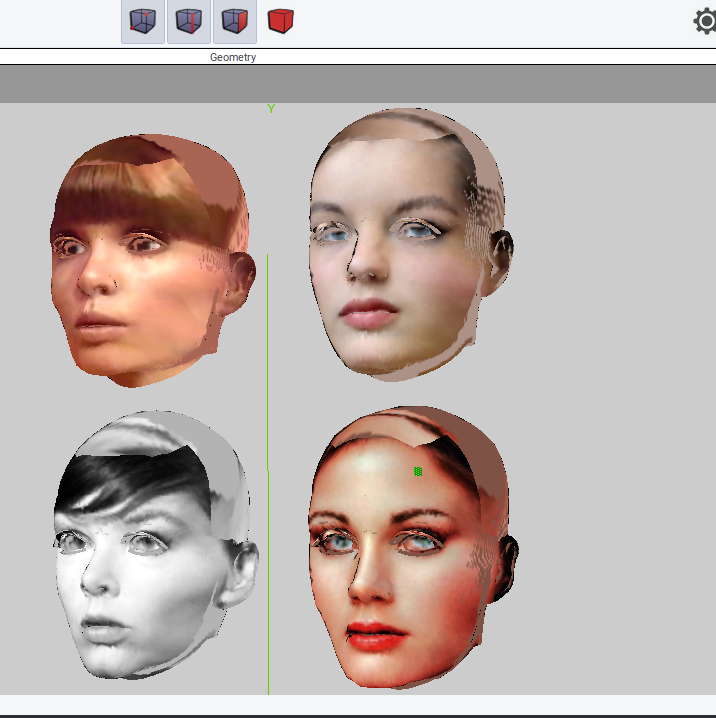
Finally, I've also placed in my Filelocker a zip with a Wings3D file that will allow you to examine some results exported directly from the script. The four Antonia-1.2 heads shown here are in the file, so any of you who have been curious about the quality of its morphs can take a look.
https://www.renderosity.com/filelocker/57480/download?key=1451
Bandwidth is limited, but I figure the five of us who are still hanging around here at the forums can't possibly use it all. Right?
Anyway, I'm going to finish up this debugging pass and get back to working out how to do this with Github.
===========================sigline======================================================
Cage can be an opinionated jerk who posts without thinking. He apologizes for this. He's honestly not trying to be a turkeyhead.
Cage had some freebies, compatible with Poser 11 and below. His Python scripts were saved at archive.org, along with the rest of the Morphography site, where they were hosted.
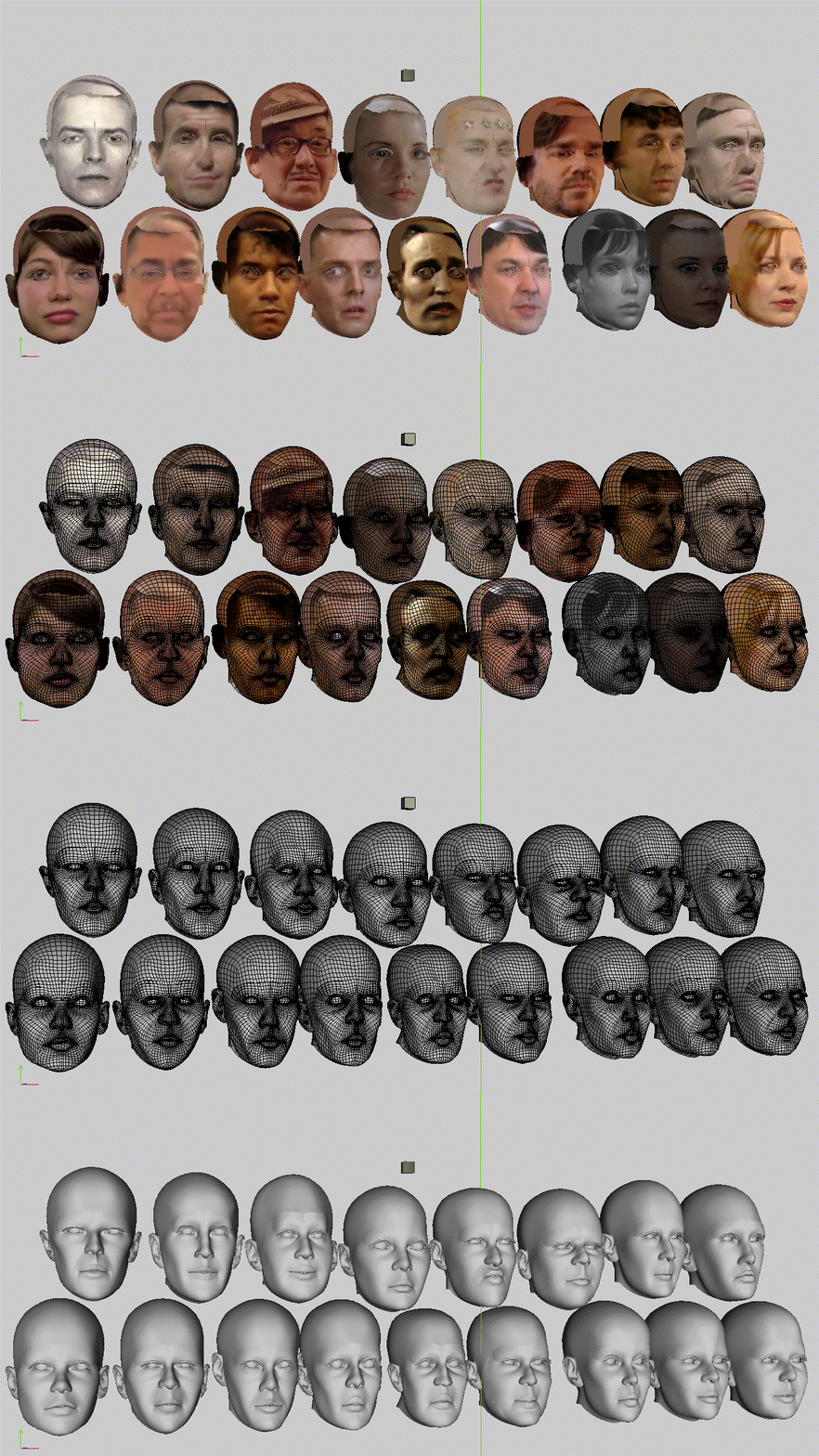
Ooh, we can do gif files.
I am one of those who pronounce it "Gee-Eye-Eff".
===========================sigline======================================================
Cage can be an opinionated jerk who posts without thinking. He apologizes for this. He's honestly not trying to be a turkeyhead.
Cage had some freebies, compatible with Poser 11 and below. His Python scripts were saved at archive.org, along with the rest of the Morphography site, where they were hosted.
I have a compiled exe and support files available, if anyone is interested in testing the program. Private message me if that interests you. I gather that no Mac users had any interest, before, but if anyone on Mac wants to test, I can compile for Mac, but without Dlib support and so far with no verification from actual Mac users that the compiled version runs properly.
Edited to note that the testing files include pre-made comparison files for LaFemme1 and LHomme1, as well as Posette, Vicky1, Pauline, and the default Antonia-1.2.
===========================sigline======================================================
Cage can be an opinionated jerk who posts without thinking. He apologizes for this. He's honestly not trying to be a turkeyhead.
Cage had some freebies, compatible with Poser 11 and below. His Python scripts were saved at archive.org, along with the rest of the Morphography site, where they were hosted.
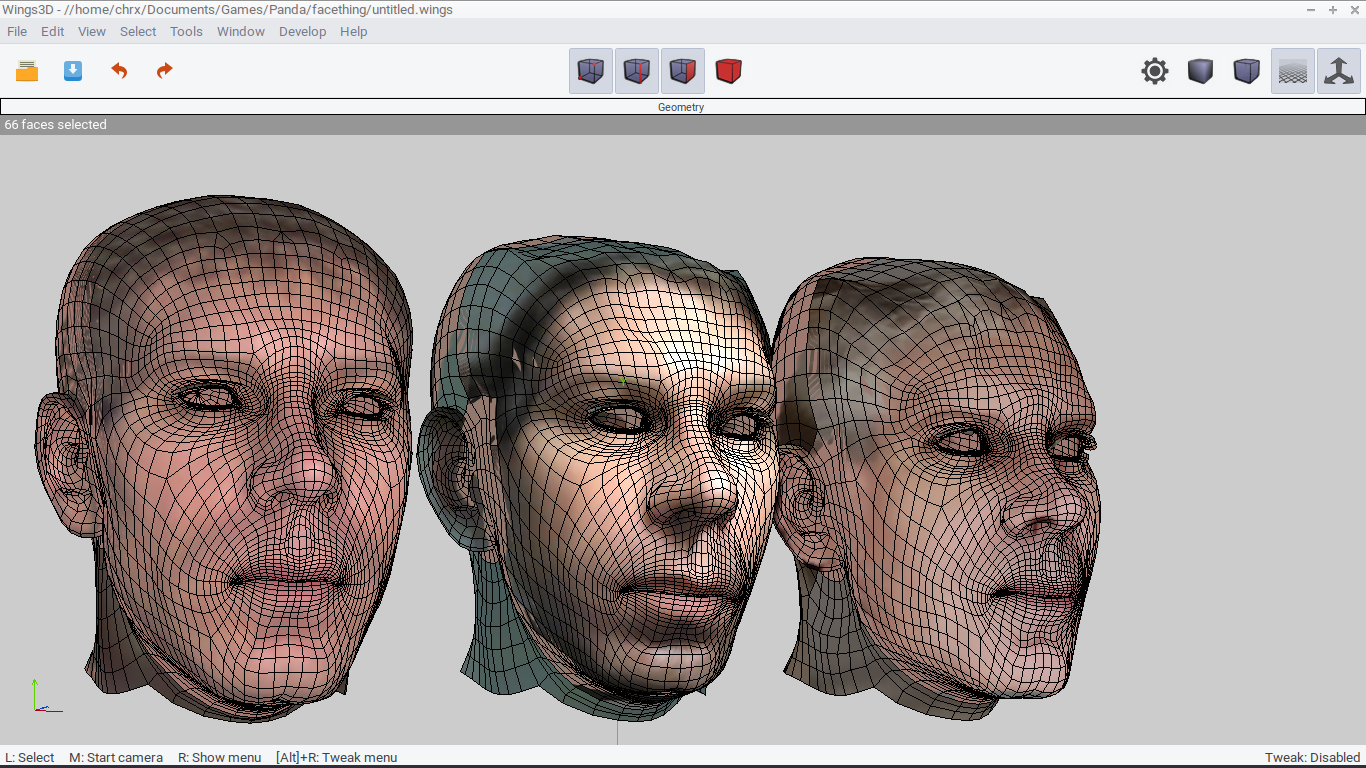
It's taken me three morphs of my own stupid face to begin accepting that I might actually look sort of like that. I'm not here to advertise my unfortunate features, but to show that I'm testing a bit with L'Homme and LaFemme. Someone mentioned Dawn and Dusk to me, but I don't know where to find those so I can set up files for them.
A compiled exe version is available for testing, now with basic instructions and reference in pdf form, with a hyperlinked table of contents and illustrations & stuff. Message me if interested. I'm a freak and a weirdo, my nose maybe looks like you can see right there, but I don't bite. Usually, I don't bite. I have not yet bitten anyone. In private message. Okay.
===========================sigline======================================================
Cage can be an opinionated jerk who posts without thinking. He apologizes for this. He's honestly not trying to be a turkeyhead.
Cage had some freebies, compatible with Poser 11 and below. His Python scripts were saved at archive.org, along with the rest of the Morphography site, where they were hosted.
I guess I should have said in the previous post that L'Homme was made l'homely by wearing my own personal features. Ah, well. Here's another test of L'Homme.
Working with Antonia for so long has really spoiled me. How do you guys deal with the lack or definition around the nostrils, or the ears? If these are Poser's current flagship figures, well. I'm disappointed to learn about it. I guess I'm testing version 1, and maybe there's a better version 2? Those nostrils act like they know what they are, "Look at me! I'm some nostrils!" But then they fizzle out before they reach the end.
===========================sigline======================================================
Cage can be an opinionated jerk who posts without thinking. He apologizes for this. He's honestly not trying to be a turkeyhead.
Cage had some freebies, compatible with Poser 11 and below. His Python scripts were saved at archive.org, along with the rest of the Morphography site, where they were hosted.
Cage posted at 5:16 PM Tue, 23 June 2026 - #4507586
Dawn and Dusk are included with the Bondware version of Poser 11 and upwards - I recall you saying you owned Poser 11 but didn't use it much. Anyway, their content files should be available to you if you haven't already downloaded them.Someone mentioned Dawn and Dusk to me, but I don't know where to find those so I can set up files for them.
There's a Dawn 2 as well, but you have to pay for her.
You look familiar somehow. And no, I'm not referring to the Gollum tests. :D
Well, Edmond Curse, seen in my avatar, started as a pretty standard fan fiction Mary Sue type character, and was made to look as much like me as I could manage at the time. I keep coming to grips with the truth of my own appearance, then slowly becoming confused again until I think I look more like the somewhat more attractive people around me. Then I have a shock as I again confront the truth, "Do I really look like that" is a way of life, when you're down there among the threes, on that rotten ten-point scale.
But it seems unlikely that we've met. We're from two different worlds!
I guess I need to start actually searching the Rosity marketplace for these figures, then. I'll do that. I would like the script to include prepared setup files for the heads of the more more popular figures in what remains of Poserdom. The trouble being that I've used only Antonia for 15 years, so I don't own the popular figures in Poserdom. But I'll get it together.
===========================sigline======================================================
Cage can be an opinionated jerk who posts without thinking. He apologizes for this. He's honestly not trying to be a turkeyhead.
Cage had some freebies, compatible with Poser 11 and below. His Python scripts were saved at archive.org, along with the rest of the Morphography site, where they were hosted.
I guess I need to start actually searching the Rosity marketplace for these figures, then. I'll do that. I would like the script to include prepared setup files for the heads of the more more popular figures in what remains of Poserdom.
Don't search the marketplace, because you'll have to pay; that's why I didn't post links to Dawn and Dusk. For reasons, the Poser 11 content downloads no longer seem to be available, but looking through our earlier correspondence I see you also own Poser 13. In which case, go here and enter your serial number to access them.
Folks like me who use Poser to make comic strips with pretensions of being graphic novels are always on the lookout for real-life, average looking characters (no offence intended! I'm a real-life, average looking character myself). There's a limit to the number of supermodels / superheroes you can use to populate a real-life, average looking comic. :)
I guess it's a problem, with a tool like this. The most easily available source image faces belong to lovely people. The TV characters composite up there was intended to show some variety, but it's just more nice-looking faces, isn't it? And I don't have a lot of more average faces for use in testing, aside from my own.
That is helpful information, EB. Thank you. I will gather the Poser 13 figures and prep them. I still haven't loaded either of the Bondware versions of Poser that I've bought, largely due to their phone home thing. I've ranted and babbled about that already elsewhere.
===========================sigline======================================================
Cage can be an opinionated jerk who posts without thinking. He apologizes for this. He's honestly not trying to be a turkeyhead.
Cage had some freebies, compatible with Poser 11 and below. His Python scripts were saved at archive.org, along with the rest of the Morphography site, where they were hosted.
Long ago, I mused here at Rosity that Daz was freaking me out, since my mother is named Vicki and her brother was named Michael. That's how long ago it was, back in the before times. Someone responded to that post by suggesting that I must be called Stephanie. So I was maybe a bit relieved when Daz went all Genesis, because the only Genesis I knew stole the dessert from my lunchbox in third grade, and she later punched me in the stomach in fourth grade, but we weren't related at all!
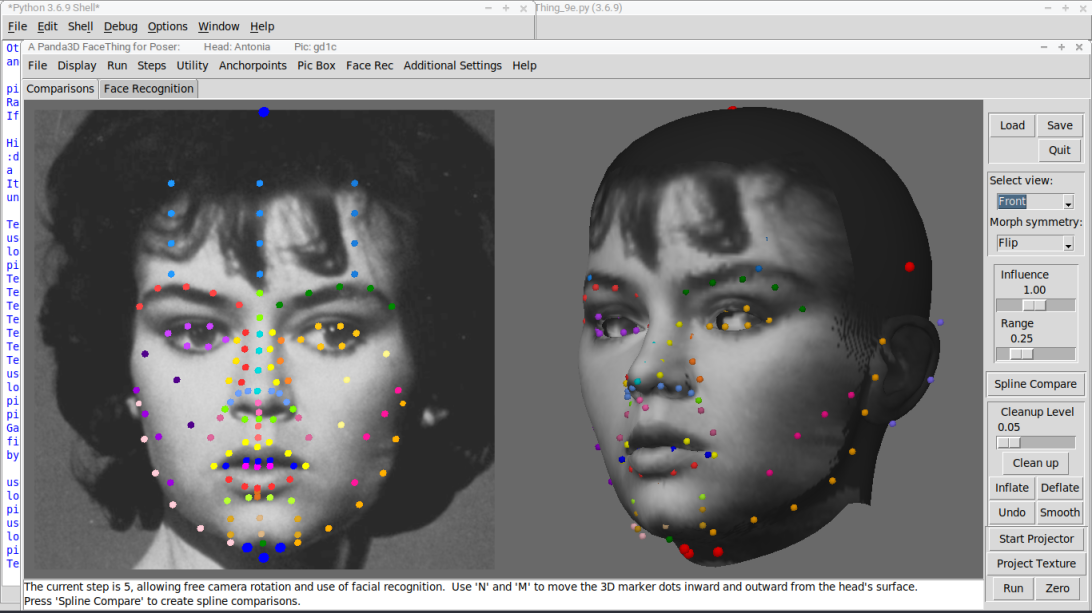
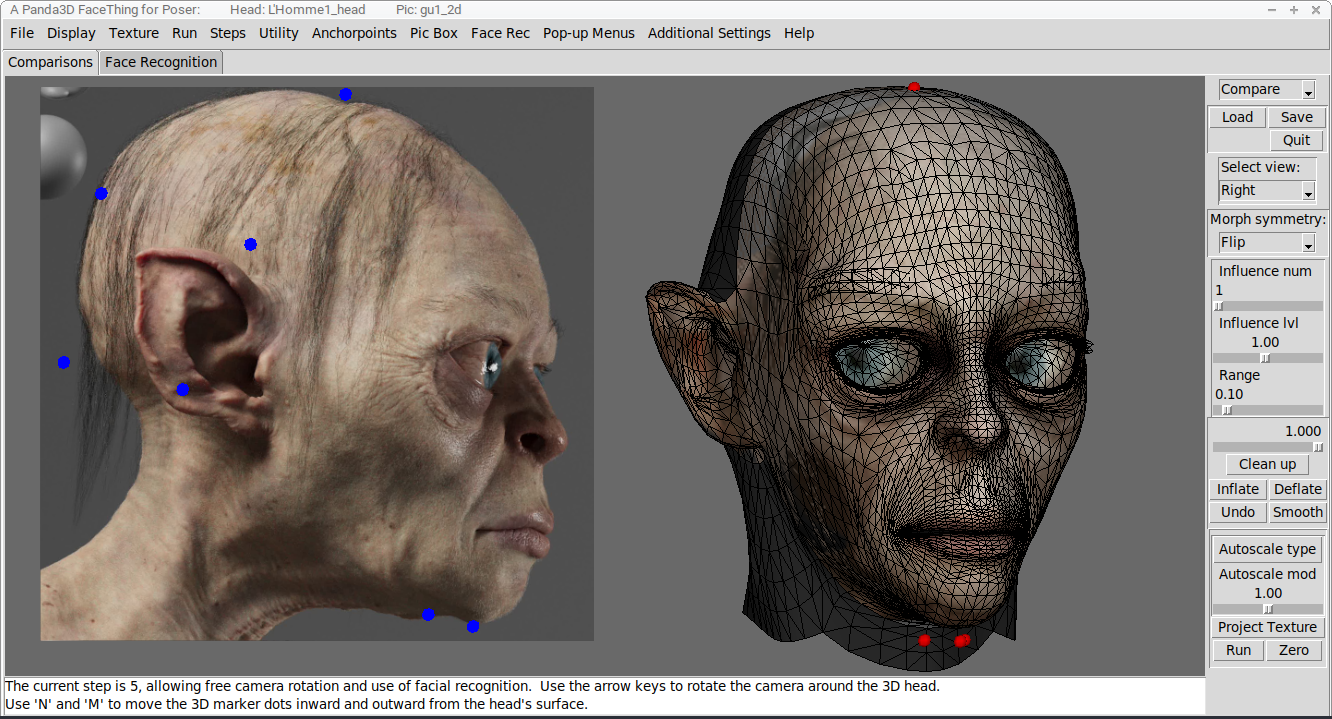
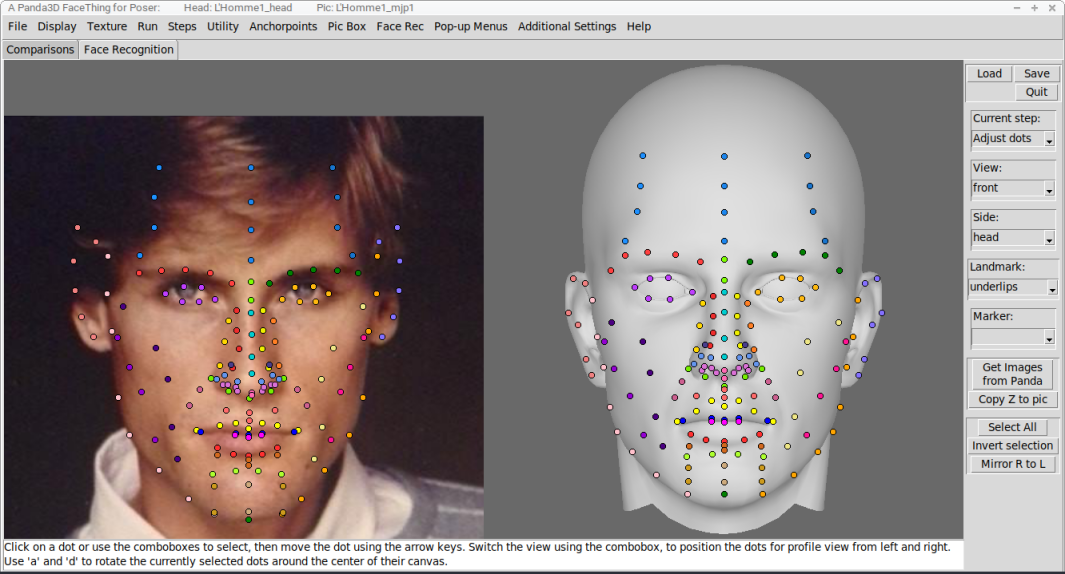
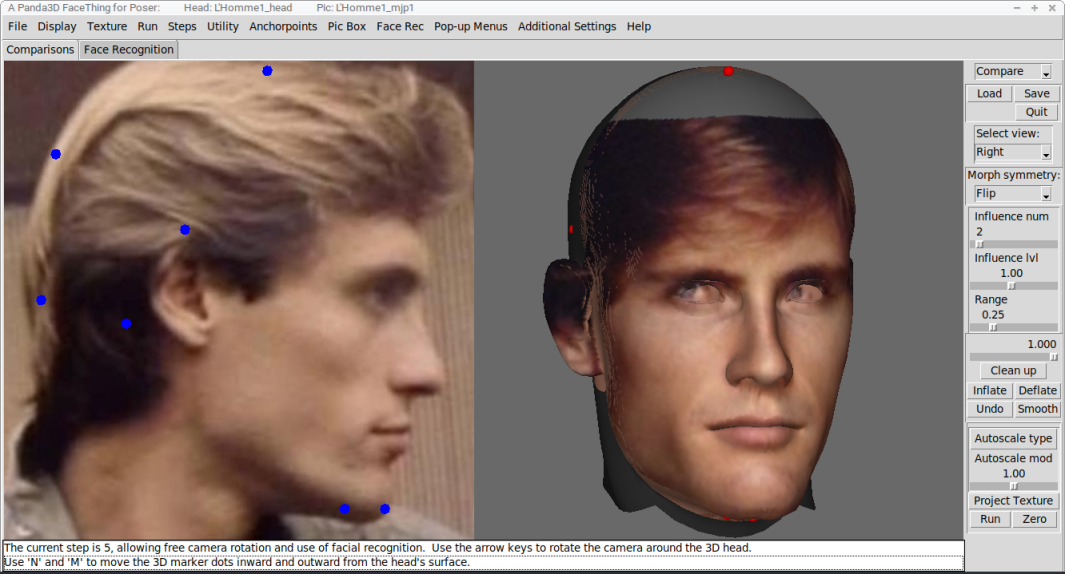
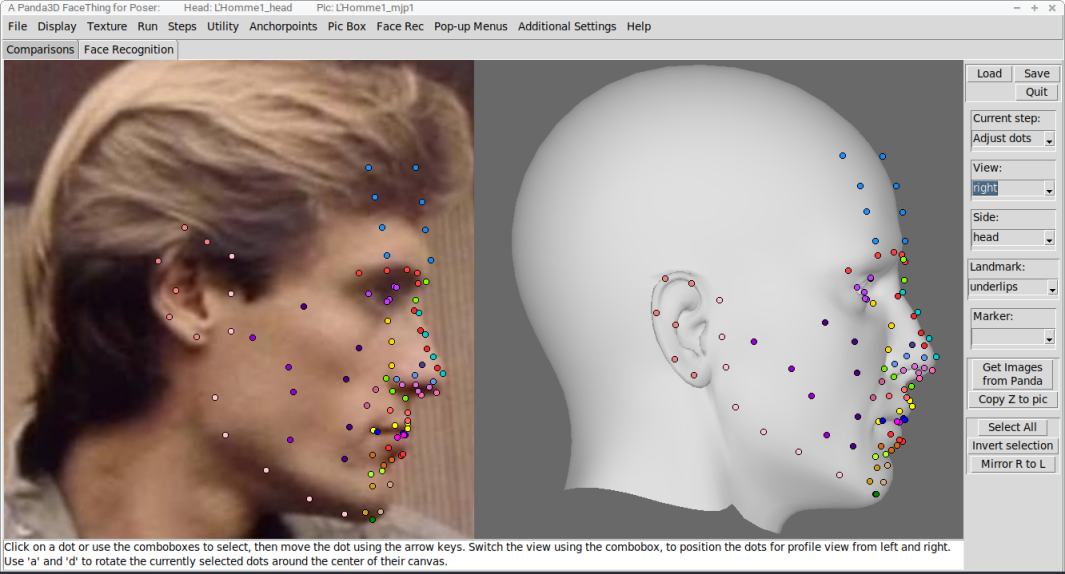
Anyway, this is that Michael, morphed and texture-projected onto L'Homme. It's worked pretty well. The second and third images are here because it occurred to me that I haven't shown all of you (yes, you, my purely notional audience) the final set of marker dots that are being used to capture a resemblance. As well, perhaps you remember me babbling about how I would have to find a way to compensate for Pauline's brow. L'Homme, here, has a similar mesh in many ways -- I've been assuming the current L'line of L'Poser L'figures was derived from Paul and Pauline -- and one of those similarities is that brow. L'Homme has a brow that will force itself into your morphs, if you don't take steps to remove it, and also a lump on his nose.
The trick to removing these is to move the marker dots of the head inward or outward relative to the head's surface. Since the final morph is created from the deltas between the positions of the markers on the head side and those on the pic side, moving a pic marker along a vector is equivalent to moving the corresponding head marker along a vector pointing in the opposite direction. Which means we can de-emphasize L'Homme's brow and nose lump by moving the markers in those areas inward. The opposite is true, as well. Those five markers running up and down each cheek down directly correlate to any facial anatomical landmarks, but they're there because we still need the ability to sculpt those areas. By moving those inward on the head, beneath its surface, it is easier to define the cheeks of the pic-face without exaggeration that moves too far from the reference points in the source picture.
Okay, nobody panic! The images came in with a jumbled order, so the second and third images are the first and third images! Okay? Stop panicking!
===========================sigline======================================================
Cage can be an opinionated jerk who posts without thinking. He apologizes for this. He's honestly not trying to be a turkeyhead.
Cage had some freebies, compatible with Poser 11 and below. His Python scripts were saved at archive.org, along with the rest of the Morphography site, where they were hosted.
===========================sigline======================================================
Cage can be an opinionated jerk who posts without thinking. He apologizes for this. He's honestly not trying to be a turkeyhead.
Cage had some freebies, compatible with Poser 11 and below. His Python scripts were saved at archive.org, along with the rest of the Morphography site, where they were hosted.
Something that I'm really noticing with L'Homme is a problem with the InnerEye material. For some weird reason, the InnerEye -- the eyesocket, inside the head -- is inset into the geomtry as though modeled using the Wings3D 'Intrude' function. There's an internal layer of polygons that pointlessly lies right underneath the SkinHead (an unfortunate name) material's outer surface. It is far too close, really weird design choice. Which means it keeps poking through the outer skin surface. And I can't just push it back in using a normals-driven function, because the InnerEye extends into the visible edges of the eyelids, so trying to hide the eyesocket that way distorts the shape of the eyes. Who the flip built this thing??? Because that person was drinking the weird sauce at the time. I can only hope this sort of thing was fixed with version 2 of the figure, because that is just klunky. I am not the only one who has noted this! It was brought to my attention by a tester.
I may be ranting now. Do you folks have some way of dealing with this problem? If there's a known trick to compensate for this sort of thing, maybe I can integrate that fix into the script's process, to help remove a problem from a morph before it can happen.
===========================sigline======================================================
Cage can be an opinionated jerk who posts without thinking. He apologizes for this. He's honestly not trying to be a turkeyhead.
Cage had some freebies, compatible with Poser 11 and below. His Python scripts were saved at archive.org, along with the rest of the Morphography site, where they were hosted.

This looks incredibly useful. Will it also work with Dusk? Dawn? M4? V?
I would love to try the Windows 7 version.
All art is experimental. All life is art.
Buy me a coffee, or some ramen?
It should work with any figure for which a head comparison file is created. So far I've created files for Antonia-1.2, Posette, Vicky1, Pauline, LaFeme1, and L'Homme1. I'm slowly adding more to that list, but I keep coming up with ways to try to refine and improve the process during all the testing I have to do as I set up those new heads. Anyone can set up a head. The process is fairly open and extensible, but... it may be a bit complicated in places. Part of that attempted refining is trying to simplify the thing and make it more accessible.
The Windows 7 version should just be a general compiled exe Windows version.
Testers are quite welcome! I can get the current script into a useful state and send you some download links by the end of today.
===========================sigline======================================================
Cage can be an opinionated jerk who posts without thinking. He apologizes for this. He's honestly not trying to be a turkeyhead.
Cage had some freebies, compatible with Poser 11 and below. His Python scripts were saved at archive.org, along with the rest of the Morphography site, where they were hosted.

It does a nice job :D I used my own textures, but with practice I can generate a morph in under 10 miutes. I used standard morphs for the eye tilt and touc up, but
I work with windows 10 and had no problems with the program (once I figured out what I was doing)
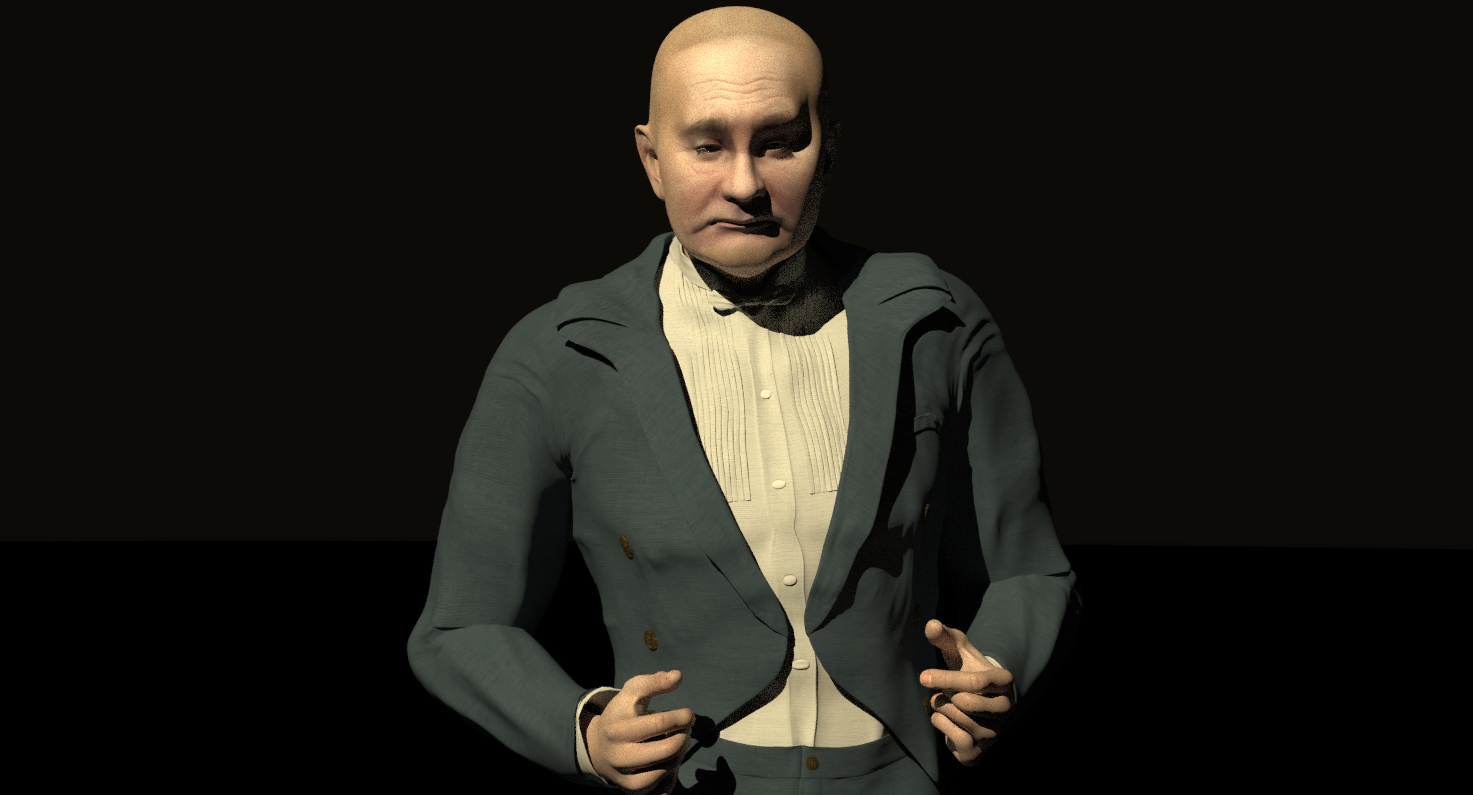
My Vlad character
Bill
People that know everything by definition can not learn anything
Nice! It's encouraging to know that the compiled version is working on Windows. Each head only needs to be set up once, and can then be saved and used with any number of picture sets. Once you get the hang of where all the dots go -- and there are admittedly many, many dots -- you can produce pic-set morphs pretty quickly. That gif up there (GEE-EYE-EFF) took a few hours, one afternoon, to make many, many morphs. And the pic-sets can be saved and reopened later, just like the heads, so a morph can be refined gradually. Everyone has seen too much of the same morphs from me, over and over as I try to display improvements that probably only I notice. Then the pic-sets can be used with other heads than the one with which they were initially set up -- with some appropriate scaling, since the actual size of the face differs from one Poser figure head to another.
===========================sigline======================================================
Cage can be an opinionated jerk who posts without thinking. He apologizes for this. He's honestly not trying to be a turkeyhead.
Cage had some freebies, compatible with Poser 11 and below. His Python scripts were saved at archive.org, along with the rest of the Morphography site, where they were hosted.
I'll be installing it tonight and giving it a go hopefully tomorrow. My ADHD makes complex tasks incredibly difficult for me to complete...I even get distracted from vidya games.
All art is experimental. All life is art.
Buy me a coffee, or some ramen?
Let me know if you have questions.
===========================sigline======================================================
Cage can be an opinionated jerk who posts without thinking. He apologizes for this. He's honestly not trying to be a turkeyhead.
Cage had some freebies, compatible with Poser 11 and below. His Python scripts were saved at archive.org, along with the rest of the Morphography site, where they were hosted.
Okay, I'm looking at L'Homme, here, and... I'm going to go on the record. Whoever decided that the eye translation dials should be linked to face morphs, completely destroying the ability of the eye to be adjusted relative to the eyesocket? That person is a grade-A jackass. That is such a stupid design decision. You might as well not have the translation dials, do you grasp that? Because you've turned them into a morphing feature. If you're going to do something like that, ADD A SECOND SET OF TRANSLATION DIALS. You can do that. I've done it with Antonia's jawLower actor. You just give the additional dials unique names. One dial is linked to the old mouth open morph and the other one works with the new weight-mapped jaw handling.
Seriously, I haven't seen something this dumb since they decided to link the Poser library system to Flash and Internet Explorer. Which presumably means it was mandated by management, and the programmer/figure developer shrugged and said, "Whatever. I'm getting paid."
You can showcase new, advanced features without completely wrecking existing utility. You just have to not do it the stupid way.
Rant over.
===========================sigline======================================================
Cage can be an opinionated jerk who posts without thinking. He apologizes for this. He's honestly not trying to be a turkeyhead.
Cage had some freebies, compatible with Poser 11 and below. His Python scripts were saved at archive.org, along with the rest of the Morphography site, where they were hosted.
I figure I've chased everyone away by now, and I guess it serves me right, but I will ask anyway.
I'm not a fan of Daz Studio, I've never used it, I have no interest in using it and I will not be loading it onto any of my Poser devices. Further, this thread should not become any kind of standard Poser-Daz fight, oh man. But as I approach what really, truly, for-sure-this-time looks like the final phase of development, I wonder about adding support for Genesis to the process. Obviously I can't hope to load the Daz geometry itself and support that, with Daz's weird, restrictive licensing thing they do. But I am told that Genesis can be exported as obj, and if that obj has a 'head' group the script can theoretically support it.
But I know nothing about Genesis and could use help and pointers, if available. Can anyone help with this?
I'm also interested in working out how Blender figures, such as MakeHuman, might be supported. I have imported the entire MH as obj and exported a shaped head, but I understand Blender shape keys work differently than Poser morphs, and I'm not sure how the script should export anything for use with Blender. If anyone can help with this, that might be pretty neat.
===========================sigline======================================================
Cage can be an opinionated jerk who posts without thinking. He apologizes for this. He's honestly not trying to be a turkeyhead.
Cage had some freebies, compatible with Poser 11 and below. His Python scripts were saved at archive.org, along with the rest of the Morphography site, where they were hosted.
It's relatively simple to use Genesis and Genesis 2 in Poser, but the catch is that you need DAZ Studio installed if you want to avoid DSON tomfoolery; DSON is no longer maintained, in any case. Further potentially inflammatory comments are omitted. :) How big a user base this amounts to, I don't know, but it's a straightforward process to export from DAZ so I guess others must be doing it too.
If you're determined to avoid DAZ Studio altogether, there are other ways to extract OBJ geometry from DAZ's DSF data files: Dimension3D's DSF Toolbox is one that I've used, but I'm not aware of anything free.
Oh, excellent. I've put D3D's script on my September list. Thanks, EB.
===========================sigline======================================================
Cage can be an opinionated jerk who posts without thinking. He apologizes for this. He's honestly not trying to be a turkeyhead.
Cage had some freebies, compatible with Poser 11 and below. His Python scripts were saved at archive.org, along with the rest of the Morphography site, where they were hosted.
LaFemme2 is coming along. The worst problems of the first generation L'Figeurs seem to have been remedied in series two. The little, tiny nub of a nose required some careful tweaks to head marker placement, to get it to handle as desired. The main complication I'm seeing is with the irregular mesh density. I will start showing some pictures.
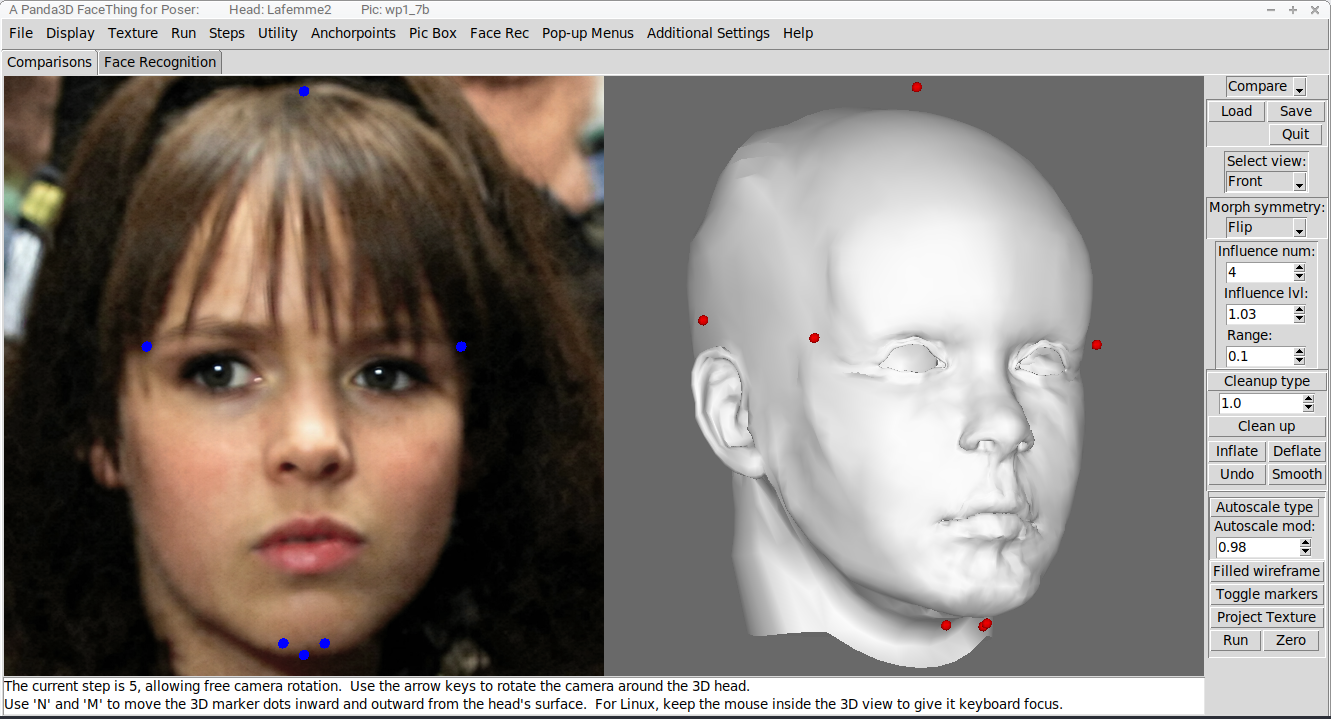
This is LaFemme2 with a fresh transfer. As you can see, the results, out of the box, are messy. We're morphing a head with some thousands of vertices using a point cloud of fewer than 200 marker points. The results are general and require cleanup.
===========================sigline======================================================
Cage can be an opinionated jerk who posts without thinking. He apologizes for this. He's honestly not trying to be a turkeyhead.
Cage had some freebies, compatible with Poser 11 and below. His Python scripts were saved at archive.org, along with the rest of the Morphography site, where they were hosted.
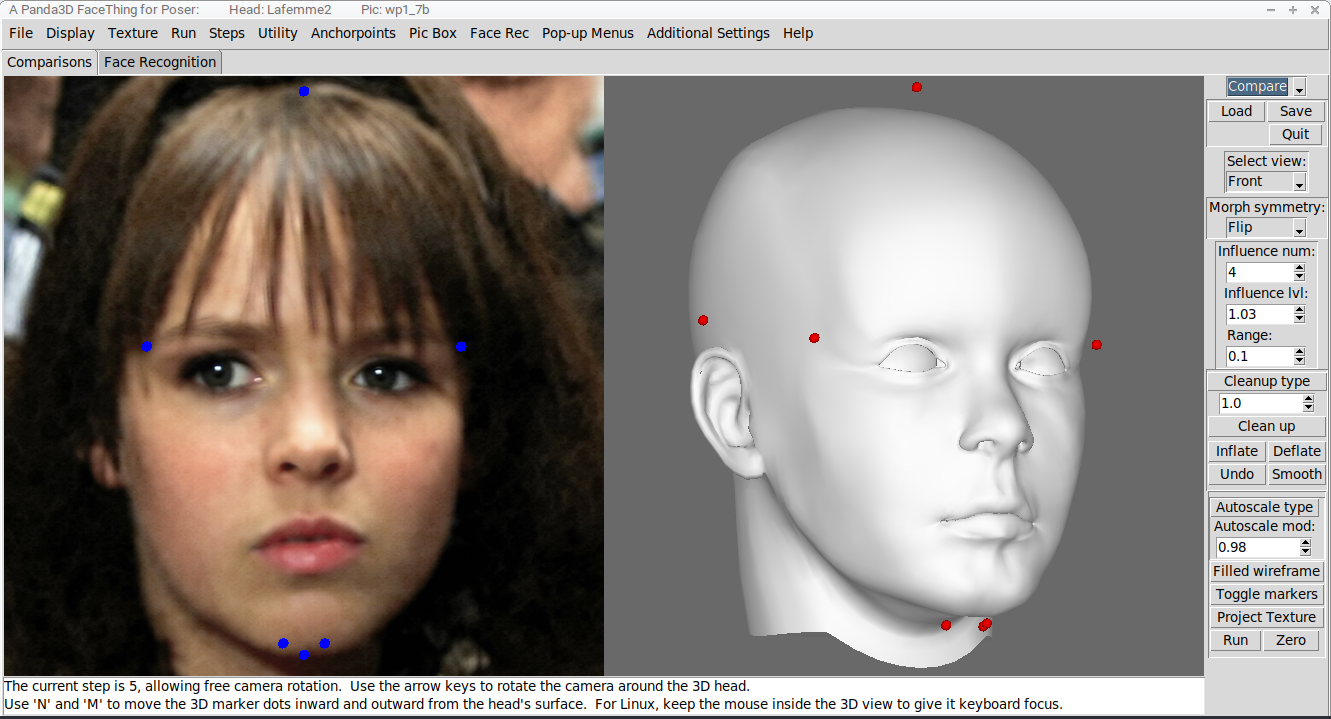
The Old Timers among us may recall my Restore Detail smoothing script, with its apparent reputation for only working on Antonia. Facething uses Restore Detail for its 'Clean up' function, which you can see right there, on its button. The 3D head, here, has had one pass of cleanup run on it, and the process has helped fix most of the mess, but there are still some things happening down there in the chin area and the septum-philtrum region. The mesh density is much higher than it really needs to be in those areas, given that no one is specifically morphing a chin or undernose for wild levels of detailing. Well, I don't know you, maybe you're doing that, I don't know. But it seems unlikely. I assume that area is super-dense as an offshoot of the useful added density for the lips and nose, and maybe whaddayacall topological thinning is not as approachable for even professional modelers as I might like to imagine.
Whatever the cause, that area is denser than it needs to be, and the overall mesh density of the head varies a fair bit. The lips and nose, which have that density and need it, clean up nicely. The chin, where one generally wants smoother, more general shapes, still has its own mess after one pass of Restore Detail. Further head-wide passes can smooth away some of the detailing we really want to retain. The recognized limitations of the Restore Detail script are showing themselves. It works well on heads with a nice mesh flow and fairly even density.
===========================sigline======================================================
Cage can be an opinionated jerk who posts without thinking. He apologizes for this. He's honestly not trying to be a turkeyhead.
Cage had some freebies, compatible with Poser 11 and below. His Python scripts were saved at archive.org, along with the rest of the Morphography site, where they were hosted.
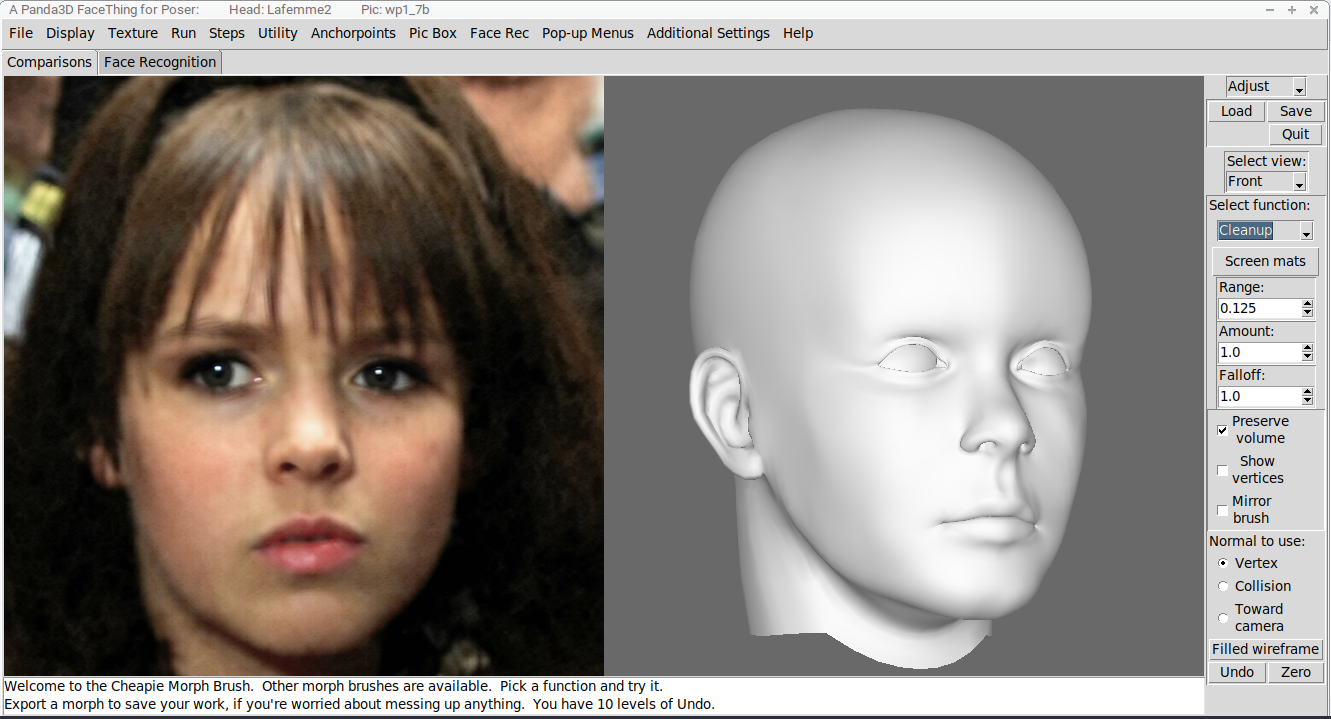
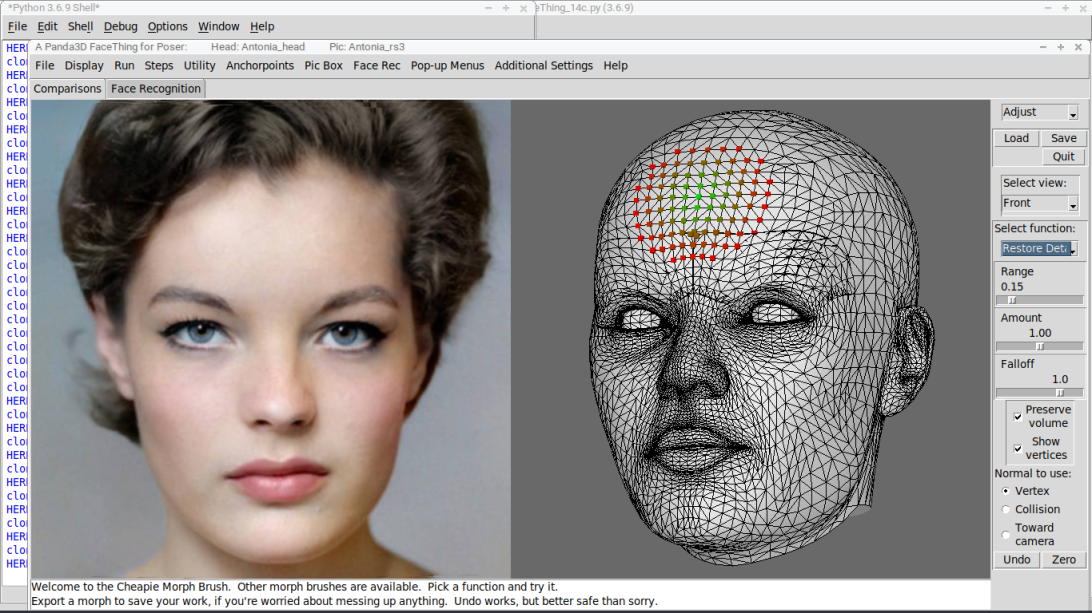
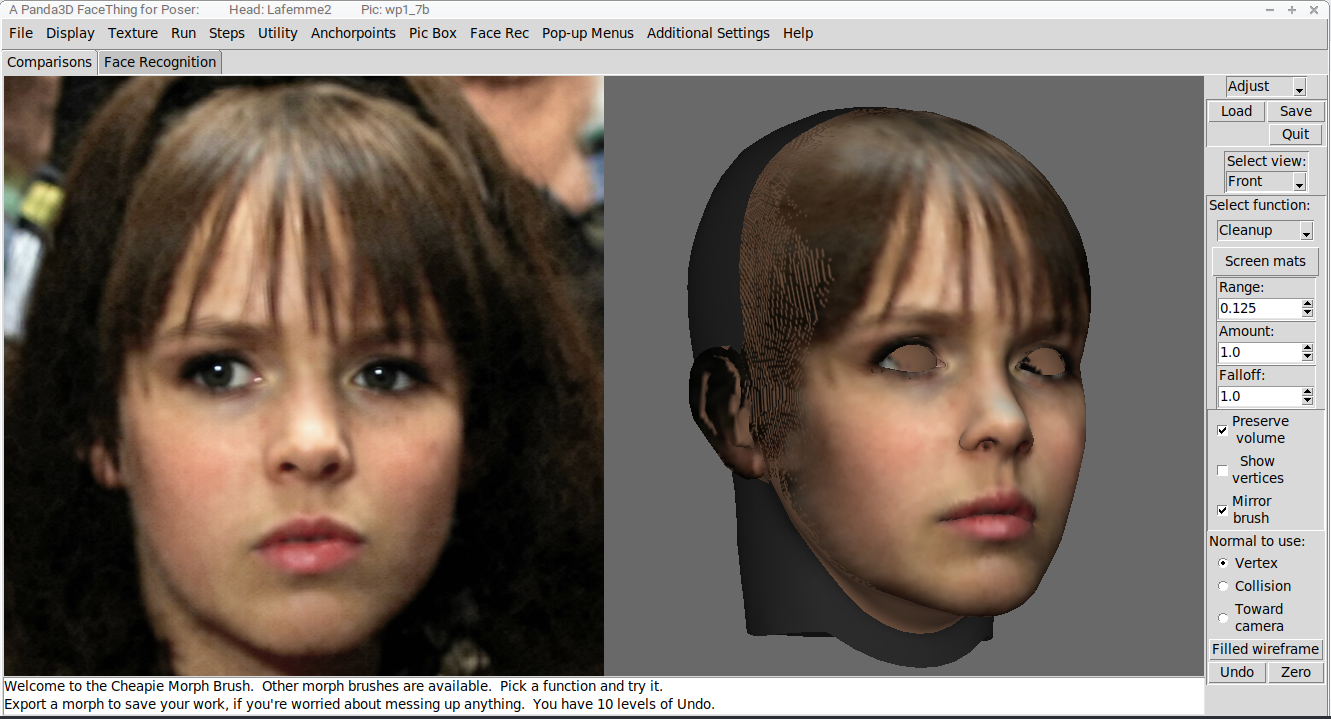
Here, I'm showing the solution to the above problem. Facething offers the tools to fix its own stupid problems. Before, we were seeing the Comparisons toolset. This one is the Adjust toolset, which is our Cheapie Morph Brush -- other morph bushes may be available.
The main reason I bothered to code a brush-based morphing tool into this is not because I figure I can compete with the more high-falutin' programs with such tools (why should anyone else have a shaping brush, when ZBrush or, I dunno, Mudbox, do it soooo much better, amiright). Bah, phooey. I'm lucky to make it less clunky than Amorphium. But what no other brush-based morphing tool offers is Restore Detail in brush form. RD is a smoothing process that pulls the vertices back toward their original relationships, instead of rounding everything down to a nub. In brush form, it can be used in just those areas that need it, quick and easy. Here, I've cleaned up the chin and the philtrum and a couple of spots, the neck and ears, IIRC.
===========================sigline======================================================
Cage can be an opinionated jerk who posts without thinking. He apologizes for this. He's honestly not trying to be a turkeyhead.
Cage had some freebies, compatible with Poser 11 and below. His Python scripts were saved at archive.org, along with the rest of the Morphography site, where they were hosted.
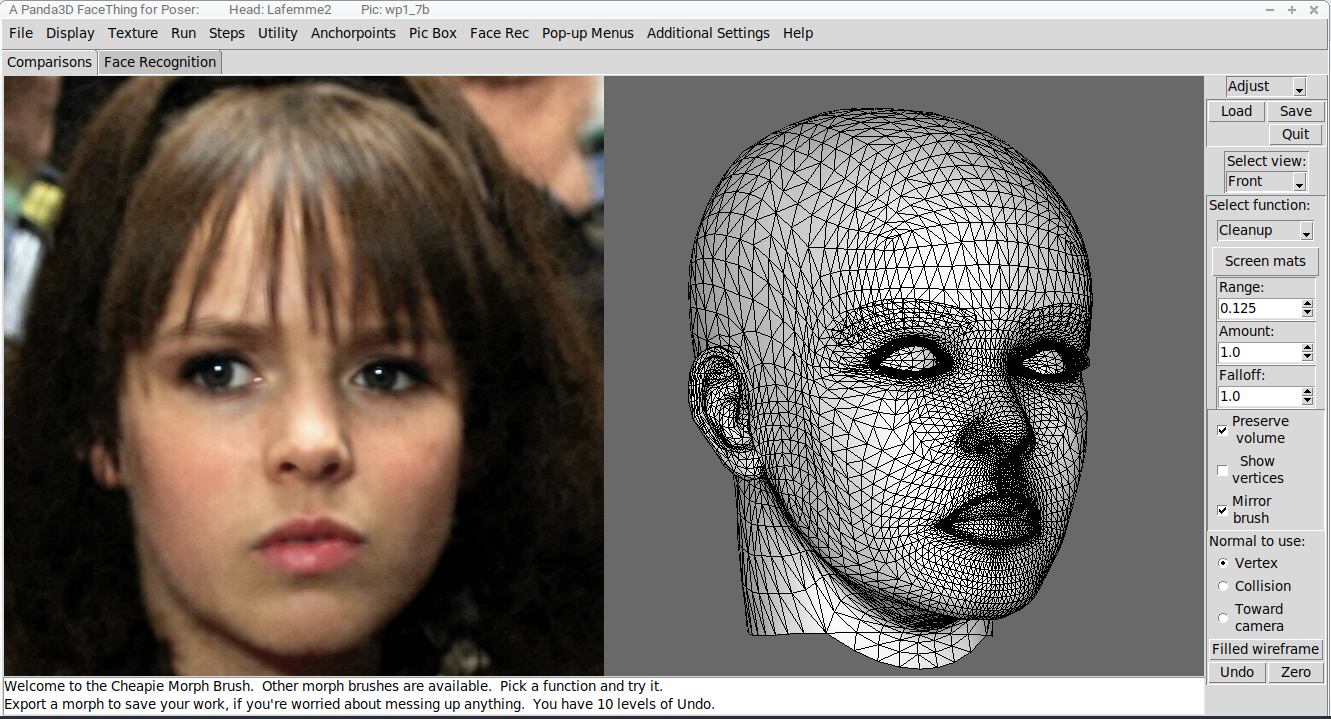
That's it, I guess. LaFemme2 is almost set up, the head morphs nicely, but those freakishly dense areas may require special attention using some other features of the script.
===========================sigline======================================================
Cage can be an opinionated jerk who posts without thinking. He apologizes for this. He's honestly not trying to be a turkeyhead.
Cage had some freebies, compatible with Poser 11 and below. His Python scripts were saved at archive.org, along with the rest of the Morphography site, where they were hosted.
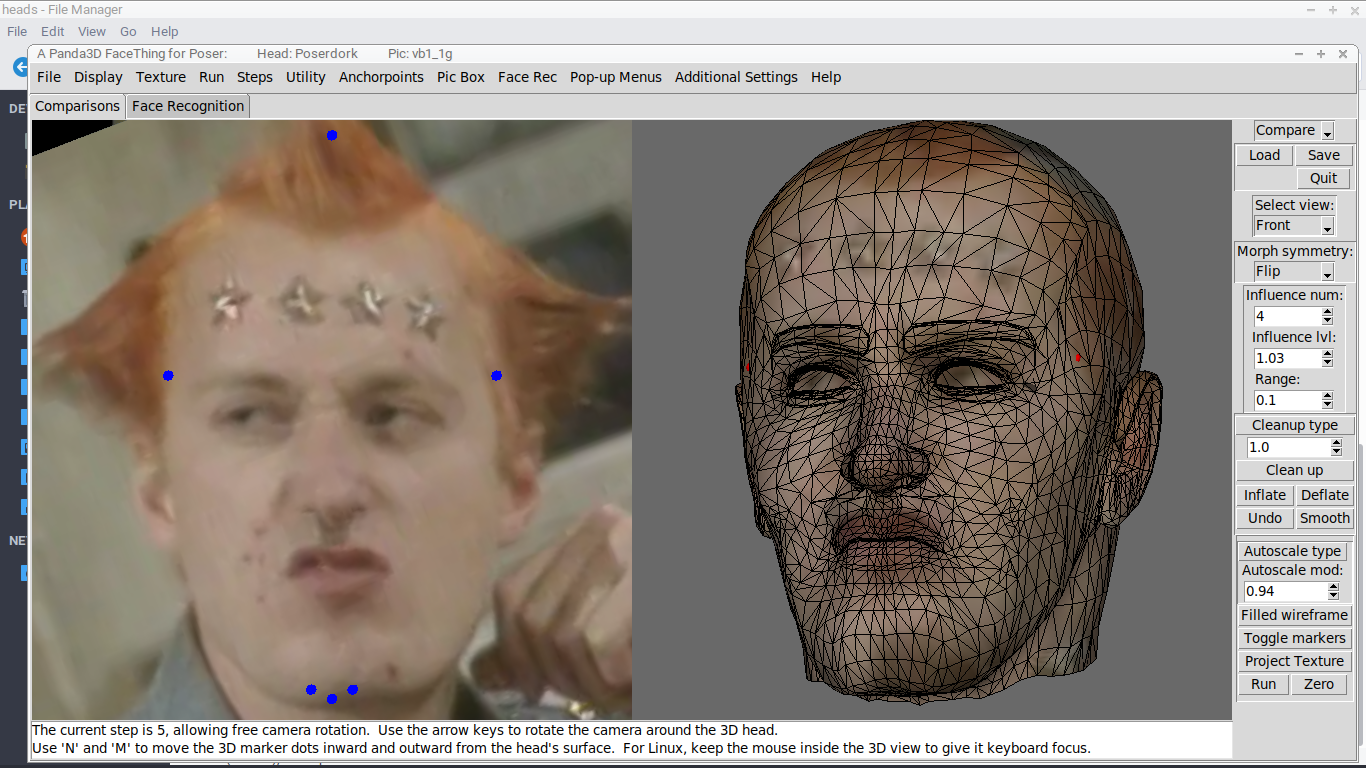
Poserdork as Vyvyan Basterd. All of these pic-sets were prepared for the Antonia-1.2 head. The process is intended to produce morphs that are as close as possible to equivalent, across various heads. This does require that head markers be carefully calibrated for compatibility with the existing Antonia set. But note that this is just the marker arrangement at which I've arrived. You, potential user, could find preferable some entirely different way of arranging the markers. The process is fairly open, that way.
===========================sigline======================================================
Cage can be an opinionated jerk who posts without thinking. He apologizes for this. He's honestly not trying to be a turkeyhead.
Cage had some freebies, compatible with Poser 11 and below. His Python scripts were saved at archive.org, along with the rest of the Morphography site, where they were hosted.
Thanks, Vince. You or anyone else can start using the script today, if you like. A compiled exe for Windows is available on request. If you want to run it as pure Python, say on Linux without using Wine and the exe, you'll need to work with me a bit as I work out a process for helping another Linux-Python user set up the software. Mac is completely untested, but as noted earlier, I can compile a version for Mac but there's no known way to include dlib in that.
Eventually this will go up on Github -- I have the page started for it -- but there are still some things to finalize and a couple of features I want to add or improve before I release the code into the wild. The quality of the code, if anyone is interested, is pretty Meh. I am not the founder of I HATE PEP8 Fan Club for no reason.
Just message me or ask here in the thread, if you want a copy of the thing, anyone.
===========================sigline======================================================
Cage can be an opinionated jerk who posts without thinking. He apologizes for this. He's honestly not trying to be a turkeyhead.
Cage had some freebies, compatible with Poser 11 and below. His Python scripts were saved at archive.org, along with the rest of the Morphography site, where they were hosted.
was re-reading the thread & realized you'd posted some AP morphs, so I dug out my old AP1.2 & tried them out. AP texture w/ODF shader. Posted in my gallery.
still lost in the wilderness
Poser 13 Superfly pretty much only these days
I had forgotten about those. They are very outdated! I have since then added various marker sets that improve the shaping in key areas, as well as creating better symmetry routines and improved ways of matching the head-tilt between the front and profile images.
I'm glad the old morphs have some use for you, at least. A thumbs-up emoticon goes here.
===========================sigline======================================================
Cage can be an opinionated jerk who posts without thinking. He apologizes for this. He's honestly not trying to be a turkeyhead.
Cage had some freebies, compatible with Poser 11 and below. His Python scripts were saved at archive.org, along with the rest of the Morphography site, where they were hosted.

Privacy Notice
This site uses cookies to deliver the best experience. Our own cookies make user accounts and other features possible. Third-party cookies are used to display relevant ads and to analyze how Renderosity is used. By using our site, you acknowledge that you have read and understood our Terms of Service, including our Cookie Policy and our Privacy Policy.
That's Antonia_1.2, there, wearing this morph with no modifications, as well as a couple of those low-res projected textures to modify the face shader.
===========================sigline======================================================
Cage can be an opinionated jerk who posts without thinking. He apologizes for this. He's honestly not trying to be a turkeyhead.
Cage had some freebies, compatible with Poser 11 and below. His Python scripts were saved at archive.org, along with the rest of the Morphography site, where they were hosted.