
Renderosity Forums / Poser Python Scripting
Welcome to the Poser Python Scripting Forum
Forum Moderators: Lobo3433, Staff Forum Coordinators: Anim8dtoon
Poser Python Scripting F.A.Q (Last Updated: 2026 Aug 22 10:53 am)
Check out the new Poser Python Wish List thread. If you have an idea for a script, jot it down and maybe someone can write it. If you're looking to write a script, check out this thread for useful suggestions.
Also, check out the official Python site for interpreters, sample code, applications, cool links and debuggers. This is THE central site for Python.
You can now attach text files to your posts to pass around scripts. Just attach the script as a txt file like you would a jpg or gif. Since the forum will use a random name for the file in the link, you should give instructions on what the file name should be and where to install it. Its a good idea to usually put that info right in the script file as well.
Checkout the Renderosity MarketPlace - Your source for digital art content!

Subject: Reconciling Different Prop Rotation Axes In Poser And DAZ Studio

I guess that the answer on the Poser side may lie in one or more of the following (from the Poser 6 PoserPython Methods Manual). But the 'explanations' really don't help me here. I guess I should just try printing all of these out in step (10) to see if any of them match the values I'm getting from DAZ Studio?
actor.AlignmentRotationXYZ() - Get a tuple comprising the ordered rotation alignment for this actor. (order is X, Y, Z)
actor.LocalQuaternion() - Get a tuple comprising the quaternion local rotation for this actor.
actor.Orientation() - Get the orientation of the actor’s coordinate system (x,y,z ordered rotation).
actor.WorldQuaternion() - Get a tuple comprising the quaternion world rotation for this actor.
(I never learnt about quaternions - I have the vague impression that they define rotations by specifying a vector/axis and a rotation about that axis ?)
The 3Dcheapskate* occasionally posts sensible stuff. Usually by accident. And it usually uses Poser 11, with units set to inches. Except when it's using Poser 6 or PP2014, or when its units are set to PNU or something else.
*soon only to be available in two flavours - DAZ and Renderosity
Not sure what to make of the results I just got. In Poser 6 I just ran the script that does (1) to (9) automatically. First using the parameters I'd obtained from step (10) of the manual process in Poser 6, and second with the parameters I'd obtained from step (10) of the manual process in DAZ Studio
First: 'InHand' katana set up at origin in P6 using P6 HANDYPROXYDATA (yR=75.9741, xR=22.9775, zR=-10.0, xT=0.571, yT=0.089, zT=-0.38):
This is where the katana ended up - correctly positioned in the proxy-hand at the origin:
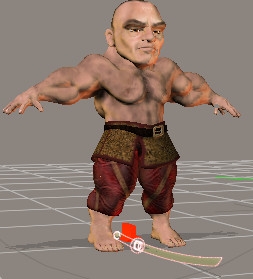
And here's all the Poser rotation/orientations for the prop:
The numbers on the parameter dials (xRotate, yRotate, zRotate) correspond to the values from the HANDPROXYDATA lines
AlignmentRotationXYZ() =(63.95, -8.864, 14.156)
Orientation() =(63.95, -8.864, 14.156)
LocalQuaternion()=(0.7802, 0.06667, 0.2319, 0.5770)
WorldQuaternion()=(0.7802, 0.0666, 0.2319, 0.5770)
Second: 'InHand' katana set up at origin in P6 using DAZ Studio HANDYPROXYDATA (yR=16.4, xR=22.12, zR=79.98, xT=0.546, yT=0.198, zT=-0.375):
Here's where the katana ended up - wrong!
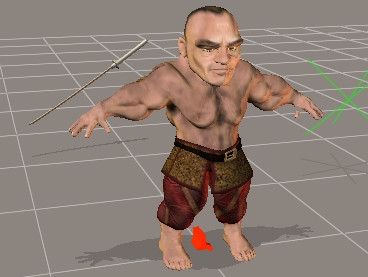
And here's all the Poser rotation/orientations for the prop:
The numbers on the parameter dials (xRotate, yRotate, zRotate) correspond to the values from the HANDPROXYDATA lines
AlignmentRotationXYZ() =(63.95, -8.864, 14.156)
Orientation() =(63.95, -8.864, 14.156)
LocalQuaternion()=(0.7267, 0.09721, -0.4695, 0.4919)
WorldQuaternion()=(0.7267, 0.09721, -0.4695, 0.4919)
I noticed that all the green values are the same (exactly the same, to at least 12-13 decimal places).
I really do not understand all this...
The 3Dcheapskate* occasionally posts sensible stuff. Usually by accident. And it usually uses Poser 11, with units set to inches. Except when it's using Poser 6 or PP2014, or when its units are set to PNU or something else.
*soon only to be available in two flavours - DAZ and Renderosity
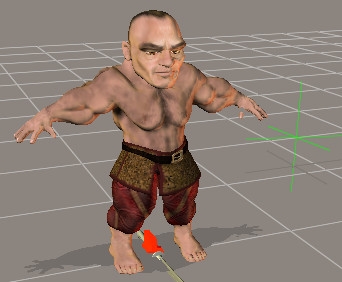
Just noticed that the origin of the katana hasn't been zeroed (don't think that's really relevant - the orientation of the katana using the DAZ Studio parameters is completely wrong). Anyway, the screenshot of the correctly positioned katana using the P6 parameters was from a different camera angle and cropped out the green origin marker. So here's a new screenshot from a similar angle to the DS version, and showing the prop origin marker:
The 3Dcheapskate* occasionally posts sensible stuff. Usually by accident. And it usually uses Poser 11, with units set to inches. Except when it's using Poser 6 or PP2014, or when its units are set to PNU or something else.
*soon only to be available in two flavours - DAZ and Renderosity

Hello,
I don't know DAZ axis system, so it is impossible for me to help you. About Quaternion, you can read my tutorial on this matter at:
http://www.renderosity.com/mod/freestuff/?item_id=72870
I also wrote a tutorial on Poser Matrix method at:
http://www.renderosity.com/mod/freestuff/?item_id=72801
Allstereo
Thanks allstereo, understanding what these PoserPython functions are returning is the first vital step, so I'll download your items when I'm back on my own system - they should definitely help. I did check the quaternion article on Wikipedia, and it was all gobbledigook to me :oS ... I couldn't understand what it was taliking about !
What's puzzling me most about the multicoloured results I noted is what exactly do the tuples returned by actor.AlignmentRotationXYZ() and actor.Orientation() represent?
The 3Dcheapskate* occasionally posts sensible stuff. Usually by accident. And it usually uses Poser 11, with units set to inches. Except when it's using Poser 6 or PP2014, or when its units are set to PNU or something else.
*soon only to be available in two flavours - DAZ and Renderosity
Another thing I just thought to try (posted here mainly so I don't forget to do it tomorrow) - save the scene as a PZ3 and examine the katana in the file. And import the scene into DAZ Studio.
But I'd expect that if I save the scene with the dwarv and the correctly positioned katana in the proxy-hand at his feet, then when I import the PZ3 into DAZ Studio I'd expect the katana to be correctly positioned too. But if in DAZ
Not really sure where this is going...
The 3Dcheapskate* occasionally posts sensible stuff. Usually by accident. And it usually uses Poser 11, with units set to inches. Except when it's using Poser 6 or PP2014, or when its units are set to PNU or something else.
*soon only to be available in two flavours - DAZ and Renderosity
Hello,
About the Python method actor.Orientation, it is the Original orientation of the prop. Look at the Orientation values in the Joint Editor Window. Perharps, it is your problem, Check in the Joint Editor if the prop "In Hand" has some values in the Orientation cases. Do the same for the prop "In Sheath". The computation of World Orientation should take care of the initial Orientation values (See my tutorial on Poser Matrix).
Allstereo
Thanks for the tutorials - very much appreciated. I've quickly read through the quaternion one, and I'm already much happier. Need to read it again a few times.
The matrix tutorial will take a bit longer...
Regarding actor.Orientation() giving the prop's original orientation (as defined in the PP2 I assume?) - that would explain why it's the same in both cases, despite the prop being oriented differently. (The PoserPython Manual description "Get the orientation of the actor’s coordinate system (x,y,z ordered rotation)." is clearly wrong - the prop origin marker (three mutually perpendicular green lines) in my two cases is clearly different)
The 3Dcheapskate* occasionally posts sensible stuff. Usually by accident. And it usually uses Poser 11, with units set to inches. Except when it's using Poser 6 or PP2014, or when its units are set to PNU or something else.
*soon only to be available in two flavours - DAZ and Renderosity
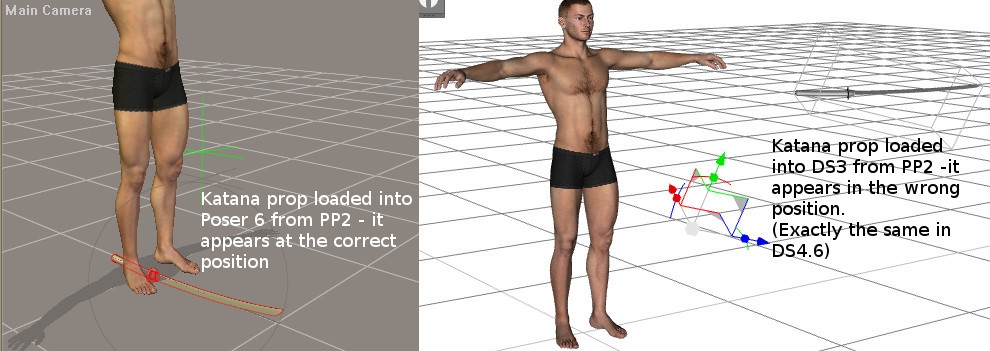
This is odd. I saved the correctly positioned (at the origin) katana as a prop from Poser 6.
When I load the PP2 in Poser (tried 6 and 9) it's fine.
But if I load it in DAZ Studio (tried 3 and 4.6) it's in the wrong place and wrongly oriented.
Never seen that before - a PP2 prop that loads differently in Poser and DAZ Studio...
The 3Dcheapskate* occasionally posts sensible stuff. Usually by accident. And it usually uses Poser 11, with units set to inches. Except when it's using Poser 6 or PP2014, or when its units are set to PNU or something else.
*soon only to be available in two flavours - DAZ and Renderosity
And here are the relevant bits from the PP2 I created from P6:
prop JSKzeroP6:1
{
name JSKzeroP6
...
parent UNIVERSE
...
channels
{
...
xOffsetA OriginX
{
name originX
initValue 0
hidden 0
forceLimits 0
min -100000
max 100000
trackingScale 0.004
keys
{
static 1
k 0 0
}
interpStyleLocked 0
staticValue 0
}
yOffsetA OriginY
{
name originY
initValue 0
hidden 0
forceLimits 0
min -100000
max 100000
trackingScale 0.004
keys
{
static 1
k 0 0
}
interpStyleLocked 0
staticValue 0
}
zOffsetA OriginZ
{
name originZ
initValue 0
hidden 0
forceLimits 0
min -100000
max 100000
trackingScale 0.004
keys
{
static 1
k 0 0
}
interpStyleLocked 0
staticValue 0
}
...
rotateY yRotate
{
name yrot
initValue 0
hidden 0
forceLimits 0
min -100000
max 100000
trackingScale 1
keys
{
static 0
k 0 75.9741
}
interpStyleLocked 0
}
rotateX xRotate
{
name xrot
initValue 0
hidden 0
forceLimits 0
min -100000
max 100000
trackingScale 1
keys
{
static 0
k 0 22.9775
}
interpStyleLocked 0
}
rotateZ zRotate
{
name zrot
initValue 0
hidden 0
forceLimits 0
min -100000
max 100000
trackingScale 1
keys
{
static 0
k 0 -10
}
interpStyleLocked 0
}
translateX xTran
{
name xtran
initValue 0
hidden 0
forceLimits 0
min -100000
max 100000
trackingScale 0.001
keys
{
static 0
k 0 0.571
}
interpStyleLocked 0
trackingScaleMult 1
}
translateY yTran
{
name ytran
initValue 0
hidden 0
forceLimits 0
min -100000
max 100000
trackingScale 0.001
keys
{
static 0
k 0 0.089
}
interpStyleLocked 0
trackingScaleMult 1.000000
}
translateZ zTran
{
name ztran
initValue 0
hidden 0
forceLimits 0
min -100000
max 100000
trackingScale 0.001
keys
{
static 0
k 0 -0.38
}
interpStyleLocked 0
trackingScaleMult 1.000000
}
xOffsetB xOffB
{
name xOffB
initValue 0
hidden 1
forceLimits 0
min -100000
max 100000
trackingScale 0.004
keys
{
static 1
k 0 0
}
interpStyleLocked 0
staticValue 0
}
yOffsetB yOffB
{
name yOffB
initValue 0
hidden 1
forceLimits 0
min -100000
max 100000
trackingScale 0.004
keys
{
static 1
k 0 0
}
interpStyleLocked 0
staticValue 0
}
zOffsetB zOffB
{
name zOffB
initValue 0
hidden 1
forceLimits 0
min -100000
max 100000
trackingScale 0.004
keys
{
static 1
k 0 0
}
interpStyleLocked 0
staticValue 0
}
}
endPoint -0.359223 0.668103 0.207721
origin 0 0 0
orientation 63.9512 -8.86485 14.1564
...
}
The 3Dcheapskate* occasionally posts sensible stuff. Usually by accident. And it usually uses Poser 11, with units set to inches. Except when it's using Poser 6 or PP2014, or when its units are set to PNU or something else.
*soon only to be available in two flavours - DAZ and Renderosity
(P.S. see "Self-Amending Special Characters When Editing Posts !" for how I got the formatting in the last post...)
The 3Dcheapskate* occasionally posts sensible stuff. Usually by accident. And it usually uses Poser 11, with units set to inches. Except when it's using Poser 6 or PP2014, or when its units are set to PNU or something else.
*soon only to be available in two flavours - DAZ and Renderosity
That PP2 basically has the following settings (all listed in X, Y, Z order here):
OffsetA = (0,0,0)
OffsetB = (0,0,0)
Origin = (0,0,0)
Orientation = (63.95,-8.86,14.14)
Rotations = (22.9, 75.9, -10)
Translations = (0.57, 0.089, -0.38)
Maybe I should try editing the PP2 and setting Orientation to (0,0,0) to see if that puts the prop in the same position in Poser and DAZ Studio ?
(I love trial and error!)
The 3Dcheapskate* occasionally posts sensible stuff. Usually by accident. And it usually uses Poser 11, with units set to inches. Except when it's using Poser 6 or PP2014, or when its units are set to PNU or something else.
*soon only to be available in two flavours - DAZ and Renderosity
That was a good idea - now I think I’m getting somewhere !
Left - Poser 6, Right - DAZ Studio 3
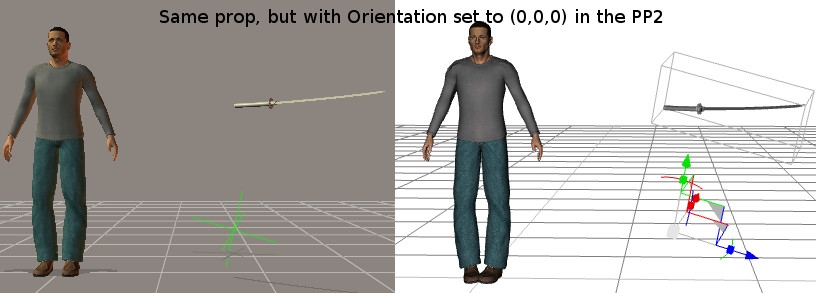
(and yes indeed, if I save the correctly positioned 'InSheath' katana (which worked correctly in both Poser and DAZ Studio) as a prop Orientation is already set to (0,0,0) in the PP2)
The 3Dcheapskate* occasionally posts sensible stuff. Usually by accident. And it usually uses Poser 11, with units set to inches. Except when it's using Poser 6 or PP2014, or when its units are set to PNU or something else.
*soon only to be available in two flavours - DAZ and Renderosity
So (hopefully) in conclusion I need to add an extra step to the procedure in my original post, something like
"3a) Zero its orientation"
The 3Dcheapskate* occasionally posts sensible stuff. Usually by accident. And it usually uses Poser 11, with units set to inches. Except when it's using Poser 6 or PP2014, or when its units are set to PNU or something else.
*soon only to be available in two flavours - DAZ and Renderosity
...Look at the Orientation values in the Joint Editor Window. Perharps, it is your problem, Check in the Joint Editor if the prop "In Hand" has some values in the Orientation cases. Do the same for the prop "In Sheath"...
You were spot-on with that ! So thanks very much again. Setting the orientation to zero in PoserPython is easy with actor.SetOrientation(0.0,0.0,0.0), but the DAZ Script function to set orientation requires a quaternion.
So I've posted over in the DAZ script forum about what value I should set that quaternion to - I realized that my initial idea of (0,0,0,0) couldn't be right, and it looks like (0,0,0,1) is the correct one...
The 3Dcheapskate* occasionally posts sensible stuff. Usually by accident. And it usually uses Poser 11, with units set to inches. Except when it's using Poser 6 or PP2014, or when its units are set to PNU or something else.
*soon only to be available in two flavours - DAZ and Renderosity
Hello,
Just to make thing easier with Quaternion. The first number is the rotation angle and the next three is the axis orientation. To find the Quaternion value for Daz, you can use the script described in my Poser Quaternion tutorial (page 11) on the prop actor. Use the reported values with Daz. Just a trial and error approach.
Allstereo
I hadn't thought of using your scripts to find the value! Thanks again. :)
The 3Dcheapskate* occasionally posts sensible stuff. Usually by accident. And it usually uses Poser 11, with units set to inches. Except when it's using Poser 6 or PP2014, or when its units are set to PNU or something else.
*soon only to be available in two flavours - DAZ and Renderosity

Privacy Notice
This site uses cookies to deliver the best experience. Our own cookies make user accounts and other features possible. Third-party cookies are used to display relevant ads and to analyze how Renderosity is used. By using our site, you acknowledge that you have read and understood our Terms of Service, including our Cookie Policy and our Privacy Policy.
(Note: I’m trying to do this for DS3-4+ and Poser6-10+)
I’ve got a manual procedure (with a couple of scripts to assist) for positioning a hand-held prop in a proxy-hand at the world origin. The procedure is basically this:
*(Note: the zero origin/offsets at (4) and (5) is mainly as a visual reference. (7) and (8) are for ensuring that rotations are about the world centre)
The result of this procedure is a set of six parameters (X, Y, Z rotations and X, Y, Z translations) that can be used along with another script to do the whole procress (1) to (9) automatically in the future.
For many props the six values I get doing this in Poser are the same as I get doing it in DAZ Studio (after converting translations between DAZ units and Poser units of course).
However, for some props I get very different values from Poser and DAZ Studio. I’ve just realized that the problem occurs when if the prop’s local rotation axes aren’t aligned with the world axes, since in DAZ Studio step (9) sets world axis rotations, whereas in Poser step (9) sets local axis rotations. At least that’s how it looks to me - the attached screenshot should help visualize what I’m on about.
I’m trying to find a way of getting a set of three rotation values out of step (10) that will work in both Poser and DAZ Studio. Any thoughts and suggestions on the subject would be appreciated. I realize that the solution may be on either on the DAZ Studio side or on the Poser side, so I’m posting this on the a couple of forums.
The 3Dcheapskate* occasionally posts sensible stuff. Usually by accident. And it usually uses Poser 11, with units set to inches. Except when it's using Poser 6 or PP2014, or when its units are set to PNU or something else.
*soon only to be available in two flavours - DAZ and Renderosity