
Renderosity Forums / Carrara
Welcome to the Carrara Forum
Forum Coordinators: Kalypso, Anim8dtoon
Carrara F.A.Q (Last Updated: 2026 Sep 09 4:39 am)
Visit the Carrara Gallery here.

Subject: Hexagon To Carrara Displacement Map question...


Hi Mat, I got a little lost about your question in Hexagon to Carrara... sometimes Hex freeze (thats the right word?) the mesh, so you end with a highpoly object with "displacement" without the maps... but in Hex you can set to export the Displacement map as a separeted file so you can load in Carrara or any other 3D tool.
Second: Carrara cant use procedural to paint... lets wait if we have something like that in version 8...
I did a pack with skin shaders for Vic using the 3DPaint feature!
Follow me at euQfiz Digital
=B
acct slip up =P
I think you understood my question, you answered it, =B
I didnt know that it would do that, the "freezing"... Is that a setting I can change, or was it something I did that allowed it to happen? I actually like it, but that wasnt my initial plan. I wasnt thinking at 1st, but how would one go back to the original form before the displacement? I suppose that would be a matter of having saved the original, pre-altered object/file, but I started w/ a sphere and took it from there.
I guess I got ahead of myself, but it would be far too cool if Carrara could actually generate the textures we paint w/ using its fractal generator "flux capacitator" =)
Thanks for the heads up...
There are 3 kinds of people in the
world. Those that can count, and those that can't..

Here's a good tutorial for this:
http://forums.polyloop.net/hexagon-tutorials/7079-hexagon-2-example-workflow.html
Basically you paint your your displacement, export the map, then drop down the smoothing to the low poly object and export that.
Thanks for the link =) Exactly what I was in need of...
Gonna check out the pdf in a bit...
Heres another question (sorry for being a pita =P)...
Can we paint color and bump/displacement at the same time, so that the color and bump correspond, or do you just copy/paste the color channel to the bump channel (in the shader tree) and take it from there?
This tool is really awesome, cant wait to see how it evolves...
There are 3 kinds of people in the
world. Those that can count, and those that can't..
Follow me at euQfiz Digital
Well, now Im starting to have problems, glad I have you here...
Im having trouble making heads or tails of when something is selected, on, both or not?!? I paint on a channel, then all of a sudden I wont see the painting (for example if I select another scene item or tool). I get errors when I try to save files that utilize the painting tool, thats not good at all...
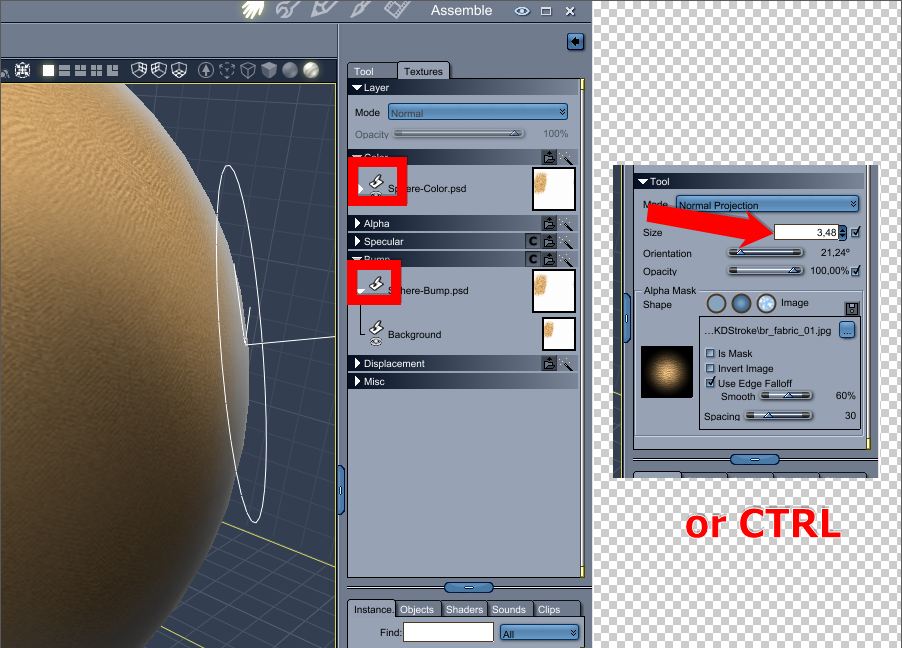
I do see now that the size of the brush and the size of the texture are related, thats good to know...
I was looking more to paint a color/texture and then use another image/brush for the bump, but simultaneously... Like a color image and its b/w component, to yield a texture painting that has color and depth...
Hope Im making sense, I really appreciate the help =)
There are 3 kinds of people in the
world. Those that can count, and those that can't..
I didnt have any problem saving files here...
About the two images for paint diferent channels: NO you cant do that for now. But since the channels are separeted file syou can converte to B/W latter...
Follow me at euQfiz Digital
Whoa, musta missed your response, sorry =P
While Im not at home now (and wont be for the next few days) I wont get to see what was causing the errors on saving the files, but I think it was something to do w/ me writing over the texture files it creates and prolly (w/ me, more than likely =B) messed up somewhere in there. I wasnt too concerned about naming files, was only testing...
However, after playing more I was able to figure out the switching on/off bit and having the channel youre editing selected. I didnt know it would/was paint/ing more than 1 domain (by "domain" I mean how it separates the millenium figures into head, limbs, body, eyes/lashes, etc) simultaneously. You have to manually switch the domains you want to use AND select the domain you want to paint/edit on. In short, you need to have those paintbrushes on the sides -on- AND you need to have a layer selected... Ive developed the habit of adding a layer above the background and going through the channels carefully selecting what I want to paint and double checking to make sure Im editing on the right layer.
I actually became "somewhat descent" at using the paint tool, its really an awesome added feature to Carrara. Practice makes perfect =)
Again, thanks for the help fellas.
There are 3 kinds of people in the
world. Those that can count, and those that can't..

Quote - My second question (and this is strictly Carrara) is this. Is it possible to set a proceedural shader in Carrara and use the proceed to paint with, or are we limited to pictures only?!? Thats a longshot and I may be asking for too much but I wouldnt want to have the feature and not know how to use it).
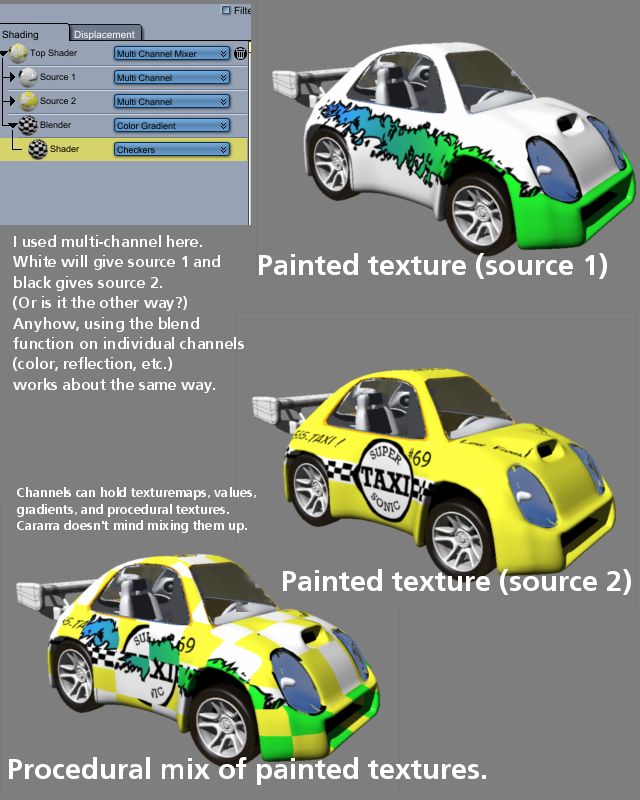
I belive it's possible to paint a map manually that can blend channels, just do it in grayscale. Use the blend function for the shader channel or layers list and then dump the grayscale in there. Then you can paint where you want the different procedural channels to be. It's capable of pretty neat effect, like if you want something like a flat black shader applied over a metallic glossy car paint or something of that sort. (Channel A is flat black, Channel B is glossy car paint, blend control is grayscale that separates where A & B get used.) Likewise you can have two different painted designs, and again use the blender with a grayscale procedural between the two. And you can stack blends on top of blends to some extent (not sure how many levels, but I know two seems to work ok.) It's hard to deny that the way shaders are handled in Carrara is one of the software's more powerful features and is worthy of exploration.
Your friendly neighborhood Wings3D nut.
Also feel free to browse my freebies at ShareCG.
There might be something worth downloading.
Your friendly neighborhood Wings3D nut.
Also feel free to browse my freebies at ShareCG.
There might be something worth downloading.
Paul, Ive read your post several times and still dont understand, lol...
I see now that what im asking is way beyong Carraras capabilities (at this time), let me describe a bit better...
To quickly explain, lets imagine you could, instead of choose a paint brush preset that uses a texture to paint with, we could choose a proceedural shader to paint with, having all its proceedural "goodness" intact. We could paint seamlessly on surfaces, and be able to edit the shader in the normal way, both before AND after the painting...
I think what youre doing, is applying 2 seperate painting jobs and then using the Mixer to blend them (the texture for the blend function of course can be painted as well), as youre saying, That is, pretty slick Paul, I must admit... The input is greatly appreciated, thanks.
(I know, what the hell was I thinking, no way Carrara can do what Im asking =P)
There are 3 kinds of people in the
world. Those that can count, and those that can't..
Are you talking about baking textures onto something after UV mapping? (Yeah, I know how it is with terminology in 3D. It's still a fairly new developing field, and us artists are still making up the names for stuff.) Baking textures is a whole other can o' worms. That's what you'll need if you're trying to export some aspects of shader/material/texture for use in other apps. I'm not exactly sure if Cararra has that feature (yet).
Oh wait, added Carrara to that search term in the above link on texture baking. Inagoni has a plugin for that. That might be what you're looking for.
But if you just wanted to paint on a model such a procedural is applied to specific areas, a grayscale mask and using a blend control on a channel or multichannel mixer is quite possible. If you wanted to paint such that one procedural is applied over another, use the multichannel mixer. Then paint the areas where you want the foreground procedural to appear white and the rest black. Save that as a texture map. Then use the multichannel mixer. Go into Source A, drop in the procedural you want on top. Then go into Source B and drop in the procedural you want on the bottom. (Inside the source layer editor, you can use the wizard button to pick an existing shader. At least I find that to be the easy and painless way.) Then in the mixer channel, set it to texture map and load the B/W map you made. If it's backwards, there should be a toggle to invert colors (so it's easy to fix.) I'm thinking I'll let one of the pros explain the multichannel mixer, they're likely to do a better job of it. I'm just letting you know what you're describing sounds feasible.
Your friendly neighborhood Wings3D nut.
Also feel free to browse my freebies at ShareCG.
There might be something worth downloading.

Quote - Are you talking about baking textures onto something after UV mapping? (Yeah, I know how it is with terminology in 3D. It's still a fairly new developing field, and us artists are still making up the names for stuff.) Baking textures is a whole other can o' worms. That's what you'll need if you're trying to export some aspects of shader/material/texture for use in other apps. I'm not exactly sure if Cararra has that feature (yet).
Carrara allows you to convert procedural shaders from UV mapped objects into JPG texture maps when exporting them as OBJ. But the resolution is not near as good as what Inagoni's Baker plugin can do.
www.youtube.com/user/ShawnDriscollCG
Have to be honest, it took a while and quite a few read-overs before I even started to get the grasp of what all that stuff is and what you guys are talking about. Baking seems like an awesome feature, and I can see alot of possibilities taking advantage of it. Let me see if I get this straight though...
Baking means applying a proceedural texture to a UVMapped object, and then having the program/utility/plug-in extract that "shading" as an actual texture map, that could then be applied to the object to mimic/imitate the proceedural texture?!? This texture map could also be further edited or postworked to enhance its visual quality I suppose, thats just too awesome, Im all new to this...
However =P
What I want to be able to do is this, let me explain again =)
If you are familiar w/ the clone/rumber stamp tool in Photoshop, I am looking to do something like that, as if the align feature is checked off. Lets say in Carrara I want to paint the Daz Troll. I set up the figure and paint brush to begin to paint. I click on the image to open the 3D paint brush presets, I now access all of Carraras shader presets as well as the paint brush presets. I choose the Complex Green 2 shader to paint on the Troll. Over his skin surface, as I paint (and hold down the mouse button) the brush paints a continuous stream of the proceedural shader over the surface, seamlessly... I could then export the figure and the mapsOf course you would expect that it works on uvmapped objects, but if it could work on unmapped/organic objects, that would be nice too, but asking for far too much as I now understand...
I dont suppose there exists a program that CAN do what Im asking?!? Allows you to paint on 3D mapped/unmapped objects w/ proceedurals?!?
But again, thanks for the response guys =)
There are 3 kinds of people in the
world. Those that can count, and those that can't..
Quote - Baking means applying a proceedural texture to a UVMapped object, and then having the program/utility/plug-in extract that "shading" as an actual texture map, that could then be applied to the object to mimic/imitate the proceedural texture?!? This texture map could also be further edited or postworked to enhance its visual quality I suppose, thats just too awesome, Im all new to this...
Yes. The advantage to all this is your rendering will be way faster because Carrara is computing the pixels for the rendered object from a simple texture map instead of having to re-calculate the procedural shader for each pixel of the object.
Quote - Lets say in Carrara I want to paint the Daz Troll. I set up the figure and paint brush to begin to paint. I click on the image to open the 3D paint brush presets, I now access all of Carraras shader presets as well as the paint brush presets. I choose the Complex Green 2 shader to paint on the Troll. Over his skin surface, as I paint (and hold down the mouse button) the brush paints a continuous stream of the proceedural shader over the surface, seamlessly... I could then export the figure and the mapsOf course you would expect that it works on uvmapped objects, but if it could work on unmapped/organic objects, that would be nice too, but asking for far too much as I now understand...
I dont suppose there exists a program that CAN do what Im asking?!? Allows you to paint on 3D mapped/unmapped objects w/ proceedurals?!?
I don't know the answer to that. I have not done any painting in Carrara, so I don't even know if it's anything like Hexagon where you only paint with texture map brushes and not procedural ones.
www.youtube.com/user/ShawnDriscollCG
Never used the reveal brush before Patrick, its pretty cool. Thanks for the heads up on that one =)
Two things...
Is it possible to have the reveal brush paint w/ the same settings/properties as the photobased shader that's being used? For instance, if I use a shader that used a photo for the color, but has reflection, specularity and so on, can those properties be painted as well, and if so, how?!?
I tried using one of the included proceedural rock shaders on M3. All you get is base color (the scaling is too low), is there a way to increase the scaling of the proceed to have it match its visual counterpart, or seem as if Im "applying" the shader to the domain, even though I would be indeed painting on it?
Ive been playing around w/ 3D Coat, and its AWESOME (even better than ZBrush "polypainting" maybe?!?), but Im wondering how much of those features I can pull from Hex and Carrara...
There are 3 kinds of people in the
world. Those that can count, and those that can't..
I'm not sure if this applies or not (taking a guess), but some shaders materials don't always show well depending on what preview mode the staging room is set too and what the settings for that are. I'd say to paint with one that doesn't seem to show, and test it with the preview tool. (The camera icon thing that lets you drag a box.) If the texture shows properly there, then you're probably ok.
Your friendly neighborhood Wings3D nut.
Also feel free to browse my freebies at ShareCG.
There might be something worth downloading.
I wanted to double check it, and make sure I rendered what it was I was doing/talking about... And here's what I found...
I think that the scaling of shader is directly related to the scaling of the object being painted on, for example, a default sized imported M4 will show the proceedural at a "normal" scaling, however if that M4 is scaled up, the scaling of the shader appears to be decreased, and viscera, if the M4 figure is scaled down, the scaling of the shader/proceed appears larger...
Is this what you guys are finding?!? Did we find out if its possible to paint using the reveal brush but to also paint the shaders properties/qualities as well?!?
There are 3 kinds of people in the
world. Those that can count, and those that can't..
I think you are right, in that the reveal brush doesn't actually paint much of the procedural texture except a rough color approximation. Sorry for that misinformation. I had tried revealing a shader with a texture map and it worked. So I don't think right now you can reveal anything but the color information of a shader. You can copy those maps over to other channels, like bump. But that's about it. I'll have to bug the developers to add that, it seems possible to me. Of course you can paint those other channels by hand, also if you like.

Privacy Notice
This site uses cookies to deliver the best experience. Our own cookies make user accounts and other features possible. Third-party cookies are used to display relevant ads and to analyze how Renderosity is used. By using our site, you acknowledge that you have read and understood our Terms of Service, including our Cookie Policy and our Privacy Policy.
Hey gang, hope all is good and gravy for you this Monday =)
After finally establishing my new system and having it run smooth, I decided to try the 3d paint features of both Hexagon and Carrara and spent the better half of the weekend learning the tools.
Everything went fine actually, I didnt have any "problem" I wasnt able to figure out but I have a few questions and would appreciate sharing some of that awesome wisdom you got =)
My 1st question is that when I took a model from Hex and applied displacement mapping brushes on it. Everything went fine, but I was surprised to see that the model doesnt use a displacement map like I had thought. I later learned that the Dismap doesnt export like the color/texture map, but needs to done as a seperate process. Thats fine too, was able to do that w/o any issue. My question is "why" did the model show/have the displacement that I brushed on it w/o the displacement map having been assigned in Carrara?!? Thats actually "good" I thought, not needing to worry about how to set the map, but Id like to know why it didnt need it. Do the displacement tools -actually- change the geometry w/o the need for a dsiplacement map?!? I know that displacement does indeed alter the model, but I was under the assumption it would still need the map in order to maintain its altered shape.
My second question (and this is strictly Carrara) is this. Is it possible to set a proceedural shader in Carrara and use the proceed to paint with, or are we limited to pictures only?!? Thats a longshot and I may be asking for too much but I wouldnt want to have the feature and not know how to use it).
I have to say Im amazed at the 3d Paint tool for Carrara and Hexagon. Wasnt able to use it before but its really amazing, especially that you can mix, add and delete layers of channels.
Also, if anyone has any work theyve rendered that utilizes the 3D paint tool for Carrara, if you could post links or screenshots of what youve done thatd be really awesome =)
Thanks again for your patience in reading my long winded and often boring posts =)
Any help/posts/links/adv anyone could send my way would be greatly appreciated!
There are 3 kinds of people in the world. Those that can count, and those that can't..