Filter: Safe | Thu, Jul 16, 5:31 PM CDT

Renderosity Forums / Carrara


Welcome to the Carrara Forum

Forum Coordinators: Kalypso, Anim8dtoon

Carrara F.A.Q (Last Updated: 2026 Jul 11 2:50 am)


Visit the Carrara Gallery here.

Carrara Free Stuff here.

 
Visit the Renderosity MarketPlace - Your source for digital art content!


Subject: WIP - using bones and joints


ominousplay ( ) posted Wed, 21 November 2007 at 8:27 PM · edited Thu, 09 July 2026 at 8:57 PM

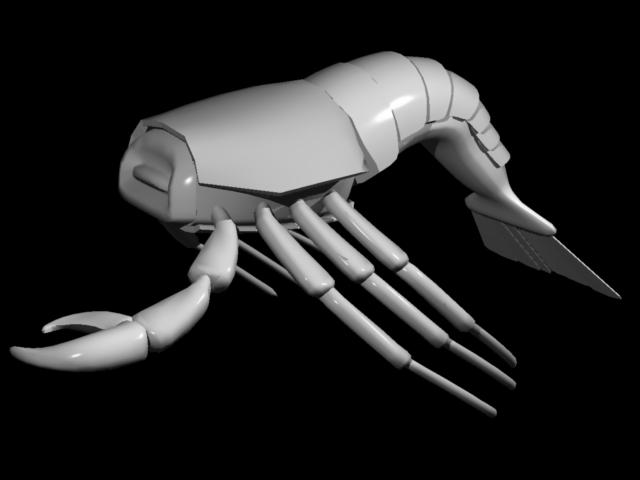
file_393909.jpg

I am having fun using bones (for the tail) and joints(for the legs and claws) on this model. It is untextured, still in the early stages - and I don't know if the head will be like a lobster/ shrimp or like a crab. I had to add bones, then attach the legs with joint constraints - else the bones would affect the legs as well. R

Never Give Up!


bwtr ( ) posted Wed, 21 November 2007 at 11:37 PM

Have fun--or, really --patience!

bwtr


ominousplay ( ) posted Thu, 22 November 2007 at 1:53 AM

Brian, I'm still trying to find the answer to the plug-in - Vectorstyle 2 - for Carrara6Pro - I've looked all over the Daz forum and didn't find my answer. I purchased it from Eovia, have the proof on Daz website in my account - and I emailed Daz, but no answer. I have it and use it with Carrara5Pro - but what about Carrara6 ? Do we have to purchase it again? Does anyone know?

Never Give Up!

ominousplay ( ) posted Thu, 22 November 2007 at 2:02 AM

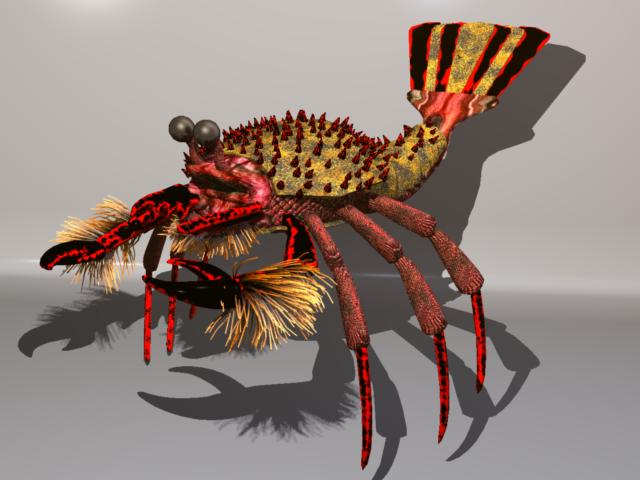
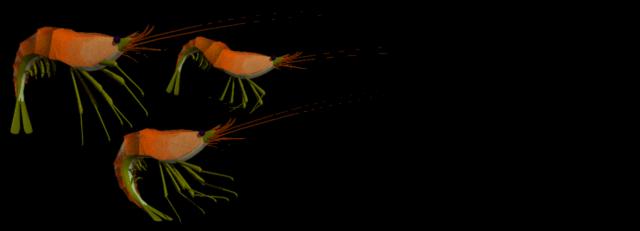
file_393925.jpg

I made shrimp using the same technique, but this is a new model. I'm hoping it looks like a cross between a king crab and a shrimp - a prehistoric lobster.

Never Give Up!


bwtr ( ) posted Thu, 22 November 2007 at 3:38 AM

There is a crayfish tutorial for Carrara going way back. I have seen it in my files only a few days ago. NOWHERE n0w!@#$%^****

Keep onto Daz about Vector style--sure I saw an answer a few weeks back.

bwtr


GKDantas ( ) posted Thu, 22 November 2007 at 9:25 AM

Very good job!! Hey, about your VectorStyle the answer is no! If you have the item in your Itemized Ordem just reset your donwload and you will get the version 5 and 6 again. If not just write to Daz with your serial and they will add it to your downloads. Daz is a little slow this days, so be patiente with them.**
**

Follow me at euQfiz Digital


bwtr ( ) posted Thu, 22 November 2007 at 7:58 PM

I have a little tute for making a Sea Scorpion (Crayfish) that dates back to Carrara2 days!

In a zip file if anyone wants to PM me (It's VERY basic!)

bwtr


ominousplay ( ) posted Mon, 26 November 2007 at 1:00 AM

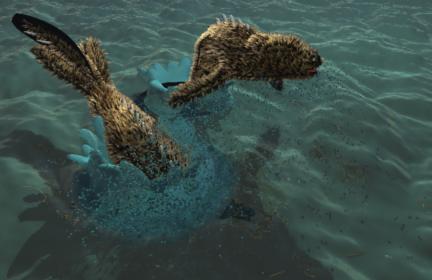
file_394193.jpg

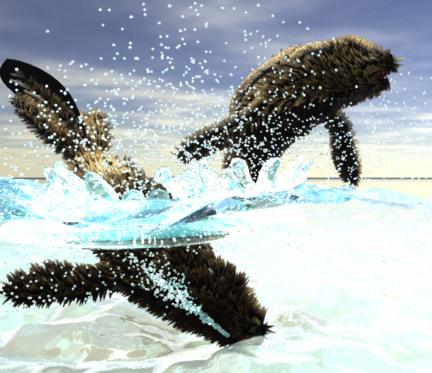
I'm changing the focus - I can't figure the best way to texture the "splash" - it has the same shader as the water - and what a slow-poke to render - I'm thinking the best way to get them to match is post-production... any ideas?

Never Give Up!


ominousplay ( ) posted Mon, 26 November 2007 at 1:03 AM

file_394194.jpg

This was a previous render... I like the perspective better than the top render, but this one had an issue with the replicated water - it is under the base ocean primitive, I didn't notice it and the render took 1 hour - the diving seal is bumping into the replicated ocean - The first render above has shadow issues...

Never Give Up!


bwtr ( ) posted Mon, 26 November 2007 at 1:15 AM

Going well mate. Keep up the good work.
It's an oldy, and I said it on onother forum site---"The journey is more fun than the destination".

bwtr


ominousplay ( ) posted Mon, 26 November 2007 at 2:05 PM

Thanks Brian, if I didn't enjoy the journey, I'd go mad! It's funny - the more I get into this stuff and play around trying to solve little 3d issues ( self-made ), the more I find myself thinking about it during the day, on walks,even in my dreams - wierd. I'll be looking at a tree and think, "How could I render that tree - it's far enough away to use a low-poly mesh...". Has anyone seen Ratatouie? That movie go me thinking - the fur/hair on the those rats and the water scenes - wow! I noticed how dry my seals look -

Never Give Up!

ominousplay ( ) posted Mon, 26 November 2007 at 3:58 PM

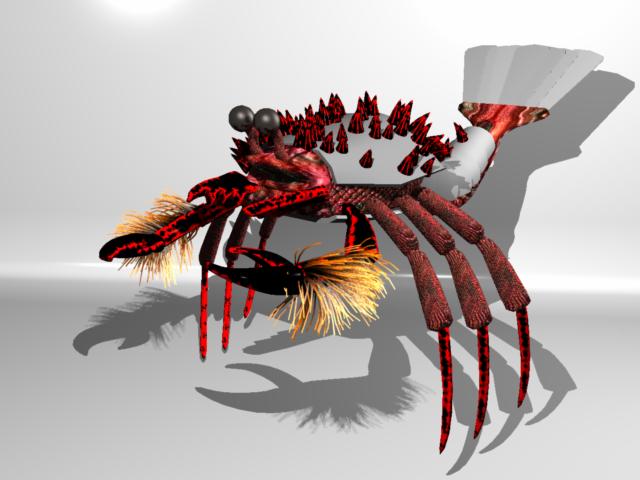
file_394235.jpg

I forgot to ask: How does one turn off the hair and particle calculations until rendering? When I load a scene with hair and particles - Carrara keeps calculating the changes in the scene, and it bugs me to have to wait each time I make a change... and sometimes it won't calculate. Is there a way of turning it off? This is more progress on the WIP from the start of this post...

Never Give Up!


ominousplay ( ) posted Mon, 26 November 2007 at 8:26 PM

file_394249.jpg

Okay, I know I a pig for posting so much. I just like to share what I'm doing. Please, if you have suggestions for these WIPs, please throw em' out. I'm thinking the skipes need to blend in with the shell more... but I like them to stand out at the same time.

Never Give Up!


Miss Nancy ( ) posted Mon, 26 November 2007 at 8:49 PM

I think it's a groovy-looking haired shrimp-lobster. when are ya gonna do an animation of it?


ominousplay ( ) posted Wed, 28 November 2007 at 3:54 PM

file_394402.txt

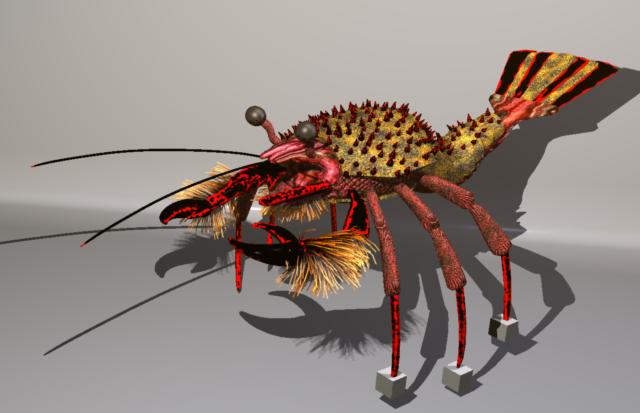
I'd like to animate it but I'm having trouble. I"ve uploaded the file. It contains Anything Grows on the arms, and Anything Goos for a few of the shaders - and its CarraraPro6. Feel free to play around with it - I guess I have to add, don't sell it off as your own... I will be using it in a children's book. But I could use help. I'm trying to set up the IK Chain for the legs - the body has bones, but the legs are set for joints... Check out how I've got it set up and see if it can be organized another way - currently I can't add IK to legs - notice I have cubes at the tip of the legs, they will be invisible after I've attached IK - Well, I'm at a loss - I've done it in the past, but I can't get it going. I'd love to be able lower the body (bone) and the legs (IK tip) don't move, only bend. I know I'll need to set limits once the IK is working - but I can ony get the last joint to bend. I want the two joints to bend, attached to body, and the "knee".

Never Give Up!


ominousplay ( ) posted Wed, 28 November 2007 at 3:56 PM

file_394403.jpg

Here is the creature - it needs IK - the cubes at the end of each leg will be invisible, but are used to attach the IK tip...

Never Give Up!


Miss Nancy ( ) posted Wed, 28 November 2007 at 6:16 PM

maybe that's yer problem - using those cubes instead of the last leg segment as the IK target (end of chain).


ominousplay ( ) posted Wed, 28 November 2007 at 7:54 PM

I don't know - I'll try without. The cubes have the hotpoint close to the end, which make it easier to manage. Thank you

Never Give Up!


bwtr ( ) posted Wed, 28 November 2007 at 8:46 PM

Great fun. Here is a jpg I used on the head and legs which I thought looked effective.

bwtr


bwtr ( ) posted Wed, 28 November 2007 at 8:48 PM

Great fun. Here is a jpg I used on the head and legs which I thought looked effective.

bwtr


bwtr ( ) posted Wed, 28 November 2007 at 8:49 PM

file_394429.jpg

Great fun. Here is a jpg I used on the head and legs which I thought looked effective.

bwtr


ominousplay ( ) posted Thu, 29 November 2007 at 10:35 AM

Thanks! That is a great texture, I'll give it a try. I still haven't figured out the problem with the IK chain not affecting all the joints between the body and the tip object. Could it be because the figure is a mix between bones and these joints without bones? If that's the case, attaching the legs to an invisible whatever that is attached... oh, I don't know. Thanks for the help.

Never Give Up!


ominousplay ( ) posted Thu, 29 November 2007 at 5:28 PM

file_394486.mov

Okay - thank you all for the help! It worked. I had a messed up leg - it tried the same technique on one of the other legs and it worked. I was able to add IK to each leg - here is a movie of a simple animation. Let me know if anyone wants the posted file - and bwtr - your texture map is on the legs : )

Never Give Up!


Miss Nancy ( ) posted Thu, 29 November 2007 at 6:19 PM

it seems to be working o.k. now. see if ya can get the claws to grab something.


ominousplay ( ) posted Fri, 30 November 2007 at 1:24 AM

file_394502.mov

Okay, I learned something on this exercise. The shaders - both the wizard - rock/stone shader, and the Anything Goos shader move when I move the figure - or when the figure's tail moves - it is hard to see in this little movie, but I can see shifts and movement on the shader. And the legs are still hard to control - I need to lock down and limit the IK more. This little pound of hairy flesh is kinda fun - a metaball with fur. Do I have to use a painted texture map to keep if from moving?

Never Give Up!


ominousplay ( ) posted Fri, 30 November 2007 at 1:36 AM

file_394503.txt

Here is the file if anyone wants to play around with it. I can't imagine animating a bunch of these little critters running around a cave floor... But if someone wants to try and post it - that would be great! It is Carrara6Pro - Shaders use Anything Goos and it might not include some textures.

Never Give Up!


bwtr ( ) posted Fri, 30 November 2007 at 1:48 AM

Well done and thanks.

bwtr


Miss Nancy ( ) posted Sun, 02 December 2007 at 4:36 PM

thx for the model, omino. here's what I get. reduced figure size to 2.5%, as it imported at approx. 1200 inches. I deleted various props. I haven't got those plug-ins AFAIK. it asked for some jpegs which I didn't have, but which i reckon are linked above.
Image Hosted by www.postmyimage.com


UVDan ( ) posted Sun, 02 December 2007 at 9:57 PM
Forum Moderator

Great looking crab creature!

Free men do not ask permission to bear arms!!


ominousplay ( ) posted Sun, 02 December 2007 at 11:57 PM

Miss Nancy, can you post the water movie you rendered - it looks great.

Never Give Up!


Miss Nancy ( ) posted Mon, 03 December 2007 at 11:09 AM

I only rendered the above gif. didn't render to any mov format. as you may know, some of these users don't have the h264 codec.


ominousplay ( ) posted Mon, 03 December 2007 at 12:01 PM

Okay, can you explain how you made the animated gel that you used - it looks like light through water... great effect!

Never Give Up!


Miss Nancy ( ) posted Mon, 03 December 2007 at 12:59 PM

oh, that. it's the caustic wave shader - one of the presets. 0% completion at time 0, 100% completion at frame 30. but it's all automatic. just load the preset, import yer lobster, reduce lobster from 1200 inches to 60 inches (reduce scale to 2.5%), then render.


ominousplay ( ) posted Mon, 03 December 2007 at 1:31 PM

One more question... how did you get a gif. as your avitar? : ) I want an moving gif too... I tried, but it keeps rejecting it. I even made it very very little.

Never Give Up!


Miss Nancy ( ) posted Mon, 03 December 2007 at 1:48 PM

just be sure it's less than 28 kb, 100X130. use carrara or cs3. restrict to web-safe colours for smaller file. no dithering. I can only advise for OS X. empty cache after uploading it in yer forum options, as there are quite a few problems with their php software, hence it may appear to be rejecting it, when instead it's actually accepting it.


ominousplay ( ) posted Mon, 03 December 2007 at 3:45 PM

Thank you. I'll give it a shot later. I'm on OS X also... yeah Mac!

Never Give Up!


Privacy Notice

This site uses cookies to deliver the best experience. Our own cookies make user accounts and other features possible. Third-party cookies are used to display relevant ads and to analyze how Renderosity is used. By using our site, you acknowledge that you have read and understood our Terms of Service, including our Cookie Policy and our Privacy Policy.