
Renderosity Forums / DAZ|Studio
Welcome to the DAZ|Studio Forum
Forum Moderators: wheatpenny Forum Coordinators: Lobo3433
DAZ|Studio F.A.Q (Last Updated: 2026 Jul 13 10:03 pm)


Subject: Clothing and Victoria Figures


Is there also a sort of "Auto-Fit" Function in Poser for Victoria 4 Figures? And how do I actually rig Clothing?
There is not an auto fit function in Poser. Clothing can be converted to a new figure in the fitting room. These instructions are for L'homme but will work for any figure in Poser.
1. Load figure. Turn off IKs. Use Figure>zero figure. (For L’Homme, make sure the L’Homme size dial is set to zero.) Hide posing chips/control handles.
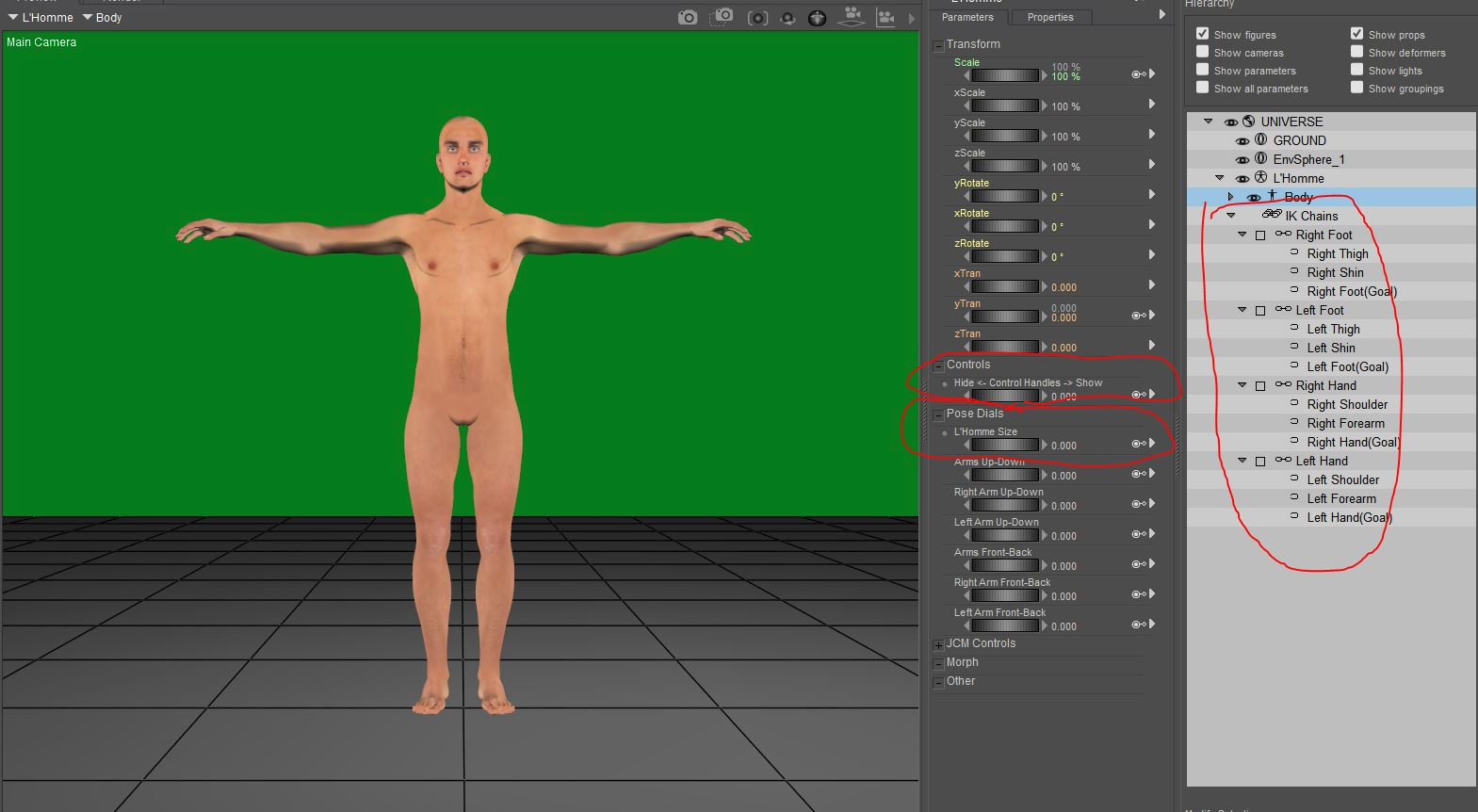
2. Load clothing
3. Move and resize the clothing so it is close to fitting your figure. You might also use the pose dials or scales for individual body parts of the clothing. If the scaling dials aren’t visible, click on the menu on the parameters palette and check the Show hidden parameters option. Don’t forget the pose symmetry option.
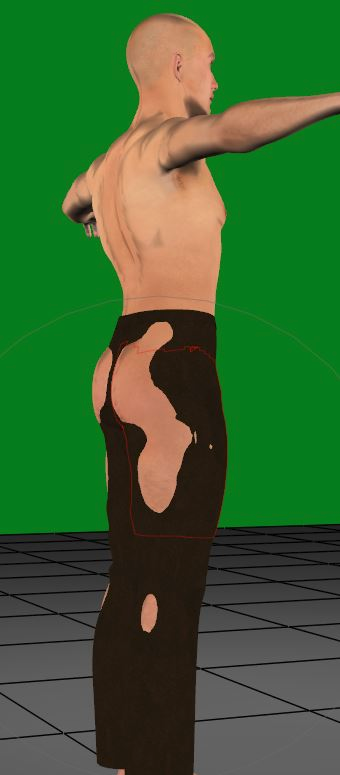
4. Make sure your figure isn’t subdivided. With the clothing selected, open the morph tool and don’t panic. (There’s always undo) Create a new morph and call it something unique like custom_morph. It really doesn’t matter what it’s called. It’s a temporary morph.
5. Select the Loosen fit brush and set the goal to your figure. If you don’t see your figure listed, you probably have it selected and are working with the wrong thing.
6. Set the magnitude to .1 or .05. The loosen brush is very sensitive, and this is the strength of the brush, so you want it low. The size is your choice. I usually find the default too small. Use whatever you’re comfortable with.
7. Working from the edges of the poke-through inward, stroke the brush over the poke-through. Work only on one side. Later, you can mirror the morph. Be patient as you work. Higher poly garments are slower to work with.
8. Once there are no more poke-throughs, go to display>figure style> wireframe (or press ctrl-alt 3) to check for places where the clothing is too far from the figure.
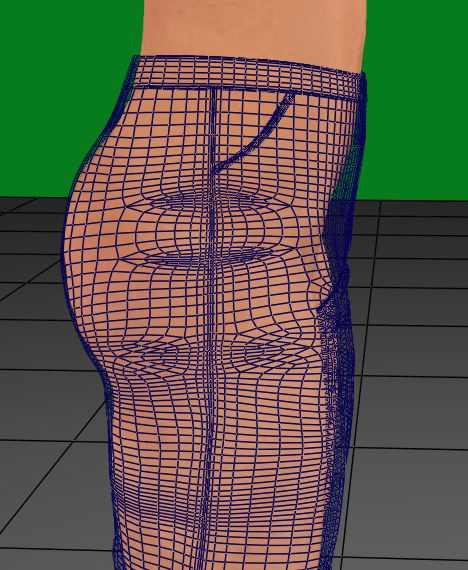
9. Use the tighten-fit brush if you find places that need to be fixed. Set the Pokethrough margin to about .001 or so. The smaller the number, the closer to the figure the clothing will get. .5 is good for the magnitude and your choice of brush sizes.
10. Stroke the places you want closer.
11. For tight areas, like between the legs, you can hide the body parts that are in the way.
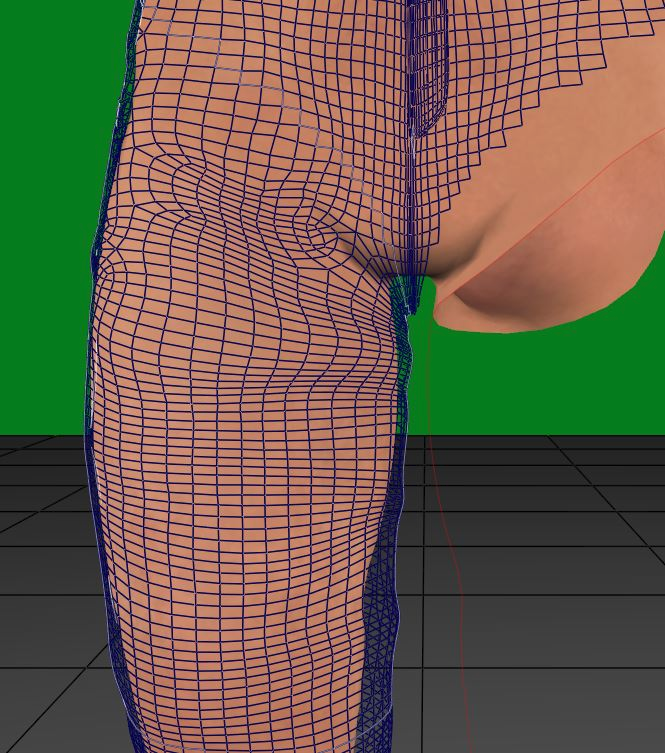
12. Make sure no parts are touching other parts, like in between the legs. The fitting room may get confused and mix up polys.
13. Use the smoothing tool for any place where the polys are bunching. You may need to use the loosen brush again afterward.
14. At the bottom of the morph tool, click on mirror and copy the morph from the side you were working on to the other.
15. Go to display>figure style>use document style (Ctrl. Alt. 0) and look for areas that need touch-ups.
16. When you don’t have any more, close the morph palette
17. Save your work. You don’t want to go through that again.
18. Go into the fitting room and create a new session. For the object, choose the clothing you are converting. Make sure the zero figure is NOT checked. Choose your figure for the goal. The zero figure can be checked here.
19. Ignore all the fitting tools because they don’t work right, and the clothing is already shaped how you want it.
20. Hit the create figure button.
21. A window will pop up with a chance to name the clothing. You can use the suggested name or another. Click Okay
22. In the transfer figure pop-up window, click the checkbox to deselect everything and select only the body parts you need. You don’t have to select every part individually. You can select the extremities (neck, forearm, shin, or foot), and everything between that and the body will be selected.
23. Click on select to choose which morphs you want to copy.
24. If the grouping is similar, you can choose to try to use the original grouping of the body parts; if they are different (such as having other parts), check auto group.
25. Click okay and go back to the pose room
26. Hide the original clothing and select the new clothing
27. Go to figures>copy joint zones from and choose the figure you are fitting it to.
28. Conform and test
29. Save file
30. Save the new clothing to the library
I use the steps 18-30 to rig something too.
Available on Amazon for the Kindle E-Reader Monster of the North and The Shimmering Mage
Today I break my own personal record for the number of days for being alive.
Check out my store here or my free stuff here
I use Poser 14 and Windows 11

bluewoods posted at 3:18 PM Tue, 16 June 2026 - #3001007
In Poser there is a function called Copy morphs which will fit clothing to the figure whichever figure it is.Hello, I have a Question again. I’ve been advised to just put this behind me, but I still can't quite Imagine that it’s not possible. I know that Victoria 4 is a Poser Figure. But which Function in Poser makes the Clothing fit the Figure's Body Shape perfectly, something that doesn't exist in Daz Studio? Which Functions of the Victoria 4 figure do not work in Daz Studio?
Is there a Product that allows me to create a Victoria 4 Clone from a Genesis 8 Figure? There is such a Product for Genesis 2 Figures.
Does Clothing only work with rigging? Is it also possible to create Clothing that fits over the Figure like a Geoshell (a second Skin)?
Is there also a sort of "Auto-Fit" Function in Poser for Victoria 4 Figures? And how do I actually rig Clothing?
In Daz Studio with current figures the genesis program will autofit clothing as you morph the figure. Good clothing makers will create custom morphs for standard morphs and include them in the clothing so it will fit those figures.
An example of this is a dress I'm making for Dawn SE. I have created 8 custom morphs for the dress so it will automatically go from Dawn to those morphs. See images below.
Victoria 4 is based on legacy rigging and to my knowledge doesn't autofit clothing because of this.
That said the original Genesis came with V4 autofit and mapping so you can use V4 textures and clothing on Genesis. From memory there is a way to transfer the morphs also but it has been a very long time since I looked at it and I would have to try and find a tutorial. I suggest googling tutorials on converting v4 morphs to Genesis and I'm sure you will easily find it.
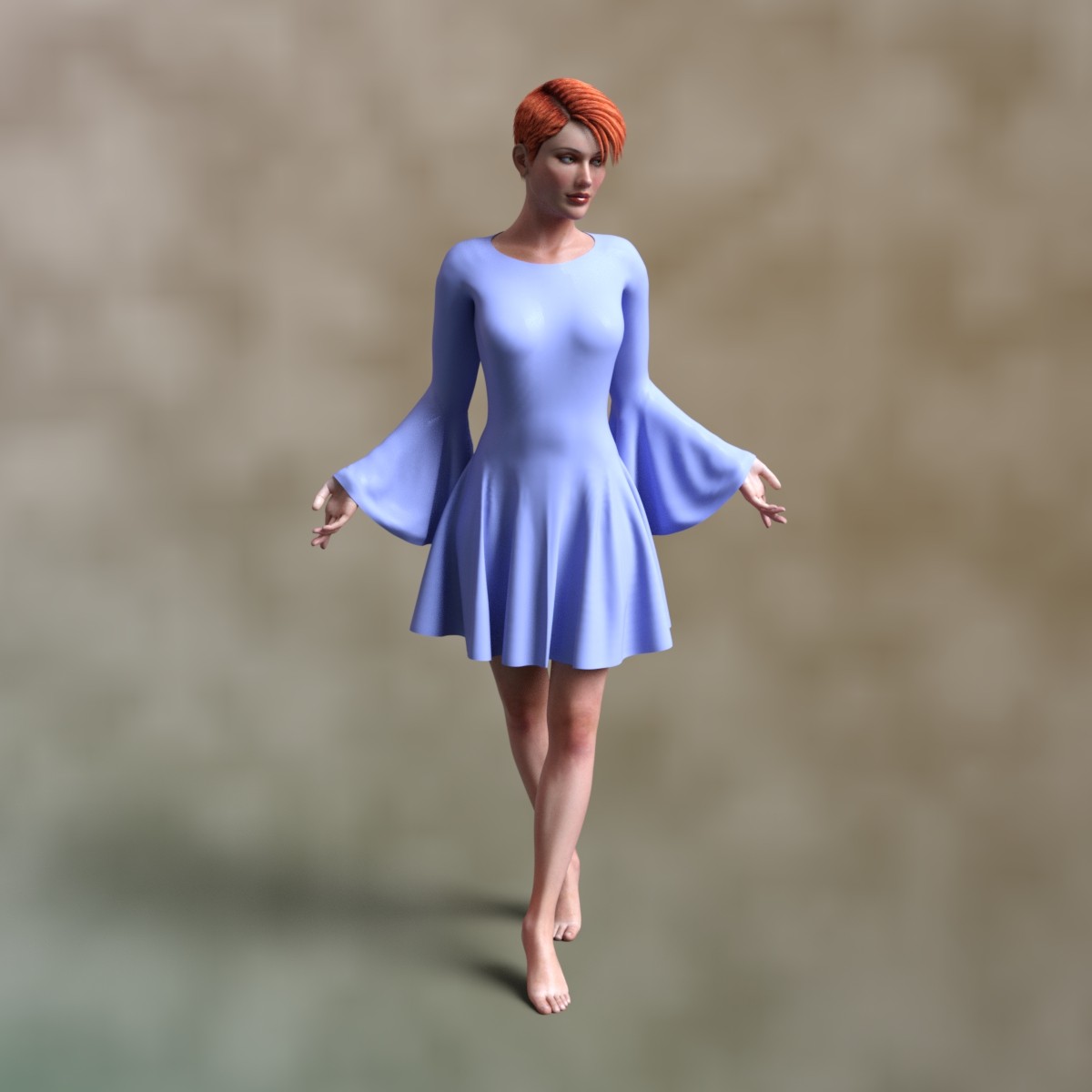
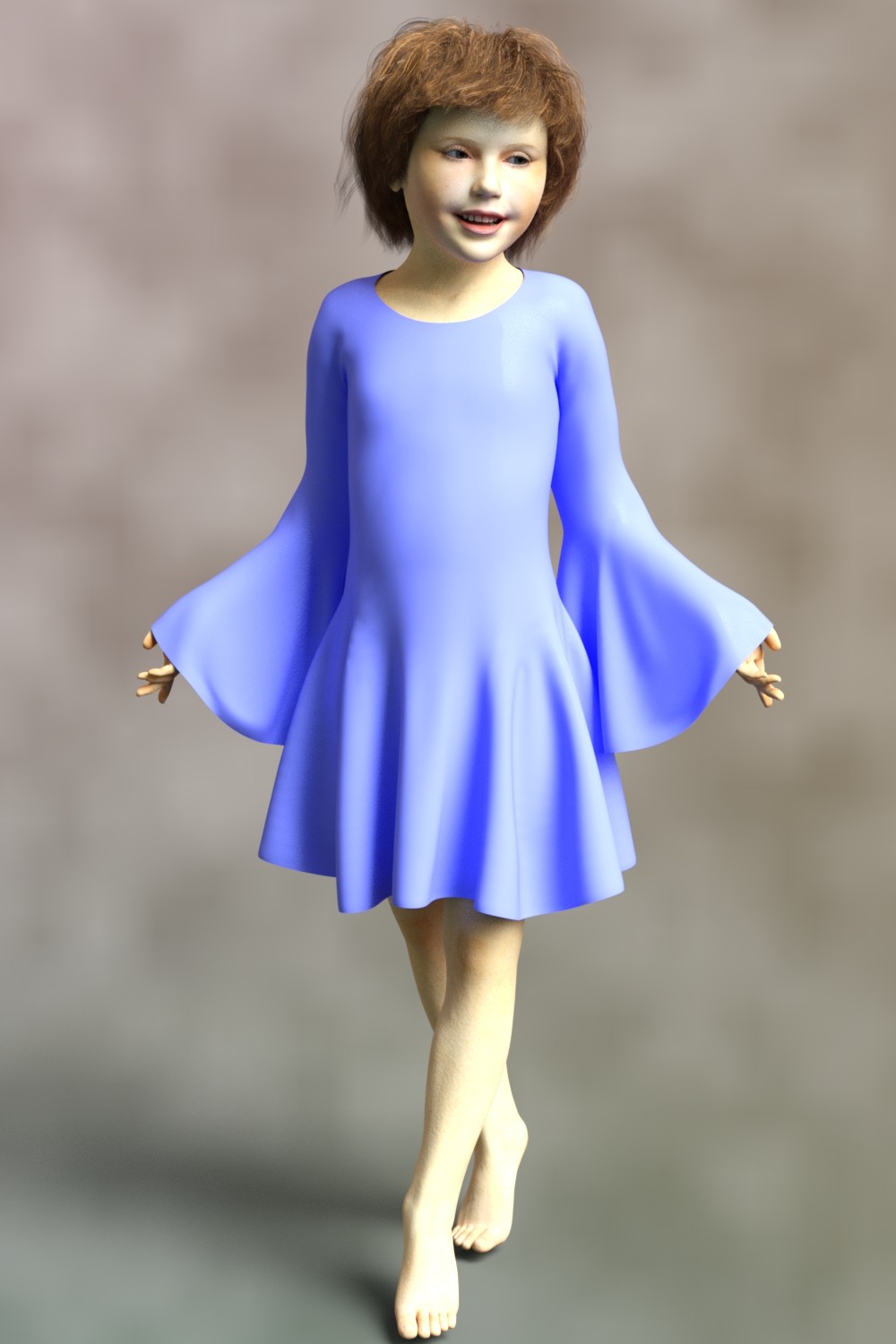
bluewoods posted at 3:18 PM Tue, 16 June 2026 - #3001007Thanks for the info. I will have to see how I go with it.Is there also a sort of "Auto-Fit" Function in Poser for Victoria 4 Figures? And how do I actually rig Clothing?
There is not an auto fit function in Poser. Clothing can be converted to a new figure in the fitting room. These instructions are for L'homme but will work for any figure in Poser.
1. Load figure. Turn off IKs. Use Figure>zero figure. (For L’Homme, make sure the L’Homme size dial is set to zero.) Hide posing chips/control handles.
2. Load clothing
3. Move and resize the clothing so it is close to fitting your figure. You might also use the pose dials or scales for individual body parts of the clothing. If the scaling dials aren’t visible, click on the menu on the parameters palette and check the Show hidden parameters option. Don’t forget the pose symmetry option.
4. Make sure your figure isn’t subdivided. With the clothing selected, open the morph tool and don’t panic. (There’s always undo) Create a new morph and call it something unique like custom_morph. It really doesn’t matter what it’s called. It’s a temporary morph.
5. Select the Loosen fit brush and set the goal to your figure. If you don’t see your figure listed, you probably have it selected and are working with the wrong thing.
6. Set the magnitude to .1 or .05. The loosen brush is very sensitive, and this is the strength of the brush, so you want it low. The size is your choice. I usually find the default too small. Use whatever you’re comfortable with.
7. Working from the edges of the poke-through inward, stroke the brush over the poke-through. Work only on one side. Later, you can mirror the morph. Be patient as you work. Higher poly garments are slower to work with.
8. Once there are no more poke-throughs, go to display>figure style> wireframe (or press ctrl-alt 3) to check for places where the clothing is too far from the figure.
9. Use the tighten-fit brush if you find places that need to be fixed. Set the Pokethrough margin to about .001 or so. The smaller the number, the closer to the figure the clothing will get. .5 is good for the magnitude and your choice of brush sizes.
10. Stroke the places you want closer.
11. For tight areas, like between the legs, you can hide the body parts that are in the way.
Mature Image BlockedImage blocked according to your Max Maturity Rating : Safe
12. Make sure no parts are touching other parts, like in between the legs. The fitting room may get confused and mix up polys.
13. Use the smoothing tool for any place where the polys are bunching. You may need to use the loosen brush again afterward.
14. At the bottom of the morph tool, click on mirror and copy the morph from the side you were working on to the other.
15. Go to display>figure style>use document style (Ctrl. Alt. 0) and look for areas that need touch-ups.
16. When you don’t have any more, close the morph palette
17. Save your work. You don’t want to go through that again.
18. Go into the fitting room and create a new session. For the object, choose the clothing you are converting. Make sure the zero figure is NOT checked. Choose your figure for the goal. The zero figure can be checked here.
19. Ignore all the fitting tools because they don’t work right, and the clothing is already shaped how you want it.
20. Hit the create figure button.
21. A window will pop up with a chance to name the clothing. You can use the suggested name or another. Click Okay
22. In the transfer figure pop-up window, click the checkbox to deselect everything and select only the body parts you need. You don’t have to select every part individually. You can select the extremities (neck, forearm, shin, or foot), and everything between that and the body will be selected.
23. Click on select to choose which morphs you want to copy.
24. If the grouping is similar, you can choose to try to use the original grouping of the body parts; if they are different (such as having other parts), check auto group.
25. Click okay and go back to the pose room
26. Hide the original clothing and select the new clothing
27. Go to figures>copy joint zones from and choose the figure you are fitting it to.
28. Conform and test
29. Save file
30. Save the new clothing to the libraryI use the steps 18-30 to rig something too.


All figures are rigged Otherwise it would be a lot more difficult to pose them. V4 has parametric rigging while later figures have triax rigging. @richardandtracy wrote this tutorial for converting from parametric to triax. Doing this to V4 will grant the autofit capabilities you seek, but it will not be easy.

"Is there a product that allows me to create a Victoria 4 clone from a Genesis 8 figure? There is such a product for Genesis 2 figures."'
Considering that OP does not own Poser, much of this information is over his head. But, to answer his question, yes, there is a DAZ product that can make Genesis 8 female accept V4 clothing. It is essentially creating a V4 clone capable of autofitting her clothing. Now, you can spend $30 for the product, or you can create your own V4 clone for free. There are instructions at the DAZ forum. I spent the evening generating my own V4 clone for G8F, and you can see my DS render below:
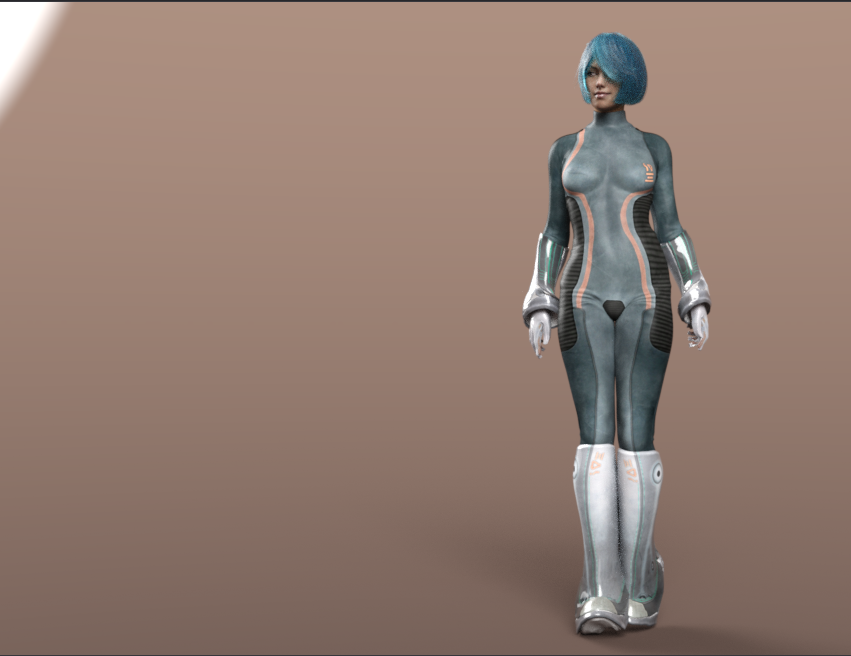
This is Genesis 8 Female sporting Aery Soul's Ive outfit for V4, a rather old item of clothing. It is autofitting the figure and will accept most morphs, within reason. It also poses well. Next, I will attempt to transfer morphs from V4 to G8F; I have found tutorial instructions explaining the process.
Hello,
I’d like to thank everyone for the detailed Answers so far. The Person who wrote the last Comment is already aware of the Situation. I realize now that I need to explain this more clearly, I am currently working exclusively with Daz Studio, something I probably didn't mention clearly enough.
I did ask a few Questions about Poser, though that was mostly out of Interest in how that particular Function is implemented in the Software. If I do start using Poser at some Point, at least I now know how to adjust Clothing.
I tried out the "Transfer Sctive Morph" thing, but I'm not really satisfied with the result either. The Image on the left shows the Base Figure, while the Image on the right shows it after I’ve loaded a Character. Although the Clothing roughly conforms to the new shape, it still stands away from the Body.
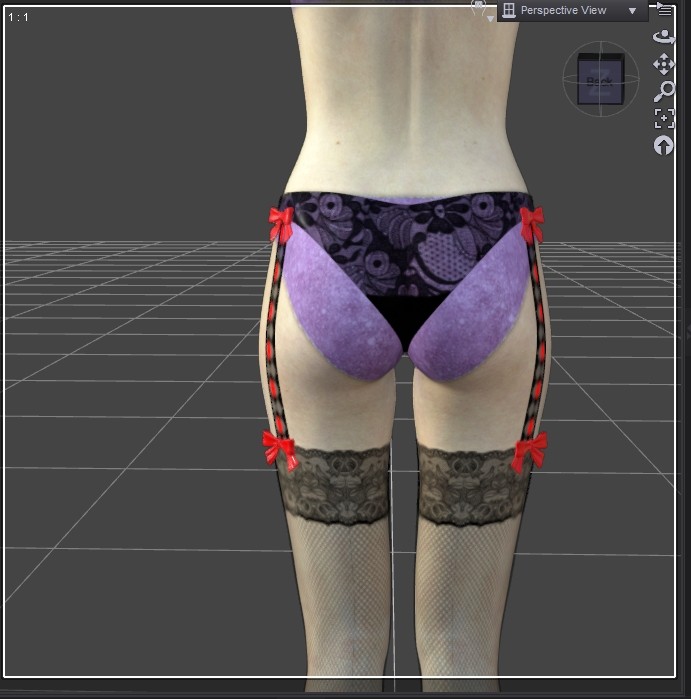
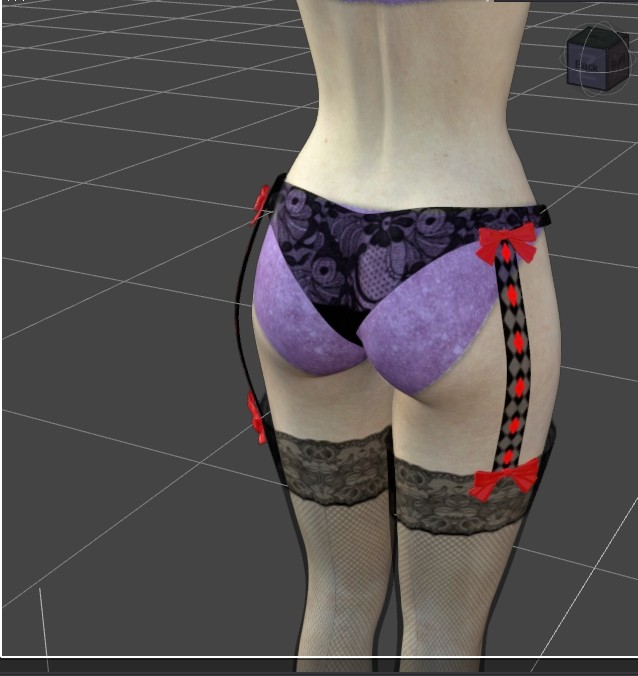
By "Victoria 4 Clone," I actually meant a Product like the one for the Genesis 2 Figure, a Clone that Shares the same Body Proportions as the Victoria 4 Figure. But for now, I’m going to try out these Instructions, maybe that will clear everything up.
I just want to briefly mention that people who primarily work with Poser are the ones explaining Daz Studio to me. I also wouldn't have thought it would be so hard to find someone who understands both Poser and Daz Studio.

"By "Victoria 4 Clone," I actually meant a Product like the one for the Genesis 2 Figure, a Clone that Shares the same Body Proportions as the Victoria 4 Figure. But for now, I’m going to try out these Instructions, maybe that will clear everything up. "
Maybe this thread will help. It might actually be easier to load the shape onto Genesis 2 first and then transfer the character from Genesis 2 to Genesis 8.
There is a thread on the DAZ forum called "Converting to G1, G2, G3, G8 & G9" that discusses quite a few different approaches and workflows. You may find something useful there.
I just want to briefly mention that people who primarily work with Poser are the ones explaining Daz Studio to me. I also wouldn't have thought it would be so hard to find someone who understands both Poser and Daz Studio.
Well, for many DAZ users it has probably been a very long time since they last used Poser, if they ever used it at all. Poser has also evolved quite a bit over the years. On the other hand, Poser users who switch to DAZ Studio usually do so because of the Genesis figures, so they may not have much experience with using Victoria 4 in DAZ Studio either.
You might also want to ask an AI for suggestions. Yes, it can sometimes be a bit tedious, but so far I've been able to solve every DAZ-related problem that way, including issues I never expected to run into. At one point my Genesis 8 installation somehow became corrupted. I still don't know exactly what happened, but the figure simply refused to load. With the help of an AI and an evening of trial and error, I managed to get everything working again. Along the way I also learned several DAZ Studio features I hadn't even known existed.
As for Victoria 4, honestly, if you plan to keep using her, you might want to consider giving Poser a try. With EvilInnocence's CrossDresser, Genesis 8 clothing can be converted to Victoria 4 proportions, and Poser also offers some built-in solutions that have already been mentioned in this thread.
Your issue with that strap, for example, could be fixed very quickly in Poser using the Morph Brush. Alternatively, you could look for a DAZ Studio script or utility that provides similar functionality. There are so many scripts available for DAZ Studio that there may already be one designed specifically for this kind of adjustment.
Well really, @bluewoods, what do you expect? This is the land of Poser. @RHaseltine is a long time Daz site forum mod. He visits here out of the goodness of his heart. And most of the really knowledgeable DS people hang out on the forums at the Daz site. And a lot of the DS customers here are shopping for g8 and later stuff. So you get what you get from the people on hand.
I will say there is a lot of Poser expertise on hand in the Poser forums.
Hello, I have a few more Questions for the Person who gave me the Tip about the rigging guide. Do I have to re-rig the Clothing as well? Will the "Auto-Fit" Function work with this Figure? Can I still use V4 Poses? And can I still apply V4 Characters to this Figure? Have you tried this before?
Just a Question out of Interest, do the current Poser Figures come with Hair, Skin Texture, and Clothing already included? With the Genesis Figures, you only get the Base Figure, without anything else and have to buy specific Characters separately. Can I switch between the Child and Adult Versions of the Dusk or Dawn Figure?
Is this a different Person from the DAZ Moderator? https://www.renderosity.com/users/richardandtracy
Does this Person live with a Cat? I think I read something like that in the DAZ Forum once.
Just another Question about the DAZ Figures, what is the difference in Rigging between the Genesis 1 and 2 Figures and the subsequent Figures?
I’d also be curious to know, has anyone actually used the Victoria 4 Figure in Daz Studio? Daz Studio was released around 2005/2006 and Victoria 4 in 2006, but the first Genesis Figure didn't arrive until 2011, so what were People doing in Daz Studio back then? I understand why no one bothers with such old Products these days, but there must still be a few People around who worked with them back then.
Fair enough, I won't keep pestering you about it. I'll just stop asking so many Questions about older Products from now on.
Maybe instead of being disappointed with the answers you're getting in a forum that is still used primarily by Poser users, you could start a thread titled something like:
"Who is still using Victoria 4 in DAZ Studio?"
You could ask that question on both Renderosity and the DAZ forums. I'm sure there are still people around who use Victoria 4 in DAZ Studio, even if they are not as common as they used to be.
The reason I think this question is important is that it helps you find the right audience. If someone is still actively using Victoria 4 in DAZ Studio today, they are much more likely to have practical experience with the exact workflow and problems you're asking about.
It's a shame that the suggestions you've received so far seem to be raising even more questions. But I don't think the solution is to stop asking questions altogether.
I work in a support hotline, and one thing I've learned is that asking the right people can make all the difference.
If your goal is to use Victoria 4 in DAZ Studio, it may help to first find people who are still actively using that workflow. They are likely to have the practical experience you're looking for.
As for moderators, forum roles, or personal details about other users, I wouldn't worry too much about those things. What really matters is whether someone has experience with the specific workflow you're trying to achieve.
You are looking for help, and people here are genuinely trying to help. Focusing on the experience and knowledge they bring to the discussion will probably get you the answers you're looking for more quickly.
Hello midinick, I’ll take your advice to Heart and give it a try. There’s bound to be someone on the DAZ Forum who can help me out, though I haven’t found any truly useful help there so far. To me, that Forum still feels like a strange Place, I’m not really keen on spending time there. I’ve probably spoken to too many People who are no longer active there.
Your suggestion is valid, though. I’ve reached out to various People on different Platforms to ask around, but by now, I’m mostly just frustrated. I really need People who are knowledgeable about the Adult Content Side of Things. However, on Sites dedicated to Adult Products, I haven’t yet found anyone with the necessary fundamental understanding of DAZ and the Genesis and Victoria Figures.
That makes Forums a poor Choice, since those kinds of Topics aren't welcome there anyway. Besides, I prefer having personal Conversations rather than discussing Things in a Public Forum. I’ll start a new Topic tomorrow, when you’re already disappointed, things can’t really get any worse.

>>>> If your goal is to use Victoria 4 in DAZ Studio, it may help to first find people who are still actively using that workflow. They are likely to have the practical experience you're looking for.
>>> You are looking for help, and people here are genuinely trying to help. Focusing on the experience and knowledge they bring to the discussion will probably get you the answers you're looking for more quickly.

Privacy Notice
This site uses cookies to deliver the best experience. Our own cookies make user accounts and other features possible. Third-party cookies are used to display relevant ads and to analyze how Renderosity is used. By using our site, you acknowledge that you have read and understood our Terms of Service, including our Cookie Policy and our Privacy Policy.
Hello, I have a Question again. I’ve been advised to just put this behind me, but I still can't quite Imagine that it’s not possible. I know that Victoria 4 is a Poser Figure. But which Function in Poser makes the Clothing fit the Figure's Body Shape perfectly, something that doesn't exist in Daz Studio? Which Functions of the Victoria 4 figure do not work in Daz Studio?
Is there a Product that allows me to create a Victoria 4 Clone from a Genesis 8 Figure? There is such a Product for Genesis 2 Figures.
Does Clothing only work with rigging? Is it also possible to create Clothing that fits over the Figure like a Geoshell (a second Skin)?
Is there also a sort of "Auto-Fit" Function in Poser for Victoria 4 Figures? And how do I actually rig Clothing?