
Renderosity Forums / Poser - OFFICIAL
Welcome to the Poser - OFFICIAL Forum
Forum Moderators: RedPhantom Forum Coordinators: Anim8dtoon
Poser - OFFICIAL F.A.Q (Last Updated: 2026 Jul 24 8:58 pm)

Subject: Antonia - Opinions?


Rhia474 posted at 4:36 PM Sat, 19 August 2023 - #4473003
Omg, *blushes* yes, in fact, I was making lunch...
*looks 'GOOD'*

fine: I'm not alone 
𝒫𝒽𝓎𝓁
(っ◔◡◔)っ
👿 Win11 on i9-13900K@5GHz, 64GB, RoG Strix B760F Gaming, Asus Tuf Gaming RTX 4070 OC Edition, 1+2 TB SSD's, 6+4TB HD
👿 Mac Mini M2, Tahoe 26.5, 16GB, 500GB SSD
👿 Nas 10TB
👿 Poser 13 and 14 ❤️
Rhia474 posted at 11:26 AM Sat, 19 August 2023 - #4472960
Thanks Rhia! I'll have to go look at some references for the freckles to understand the sizes, shapes and colorations better. Just for research purposes, obviously, nothing weird about staring at lots of freckled people on the interwebs.That lip is nice and softly transitioned now, I think you got it; the freckles look food (a bit overlarge for what I have and know regarding face freckles, may be wrong) it's the hair that breaks the immersion with those highlights...

Also, Antonia definitely needs better hair for her future adventures. Any recommendations?
-- I'm not mad at you, just Westphalian.

Rhia474 posted at 9:05 PM Sat, 19 August 2023 - #4473047
Thanks, I'll have a look. Ohki makes great stuff.I absolutely love all the hairs Afrodite-Ohki makes, but you'd need to fit them to Antonia. They are great in Poser 12 and 13 Superfly.
I've also been thinking about trying out the new Blender tools to make an original hair piece for Toni and import it into Poser. Has anyone tried something like that before?
-- I'm not mad at you, just Westphalian.
So, I made a simple material layer that darkens the lip material just enough to make the bright outline disappear. The current version does not use a mask, so it makes the lips themselves a little darker, too, not just the narrow strip of skin around them, which is okay for me personally. If someone would prefer to leave the lips as they are, it should be easy enough to make a mask for that.
Now my question is whether I should publish that layer on its own or just pack it up with the freckles and makeup when I freestuff those.
My other question is whether it's worth the effort to support FireFly in those layers. I don't really use it, so my materials are probably rubbish in FF, but so far at least I tend to make them so that they render something resembling what I had in mind. I think only supporting SuperFly for layers is a bit easier because I can use a MixClosure with a mask (not tested, I just *seem* to remember that that's a thing) instead of applying the same mask to a number of individual channels in the material root, which if one is me means one invariable forgets some.
-- I'm not mad at you, just Westphalian.

I'd say best keep lips and freckles apart, unless of course the limits of OpenGL start playing havock. If anyone for any other reason wants to reduce the number of texture maps, they can simply merge them in any graphical editor.
I would not pain on FF anymore. Just use a basic shader, no faked SSS etc.
I'd say best keep lips and freckles apart, unless of course the limits of OpenGL start playing havock. If anyone for any other reason wants to reduce the number of texture maps, they can simply merge them in any graphical editor.
I would not pain on FF anymore. Just use a basic shader, no faked SSS etc.
Oh, I didn't mean to put the lips and freckles on the same layer, just inside the same FreeStuff item. Everything will of course be on a separate layer loaded by a separate file: lip fix, lipstick, eyeliner, eyeshadow, blush, freckles.
Anyway, here's the full glow-up, as I believe the cool kids call it these days. I bought Catarina hair by Afrodite-Ohki today, and I'm in love.

-- I'm not mad at you, just Westphalian.
You may get a hint for a rather good-looking FF material set, using EZSkin.So, I made a simple material layer that darkens the lip material just enough to make the bright outline disappear. The current version does not use a mask, so it makes the lips themselves a little darker, too, not just the narrow strip of skin around them, which is okay for me personally. If someone would prefer to leave the lips as they are, it should be easy enough to make a mask for that.
Now my question is whether I should publish that layer on its own or just pack it up with the freckles and makeup when I freestuff those.
My other question is whether it's worth the effort to support FireFly in those layers. I don't really use it, so my materials are probably rubbish in FF, but so far at least I tend to make them so that they render something resembling what I had in mind. I think only supporting SuperFly for layers is a bit easier because I can use a MixClosure with a mask (not tested, I just *seem* to remember that that's a thing) instead of applying the same mask to a number of individual channels in the material root, which if one is me means one invariable forgets some.
𝒫𝒽𝓎𝓁
(っ◔◡◔)っ
👿 Win11 on i9-13900K@5GHz, 64GB, RoG Strix B760F Gaming, Asus Tuf Gaming RTX 4070 OC Edition, 1+2 TB SSD's, 6+4TB HD
👿 Mac Mini M2, Tahoe 26.5, 16GB, 500GB SSD
👿 Nas 10TB
👿 Poser 13 and 14 ❤️
You don’t understand. I have exactly zero interest in FireFly materials. Ever since I returned to Poser, I’ve effectively been making Superfly materials while restricting myself to nodes that I assume FireFly will also render, and that feels increasingly pointless. What I’m considering is giving up on that half-arsed FF support and just using whichever node gets me where I want the easiest.
-- I'm not mad at you, just Westphalian.

odf posted at 8:25 AM Sun, 20 August 2023 - #4473103
You don’t understand. I have exactly zero interest in FireFly materials. Ever since I returned to Poser, I’ve effectively been making Superfly materials while restricting myself to nodes that I assume FireFly will also render, and that feels increasingly pointless. What I’m considering is giving up on that half-arsed FF support and just using whichever node gets me where I want the easiest.

I wasn't trying to push you back into FF's world, I don't use it anymore too 
𝒫𝒽𝓎𝓁
(っ◔◡◔)っ
👿 Win11 on i9-13900K@5GHz, 64GB, RoG Strix B760F Gaming, Asus Tuf Gaming RTX 4070 OC Edition, 1+2 TB SSD's, 6+4TB HD
👿 Mac Mini M2, Tahoe 26.5, 16GB, 500GB SSD
👿 Nas 10TB
👿 Poser 13 and 14 ❤️
hborre posted at 10:27 AM Sun, 20 August 2023 - #4473111
Thanks for reminding me of my other reason for avoiding Cycles nodes so far, namely that they tend to make the preview unusable. I'll have to see how things look now. So far I've seen two different hair pieces with SuperFly shaders show up pitch black (but with highlights) in Poser 13.1, so render my optimism cautious.Switch from the PoserSurface node to the PhysicalSurface node which is simpler and easier to use. And now that P13 Preview will display the texture map in Superfly there will be no guessing at how your final render will look.
Oh, and yes, PhysicalSurface all day every day.
-- I'm not mad at you, just Westphalian.

I didn't think I would love Cycles but once you get your head around things renders look even better concerning skin and other organic surfaces. We now, in Poser 13, have sort of preview of the color info. It will continue to be worked on to get all the maps to give a more "What you can expect" viewport preview in time but it takes time. I'm just happy I'm not looking at a pure white figure any more! LOL
---Wolff On The Prowl---
RAMWorks posted at 9:15 AM Mon, 21 August 2023 - #4473168
Let's say that with my skin setup, there are not pure white anymore, indeed...I didn't think I would love Cycles but once you get your head around things renders look even better concerning skin and other organic surfaces. We now, in Poser 13, have sort of preview of the color info. It will continue to be worked on to get all the maps to give a more "What you can expect" viewport preview in time but it takes time. I'm just happy I'm not looking at a pure white figure any more! LOL


But I don't really mind as I've setup a script to switch to the PoserSurface node when it's needed 
𝒫𝒽𝓎𝓁
(っ◔◡◔)っ
👿 Win11 on i9-13900K@5GHz, 64GB, RoG Strix B760F Gaming, Asus Tuf Gaming RTX 4070 OC Edition, 1+2 TB SSD's, 6+4TB HD
👿 Mac Mini M2, Tahoe 26.5, 16GB, 500GB SSD
👿 Nas 10TB
👿 Poser 13 and 14 ❤️

When I'm working with Cycles nodes, I turn off the hardware shading and have a poser surface with an image map or color chip. Then I don't have white or black
Available on Amazon for the Kindle E-Reader Monster of the North and The Shimmering Mage
Today I break my own personal record for the number of days for being alive.
Check out my store here or my free stuff here
I use Poser 14 and Windows 11
Right, I remember trying that at some point. I think the problem was that hardware shading provided a better preview of lights and shadows, and that's something I spend a lot of time on in my renders. But it's true that for texture work it would make sense to turn it off and then back on when the texturing is done, so thanks for the reminder!When I'm working with Cycles nodes, I turn off the hardware shading and have a poser surface with an image map or color chip. Then I don't have white or black
-- I'm not mad at you, just Westphalian.

I think I've achieved sparkly eye shadow. Now I just need to work on fancier lighting to make it come out better.
(Also, incidentally, Afrodite-Ohki's hair looks really great with Ghostship2's SuperFly shaders. Like chef's kiss great.)
Wow, nice!
And... my first thought has been for Pauley Perrette 
𝒫𝒽𝓎𝓁
(っ◔◡◔)っ
👿 Win11 on i9-13900K@5GHz, 64GB, RoG Strix B760F Gaming, Asus Tuf Gaming RTX 4070 OC Edition, 1+2 TB SSD's, 6+4TB HD
👿 Mac Mini M2, Tahoe 26.5, 16GB, 500GB SSD
👿 Nas 10TB
👿 Poser 13 and 14 ❤️

Gorgeous ❤
𝒫𝒽𝓎𝓁
(っ◔◡◔)っ
👿 Win11 on i9-13900K@5GHz, 64GB, RoG Strix B760F Gaming, Asus Tuf Gaming RTX 4070 OC Edition, 1+2 TB SSD's, 6+4TB HD
👿 Mac Mini M2, Tahoe 26.5, 16GB, 500GB SSD
👿 Nas 10TB
👿 Poser 13 and 14 ❤️

Pink hair with a touch of pink / light magenta around the eyes, plus an according color on the nails 
𝒫𝒽𝓎𝓁
(っ◔◡◔)っ
👿 Win11 on i9-13900K@5GHz, 64GB, RoG Strix B760F Gaming, Asus Tuf Gaming RTX 4070 OC Edition, 1+2 TB SSD's, 6+4TB HD
👿 Mac Mini M2, Tahoe 26.5, 16GB, 500GB SSD
👿 Nas 10TB
👿 Poser 13 and 14 ❤️


Antoinette for Antonia. Something I've been working on. I think Antonia is one of the best visual 3d Models that Poser has (or that I've seen).
So, I am starting to make characters and morphs based around her. I just wish someone would make Viseme Map Mouth Morphs for her.


Wow, very nice work on the morphs! Are you going to make them available to us Poser peeps? I sure hope so......Antoinette for Antonia. Something I've been working on. I think Antonia is one of the best visual 3d Models that Poser has (or that I've seen).
So, I am starting to make characters and morphs based around her. I just wish someone would make Viseme Map Mouth Morphs for her.
Mature Image BlockedImage blocked according to your Max Maturity Rating : SafeMature Image BlockedImage blocked according to your Max Maturity Rating : SafeMature Image BlockedImage blocked according to your Max Maturity Rating : Safe


Wow! Isn't she gorgeous? 
𝒫𝒽𝓎𝓁
(っ◔◡◔)っ
👿 Win11 on i9-13900K@5GHz, 64GB, RoG Strix B760F Gaming, Asus Tuf Gaming RTX 4070 OC Edition, 1+2 TB SSD's, 6+4TB HD
👿 Mac Mini M2, Tahoe 26.5, 16GB, 500GB SSD
👿 Nas 10TB
👿 Poser 13 and 14 ❤️
Content Advisory! This message contains nudity
Holy thread resurrection, Batman!
Just popping my head up here to say that Antonia and I are moving to Blenderland for the time being, probably at least until unimesh figure support is a thing in Poser (also, I can't be bothered to try and make GPU renders work with Windows software on my recently linuxified computer). So, if you're interested in our further exploits, please consult the thread in the Blender forum.
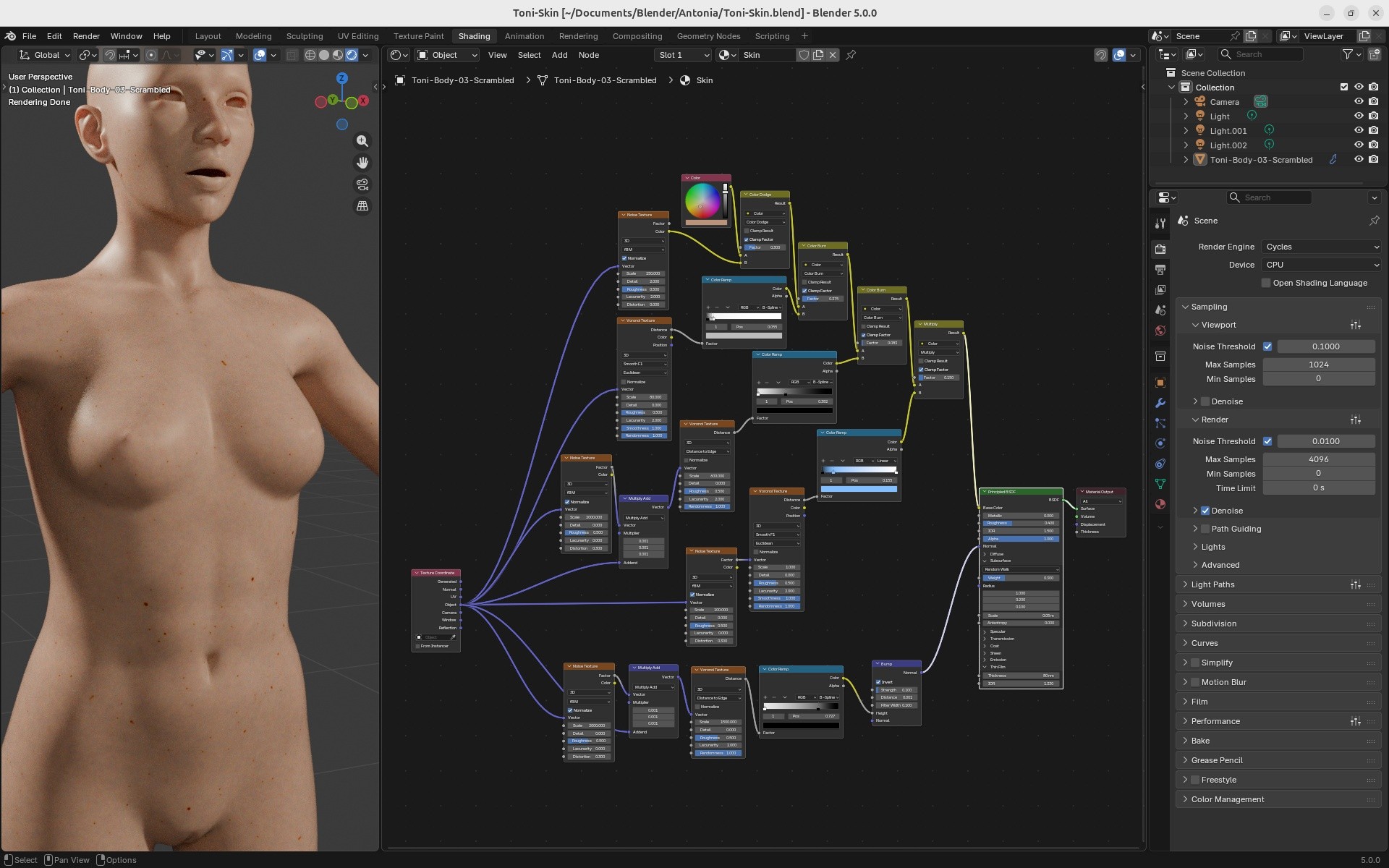
-- I'm not mad at you, just Westphalian.

officially requesting yr poser skin shader setup you mentioned over in the blender thread.
465 pages!!!! is this the longest undead thread in rendo history?
still lost in the wilderness
Poser 13 Superfly pretty much only these days
279 pages for me. I must have a larger page size in my settings. :-)
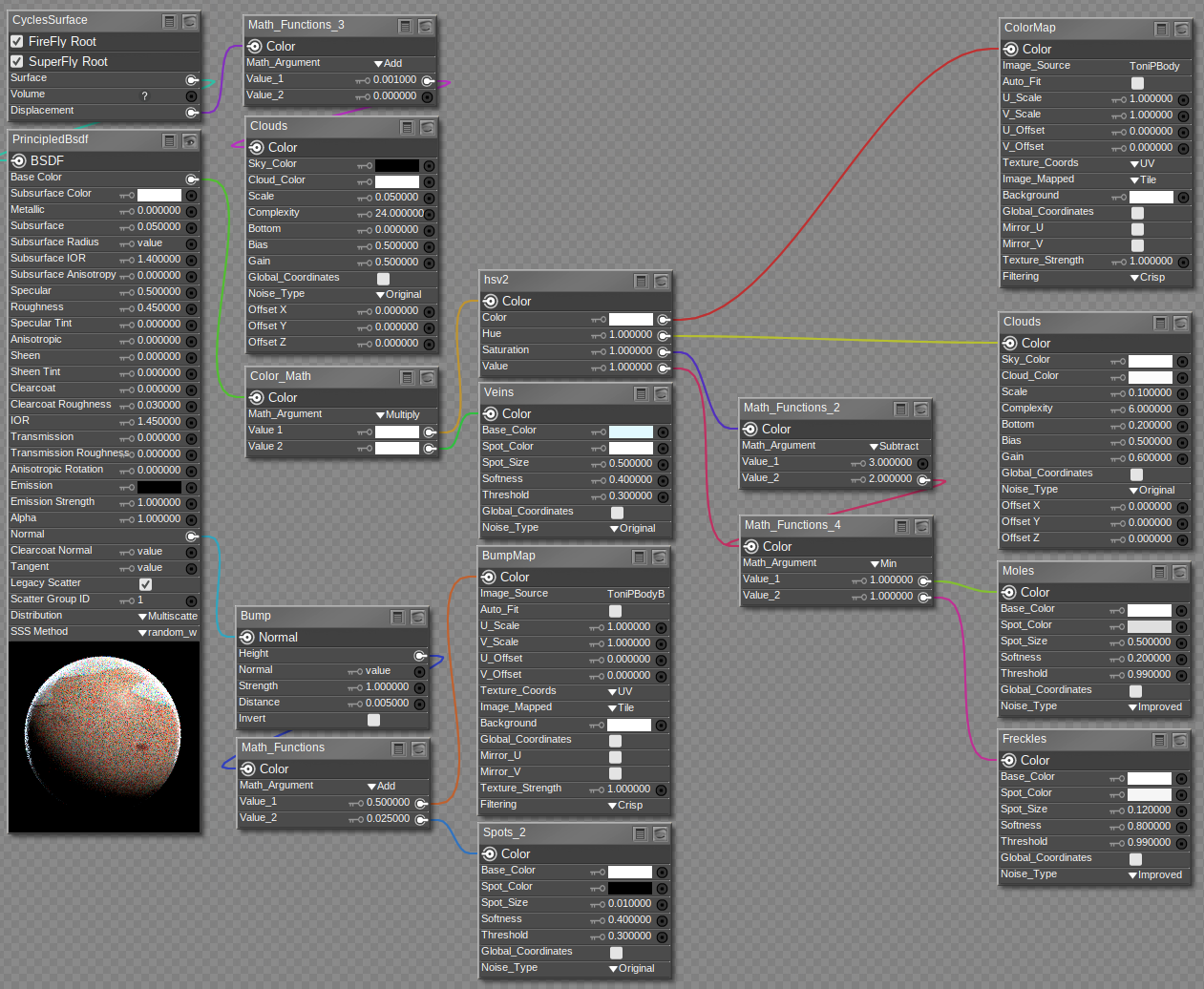
The shader is here: https://www.renderosity.com/filelocker/57421/download?key=3963. Right click and choose "Save link as..." if your browser can do that. It's just a single material, so you will have to adjust texture maps after applying it to all the skin material zones in your figure.
The setup looks like below. I'm sure hborre will have many suggestions for improvements. My main goal was to introduce some variability on top of the base textures to make the skin look more realistic, but the base material is probably not the best it could be. I found the Spots node in Poser very useful, and so far I haven't figured out how best to replace or simulate it in Blender.
-- I'm not mad at you, just Westphalian.
Content Advisory! This message contains nudity
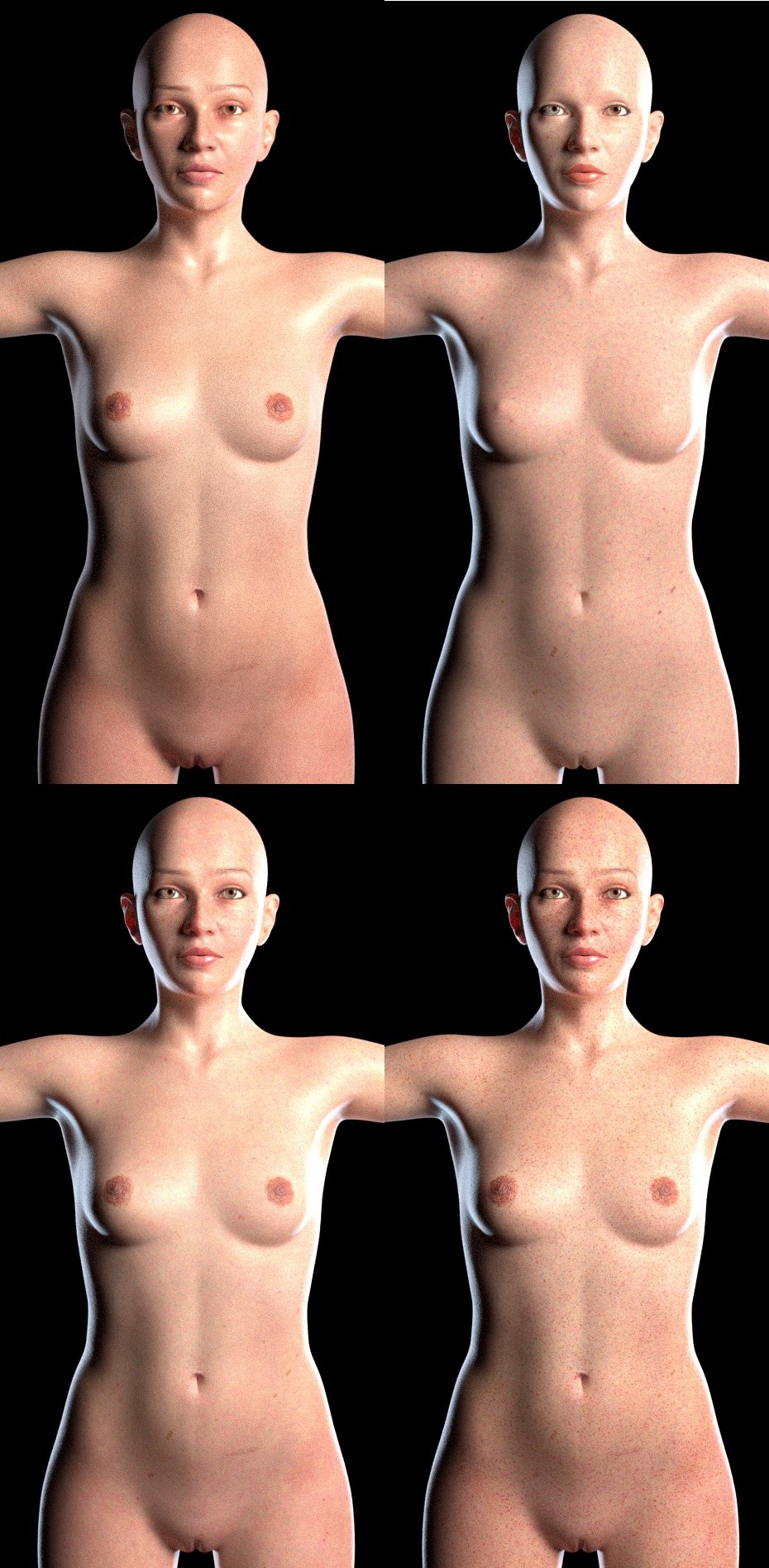
Some illustrations...
Top left is the original Antonia 1.3 material, top right the new one with a constant base color and no texture maps. Bottom left is the new material with the standard Toni texture by SaintFox and the late and great Digital-Lion, bottom right a variation with the melanin variations a.k.a. freckles dialed up, which one can do by making the spot color in the Freckles node darker.
Please don't pay attention to the eyes and lip/eye makeup. I simply couldn't be bothered to equalize it for all the materials.
-- I'm not mad at you, just Westphalian.
thanks! will see what i can do with that!
still lost in the wilderness
Poser 13 Superfly pretty much only these days

It looks like your skin in fully procedural. How are you handling the areolas, there in the nippular region? It sort of looks like you have some radial symmetry. I recall radial effects being a problem, back during the ancient threads about creating a procedural iris shader. One of maybe three or four things that couldn't be approached purely with nodes, for some reason.
===========================sigline======================================================
Cage can be an opinionated jerk who posts without thinking. He apologizes for this. He's honestly not trying to be a turkeyhead.
Cage had some freebies, compatible with Poser 11 and below. His Python scripts were saved at archive.org, along with the rest of the Morphography site, where they were hosted.
Content Advisory! This message contains nudity
I did a preliminary rework of the shader you posted above and added a little AO to bring out the details. This is just the skin shader; the remainder of the body parts need to be done.
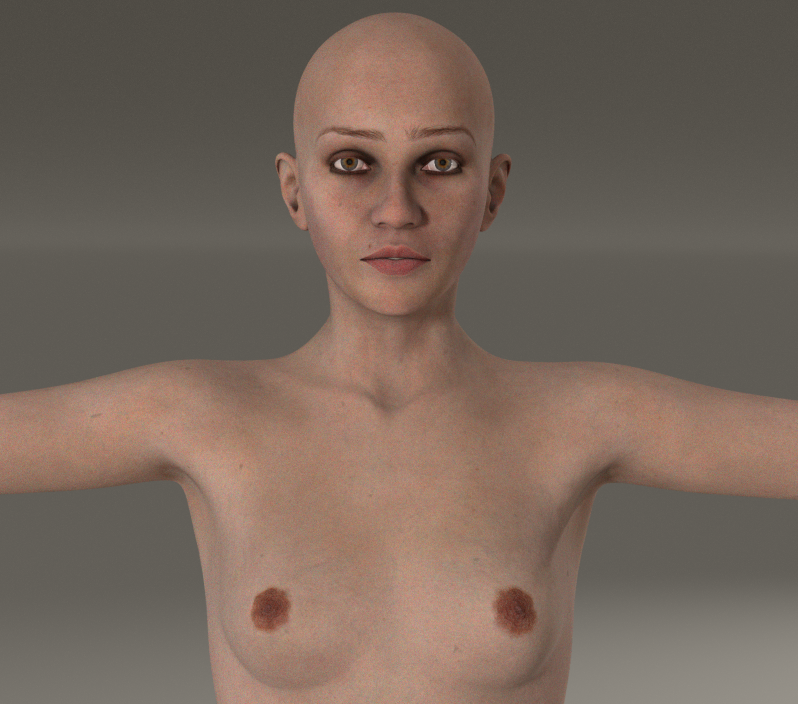
This is strictly using P14 Cycles for Superfly rendering. At some point, I'll post the completed shader image with the changes.
i like AO on most surfaces but am undecided about skin, especially the eye sockets & ears. maybe with really low values?
been pulling the bits (freckles, moles, veins) off as layers just to experiment & have accidentally come up with some pretty decent alien skin variants. one variation might work for mud or blood splattered. interesting.
still lost in the wilderness
Poser 13 Superfly pretty much only these days
Content Advisory! This message contains nudity
Well, consider me sold on AO. With a small enough depth and the red tint I suggested, the navel, lips, nostrils, eyes and ears have definitely improved here (before on the left, after on the right). Some strange artifacts, though, that I'm sure you've already solved. I won't bother, seeing as I don't plan to do many Poser renders in the immediate future.
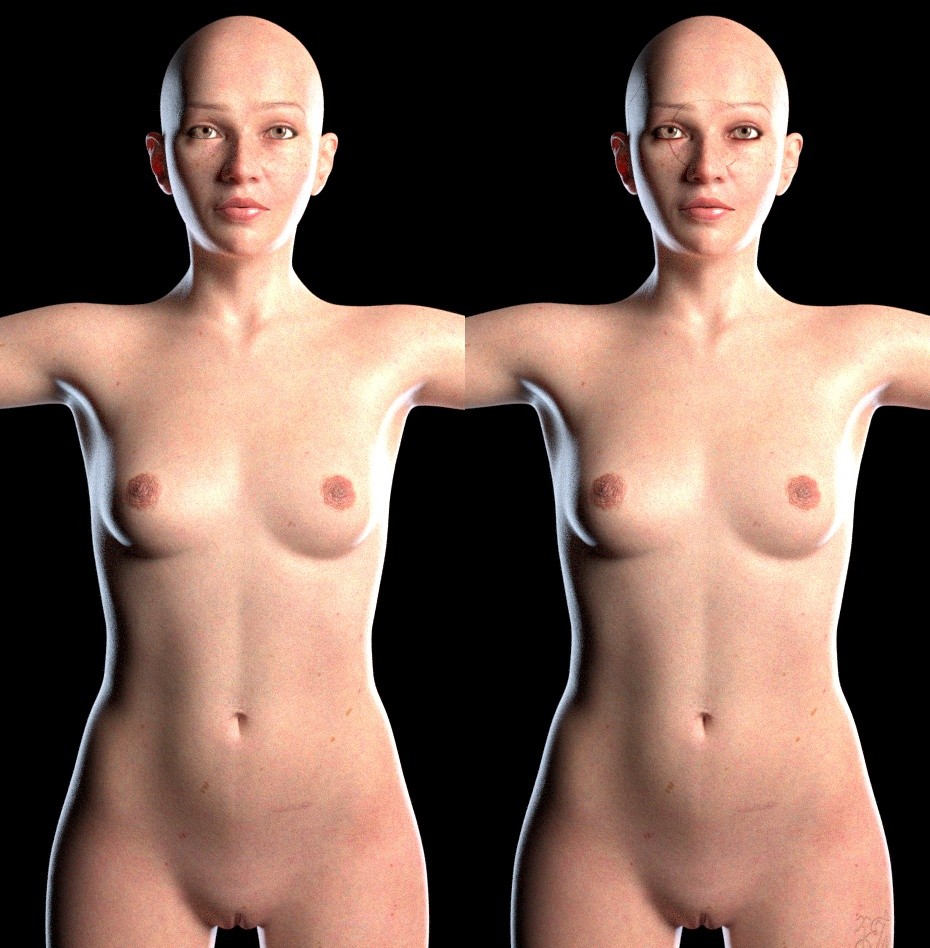
-- I'm not mad at you, just Westphalian.
Okay, so this is my favorite AO setup so far. Just selectively darkening the base color via a hsv2 node.
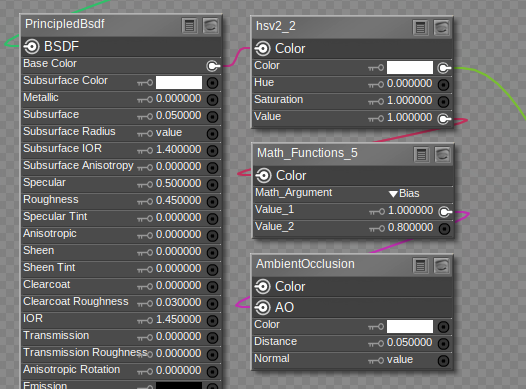
A higher second value in the Bias node produces a more subtle effect in this case. I imagine 1.0 would effectively mean no AO at all, but I haven't tested that.
Here's a before and after:
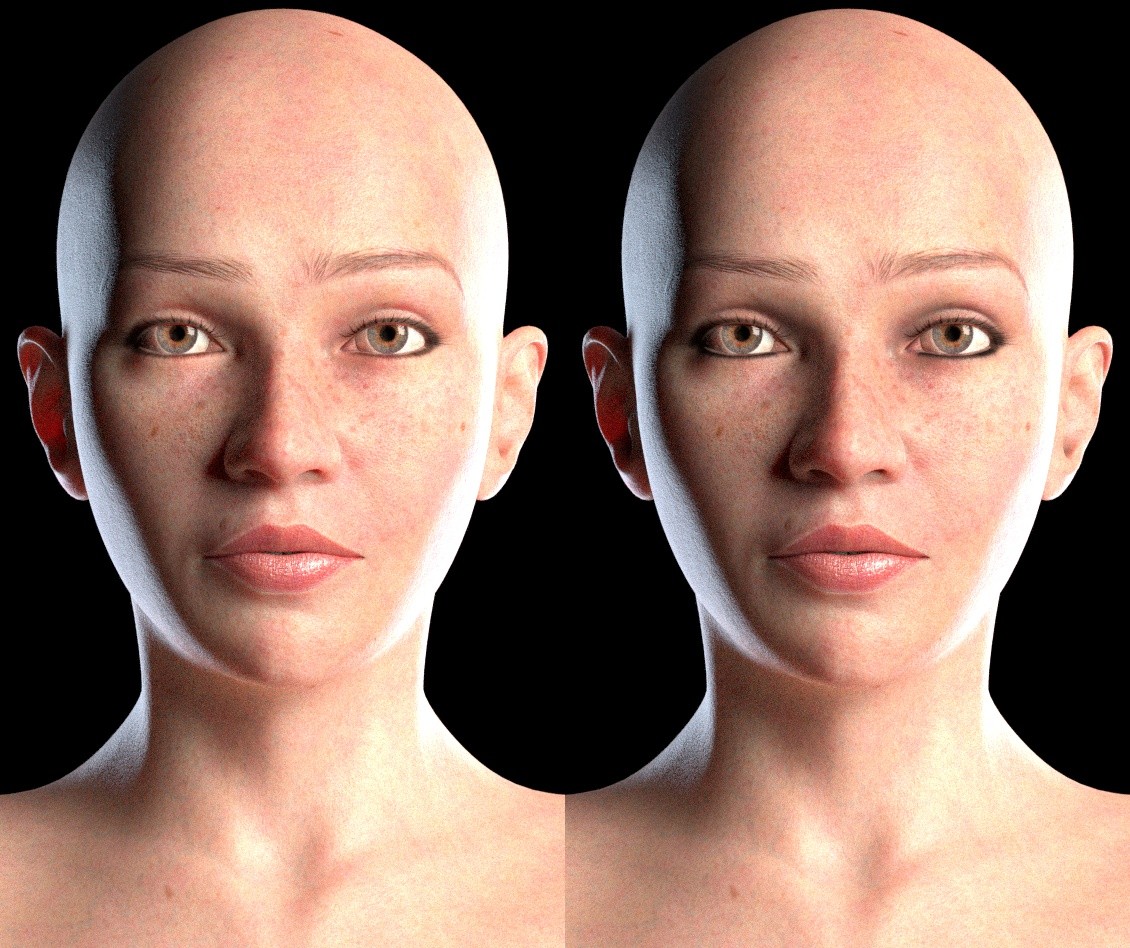
It seems quite effective at counteracting the SSS artifacts that one often see in tight spots and just generally making the render look crisper.
-- I'm not mad at you, just Westphalian.
The HSV2 node is incorrect for Cycles, although you might get the same desired effect. I don't mix shader nodes designated for different render engines because if there is a slight variability in the nodes, it will impact the render.
AO always darkens the texture; it's a matter of controlling the intensity. I think your Subsurface scaling value is set too high. Given that the Poser models are proportionally sized on a smaller scale, the Subsurface scale, or the Subsurface Radius, should be adjusted accordingly.

odf posted at 2:34 AM Thu, 11 December 2025 - #4502189
hm it seems I can not use the file in Poser 13? If I apply it Poser is asking to create material zones which do not exist, usually I click "yes" and can copy the material... but here it will not create the material. I also can not apply it on Antonia.279 pages for me. I must have a larger page size in my settings. :-)
The shader is here: https://www.renderosity.com/filelocker/57421/download?key=3963. Right click and choose "Save link as..." if your browser can do that. It's just a single material, so you will have to adjust texture maps after applying it to all the skin material zones in your figure.
The setup looks like below. I'm sure hborre will have many suggestions for improvements. My main goal was to introduce some variability on top of the base textures to make the skin look more realistic, but the base material is probably not the best it could be. I found the Spots node in Poser very useful, and so far I haven't figured out how best to replace or simulate it in Blender.
I am asking because I was about to copy the shader onto LaFemme... OMG this materials are really cool! .. but my La Femme looks like a bit sunburnt and so I wanted to ask.. which color do I need to tweak that her skin looks like "normal" pale skin? XD ... I copied your materials from the screenshot but du maybe my color blindness I choose the wrong color in one of theese nodes.
hm it seems I can not use the file in Poser 13? If I apply it Poser is asking to create material zones which do not exist, usually I click "yes" and can copy the material... but here it will not create the material. I also can not apply it on Antonia.
I am asking because I was about to copy the shader onto LaFemme... OMG this materials are really cool! .. but my La Femme looks like a bit sunburnt and so I wanted to ask.. which color do I need to tweak that her skin looks like "normal" pale skin? XD ... I copied your materials from the screenshot but du maybe my color blindness I choose the wrong color in one of theese nodes.
(The error is always 40 cm away from the screen.)
I’ve now put the material onto a sphere, and that’s where I finally found it. I honestly didn’t notice it before XD

Privacy Notice
This site uses cookies to deliver the best experience. Our own cookies make user accounts and other features possible. Third-party cookies are used to display relevant ads and to analyze how Renderosity is used. By using our site, you acknowledge that you have read and understood our Terms of Service, including our Cookie Policy and our Privacy Policy.
Omg, *blushes* yes, in fact, I was making lunch...
*looks 'GOOD'*