
Renderosity Forums / Carrara
Welcome to the Carrara Forum
Forum Coordinators: Kalypso, Anim8dtoon
Carrara F.A.Q (Last Updated: 2026 Jul 11 2:50 am)
Visit the Carrara Gallery here.

Subject: Realism in human character, Poser vs Carrara


Just a wild guess, but I'd say it's the strand-based hair on that character which is causing the long rendertimes, especially if you're using GI or any advanced lighting scheme, like soft shadows. Poser's strand hair is integrated into it's render core, so Poser handles the spline geometry very well in it's native renderer. Of course, if you started using raytraced shadows, you'd see a major jump in render times even in poser.
That said, I'm curious.. your render time in Poser for that image was 80 seconds, but what was it in Carrara? You said the renders came out beautiful, so are they better to the point of justifying the longer rendertime?
Also, I don't own it, but you might look into the Carrara plugin called, "Anything Grows", which supposedly can do things like fur and hair directly in Carrara, with reasonable rendertime. Perhaps you can figure out a way to use it instead of strand hair? Again, I don't know of the full capability of this plugin, or even if it can be useful for natural hair. This is one area I think Carrara lacks badly. Every other app I know of, from Maya to Shade Pro, has hair plugins that render relatively quickly. In fact, one of the best I've seen is now available for Cinema4D. That might be another route you look at (Cinema4D) if Carrara doesn't suit you.
If you used prop hair, and good render settings, I'm sure you'd see a drastic difference in speed.
Message edited on: 01/30/2006 17:29
Well, I have to have dynamic hair for my animations, that is certain. And yes, it IS the strand hair that is slowing down Carrara. I have not been able to get a render time under 12 minutes yet and several were over 20. But I'm not giving up by any means. I'll be putting in another session tonight attempting to get a good realism close-up render with strand hair in Carrara. In Poser, you have to make strand hair invisible to raytrace or you will be there for an hour. Luckily, you can do that just for the hair, letting raytrace/fastscatter go to work on the skin. So, I've got to turn raytrace off in Carrra, and look for another avenue to GI and realism/great shadows. ::::: Opera :::::
Opera, I don't think you need raytrace turned on at all just to use the fastscatter node in Poser. Fastscatter is subject to depth map shadows. Unless you mean AO, which is raytraced. Anyway, I'm sure you can include/exclude objects from certain lights in Carrara, or exclude certain objects from receiving raytraced shadows, or any shadows at all. I haven't tried it yet, but most 3D apps can do this. I know it's possible in Vue 5i for example. If not, then that's a real bummer in my opinion.
Well, I am going by my guru face_off. Using his shaders, if you turn the fastscatter node on, it tells you raytrace must be on. And yes, it also has to be on for AO, but there is no AO in my baseline render here. I'll look into that fastscatter/raytrace thing a little deeper. if the hair can be excluded from raytrace in Carrara, that would be fantastic. In tonight's session, I'll try removing the hair and see what the difference is, then look for the exclusion. Also, I'll post the file, as requested by bluetone, later tonight. ::: OG :::
Well, I just ran my own test with fastscatter, and it makes absolutely no difference if raytrace is turned on or not. The renders were exactly the same, so long as there's no raytrace materials or shadows in the scene. In fact, I was able to render the fastscatter effect with the P4 engine as well. Maybe your guru made a mistake, or maybe he was referring to something else?
The only things that require raytracing in Poser 5/6 Firefly are reflections/refractions, AO, gather, fresnel, or raytraced shadows. Otherwise, it's not being used.
Rest assured, if any element of your scene was actually using raytracing in Poser 6, the rendertime would be far more significant than what it is now. That, I'm sure is playing a big difference in the rendertime benchmarks you are running as well.
Firefly is not good at raytracing anything, at least not at high quality. It's painfully slow compared to true raytrace engines like Carrara has. Compare the AO in Poser vs. that in Carrara 5. There's no contest. Compare the quality of reflections or raytraced shadows, and you'll see there's no comparison in the way of rendertime.
If you're absolutely sure you won't ever need to use any raytraced effects (even for a mirror, or metal material), then I don't know what you are looking for other than what you already have inside of Poser. Carrara definitely handles more geometry, but other than that, Poser is going to do just as well, pound for pound. If you're looking for more realistic lighting, then you'll have that in Carrara. The GI is much better than the IBL in Poser, but you will pay for it at rendertime. Also, I have had problems using GI in Carrara for animation. I often have to deal with noisy artifacts in the scene, and the only way to cure it is to turn up higher settings, which of course will make rendertime suffer even more. The result is stunning, but you will need patience.
Message edited on: 01/30/2006 21:20

Renderosity has no problems with people posting files for others to use - provided you are the owner of the copyright/content that is. If you made the model and textures, then feel free to post the file. If the file contains actual Poser or DAZ content, please do not post since it violates the licensing agreements for those software items. I know, I know, everyone knows that. But I just have to say it before a mistake might be made... ;-) Mark
First, you are correct about fastscatter/raytrace. That was my error, not face_offs. And, there is/was nothing needing raytrace in the scene. And, I agree: the raytrace in firefly is not good for general shadows. However, if you turn it on and attach AO in shaders on SOME items, and keep all hair invisible to raytrace, you get decent AO at tolerable times. The effects you are referring to in animation are probably the same found in Poser animation if the settings are too low. We call it "flicker" and yes, the solution is to jack up the bias and pixel settings. The byproduct of that is better shadow edges and hair strand resolution, so it is okay. But it slows render. Here's what I'm looking for: animation without flicker and damn good shadows and hair resolution on the level of the render on this thread (which was accomplished without AO and IBL, only high-setting depth-map-shadows and great skin shaders with fastscatter), but at at least twice the speed. So, it would have to be 40 seconds or less for 640x480. I don't even know if raytrace in Carrara is the answer, or HDRI lights, or AO, or??? it really does not matter, as long as I can get a render like that attached in 40 seconds. At twice speed for equal quality, it would be worth purchase and hassle of rendering outside of Poser. ::::: Opera :::::

Did you try using the fake GI preset in carrara or other studio light setup w/ no GI?...ambient occlusion? Many other lighting options to also try. If you get results you like w/ baking try that.(baker plugin).The fact is GI just takes longer.Yes, you can choose to have lights only effect certain objects, but I don't really think that will help render time significantly if at all.
No need to think outside the box....
Just make it
invisible.
It is in the indoor lighting. Also setup your own studio. Oh I am sure people are always trying to drive down render times :D Just gotta do apples to apples. However, the thread name is misleading...sounds like you are looking for speed...just only willing to sacrifice so muchrealism for it. Many poser people here hopefully someone can test for you.
No need to think outside the box....
Just make it
invisible.
Operaguy, I'm thinking you can get it down to perhaps the same (80 seconds) or maybe even 60 seconds with the same quality, apples to apples, if you really learn the ins and outs of Carrara like you do Poser.
You seem to be looking for exactly half the time, and I'm not sure you'll get it, being that you're using an imported PZ3 with Poser's dynamic strand hair. I hope I'm wrong, we shall see.
My point is, the BIG difference in rendertime won't come from a minimalist apples to apples comparison like this one. That's not where the real benefit of Carrara is. The big difference will be noticable when you try to get MORE out of the scene than just the same level of detail.
For example, if you wanted to really enhance the realism of that image, you could add some nice raytraced reflections in the eyes, AO for contact shadowing, perhaps some volumetric lighting to give it some drama, a detailed interior or exterior environment to fulfill the background visualization, etc. That's where Carrara's features and render speed will blow Poser away, and that's why I'm wondering if what you really want isn't just best done in Poser itself. I guess your test results will tell you if you're on the right track. I'm interested to hear them myself.
Message edited on: 01/30/2006 23:56
I AM looking for speed, given a baseline. I am NOT looking for the advanced portrait features jimbo is listing, because there is no chance they give me speed. Obviously, those features have their place, normally for single-frame renders. So, you are right, maybe the thread title is misleading. Let's put it this way, I am an animator looking for more speed than Poser can give me (i am flexible on the "half"), but I want a baseline of realism. I guess that's what I meant. Since I have to have dynamic hair, but this is the problem in render time, is their a non-Poser dynamic strand hair model more sympatico with Carrara? ::::: Opera :::::
I'm doing animations too now, Operaguy, which is why I purchased Carrara. Those things I mentioned are all possible for animation, with regard to speed. Of course, my idea of speed and yours may differ, but overall, raytraced reflections, environments, and even volumetric lights are not just things reserved for stills, especially when you consider the fact that you have the ability to network render.
I think the main problem you will face, no matter what program you use, will be that you seem adamant on bringing Poser animations into it. I've started to come to the conclusion that perhaps doing away with that first step is the only way to get the efficiency I need, which is why I'm thrilled that Carrara allows you to natively rig Poser figures automatically.
The only other thing that would keep YOU from going that route is that you absolutely need dynamic hair. That might be the biggest hurdle. I'm not saying you can't achieve the goals you want in Carrara, but that could be the one issue.
Check out the plugin for Carrara called "Anything Grows". It supposedly can generate lots of things, from plants to hair. I don't have it, but I'm sure someone will know if it can do what you need. I don't know if it has the "styling" tools you would require to make a good hairstyle like in Poser. That's the one thing Carrara lacks.
Have you checked out any of the other applications out there that can do what you want? Almost all of them now have the ability to import Poser scenes, or to rig Poser figures in them, and some have their own strand-based hair that is better and faster than Poser's own. Cinema4D comes to mind, or 3dsmax (pricey).
Message edited on: 01/31/2006 00:43
If you are going to be doing animations that contain dynamic hair than using Ambient Occlusion is recommended over the full Indirect lighting. But keep in mind that Poser Dynamic Hair is very slow to render with GI. Also don't over do it with high-res texture maps and heavy meshes cause in an animation the overly high-res textures are just overkill. They work better for your still single image closeup renders. later.
Hi, To continue with my previous post. I loaded the James with Messy hair into Carrara. By default the lights imported into Carrara from Poser do not have any shadow buffer setup. If you use raytrace soft shadows it will look beatiful but it will render very slow so try the the shadow buffer setting and back in the light tab reduce the amount of shadows this will give good hair results and faster rendering.
I have to fold my cards for now. No matter what settings I give for any sort of GI, including just AO, the dynamic hair completely ruins my render time. Following Ringo's suggestion, I changed the shadows to "shadow buffer" and made sure all GI was shut down. I was able to move up and down in quality and get James+Messy to render, but anything in the neighborhood of my baseline 80 seconds was not as good as my Poser render. I am confident that if I committed to Carrara, learned shadow buffer and other lighting tricks, plus then learned SSS on skin, etc., I might be able to get back to same quality at same render time. However, there is no windfall to be had. That is because of my need for dynamic hair, for realism in animation. I accept responsibility for that choice, and there is no free lunch, as the director of FF learned trying to deal with 50,000 strand shoulder length hair for 100 minutes. I have to return to consideration of my render budget, and find more seconds in it, perhaps as many as 400. At that point, I'll return to Carrara and look in again. Thank you, ::::: Opera :::::
Attached Link: http://jrdonohue.com/blurr.mov
5 MB, QuicktimeThis is just a teaser, but will give you an idea.
::::: Opera :::::

Privacy Notice
This site uses cookies to deliver the best experience. Our own cookies make user accounts and other features possible. Third-party cookies are used to display relevant ads and to analyze how Renderosity is used. By using our site, you acknowledge that you have read and understood our Terms of Service, including our Cookie Policy and our Privacy Policy.
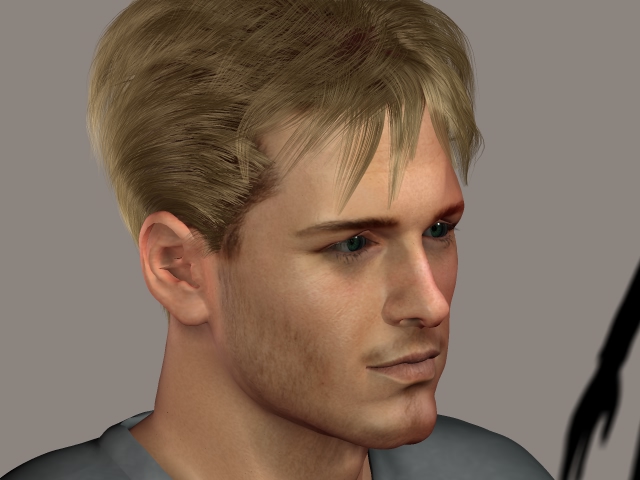
I am engaged in a healthy discussion here on the OpenGl and slider abilites of Carrara....this is a different topic: Comparing high quality Poser6 realism to Carrara's. The attached image is my baseline. It was rendered in Poser 6. I am gradually learning how to set lights and render settings in Carrara, but it will take me days and days of work to emulate the Poser baseline render. Meanwhile, the renders I AM getting out of Carrara are beautiful, but with very high render times. My goal is to determine if, quality for quality, I can get a significant render speed increase for this type of image in Carrarra over Poser6. I am hoping to suplement my own investigations with help from Carrara veterans, either by ancedotal tales or attempts to replicate this baseline. I might spend days and days, but still not arrive at the settings a good Carrara guru would know in an instant are optimal and fast. Here are the elements in the baseline: RENDER SIZE: 640x480 James Casual James_Messy strand hair (dynamic) Lights: (3) Main infinite; DepthMapShadows Blurr:5 Bias:.01 Map:1024 Intensity: 77 Light2Fill Spot, no shadows intensity 66 Light3Back Spot, no shadows intensity 53 (behind the right ear) Render settings: Engine: FireFly RENDER SIZE: 640x480 Raytrace on (For fastscatter Shader) bounces = 2 Hair invisible to raytrace, and not casting shadows Min shading Rate: 1.0 Pixel Samples: 3 THERE IS NO IBL OR AO, just tight depth map shadows. Shaders: face_off skin realism package, fastscatter engaged. Hardware: AMD 3500+, 4GRam, XPPro, RaptorHD, NVIDIA GeForce 5600, 256MB Render time: 80 seconds. Can anyone either attempt to replicate this render, or at least state whether Carrara can achieve something very close at a lesser rendertime? Thank you, ::::: Opera :::::