
Renderosity Forums / 3DS MAX
Welcome to the 3DS MAX Forum
Forum Moderators: wheatpenny
3DS MAX F.A.Q (Last Updated: 2024 Aug 27 11:07 am)
Welcome to the 3DS Max Forum!
Considering 3ds Max? Download the FREE 30-day trial here

Ready to purchase 3ds Max? Go here
Renderosity maintains a zero tolerance policy concerning the trading/use of illegal software.
Refer to the Terms Of Service for the lowdown concerning warez.
POSER/MAX FAQ - This covers MANY of the issues involved when using Max in conjunction with Poser.
Take the time to look over this post before starting a thread in the forum.
Checkout the Renderosity MarketPlace - Your source for digital art content!

Enjoy your stay and keep coming back!

Subject: How to find ngons



Click the attached image to enlarge.
There's more than one way to do it. Choose an object, go into polygon subobject mode. In to the Graphite ribbon, and under the "Selection" tab, you will find there are multiple ways to locate Ngons, or any polygon of specific sides. On the left, in your "Select" menu there is a button to find all Non-QUads. This one will find both Ngons and Triangles all at once. However, at the right, under the By Numeric menu, is a way to select more specific forms of Ngon. You can select equal to, less than, or greater than polygons with 4 sides (or the specific number of sides you put in there, but 4 is the default) on any selected object.
You should find the selection tools quite robust.
______________________________________
My Store
My Free Models
My Video Tutorials
My CG Animations
Instagram: @luxxeon3d
Facebook: https://www.facebook.com/luxxeon

You might find too that Max is a great software for cleaning up a mesh. Lots of ways to convert tris to quads, and some tricks to automatically ger rid of ngons too. Once you have all the Ngons of 5 sides or more selected, there's a trick I learned to automatically convert those into triangles, if you don't mind triangles in your mesh:
In Polygon mode, use the By Numeric option to select all your Ngons. Now, with all the Ngons selected, hold down CTRL on your keyboard while you switch over to Vertex mode. Switching to vertex mode while holding down control will transfer your polygon selection to vertex, and you will have all the vertices of those Ngons that were selected in polygon mode, now selected in vertex mode. Next, with all the vertices of your ngons now selected, just click "connect". Max will automatically attach edges to all your selected vertices intelligently, and convert all your ngons to triangles. Now if you search for Ngons on your object, you won't find any. It's a quick and dirty way of cleaning up a mesh of ngons, and works every time.
Tools : 3dsmax 2015, Daz Studio 4.6, PoserPro 2012, Blender
v2.74
System: Pentium QuadCore i7, under Win 8, GeForce GTX 780 / 2GB
GPU.
Quote - You might find too that Max is a great software for cleaning up a mesh. Lots of ways to convert tris to quads, and some tricks to automatically ger rid of ngons too. Once you have all the Ngons of 5 sides or more selected, there's a trick I learned to automatically convert those into triangles, if you don't mind triangles in your mesh:
In Polygon mode, use the By Numeric option to select all your Ngons. Now, with all the Ngons selected, hold down CTRL on your keyboard while you switch over to Vertex mode. Switching to vertex mode while holding down control will transfer your polygon selection to vertex, and you will have all the vertices of those Ngons that were selected in polygon mode, now selected in vertex mode. Next, with all the vertices of your ngons now selected, just click "connect". Max will automatically attach edges to all your selected vertices intelligently, and convert all your ngons to triangles. Now if you search for Ngons on your object, you won't find any. It's a quick and dirty way of cleaning up a mesh of ngons, and works every time.
That's a good trick to quickly eliminate ngons from a mesh. However, you may also end up triangulating some quads in the process, if the vertices selected share the border of any quads in the mesh. To make sure that isn't the case, you can do the trick you just described above, which works to get rid of ngons, and then, in the Graphite Ribbon, under Geometry, click "Quadrify All", to eliminate unwanted triangles that may have been generated on your Quads.
______________________________________
My Store
My Free Models
My Video Tutorials
My CG Animations
Instagram: @luxxeon3d
Facebook: https://www.facebook.com/luxxeon
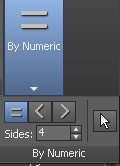
Some UI configurations in Max can make the Ribbon appear differently, on different display types, but this is the panel you're looking for, and will appear under the "Selection" tab, when you have Polygon subobject mode enabled.
______________________________________
My Store
My Free Models
My Video Tutorials
My CG Animations
Instagram: @luxxeon3d
Facebook: https://www.facebook.com/luxxeon

Bandolin is furiously looking through the manual and 3ds Max bible for some obscure procedure that neither Maxx nor Lux knows...
<strong>bandolin</strong><br />
[Former 3DS Max forum coordinator]<br />
<br />
<a href="http://www.renderosity.com/homepage.php">Homepage</a> ||
<a href="http://www.renderosity.com/mod/sitemail/">SiteMail</a> ||
<a href="http://excalibur.renderosity.com/mod/gallery/browse.php?user_id=70375">
Gallery</a> || <a href="http://www.renderosity.com/mod/freestuff/index.php?username=bandolin">
Freestuff</a>
<p><em>Caution: just a hobbyist</em></p>Ok, so I just tried it, and it found all the ngons in my model. Now, if I want to quadrify can I use the following method?
- While in Polygon subobject mode
- Graphite modeling tools
- Geometry
- Quadrify selection
I tried that but nothing happened. I'll look over the manual to see if I can get an answer before a response.
<strong>bandolin</strong><br />
[Former 3DS Max forum coordinator]<br />
<br />
<a href="http://www.renderosity.com/homepage.php">Homepage</a> ||
<a href="http://www.renderosity.com/mod/sitemail/">SiteMail</a> ||
<a href="http://excalibur.renderosity.com/mod/gallery/browse.php?user_id=70375">
Gallery</a> || <a href="http://www.renderosity.com/mod/freestuff/index.php?username=bandolin">
Freestuff</a>
<p><em>Caution: just a hobbyist</em></p>Ok, so what I found was that Quadrify selection actually does what Lux mentioned after Max's suggestion of triangulating N-gons. Quadrify will convert triangles into quads. Didn't have to look far, just hovered of the tool.
<strong>bandolin</strong><br />
[Former 3DS Max forum coordinator]<br />
<br />
<a href="http://www.renderosity.com/homepage.php">Homepage</a> ||
<a href="http://www.renderosity.com/mod/sitemail/">SiteMail</a> ||
<a href="http://excalibur.renderosity.com/mod/gallery/browse.php?user_id=70375">
Gallery</a> || <a href="http://www.renderosity.com/mod/freestuff/index.php?username=bandolin">
Freestuff</a>
<p><em>Caution: just a hobbyist</em></p>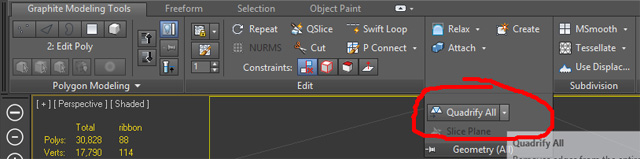
______________________________________
My Store
My Free Models
My Video Tutorials
My CG Animations
Instagram: @luxxeon3d
Facebook: https://www.facebook.com/luxxeon

Quote - oh, I had to select "polygon" to get that, Lux. Thanks, it works. It shows > 4 which means n-gons.
And the quadrify all tool is cool, dunno if it T's the edge loops or allows for loop selection. Will have to play a bit.
This particular option is only a way to arbitrarily automate the quadrangulation of triangles in your mesh, if it's mathematically possible. It has no options for edge flow. There's a "Quadrify Mesh" modifier, which provides parametric control over the quad size percentage, which can be useful, but no does not allow for edge flow control. These are solutions for "quick and dirty" quadrification.
If you need more fine control over your topology, there are a great number of tools in the Graphite Freeform tab for retopology, which provide very good control over edge flow, and quad surface creation. The PolyDraw tools allow you to draw a grid of quads, to create surfaces, which can be conformed to another object, or used to restructure edge flow on another dense topology.
______________________________________
My Store
My Free Models
My Video Tutorials
My CG Animations
Instagram: @luxxeon3d
Facebook: https://www.facebook.com/luxxeon

Privacy Notice
This site uses cookies to deliver the best experience. Our own cookies make user accounts and other features possible. Third-party cookies are used to display relevant ads and to analyze how Renderosity is used. By using our site, you acknowledge that you have read and understood our Terms of Service, including our Cookie Policy and our Privacy Policy.
At some point in a complex project, ngons are created. Either on purpose, or by accident when adjusting the object. Max seems to be prevelant in this with end caps and whatnot on primatives.
In Softimage XSI, I can select n-sided polygones. 5 sides or more. Real easy. In Max, I see the x-view T-vertices that show me where a quad loop terminates (cool) but that does not necessarily mean an n-gon.
Please, no flame wars. I just want to learn Max.
How can I find n-gons in a complex scene?
Thanks.