
EricofSD opened this issue on Dec 21, 2013 · 12 posts
LuxXeon posted Sun, 22 December 2013 at 4:43 PM
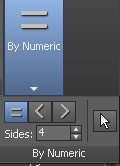
Some UI configurations in Max can make the Ribbon appear differently, on different display types, but this is the panel you're looking for, and will appear under the "Selection" tab, when you have Polygon subobject mode enabled.
______________________________________
My Store
My Free Models
My Video Tutorials
My CG Animations
Instagram: @luxxeon3d
Facebook: https://www.facebook.com/luxxeon