
Renderosity Forums / Blender
Welcome to the Blender Forum
Forum Moderators: Lobo3433 Forum Coordinators: bwsupport
Blender F.A.Q (Last Updated: 2026 Apr 20 6:45 am)
Welcome to the Blender Forum!
Your place to learn about Blender, ask questions,
exchange ideas, and interact with the other Blender users!
Gallery | Freestuff | Tutorials
Visit the Renderosity MarketPlace. Your source for digital art content!


Subject: Welcome and General Blender Info for Newbies


Lobo3433 posted at 3:59PM Sun, 15 October 2017 - #4316100
Miss B posted at 10:21AM Sun, 15 October 2017 - #4316080
Well it took me about 15 minutes, BUT, I couldn't do the last step because I haven't upgraded to 2.79 yet, so the Wireframe Modifier must be a new one. I'll have to upgrade and play with it more tomorrow.
You're right though, the screenshots were good enough, so not knowing Russian wasn't a problem at all.
Just curious which version of Blender are you using I see the Wire frame modifier as part of the modifiers all the way back to version 2.72
Really? I'm on 2.78, so only one update back, but I don't see that modifier. That said, with these old eyes, you never know.
OK, I just checked, and it seems my laptop's monitor isn't long enough, so there was a down arrow at the bottom of the Modifier flyout dialog, and I found it!! 
I told you, with these old eyes. . . . I don't EVER recall seeing that down arrow on that flyout dialog before. ~shakes head~
_______________
OK . . . Where's my chocolate?
OK, initially it only took me 15 minutes, but when I applied the Wireframe Modifier, the outer edge was wonky, and I couldn't figure out what was wrong. Sooooo, I started over again, realized what didn't happen the first time around, and finally had success!!
I even UV Mapped it, though I didn't want a million pieces, so I Unwrapped it via Project From View, which left it intact as one piece. Most times you wouldn't do that, but with something symmetrically round, it just made sense.
My Gothic Window
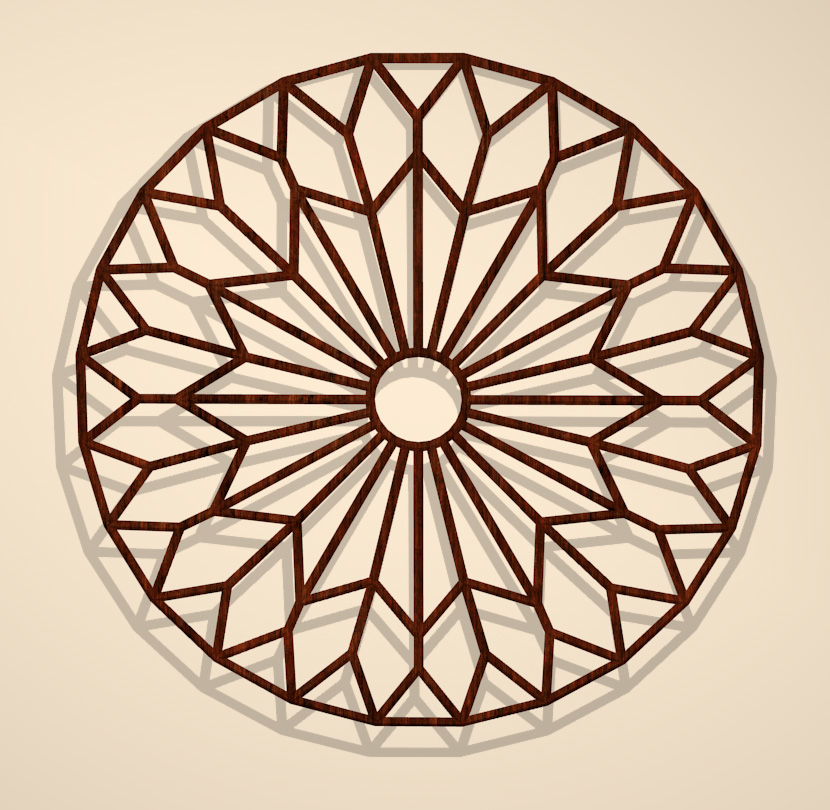
Just for the fun of it, I applied the Subdivision Surface Modifier, and this is what I got.

Not sure what I could use it for, but I like it. 
_______________
OK . . . Where's my chocolate?
Wow ok now your one up on me I tried the Subdivision surface and it was like I broke something your second one can be a fancy table top can fill the holes with like glass or something and it would make a interesting table top really great look bravo 
Lobo3433
Blender Maya & 3D Forum Moderator
Funny you mention a table top, as that was my first impression as well, though I think I would make a new one, except set up the Circle with only 10 Verts instead of 24. That would give me much more surface to the table top, though I do like your suggestion of filling in the holes with glass.
_______________
OK . . . Where's my chocolate?
The technique once you have how to do it does open up a a few different possibilities
Lobo3433
Blender Maya & 3D Forum Moderator

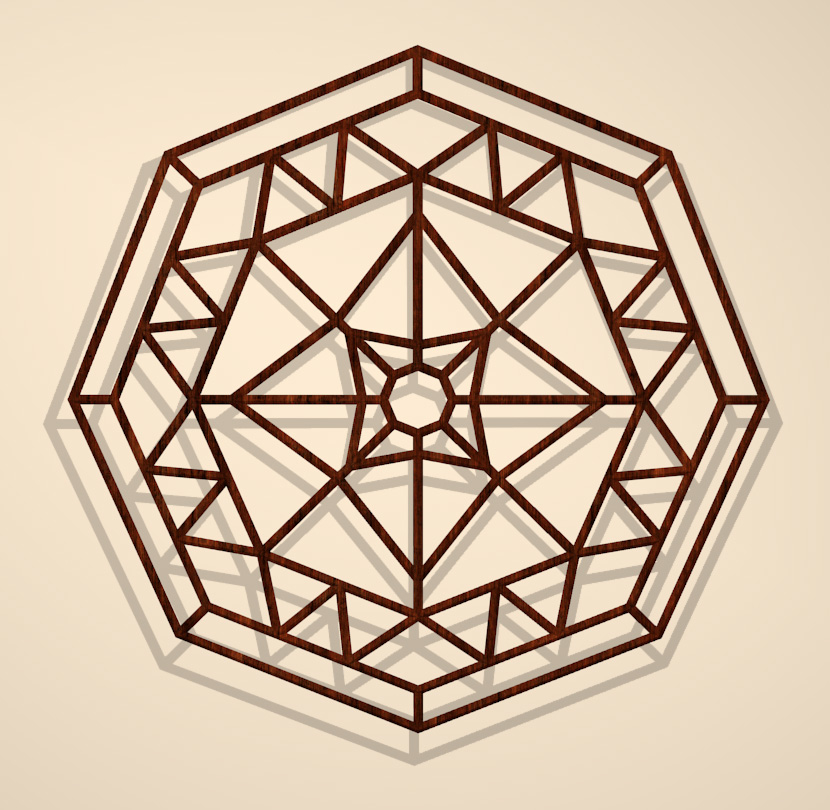
OK, couldn't leave this alone, so I tried a different shaped window, and this is what I came up with.
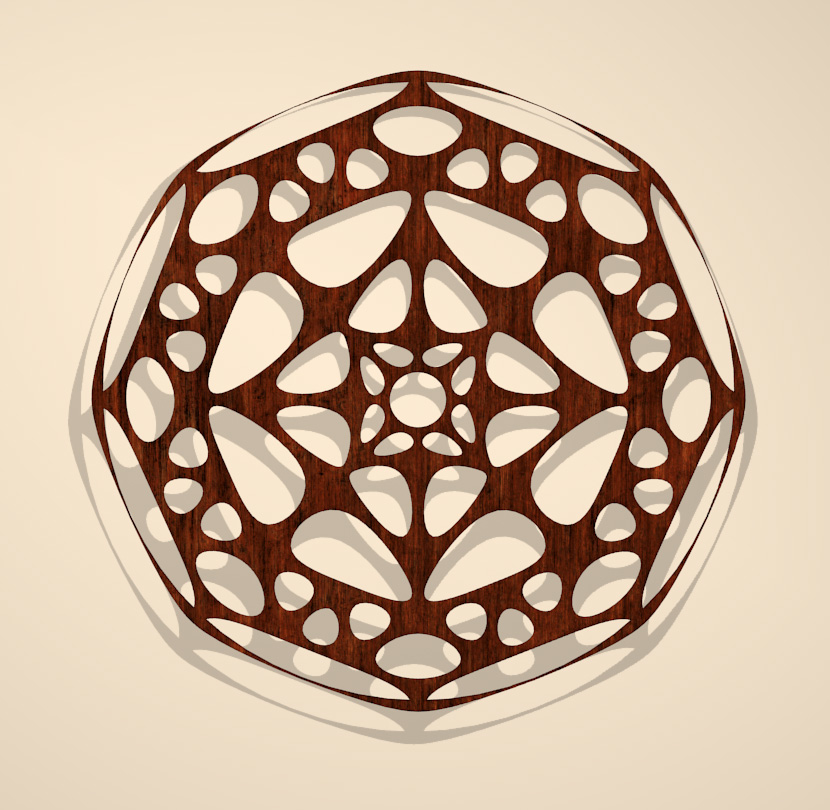
Of course, I just had to try it subdivided, but I don't like the outer edge on this one. I probably should've done this one slightly differently where the outer section is so it would've subdivided better.
_______________
OK . . . Where's my chocolate?
Hi Miss B
I have to say I like the first one of your new shaped window really great looking on You can make several varieties might make an interesting product as a starting point for their projects
Lobo3433
Blender Maya & 3D Forum Moderator
incantrix posted at 1:03PM Thu, 19 October 2017 - #4316354
Just thinking here but if you conformed it to a dome with a fairly flat top to it, then flipped it upside down you could make quite a few nice cane style baskets.
Incantrix
Interesting thought. I hadn't thought of anything other than a Gothic window when creating it, but it could make a nice basket.
_______________
OK . . . Where's my chocolate?
Lobo3433 posted at 1:04PM Thu, 19 October 2017 - #4316361
Hi Miss B
I have to say I like the first one of your new shaped window really great looking on
I'm not a vendor, nor have any plans on becoming one, but it would be interesting to see how many more designs I can come up with.
The odd thing was, the photo that gave me the idea had the flat side of the Octagon on top, but I didn't like the center design I came up with as much when I rotated it around, so figured I'd just leave it with one of the points on top.
_______________
OK . . . Where's my chocolate?
Miss B posted at 4:25AM Fri, 20 October 2017 - #4316366
Interesting thought. I hadn't thought of anything other than a Gothic window when creating it, but it could make a nice basket.
The beauty of using shapes whether they be Gothic or not is the application is only limited by the imagination.
Incantrix
Miss B posted at 3:05PM Thu, 19 October 2017 - #4316367
Lobo3433 posted at 1:04PM Thu, 19 October 2017 - #4316361
Hi Miss B
I have to say I like the first one of your new shaped window really great looking on
I'm not a vendor, nor have any plans on becoming one, but it would be interesting to see how many more designs I can come up with.
The odd thing was, the photo that gave me the idea had the flat side of the Octagon on top, but I didn't like the center design I came up with as much when I rotated it around, so figured I'd just leave it with one of the points on top.
I fully understand not wanting to be a Vendor but was my way of say I really thought it was well done 
Lobo3433
Blender Maya & 3D Forum Moderator
incantrix posted at 10:42PM Thu, 19 October 2017 - #4316370
Miss B posted at 4:25AM Fri, 20 October 2017 - #4316366
Interesting thought. I hadn't thought of anything other than a Gothic window when creating it, but it could make a nice basket.
The beauty of using shapes whether they be Gothic or not is the application is only limited by the imagination.
Incantrix
Very true. I like being able to look at something and being able to "picture" it as something totally different.
_______________
OK . . . Where's my chocolate?
Lobo3433 posted at 10:43PM Thu, 19 October 2017 - #4316375
Miss B posted at 3:05PM Thu, 19 October 2017 - #4316367
Lobo3433 posted at 1:04PM Thu, 19 October 2017 - #4316361
Hi Miss B
I have to say I like the first one of your new shaped window really great looking on
I'm not a vendor, nor have any plans on becoming one, but it would be interesting to see how many more designs I can come up with.
The odd thing was, the photo that gave me the idea had the flat side of the Octagon on top, but I didn't like the center design I came up with as much when I rotated it around, so figured I'd just leave it with one of the points on top.
I fully understand not wanting to be a Vendor but was my way of say I really thought it was well done
Thank you, and I'm glad you like it.
_______________
OK . . . Where's my chocolate?
Miss B posted at 3:52PM Sun, 22 October 2017 - #4316402
incantrix posted at 10:42PM Thu, 19 October 2017 - #4316370
Miss B posted at 4:25AM Fri, 20 October 2017 - #4316366
Interesting thought. I hadn't thought of anything other than a Gothic window when creating it, but it could make a nice basket.
The beauty of using shapes whether they be Gothic or not is the application is only limited by the imagination.
Incantrix
Very true. I like being able to look at something and being able to "picture" it as something totally different.
LOL I can't recall the number of times I've seen people using a screw driver or pair of pliers as a hammer. Innovation is always fun.
Incantrix
Found a new tutorial that looks like something worth giving a go at
Lobo3433
Blender Maya & 3D Forum Moderator
Ohhhh, now I'm not really into any doing kind of animation, but that looks waaaaay cool. Thanks for the link Lobo.
_______________
OK . . . Where's my chocolate?
Miss B posted at 10:15AM Tue, 05 December 2017 - #4319328
Ohhhh, now I'm not really into any doing kind of animation, but that looks waaaaay cool. Thanks for the link Lobo.
I am not into animation either mainly just over my head but this one looks like an easy one to put together and even thou not my main focus might give it a try because yes it does look cool
Lobo3433
Blender Maya & 3D Forum Moderator
Bringing this thread back to the top of the forums allot of useful info in this thread
Lobo3433
Blender Maya & 3D Forum Moderator
Thanks for "bumping" it Lobo. I totally forgot about this thread.
_______________
OK . . . Where's my chocolate?
It is suppose to stay as a sticky but seems that after 45 days or so it tends to get archived so I will try and make sure it does not happen
Lobo3433
Blender Maya & 3D Forum Moderator
Ahhh, so it's not a "forever" sticky. OK, good to know.
_______________
OK . . . Where's my chocolate?
I always thought it is supposed to be a forever sticky but if it gets no new post added to the thread it gets archived
Lobo3433
Blender Maya & 3D Forum Moderator
Here is a good tutorial UV mapping with a simple exercise to get you on the road to better UV
UV Exercise & The UV Project modifier for Auto Global UV’s in Blender
Lobo3433
Blender Maya & 3D Forum Moderator
I do not think I added this link to this list but it is another must have link for all Blender users
Lobo3433
Blender Maya & 3D Forum Moderator
Thanks for those last 2 links Lobo. I just bookmarked them.
_______________
OK . . . Where's my chocolate?
Your welcome
Lobo3433
Blender Maya & 3D Forum Moderator
Came across this by accident and thought like myself many would not be aware of this but if you have an Amazon.com Prime account they actually have some free beginners Blender tutorials under their Amazon Prime Video section again you have to have an Amazon.com Prime membership. I have not watched them so can not critique them on quality and such but it is another resource to learn Blender
Lobo3433
Blender Maya & 3D Forum Moderator
New Free Blender Full Keyboard Shortcuts Cheat sheet that I am sure many will find useful
https://www.cheatography.com/henriqueog/cheat-sheets/blender-full/ The download button is on the left near the top.
Lobo3433
Blender Maya & 3D Forum Moderator
That looks nice Lobo. Thanks for the link. 
_______________
OK . . . Where's my chocolate?
My pleasure hope he updates it when 2.8 comes out since rumor is some of the hotkeys are going to be changing
Lobo3433
Blender Maya & 3D Forum Moderator
Oh, now that's NOT good news. I'm so used to my hot keys, I'd hate to have to start relearning them. Let's hope they're obscure hot keys, and not ones we use all the time.
_______________
OK . . . Where's my chocolate?
From my understanding the majority of the most used hotkeys are not being affected and some are going to be new hotkeys for some of the newer features I have not been able to find any concrete information on this most have been some rumblings and seems nothing specific will be made clear until we are closer to at least a beta release so current alpha releases nothing has been changed.
Lobo3433
Blender Maya & 3D Forum Moderator
Ahhhh, OK. If the changes are to actions we don't necessarily use every day, or new hot keys are added for new actions, that's not so bad, because then we'd have to learn them anyway. I just don't look forward to relearning any I've been used to for a long time.
_______________
OK . . . Where's my chocolate?
Totally agree once I got use to committing them to memory and using them so often now hate to have to relearn new ones for the same things previously this is one topic I have been keeping my eye on since I am sure it will effect many of us
Lobo3433
Blender Maya & 3D Forum Moderator
Here is a good beginners project for beginners and intermediate Blender users "Making a 3D Pretzel - Part 1" by CGMasters
Lobo3433
Blender Maya & 3D Forum Moderator
Ohhhh, that looks yummy. 
Seriously though, knowing how to make something that intertwines like a pretzel has to be good thing.
_______________
OK . . . Where's my chocolate?
Miss B posted at 8:45PM Wed, 29 August 2018 - #4335429
Ohhhh, that looks yummy.
Seriously though, knowing how to make something that intertwines like a pretzel has to be good thing.
First thing that came to mind was like making laces on shoes or corset if creating clothing and I am sure the steps can be applied to other such items
Lobo3433
Blender Maya & 3D Forum Moderator

I haven't checked it out yet, just saw the picture (which made me hungry) but my thought was using it for braids. Though I've seen other videos for making braids specifically.
Available on Amazon for the Kindle E-Reader Monster of the North and The Shimmering Mage
Today I break my own personal record for the number of days for being alive.
Check out my store here or my free stuff here
I use Poser 13 and win 10
RedPhantom posted at 9:46AM Thu, 30 August 2018 - #4335486
I haven't checked it out yet, just saw the picture (which made me hungry) but my thought was using it for braids. Though I've seen other videos for making braids specifically.
Braids is another good one that I think might be doable with this method
Lobo3433
Blender Maya & 3D Forum Moderator
I have to agree. Definitely looks like a good method for modeling braids.
_______________
OK . . . Where's my chocolate?
Just updating thread so sticky stays on top
Lobo3433
Blender Maya & 3D Forum Moderator
Lobo3433
Blender Maya & 3D Forum Moderator
I came across this course again I thought it had been lost or site taken down but these are a list of tutorials by Neal Hirsig and his "3D Design Course' for Tufts University from 2007 to 2013. This course includes 150 well organized, concise & detailed Video Tutorials for Blender 3D, 2.6x." There are both written and video tutorials as last count there are a 150 video tutorials granted they are for for Blender 2.6 many are still applicable today they do teach best practices and cover just about everything with in Blender. I started with these tutorials myself when I began my Blender journey and highly recommend them
Blender 3D Design Course, -Neal Hirsig Youtube Playlist 150 videos
Lobo3433
Blender Maya & 3D Forum Moderator
OMG Lobo!! Thank you, thank you, thank you!! I had all of the links at Gryllus bookmarked, but haven't been able to access them for a while. NOW I HAVE THEM ALL!!
_______________
OK . . . Where's my chocolate?
Yes I had them all also and could not get to the old links and was looking up something else and found this actually I was looking at a book on amazon and you can look thru the book and was reading the preface and came across the link when it clicked that these were some of the first Blender tutorials I ever tried I think I still have some of the old PDF's on one of my old external drives so when I saw the link leads to the old tutorials and that now they number 150 thought this is still a very useful resource to have on hand for learning Blender especially for beginners
Lobo3433
Blender Maya & 3D Forum Moderator

Privacy Notice
This site uses cookies to deliver the best experience. Our own cookies make user accounts and other features possible. Third-party cookies are used to display relevant ads and to analyze how Renderosity is used. By using our site, you acknowledge that you have read and understood our Terms of Service, including our Cookie Policy and our Privacy Policy.
Miss B posted at 10:21AM Sun, 15 October 2017 - #4316080
Just curious which version of Blender are you using I see the Wire frame modifier as part of the modifiers all the way back to version 2.72
Lobo3433
Blender Maya & 3D Forum Moderator
Renderosity Store
My Free Stuff
Facebook
Twitter