Lobo3433 opened this issue on Aug 08, 2013 · 127 posts
Lobo3433 posted Thu, 08 August 2013 at 10:55 AM Forum Moderator
I wanted to do when I was given the opportunity to be the Coordinator for the Blender Forum was to promote and show off how much readily available information was here for those who are new to Blender. I have been fortunate to have found this forum to be a treasure chest of information for learning and developing my Blender skill set so I wanted to share some common information to those just starting out. I encourage our veterans to add either links or tidbits that will be useful for those just starting out with Blender.
Download Blender http://www.blender.org</http:>
Getting Started with Blender
Blender Documentation http://wiki.blender.org/index.php/Main_Page
Blender Course Video and PDF tutorials http://gryllus.net/Blender/3D.html
Blender Course PDF Tutorial English and Netherlands http://blendercourse.com</http:>
Blender Basics Blender Cookies Video http://cgcookie.com/blender/cgc-courses/blender-basics-introduction-for-beginners/
MASTERING BLENDER for Beginners - FREE Online Version
Lobo3433
Blender Maya & 3D Forum Moderator

RobynsVeil posted Thu, 08 August 2013 at 1:58 PM
With Blender moving forward so quickly, it's hard for people who write tutorials and such to stay current, so some of these links provide material that is slightly dated, like the Blender Basics Book. However, because it is so well written and provides information on so much that is current, this Central Dauphin High School effort does deserve mention.
Another source of information is the blenderartists.org site. Whilst perhaps not the most congenial atmosphere to ask questions - one tends to get ignored at worst if the consensus is that the question is one a bit of searching would have answered, unlike here on Rendo - it's a great place to lurk and read-read-read. People are doing some cutting-edge stuff on there so if your brain can absorb it all (and some stuff is admittedly way over my pointy-little head :biggrin: ) it's one of the most informative sites out there.
Then, of course, there's Andrew Price. He's got a lot of free stuff, which - as a newbie - I'd be doing first before getting stuck into some of the rather pricy courses he offers.
Another little goldmine is youtube... just do a search for, say, "blender cycles", for example. This will keep you busy for a month or more, particularly if you have a day job. 
Despite the old prevailing attitude that Blender is "too hard to learn" "too complicated" and other such nonsense, it is one of the better documented and explored applications out there. Incredibly talented people have set up brilliant blogs on how to do really exciting things with all the newest Blender technology, like Cycles and some of the modifiers (Ocean comes to mind)... this list is mindboggling in scope.
Monterey/Mint21.x/Win10 - Blender3.x - PP11.3(cm) - Musescore3.6.2
Wir sind gewohnt, daß die Menschen verhöhnen was sie nicht verstehen
[it is clear that humans have contempt for that which they do not understand]
RobynsVeil posted Thu, 08 August 2013 at 2:04 PM
For example, I'm getting stuck into creating this forest path.
It's actually hard to stop, once you've gotten started. :lol:
Monterey/Mint21.x/Win10 - Blender3.x - PP11.3(cm) - Musescore3.6.2
Wir sind gewohnt, daß die Menschen verhöhnen was sie nicht verstehen
[it is clear that humans have contempt for that which they do not understand]
Lobo3433 posted Thu, 08 August 2013 at 4:55 PM Forum Moderator
Quote - Despite the old prevailing attitude that Blender is "too hard to learn" "too complicated" and other such nonsense, it is one of the better documented and explored applications out there. Incredibly talented people have set up brilliant blogs on how to do really exciting things with all the newest Blender technology, like Cycles and some of the modifiers (Ocean comes to mind)... this list is mindboggling in scope.
I agree with all that RobynsVeil** **especially this last portion having tried my hand at the old version of Blender the current devolopement has come broken down that wall and former sterotype of being to hard to learn. There is wealth of information and some really talented indivuals and communities sharing knowledge on how they do many exciting things and very proud that ours here is one that is so willing to help so take up the challenge jump into Blender wont loose anything. Thank you RobynsVeils for sharing
Lobo3433
Blender Maya & 3D Forum Moderator

JuanJose_Torres posted Fri, 06 September 2013 at 7:37 PM
Thank you very much to both of you for the high praise. I'm very happy to see my contributions appreciated this much, and will keep giving to the Blender community to the best of my abilities. :)

BardicHeart posted Sat, 07 September 2013 at 1:41 AM
This series of Youtube videos done by Jack Lewis is pretty helpful for those just starting in Blender. The link open a play list that allows you to view them in order. It takes you through downloading and installing, a walk thru of the interface, and then on to how to do various basic tasks in Blender.
Blender Absolute Beginners Series
This second series is by A1Sirius and is longer. It also is aimed at beginners and starts with walking you through downloading and installing, customizing the interface, etc. Again, they are set up as a playlist so you can view them in order.
Absolute Beginners Blender Tutorials
Lobo3433 posted Mon, 14 October 2013 at 10:46 AM Forum Moderator
Since I recently saw two post concerning this subject or how to create and merge back two windows in Blender I went looking for a quick short tutorial on how to perform this since yeah sometimes Blender does not make things obvious and trust me when I first started out with Blender it was something I had to learn so here is the tutorial
Splitting / Joining Windows Tutorial This is for Blender 2.5 but it holds true up to the most current release and I must thank Ira Krakow for4 he has a an extensive library of Blender turtorials on Youtube that are worth watching hope this helps
Lobo3433
Blender Maya & 3D Forum Moderator
vbood2012 posted Sun, 10 November 2013 at 10:18 PM
Quote - For example, I'm getting stuck into creating this forest path.
It's actually hard to stop, once you've gotten started. :lol:
I am about to make a fashion software but i need realistic models like does created in poser and blender can i import these models into my software?
vbood2012 posted Sun, 10 November 2013 at 10:19 PM
Quote - > Quote - Despite the old prevailing attitude that Blender is "too hard to learn" "too complicated" and other such nonsense, it is one of the better documented and explored applications out there. Incredibly talented people have set up brilliant blogs on how to do really exciting things with all the newest Blender technology, like Cycles and some of the modifiers (Ocean comes to mind)... this list is mindboggling in scope.
I agree with all that RobynsVeil** **especially this last portion having tried my hand at the old version of Blender the current devolopement has come broken down that wall and former sterotype of being to hard to learn. There is wealth of information and some really talented indivuals and communities sharing knowledge on how they do many exciting things and very proud that ours here is one that is so willing to help so take up the challenge jump into Blender wont loose anything. Thank you RobynsVeils for sharing
I am about to make a fashion software but i need realistic models like does created in poser and blender can i import these models into my software?
Lobo3433 posted Sun, 10 November 2013 at 10:27 PM Forum Moderator
If your software can accept any of the default file types that can be exported from Blender and or Poser the most common being obj and collada of course their are other file formats but I think for the Poser, Daz 3D communities these two would be the most used.
Lobo3433
Blender Maya & 3D Forum Moderator
BardicHeart posted Mon, 11 November 2013 at 6:41 AM
Quote - I am about to make a fashion software but i need realistic models like does created in poser and blender can i import these models into my software?
Yes you can. I'm also starting to experiment with making clothing for V4, so this is what I did.
First I exported the base V4 model as an OBJ format with all vertices welded so that its a single object when I import it into Blender. Next I applied some of the various base body morphs such as Amazon, Bodybuilder, Utopian, etc. and exported each of these in the same way.
Second, I import each as its own blend file in Blender and named the file so that it was easy for me to tell which was what morph shape.
Third, I set up a base work file and on the first layer I LINK to the V4 base blend file. By Linking the mesh is imported but cannoted be directly edited or moved. This way i don't have to worry about accidentally alterting it or moving it since the only reason I want it there is as a reference for making clothing fits. Next on other layers I link the other morphed version so that I can later adjust my clothing items to fit each and export fit morphs all from the same blend file.
RobynsVeil posted Mon, 11 November 2013 at 7:59 AM
Quote - Thank you very much to both of you for the high praise. I'm very happy to see my contributions appreciated this much, and will keep giving to the Blender community to the best of my abilities. :)
Wow, nice to see you on here, JuanJose! Your work is definitely of the best quality ever. I wish I had more time to study your work specifically - it is indeed worth the effort!
Monterey/Mint21.x/Win10 - Blender3.x - PP11.3(cm) - Musescore3.6.2
Wir sind gewohnt, daß die Menschen verhöhnen was sie nicht verstehen
[it is clear that humans have contempt for that which they do not understand]

NanetteTredoux posted Mon, 11 November 2013 at 2:16 PM
Lovely stuff, thank you.
This blog is a favourite of mine: http://blendermama.com/
This lady has something to offer beginners and fairly advanced users as well:
http://www.youtube.com/user/vscorpianc
I love these guys too: http://metalix.co.nz/tutorials/blender/
Poser 11 Pro, Windows 10
Auxiliary Apps: Blender 2.79, Vue Complete 2016, Genetica 4 Pro, Gliftex 11 Pro, CorelDraw Suite X6, Comic Life 2, Project Dogwaffle Howler 8, Stitch Witch
Lobo3433 posted Thu, 11 September 2014 at 8:37 PM Forum Moderator
To reactivate this sticky thread since it seems they become archived after so long I will read the link to my most current post about the keyboard shortcuts
Will try to keep this updated and current as I come across worthwhile information that will benfit the community. Please also feel free to contribute anything related to either tutorials, tools and general information that would benfit new & experinced Blender users alike
Lobo3433
Blender Maya & 3D Forum Moderator
RobynsVeil posted Sat, 13 September 2014 at 4:27 PM
Thanks for the short-cuts link, Lobo - GOLDMINE!! 
Monterey/Mint21.x/Win10 - Blender3.x - PP11.3(cm) - Musescore3.6.2
Wir sind gewohnt, daß die Menschen verhöhnen was sie nicht verstehen
[it is clear that humans have contempt for that which they do not understand]
Lobo3433 posted Sat, 13 September 2014 at 5:01 PM Forum Moderator
Quote - Thanks for the short-cuts link, Lobo - GOLDMINE!!
Your very welcome RobynsVeil actually came across two tutorials of yours on Pinrest I think about the Bagginsbill Matmatic looking forward to reading them so thank you for those you reallyh should add them here I am sure others would want them as well
Lobo3433
Blender Maya & 3D Forum Moderator
tchadensis posted Sun, 14 September 2014 at 6:30 PM
Wow, Blenderartists is amazing. I've been reading it (off and on) for two days now and just scratched the surface. I've seen a few posts asking about importing Blender models to Poser and have directed them here.
RobynsVeil posted Tue, 16 September 2014 at 4:16 PM
Quote - You're very welcome, RobynsVeil. Actually came across two tutorials of yours on Pinterest I think about the Bagginsbill Matmatic looking forward to reading them so thank you for those. You really should add them here I am sure others would want them as well.
Thank you for your kind words, Lobo. I've had a re-look at them recently, and they need a bit of revision, I think. I still do use Matmatic because I love Python (indeed, Matmatic was my first real introduction to Python! - thanks to BB and KobaltKween I sort-of got my head around OOP and how it all works) and have no issue writing code to automate stuff.
Is Matmatic easy to use? If 1) you're not intimidated by the thought of writing code - many ARE! - and 2) need some way to manage materials quickly for a wide range of mat zones or 3) want some way to make your materials more sophisticated and realistic, then Matmatic is a good way to go.
However, for some this tool might be excess to requirement. If any of the above-mentioned conditions are lacking, SnarlyGribby has released this brilliant graphical (FREE!!) tool called EZMat, available here, which, whilst it doesn't replace Matmatic, for most content creators purposes is completely in-line with requirement.
Monterey/Mint21.x/Win10 - Blender3.x - PP11.3(cm) - Musescore3.6.2
Wir sind gewohnt, daß die Menschen verhöhnen was sie nicht verstehen
[it is clear that humans have contempt for that which they do not understand]
Lobo3433 posted Tue, 16 September 2014 at 4:53 PM Forum Moderator
Hi RobynsVeil
thank you for the information I know you had mentioned Matmatic to me before and when I came across your tutorials in PDF format to be able to read grabbed them up even if they might be a bit dated I am sure that they will still be a worth of information and knowledge. I will also look at the EZMat you mentioned
Thank you
Lobo3433
Blender Maya & 3D Forum Moderator
RobynsVeil posted Tue, 16 September 2014 at 5:32 PM
Keeping in mind that these documents are going to be revised, here is a link:
** Bagginsbill's Matmatic 01 - (Introduction)**
** Bagginsbill's Matmatic 02 - (Making a sort-of useful Shader)**
and this is a work in progress:
** Bagginsbill's Matmatic 03 - (A basic skin shader)**
**
**and there's more to come.
All this is to be taken with a grain of salt... if it works for you, great. If it doesn't, hey, you had a go, right? Like they say in the Linux Community: "This Distribution is Free - if it breaks, you get to keep both pieces". :blink:
Monterey/Mint21.x/Win10 - Blender3.x - PP11.3(cm) - Musescore3.6.2
Wir sind gewohnt, daß die Menschen verhöhnen was sie nicht verstehen
[it is clear that humans have contempt for that which they do not understand]
Lobo3433 posted Tue, 16 September 2014 at 8:00 PM Forum Moderator
Thanks for Posting them Robyn I am sure others will get something out of them and will appreciated and even if it breaks well I think we have enough crazy glue around that we can piece it back together again if Humpty came alright it will be a breeze 
Lobo3433
Blender Maya & 3D Forum Moderator
Lobo3433 posted Tue, 04 November 2014 at 4:30 PM Forum Moderator
Came across this on Blender nation and felt it covered many common FAQ that new and even old Blender users may want answers to
https://studiollb.wordpress.com/2014/10/11/blender-faq/
Lobo3433
Blender Maya & 3D Forum Moderator
Lobo3433 posted Sun, 01 February 2015 at 5:38 PM Forum Moderator
Just to get this back as a sticky at the top of the Forum
Lobo3433
Blender Maya & 3D Forum Moderator

heddheld posted Mon, 02 February 2015 at 6:37 AM
Lobo3433 posted Mon, 02 February 2015 at 10:48 AM Forum Moderator
Thanks for the link Heddheld
Lobo3433
Blender Maya & 3D Forum Moderator
Lobo3433 posted Sat, 21 February 2015 at 7:44 AM Forum Moderator
I know I have posted this elsewhere but here it is so easier to find than searching threads
Keyboard Shortcut Keys for Blender : http://www.katsbits.com/tutorials/blender/useful-keyboard-shortcuts.php
Lobo3433
Blender Maya & 3D Forum Moderator
Lobo3433 posted Fri, 06 March 2015 at 12:15 PM Forum Moderator
I am not overly a big fan of social networks and only participate in areas that will help me learn more about specific subjects like Blender, Texturing and things related to my 3D hobby. I do not know how many of you might already be a part of Google+ but did come across the gem Adventures In Blender you can find tutorials, information on new tricks and see what others are working on within the larger Blender Community and it is not English only so you might find some useful stuff in your own native language
Lobo3433
Blender Maya & 3D Forum Moderator
Lobo3433 posted Fri, 11 September 2015 at 4:25 PM Forum Moderator
Going to add this as a new resource for those who are coming to Blender for the first time and wish to develop a list of resources themselves.
MASTERING BLENDER for Beginners - FREE Online Version
Lobo3433
Blender Maya & 3D Forum Moderator
Lobo3433 posted Mon, 28 September 2015 at 9:43 AM Forum Moderator
I just found this out this morning and thought it would be very useful for all. Seems due to the changes at CG Cookie they have made all their archive free to everyone. Some of the videos are a bit date but still very useful for Blender Artist and they have included videos and tutorials for 3Ds Max, Zbrush and more
Lobo3433
Blender Maya & 3D Forum Moderator
Lobo3433 posted Sat, 10 October 2015 at 11:13 AM Forum Moderator
Another great resource for news and tutorials is Blender Art Magazine
Lobo3433
Blender Maya & 3D Forum Moderator
Lobo3433 posted Sat, 02 January 2016 at 8:43 PM Forum Moderator
Hope all had a wonderful holiday lets make 2016 something Grand
Lobo3433
Blender Maya & 3D Forum Moderator
Xrendfram posted Wed, 13 January 2016 at 12:25 AM
http://www.foxrenderfarm.com/ with the latest Blender3D! Camera004.jpg
http://www.foxrenderfarm.com/
Lobo3433 posted Mon, 23 May 2016 at 8:08 PM Forum Moderator
Hey just a reminder if you got useful links that will be helpful to new members who want to learn Blender post them here and actually even links that would be useful for all of us add them always looking for new things to learn
Thanks
Lobo3433
Blender Maya & 3D Forum Moderator

TheBryster posted Mon, 08 August 2016 at 11:25 AM
LOL I just realised how much I've got my work cut out! Great thread! Thanks for posting everybody!
Available on Amazon for the Kindle E-Reader
All the Woes of a World by Jonathan Icknield aka The Bryster
And in my final hours - I would cling rather to the tattooed hand of kindness - than the unblemished hand of hate...
Lobo3433 posted Tue, 09 August 2016 at 2:20 PM Forum Moderator
I should have add this here instead of having made a whole new post even I forget my head is attached to my shoulders lol. This is a new Youtube channel about 2 weeks old and seems to be starting a really basic set of beginner tutorials that after viewing a few i would recommend. I will say these are for real beginniners who maybe have never even opened up a 3D application. They are not overly long and does go into each aspect in good plain English detail. Introduction to computer graphics with Blender
Lobo3433
Blender Maya & 3D Forum Moderator
Lobo3433 posted Wed, 18 January 2017 at 11:06 AM Forum Moderator
I encourage members to add information to this sticky thread that will provide useful information for new comers to Blender and even for us oldies to the group I know I have learned allot just from viewing a few of the links mentioned in this thread
Lobo3433
Blender Maya & 3D Forum Moderator
Lobo3433 posted Mon, 11 September 2017 at 11:14 AM Forum Moderator
Came across two new tutorial channels on Youtube this weekend that I had not seen before and thought they would be good ones to share here
Modelling in Blender For Absolute Beginners https://youtu.be/ICBP-7x7Chc
This second one I really liked since it had several tutorials on using curves for modeling and they are short but the projects are really ones you can build on
Blended https://www.youtube.com/channel/UCIkE0VBmNVfCH5Gws5LopKA/featured
Lobo3433
Blender Maya & 3D Forum Moderator
Lobo3433 posted Tue, 10 October 2017 at 2:39 PM Forum Moderator
Came across this tutorial I think many might find useful but first a warning it is written in Russian so it might be easier to flow by those with intermediate knowledge of Blender I was able to complete it with a few mistakes that was able to fix along the way so good luck if you try it. It is doable my try at it is below

Lobo3433
Blender Maya & 3D Forum Moderator
heddheld posted Tue, 10 October 2017 at 3:30 PM
make a nice stained glass window !! you gonna make the rest of church mate ?
Lobo3433 posted Tue, 10 October 2017 at 7:47 PM Forum Moderator
I might when I came across the tutorial thought it might inspire I have been wanting to do something Gothic with arches and windows that this would fit the build for and funny this is the first Gothic inspired look I have been able to actually achieve lol so yeah maybe I can plan something around this
Lobo3433
Blender Maya & 3D Forum Moderator

Miss B posted Wed, 11 October 2017 at 11:48 AM
You know Lobo, the Udemy Blender course I'm taking has a section on creating arches and such, and the finished projects I've seen look very much like Gothic Cathedrals.
_______________
OK . . . Where's my chocolate?
Lobo3433 posted Thu, 12 October 2017 at 10:09 AM Forum Moderator
Miss B posted at 11:08AM Thu, 12 October 2017 - #4315796
You know Lobo, the Udemy Blender course I'm taking has a section on creating arches and such, and the finished projects I've seen look very much like Gothic Cathedrals.
Oh Miss B which one I am signed up for several but do some family issue have fallen behind on a couple but if you have one that would include techniques like that I would be very interested
Lobo3433
Blender Maya & 3D Forum Moderator
Miss B posted Thu, 12 October 2017 at 1:06 PM
Lobo3433 posted at 2:00PM Thu, 12 October 2017 - #4315881
Miss B posted at 11:08AM Thu, 12 October 2017 - #4315796
You know Lobo, the Udemy Blender course I'm taking has a section on creating arches and such, and the finished projects I've seen look very much like Gothic Cathedrals.
Oh Miss B which one I am signed up for several but do some family issue have fallen behind on a couple but if you have one that would include techniques like that I would be very interested
It's the Learn 3D Modelling - The Complete Blender Creator Course. I wish we had this conversation a couple of days ago, since it just went off sale, so keep a look out. I assume you get the emails when they're having a sale, so you should get a notification the next time it's on sale. It's a very popular course, so it's on sale often.
I'm also taking a couple of Maya classes, and some programming/web design classes, so I've not gotten much past the first 2 sections of the Blender class. I just checked the curriculum, and the inside of a Gothic Church is in the Game Assets section, which is nearer the end of the course.
_______________
OK . . . Where's my chocolate?
Lobo3433 posted Fri, 13 October 2017 at 9:23 AM Forum Moderator
Hi Miss B Yes I am enrolled in that course but due to some personal issues have not gotten to that point in the course I will get back on track with it because i do see the potential for this tutorial in making the window going together with the chapter on doing the archers thanks for pointing it out and reminding me
Lobo3433
Blender Maya & 3D Forum Moderator
Miss B posted Fri, 13 October 2017 at 11:34 AM
You're quite welcome Lobo. I downloaded that tutorial you linked to, and I'm going to try it out, though Russian isn't a language I can read either, so we shall see how I do.
_______________
OK . . . Where's my chocolate?
Lobo3433 posted Fri, 13 October 2017 at 1:39 PM Forum Moderator
Miss B posted at 2:34PM Fri, 13 October 2017 - #4315975
You're quite welcome Lobo. I downloaded that tutorial you linked to, and I'm going to try it out, though Russian isn't a language I can read either, so we shall see how I do.
I came across issue when using the knife tool seems some how I had either double clicked or something and had extra verts that became visible when you get to the final part where you use the wire frame modifier so if you come across the same mistake I made zooming in and removing the extra verts and reusing the knife tool fixed the mistake.
Lobo3433
Blender Maya & 3D Forum Moderator
Miss B posted Fri, 13 October 2017 at 10:42 PM
Good to know, so I'll make a note of it for when I get around to trying the tutorial.
_______________
OK . . . Where's my chocolate?
Lobo3433 posted Sat, 14 October 2017 at 9:56 AM Forum Moderator
I am sure you will get it have confidence 
Lobo3433
Blender Maya & 3D Forum Moderator
Miss B posted Sat, 14 October 2017 at 10:23 PM
Well it took me about 15 minutes, BUT, I couldn't do the last step because I haven't upgraded to 2.79 yet, so the Wireframe Modifier must be a new one. I'll have to upgrade and play with it more tomorrow.
You're right though, the screenshots were good enough, so not knowing Russian wasn't a problem at all.
_______________
OK . . . Where's my chocolate?
heddheld posted Sun, 15 October 2017 at 4:58 AM
you could have used the skin modifier or convert to curves and use a bevel.....just ideas lol
for the arches use curves for main shape then another curve to use as a bevel obj then u can have the fancy shapes of the stone work can use a third curve as a taper obj .....big thick base to arch and getting thinner as they get higher and if you don't like drawing curves in blender ..........do drawing in inkscape (other) export as svg and import to blender
hope that's given you some ideas
Miss B posted Sun, 15 October 2017 at 7:31 AM
It has heddheld, thanks. I'm going to copy those notes, and give them a try as well. 
_______________
OK . . . Where's my chocolate?
Lobo3433 posted Sun, 15 October 2017 at 9:23 AM Forum Moderator
Miss B posted at 10:21AM Sun, 15 October 2017 - #4316080
Well it took me about 15 minutes, BUT, I couldn't do the last step because I haven't upgraded to 2.79 yet, so the Wireframe Modifier must be a new one. I'll have to upgrade and play with it more tomorrow.
You're right though, the screenshots were good enough, so not knowing Russian wasn't a problem at all.
Just curious which version of Blender are you using I see the Wire frame modifier as part of the modifiers all the way back to version 2.72
Lobo3433
Blender Maya & 3D Forum Moderator
Miss B posted Sun, 15 October 2017 at 3:05 PM
Lobo3433 posted at 3:59PM Sun, 15 October 2017 - #4316100
Miss B posted at 10:21AM Sun, 15 October 2017 - #4316080
Well it took me about 15 minutes, BUT, I couldn't do the last step because I haven't upgraded to 2.79 yet, so the Wireframe Modifier must be a new one. I'll have to upgrade and play with it more tomorrow.
You're right though, the screenshots were good enough, so not knowing Russian wasn't a problem at all.
Just curious which version of Blender are you using I see the Wire frame modifier as part of the modifiers all the way back to version 2.72
Really? I'm on 2.78, so only one update back, but I don't see that modifier. That said, with these old eyes, you never know.
OK, I just checked, and it seems my laptop's monitor isn't long enough, so there was a down arrow at the bottom of the Modifier flyout dialog, and I found it!!
I told you, with these old eyes. . . . I don't EVER recall seeing that down arrow on that flyout dialog before. ~shakes head~
_______________
OK . . . Where's my chocolate?
Miss B posted Sun, 15 October 2017 at 8:54 PM
OK, initially it only took me 15 minutes, but when I applied the Wireframe Modifier, the outer edge was wonky, and I couldn't figure out what was wrong. Sooooo, I started over again, realized what didn't happen the first time around, and finally had success!!
I even UV Mapped it, though I didn't want a million pieces, so I Unwrapped it via Project From View, which left it intact as one piece. Most times you wouldn't do that, but with something symmetrically round, it just made sense.
My Gothic Window
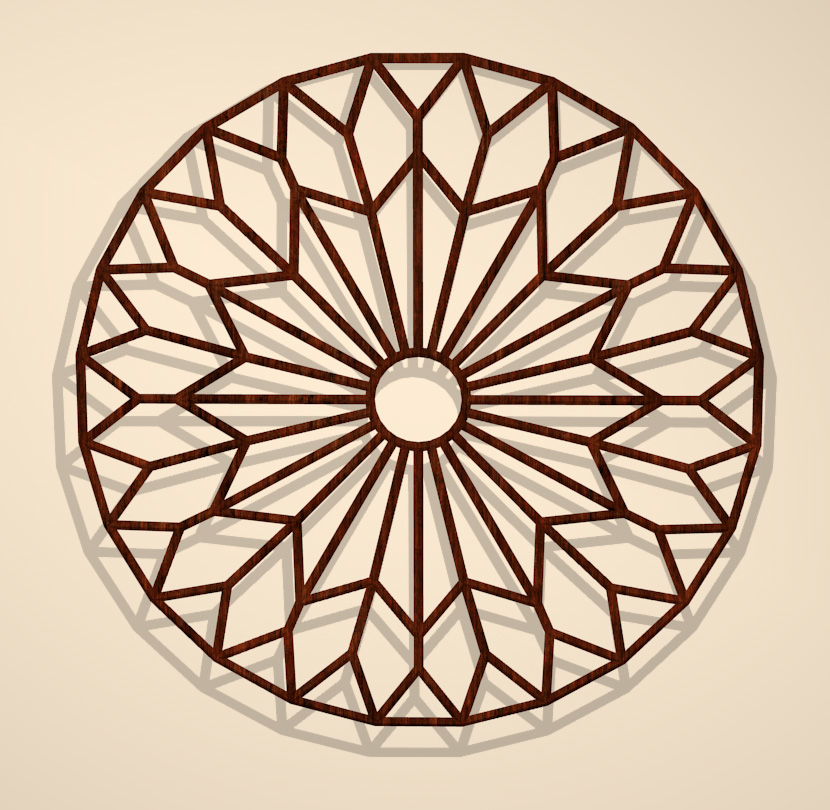
Just for the fun of it, I applied the Subdivision Surface Modifier, and this is what I got.

Not sure what I could use it for, but I like it.
_______________
OK . . . Where's my chocolate?
Lobo3433 posted Mon, 16 October 2017 at 8:52 AM Forum Moderator
Wow ok now your one up on me I tried the Subdivision surface and it was like I broke something your second one can be a fancy table top can fill the holes with like glass or something and it would make a interesting table top really great look bravo 
Lobo3433
Blender Maya & 3D Forum Moderator
Miss B posted Mon, 16 October 2017 at 9:57 AM
Funny you mention a table top, as that was my first impression as well, though I think I would make a new one, except set up the Circle with only 10 Verts instead of 24. That would give me much more surface to the table top, though I do like your suggestion of filling in the holes with glass.
_______________
OK . . . Where's my chocolate?
Lobo3433 posted Mon, 16 October 2017 at 2:23 PM Forum Moderator
The technique once you have how to do it does open up a a few different possibilities
Lobo3433
Blender Maya & 3D Forum Moderator

incantrix posted Wed, 18 October 2017 at 9:36 PM
Like the 2nd one Miss B, reminds me of wall hangings you used to see in old cafes etc and a lot of mediterranean walls and that style homes.
Probably showing my age again there lol
Incantrix
Miss B posted Wed, 18 October 2017 at 11:06 PM
Miss B posted Wed, 18 October 2017 at 11:39 PM
OK, couldn't leave this alone, so I tried a different shaped window, and this is what I came up with.
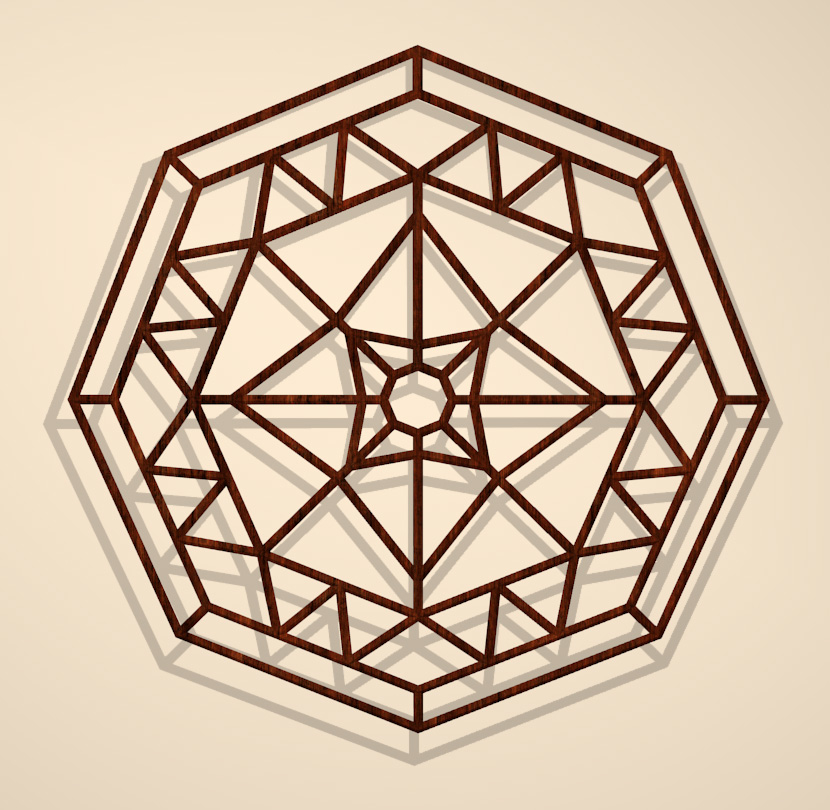
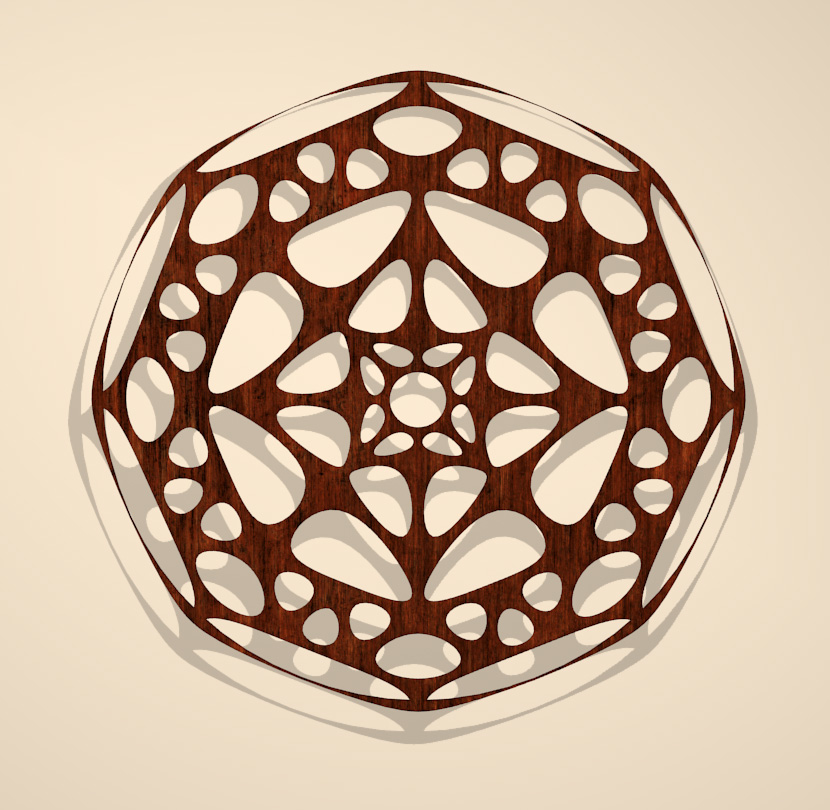
Of course, I just had to try it subdivided, but I don't like the outer edge on this one. I probably should've done this one slightly differently where the outer section is so it would've subdivided better.
_______________
OK . . . Where's my chocolate?
incantrix posted Thu, 19 October 2017 at 9:14 AM
Just thinking here but if you conformed it to a dome with a fairly flat top to it, then flipped it upside down you could make quite a few nice cane style baskets.
Incantrix
Lobo3433 posted Thu, 19 October 2017 at 11:28 AM Forum Moderator
Hi Miss B
I have to say I like the first one of your new shaped window really great looking on You can make several varieties might make an interesting product as a starting point for their projects
Lobo3433
Blender Maya & 3D Forum Moderator
Miss B posted Thu, 19 October 2017 at 12:04 PM
incantrix posted at 1:03PM Thu, 19 October 2017 - #4316354
Just thinking here but if you conformed it to a dome with a fairly flat top to it, then flipped it upside down you could make quite a few nice cane style baskets.
Incantrix
Interesting thought. I hadn't thought of anything other than a Gothic window when creating it, but it could make a nice basket.
_______________
OK . . . Where's my chocolate?
Miss B posted Thu, 19 October 2017 at 12:07 PM
Lobo3433 posted at 1:04PM Thu, 19 October 2017 - #4316361
Hi Miss B
I have to say I like the first one of your new shaped window really great looking on
I'm not a vendor, nor have any plans on becoming one, but it would be interesting to see how many more designs I can come up with.
The odd thing was, the photo that gave me the idea had the flat side of the Octagon on top, but I didn't like the center design I came up with as much when I rotated it around, so figured I'd just leave it with one of the points on top.
_______________
OK . . . Where's my chocolate?
incantrix posted Thu, 19 October 2017 at 12:31 PM
Miss B posted at 4:25AM Fri, 20 October 2017 - #4316366
Interesting thought. I hadn't thought of anything other than a Gothic window when creating it, but it could make a nice basket.
The beauty of using shapes whether they be Gothic or not is the application is only limited by the imagination.
Incantrix
Lobo3433 posted Thu, 19 October 2017 at 2:06 PM Forum Moderator
Miss B posted at 3:05PM Thu, 19 October 2017 - #4316367
Lobo3433 posted at 1:04PM Thu, 19 October 2017 - #4316361
Hi Miss B
I have to say I like the first one of your new shaped window really great looking on
I'm not a vendor, nor have any plans on becoming one, but it would be interesting to see how many more designs I can come up with.
The odd thing was, the photo that gave me the idea had the flat side of the Octagon on top, but I didn't like the center design I came up with as much when I rotated it around, so figured I'd just leave it with one of the points on top.
I fully understand not wanting to be a Vendor but was my way of say I really thought it was well done 
Lobo3433
Blender Maya & 3D Forum Moderator
Miss B posted Thu, 19 October 2017 at 9:43 PM
incantrix posted at 10:42PM Thu, 19 October 2017 - #4316370
Miss B posted at 4:25AM Fri, 20 October 2017 - #4316366
Interesting thought. I hadn't thought of anything other than a Gothic window when creating it, but it could make a nice basket.
The beauty of using shapes whether they be Gothic or not is the application is only limited by the imagination.
Incantrix
Very true. I like being able to look at something and being able to "picture" it as something totally different.
_______________
OK . . . Where's my chocolate?
Miss B posted Thu, 19 October 2017 at 9:43 PM
Lobo3433 posted at 10:43PM Thu, 19 October 2017 - #4316375
Miss B posted at 3:05PM Thu, 19 October 2017 - #4316367
Lobo3433 posted at 1:04PM Thu, 19 October 2017 - #4316361
Hi Miss B
I have to say I like the first one of your new shaped window really great looking on
I'm not a vendor, nor have any plans on becoming one, but it would be interesting to see how many more designs I can come up with.
The odd thing was, the photo that gave me the idea had the flat side of the Octagon on top, but I didn't like the center design I came up with as much when I rotated it around, so figured I'd just leave it with one of the points on top.
I fully understand not wanting to be a Vendor but was my way of say I really thought it was well done
Thank you, and I'm glad you like it.
_______________
OK . . . Where's my chocolate?
incantrix posted Sat, 21 October 2017 at 11:54 PM
Miss B posted at 3:52PM Sun, 22 October 2017 - #4316402
incantrix posted at 10:42PM Thu, 19 October 2017 - #4316370
Miss B posted at 4:25AM Fri, 20 October 2017 - #4316366
Interesting thought. I hadn't thought of anything other than a Gothic window when creating it, but it could make a nice basket.
The beauty of using shapes whether they be Gothic or not is the application is only limited by the imagination.
Incantrix
Very true. I like being able to look at something and being able to "picture" it as something totally different.
LOL I can't recall the number of times I've seen people using a screw driver or pair of pliers as a hammer. Innovation is always fun.
Incantrix
Lobo3433 posted Mon, 04 December 2017 at 9:42 AM Forum Moderator
Found a new tutorial that looks like something worth giving a go at
Beach Waves - Blender Fluid Tutorial
Lobo3433
Blender Maya & 3D Forum Moderator
Miss B posted Mon, 04 December 2017 at 11:55 AM
Ohhhh, now I'm not really into any doing kind of animation, but that looks waaaaay cool. Thanks for the link Lobo.
_______________
OK . . . Where's my chocolate?
Lobo3433 posted Tue, 05 December 2017 at 9:17 AM Forum Moderator
Miss B posted at 10:15AM Tue, 05 December 2017 - #4319328
Ohhhh, now I'm not really into any doing kind of animation, but that looks waaaaay cool. Thanks for the link Lobo.
I am not into animation either mainly just over my head but this one looks like an easy one to put together and even thou not my main focus might give it a try because yes it does look cool
Lobo3433
Blender Maya & 3D Forum Moderator
Lobo3433 posted Sat, 16 June 2018 at 9:37 AM Forum Moderator
Bringing this thread back to the top of the forums allot of useful info in this thread
Lobo3433
Blender Maya & 3D Forum Moderator
Miss B posted Sat, 16 June 2018 at 1:18 PM
Thanks for "bumping" it Lobo. I totally forgot about this thread.
_______________
OK . . . Where's my chocolate?
Lobo3433 posted Sat, 16 June 2018 at 1:59 PM Forum Moderator
It is suppose to stay as a sticky but seems that after 45 days or so it tends to get archived so I will try and make sure it does not happen
Lobo3433
Blender Maya & 3D Forum Moderator
Miss B posted Sat, 16 June 2018 at 5:29 PM
Ahhh, so it's not a "forever" sticky. OK, good to know.
_______________
OK . . . Where's my chocolate?
Lobo3433 posted Sun, 17 June 2018 at 10:16 AM Forum Moderator
I always thought it is supposed to be a forever sticky but if it gets no new post added to the thread it gets archived
Lobo3433
Blender Maya & 3D Forum Moderator
Miss B posted Sun, 17 June 2018 at 12:17 PM
Lobo3433 posted Sun, 17 June 2018 at 2:29 PM Forum Moderator
Here is a good tutorial UV mapping with a simple exercise to get you on the road to better UV
UV Exercise & The UV Project modifier for Auto Global UV’s in Blender
Lobo3433
Blender Maya & 3D Forum Moderator
Lobo3433 posted Fri, 29 June 2018 at 11:26 PM Forum Moderator
I do not think I added this link to this list but it is another must have link for all Blender users
Blender 3D: Noob to Pro/Advanced Tutorials/Print version
Lobo3433
Blender Maya & 3D Forum Moderator
Miss B posted Fri, 29 June 2018 at 11:59 PM
Thanks for those last 2 links Lobo. I just bookmarked them.
_______________
OK . . . Where's my chocolate?
Lobo3433 posted Sat, 30 June 2018 at 10:45 AM Forum Moderator
Your welcome
Lobo3433
Blender Maya & 3D Forum Moderator
Lobo3433 posted Sat, 21 July 2018 at 9:49 AM Forum Moderator
Came across this by accident and thought like myself many would not be aware of this but if you have an Amazon.com Prime account they actually have some free beginners Blender tutorials under their Amazon Prime Video section again you have to have an Amazon.com Prime membership. I have not watched them so can not critique them on quality and such but it is another resource to learn Blender
Lobo3433
Blender Maya & 3D Forum Moderator
Lobo3433 posted Tue, 07 August 2018 at 10:27 AM Forum Moderator
New Free Blender Full Keyboard Shortcuts Cheat sheet that I am sure many will find useful
https://www.cheatography.com/henriqueog/cheat-sheets/blender-full/ The download button is on the left near the top.
Lobo3433
Blender Maya & 3D Forum Moderator
Miss B posted Tue, 07 August 2018 at 11:06 AM
That looks nice Lobo. Thanks for the link.
_______________
OK . . . Where's my chocolate?
Lobo3433 posted Tue, 07 August 2018 at 2:38 PM Forum Moderator
My pleasure hope he updates it when 2.8 comes out since rumor is some of the hotkeys are going to be changing
Lobo3433
Blender Maya & 3D Forum Moderator
Miss B posted Tue, 07 August 2018 at 7:01 PM
Oh, now that's NOT good news. I'm so used to my hot keys, I'd hate to have to start relearning them. Let's hope they're obscure hot keys, and not ones we use all the time.
_______________
OK . . . Where's my chocolate?
Lobo3433 posted Wed, 08 August 2018 at 10:53 AM Forum Moderator
From my understanding the majority of the most used hotkeys are not being affected and some are going to be new hotkeys for some of the newer features I have not been able to find any concrete information on this most have been some rumblings and seems nothing specific will be made clear until we are closer to at least a beta release so current alpha releases nothing has been changed.
Lobo3433
Blender Maya & 3D Forum Moderator
Miss B posted Wed, 08 August 2018 at 11:27 AM
Ahhhh, OK. If the changes are to actions we don't necessarily use every day, or new hot keys are added for new actions, that's not so bad, because then we'd have to learn them anyway. I just don't look forward to relearning any I've been used to for a long time.
_______________
OK . . . Where's my chocolate?
Lobo3433 posted Wed, 08 August 2018 at 3:05 PM Forum Moderator
Totally agree once I got use to committing them to memory and using them so often now hate to have to relearn new ones for the same things previously this is one topic I have been keeping my eye on since I am sure it will effect many of us
Lobo3433
Blender Maya & 3D Forum Moderator
Lobo3433 posted Wed, 29 August 2018 at 9:13 AM Forum Moderator
Here is a good beginners project for beginners and intermediate Blender users "Making a 3D Pretzel - Part 1" by CGMasters
Lobo3433
Blender Maya & 3D Forum Moderator
Miss B posted Wed, 29 August 2018 at 10:27 AM
Ohhhh, that looks yummy. 
Seriously though, knowing how to make something that intertwines like a pretzel has to be good thing.
_______________
OK . . . Where's my chocolate?
Lobo3433 posted Wed, 29 August 2018 at 7:45 PM Forum Moderator
Miss B posted at 8:45PM Wed, 29 August 2018 - #4335429
Ohhhh, that looks yummy.
Seriously though, knowing how to make something that intertwines like a pretzel has to be good thing.
First thing that came to mind was like making laces on shoes or corset if creating clothing and I am sure the steps can be applied to other such items
Lobo3433
Blender Maya & 3D Forum Moderator

RedPhantom posted Thu, 30 August 2018 at 6:16 AM Site Admin
I haven't checked it out yet, just saw the picture (which made me hungry) but my thought was using it for braids. Though I've seen other videos for making braids specifically.
Available on Amazon for the Kindle E-Reader Monster of the North and The Shimmering Mage
Today I break my own personal record for the number of days for being alive.
Check out my store here or my free stuff here
I use Poser 13 and win 10
Lobo3433 posted Thu, 30 August 2018 at 8:46 AM Forum Moderator
RedPhantom posted at 9:46AM Thu, 30 August 2018 - #4335486
I haven't checked it out yet, just saw the picture (which made me hungry) but my thought was using it for braids. Though I've seen other videos for making braids specifically.
Braids is another good one that I think might be doable with this method
Lobo3433
Blender Maya & 3D Forum Moderator
Miss B posted Thu, 30 August 2018 at 1:50 PM
I have to agree. Definitely looks like a good method for modeling braids.
_______________
OK . . . Where's my chocolate?
Lobo3433 posted Tue, 04 December 2018 at 7:28 PM Forum Moderator
Just updating thread so sticky stays on top
Lobo3433
Blender Maya & 3D Forum Moderator
Lobo3433 posted Tue, 19 March 2019 at 9:30 AM Forum Moderator
Here is a good one which would be helpful to all Blender users
All Blender 2.8 modifiers explained
Lobo3433
Blender Maya & 3D Forum Moderator
Lobo3433 posted Thu, 25 April 2019 at 2:58 PM Forum Moderator
I came across this course again I thought it had been lost or site taken down but these are a list of tutorials by Neal Hirsig and his "3D Design Course' for Tufts University from 2007 to 2013. This course includes 150 well organized, concise & detailed Video Tutorials for Blender 3D, 2.6x." There are both written and video tutorials as last count there are a 150 video tutorials granted they are for for Blender 2.6 many are still applicable today they do teach best practices and cover just about everything with in Blender. I started with these tutorials myself when I began my Blender journey and highly recommend them
Blender 3D Design Course, -Neal Hirsig Youtube Playlist 150 videos
Lobo3433
Blender Maya & 3D Forum Moderator
Miss B posted Thu, 25 April 2019 at 5:45 PM
OMG Lobo!! Thank you, thank you, thank you!! I had all of the links at Gryllus bookmarked, but haven't been able to access them for a while. NOW I HAVE THEM ALL!!
_______________
OK . . . Where's my chocolate?
Lobo3433 posted Thu, 25 April 2019 at 6:45 PM Forum Moderator
Yes I had them all also and could not get to the old links and was looking up something else and found this actually I was looking at a book on amazon and you can look thru the book and was reading the preface and came across the link when it clicked that these were some of the first Blender tutorials I ever tried I think I still have some of the old PDF's on one of my old external drives so when I saw the link leads to the old tutorials and that now they number 150 thought this is still a very useful resource to have on hand for learning Blender especially for beginners
Lobo3433
Blender Maya & 3D Forum Moderator
Lobo3433 posted Fri, 19 July 2019 at 4:27 PM Forum Moderator
Just to keep this on top where Sticky belong
Lobo3433
Blender Maya & 3D Forum Moderator
Lobo3433 posted Thu, 05 December 2019 at 7:36 PM Forum Moderator
Just some house keeping to keep this thread active
Lobo3433
Blender Maya & 3D Forum Moderator
Lobo3433 posted Sun, 17 May 2020 at 5:15 PM Forum Moderator
Just posting to refresh thread
Lobo3433
Blender Maya & 3D Forum Moderator

Torquinox posted Thu, 18 June 2020 at 10:13 AM
This looks like a pretty solid and deep Blender 2.8 for-beginners tutorial from CG Fast Track. It's 3 parts: Up and Running, Sword, and Stone.
Lobo3433 posted Thu, 18 June 2020 at 4:43 PM Forum Moderator
Oh that looks like a good one great add Torquinox Here is one that just came out
7 hidden Blender hacks that will improve your workflow
Lobo3433
Blender Maya & 3D Forum Moderator
Torquinox posted Thu, 18 June 2020 at 6:56 PM
Thanks Lobo! Those hidden hacks look good, too!
Torquinox posted Sun, 12 July 2020 at 3:08 PM
There are a lot of Blender folks on Youtube making good, approachable beginner and feature demonstration videos. Here is a tip of the hat to SirPinkBeard. He has a mellow, approachable presentation style that I find agreeable. He has sets of videos arranged into courses, as well. I don't know about his get rich videos and some of that other stuff, but for Blender, his page is well worth a look.
Miss B posted Sun, 12 July 2020 at 11:42 PM
Thanks for the link Torq, as his Blender tutorials look interesting.
_______________
OK . . . Where's my chocolate?
Torquinox posted Mon, 13 July 2020 at 12:16 PM
Hi Miss B! Any time I watched some and thought it was good. I'll be watching more. BTW: DId you take your sculpting course? How did it go?
Miss B posted Mon, 13 July 2020 at 1:30 PM
No, haven't gotten into sculpting yet, but I'm looking forward to it, so when I do, I'll let you know how it goes.
_______________
OK . . . Where's my chocolate?
Torquinox posted Mon, 13 July 2020 at 2:28 PM
I'll be happy to hear all about it (and hopefully get to see what you made, too). 
Miss B posted Mon, 13 July 2020 at 5:37 PM
Oh for sure I'll show it off, assuming it's worth showing off.
_______________
OK . . . Where's my chocolate?
Torquinox posted Fri, 09 July 2021 at 9:19 AM
Let's wake this one up, too. If you're new to Blender or new to the 3D scene on Youtube, you may not know about the pair of former character animators turned educators known as Flipped Normals. These two guys are opinionated, but they're also very good at explaining things. To that end, in August 2019, they put out a 5-part beginner series on modeling a lightsaber in current versions (2.8+) of Blender. I haven't seen it mentioned here, so I shall mention it now. Hopefully, this does not overload the forum software.
Miss B posted Fri, 09 July 2021 at 10:30 AM
Thanks for these Torq. I've finally installed 2.93, and have been playing around in it, though mostly setting up the UI to look similar to my 2.79 UI.
_______________
OK . . . Where's my chocolate?
Torquinox posted Fri, 09 July 2021 at 12:50 PM
My pleasure, Miss B! Glad to help. I'm glad you're finally dipping your toe in. I think you'll find the water's quite nice in 2.93.
Miss B posted Fri, 09 July 2021 at 1:15 PM
I'm sure once I get used to it, it will be easier to work with. Right now I'm still making notes where to find things I had no problem finding in the 2.7x versions.
_______________
OK . . . Where's my chocolate?
Torquinox posted Fri, 09 July 2021 at 1:51 PM
I feel your pain, but I think it'll be worth the effort for you.
Miss B posted Mon, 12 July 2021 at 2:30 PM
OK, I'm slowly going out of my mind! Can someone please help me?
I've been slowly watching the first video Torq posted by FlippedNormals so I can make notes about how some things are accessed in the new UI, and I've just realized I'm missing a very important aspect, one I edit all the time.
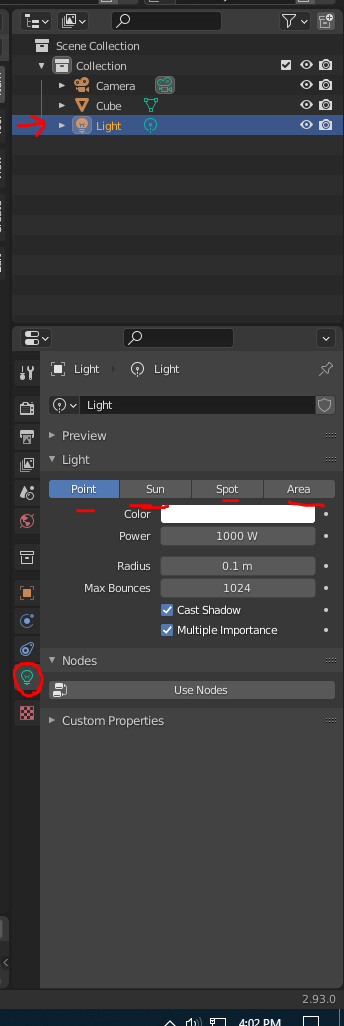
How on earth can I edit the positions of the Camera and/or the Lights??? I can only see them in Layout mode, which is fine, but there are no Gizmos to grab and move the Camera and/or the Lights, and there's nothing in the Properties panel where I can edit the Type of light I want, and how dense I want the lighting (soft or full force), or any thing else related to the individual Lights!!!
WHERE DID THEY HIDE THIS??? I knew I wasn't going to be happy with the new UI, and now I've hit a major block I can't seem to get past.
Edited to Add: OK, I finally found how to get the Gizmo for moving the Lights and Camera. I didn't have the Move button on the left Toolbar selected. OK, but I'm still not seeing anything in the Properties panel relating to the Lights, so I still would like some help with that issue.
Thanks in advance.
_______________
OK . . . Where's my chocolate?
RedPhantom posted Mon, 12 July 2021 at 4:09 PM Site Admin
To change light
Available on Amazon for the Kindle E-Reader Monster of the North and The Shimmering Mage
Today I break my own personal record for the number of days for being alive.
Check out my store here or my free stuff here
I use Poser 13 and win 10
Miss B posted Mon, 12 July 2021 at 5:55 PM
Thank you, thank you, thank you!!!
The problem I was having, was I selected the light, but when I checked the icons down the side of the Parameters panel, that light icon wasn't there. NOW I'm seeing it!!
Not sure why I didn't see it before, because even though it looks different than the 2.79 UI, it's basically the same access, except it's vertical down the side of the Parameters Panel, rather than horizontal across the top of the Parameters panel.
Thanks again! Now I can continue taking notes and such. I'm about 1/2 way through that first tutorial, which basically deals with the UI, though version 2.8x, but it's not really any different than 2.9x, so definitely helpful.
_______________
OK . . . Where's my chocolate?
RedPhantom posted Mon, 12 July 2021 at 6:47 PM Site Admin
I think those icons randomly disappear and come back There are times I don't see them either.
Good luck with the tutorial
Available on Amazon for the Kindle E-Reader Monster of the North and The Shimmering Mage
Today I break my own personal record for the number of days for being alive.
Check out my store here or my free stuff here
I use Poser 13 and win 10
Torquinox posted Mon, 12 July 2021 at 7:27 PM
Hi Miss B, Glad to see you are enjoying (is that the right word?) the tutorial. I hope you're enjoying it by the end.
Hi Red Phantom, you're better than a help desk! Cheers to you.
Miss B posted Mon, 12 July 2021 at 8:20 PM
RedPhantom posted at 8:15PM Mon, 12 July 2021 - #4423053
I think those icons randomly disappear and come back There are times I don't see them either.
Good luck with the tutorial
Actually I'm not sure it "disappeared", but rather I didn't recognize it as a light bulb, and when I was hovering over each icon to see what they were, all that one said, or the one that was the next to last one in the vertical row said, that it was "Object data" or something similar. It didn't say what object it was referring to, so I didn't click on it.
Now I feel liking I'm getting somewhere, though some items are referred to by different names, such as the "power" of the light refers to Watts, but 2.79 didn't state it that way, or at least I don't recall it doing so.
Getting used to where everything is, and how they work, is going to take a while, but I'll get there eventually.
_______________
OK . . . Where's my chocolate?
Miss B posted Mon, 12 July 2021 at 8:24 PM
Torquinox posted at 8:21PM Mon, 12 July 2021 - #4423056
Hi Miss B, Glad to see you are enjoying (is that the right word?) the tutorial. I hope you're enjoying it by the end.
Lets put it this way, they're discussing just about everything, so it's definitely educational, which is what I need at this point. I have found a few things not yet mentioned, simply by looking and clicking on things, so as long as I make notes (which I've done with every piece of 3D software I've ever owned) I won't go crazy finding it again if it's something I don't get to use that often. It'll be in my notes.
_______________
OK . . . Where's my chocolate?
Torquinox posted Mon, 12 July 2021 at 10:00 PM
That sounds great, Miss B!
Miss B posted Tue, 13 July 2021 at 10:41 AM
Miss B posted at 10:36AM Tue, 13 July 2021 - #4423057
RedPhantom posted at 8:15PM Mon, 12 July 2021 - #4423053
I think those icons randomly disappear and come back There are times I don't see them either.
Good luck with the tutorial
Actually I'm not sure it "disappeared", but rather I didn't recognize it as a light bulb, and when I was hovering over each icon to see what they were, all that one said, or the one that was the next to last one in the vertical row said, that it was "Object data" or something similar. It didn't say what object it was referring to, so I didn't click on it.
OK, RedPhantom, I think I now know why I didn't see that light bulb icon at first. Those icons don't "disappear", what happens is, they "change" depending on what you have selected. I discovered that last night when I had the mesh/object selected, instead of one of the lights. Instead of the light bulb, I saw an upside down triangle type icon, which is the icon I see when I select the model/cube I was playing with. So that's why I didn't see what I was looking for. I hadn't correctly selected the light I wanted, so it was still selecting the cube, and that's what data was showing in the Parameters panel. ~makes another note~
_______________
OK . . . Where's my chocolate?