
Renderosity Forums / Poser - OFFICIAL
Welcome to the Poser - OFFICIAL Forum
Forum Moderators: RedPhantom Forum Coordinators: Anim8dtoon
Poser - OFFICIAL F.A.Q (Last Updated: 2026 May 30 10:54 pm)

Subject: Loading preexisting morphs from Lightwave in Poser


I don't know anything about Lightwave, but I suspect your problem has to do with how the mesh is grouped into subpatches as you say. Are you exporting the entire mesh and importing the entire mesh back into Poser? Or when you export a morph target, are you only exporting the subpatch? It sounds like you're exporting "a bodypart", which suggests a subpatch - possibly the border verts are not counted quite the same. Do border verts exist in both bodyparts as the same vertex, or two separate verts that are in the same x/y/z? If Poser is saying wrong number of verts, that may be why. You probably would have better luck asking in a Lightwave forum, as you say.
This is Zbrush info but scroll down to Rebelmommy's posts near the end, she's explaining about bringing morph targets for multiple bodyparts back into Poser:
http://www.renderosity.com/mod/forumpro/showthread.php?thread_id=2698187&page=2
Quote - Well you can get the p[arts back into poser in 2 ways that I know of. You can do as EddyL said and export each part seperately out of ZBrush by doing the following (again this is an example ofa Head/NEck combo) you select as visible the head (Ctr+Shift+Click on Head) and export the head, than Ctr+Shift to make everything visible again, then you select as visible the neck (Ctr+Shift+Click on Neck) and export the neck.
Or you can export the whole head/Neck?ect obj out ofZbrsh just as you have been doing the individual parts. Then you import that OBJ into poser using : Import>Wavefront obj.
Once it is loaded and selected in poser go to your grouping tool and select spawn props. Then it will split your head.neck combo into 4 parts.. the original head/neck onj, a copy of that original and a seperate head and neck. Simply export out the head and neck one at a time(with just the as morph target no world transformation checked) and then you will be able to import the new pieces as morph targets:)
Download my free stuff here: http://www.renderosity.com/homepage.php?page=2&userid=323368

@Paloth - A little more info on how you went about exporting might help in solving the problem.
Did you create all the endomorphs before doing any freezing? Create Part Names like "head, neck, chest" etc ahead of exporting? Just some more details of exactly what process you took would maybe help pinpoint the cause.
Not sure what you're getting at when you say "freeze with the morph at it's most extreme??"
If you freeze the subpatches while the endo morph is in base mode, you should still be able to click through all the morphs you made and export them one by one since all the endomorphs would freeze right along with the base.
Could you elaborate on what exactly you did a bit more please?
Hey! His nose is dry! ... Someone should lick it, just in case. - Diego
Syntrifid, I created my endomorphs before freezing. All of the parts had been created and named in Lightwave prior to freezing. I froze my figure, exported it as an obj. and boned it in Poser. Then I went back to the original model in Lightwave, froze it again selected the head and loaded the “mouth open” morph. Then I exported the head endomorph as an obj and attempted to load it as a morph in Poser. At this point I was informed by the program that the vertices don’t match. By “freeze with the morph at it's most extreme” I just meant that the mouth was completely open in the head endomorph which I exported as an obj.
Download my free stuff here: http://www.renderosity.com/homepage.php?page=2&userid=323368
Thanks for the additional info. - Something you might try... select the head part of the frozen version of the figure, do a cut/paste to seperate it from the other body parts. (you could do this with all the body parts actually) - With the morphs in the "base" mode, export all the body parts as one .obj file (even though they are seperate objects now) Poser will load it as one object and weld the parts in the Setup Room.
Then export your head morphs as individual obj's. I have found this works for me. For some reason, Poser reacts differently when it recognizes the points where the head and neck seperate as a border edge rather than points in a continuous mesh, even though the points are occupying the exact same space.
Good luck with it!
Hey! His nose is dry! ... Someone should lick it, just in case. - Diego
Thanks. I'll give it a try.
Download my free stuff here: http://www.renderosity.com/homepage.php?page=2&userid=323368
Download my free stuff here: http://www.renderosity.com/homepage.php?page=2&userid=323368
I have heard of people have that scaling problem before but I haven't experienced it myself.
I would suggest perhaps Not copying and pasting the morphed head into a seperate layer in LW. so you are exporting the exact same group of polygons each time, only reshaped.
Here's how I do it....
1 - Seperate all the body parts
2 - Export all parts as 1 .obj file.
3 - Select head and hit the = key to hide all non-selected parts.
4 - Apply morph to head and export to obj.
5 - Repeat with all morphs for the head.
(Then if applicable..)
6 Hit key to show all hidden objects.
7 Select any other body part that has morphs and repeat as needed..
I do all the obj exports in LW before I even bring anything into Poser. Not sure if this would have any real bearing on the outcome, seems like it shouldn't really matter but that's just the way my workflow goes.
Hope this helps you out ..
Hey! His nose is dry! ... Someone should lick it, just in case. - Diego
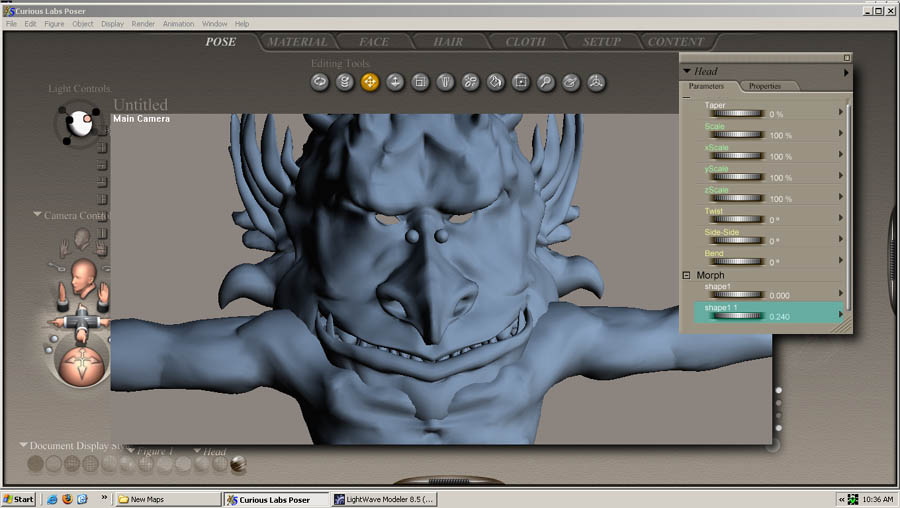
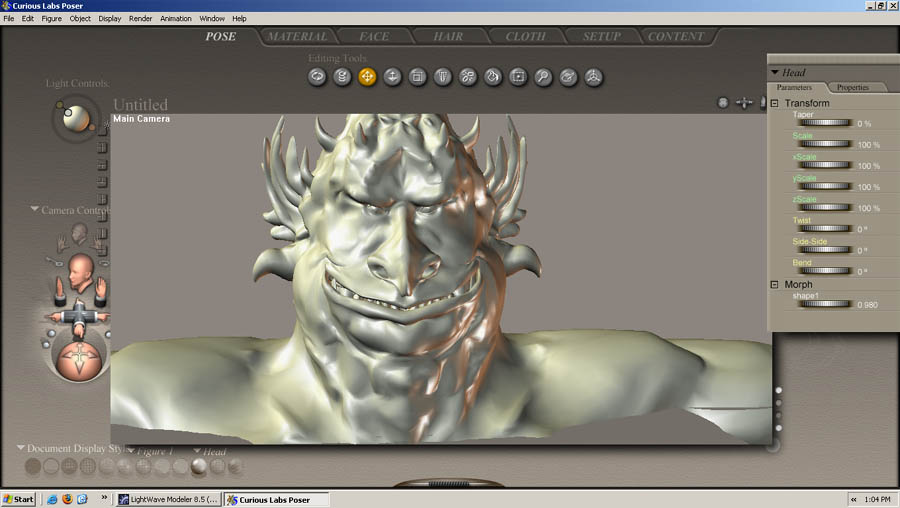
I followed your procedure and hid the non-selected parts before exporting the morph target. It loads but it blows up the head just like before. What version of Poser and Lightwave do you use?
Download my free stuff here: http://www.renderosity.com/homepage.php?page=2&userid=323368

Just a query -- have you tried the Greenbriar plug-ins? Or perhaps more properly: do you want to try them?
"Oh btw - just thought of this, When you import the obj into Poser, make sure you UNcheck all the tic boxes so Poser itself isn't resizing your main mesh! I didn't see this response before I wrote my last response. I'll give this a try tommrow. At least there's a ray of hope now. XENOPHONZ, the Greenbriar plug-ins causes the Poser figures to load with their rigging, but with no weight maps. Without either falloff zones or weight maps to control the bending, I wonder how they would actually perform.
Download my free stuff here: http://www.renderosity.com/homepage.php?page=2&userid=323368
Very good -- as someone who's looking at purchasing the plug-ins (once I know my way around LW better), I was curious to hear what you had to say about them.
I'm not sure about the weight-mapping issue, or the effect that this would have on Poser imports. I've heard the Greenbriar plug-ins described as a "halfway" means of getting LW models into Poser. But halfway might still be better than no way......
Download my free stuff here: http://www.renderosity.com/homepage.php?page=2&userid=323368
Thanks. I will definitely file that information for future reference. It helps.
The blowing up the head thing is very likely a scaling precision error, same as affects people for Zbrush morph target transfer. There is a utility called objAction Scaler that got me around this problem for the same kind of task in Zbrush, thanks to Nruddock for pointing the fix out to me:
http://www.renderosity.com/mod/forumpro/showthread.php?thread_id=2698187
Quote - One thing you could try is using ObjAction Scaler -> http://www.renderosity.com/mod/freestuff/index.php?user_id=124
Use it to scale up the OBJ before import to ZB and to scale down before loading as a morph in Poser.

Try hiding all body pats in Lightwave that you don't want exported as part of the Morph.
IE, hide everything but the head part before you export.
Also make sure you have nothing selected when you export. No points. No polys. No Edges.
mo·nop·o·ly [muh-nop-uh-lee]
noun, plural mo·nop·o·lies.
1. exclusive control of a commodity or service in a particular market,
or a control that makes possible the manipulation of prices

Poser cuts the mesh into pieces so in order to use LW morphs you have to do the following:
Freeze the subpatched model to polygons,
Export the endomorph model exactly the way you do the original,
Load the endomorph model into Poser exactly the same way you do the original,
Now export the morphed parts from Poser as objs and re-import as morph targets.
This is how you Have to do it to overcome Poser's slicing and dicing the mesh.
When you export just the head from LW, you end up with a different vertex order than when you export the head from Poser; different vertex order results in the morph blowing up.
BTW, In LW you pretty much have to subpatch to get a smooth render whereas POser has a rendertime setting that does subpatch smoothing for the render (about the only positive thing I have to say about Poser LOL).
Quote -
Load the endomorph model into Poser exactly the same way you do the original,
Now export the morphed parts from Poser as objs and re-import as morph targets...When you export just the head from LW, you end up with a different vertex order than when you export the head from Poser; different vertex order results in the morph blowing up.
Never had to do all that myself.. As I mentioned previously, if I cut the model into parts in LW before exporting the main mesh, I can export them all as one object and import that into Poser.. then export all morphed versions of the head to obj, and just load them into Poser as Morph Targets and the vertex order remains in tact.
Quote - BTW, In LW you pretty much have to subpatch to get a smooth render whereas POser has a rendertime setting that does subpatch smoothing for the render (about the only positive thing I have to say about Poser LOL).
Well, that all depends, both LW and Poser have a surface smoothing (I have recently heard it refered to as "phong shading") In Poser it is adjusted by the "Crease Angle" setting while in Lightwave it is called "Smoothing Threshold".
The render smoothing in Poser is a different thing, and is similar to subPatch type smoothing as you mentioned. The difference is the polygon mesh in Poser is already high density. A subPatch in Lightwave uses the vertices in a low density Polygon "cage" as control points in a spline based object.
How smooth the overall object will be at render time depends on the number of Patch Divisions you set it to when you render in LW. Poser doesn't handle spline based objects so any subPatched objects need to be "frozen" into a polygon mesh in order to be imported into Poser.
Once you do freeze the object in LW, you really don't need to "re-subpatch" it to get a decent render. But there's no reason why you can't do it . It would really depend on how dense your patch division setting was when you first froze the model.
Hey! His nose is dry! ... Someone should lick it, just in case. - Diego
Quote-"Never had to do all that myself.. As I mentioned previously, if I cut the model into parts in LW before exporting the main mesh, I can export them all as one object and import that into Poser.. then export all morphed versions of the head to obj, and just load them into Poser as Morph Targets and the vertex order remains in tact."
That should work fine as long as that is how the figure was imported into Poser in the first place. If not, as for example with one of the Daz figure meshes, you will likely run into issues with Poser slicing the original mesh into individual body part meshes. The key thing it to import the morphed obj exactly the same way that the original figure was imported, with exactly the same number and order of vertices.
Quote-"The difference is the polygon mesh in Poser is already high density. A subPatch in Lightwave uses the vertices in a low density Polygon "cage" as control points in a spline based object. "
No, the difference is that POser supports rendertime subdivision and LW requires the model be subpatched to get the same benefit. Put a Daz Poser mesh into LW and you need to subpatch it to get a smooth outline at rendertime. Most of the LW people here seem to be into really sparse meshes and subpatching lets you do that, but at the expense of detail. 35-45,000 quads for a humanoid mesh that will support realistic looking deformations seems fairly standard out in the real world. Compared to that, Poser meshes are a bit heavy, but then polygons are cheap!
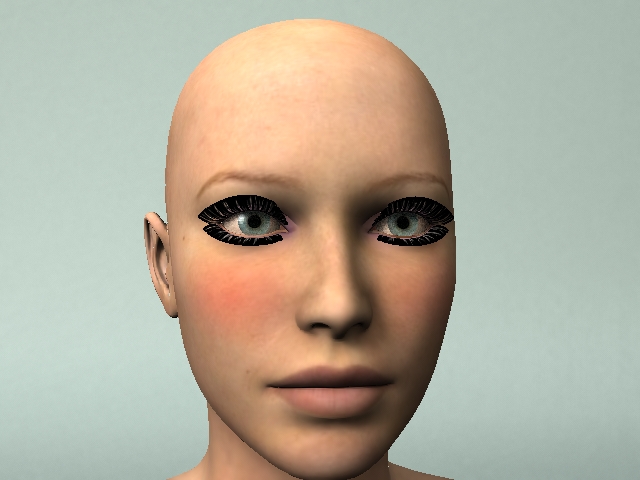
Quote - Put a Daz Poser mesh into LW and you need to subpatch it to get a smooth outline at rendertime.
Not So!!!!!!!! Here is a quick render of DAZ Victoria 4 in Lightwave NOT subpatched. (granted the edges of this particular render are a bit jagged but that is purely because I didn't use any anti-aliasing on this quickie render)
The v4 model has roughly 66,000 polygons in the entire figure. The purpose of subpatching is that this level of smoothness can be achieved with less than 10,000 polygons. LW people use less polys because by using the SubD mode, they CAN.
Hey! His nose is dry! ... Someone should lick it, just in case. - Diego
Do the same thing with V3 and the shoulder outline shows the polygon facets. The V4 mesh is a lot more balanced but has the highest mesh resolution on the face as well.
The whole point of more polygons is to support detail. You can get smoothness with a lot less than 10,000 polygons. You are likely to have issues with muscle and tendon detail though.
It all depends on what you want to do. Syntrifid, if you are happy with low poly count meshes and they let you do everything you want, more power to you. On the other hand King Kong from the movie a year or two ago was made with 64,000 polygons for good reasons, I'm sure. I happen to want a level of detail that is in line with a 40-50,000 polygon model. As I said earlier, polygons are cheap so it is easy to afford the number you need for your application.
I understand the point you're making but I think you may be misunderstanding mine. The subpatched object is not a polygon mesh. It is a spline based object. If you "freeze" the subpatched object you WILL turn it into a polygon mesh with easily 50,000 or more polys. The point is, in Poser you MUST use a polygon mesh, the .obj format does not support spline based models. Formats like .lwo (Lightwave object) or .mb (Maya binary) do.
And yes the reason for high poly count IS to add detail. With a subpatch object you can achieve a similar level of detail with less polygons.
Hey! His nose is dry! ... Someone should lick it, just in case. - Diego
I've been using LW for years, so I believe I fully understand your point. I always subpatch my organic models in LW, but a subpatched quad gets smoothed, it doesn't get more detail just from subpatching.
A lot also depends on your work flow. If you do everything in LW life is simplified at the expense of a somewhat limited toolset. If you include other apps (like Maya or ZBrush for brush based sculpting tools for example) then you want a suitably detailed polygon mesh that supports transfer of the detail between apps. Then you can smooth it at render time via subpatching.
Quote - so I believe I fully understand your point. I always subpatch my organic models in LW, but a subpatched quad gets smoothed, it doesn't get more detail just from subpatching.
Well, no that really wasn't my point. I know that merely subpatching an object doesn't create more detail, but my point is you can achieve the same level of detail with less geometry in a subpatch object than you can in a polygon mesh. Regardless of how much detail you put into it.
Hey! His nose is dry! ... Someone should lick it, just in case. - Diego
Perhaps we can agree if I state that when in LW my character mesh has about 45,000 quad subpatches and that the amount of detail you can put into a subpatched model is a function of number and placement of the subpatch corners/control vertices (just as the amount of detail you can put into a polygon model is a function of number and placement of the polygon vertices.
As I said, if you want to minimize the "weight" of your mesh and can do everything you want in LW, a subpatch model is the way to go. If you want to leverage the strengths of other apps against some of LWs weaknesses, a polygon model is the way to go (with conversion to a subpatch model while in LW.)
Vertices are cheap, so I don't worry about using the minimum possible geometry. Other people do. To each his own!
Parthius, the subpatch is merely a simplified grid of polygons and control points superimposed over a dense mesh to make modeling easier. How dense the mesh actually is at any time can be adjusted depending the user's preference. If you want more detail in your subpatched model, you can add more control point. Though finer detail might be produced with the ultra-dense meshes of Zbrush, most people would find it more useful to create that sort of detail with texture map displacements. Memory limits are a very real issue in 3D if you're building complex scenes, but the point is that the actual geometry isn't "minimized" by a subpatch.
Download my free stuff here: http://www.renderosity.com/homepage.php?page=2&userid=323368
Paloth, I assure you that I understand what a subpatch is, it's advantages, and it's limitations. As I think I stated, I find it advantageous to have my detail portable between applications.
As for memory limits, it doesn't much matter whether the "things" that are in memory are polygon vertices or patch control points. If memory is an issue, go with a 64bit OS and buy more memory. Also, if you're building complex scenes you usually use a lower polygon surrogate of a character. For a closeup, where you want muscle/tendon detail, you use a higher res mesh.
Does LW now let you animate displacement maps? If not, there is a need to put the required detail into the geometry.
BTW, was my suggestion regarding your morph problem of any use?
Download my free stuff here: http://www.renderosity.com/homepage.php?page=2&userid=323368

Privacy Notice
This site uses cookies to deliver the best experience. Our own cookies make user accounts and other features possible. Third-party cookies are used to display relevant ads and to analyze how Renderosity is used. By using our site, you acknowledge that you have read and understood our Terms of Service, including our Cookie Policy and our Privacy Policy.

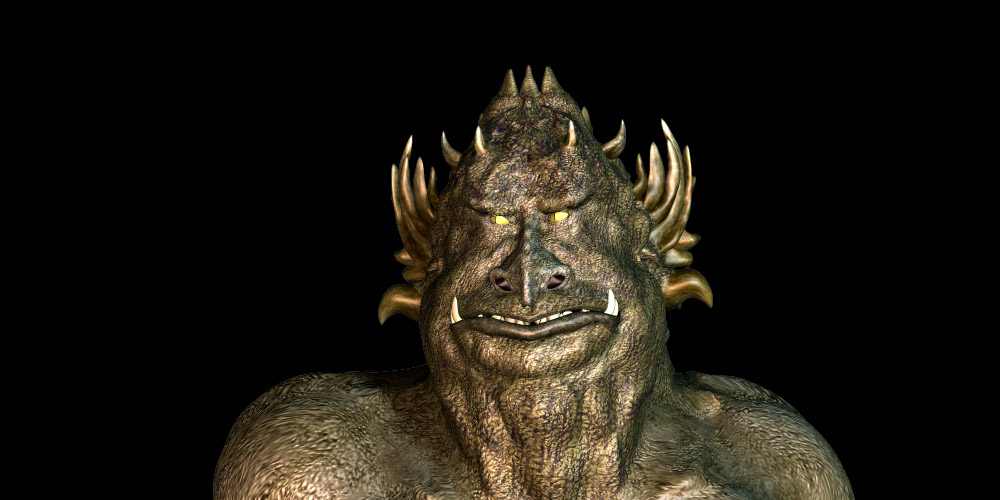
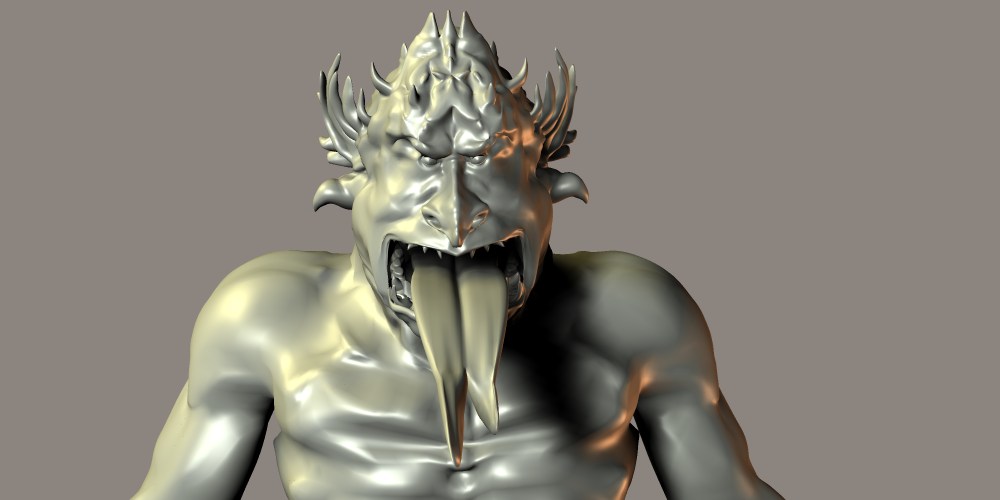
Now that my bendable buddy is almost ready for primetime, I’d like to load my morphs. Predictably, there’s a problem. My morphs (like the figure itself) were created in Lightwave, a program that uses subpatches to “simplify” a mesh, allowing for quicker (and better) control in modeling than you might get if a galaxy of vertices defined the curves. In order to bring the creature into Poser, I had to freeze the mesh and save it in the obj. format. I had hoped to load my morphs by freezing the body part with the morph at its most extreme in Lightwave and exporting it as an obj. Unfortunately, Poser gives me a message that the imported morph has the “wrong number of vertices.” An odd claim since it is the selfsame part. Maybe I should post this question to the Lightwave forum as well, but since it is Poser-related, I wonder if someone here might tell me how I can load my preexisting morphs. Recreating them without the help of the subpatch control points would be an untenable nightmare. Surely the professionals have a workaround.Download my free stuff here: http://www.renderosity.com/homepage.php?page=2&userid=323368