
Renderosity Forums / Animation
Welcome to the Animation Forum
Forum Moderators: Wolfenshire, msansing
Animation F.A.Q (Last Updated: 2026 Jan 27 4:28 pm)
Characters, motion graphics, props, particles... everything that moves!
Enjoy , create and share :)
Remember to check the FAQ for useful information and resources.
Animation learning and resources:
-
11 Second Club: Monthly character animation competition.
-
Animation Mentor: Online school. Learn from the animation masters.
-
Rigging 101: Maya rigs and rigging tutorials.
-
AnimWatch: Showcasting the best of independent animation.
-
FlashKit: The best place to learn Flash.
-
Armaverse: Stop-motion armatures for animation.
-
60+ great Character Animator's sites: Get inspired.
Checkout the Renderosity MarketPlace - Your source for digital art content!

Subject: Camera mapping

here's a tutorial for C4d :
http://www.3dfluff.com/cameramapping/cameramappingtut.htm
& one for 3dsmax:
http://download.autodesk.com/media/MNE/qt/perpixel_camera_map_300k.mov
& lots more info here
www.mattepainting.org
Message edited on: 02/08/2006 23:45

downloading
nemirc
Renderosity Magazine Staff Writer
https://renderositymagazine.com/users/nemirc
https://about.me/aris3d/

So you are saying that bulding and the rest of the buildings have no uvs at all?
nemirc
Renderosity Magazine Staff Writer
https://renderositymagazine.com/users/nemirc
https://about.me/aris3d/
none at all ,the traffic was already uv'd & textured as normal so I left that as is,nothing else was uv'd the 'textures' you can see are applied to the render itself..then that render (with all the postwork you can muster) is projected back onto the geometrie,so your texturing using the render & the camera. The final render doesnt require any fancy lighting at all,not even shadows as they have been baked into the first render/texture the same method is used in alot of films..I know all the shots of curscant in ep3 use the same technique. it is very restrictive of camera movement though,if I were to rotate that camera slightly you'd see where the geometrie has no projection on it,but again if you know what the final shot is then your good to go :)
Mental note: learn more about camera projection
nemirc
Renderosity Magazine Staff Writer
https://renderositymagazine.com/users/nemirc
https://about.me/aris3d/

Attached Link: http://www.newtek.com/products/lightwave/tutorials/rendering/camera_mapping/camera_mapping.html
In LightWave this is called "Front Projection Mapping." Here's a tutorial. Jist in case: http://www.newtek.com/products/lightwave/tutorials/rendering/camera_mapping/camera_mapping.htmlBefore they made me they broke the mold!
http://home.roadrunner.com/~kflach/

they have it in Poser..where? & how would you go about using it? I wasn't aware the camera could be used for projection
"they have it in Poser...? I wasn't aware the camera could be used for projection"
I remember hearing something about this, but I don't think it's quite the same as what we can do with Camera Mapping in 3dsmax, Stefan. Although I could be wrong about that of course.
In the 3dsmax manual, camera mapping is described as follows:
"Camera mapping lets you create mapping coordinates aligned to a camera's view, so you can paste video onto objects regardless of their orientation. There are two versions of the Camera Map modifier. One is an object-space modifier (OSM), and the other is a world-space modifier (WSM).
The WSM modifier continually updates the mapping coordinates according to the camera's movement.
OSM is "sticky", because it doesn't update the coordinates to the camera movement. It lets you distort geometry from frame to frame."
I think, from what I've heard, Poser's version of projection mapping is basically only good for stills.
PLEASE correct me if I'm mistaken though, because there's certainly a huge difference there. :-)
Message edited on: 02/09/2006 19:50
Tools : 3dsmax 2015, Daz Studio 4.6, PoserPro 2012, Blender
v2.74
System: Pentium QuadCore i7, under Win 8, GeForce GTX 780 / 2GB
GPU.
from the poser manual..not sure if it's the same thing though Create Perspective UVs buttonClicking the Create Perspective UVs button maps texture coordinates for a group. An example of using this command might be to map an imported background image of a face to a Poser group corresponding to the figures face. The faces texture coordinates would map to the image." or ": The XY option works like a slide projector in that the screen being projected onto is the XY plane whose size and position are determined using the U_Scale, V_Scale, U_Offset, and V_Offset parameters. Any surface not oriented with the selected viewing plane will distort the texture at render time." though neither of these sound like what 3dsmax and other renders are doing with camera mapping also..I didnt use any modifiers for it,it was all done in the material editor,I selected the camera map material,then there's a couple slots,one to pick your projection cam & another to create the diffuse material. this is the difference between per pixel camera mapping & just camera mapping from the 3dsmax manual: "The Camera Map Per Pixel lets you project a map from the direction of a particular camera. It is meant as an aid to 2D matte painting: you can render a scene, adjust the rendering using an image-editing application, then use this adjusted image as a matte that is projected back onto the 3D geometry. " PS:Max..we finally got power booleans last night,now max' booleans dont suck so much, :)

In Poser I have used a primitive cone that was not parented to a camera. Then about every five frames match the movement of the Poser camera, then imported it into Vue. I haven't tried it in Carrara. It works for Fast spinning pan shots where a little inaccuracy is not noticed. This will allow you to render a background movie that will almost match the movement of a Poser camera. I have tried editing a Poser file so the camera are change to figures and will be imported into other apps but I can't figure it out. Dale

Privacy Notice
This site uses cookies to deliver the best experience. Our own cookies make user accounts and other features possible. Third-party cookies are used to display relevant ads and to analyze how Renderosity is used. By using our site, you acknowledge that you have read and understood our Terms of Service, including our Cookie Policy and our Privacy Policy.
Attached Link: http://home.xtra.co.nz/hosts/polycount3d/CGTalk/CityScape01.mov
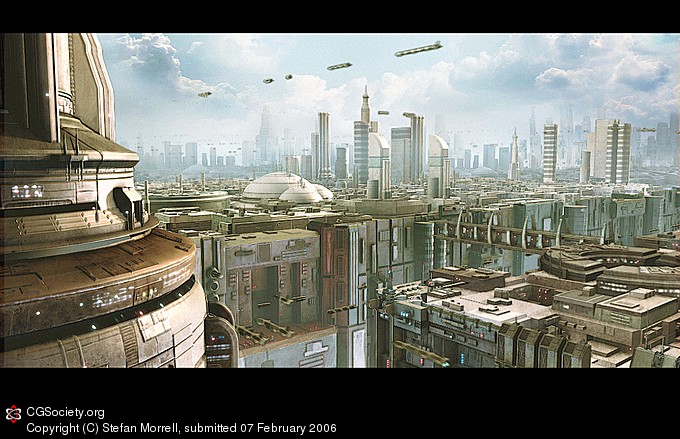
not sure if anyones interested in this but camera mapping is an awesome way of adding detail into your shots,with no uv mapping required :) if you know what the camera move is going to be then you can project textures accordingly & save yourself alot of time not having to uv & texture parts that are never seen.http://home.xtra.co.nz/hosts/polycount3d/CGTalk/CityScape01.mov
15 mb quicktime
& here's a breakdown for that shot,showing the seperate elements that each had there own camera projected map(with the excpetion of the traffic which uses regular textures & the backdrop which is painted)
http://home.xtra.co.nz/hosts/polycount3d/CGTalk/CityScape01Breakdown.mov 2mb
Message edited on: 02/08/2006 23:45
Cg Society Portfolio