
Renderosity Forums / Carrara
Welcome to the Carrara Forum
Forum Coordinators: Kalypso, Anim8dtoon
Carrara F.A.Q (Last Updated: 2026 Sep 09 4:39 am)
Visit the Carrara Gallery here.

Subject: Need some help with a Poser item...Thanks :)


From my little experience you trouble starts with hsving Poser 6 on your computer. Don't have it on your computer until--if ever--P6 becomes compatible. Once you have got rid of it and closed then restarted your computer Poser 5 will do all the great things it's supposed to in company with Carrara. ( I have written off P6 as a poor investment)
bwtr

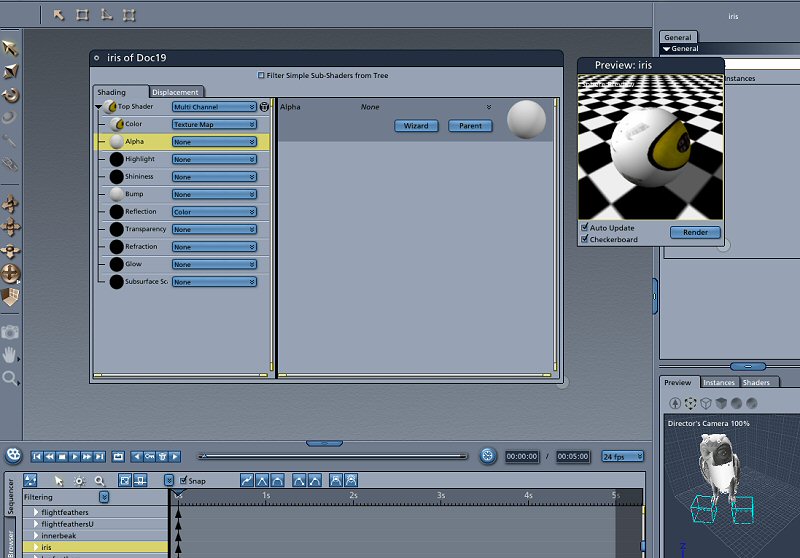
I can't be totally sure what's going on, as I only have C4Pro until C5 is released. However, I have Poser 4/5/6 all installed, store everything in the Poser 4 runtime, and point C4 at Poser 5 when importing PZ3s, without problems. Note that the irises not showing up may be due to the "Eyeball" material being opaque. That tends to happen every once in a while. Poser 6 is my friend ;) The files aren't importing as AVIs, Carrara is calling the render "AVI" because it's somehow been set to render all frames instead of just current frame.

I don't have the Owl to double check but check to see if there is two orbs for the eye, one for the texture and one that is the clear surface. Transparency with Poser is a work-in-progres. Remember, Beta by definintion means that the software isn't done yet. ;) When you come across something a little strange like that in the Beta, make sure that you report the bug so it can be worked on. Mark
Sure NP, Mark :)... What about the .avi thing...this only started happening last night....I have no idea what button I pushed to start this happening. All has been OK, in regards to importing till last night. So I have done something to start this, I just don't know what, being so new at this. Thanks for your time :)
If you're using the Transposer import funtion, there is a check box for "Import Animation" Just make sure that it is unchecked when you bring in the file. Otherwise Carrara assumes that it is geometry over time and brings in the length of the Poser animation (the default time from Poser unless you've changed it when creating the model) If the files are actually being seen as .avi files instead of .pzr files, I'm at a loss to explain that one. But if that's the case, Carrara wouldn't be importing them as geometry - just a texture...
Thanks Bluetone...will check this out tonight when I get home. I know I've hit something that I wasn't supposed to ~embarrassed~ Mark I have that uncheck, having tried Transposer & native import :) And please to all, I'm fully aware this is Beta. Honestly, since I've only had this program for a week, I have no idea if an error I'm getting is me or the program. Since I have only had it for a week, I assume it's me and that I have just missed something....that's why I ask here 1st before running off putting in a bug report. I look stupid enough as it is here, let alone looking stupid if I report a bug to Eovia & find out it was me the whole time. I don't want to waste their time. Thanks :)
Here's a gotcha for animation: if you accidently go to the Storyboard room (the one with the little pencil icon) it will automatically convert your file to an animation file. I've done that a time or two... Regarding posting bugs to Eovia, they're used to stupid posts - I post all the time. ;) Seriously, they welcome reports. Just because you're a new user to C5 doesn't mean you can't find a real bug - and that's the input they want by issuing a public beta. They're can determine if it's a "user error" v.s. "real" bug pretty easily - they've been doing this for awhile.
hmmmm....I've only looked in the storyboard room 1 time. I have to say it started with that stupid owl LOL. After that ALL poser items came in as .AVI ~whimpers~ In fact, heres a good one, I tried importing a static building(bakery by Richarbi) animated unchecked....the building imported but all it's insides popped out LOL(avi here again)...next try...imported with animation checked off and the bakery came in in tact(but still .avi) Is there something down in the sequencer area I should look at....? I tried deleted key frames but nothing happened. I really hate it when I've gone & done something stupid like this & can't figure it out. I was at the computer till late last night...staring at kinds of different things, just couldn't see it. Guess I better jump to the animation chapter & see what's up. Thanks again for bearing with my noobness :)
It does, indeed sound like something must have been checked in one or the other of your programs to start this oddness. Like Mark said above, I have no idea how Poser could be exporting an .AVI and Carrara could read it as geometry. So, hoping to help figure this out here are a couple questions: 1. The AVI that is appearing in Carrara; is it a movie you can view in the render room? Or is the file when you're in the assembly room somehow called "whatever.avi?" 2. If the doc is a carrara doc, but still called "whatever.avi," can you navigate to the file and see what the extension really is? Some files (particularly on macs, in my experience, but I don't know what platform you're on) have hidden extensions -- so your file might really be "whatever.avi.pzr" or "whatever.avi.car." This might explain the mysterious .avi extension, though what caused Poser to include it in the first place is still mysterious. You may have reset a preference in either program. Can you reset the preferences in both? (C4 did this in File>Reset Preferences -- I don't have the C5 beta yet. I have no idea how to reset the preferences in Poser.) If this doesn't work, perhaps a reinstall of both Poser and Carrara might reset the problem. It's not finding out what caused the issue, but it might solve the problem.... Just some rambling thoughts. I hope one of them is helpful.... - Dex
When in the render room it's doc#.AVI and has 1/96 frames it just keeps going till I abort. All of them the same :) On windows XP Pro. This problem only happens in C5PB not when importing into other programs.(PZ3 extension) So I am 100% sure it's something I've clicked on within the program(C5PB). I can't wait to get home now, so I can try all these ideas you all have put forth. Only 5 1/2 hours to go :(.
Ah.... So then the .avi happens when you start a render? That's the default render output for an animation on a windows machine. You can select "current frame" under the output tab and it will render a single frame. Sounds like what was said above is true -- somehow your poser file is coming into Carrara as an animation. Tick the current frame radio button and it'll start acting like a still scene.
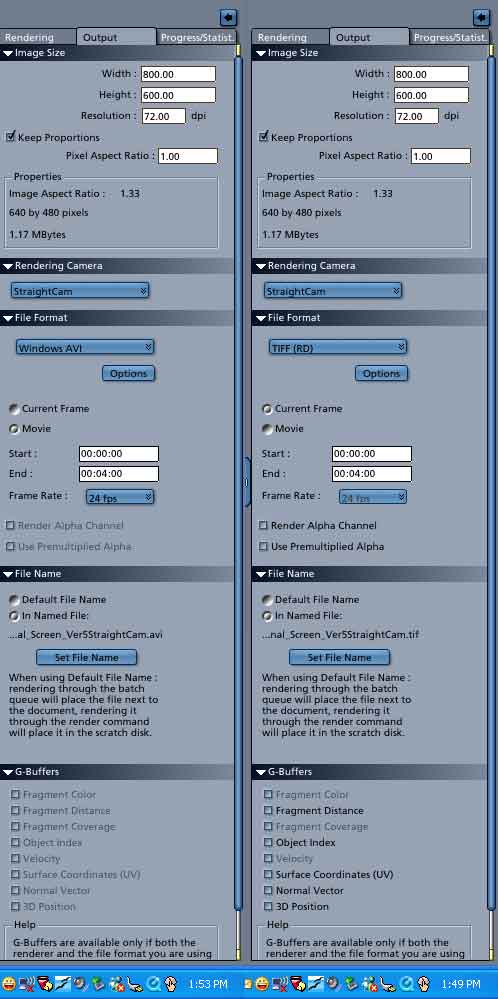
Actually you may have not hit the movie button. If you drag the timeline in Assembly Carrara will automatically set the render option to movie. Try it in a blank scene and you can see it. So, probably you accidently scrubbed the timeline at some point. No biggie. Just glad to see it wasnt something serious.
Message edited on: 11/22/2005 16:59

Privacy Notice
This site uses cookies to deliver the best experience. Our own cookies make user accounts and other features possible. Third-party cookies are used to display relevant ads and to analyze how Renderosity is used. By using our site, you acknowledge that you have read and understood our Terms of Service, including our Cookie Policy and our Privacy Policy.
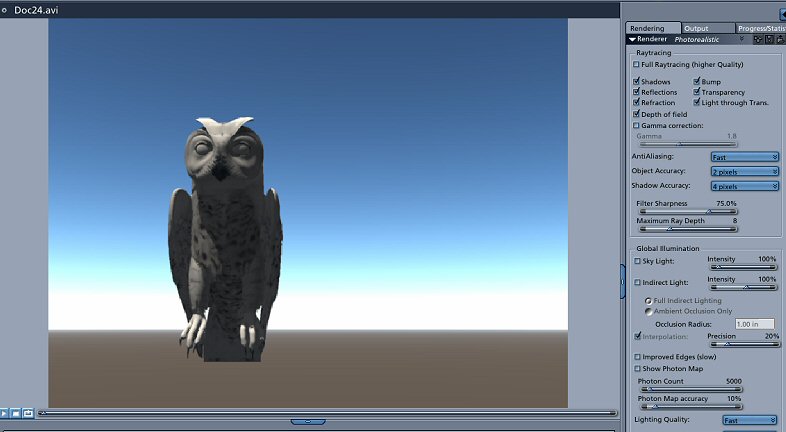
1st....I imported Noggins Owl. Problem 1 - It imported as an .AVI even though there was no animation involved what so ever. I even had unchecked import animation. This was done via Poser5 & Poser6, same result. Problem 2 - the owls eyes - the iris's aren't showing up....see the screen grabs. I tried via Poser6 .pz3 and also moved this said file to the Poser5 runtime as well...both with the same results. What have I done wrong ? Thanks