
Renderosity Forums / DAZ|Studio
Welcome to the DAZ|Studio Forum
Forum Moderators: Wolfenshire, msansing Forum Coordinators: Lobo3433
DAZ|Studio F.A.Q (Last Updated: 2026 Aug 02 4:23 pm)


Subject: More Missing Icons


Hi,
Could you just let me know a few more details in case this is something we could help you out with:
Did you buy this product here at Renderosity or at DAZ 3D?
Looking at the image you have there, it looks like you might have a missing Product thumbnail.
Product thumbnails and Smart Content require metadata that will only come with products bought directly from DAZ3D and downloaded through their system.
So if you are having issues with products bought over at DAZ 3D then you need to take it up with them.
If you bought the product here from Renderosity, there are ways to create your own metadata and Product Thumbnails.
I could point you to some tutorials on how to do that if you like, just let me know and I'll dig up some links. :)
// Ylva (Frequency3D)
Forum Moderator
Frequency Gallery | Frequency Store
Thanks Frequency3D. I appreciate your response.
It's a DAZ item.
https://www.daz3d.com/cat-bot
I use their Install Manager, but I'd like to look at those tutorials. I don't want to deal with Daz Tech Support if possible.
The Content Library has the icon, just not the Smart Content entry as shown.
Here's something though that's a mystery: A double entry for the same product, one with the other without icon. Perhaps a clue?
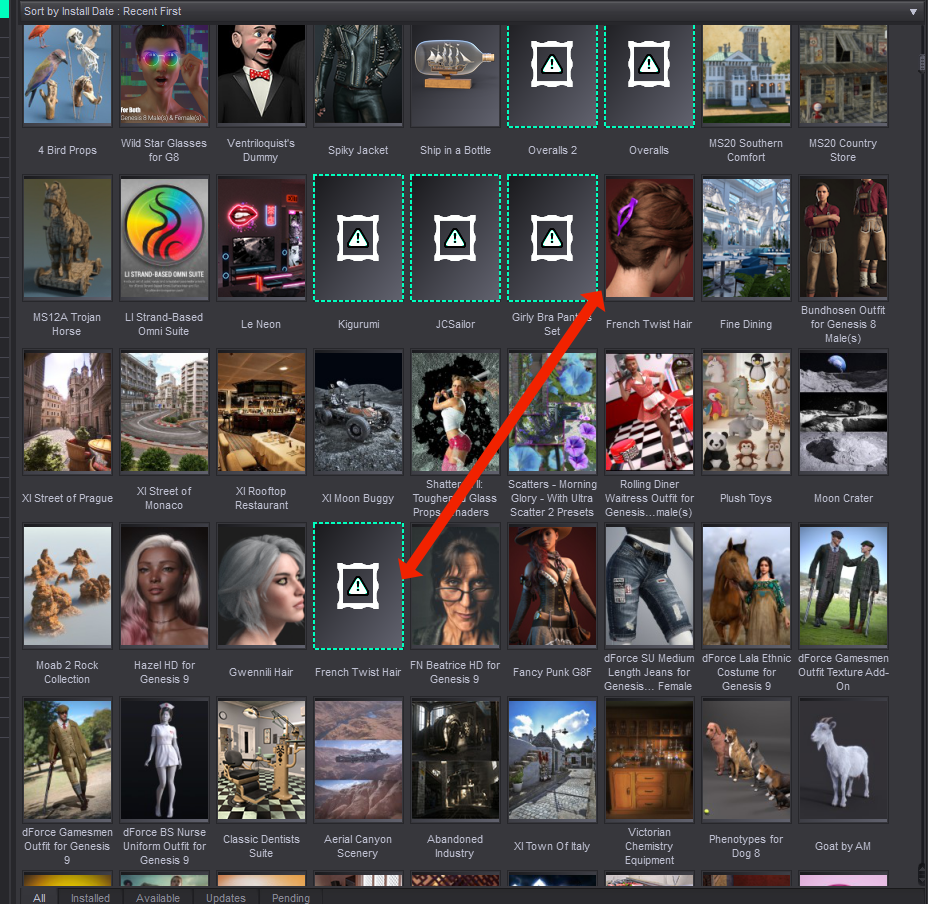

Ok, I am going to write from the perspective as myself here and not as a moderator since it had nothing to do with Renderosity.
The original link for the tutorial I have used seems to be dead - but you can just do a Google search for "creating metadata for daz studio" and you will see many links to tutorials.
As for the Product image itself, I can tell you where it lives in your DAZ content folder:
/Runtime/Support
There will be two data files for each product - a .dsa and a .dsx file. These are the files that contain your metadata.
If there is also a .jpg file with the EXACT same name as those two files, that is typically the one that will show up in the DAZ Studio for your product.
It is important that this .jpg is the correct size - I have used 180x254 which has worked well for me.
I have been able to create DAZ Studio products from scratch from my own content and then create my own jpgs. I have used it for everything from my own products to my personal DEV libraries for materials, promo templates etc. Also for any DAZ Content I have bought from Renderosity. You can think of them as virtual products.
The process basically involves clicking on a content folder within DAZ Studio and selecting "Create a Product from..."
Then there is still a bunch of things to do if you don't want your database to get all messed up - like cleaning out duplicates from the LOCAL USER default product. Also using the Content DB Editor while you have a product selected to add things like a vendor name, product number or your own system code.
Then there is also the whole process of linking props and clothing to the correct base figure and adding Smart Content Categories (I have created my own separate Smart Content Library where I have everything organized the way I like it.)
But to learn how to do that you really need to go look at a few tutorials. It's not impossible to learn, but it does take quite a bit of patience and a bit of trial and error to master.
Now, for certain DAZ Studio products that have been downloaded via the DAZ Studio content managament app, I have indeed have issues with a few products where the thumbnail was missing, I have replaced or updated it and it still shows as missing. Something else is going on where the thumbnail is sourced and updated automatically from somewhere else and I have not figured out exactly what.
If you are seeing double icons, there is a good chance that you have some sort of conflict between installing content via the content manager and the in-app (DAZ Studio) download system. I avoid the in-app download system like the plague lol because it installs things in a completely different location and just messes things up,
But yeah I have a few of those where I managed to get DAZ Studio to show my override Product thumbnail for a little while - and then it just reverted to be missing again. So I just gave up fixing some of that in the end.
Frequency Gallery | Frequency Store
Hey Richard,
Well, in this view, nothing and that's the normal behavior, which has always made me wonder why that menu item is even there. All other menu items do something But after I double click to go to the product, with or w/o icon, then that function works.
When you right-click and request More Information on any that are missing icons, you get this message:
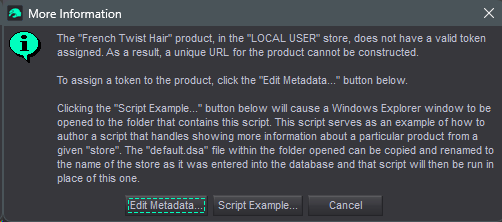
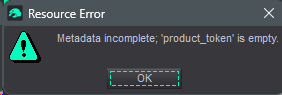
Oddly though, on the French Twist Hair with icon, I get this message:
Thanks Frequecy3D. I'll study all this when I can get rid some of the plates spinning on the sticks.
But from this and my reply to Richard, the mention of the LOCAL USER item/area seems to be a clue.
I also have, but never installed or used, RiverSoftArt's Content Wizard for Daz Studio. Maybe I'll get bold and try that on the laptop.
I had an idea... This is what that token field looks like on a fully functioning DAZ Product:
As you can see, it is editable. Very likely this corresponds to the DAZ 3D product ID. You might be able to just fetch the product ID from DAZ and then edit it manually. Worth a try.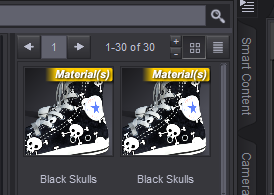
You will need to click the little menu there in the very top right corner of this image (with the product selected under Products (A-Z) under your Content Library tab.
Then select Content DB Editor and you will get the window popup from my first image.
Also, if you click DAZ 3D in the 'Store' dropdown on the left, you wil l see that the only other option there is indeed LOCAL USER.
This is basically a default store/user DS uses when no store has been specified.
I know DAZ 3D have a page on how to create a script for creating your own store options - but it is how to create a script, not something you can use right away. Otherwise I would have already created a Renderosity option there. I just use the LOCAL USER store and clean out all my file references from the LOCAL USER Product which can get really clogged up.
It is important here to know that every file/thumbnail you see when you select a Product under your Content Library tab is a reference/link to a file, not the actual file.
References tend to be created in your LOCAL USER Product for every asset and scene you create yourself on your computer. At least they seem to be created when you Caetgorize anything. The ones generated when you create assets yourself can then be Copied or Cut and move into another Product you create.
The ones from the DAZ store seem to be copyable, but can't always be cut. Sometimes, sometimes not. Another mystery. ;)
Frequency Gallery | Frequency Store
Thanks. I'll certainly study all of this.
Let me know if you manage to solve any of my unanswered questions. :D
Frequency Gallery | Frequency Store

Privacy Notice
This site uses cookies to deliver the best experience. Our own cookies make user accounts and other features possible. Third-party cookies are used to display relevant ads and to analyze how Renderosity is used. By using our site, you acknowledge that you have read and understood our Terms of Service, including our Cookie Policy and our Privacy Policy.
I'm really getting a bit piffed about this. Yet another missing icon from a relatively new product from Daz. I've got the all product items, but...
Removed the product install back to re downloading. No help. Did the usual shuck 'n jive with copying the store page image & renaming, etc., which has always been hit or miss, and didn't help this time.
Is there a definitive way to fix this?