
Renderosity Forums / Poser 13
Welcome to the Poser 13 Forum
Forum Moderators: nerd, RedPhantom
(Last Updated: 2026 Jul 31 6:30 am)

Subject: Show your Poser 13 renders!


Oooh, like the caustics and color filtering, @RedPhantom!
I'll try to post clickable thumbnails from my gallery...


general view of Urban Future 2


Well, not clickable thumbs, but it'll do.
Poser 12, Poser 13, Poser 14, in feet.
OSes: Win7Prox64, Win7Ultx64, Win11
Silo Pro 2.5.6 64bit, Silo 2025.1, Vue Infinite 2014.7, Genetica 4.0 Studio, UV Mapper Pro, UV Layout Pro, PhotoImpact X3, GIF Animator 5

Thanks so much
Available on Amazon for the Kindle E-Reader Monster of the North and The Shimmering Mage
Today I break my own personal record for the number of days for being alive.
Check out my store here or my free stuff here
I use Poser 14 and Windows 11

Just in case: on Windows, there's a plugin for Chromium-based browsers: Imagus. Upon simply hovering a direct link to a picture, it displays the said pic as big as possible. Use the uppercased letter "O" on your keyboard and the pic will open on a new tab.
It is so convenient 
𝒫𝒽𝓎𝓁
(っ◔◡◔)っ
👿 Win11 on i9-13900K@5GHz, 64GB, RoG Strix B760F Gaming, Asus Tuf Gaming RTX 4070 OC Edition, 1+2 TB SSD's, 6+4TB HD
👿 Mac Mini M2, Tahoe 26.5, 16GB, 500GB SSD
👿 Nas 10TB
👿 Poser 13 and 14 ❤️

It seems that there is a solution, but I haven't tested it as it still runs well on my Brave.Unfortunately, it is no longer available for Chrome-based browsers. It has been reported that it no longer runs on Microsoft Edge.
>>> Is there any alternative for Imagus? : r/chrome
𝒫𝒽𝓎𝓁
(っ◔◡◔)っ
👿 Win11 on i9-13900K@5GHz, 64GB, RoG Strix B760F Gaming, Asus Tuf Gaming RTX 4070 OC Edition, 1+2 TB SSD's, 6+4TB HD
👿 Mac Mini M2, Tahoe 26.5, 16GB, 500GB SSD
👿 Nas 10TB
👿 Poser 13 and 14 ❤️
Poser 12, Poser 13, Poser 14, in feet.
OSes: Win7Prox64, Win7Ultx64, Win11
Silo Pro 2.5.6 64bit, Silo 2025.1, Vue Infinite 2014.7, Genetica 4.0 Studio, UV Mapper Pro, UV Layout Pro, PhotoImpact X3, GIF Animator 5
Gorgeous pictures, wow
𝒫𝒽𝓎𝓁
(っ◔◡◔)っ
👿 Win11 on i9-13900K@5GHz, 64GB, RoG Strix B760F Gaming, Asus Tuf Gaming RTX 4070 OC Edition, 1+2 TB SSD's, 6+4TB HD
👿 Mac Mini M2, Tahoe 26.5, 16GB, 500GB SSD
👿 Nas 10TB
👿 Poser 13 and 14 ❤️
Dawn in Cafe' L'Homme; LaFemme in the red dress at left, Dawn in grey camo (center), Aiko 3 coming down the stairs at right.
Thank you, @Y-Phyl! :D
Poser 12, Poser 13, Poser 14, in feet.
OSes: Win7Prox64, Win7Ultx64, Win11
Silo Pro 2.5.6 64bit, Silo 2025.1, Vue Infinite 2014.7, Genetica 4.0 Studio, UV Mapper Pro, UV Layout Pro, PhotoImpact X3, GIF Animator 5
That's an interesting POV. Nice work
Available on Amazon for the Kindle E-Reader Monster of the North and The Shimmering Mage
Today I break my own personal record for the number of days for being alive.
Check out my store here or my free stuff here
I use Poser 14 and Windows 11
Dusk and Dawn in Cafe' L'Homme; LaFemme in foreground. I built this bar as an interior for Stonemason's Urban Future 3. Anyone know how to fix LaFemme's weirdly shadowed skin?
Poser 12, Poser 13, Poser 14, in feet.
OSes: Win7Prox64, Win7Ultx64, Win11
Silo Pro 2.5.6 64bit, Silo 2025.1, Vue Infinite 2014.7, Genetica 4.0 Studio, UV Mapper Pro, UV Layout Pro, PhotoImpact X3, GIF Animator 5
Rendering in Superfly (OptiX); shader:
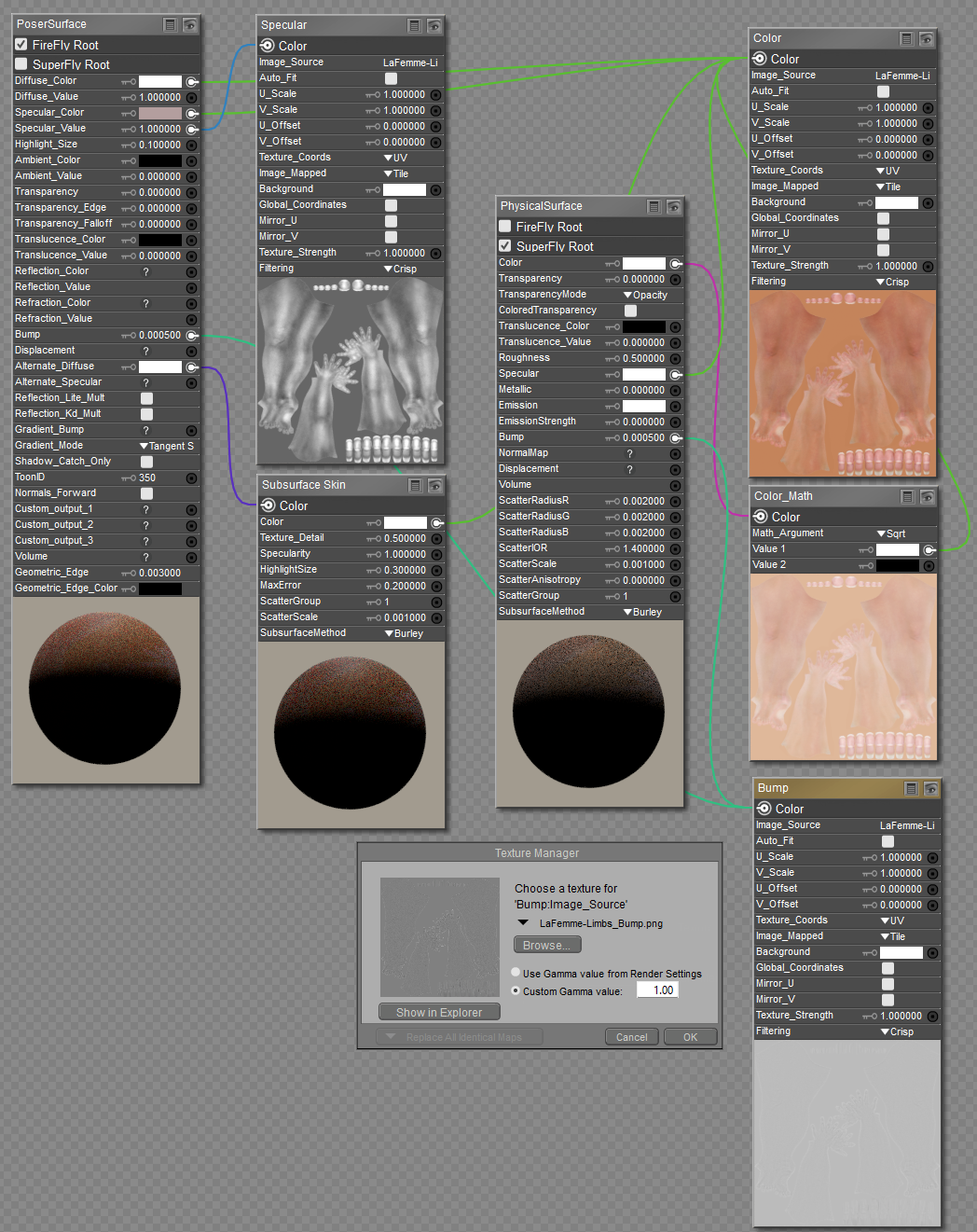
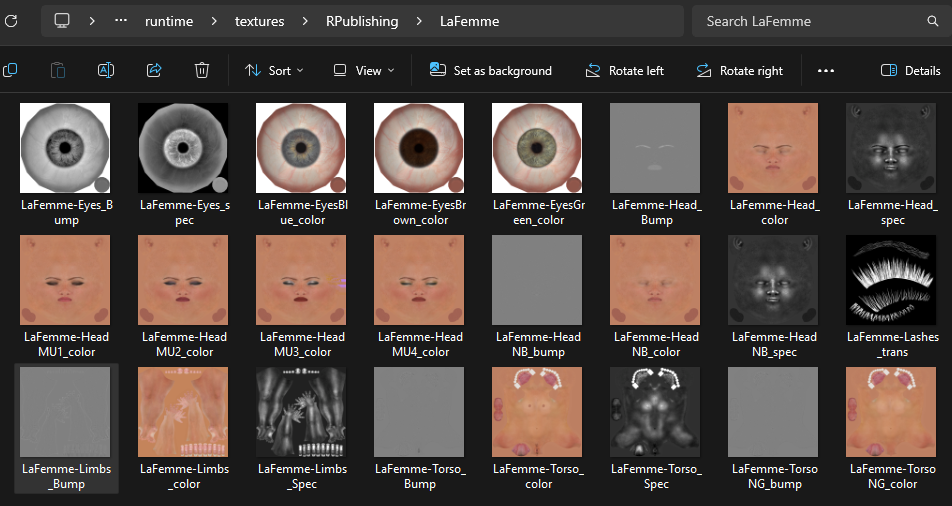
All of the bump maps are PNG; most seem to have little range in brightness. Perhaps the idea was to use 127/127/127 (medium grey) as the zero point, so that a map could show both indentions and raised bumps?
The great majority of the lighting is mesh lighting; might that account for lack of ambient occlusion?
Well, at least she isn't glowing now. ><
Poser 12, Poser 13, Poser 14, in feet.
OSes: Win7Prox64, Win7Ultx64, Win11
Silo Pro 2.5.6 64bit, Silo 2025.1, Vue Infinite 2014.7, Genetica 4.0 Studio, UV Mapper Pro, UV Layout Pro, PhotoImpact X3, GIF Animator 5
Even regular lights do not properly add the ambient occlusion in corners and recesses. For the most part, it needs to be faked or the scene will lack a quality of realism. With the addition of the RGB Color Ramp node in Poser 13, the occlusion can now be easily controlled in the image.
That specular map looks horrendous. It should be toned down considerably.
I just noticed that the Subsurface scatter method is improperly set. It should be fixed random walk; otherwise you will not see any true SSS.

Dawn in Cafe' L'Homme; LaFemme in the red dress at left, Dawn in grey camo (center), Aiko 3 coming down the stairs at right.
Beautiful work!
seachnasaigh posted at 8:24 PM Sun, 22 June 2025 - #4497305
Something I noticed when sunlight bounces into my home off of my car's windshield, vs. direct sunlight.The great majority of the lighting is mesh lighting; might that account for lack of ambient occlusion?
Then sun is something like 1.25-1.5 degrees wide in the sky. (So is the Moon, btw.) This makes the light from the sun more like a spotlight or a small mesh light, and the shadows are softer, more diffuse. You can get the same effect from artificial lighting.
The sunlight bouncing off the curves of my windshield, because the curves change the image of the sun, make it more like a point light, and the shadows are sharp edged, cleaner. It's more like a penlight flashlight.
I suspect that it's because a penlight is a narrow beam, so you get less interference: the left side (and the upside, of course) doesn't illuminate the opposite right side nearly as much. The larger the light source, the more cross illumination you get, and therefore, the fuzzier the shadows. Or such is my hypothesis.
I have never experimented with this in Poser (and in Firefly, it might not make much difference), so I have no idea if this will help or not. You might want to see if you get ambient occlusion in artificial light to see if it works in real life or not.
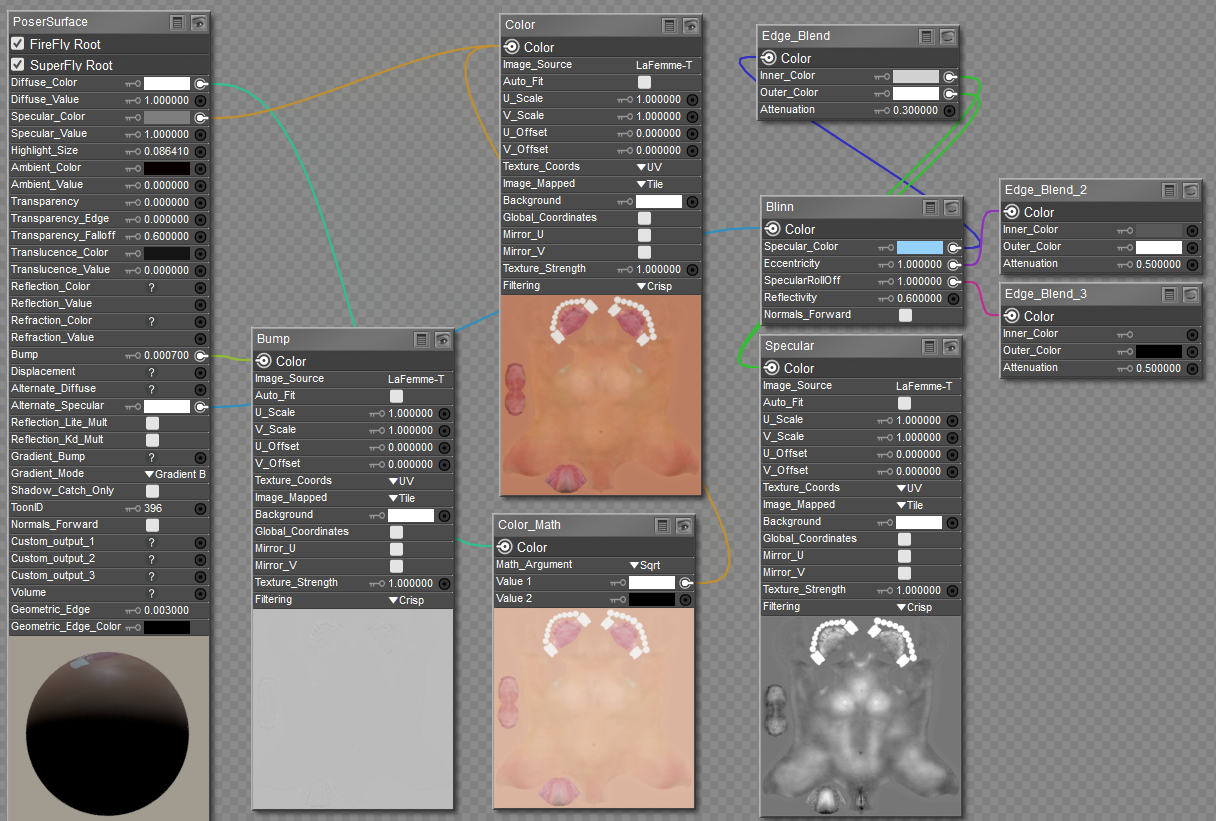
Well, this shader renders without LaFemme either glowing or showing shadow tiger stripes:
render settings:
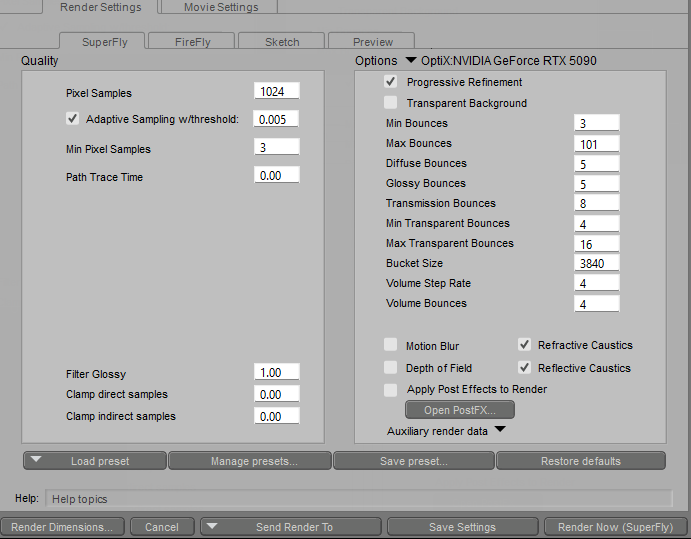
Any suggested corrections/improvements welcome! :D
Poser 12, Poser 13, Poser 14, in feet.
OSes: Win7Prox64, Win7Ultx64, Win11
Silo Pro 2.5.6 64bit, Silo 2025.1, Vue Infinite 2014.7, Genetica 4.0 Studio, UV Mapper Pro, UV Layout Pro, PhotoImpact X3, GIF Animator 5
Poser 12, Poser 13, Poser 14, in feet.
OSes: Win7Prox64, Win7Ultx64, Win11
Silo Pro 2.5.6 64bit, Silo 2025.1, Vue Infinite 2014.7, Genetica 4.0 Studio, UV Mapper Pro, UV Layout Pro, PhotoImpact X3, GIF Animator 5
There is a problem with the skin being too specular. If you are going to use the alternate_specular channel on the PoserSurface node, set the Specular_Value channel to zero. Otherwise, you will be multiplying both channels and doubling the effects. Any map plugged into the Specular_Color channel should be grayscale, not a diffuse map, according to your screenshot. The specular map needs to be plugged into both the Specular_Color and Specular_Value channels. Additionally, Diffuse_Values and Specular_Values should never be set to 100% (1.0), as nothing in nature is 100% diffuse, and 100% specularity only occurs with metallic materials.
I have completely moved away from using the PoserSurface node for Superfly rendering. Instead, I use Cycles shaders for all my renders.

Nice!
𝒫𝒽𝓎𝓁
(っ◔◡◔)っ
👿 Win11 on i9-13900K@5GHz, 64GB, RoG Strix B760F Gaming, Asus Tuf Gaming RTX 4070 OC Edition, 1+2 TB SSD's, 6+4TB HD
👿 Mac Mini M2, Tahoe 26.5, 16GB, 500GB SSD
👿 Nas 10TB
👿 Poser 13 and 14 ❤️

Whatever else might be going on, one thing that jumps out to me is that I sometimes get blockiness in shadows and specular effects if the mesh is not detailed enough. She's pretty close to the camera. Try raising the amount of subdivision.Dusk and Dawn in Cafe' L'Homme; LaFemme in foreground. I built this bar as an interior for Stonemason's Urban Future 3. Anyone know how to fix LaFemme's weirdly shadowed skin?
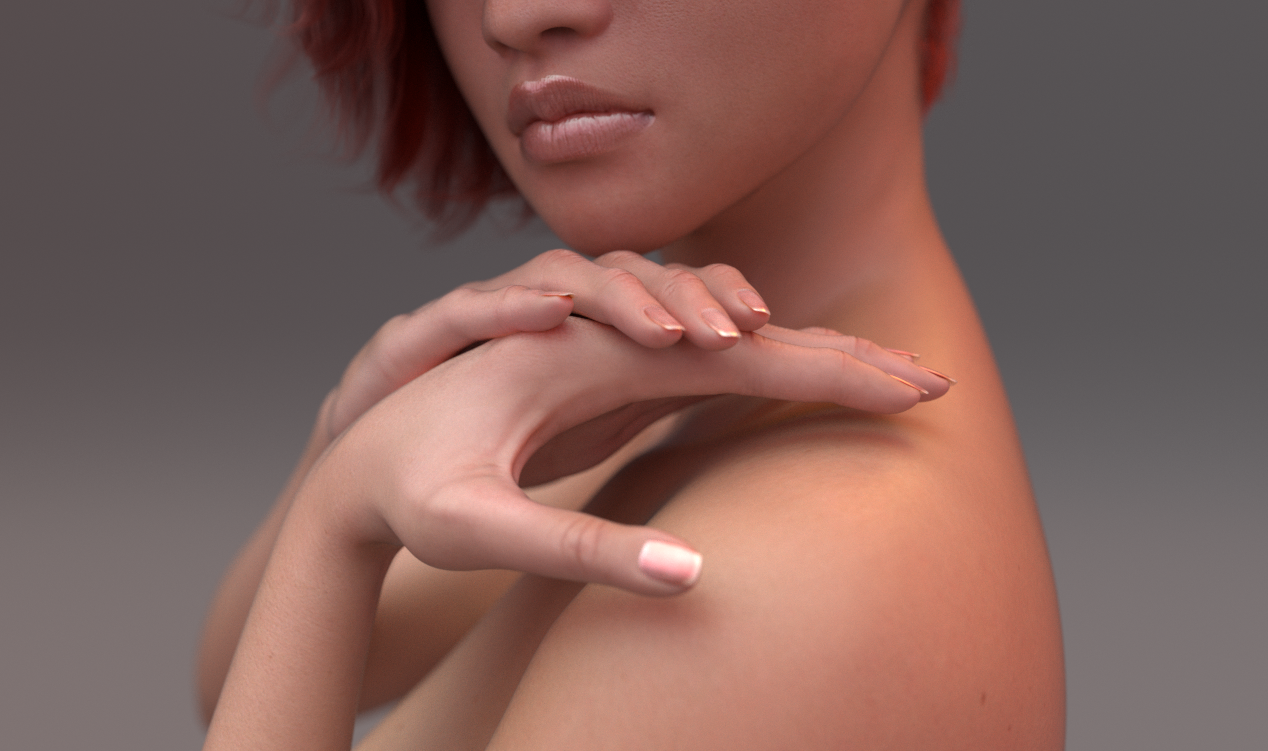
At the risk of sounding stupid (again), what is this EZSkin3Cycles?I forgot how nicely LF1's HD hand morphs work at subdivision 2, a good color map and EZSkin3Cycles:
I love the details.
Poser 12, Poser 13, Poser 14, in feet.
OSes: Win7Prox64, Win7Ultx64, Win11
Silo Pro 2.5.6 64bit, Silo 2025.1, Vue Infinite 2014.7, Genetica 4.0 Studio, UV Mapper Pro, UV Layout Pro, PhotoImpact X3, GIF Animator 5
seachnasaigh posted at 7:21 PM Sun, 22 June 2025 - #4497303I had already tried subdivision; didn't really help.Whatever else might be going on, one thing that jumps out to me is that I sometimes get blockiness in shadows and specular effects if the mesh is not detailed enough. She's pretty close to the camera. Try raising the amount of subdivision.Dusk and Dawn in Cafe' L'Homme; LaFemme in foreground. I built this bar as an interior for Stonemason's Urban Future 3. Anyone know how to fix LaFemme's weirdly shadowed skin?
Poser 12, Poser 13, Poser 14, in feet.
OSes: Win7Prox64, Win7Ultx64, Win11
Silo Pro 2.5.6 64bit, Silo 2025.1, Vue Infinite 2014.7, Genetica 4.0 Studio, UV Mapper Pro, UV Layout Pro, PhotoImpact X3, GIF Animator 5
seachnasaigh posted at 7:46 AM Tue, 24 June 2025 - #4497352
Rhia474 posted at 9:38 PM Mon, 23 June 2025 - #4497339https://cobrablade.net/snarlygribbly/poser.htmlAt the risk of sounding stupid (again), what is this EZSkin3Cycles?I forgot how nicely LF1's HD hand morphs work at subdivision 2, a good color map and EZSkin3Cycles:
I love the details.
EZSkin is a script to upgrade your older skin shades via a script.
Y-Phil can expound upon this more since he was kind enough to port to new Python and updating the Cycles shaders regularly.
https://www.renderosity.com/forums/comments/4494088/permalink
The zip file comes with a full manual and explanation.
seachnasaigh posted at 7:46 AM Tue, 24 June 2025 - #4497352
EZSkin creates materials based on what rendering engine or shader effects engine you use. In addition to Firelyfly, Superfly, and Pesky Fly (just kidding), one of the shader engines uses the Cycles root node to set up the materials. (I never could get the tanlines engine, contributed by a third party, to work, but most of the others seem to work well.)At the risk of sounding stupid (again), what is this EZSkin3Cycles?I love the details.
As Y-Phil converted EZkin to EZSkin3, that's who you should consult for best results.
Actually, today it's giving me an error like this:
Traceback (most recent call last):
File "C:\Program Files\Poser Software\Poser 13\Runtime\Python\poserScripts\ScriptsMenu\EZSkin3.py", line 5674, in Apply
msg = self.builder.BuildShader(material, shader, mh)
File "C:\Program Files\Poser Software\Poser 13\Runtime\Python\poserScripts\ezskin3\Custom shaders\CyclePBSDFSkin.py", line 118, in BuildShader
method(mat, p)
File "C:\Program Files\Poser Software\Poser 13\Runtime\Python\poserScripts\ezskin3\Custom shaders\CyclePBSDFSkin.py", line 803, in Cyclelacrimal
self.CycleGenSkin(mat, p, is_lacrimal=True)
File "C:\Program Files\Poser Software\Poser 13\Runtime\Python\poserScripts\ezskin3\Custom shaders\CyclePBSDFSkin.py", line 608, in CycleGenSkin
mat.ConnectNodes(n_invert, n_pbsdf, 'Roughness')
UnboundLocalError: local variable 'n_invert' referenced before assignment
Actually, today it's giving me an error like this:
Traceback (most recent call last):
File "C:\Program Files\Poser Software\Poser 13\Runtime\Python\poserScripts\ScriptsMenu\EZSkin3.py", line 5674, in Apply
msg = self.builder.BuildShader(material, shader, mh)
File "C:\Program Files\Poser Software\Poser 13\Runtime\Python\poserScripts\ezskin3\Custom shaders\CyclePBSDFSkin.py", line 118, in BuildShader
method(mat, p)
File "C:\Program Files\Poser Software\Poser 13\Runtime\Python\poserScripts\ezskin3\Custom shaders\CyclePBSDFSkin.py", line 803, in Cyclelacrimal
self.CycleGenSkin(mat, p, is_lacrimal=True)
File "C:\Program Files\Poser Software\Poser 13\Runtime\Python\poserScripts\ezskin3\Custom shaders\CyclePBSDFSkin.py", line 608, in CycleGenSkin
mat.ConnectNodes(n_invert, n_pbsdf, 'Roughness')
UnboundLocalError: local variable 'n_invert' referenced before assignment
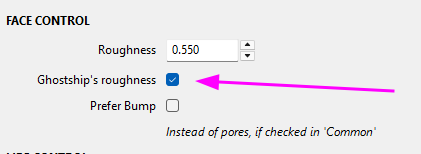
Uncheck Ghostship Roughness in CFG for the face and problem will go away, apparently that part has not been thoroughly debugged.
I just tried with default settings and on M4 this time. Same thing. Script is stuck on Lacrimal and crashes Poser. I even re-downloaded the shader.
Again, default settings and getting error:
Traceback (most recent call last):
File "C:\Program Files\Poser Software\Poser 13\Runtime\Python\poserScripts\ScriptsMenu\EZSkin3.py", line 1122, in Defaults
if not value is None: ezctl.SetValue(value)
File "C:\Program Files\Poser Software\Poser 13\Runtime\Python\poserScripts\ScriptsMenu\EZSkin3.py", line 610, in SetValue
self.control.SetValue(str(value))
AttributeError: 'StaticText' object has no attribute 'SetValue'
Traceback (most recent call last):
File "C:\Program Files\Poser Software\Poser 13\Runtime\Python\poserScripts\ScriptsMenu\EZSkin3.py", line 1152, in Reset
ctl.Reset()
File "C:\Program Files\Poser Software\Poser 13\Runtime\Python\poserScripts\ScriptsMenu\EZSkin3.py", line 601, in Reset
self.SetValue(self.initValue)
File "C:\Program Files\Poser Software\Poser 13\Runtime\Python\poserScripts\ScriptsMenu\EZSkin3.py", line 610, in SetValue
self.control.SetValue(str(value))
AttributeError: 'StaticText' object has no attribute 'SetValue'
Update: At this moment, I would not recommend using the EZSkin3 principlebsdf cycles method to enhance the skin texture on any character. I have come across a serious error where the shader does not apply correctly between the arms and the torso. It appears that something is getting internally broken at that point. I have seen it with V4. La Femme, and M4. Oddly, the legs appear fine, considering that they are from the same map.
HI
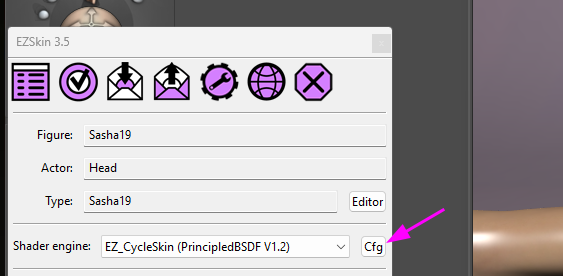
Sorry for the problems. The source of the error was a bad management of a setting used only for the face in EZSkin's configuration:
The fact that that error popped up on your system lead me to think that the plugin was not up to date, I have probably forgotten to update the version at disposal.
Sorry for this.
So just to be sure:
- EZSkin's last version: https://kdrive.digital-paradize.com/app/share/116364/ae7a51aa-8f4f-4792-99ff-abdd1b2a863b
- The last version of the PrincipledBSDF version of human skin: https://kdrive.digital-paradize.com/app/share/116364/7a305ed4-4dec-48a5-a61e-58ab586e9002
I've tested on a V4, with both checked and unchecked, and it ran fine.
Historically, on EZSkin's versions for Python2.7, there was a small node setup that SnarlyGribbly built to simulate human pores. One day, Ghosthip said in a thread that he was not finding it convincing enough. That's why there's an option in the common part, not active by default, to use the human pores simulation, and a separate option only for the face. Note that I can easily extend this setup to the rest of the skin but I put it on the face only, thinking that it was probably more for close-up of a face.
And that Ghostship's roughness is not active by default.
I have never encountered that error because I'm using the given Bump almost systematically.
Don't hesitate to tell me if you encounter another error 
𝒫𝒽𝓎𝓁
(っ◔◡◔)っ
👿 Win11 on i9-13900K@5GHz, 64GB, RoG Strix B760F Gaming, Asus Tuf Gaming RTX 4070 OC Edition, 1+2 TB SSD's, 6+4TB HD
👿 Mac Mini M2, Tahoe 26.5, 16GB, 500GB SSD
👿 Nas 10TB
👿 Poser 13 and 14 ❤️
Most welcome 
𝒫𝒽𝓎𝓁
(っ◔◡◔)っ
👿 Win11 on i9-13900K@5GHz, 64GB, RoG Strix B760F Gaming, Asus Tuf Gaming RTX 4070 OC Edition, 1+2 TB SSD's, 6+4TB HD
👿 Mac Mini M2, Tahoe 26.5, 16GB, 500GB SSD
👿 Nas 10TB
👿 Poser 13 and 14 ❤️
Cool, thank you for the feedback 
𝒫𝒽𝓎𝓁
(っ◔◡◔)っ
👿 Win11 on i9-13900K@5GHz, 64GB, RoG Strix B760F Gaming, Asus Tuf Gaming RTX 4070 OC Edition, 1+2 TB SSD's, 6+4TB HD
👿 Mac Mini M2, Tahoe 26.5, 16GB, 500GB SSD
👿 Nas 10TB
👿 Poser 13 and 14 ❤️
Content Advisory! This message contains nudity
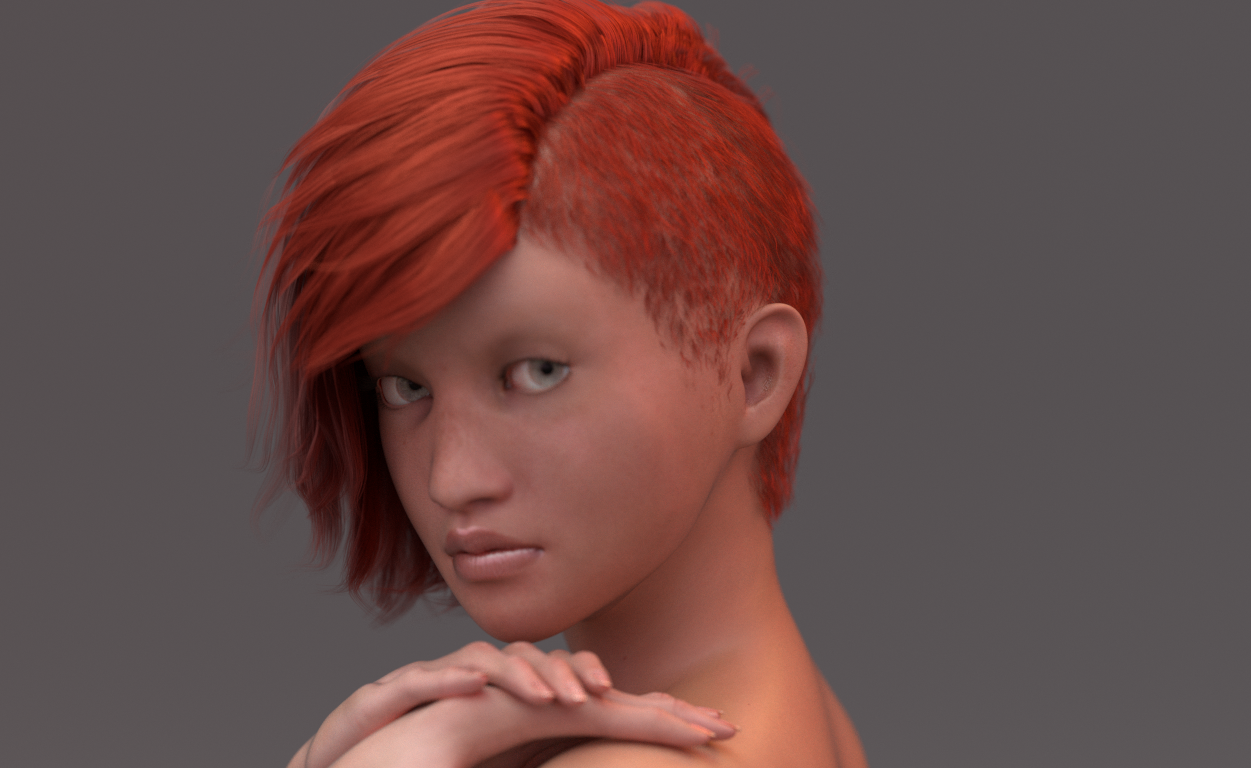
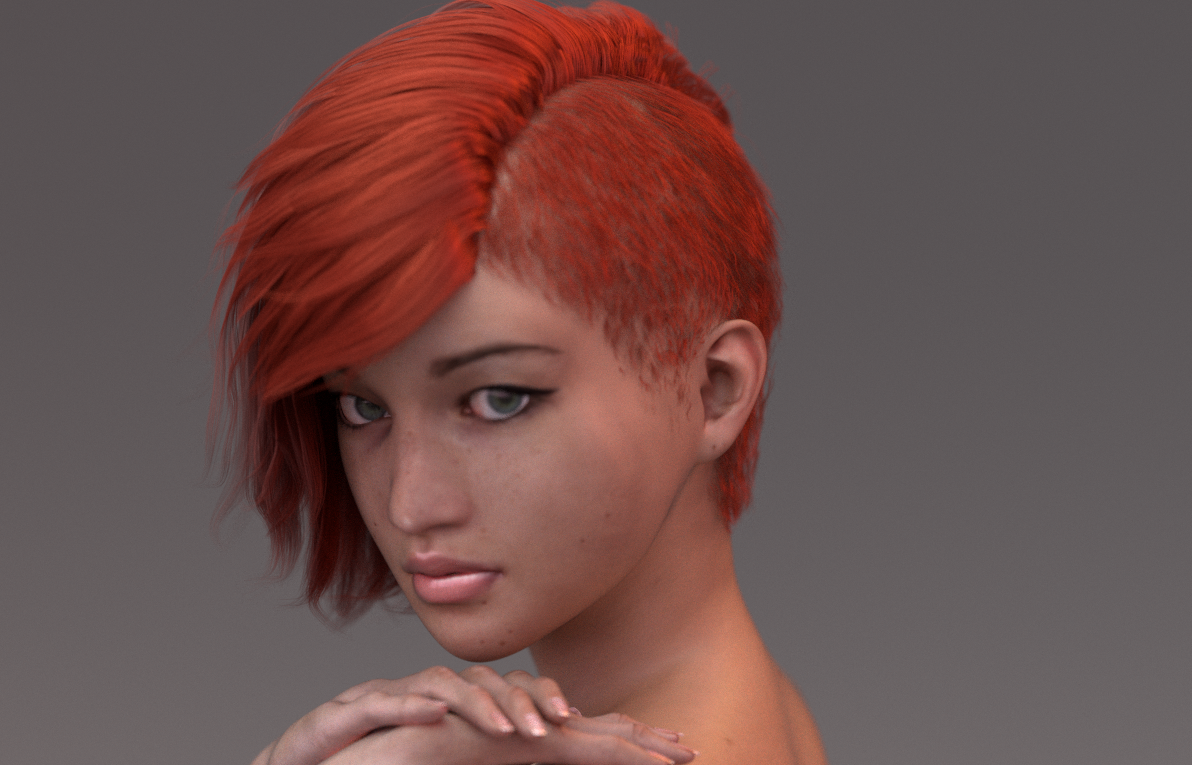
Here is Aiyana, a naturally toned Vic4, ported to Sasha16.
The last time I did a beautiful render of her, it was during December, 2020, using Poser 11 and Octane. With a splendid result using RedSpec' Octane-specific settings.
I took this as a challenge: retrieve a similar quality using EZSkin.
To achieve this, I have used "(0.0096, 0.0034, 0.0022)" instead of "(0.00482, 0.00169, 0.00109)" in the EZSkin configuration for the plugin.
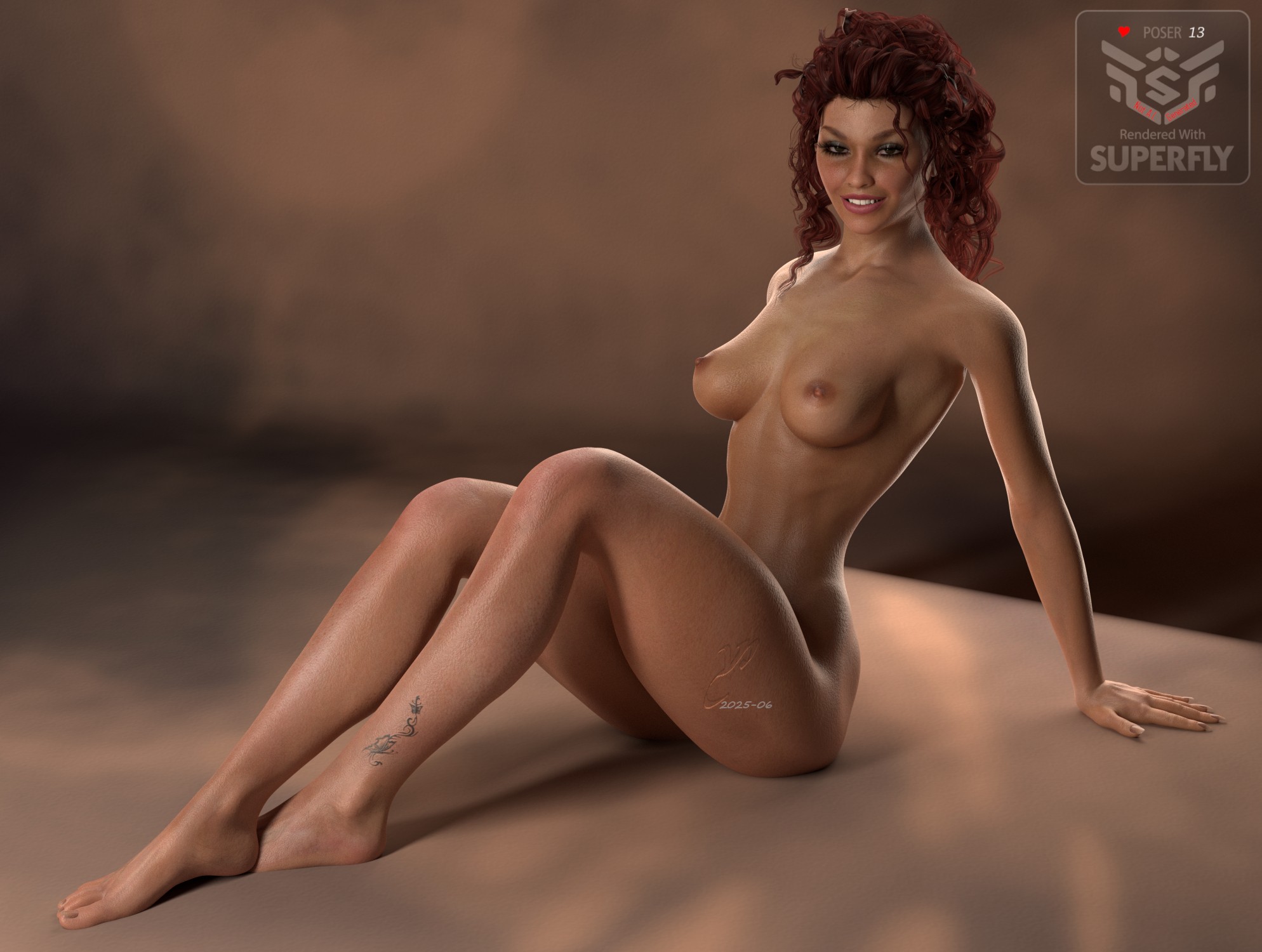
But as I was not completely satisfied by the PrincipledBSDF's specularity (probably something I'm missing...) I have added a second layer to the skin parts:
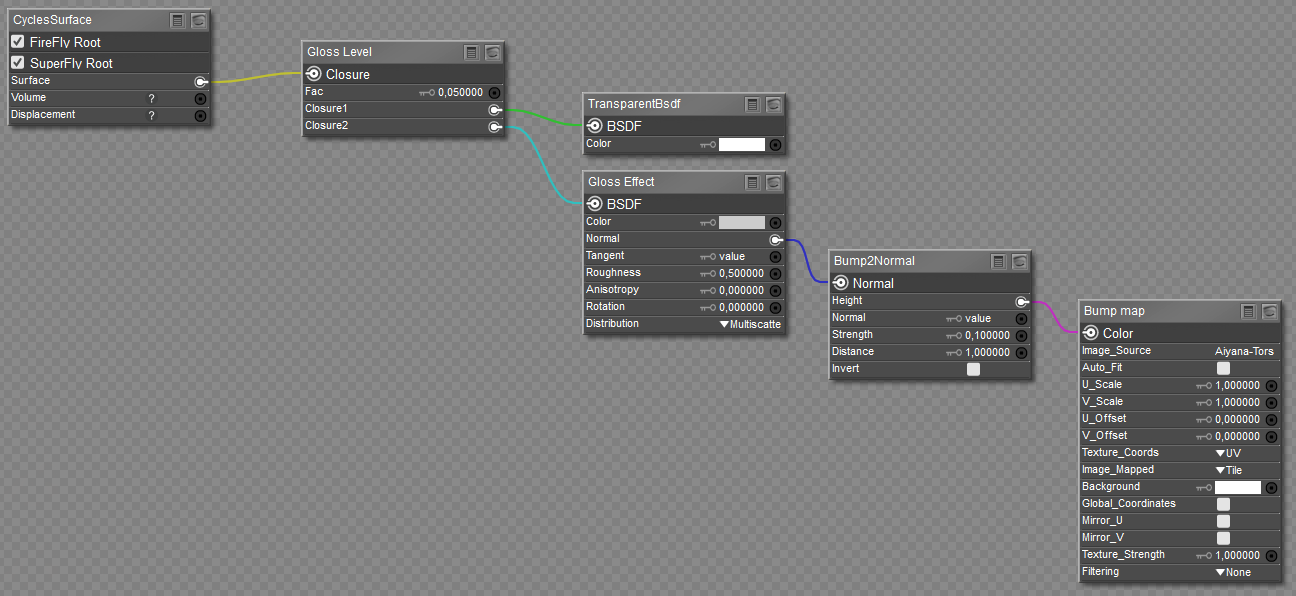
When it comes to a Gloss layer, my toolbox includes a script that detects the Bump file and adds it to the Normal input the of AnisotropicBSDF node (labeled Gloss Effect here). As sometimes adding the Bump doesn't add any particular effect, an option let me opts out this, skipping the Bump2Normal and the Bump map nodes.
The Gloss Level is a simple MixClosure node.
If you think that this specific option could be interesting to add to the PrincipledBSDF-based plugin for EZSkin, let me know.
Just as a reminder, the said plugin can add a gloss layer, provinding that the skin part is configured as a "skin_gloss" instead of a "skin", but it actually does not use the Bump, that could be an option to add.
The lighting comes from a front cylinder set in emission mode (5400K) plus a side area lamp (5200K). The StudioBackground Prop comes from archives I had completely forgotten on an almost lost hard drive, forgotten somewhere in my mess, found thanks to a crisis of tidiness... 
Probably as old as RuntimeDNA 
𝒫𝒽𝓎𝓁
(っ◔◡◔)っ
👿 Win11 on i9-13900K@5GHz, 64GB, RoG Strix B760F Gaming, Asus Tuf Gaming RTX 4070 OC Edition, 1+2 TB SSD's, 6+4TB HD
👿 Mac Mini M2, Tahoe 26.5, 16GB, 500GB SSD
👿 Nas 10TB
👿 Poser 13 and 14 ❤️
YPhil, thank you for your insight and troubleshooting.
In reviewing the last few entries of this thread, I must point out that the addition of the Pores features causes more problems than intended. I have noticed that when pores are added to the texture, it causes a major texture separation between the torso and the arms. It confounded me for some time until I discovered that the pore feature was the source of the problem. By removing it, the entire texture from head to toe became homogeneous. I caution everyone not to activate this feature, I think it causes considerable render issues and hours of unnecessary troubleshoot for individuals not familiar with EZSkin.

Privacy Notice
This site uses cookies to deliver the best experience. Our own cookies make user accounts and other features possible. Third-party cookies are used to display relevant ads and to analyze how Renderosity is used. By using our site, you acknowledge that you have read and understood our Terms of Service, including our Cookie Policy and our Privacy Policy.
RedPhantom posted at 9:39 PM Sun, 15 June 2025 - #4497109
Beautiful!