
Renderosity Forums / Poser - OFFICIAL
Welcome to the Poser - OFFICIAL Forum
Forum Moderators: RedPhantom Forum Coordinators: Anim8dtoon
Poser - OFFICIAL F.A.Q (Last Updated: 2026 May 29 3:05 pm)

Subject: La Femme and Crossdresser


Yes, it's very good news for those who want to make stills with La Femme in the starring role. Clothing was her one real drawback, and now it's solved. In a way, Crossdresser now makes her a bit superior to G8F, in terms of the range of possible scenes she can now be in. Since she can access a massive amount of V4 stuff. Crossdresser is of course free and can convert any clothing from a wide range of characters, the user just needs to buy one licence "per target character" (e.g. La Femme).
On the other hand I guess that the moaners will still be able to moan about animation, which Crossdresser converted items are not always well suited to. Plus, older clothing won't have SuperFly shaders/materials on it.
Learn the Secrets of Poser 11 and Line-art Filters.

Pretty easy to fix the small flaws that converted items have - either with some smoothing of the joint weight maps, or some morphs made with the morph tool.
As for SuperFly, it does pretty well with simple materials (those that have a diffuse map directly connected to diffuse, etc). Only some of the more complex Firefly materials that should give you a hard time. Besides, a lot of La Femme users still prefer to use Firefly anyway.
- - - - - -
Feel free to call me Ohki!
Poser Pro 11, Poser 12 and Poser 13, Windows 10, Superfly junkie. My units are milimeters.
Persephone (the computer): AMD Ryzen 9 5900x, RTX 3070 GPU, 96gb ram.

I just installed XD4, and then I bought the $99.99 All Licenses bundle. I've used the Updater, but when I open XD4, it says I have no licenses. There are no more Skipped Figures in the Updater to install, but XD4 says I have to install support files from the Updater. I don't see any more files to install. Anyone know what I'm doing wrong? (I've submitted an email to evilinnocence.)
W11,Intel i9-14900KF @ 3.20GHz, 64.0 GB RAM, 64-bit, GeForce GTX 4070 Ti SUPER, 16GB.
Old lady hobbyist. All visual art or fiction is "playing with dolls."
VISIT MY ALBUMSFOR COMICS: https://www.renderosity.com/users/VedaDalsette/gallery/albums
You can also get to my comics from my book website: https://www.vdbooks.com.
Arrgh! Never mind. I just read this on evilinnocence site. [NOTE: The licenses will not appear in your account until we manually process your order. Allow up to 24 hours for processing. If you need the licenses immediately, please purchase the licenses as individual products.]
W11,Intel i9-14900KF @ 3.20GHz, 64.0 GB RAM, 64-bit, GeForce GTX 4070 Ti SUPER, 16GB.
Old lady hobbyist. All visual art or fiction is "playing with dolls."
VISIT MY ALBUMSFOR COMICS: https://www.renderosity.com/users/VedaDalsette/gallery/albums
You can also get to my comics from my book website: https://www.vdbooks.com.

VedaDalsette: XD4 still won't show those licenses even after EvilInnocence processes the order. You'll need to download them and unzip the zipfile(s). You'll then have a collection of executable installers. You must run each installer to activate that doll's license.
As I recall, EI recommends that you only install licenses which you will definitely be using; leave the other license installers in some backup storage folder unless/until needed, because the XD4 program runs slower as more licenses are installed.
I don't see any reference to this advice in the current license installer tutorial. Maybe this only applied to an earlier version? Corrections to my post welcome.
Poser 12, Poser 13, Poser 14, in feet.
OSes: Win7Prox64, Win7Ultx64, Win11
Silo Pro 2.5.6 64bit, Silo 2025.1, Vue Infinite 2014.7, Genetica 4.0 Studio, UV Mapper Pro, UV Layout Pro, PhotoImpact X3, GIF Animator 5

Randym77, the Crossdresser (XD4) app is free at evilinnocence.com. You have to buy the figure licenses to convert the clothes. You can buy all in a bundle or just specific figures. I still have to install the licensed figures, so I haven't used it yet. However, I'm familiar with one other clothes converter. I've used PhilC's terrific Wardrobe Wizard tool, but he doesn't have a LaFemme conversion. And he's kinda retired now (good for him). So I got XD4 and bought the figure licenses. Looking forward to using it.
W11,Intel i9-14900KF @ 3.20GHz, 64.0 GB RAM, 64-bit, GeForce GTX 4070 Ti SUPER, 16GB.
Old lady hobbyist. All visual art or fiction is "playing with dolls."
VISIT MY ALBUMSFOR COMICS: https://www.renderosity.com/users/VedaDalsette/gallery/albums
You can also get to my comics from my book website: https://www.vdbooks.com.

Rhia474, I've used the Fitting Room a lot! And sometimes it works great. I have to rely on my own limited skills (thank goodness for the morphing tool to use after the fact!). I just downloaded my XD4 licenses and have yet to update the ones I'll be using, but I noticed Raffael wasn't included (everything else under the sun seemed to be), so I'll be using the Fitting Room for him/her.
I'm not an artist like so many talented people on here, just a hobbyist who likes to use pictures for my own personal use in storytelling (I'm not a gamer), so I love the ease of clothes conversions. I'm retired now, and back when I was working too many hours (like so many Americans are forced to), I'd discovered Poser 4 and played with it whenever I found some time. I've kept up with a lot of the upgrades and now have that time. I'm discovering so many things I hadn't used before (for example, I think I just discovered Pose Symmetry last year and I use it all the time now). I've made some very small animations and keep telling myself I'll be using that function more, but I still don't have the patience (and probably not a powerful enough computer). I just want to write my own stories and still pictures are fine so far.
Sorry to ramble. Fitting Room is a godsend, but I always seem to have to go into Joint Editor after using it, though. I'm not skilled with weights and figure grouping and all that. On another note, I'm awed by the textures people make. That's total magic to me.
Okay, my rambling will now really end.
W11,Intel i9-14900KF @ 3.20GHz, 64.0 GB RAM, 64-bit, GeForce GTX 4070 Ti SUPER, 16GB.
Old lady hobbyist. All visual art or fiction is "playing with dolls."
VISIT MY ALBUMSFOR COMICS: https://www.renderosity.com/users/VedaDalsette/gallery/albums
You can also get to my comics from my book website: https://www.vdbooks.com.
I might give Crossdresser a try. I wonder if I can use WW to convert to, say, V4, and get away with just getting Crossdresser licenses for V4 and LaFemme.
I have used the Fitting Room, but I find it difficult to get good results. WW is super easy in comparison, and the clothes seem to fit better in extreme poses. Maybe I just don't know how to use it right.
randym77, you can use the free XD4 (Crossdresser) app and purchase just the licenses you need (@ $10 each). I was going to do that, but when I looked at all the figures I wanted to include to convert to, it was cheaper to buy the bundle for $100. From what I understand, you can, no charge, convert FROM any figure it has but need to buy the license to convert TO a figure. If you want to convert Jessica 6 clothes to La Femme, you'd only need to buy the La Femme license.
Time for me to play with it now.
W11,Intel i9-14900KF @ 3.20GHz, 64.0 GB RAM, 64-bit, GeForce GTX 4070 Ti SUPER, 16GB.
Old lady hobbyist. All visual art or fiction is "playing with dolls."
VISIT MY ALBUMSFOR COMICS: https://www.renderosity.com/users/VedaDalsette/gallery/albums
You can also get to my comics from my book website: https://www.vdbooks.com.
For me. The fitting room just isn't clear on how to do everything. I'd be happy to do a public project step by step so anyone can see the ease or the difficulty of fitting one clothing made for one figure onto another. In the meantime, I'll say it's not a single or two click solution. It's easier to run it through a conversion program and apply the morph brush or adjust inner and outer material zones to take care of any jagged edges. The morph brush itself does take getting used to but it most certainly works. I won't go into the hair room which is slightly harder to get working than the Webb telescope. Ease counts. Speed counts.
Crossdresser of XD4 as it's known is located here. XD4 Check things out for yourselves.
Much love for Phil C. Phil, all the greats retire, then come back from time to time. They are always appreciated. You will be too. Drop by and say hi if you're able.
@ VedaDalsette You do not ramble. Please continue to speak your mind about issues, problems, or any thoughts you have. I am the Original Poster (OP) and I certainly don't mind digression from the main topic as well. As long as discourse is civil, we won't be suppressing any points of view.
@Rhia I started this response by my thoughts on the Fitting Room. If you would provide a minitutorial or perhaps state your workflow, it would be appreciated. Poser is super powerful and a lot of features are ignored because they seem too hard. I could be using the room wrong or missing a single step that would make the fitting room part of my workflow. I appreciate your thoughts and hope you will share more.
I love the discussion and I apologize for hijacking the thread with my question about the Fitting Room since I am aware this is about Crossdresser. I myself am only a hobbyist as well, playing with Poser in my spare time for over 10 years now. I am at work until later this evening but can see if I can start a separate thread perhaps tonight regarding how I work the Fitting Room. I have a slightly different workflow for different figures depending on whether prefits were made for them that I purchased or I am just futzing around with conversions myself.
Rhia474 posted at 12:31PM Wed, 16 October 2019 - #4367320
I love the discussion and I apologize for hijacking the thread with my question about the Fitting Room since I am aware this is about Crossdresser. I myself am only a hobbyist as well, playing with Poser in my spare time for over 10 years now. I am at work until later this evening but can see if I can start a separate thread perhaps tonight regarding how I work the Fitting Room. I have a slightly different workflow for different figures depending on whether prefits were made for them that I purchased or I am just futzing around with conversions myself.
Please do. Maybe you can tell me what I'm doing wrong with Prefittter-CR2. It does not work for me. At. All. Though others apparently get good results.
Seachnasaigh, I'm installing the XD4 figure licenses now and have copies of all 182 figures that come with the bundle. I hope 38 isn't too many to run at once. Oh, well, we'll see. Thanks!
I wish there was an XD4 license for Raffael (PhilC doesn't have one for WW either). I was also surprised to see no licenses for Paul or Pauline (but PhilC's WW has that). At least, there's the Poser Fitty Room.
I want to use better background figures than the Lores P4/P2 without grinding Poser to a halt, so I ran a python script to get polygon totals for figures and discovered Raffael's low poly count.
These are the adult figure poly counts I got. Some surprised me (Miki2 and Sydney).
Raffael totals --> 11279 polys 11914 verts
P3F totals --> 15588 polys 15576 verts
P4F totals --> 16380 polys 16392 verts
P3Bizman totals --> 17138 polys 17648 verts
P3M totals --> 17565 polys 17515 verts
P4M totals --> 18688 polys 18655 verts
Don totals --> 24139 polys 24105 verts
La Femme totals --> 24250 polys 26337 verts
V3RR totals --> 24406 polys 25041 verts
M3RR totals --> 24406 polys 25041 verts
Judy totals --> 24573 polys 24559 verts
Rex totals --> 29548 polys 34183 verts
James totals --> 29731 polys 29974 verts
Roxie totals --> 31698 polys 36697 verts
Jessica totals --> 32418 polys 34461 verts
Paul2 totals --> 35145 polys 37449 verts
Pauline 2 totals --> 36402 polys 38593 verts
Dawn totals --> 39326 polys 41318 verts
Dusk totals --> 39326 polys 41318 verts
Michael 4 totals --> 66830 polys 70638 verts
Victoria4 totals --> 66830 polys 70638 verts
PHFemale totals --> 69911 polys 72201 verts
JessiG2 totals --> 99003 polys 113719 verts
JamesG2 totals --> 90003 polys 97478 verts
Miki4 totals --> 72978 polys 79796 verts
Ryan totals --> 73700 polys 86687 verts
PHMale totals --> 80556 polys 83320 verts
Alyson totals --> 83032 polys 99572 verts
SimonG2 totals --> 90705 polys 98534 verts
Genesis 1 (Gen1M) totals --> 94360 polys 96967 verts
Genesis (Gen1F) totals --> 94360 polys 96967 verts
Genesis 2 Female totals --> 105456 polys 108085 verts
Genesis 2 Male totals --> 105456 polys 108085 verts
Miki2 totals --> 117143 polys 128230 verts
SydneyG2 totals --> 119317 polys 133591 verts
W11,Intel i9-14900KF @ 3.20GHz, 64.0 GB RAM, 64-bit, GeForce GTX 4070 Ti SUPER, 16GB.
Old lady hobbyist. All visual art or fiction is "playing with dolls."
VISIT MY ALBUMSFOR COMICS: https://www.renderosity.com/users/VedaDalsette/gallery/albums
You can also get to my comics from my book website: https://www.vdbooks.com.

I've used PhilC's Wardrobe Wizard since its beta stage and loved it! Then I started using the Fitting room but I would have to make a lot of adjustments since clothes tended to lose their shape and sometimes just get wrapped and shrunk on the figure so there were several settings to fiddle about with and my .cr2s always ended up with some kind of problem so then I started saving them as props and making them dynamic.
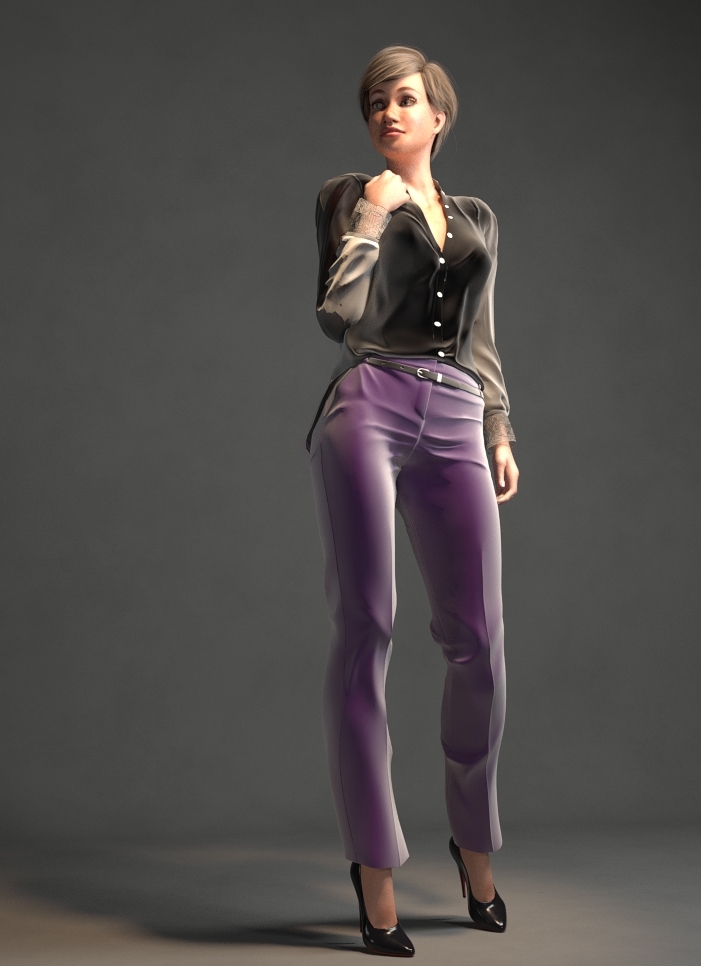
I decided to give Crossdresser a try with La Femme and all I can say is . . . Wow! It was super fast and easier compared to all the other ways I've tried before. Here's an example that took all of maybe 5 minutes to convert and needed no adjustments.


I have used WW (since ver. 1), and XD4, as well as the Fitting room. Some products work better with WW, some with XD, some with the Fitting room. I just use whatever works best between the three of them.
And I agree - it is a godsend for the customers - especially when a figure you like doesn't actually have any useful clothing made for it.
Not so much for clothing vendors.
@VedaDalsette: You might also want to consider P3DA's Lorenzo Lorez and Loretta Lorez.
@Glitterati3D: If XD4 is open, close it. Run the updater. Run the license installer for La Femme. I recall that they specifically said to close XD4 before running license installers.
All of the dolls will appear in the "from" list. If any of the newer ones are missing, run the updater, which will update XD4 itself, adding any new dolls to its repertoire. The "to" list will only show those dolls for whom you have installed a license.
I see they now have a Dusk license; I already have the Dawn license. I'll be getting the Dusk and La Femme licenses. 
Poser 12, Poser 13, Poser 14, in feet.
OSes: Win7Prox64, Win7Ultx64, Win11
Silo Pro 2.5.6 64bit, Silo 2025.1, Vue Infinite 2014.7, Genetica 4.0 Studio, UV Mapper Pro, UV Layout Pro, PhotoImpact X3, GIF Animator 5
Glitterati3D posted at 11:50PM Wed, 16 October 2019 - #4367360
I bought the La Femme addon, installed it and can't get it to work. I can get La Femme in the FROM list, but not in the TO list.
What am I forgetting? It's been a while since I used Crossdresser.
I installed the addon, ran the updater (several times now).
Any help greatly appreciated.
Did you install the La Femme license in the same directory as XD4? I'm only asking because I installed XD4 on a drive other than the default the installer points at. Then when I ran the La Femme installation I almost didn't see that it still had the default path so I had to point it to the right path. If you look in your installation of XD4 you should find a file named figures and inside it all the figures you selected to import to convert FROM. If you installed the La Femme license correctly then in that folder you should have some .dat files beginning with "to_" . If not, then it means it wasn't installed correctly. If you do have those files and still can't see La Femme in the TO column then I suggest you contact the vendor.
Kalypso posted at 5:24PM Wed, 16 October 2019 - #4367351
I've used PhilC's Wardrobe Wizard since its beta stage and loved it! Then I started using the Fitting room but I would have to make a lot of adjustments since clothes tended to lose their shape and sometimes just get wrapped and shrunk on the figure so there were several settings to fiddle about with and my .cr2s always ended up with some kind of problem so then I started saving them as props and making them dynamic.
I decided to give Crossdresser a try with La Femme and all I can say is . . . Wow! It was super fast and easier compared to all the other ways I've tried before.
Interesting. I guess I'll have to try it. Especially since I'd only need one license.
Seachnasaigh, thanks for the tip. The Lorenzo/Loretta bundle is 50% off and I bought it for $20!
W11,Intel i9-14900KF @ 3.20GHz, 64.0 GB RAM, 64-bit, GeForce GTX 4070 Ti SUPER, 16GB.
Old lady hobbyist. All visual art or fiction is "playing with dolls."
VISIT MY ALBUMSFOR COMICS: https://www.renderosity.com/users/VedaDalsette/gallery/albums
You can also get to my comics from my book website: https://www.vdbooks.com.
@randym77: Since you specifically asked for the PreFitter, I will start with how I use it in the Fitting room:
-
Start with an empty scene. Load the Prefitter V4 CR2 from your Figures folder. Inject the V4 to La Femme plug from the Pose library. Select the Donor figure and set FBM La Femme to 1 in Donor Body..
-
Load La Femme. Make sure IK is off on the feet (it is ON by default, argh). Zero the figure (window--.Joint Editor Zero Figure). At this point, the V4 Donor should cover everything but hands and feet. With La Femme selected, Load Body Morphs, and if you have them, the BK Body Morphs. At this point, it might be worth saving this scene; it will save time in the future.
-
Load your V4 clothing item. Do NOT CONFORM. With clothing item selected, go to Figure> Copy Morphs From...> V4_Donor> Select None, then select FBM_LaFemme, then hit OK on the bottom. Once the copying is done, select the clothing item, find the FBM_La Femme morph, and set it to 1 in the clothing item.
-
Go to V4_Donor Hip Properties and make it invisible. (V4Donor—Body Parts—Hip—Properties tab—Visible checkmark removed)
-
Select the clothing item again. Dial any morphs you want to fix any poke throughs. As La Femme is bulkier as a base figure than V4, the V4 Bulk FBM works here well (with some items, I found I had to set it up to 0.5).
-
Now switch to the fitting room tab. Click New (as in, new fitting session). Object will be your clothing item. The goal will be La Femme. In other words, fit the clothing item to the La Femme figure not the donor. DO NOT ZERO FIGURES. Hit OK. Under the Fit section, try Iterations 10 and poke through margin 0.0020 More iterations will cause the oft mentioned suction effect. Dial in those above-mentioned values to Fit Iterations and Pokethrough margin. Leave all else untouched. Now hit the FIT button and watch the magic.
7.Once that is done, hit Create Figure button. Name your clothing figure (I usually leave the original name and add La Femme [or Dawn, Dusk, whatever you are using as your new fit]. Now wait till the next menu pops up. From this menu, select only the body parts the clothing covers, and check all 3 options (Transfer Morphs, Autogroup and Zero Rotations). Now wait. It will take a bit. I normally go and get a drink at this point (nothing really horrible timewise, but it usually takes at least one minute, depending on how complex the figure is). I almost always have a blue circle to help me to know when it’s still working.
-
When it is done creating and you can get back into the pose screen, do so (hit the Pose tab). Now select the new figure (identified by the useful addition you performed in the Fitting room, since you now have TWO clothing items on the scene, the original and the fitted new one), Hit Figure > Copy Morphs From... . Select the old clothing figure, and select as many "body" morphs as you want from the list. Then save the new clothing item as a new figure. I find that if I save it in the same folder as the original is, I have no problems loading them later.
-
Finally, delete the old clothing figure, and the Donor if you haven't already. NOW conform the new clothing figure to La Femme. All the sliders should work.
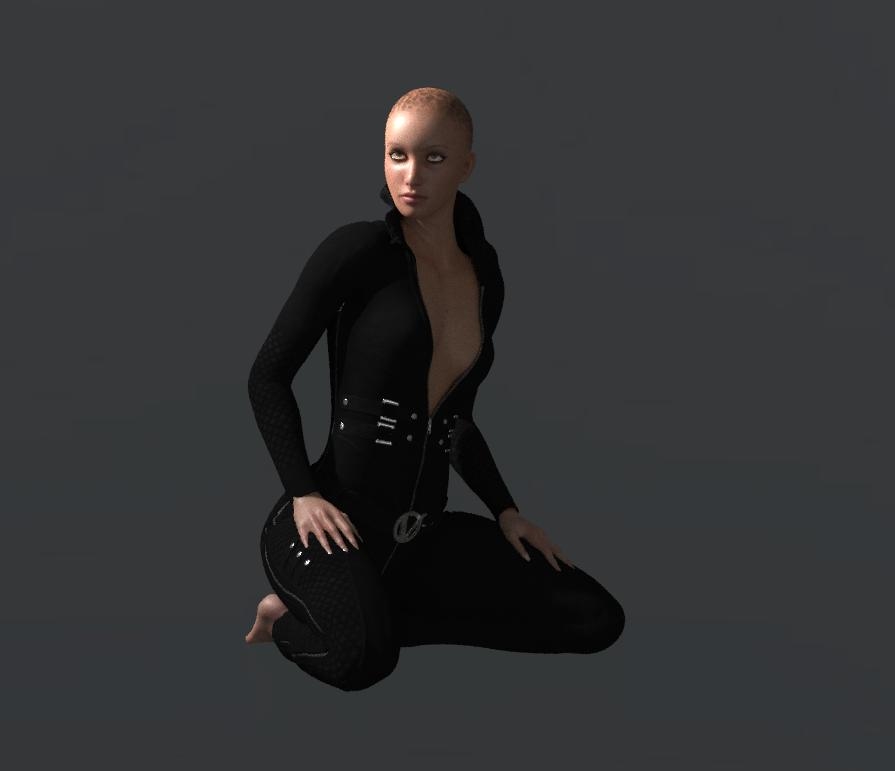
Quick and dirty render in SF of the Vindicator Catsuit fitted to La Femme:
randym77 posted at 6:29PM Wed, 16 October 2019 - #4367379
Interesting. I guess I'll have to try it. Especially since I'd only need one license.
You wouldn't need to buy any license to try it; XD4 has several free licenses available: P4 girl and P4 boy, MGPT (Millennium Girl Pre-Teen), all P5 dolls, Sara, etc.
But if you mostly use V4 and La Femme, those two licenses would let you use all of your content which was made for other dolls.
With more licenses, for example, you could convert a uniform, made for V3, to P6 Jessie, Sasha-16, A3, Dawn, and La Femme. Then populate a scene with a crew who match but who don't look like clones, because they are different heights, build, facial features, etc.
@Rhia474: Thank you for the tut; I haven't used the fitting room, so it's still an unknown to me. 
Poser 12, Poser 13, Poser 14, in feet.
OSes: Win7Prox64, Win7Ultx64, Win11
Silo Pro 2.5.6 64bit, Silo 2025.1, Vue Infinite 2014.7, Genetica 4.0 Studio, UV Mapper Pro, UV Layout Pro, PhotoImpact X3, GIF Animator 5
Okay, for the second one I was using Lyrra's Dawn Fitroom Helper kit. Same steps apply to Dusk with her Dusk kit as well.
- Load Dawn. Zero figure.
- Add all morphs you want or have to Dawn.
- Load your clothing item. Again, DO NOT CONFORM.
- In your Pose Library find the v4 to Dawn fit pose in the FitRoom Helpers folder. Apply this to your clothing item. This will move the clothing and scale it to fit. It will not be perfect. This is okay.
- Now use any morphs in the clothing item from V4 to better fit. Again, Bulk works great, so is Arms size. If you have pokethroughs still, don’t worry, just make sure it’s not a huge one. For me, there are almost always small pokeys at the armpit and inner tighs. These will/can be fixed by the fitting and by the morph brush. Again, do not conform.
- Now we go the the Fitting Room. Start a new session. The object will be the clothing item. Do NOT select Zero figure. We need to keep the pose and shaping we just added. In the second box select Dawn. The figure should be zeroed. Again, under the Fit section, try Iterations 10 and poke through margin 0.0020 More iterations will cause the oft mentioned suction effect. Dial in those above-mentioned values to Fit Iterations and Pokethrough margin. Leave all else untouched. Now hit the FIT button and watch the magic. 7.Once that is done, hit Create Figure button. Name your clothing figure (I usually leave the original name and add Dawn. Now wait till the next menu pops up. In this screen you will select the parts of Dawn’s rigging to transfer. Choose all 3 options including ‘Auto group'. This will adjust the clothing groups so they match Dawn better.
- When it is done creating and you can get back into the pose screen, do so (hit the Pose tab). Delete the V4 item. Save the new clothing item as a new figure. I find that if I save it in the same folder as the original is, I have no problems loading them later. NOW conform the new clothing figure to Dawn. There will be some pokethroughs, but hit the Morphing Tool, Select or Create Morph NewOK and select Pull; use this to smooth over to any area where the clothing is not fitting. Apply pose, render as needed.
Rhia474, thanks for the instructions on how to use the Prefitter. I wasn't sure how to use it before. I can see how it helps with the Fitting Room. Also, I had never changed the iteration and pokethrough settings before (they defaulted to 40 and .005 for me) and I've had to paint different weights on the garment before, because the Fit got too tight with all those iterations, I guess.
W11,Intel i9-14900KF @ 3.20GHz, 64.0 GB RAM, 64-bit, GeForce GTX 4070 Ti SUPER, 16GB.
Old lady hobbyist. All visual art or fiction is "playing with dolls."
VISIT MY ALBUMSFOR COMICS: https://www.renderosity.com/users/VedaDalsette/gallery/albums
You can also get to my comics from my book website: https://www.vdbooks.com.
@ Rhia474 Super Info Ping That is an amazing amount of information and perfectly listed AND easy to follow. I always speak of a one or two part solution but a good tutorial that makes things clear and easy to use? That is a treasure. I'll say right now that I didn't even know V4 had a helper folder. I've seen the prefitter in the freebies section but I had no idea how to use. What's it for is obvious but I lacked knowledge. Thanks for posting your workflow.
@VedaDalsette Did you get your licenses problems taken care of? For the record I have licenses for V4, A3. Gramps, Sadie, M4 and K4. Sam is basically Sadie and so far converts for her, works as well as converts for him. Might get the license for him anyway to help support EvilInnocence.
seachnasaigh posted at 6:36AM Thu, 17 October 2019 - #4367389
But if you mostly use V4 and La Femme, those two licenses would let you use all of your content which was made for other dolls.
I have WW and a TON of extensions for it; La Femme is basically the only figure I use that's not supported. That's why I'm interested in a La Femme license. Is it true that I would not need a V4 license to convert clothing from V4 to La Femme with Crossdresser? I don't actually have a lot of clothes for other figures. There really isn't much available, at least of the type I would use.
Rhia, thank you for the detailed instructions. I will try them tonight.
randym77 posted at 7:19AM Thu, 17 October 2019 - #4367429 Is it true that I would not need a V4 license to convert clothing from V4 to La Femme with Crossdresser?
Correct. If you want to convert V4 clothing to La Femme, you only need a La Femme license.
Poser 12, Poser 13, Poser 14, in feet.
OSes: Win7Prox64, Win7Ultx64, Win11
Silo Pro 2.5.6 64bit, Silo 2025.1, Vue Infinite 2014.7, Genetica 4.0 Studio, UV Mapper Pro, UV Layout Pro, PhotoImpact X3, GIF Animator 5
Quietrob, yes, I got my XD4 license issues corrected. As noted on evilinnocence's website, I got my licenses within 24 hours. Because it was the bundle, they were emailed with links. I downloaded them all and ran 38 of them. They're in the Crossdresser 4's Licenses folder. As the need arises, I'll add others.
I played with a few yesterday. The app is easy to use, like Wardrobe Wizard. Now that I'm familiar with it, I have to get to work.
Thanks.
W11,Intel i9-14900KF @ 3.20GHz, 64.0 GB RAM, 64-bit, GeForce GTX 4070 Ti SUPER, 16GB.
Old lady hobbyist. All visual art or fiction is "playing with dolls."
VISIT MY ALBUMSFOR COMICS: https://www.renderosity.com/users/VedaDalsette/gallery/albums
You can also get to my comics from my book website: https://www.vdbooks.com.
Seachnasaigh, I'm blown away by Daz's Lorenzo and Loretta Lorez characters. I can't believe all the morphs and mats included, and they're still so lores.
I need background retro figures and made these base figures to work off. I didn't add any of my own morphs. The only non-Lorez prop I added was the P4 fedora. His polycount is 6500 and her total is 5000. Wow! They even have eyes and mouths that move.
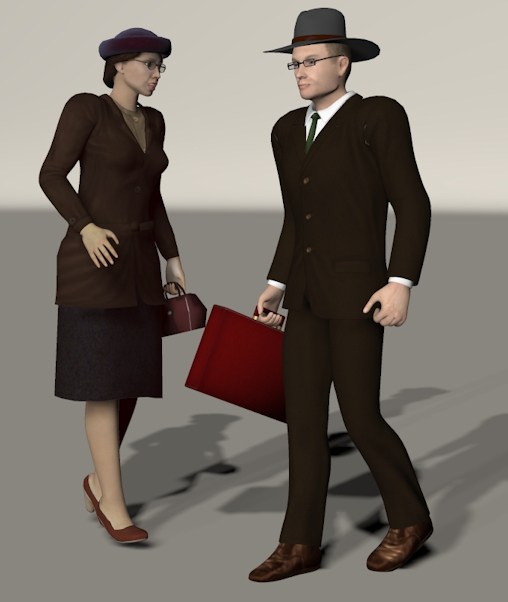
Thanks again for the tip!
W11,Intel i9-14900KF @ 3.20GHz, 64.0 GB RAM, 64-bit, GeForce GTX 4070 Ti SUPER, 16GB.
Old lady hobbyist. All visual art or fiction is "playing with dolls."
VISIT MY ALBUMSFOR COMICS: https://www.renderosity.com/users/VedaDalsette/gallery/albums
You can also get to my comics from my book website: https://www.vdbooks.com.
Thanks, Rhia! I spent so much time with Prefitter and could not get it to work. Your instructions were very helpful.
I'm still not sure what I was doing wrong before. Probably conforming at the wrong time. (The instructions that came with the product were very confusing on that point.) Anyway, it's working now. ?
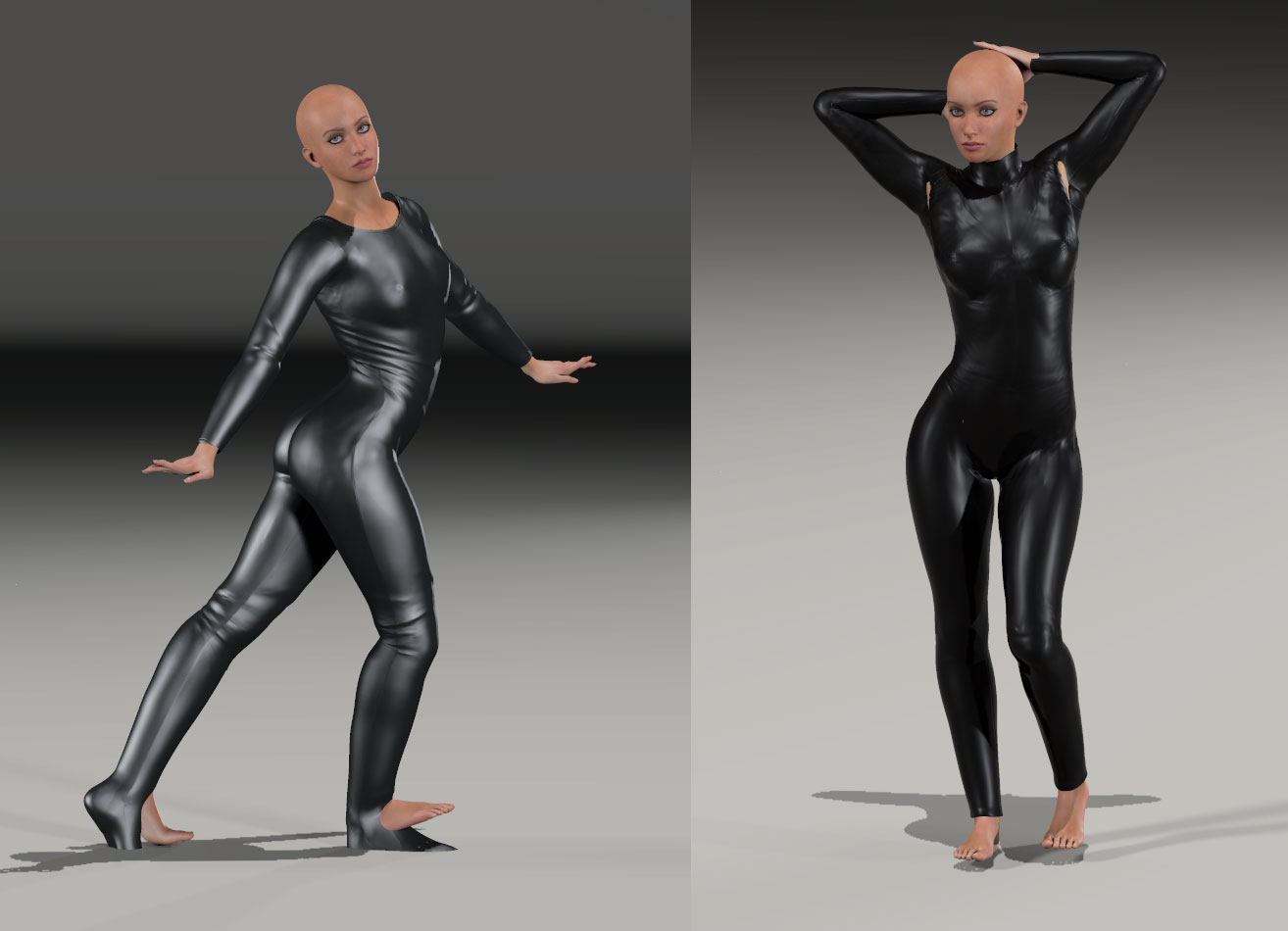
Could not get the underarm area poke through fixed with the fitting room or the morph dials, but it's minor. Hiding the shoulder or the morph brush will fix it. Feet didn't work, but I wasn't expecting them to. Much, much better results than I was getting before.
Probably will still give Crossdresser a try...
What I noticed was that the Fitting room really tells you if a garment was made well or not. I can't tell you how many bad joint spokes I had to fix with certain products that shall remain nameless, and don't get me started on crappy welding especially underarm (because I suppose no one will see it there).
Okay rant off, pleasant Rhia on: glad you got much better results. Please do give Crossdreser a try, it's probably a combination of products in one's toolbox that gives the best results.
Rhia474 posted at 7:04AM Fri, 18 October 2019 - #4367502
What I noticed was that the Fitting room really tells you if a garment was made well or not. I can't tell you how many bad joint spokes I had to fix with certain products that shall remain nameless, and don't get me started on crappy welding especially underarm (because I suppose no one will see it there).
Hmmm. Well, if anyone's curious...the one on the left is 3D-Age's Bodysuit I. The one on the right is Daz's V4 Bodysuit. I found the one on the left easier to work with (except the feet, and I would probably just hide LF's feet if I wanted to use the bodysuit feet).

I find that the fitting room performs best if I devote the time to fitting a garment first with posing, built-in morphs, and the morph brush. I almost never use the auto-fitting in the fitting room so I can make sure details aren't destroyed. I convert using the rigid features selection instead of tighten if I want a slight nudge with the auto-fitter (and I concur that 10 is about the max number of iterations before distortion occurs). The auto-fitter also can rip apart poorly made garments, and if you do the work yourself up front, that won't happen.
Does Crossdresser leave ghost bones like skirt handles intact?

randym77 posted at 6:42AM Tue, 22 October 2019 - #4367499
Thanks, Rhia! I spent so much time with Prefitter and could not get it to work. Your instructions were very helpful.
I'm still not sure what I was doing wrong before. Probably conforming at the wrong time. (The instructions that came with the product were very confusing on that point.) Anyway, it's working now. ?
Could not get the underarm area poke through fixed with the fitting room or the morph dials, but it's minor. Hiding the shoulder or the morph brush will fix it. Feet didn't work, but I wasn't expecting them to. Much, much better results than I was getting before.
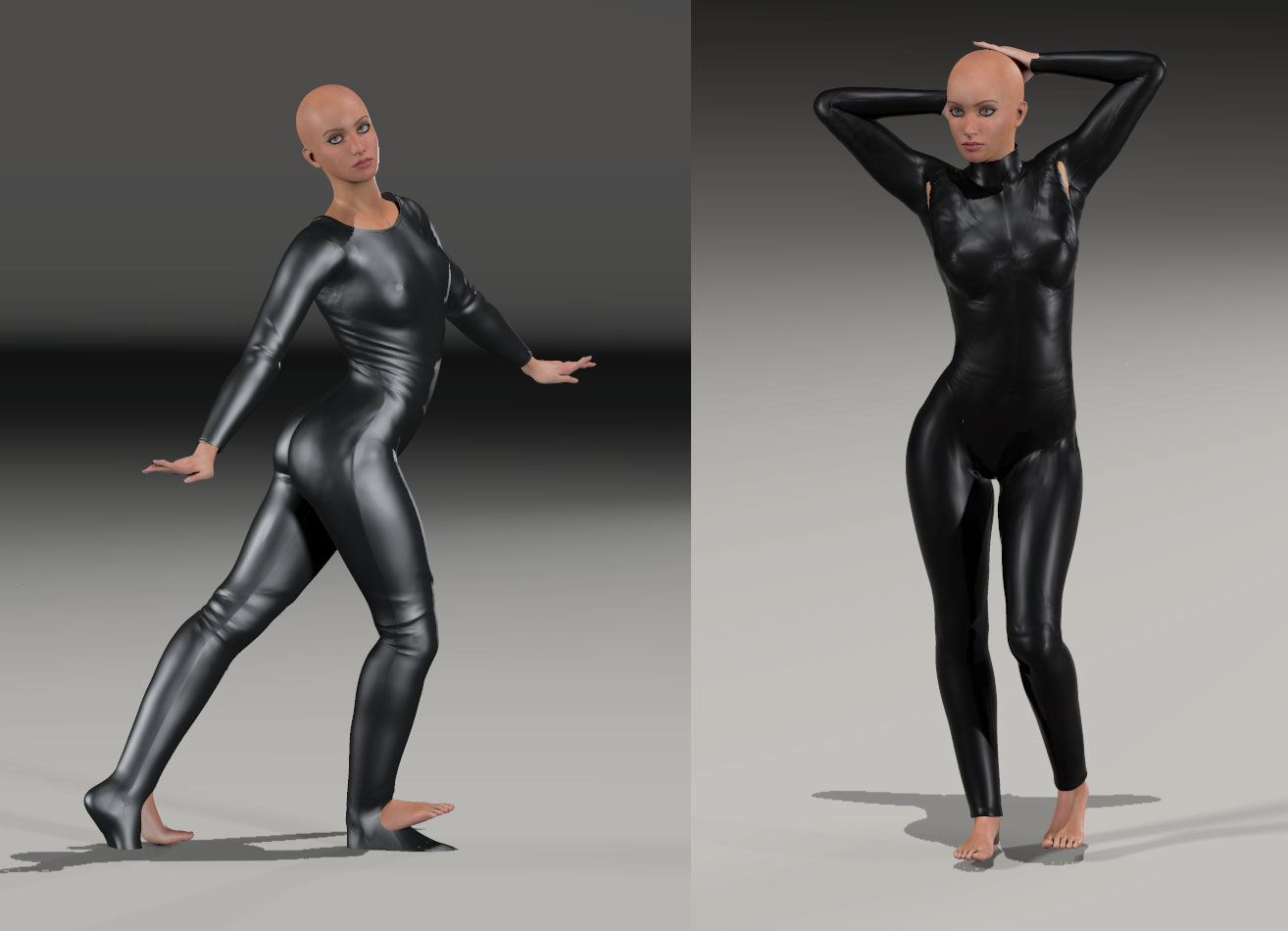
Randy I just saw this post and was wondering, when you converted the bodysuit, did you by any chance have IK on for the feet of the bodysuit?

Privacy Notice
This site uses cookies to deliver the best experience. Our own cookies make user accounts and other features possible. Third-party cookies are used to display relevant ads and to analyze how Renderosity is used. By using our site, you acknowledge that you have read and understood our Terms of Service, including our Cookie Policy and our Privacy Policy.
Just a note. I just checked and La Femme has been added to the Crossdresser licenses. I've only used Crossdresser and there is nothing like taking making a suit made for M4 suddenly fit gramps, V4 and Aiko! Now La Femme suddenly has years of wardrobe to draw from. Since Wardrobe Wizard is no longer being supported, you might check it out for yourselves.