quietrob opened this issue on Oct 14, 2019 · 38 posts
Rhia474 posted Wed, 16 October 2019 at 6:36 PM
@randym77: Since you specifically asked for the PreFitter, I will start with how I use it in the Fitting room:
Start with an empty scene. Load the Prefitter V4 CR2 from your Figures folder. Inject the V4 to La Femme plug from the Pose library. Select the Donor figure and set FBM La Femme to 1 in Donor Body..
Load La Femme. Make sure IK is off on the feet (it is ON by default, argh). Zero the figure (window--.Joint Editor Zero Figure). At this point, the V4 Donor should cover everything but hands and feet. With La Femme selected, Load Body Morphs, and if you have them, the BK Body Morphs. At this point, it might be worth saving this scene; it will save time in the future.
Load your V4 clothing item. Do NOT CONFORM. With clothing item selected, go to Figure> Copy Morphs From...> V4_Donor> Select None, then select FBM_LaFemme, then hit OK on the bottom. Once the copying is done, select the clothing item, find the FBM_La Femme morph, and set it to 1 in the clothing item.
Go to V4_Donor Hip Properties and make it invisible. (V4Donor—Body Parts—Hip—Properties tab—Visible checkmark removed)
Select the clothing item again. Dial any morphs you want to fix any poke throughs. As La Femme is bulkier as a base figure than V4, the V4 Bulk FBM works here well (with some items, I found I had to set it up to 0.5).
Now switch to the fitting room tab. Click New (as in, new fitting session). Object will be your clothing item. The goal will be La Femme. In other words, fit the clothing item to the La Femme figure not the donor. DO NOT ZERO FIGURES. Hit OK. Under the Fit section, try Iterations 10 and poke through margin 0.0020 More iterations will cause the oft mentioned suction effect. Dial in those above-mentioned values to Fit Iterations and Pokethrough margin. Leave all else untouched. Now hit the FIT button and watch the magic.
7.Once that is done, hit Create Figure button. Name your clothing figure (I usually leave the original name and add La Femme [or Dawn, Dusk, whatever you are using as your new fit]. Now wait till the next menu pops up. From this menu, select only the body parts the clothing covers, and check all 3 options (Transfer Morphs, Autogroup and Zero Rotations). Now wait. It will take a bit. I normally go and get a drink at this point (nothing really horrible timewise, but it usually takes at least one minute, depending on how complex the figure is). I almost always have a blue circle to help me to know when it’s still working.
When it is done creating and you can get back into the pose screen, do so (hit the Pose tab). Now select the new figure (identified by the useful addition you performed in the Fitting room, since you now have TWO clothing items on the scene, the original and the fitted new one), Hit Figure > Copy Morphs From... . Select the old clothing figure, and select as many "body" morphs as you want from the list. Then save the new clothing item as a new figure. I find that if I save it in the same folder as the original is, I have no problems loading them later.
Finally, delete the old clothing figure, and the Donor if you haven't already. NOW conform the new clothing figure to La Femme. All the sliders should work.
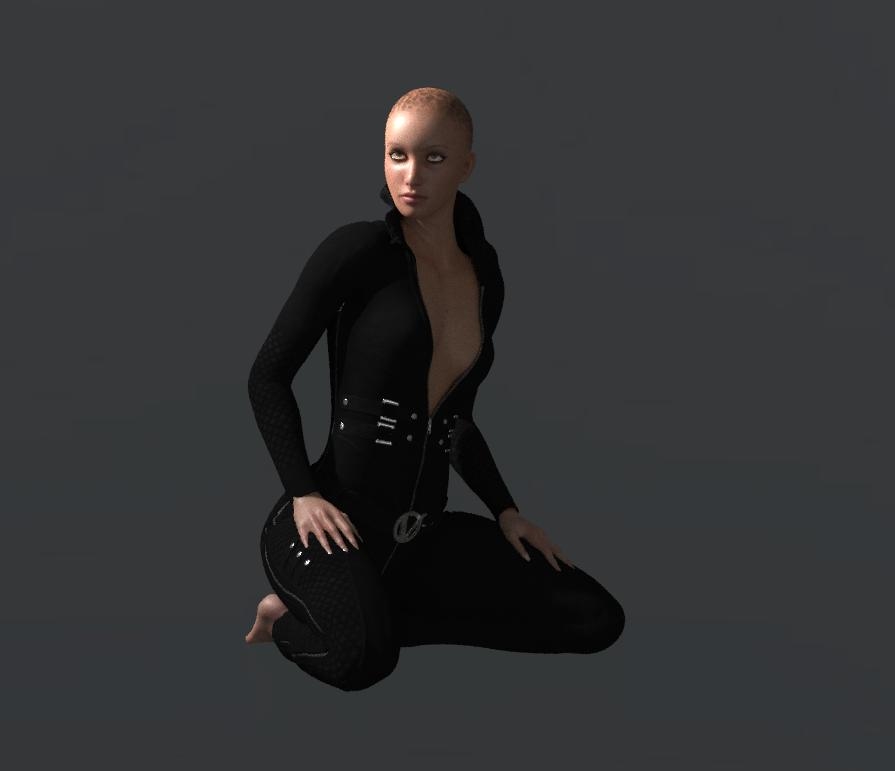
Quick and dirty render in SF of the Vindicator Catsuit fitted to La Femme: