
Renderosity Forums / Poser - OFFICIAL
Welcome to the Poser - OFFICIAL Forum
Forum Moderators: RedPhantom Forum Coordinators: Anim8dtoon
Poser - OFFICIAL F.A.Q (Last Updated: 2026 Mar 31 1:01 pm)

Subject: zBrush 4R6 Released.

msorrels informed me that the just upgrade broke his GoZ for DAZ Studio.
First chance I get I'm going to full installation zBrush 4R5.
============================================================
The
Artist that will fight for decades to conquer their media.
Even if you never know their name ,your know their Art.
Dark Sphere Mage Vengeance


Goz detects Poser but not Modo or Maya. Hmmm.... I'd be upset if I was using it.
Download my free stuff here: http://www.renderosity.com/homepage.php?page=2&userid=323368


I've got the update, and Poser's GoZ works like a charm with the new version.
I just used the updater.
Cannot say anything about Studio or other apps, though.
A ship in port is safe;
but that is not what ships are built for.
Sail out to sea and do new things.
-"Amazing
Grace" Hopper
Avatar image of me done by Chidori.

The new ZRemesher - so much awesome :D
Highly recommended, especially for giving CAD models a more Poser-friendly topology, although hard edges are currently its achilles heel.
I linked these videos in WTB's thread; they will make you believe:
ZBrushCentral announcement thread (video is close to bottom of first post)


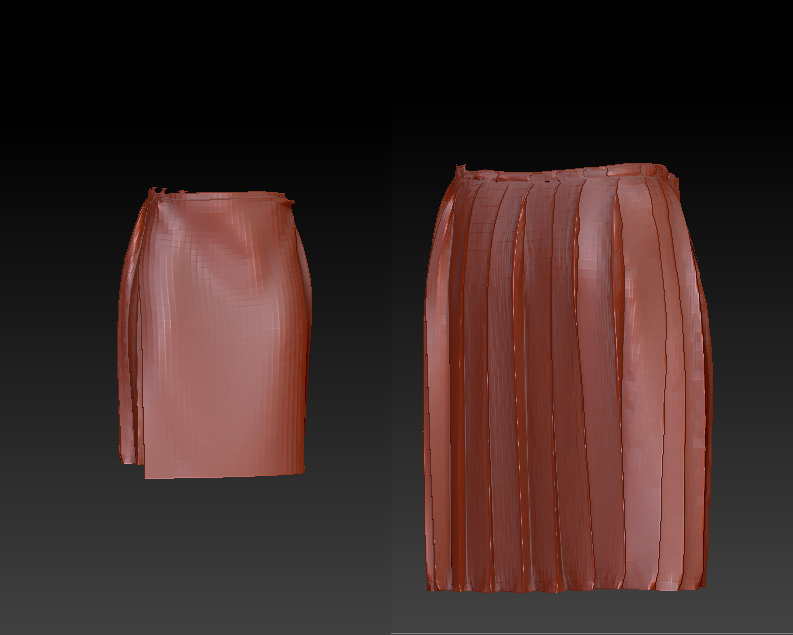
I also make MD clothing, and the original version (Qremesher) just couldn't handle pleats and sharp folds that MD can put out. Now, though....they are beeeeeauuuuu-tiful!
This kilt has sharp pleats, and the tops of the pleats have multiple layers of cloth attached at the same location. Before, I couldn't dream of putting this out as a quad mesh, but look at it now!
Yeah for ZBrush!
RosemaryR
---------------------------
"This...this is magnificent!"
"Oh, yeah. Ooooo. Aaaaah. That's how it starts.
Then, later, there's ...running. And....screaming."
With the new ZRemeshes could you model Rox's,V5 etc etc with as go topolagy ,would you have that much contraol over topolagy with ZRemeshes.
Would you need C4D as a modeler anymore ?
============================================================
The
Artist that will fight for decades to conquer their media.
Even if you never know their name ,your know their Art.
Dark Sphere Mage Vengeance

Quote - With the new ZRemeshes could you model Rox's,V5 etc etc with as go topolagy ,would you have that much contraol over topolagy with ZRemeshes.
Would you need C4D as a modeler anymore ?
I don't think its the greatest tool for retopologizing an entire human model. You dont have enough precise control over every polygon's placement and when you're trying to model a human you need that control.
It is good for clothing and other objects with large areas but at the moment you're not going to get precise details, even using the curve guides brush and all the settings in the zremesher pallet.
If you wanted to take the time to draw out every edge loop you need on a human and set the curve strength to 100 then maybe it might produce animatable results. So far I haven't tried that, but my experimenting with it so far tells me Topogun is still the premo choice for anything retopology-related, cause with that I can determine the placement of every vert edge and face.
~Shane
Quote -
With the new ZRemeshes could you model Rox's,V5 etc etc with as go topolagy ,would you have that much contraol over topolagy with ZRemeshes.
Would you need C4D as a modeler anymore ?
Quote -I don't think its the greatest tool for retopologizing an entire human model. You dont have enough precise control over every polygon's placement and when you're trying to model a human you need that control.
It is good for clothing and other objects with large areas but at the moment you're not going to get precise details, even using the curve guides brush and all the settings in the zremesher pallet.
If you wanted to take the time to draw out every edge loop you need on a human and set the curve strength to 100 then maybe it might produce animatable results. So far I haven't tried that, but my experimenting with it so far tells me Topogun is still the premo choice for anything retopology-related, cause with that I can determine the placement of every vert edge and face.
~Shane
I don't have topogun.
Could I
step 1 : sulpt a mesh in zBrush.
Step 2 : re topolgoy in topgun
Step 3: send the zbrush sculpted mesh and the topogun re topolgoy mesh back to zBrush.
Step 4 : make burned maps,displacment maps & vector maps in zBrush on to the topogun mesh in zBrush ?
topogun has GoZ ?
topogun mirrored works when your just making morphs ?
Thanks
============================================================
The
Artist that will fight for decades to conquer their media.
Even if you never know their name ,your know their Art.
Dark Sphere Mage Vengeance
Quote -
I don't have topogun.Could I
step 1 : sulpt a mesh in zBrush.
Step 2 : re topolgoy in topgun
Step 3: send the zbrush sculpted mesh and the topogun re topolgoy mesh back to zBrush.
Step 4 : make burned maps,displacment maps & vector maps in zBrush on to the topogun mesh in zBrush ?topogun has GoZ ?
topogun mirrored works when your just making morphs ?
Thanks
Basically yes.
Topogun doesn't have goZ that I'm aware of but I'm pretty sure it does read ztl files (zbrush's native format).
You don't really need GoZ for TG tho cause all you're doing is importing and exporting which is pretty much all GoZ does anyway it's just automated for you.
It allows you to create a project directory so that all your files associated with that project are kept organized.
You export your sculpted model from ZBrush as an OBJ file and load it into TG as a reference file then start building your new mesh topology on top of that reference mesh. It also recognizes ZBs polygroups and allows you to turn visibility on and off for different groups - useful if you have a model with areas that are hard to get to. You'd have to group the reference mesh in ZB before you export it to TG tho.
When finished you save out the new mesh you've greated as a new OBJ and import it back into zbrush. TG projects all your sculpting detials from the reference mesh onto the new mesh with organized topology. It will be exactly the same size and shape as the mesh you had originally sculpted in ZBrush. And inside zbrush you can project all your texture/paint data from your original mesh back onto the new mesh.
Its usually best to wait on fine detail and paint until after you've retopo'd, just to avoid having to redo anything.
Theres no reason to send your reference mesh back to zbrush. Once your new mesh is finished the reference mesh is useless cause the new mesh will have all the same details. TG's default subdivision is 3. You can set it to whatever you want, but 3 is best to get all the details from your original. You can reconstruct lower subdivisions in ZB's geometry pallet if you need/want to.
There are morph commands in TG but I've never had a reason to use them. I think it's mostly for when you've created blend shapes and then later discover you need to retopo. I just wait to do all my morphing in zb on the new mesh.
A license for TG is $100 and you get free updates whenever they're available.
There are some bugs but they aren't too bad as long as you stay aware of them. Mostly the bugs I've found are in symmetry mode when building topology. It doesn't always mirror over correctly so there's instances where you have to turn symmetry off, create your geometry on each side as equal as possible, and then turn symmetry back on. It's fine with moving points, and usually with cutting new edges, but if you delete anything on one side you have to manually delete it on the other side too. If you forget you can create a nasty mess for yourself on one half of the model pretty quickly. I haven't figured out how to keep that from happening yet, so I just go slow and carefully.
Hopefully the next update will fix the symmetry issues.
Blender also has a retopo feature but it's been a long time since I used it so I can't remember enough about it to explain atm.
~Shane

Best bet is to just model on one side in topogun and mirror over in another application. It's faster, as you don't have to fear symmetry issues and amounts to about the same model. Just be sure to have a clean loop down the center and that you select all its vertices to perform a Zero Sym on them when you're done.
The morph tool in Topogun is handy if you've made changes to the shapes in your reference mesh after you've done most of your retopology. You can then use it to reproject your new topology onto the altered reference mesh and everything should line up as they had before the change. I've done it a few times and it seems to work.
ZRemesher is great - it's leagues above Qremesher in figuring out how a mesh should flow even without the guides. With the guides I find it does a decent job for the most part but the more guides you add, the easier it is for the feature to get confused oddly enough.
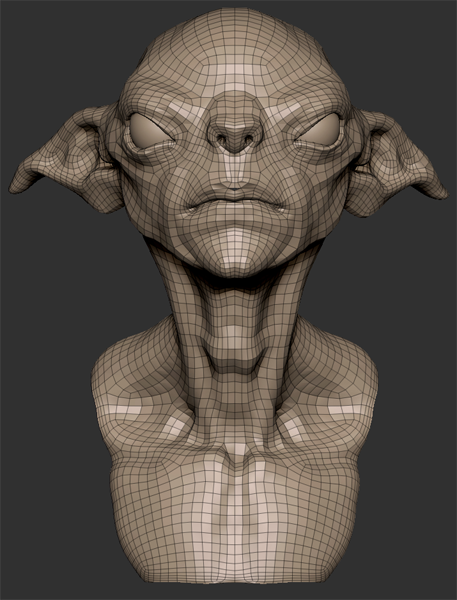
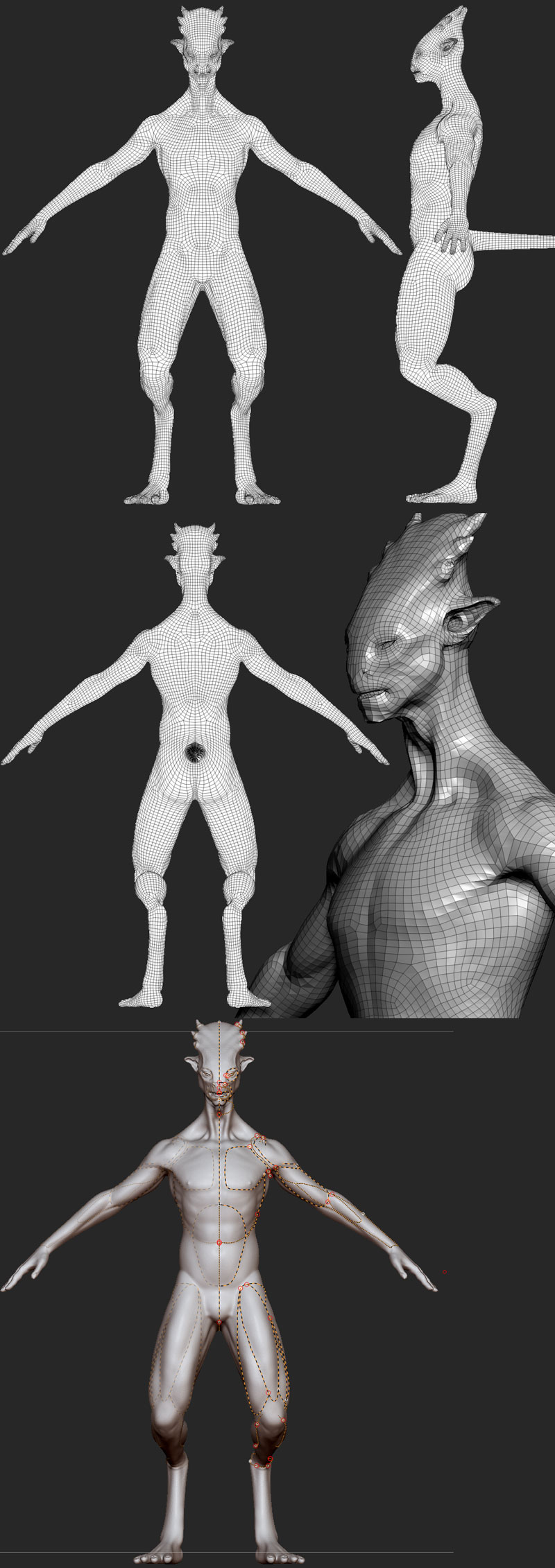
I find the best use of the guide curves is to enclose an area as opposed to outline exact muscle structure. This leaves the program free to do its thing while still getting the zones you want for easier projection of detail. Ultimately that's what ZRemesher is all about. It's primary use will be to get a mesh from either a Dynameshed model or one that has poor layout for certain details) that you can get cleaner details with fewer subdivisions during the reproject process. At least that'll be my primary use before using the mesh to continue my sculpting. Technically, in theory, you could create a model for use in Poser with it but you may run into some odd layouts that would be hard to get around depending on how you've put down your guides or if you used any at all. I will say for non-humanoid animals, it has so far proven very intelligent in its creation of topology. Dragons and quadropeds in particular on my end.

Privacy Notice
This site uses cookies to deliver the best experience. Our own cookies make user accounts and other features possible. Third-party cookies are used to display relevant ads and to analyze how Renderosity is used. By using our site, you acknowledge that you have read and understood our Terms of Service, including our Cookie Policy and our Privacy Policy.
zBrush 4R6 Released.
http://pixologic.com/
When I just upgraded from zBrush 4R4 to zBrush 4R5 & it Broke GoZ.
So then I full installation zBrush 4R5 & GoZ worked
Think I'm going to full installation zBrush 4R6.
Unless any one knows better ?
============================================================
The Artist that will fight for decades to conquer their media.
Even if you never know their name ,your know their Art.
Dark Sphere Mage Vengeance