
Renderosity Forums / Poser - OFFICIAL
Welcome to the Poser - OFFICIAL Forum
Forum Moderators: RedPhantom Forum Coordinators: Anim8dtoon
Poser - OFFICIAL F.A.Q (Last Updated: 2026 Jun 01 7:15 am)

Subject: Waaaaaaaay OT: Windows 7 Home and Font Deleting


Attached Link: Unlocker
I'm not sure it'd help, but try Unlocker, it's a free utility that can force Windows to release files that are "in use" and allow you to delete them
________________________________________________________________
If you're joking that's just cruel, but if you're being sarcastic, that's even worse.

Jeni:
It appears you are not the only one having this problem.
Assuming you've already smacked the hubby on the back of the head, here's another suggestion.
You may be having permissions problems. See the discussion at the below link, it also refers to a script to automate the permission and removal process for too many fonts. You have to read through to find the batch file needed.
Another issue is making sure you don't remove required fonts - this is also in the discussion.
Good luck.
social.answers.microsoft.com/Forums/en-US/w7desktop/thread/60f5ac05-182e-438f-88e4-2a7432d8e161
Klebnor
Lotus 123 ~ S-Render ~ OS/2 WARP ~ IBM 8088 / 4.77 Mhz ~ Hercules Ultima graphics, Hitachi 10 MB HDD, 64K RAM, 12 in diagonal CRT Monitor (16 colors / 60 Hz refresh rate), 240 Watt PS, Dual 1.44 MB Floppies, 2 button mouse input device. Beige horizontal case. I don't display my unit.
Ok, so far:
Unlocker didn't work, I don't know why.
Klebnor, I'm on my way out the door, but I've tried most of what is shown at that link. I just have to restart in safe mode, and then, hopefully, it will work.
Thank you so much!!!!!
Sitemail | Freestuff | Craftythings | Youtube|
Knowledge is knowing a tomato is a fruit. Wisdom is not putting it
into a fruit salad.
Also, yeah, he got a punch to the arm. :lol:
Sitemail | Freestuff | Craftythings | Youtube|
Knowledge is knowing a tomato is a fruit. Wisdom is not putting it
into a fruit salad.

3000 fonts? Wow and I thought I was a fontaholic... But I only have 1327 fonts installed. WAAH! Now I'm pining for more...
FREEBIES! | My Gallery | My Store | My FB | Tumblr |
You just can't put the words "Poserites" and "happy" in the same sentence - didn't you know that? LaurieA
Using Poser since 2002. Currently at Version 11.1 - Win 10.

Attached Link: MalwareBytes - File Assassin
Jen, often simply restarting will clear the "in use" issue.If restart doesn't solve it, then I would use File Assassin.
*"
- FileASSASSIN
Chances are if you have been using a computer, you have ran into one or more of the following messages:
- Cannot delete file: Access is denied.
- Make sure the disk is not full or write-protected and that the file is not currently in use.
- The source or destination file may be in use.
- The file is in use by another program or user.
These are very common messages that occur when attempting to delete files that a particular malware infection put onto your system. Malwarebytes is all too familiar with these messages, which is why we created FileASSASSIN.
FileASSASSIN is an application that can delete any type of locked files that are on your computer. Whether the files are from a malware infection or just a particular file that will not delete - FileASSASSIN can remove it. The program uses advanced programming techniques to unload modules, close remote handles, and terminate processes to remove the particular locked file. Please use with caution as deleting critical system files may cause system errors.
Usage- - - - - -
Simply download FileASSASSIN from one of the links below. If you selected the portable build, simply unzip and run the application, otherwise run the installer provided. Start FileASSASSIN and select a file by dragging it onto the text area or select it using the (...) button. Next, select a removal method from the list. Finally, click Execute and the removal process will commence.
"
You can delete the offending file, or just unlock it, as you wish.
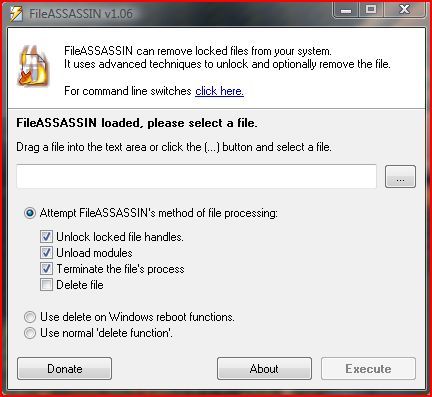
If deleting, try the " normal" delete first - it's immediate and no restart is required. If that fails, then use the delete on Windows reboot function.
Poser 12, Poser 13, Poser 14, in feet.
OSes: Win7Prox64, Win7Ultx64, Win11
Silo Pro 2.5.6 64bit, Silo 2025.1, Vue Infinite 2014.7, Genetica 4.0 Studio, UV Mapper Pro, UV Layout Pro, PhotoImpact X3, GIF Animator 5


Quote - 3000 fonts? Wow and I thought I was a fontaholic... But I only have 1327 fonts installed. WAAH! Now I'm pining for more...
I never ever install additional fonts to my windows folder. I learned the hard way back when I had windows 98.
Now I use Printer's Apprentice 7.0 and any extra fonts that I want, I put into an entirely separate folder somewhere on my hard drive and browse them using Printer's Apprentice 7.0. When I want to use one with my graphic program, I simply open the font and minimize it to my tool bar.
Contrary to belief, you don't have to have a font installed to be able to use it. It just has be open and then it will show up in your font list in your graphic program.
So far as the program goes, it does allow you to use installed fonts, uninstalled fonts, and manage installed fonts very easily.
"It is good to see ourselves as
others see us. Try as we may, we are never
able to know ourselves fully as we
are, especially the evil side of us.
This we can do only if we are not
angry with our critics but will take in good
heart whatever they might have to
say." - Ghandi

Worst case scenario: you loose a week's time and a little effort and you do a system restore.
WARK!
Thus Spoketh Winterclaw: a blog about a Winterclaw who speaks from time to time.
(using Poser Pro 2014 SR3, on 64 bit Win 7, poser units are inches.)
w00t!! Using safemode to delete them worked!!!! Thanks for all your help, guys :) It wasn't so much that I want a crap ton of fonts installed (really, I don't)...but, with all of them installed I couldn't run photoshop. Now that they're under 2k, I'm golden, and I'll delete more at my leisure.
Sitemail | Freestuff | Craftythings | Youtube|
Knowledge is knowing a tomato is a fruit. Wisdom is not putting it
into a fruit salad.

Kawecii.. Using Knoppix or what? Interesting idea.
FREEBIES! | My Gallery | My Store | My FB | Tumblr |
You just can't put the words "Poserites" and "happy" in the same sentence - didn't you know that? LaurieA
Using Poser since 2002. Currently at Version 11.1 - Win 10.
I have experimented Fedora and Kbuntu. With Ubuntu I had no luck because I downloaded a version that install Linux and not run from CD. I had an older Kurumin that once worked but now refused to open a 500GB SATA.
Anyway, any Linux that boots from CD/DVD and is able to mount the disk and drives and then edit files (move, copy, delete) is all what you need.
Stupidity also evolves!
Bumping this up because I've run into a curious, and related, problem.
I can start, and run PS4 just fine, in 64 bit mode and everything. And do whatever I please in it - EXCEPT use the Type tool. Then it dies. And since i'm well under the 2K fonts (as mentioned above) I suspect it's a "similar but not same" problem here.
BEFORE I installed all my lovely fonts (actually.. I didn't install them per se, I just copied the fonts folder over from my previous windows folder...) I am pretty sure the Type Tool worked.
The REALLY odd thing is, I can use the 32 bit CS4 with all the fonts... but it's the 64 bit I start by default...
Anyone got any ideas?
FREEBIES! | My Gallery | My Store | My FB | Tumblr |
You just can't put the words "Poserites" and "happy" in the same sentence - didn't you know that? LaurieA
Using Poser since 2002. Currently at Version 11.1 - Win 10.

Just a note for those thinking of deleting fonts, do be careful what you delete. Some fonts are actually used by windows and you can get some strange looking things showing up on you computer. (Like in xp the ► in the start menu is a font) I learned this the hard way and let me tell you it's a pain the in butt to fix it.
Available on Amazon for the Kindle E-Reader Monster of the North and The Shimmering Mage
Today I break my own personal record for the number of days for being alive.
Check out my store here or my free stuff here
I use Poser 13 and win 10
safe mode doesnt load many drivers or application helpers. You may have several word and photoshop helpers loaded that may be locking the fonts. Windows itself will lock a bunch of them .
You may be able to delete via the Control Panel > Fonts option , select the file and use the menu File >Delete. It is meant to be a deferred delete which requires a reboot to take effect. This is windows XP but should still apply to vista or win 7.
Hm I'm starting to think I'll have to reinstall my CS4. It crashes in both 32 and 64 versions if I use the healing brush. I never had those problems with it in Vista, so perhaps something is corrupted somehow. sigh
FREEBIES! | My Gallery | My Store | My FB | Tumblr |
You just can't put the words "Poserites" and "happy" in the same sentence - didn't you know that? LaurieA
Using Poser since 2002. Currently at Version 11.1 - Win 10.

Privacy Notice
This site uses cookies to deliver the best experience. Our own cookies make user accounts and other features possible. Third-party cookies are used to display relevant ads and to analyze how Renderosity is used. By using our site, you acknowledge that you have read and understood our Terms of Service, including our Cookie Policy and our Privacy Policy.
Last week, I had to replace the main hard drive in my PC, which means I had to reinstall Windows 7. I have Windows 7 Home, because, really, I didn't think I needed anything else, and it was the direct upgrade from what came with the computer when I bought it last year. Anyway, my husband decided to "help" me when I went to the grocery store by installing a whole DVD worth of fonts.
:b_upset:
3000 + fonts later, and I can't open photoshop OR my Acrobat viewer. I was able to delete about 1000 from the font folder before having to restart my system....and now, I can't delete ANY OF THEM :( It keeps telling me that they're in use. I highly doubt "dings" style fonts are in use.
Anyone have any ideas on what I should do? I've tried everything on the Windows site, and trying to "reset" the fonts doesn't do anything.
Sitemail | Freestuff | Craftythings | Youtube|
Knowledge is knowing a tomato is a fruit. Wisdom is not putting it into a fruit salad.