
JenX opened this issue on Aug 06, 2010 · 18 posts
seachnasaigh posted Fri, 06 August 2010 at 8:04 AM
Attached Link: MalwareBytes - File Assassin
Jen, often simply restarting will clear the "in use" issue.If restart doesn't solve it, then I would use File Assassin.
*"
Chances are if you have been using a computer, you have ran into one or more of the following messages:
These are very common messages that occur when attempting to delete files that a particular malware infection put onto your system. Malwarebytes is all too familiar with these messages, which is why we created FileASSASSIN.
FileASSASSIN is an application that can delete any type of locked files that are on your computer. Whether the files are from a malware infection or just a particular file that will not delete - FileASSASSIN can remove it. The program uses advanced programming techniques to unload modules, close remote handles, and terminate processes to remove the particular locked file. Please use with caution as deleting critical system files may cause system errors.
Usage- - - - - -
Simply download FileASSASSIN from one of the links below. If you selected the portable build, simply unzip and run the application, otherwise run the installer provided. Start FileASSASSIN and select a file by dragging it onto the text area or select it using the (...) button. Next, select a removal method from the list. Finally, click Execute and the removal process will commence.
"
You can delete the offending file, or just unlock it, as you wish.
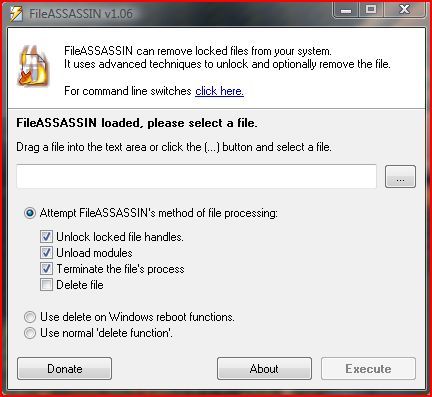
If deleting, try the " normal" delete first - it's immediate and no restart is required. If that fails, then use the delete on Windows reboot function.
Poser 12, Poser 13, Poser 14, in feet.
OSes: Win7Prox64, Win7Ultx64, Win11
Silo Pro 2.5.6 64bit, Silo 2025.1, Vue Infinite 2014.7, Genetica 4.0 Studio, UV Mapper Pro, UV Layout Pro, PhotoImpact X3, GIF Animator 5