
Renderosity Forums / Poser - OFFICIAL
Welcome to the Poser - OFFICIAL Forum
Forum Moderators: RedPhantom Forum Coordinators: Anim8dtoon
Poser - OFFICIAL F.A.Q (Last Updated: 2026 Jun 06 6:06 pm)

Subject: Morph Cleanup Script

Quote - I was thinking using the matched UV as a bridge between two sets of meshes might help, but in fact it is introducing more problems into the equation owing to the anomalies ( such as edges ) created when mapping a 2D UV onto a three dimensional surface.
If people had flat heads it would make life much simpler lol.
I may have been too imprecise with my language, up there. The trouble isn't any edges in the geometry. It's the seams in the UV map, where the texvertices are split and you have separate UV islands.
I also overlooked the idea of the remapped UV in your proposal. What I managed to do was use the weighted vertex correlations created by TDMT to adjust the UV's of the target mesh to duplicate the UV layout on the source mesh. The trouble was the UV seams. I don't think that would go away, even if we had something like DPH's remapped geometry to try to use as a control in the process. The trouble would still be trying to define what the split texvertices of the target geometry should do. The best result I could imagine would be literally duplicating DPH's remapping, because there the seams are defined for us. But there's no need to do that. If we were to try to extrapolate beyond that, the problem of the split UV seams would come back into the process. A control file would only help with the seam problem if we limited the possible seams to what was present in the control. So one might be able to rearrange the rest of the UV positions, but I still don't see any gain from doing that. (Sorry if I'm babbling. I'm "thinking out loud," as it were. :lol:)
I'm thinking about it again, and maybe someone will read this discussion and introduce a new idea that could solve the matter. It's good that you brought it up! :thumbupboth:
===========================sigline======================================================
Cage can be an opinionated jerk who posts without thinking. He apologizes for this. He's honestly not trying to be a turkeyhead.
Cage had some freebies, compatible with Poser 11 and below. His Python scripts were saved at archive.org, along with the rest of the Morphography site, where they were hosted.

Looking at the UVs is an interesting idea. But I'm just a bit confused now. Are we talking deriving UV mappings from Cage's vertex correspondences, or deriving correspondences from already matching UV mappings for a pair of figures? And why are seams so problematic? I understand that they're a bit tricky, but unless one wanted to match completely unrelated, existing UV mappings - which I don't think would be very useful, anyway - I can't see the big unsolvable problem.
So, what am I missing?
-- I'm not mad at you, just Westphalian.
The idea is to derive a UV transfer from one geometry to another, using a TDMT comparison data file. This can be done (mostly). Spanki and I have both done it in different contexts. I started working on the idea because I wanted to port my V1 morphs to V3, but I had no money at the time and no V3 textures. So I wanted to port the V1 UV's to V3, so I could use my existing textures as well as morphs.
I believe (correct me if I'm mistaken, anyone) that Ian Porter is suggesting a similar process, but using something like DP Hoadley's (begging his pardon if I've misspelled) remappings of different figures as a sort of control for the process.
The problem with using the data file for UV transfer is that we correlate vertices to vertices. UV's, however, use texvertices. A vertex can have as many texvertices as there polygons of which the vertex is a part. We only have correlation data for one vertex, while there can be many texvertices. (Boy, I'm gonna confuse myself in a minute.... :lol:) We don't get enough data from the comparison of vertices to be able to determine how to handle all possible texvertices.
Transfer works fine when there's only one texvertex to the vertex. The trouble is on the UV seams, where there are multiple texvertices for the UV seam edge vertices. If we use the vertex data we have for any given vertex for all of its texvertices, the texvertices overlap and at least one of the UV islands has incorrect seams. The resulting mess is hard to clean up by hand, unless you have a simple geometry with few UV seams. As far as we could determine, the problem can't be resolved with code. We don't have enough information and human input is required to sort it out.
Although I wonder if something like restore_detail, or another smoothing process, for texvertices might be able to pull the errant seam texverts into place for their respective UV islands. Hmm. I tried things like that at the time, but hadn't yet developed much capability with such things.
I'm not sure I'm explaining adequately. Apologies, if I'm not. :blushing: May need more coffee. :lol:
===========================sigline======================================================
Cage can be an opinionated jerk who posts without thinking. He apologizes for this. He's honestly not trying to be a turkeyhead.
Cage had some freebies, compatible with Poser 11 and below. His Python scripts were saved at archive.org, along with the rest of the Morphography site, where they were hosted.

Cage:
My apologies, I thought the discussion was to use the UV maps of pre and post remapped figures to try and make a comparison file for morph transfer. Such as, if dphoadley was to make a remap of Antonia to V3 textures, then use the UV maps to help make a comparison file between Antonia and V3. I got totally lost on this one.
LMK
Probably edited for spelling, grammer, punctuation, or typos.
Cage: How messy does it get, though? What I mean is, do you have a solution in principle, which just doesn't deliver a usable quality, or don't you have a solution at all?
I think the first step would be to look at the seams in the "donor" figure (the one that you take the UV mapping from) and try to determine the best possible seams for the target figure from those. Is that something you've done, partially done or not done at all?
Once you have that, it should be pretty much a matter of book-keeping and the proper mangling of coordinate values. Tricky, but certainly not impossible. Obviously, there can be all kinds of quality problems like overlaps and overshoots, so even if the problem is "solved" in principle (what the mathematician in might call solved) it might not be good enough to use in practice.
See what I'm getting at?
But anyway, I think IanPorter meant just the opposite direction: given you have matching UVs for two figures, could that be used to derive a correlation file for the morph transfer? I think that's probably an easier problem, because you don't need to figure out where to put seams. On the other hand, I don't know how useful that would be. My feeling is that matching the shapes of two figures in 3d is easier than matching their UVs.
-- I'm not mad at you, just Westphalian.
Quote - Such as, if dphoadley was to make a remap of Antonia to V3 textures
You can drop the 'if'. He's already done that. I don't know when and under which conditions he will make it available, but it exists, and he said it would be free.
-- I'm not mad at you, just Westphalian.

Cage:
This script is absolutely amazing!! At least what I'm seeing in this forum topic. I tried it myself in Poser7 and ran into too many errors. I think I might not have all of the proper files or maybe I installed it wrong. I'll look more into this tomorrow and post any errors then.
So when time permits (and when it's ready), can you release a zip that will have all of the files included for V3 to Antonia in one download?
Thanks!!!
-------------------------------------------------------------------------------------------------------------
AMD FX-9590 4.7ghz 8-core, 32gb of RAM, Win7 64bit, nVidia GeForce GTX 760
PoserPro2012, Photoshop CS4 and Magix Music Maker
--------------------------------------------------------------
...and when the day is dawning...I have to say goodbye...a last look back into...your broken eyes.
odf: Ah. Just like me to wholly misunderstand. :lol: Sorry, Ian! I saw UV's mentioned and I jumped to conclusions. Sigh.
I don't know. I'd have to think about using UV maps for a geometry correlation. Hmm. In some cases, maybe it could be an interesting option. I could still see potential problems at the seams. But working backwards from multiple texverts to single verts, you could just pick one of the texverts to treat for the comparison, perhaps.
Erm, no. No. Because doing that, you'd lose any potential matching for vertices on a separate UV island.
I'll have to think about the idea. :unsure: 
Quote - How messy does it get, though? What I mean is, do you have a solution in principle, which just doesn't deliver a usable quality, or don't you have a solution at all?
I don't think I have a solution in principle, no. I tried everything I could think of, at the time, and I don't have any new ideas, right now. I think the situation was more complicated than I expressed above, too. Unless you have a perfect vertex match where a seam split can go, there can be issues about where to split the seam. Even if seam split verts do match up, then it's tricky to try to sort out which texvert for source should go with which texvert for target. It gets horribly complicated and it seems beyond my skill to sort out. Possibly it could be sorted out. I always have faith in the potential of those who are smarter or better-educated than I am. :lol:
I'm sort of afraid to revisit the matter, too. I spent two months on it in early 2007 and was so frustrated that I drew back from the TDMT project at that point, which is where phase 1 of the project ended. We didn't get back to it until 18 months later. :lol: I don't want to drop this before I've done the best with it that I can.
Which thought brings me to a problem. I'm using squared distances for the pure PoserPython comparisons, and that means the threshold value needs to be squared, too. But the threshold is less than 1.0, and I hadn't thought it through to realize that the value would grow smaller, not larger, when squared. :blushing:
So I need to understand how to appropriately raise the threshold to reflect the squared values. I have no idea how to do this! Ack! 0.006^2 = 0.000036. sqrt(0.0036) = 0.006, but that's smaller again. Apparently I'm trying to do something absurd and nonsensical. :blushing: Which isn't unusual, for me. :lol:
Any ideas how I can fix this? The squared distances are almost twice as fast, but also not accurately reflecting what we'd get without them, if the threshold problem can't be solved.
And... just to see what would happen, I went ahead and wrote the PureBasic program to handle comparisons externally. Ack, again! :ohmy: It's slower than PoserPython with the squared distances, partially because it struggles to import all the vertex data and sort it out. Then when it runs, it turns out to be a CPU hog, running at 75% to 90% CPU usage the whole time.
So I'm not sure that's a feasible approach at all, and Cage is having a bad day. :cursing: :lol:
===========================sigline======================================================
Cage can be an opinionated jerk who posts without thinking. He apologizes for this. He's honestly not trying to be a turkeyhead.
Cage had some freebies, compatible with Poser 11 and below. His Python scripts were saved at archive.org, along with the rest of the Morphography site, where they were hosted.
Quote - Cage:
This script is absolutely amazing!! At least what I'm seeing in this forum topic. I tried it myself in Poser7 and ran into too many errors. I think I might not have all of the proper files or maybe I installed it wrong. I'll look more into this tomorrow and post any errors then.
So when time permits (and when it's ready), can you release a zip that will have all of the files included for V3 to Antonia in one download?
Thanks!!!
Thank you!  It seems to work fairly well, once a comparison data file has been successfully generated. Matters leading up to that point aren't quite as successful, but they're working.
Yes, please do post any errors you're encountering. Are you just running the transfer script? If running transfers, placement of the .vmf/.vmz files is critical. They need to be placed as shown in the download zip file(s).
All the files for V3 to and from Antonia are currently available in one download:
http://www.the.cage.page.phantom3d.net/TDMT_Match/VMF/V3_Antonia_VMF.zip
The zip contains the .vmz files for transfer from V3 to Antonia and vice versa. These are the best files for this transfer set that I've managed to work out, so far. They can be improved upon, but I haven't gotten to that yet. :lol: Is that what you wanted?
===========================sigline======================================================
Cage can be an opinionated jerk who posts without thinking. He apologizes for this. He's honestly not trying to be a turkeyhead.
Cage had some freebies, compatible with Poser 11 and below. His Python scripts were saved at archive.org, along with the rest of the Morphography site, where they were hosted.
Cage: I'm in no position to tell you what to do, but I hope you'll be able to forget about that UV transfer problem then. We don't want you to get all frustrated and give up your great work on the morph transfer.
I'd be interested in giving the UV transfer thing a try at some point, because if it could be automated and use the same correlation file, that might be really useful. But I better wait until Antonia's at Version 1.0, since it doesn't exactly seem like a project for a weekend.
I've had some ideas for speeding up the distance calculations without using a separate program. I'll try them out and let you know. As for the squaring problem: yes, the squares of numbers smaller than one get smaller. So the threshold will - and should - get smaller, too. There's no problem. It can be confusing to do this by hand, so you should use a calculator. sqrt(0.0036) = 0.06, by the way. 
-- I'm not mad at you, just Westphalian.
odf: I'm not going near UV transfer, for the time being. :lol: An interesting idea, but I'm not ready for it.
Feel free to try it if you'd like. It could really be something, if it can be made to work. The version of TDMT available on my scripts page (sigline) includes a UV module. There, you can find all the messy experiments I was conducting. I believe the code still works. If you re-map one ball prop and try to port the UVs to another, it might make a simple test which wouldn't take too long using the slower, older version of TDMT.
(Oh, man. Just tested it and Poser 7 crashed. Forgot about that. I need to disable the menus on the old TDMT. They do something bad. Don't try to run the UV code in P7! It works in P5.)
Go to it, with your speed ideas. I'm looking at my code for close_verts_falloff(), and it's a mess. I patched together pieces of a few things I'd worked on earlier when I constructed it, and I didn't think to clean it up before releasing the script. I'm not sure anything in the messy part is slowing it down, but I'll look at it closely.
So... if I have a distance of 5.0, but I'm not doing the square root, it's a squared distance of 25.0. And if my threshold of 0.006 is being squared, it's 0.000036. So. Umm. The threshold has grown smaller while the distances have grown larger. Which causes way more distances to be screened than we want. That's where I'm seeing a problem. I'm sleepy enough right now to believe I'm imagining the problem. :lol: Is my reasoning correct, here? The threshold should grow larger if the distances are growing larger. Otherwise, the whole thing is off.
And, oh man. I did the calculation on the calculator, then shut it off and typed the result from an obviously limited short-term memory. :blushing:
===========================sigline======================================================
Cage can be an opinionated jerk who posts without thinking. He apologizes for this. He's honestly not trying to be a turkeyhead.
Cage had some freebies, compatible with Poser 11 and below. His Python scripts were saved at archive.org, along with the rest of the Morphography site, where they were hosted.
Cage: The square root (or, conversely, the second power) is a strictly increasing function on the non-negative numbers. If a value is above the original threshold, then the square of that value will be above the squared threshold. If a value is below the original threshold, the squared value will be below the squared threshold. The fact that the range of your values increases does not matter, since all you're interested in is their ordering by size which - I'll say it again - doesn't change if you square or take the square root.
-- I'm not mad at you, just Westphalian.
Hmm, I'm trying to run the comparison script, but I'm confused. First of all, I don't have Vickie 1, only Vickie 2. Is the included pose file supposed to work with Vickie 2? Also, both pose files (the one for Vickie and for Antonia) load the Barbara Gordon morph. Is that supposed to happen? I guess it doesn't really matter for testing running times, but I'd like to be as close to the configuration you used as possible.
-- I'm not mad at you, just Westphalian.

-- I'm not mad at you, just Westphalian.

Hi,
Sorry I seem to have caused confusion, and then dissappeared off to sleep.
I was suggesting using the UV's to identify which vertices should be in the same place on the meshes. Looking back at my post it was confusing and I apologise for that.
Regarding the squared thresold calculation:-
Could you multiply your figures up by , say 1000. Do the calculation and then divide the results by 1000. eg
(0.006*1000)^2 = 36 /1000 = 0.036
Cheers
Ian

Little disclaimer: I've only tested this on P8 so far, so it is possible that I'm using some Python syntax that doesn't work with earlier versions. If that's the case, and it isn't obvious how to back-port a particular line, let me know.
-- I'm not mad at you, just Westphalian.
Quote - Texture Converter 2 from DAZ is designed to re-render textures from one figure to another. It is designed to allow plugins for new users to be developed, and the developers are willing to assist in the generation of a plugin.
Interesting. I wonder what the developer process is like. :unsure:
If the UV seams problem could be overcome, this script's process might have the potential to accomplish something similar with fewer complications. Not sure. Hmm.
===========================sigline======================================================
Cage can be an opinionated jerk who posts without thinking. He apologizes for this. He's honestly not trying to be a turkeyhead.
Cage had some freebies, compatible with Poser 11 and below. His Python scripts were saved at archive.org, along with the rest of the Morphography site, where they were hosted.
odf: I'm definitely sold on using a 3D grid technique. :woot: I just needed to convince myself that there were no other real options, first. :lol: After the fiasco with my PureBasic program, I'm ready to add some form of the screening. I'll take a look at what you've worked out.
I believe I've tracked down some problems in the way I was calculating the weights, which could explain some of the distortion which is showing up in shape transfers. At any rate, the process distorts the resulting weights.
What's happening is that the "number of influences" is being applied to the distances dict listings, not the actual number of vertices which end up with weights. Because more than one vertex can end up with the same distance listing, this process can lead to more weights than the GUI-specified number of influences. But I calculate the weights using only one listing per distance, then divide the weight for that distance among any verts which duplicate that distance. I'm working on a better process.
The question is, should I favor a process which permits more weights than the specified number of influences, or keep the number of weights equal to the number of influences? I guess I'll try both, and see what comes of it.
I'll check out your grid code! :woot: You've been busy. Thank you. :thumbupboth:
===========================sigline======================================================
Cage can be an opinionated jerk who posts without thinking. He apologizes for this. He's honestly not trying to be a turkeyhead.
Cage had some freebies, compatible with Poser 11 and below. His Python scripts were saved at archive.org, along with the rest of the Morphography site, where they were hosted.
Ian: You've hit upon one of the ideas I put down in my notebook, after logging off last night. :lol: That would return the value I had intuitively expected from the squaring, before my brain kicked in and I thought about what was really happening. I believe this code could get it there:
mults = 0
if (threshold < 1.0) and (abs(threshold) == threshold):
while threshold < 1.0:
threshold = 10
mults += 1
threshold = threshold2
threshold /= (mults10)
This would raise the threshold value to where I'd expected. The question is whether the increase is actually proportionally correct for comparison against the squared distance values. I'm prepared to favor a hack like this, if it will help generate with the non-.pyd version the same basic results available for the .pyd version, while retaining the greater speed of using squared distances.
So, no need to apologize for your suggestion. We're thinking along similar lines. :lol: I hope no one will be afraid to present their thoughts or ideas in this thread, even if the ideas turn out not to work as hoped. I do that a lot, myself. I'm wrong more than right. :lol:
===========================sigline======================================================
Cage can be an opinionated jerk who posts without thinking. He apologizes for this. He's honestly not trying to be a turkeyhead.
Cage had some freebies, compatible with Poser 11 and below. His Python scripts were saved at archive.org, along with the rest of the Morphography site, where they were hosted.
Quote - Little disclaimer: I've only tested this on P8 so far, so it is possible that I'm using some Python syntax that doesn't work with earlier versions. If that's the case, and it isn't obvious how to back-port a particular line, let me know.
I just tested in P5 and it threw a rod before it ever got to your code. :lol: The older version of Python doesn't like something I'm doing in the GUI, apparently.
So there's some debugging needed for backwards-compatibility. :blushing:
And... I'm looking at your grid screening in amazement. Wow! You should see the "octree" code I was using. Every vert ends up being passed around between half a dozen functions, because my way of visualizing the process is way too concrete. :lol: I actually construct virtual boxes and then arduously fill them.
But... holy mazola! You've got it happening, here. Jeepers. :woot:
===========================sigline======================================================
Cage can be an opinionated jerk who posts without thinking. He apologizes for this. He's honestly not trying to be a turkeyhead.
Cage had some freebies, compatible with Poser 11 and below. His Python scripts were saved at archive.org, along with the rest of the Morphography site, where they were hosted.
Cage:
Texture Convertor 2, version 2.0.4 (TC2) is available at DAZ3D. Below is a link to some of the products of the TC2 line. If there are others I am sure they can be ferreted out.[
http://www.daz3d.com/i.x/search/searchsub/?_m=d&sstring=tc2](http://www.daz3d.com/i.x/search/searchsub/?_m=d&sstring=tc2)
The Product support page is:
http://www.textureconvertor.com/about.asp
One would need to contact the site owners about the process of defining a new figure. Things such as the primary eye texture UV would need to be solidly settled. I took a look at the Plugin files (for specific figures) and these are in ASCII (and make no sense to me). The graphics files (masks) needed are in common formats and should cause no problems. Odf would need to let us know when the UV mapping and the mesh of Antonia are finished for Antonia 1.XX before begining the process of desigining a plug-in.
LMK
Probably edited for spelling, grammer, punctuation, or typos.
lkendall, whatever you're doing to format your text... IT BROKE THE FORUM! :lol: My page is seventeen feet wide now.
Thank you for the links! :D
===========================sigline======================================================
Cage can be an opinionated jerk who posts without thinking. He apologizes for this. He's honestly not trying to be a turkeyhead.
Cage had some freebies, compatible with Poser 11 and below. His Python scripts were saved at archive.org, along with the rest of the Morphography site, where they were hosted.
And Cage, please don't mess with the threshold!
You square your values, you compare them to the
squared threshold. It's really that simple.
The distribution of values is only relevant when
you calculate weights. Of course squared distances
will lead to different weights than distances. I can
never remember how these things should work, but
if you want, I can have a look at your weight-calculating
code and try to remember my maths.
-- I'm not mad at you, just Westphalian.
Cage:
Sorry about the busted forum (:( I didn't mean to break it. I hope it gets better soon.
My browser is normal width. I have noticed that copying/pasting a link and then typing a message after it causes the text color to change.
Odf:
Eleven now.
LMK
Probably edited for spelling, grammer, punctuation, or typos.
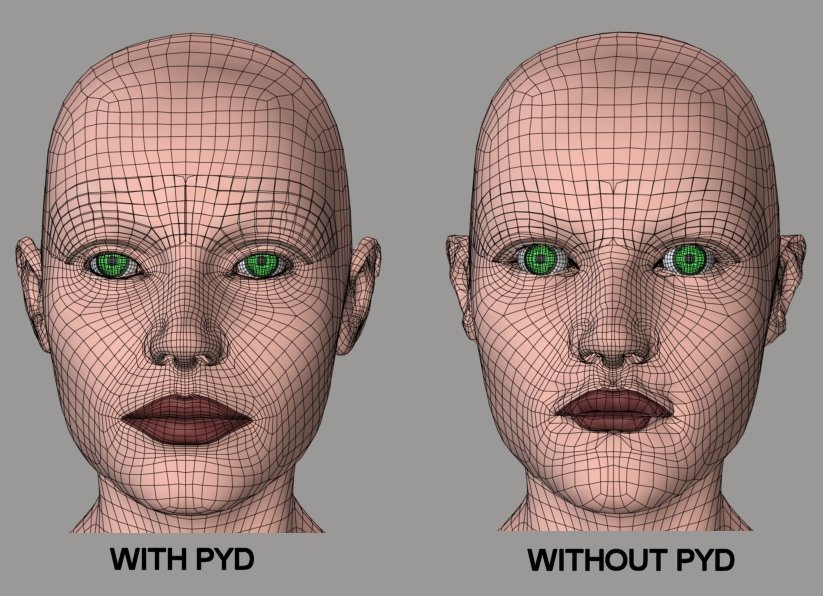
Okay. This squared business is counter-intuitive. :lol:
I tested not leaving it alone, and the results weren't helpful. But they were
also confused by the problem I report, below....
I'm working on a big cleanup effort, but I've noticed a really bizarre bug.
This is present in the currently posted form of the comparison script,
and I have no idea what is causing it. I'm guessing some kind of
float accuracy issues, but I can't track that down.
The problem: I'm consistently generating completely different sets of
correlations when using the pyd than when I'm not. I don't see where this could
be happening, unless either the .pyd or Numeric is introducing float
accuracy errors somewhere. The trouble, however, is that the .pyd results are
the good ones. The non-.pyd results aren't very good at all, in my test case.
The problem is not accuracy issues due to squared distances. I've removed the squared
distances from my WIP version of the script, thanks to odf's speed improvements (:woot:).
The problem I'm reporting, however, still remains. It shouldn't be in the sort-handling
code, because then it would affect a .pyd run, as well. In fact, I've altered most of the
close_verts_falloff() function, and the problem still carries over exactly as it is in the
current posted version of the script.
===========================sigline======================================================
Cage can be an opinionated jerk who posts without thinking. He apologizes for this. He's honestly not trying to be a turkeyhead.
Cage had some freebies, compatible with Poser 11 and below. His Python scripts were saved at archive.org, along with the rest of the Morphography site, where they were hosted.
lkendall: No problem. It makes it difficult to read the earlier posts, though. :(
Maybe we can get a mod to fix it. Can you ask a mod to alter someone else's
post if you started the thread? :unsure: Sorry if I sounded snippy about it.
I was laughing. :lol:
odf: Can I send you my comparison .pz3 for V3 to Antonia, and the current
version of the script? If you want a puzzler, this problem with different results
from the two methods is a serious one, and more important now than fixing
the speed. :( You'd need to load Spanki's .pyd to test the problem, however.
Good data:
#-------------------------------------------------------------------------------------
vertex match data...
w (vertex index) (number of matches(N)) (matched vertex indices x N) (weights x N)
#-------------------------------------------------------------------------------------
w 85 7 3178 216 3177 2329 3189 3193 3168 0.27521 0.19327 0.17954 0.15090 0.11281 0.08432 0.00395
w 86 7 4825 3176 3175 3313 217 3312 218 0.23474 0.23278 0.22796 0.12671 0.12057 0.04139 0.01585
w 87 7 2328 3169 3180 3168 9150 217 3179 0.25265 0.25081 0.17266 0.16964 0.07362 0.05926 0.02136
w 88 7 9151 2329 878 3192 3179 3180 3193 0.37328 0.21419 0.18215 0.09578 0.09173 0.02574 0.01713
w 89 7 2210 8815 8816 3147 2161 8908 8814 0.33773 0.32115 0.11973 0.08423 0.08127 0.03456 0.02133
w 90 7 1984 3148 3147 8816 174 8817 3347 0.24113 0.23631 0.17390 0.14628 0.08246 0.06084 0.05910
w 91 7 8909 3346 868 3347 3330 3329 8908 0.29217 0.25748 0.20767 0.14867 0.05154 0.04165 0.00082
w 92 7 8907 8994 2209 8908 8997 2211 8910 0.20938 0.19239 0.18265 0.16443 0.14947 0.08384 0.01785
w 93 7 3127 3128 3341 870 3343 634 3124 0.25771 0.22257 0.21289 0.19296 0.08306 0.02067 0.01012
w 94 7 3143 3345 3144 3344 3326 869 3375 0.38230 0.24107 0.13593 0.11259 0.10772 0.01066 0.00974
w 95 7 3125 3146 3144 3142 3145 173 3126 0.34280 0.23699 0.16658 0.08968 0.08291 0.06822 0.01282
w 96 7 3131 3124 171 3126 3130 4924 3128 0.24975 0.22417 0.16161 0.14397 0.10821 0.06567 0.04662
w 97 7 3332 3325 3331 3330 1985 3757 3328 0.28561 0.23040 0.18588 0.08559 0.07659 0.06878 0.06714
w 98 7 3149 3328 3325 3150 864 3347 3344 0.38607 0.33274 0.09272 0.07258 0.05613 0.03597 0.02379
w 99 7 3371 3375 3326 3760 635 3327 3758 0.29027 0.26956 0.18552 0.13964 0.06627 0.02925 0.01948
Bad data:
#-------------------------------------------------------------------------------------
vertex match data...
w (vertex index) (number of matches(N)) (matched vertex indices x N) (weights x N)
#-------------------------------------------------------------------------------------
w 85 7 9151 878 2329 3192 3194 3179 3193 0.29330 0.23181 0.15421 0.14095 0.09879 0.04917 0.03177
w 86 7 3180 3168 3179 2328 3169 9150 3176 0.28247 0.22395 0.16148 0.14561 0.11226 0.05284 0.02139
w 87 7 879 3182 9150 3179 2328 3180 3187 0.24236 0.20823 0.20734 0.18661 0.06704 0.06072 0.02770
w 88 7 3184 878 3181 3182 3183 3194 809 0.34631 0.24690 0.15496 0.10288 0.09581 0.04286 0.01026
w 89 7 8816 3346 8908 3147 2210 8815 1984 0.30769 0.21862 0.14590 0.14268 0.14099 0.02916 0.01495
w 90 7 1984 3150 3148 3347 3149 3141 174 0.23860 0.18140 0.17905 0.14870 0.11795 0.10831 0.02599
w 91 7 868 3330 3347 3328 3325 8909 1985 0.29364 0.21262 0.15274 0.11766 0.09674 0.07557 0.05103
w 92 7 2209 8909 8910 3329 8994 8908 8911 0.26359 0.20421 0.18296 0.17213 0.10928 0.06740 0.00044
w 93 7 3128 3127 871 3338 3124 3343 3129 0.26883 0.24629 0.15175 0.13401 0.10097 0.08826 0.00989
w 94 7 3143 3341 3345 634 3144 870 3326 0.24757 0.20921 0.16293 0.11613 0.11199 0.08316 0.06902
w 95 7 3126 171 3125 870 3146 3144 4924 0.24030 0.17852 0.16968 0.15950 0.12632 0.09116 0.03453
w 96 7 3131 169 3124 3129 3130 4925 3128 0.20910 0.18750 0.18416 0.14488 0.12409 0.11608 0.03419
w 97 7 3332 3331 3758 636 635 3757 3325 0.21067 0.20844 0.19379 0.13763 0.13453 0.07495 0.03999
w 98 7 864 3344 3327 3328 3149 635 3325 0.24846 0.19636 0.17557 0.13591 0.12648 0.07478 0.04245
w 99 7 3371 3375 3760 3326 3759 633 3372 0.29027 0.23643 0.21174 0.15357 0.08622 0.01160 0.01016
===========================sigline======================================================
Cage can be an opinionated jerk who posts without thinking. He apologizes for this. He's honestly not trying to be a turkeyhead.
Cage had some freebies, compatible with Poser 11 and below. His Python scripts were saved at archive.org, along with the rest of the Morphography site, where they were hosted.
Hgrnh!! I honestly feel for you. I hate these mysterious bugs.
I've checked that my grid code does not alter the results relative
to the non-pyd version without the grid. Also, if you didn't change
the inner loop, then the grid filtering should apply with pyd, as well.
When you went back to non-squared distances, did you change the line
if ((not no_pyd) and dist <= threshold) or (no_pyd and
dist <= threshold**2):
back to
if dist <= threshold:<br></br>
as well?
ETA: Sure, send me what you have. It's a long weekend here.
-- I'm not mad at you, just Westphalian.
Quote - if ((not no_pyd) and dist <= threshold) or (no_pyd and dist <= threshold**2):
back to
if dist <= threshold:<br></br>
as well?
I did. Yes. Things are much cleaner than before. :lol:
:blushing: Sorry. I don't want to cut into your time. I wasn't sure if
you were still working on adjustments to the script.
I'll prep the files and PM you with a link. You can look at them if you'd
like, but please don't let me drag you away from anything. You can say no, if
you want. I wouldn't have asked if I 'd known you'd moved on already. 
The problem definitely isn't due to your grid code. I'm applying the grid to both
non-pyd and pyd cases now. It seems to speed up both.
This is one of the more bizarre errors I've seen crop up since starting with
Python programming. Huh. When I've seen similar things in other situations,
it was usually due to some unexpected behind-the-scenes change to data formatting
made by some built-in function of the programming platform. (I'm looking at you, Numeric....)
===========================sigline======================================================
Cage can be an opinionated jerk who posts without thinking. He apologizes for this. He's honestly not trying to be a turkeyhead.
Cage had some freebies, compatible with Poser 11 and below. His Python scripts were saved at archive.org, along with the rest of the Morphography site, where they were hosted.
Well, debugging other people's code is not the most entertaining past-time
I can think of. :lol: But a fresh pair of eyes is always good, so I'll take a look,
possibly bug you with questions, and maybe we can figure it out. But if it takes
too long, please understand if I turn my attention to other things eventually.
By the way: if the zip file is no larger than 20MB, you can always just email
it to Antonia Polygon on GMail.
ETA: Never mind, got your link.
-- I'm not mad at you, just Westphalian.
Ooh, wait! I think I found it. False alarm. Hopefully.
One of the meshes was being instantiated with localspace
verts instead of worldspace, but only when not running the pyd. Programmer error. Blaming the tools for my unnoticed
mistakes. D'Oh!
At least now you'll have a copy of the files I used to create
the V3 correlation file. And a copy of the pyd.
Sorry to have bothered you. Enjoy your weekend now! It's late
summer in Australia. Are there crickets? Hmm.
===========================sigline======================================================
Cage can be an opinionated jerk who posts without thinking. He apologizes for this. He's honestly not trying to be a turkeyhead.
Cage had some freebies, compatible with Poser 11 and below. His Python scripts were saved at archive.org, along with the rest of the Morphography site, where they were hosted.
:woot: Woot!
We're good.
All fixed.
Nothing to see here, folks. Move along. Move along.
Sorry for the false alarm.
Continue swimming naked.
And other sayings.
Yes, it's fixed. Whew.
Thanks, odf. Sorry to have bothered you.
===========================sigline======================================================
Cage can be an opinionated jerk who posts without thinking. He apologizes for this. He's honestly not trying to be a turkeyhead.
Cage had some freebies, compatible with Poser 11 and below. His Python scripts were saved at archive.org, along with the rest of the Morphography site, where they were hosted.
Oh, I'm glad you found the problem. Yup, I've had false alarms like that
many times. You think your program's messed up, rip your hair out
looking for a problem, then finally realize you've looked at the wrong files.
Well, we have cicadas. I don't think they're quite the same as crickets, but
they surely make a lot of noise.
-- I'm not mad at you, just Westphalian.
Ah, the cicadas of late summer. Some people eat the noisy things.
Apparently they taste a bit like shrimp. I don't think I'll try them, myself. :lol:
I need to change a couple of things, but thanks to the speed gains of the
3D grid screening method, I think it's getting close to a final version. Then
I can put together a web page. And then I need to refine the existing correlations
and start on a Miki2 to Antonia comparison. :woot:
A debugging problem like this is like losing the car keys. I keep looking in the
same places, even though I already know there's nothing there. :lol:
===========================sigline======================================================
Cage can be an opinionated jerk who posts without thinking. He apologizes for this. He's honestly not trying to be a turkeyhead.
Cage had some freebies, compatible with Poser 11 and below. His Python scripts were saved at archive.org, along with the rest of the Morphography site, where they were hosted.
Almost to the next page. Sorry for the blank post. Want to get away from this formatting....
===========================sigline======================================================
Cage can be an opinionated jerk who posts without thinking. He apologizes for this. He's honestly not trying to be a turkeyhead.
Cage had some freebies, compatible with Poser 11 and below. His Python scripts were saved at archive.org, along with the rest of the Morphography site, where they were hosted.
And... one more, hopefully. Please stand by. Technical difficulties.
===========================sigline======================================================
Cage can be an opinionated jerk who posts without thinking. He apologizes for this. He's honestly not trying to be a turkeyhead.
Cage had some freebies, compatible with Poser 11 and below. His Python scripts were saved at archive.org, along with the rest of the Morphography site, where they were hosted.
Nope. Maybe I'll never get off this page. It's like a Twilight Zone episode.
The man who is stuck on the web page with the broken width formatting.
And then his glasses break. :lol:
Edit: Okay. We're free! :woot:
===========================sigline======================================================
Cage can be an opinionated jerk who posts without thinking. He apologizes for this. He's honestly not trying to be a turkeyhead.
Cage had some freebies, compatible with Poser 11 and below. His Python scripts were saved at archive.org, along with the rest of the Morphography site, where they were hosted.
http://www.the.cage.page.phantom3d.net/TDMT_Match/TDMT_Match_Transfer2.zip
http://www.the.cage.page.phantom3d.net/TDMT_Match/TDMT_Match_Compare1.zip
Updated both scripts. More GUI debugging for potential problems, in the transfer script. The comparison script now integrates odf's wonderful 3D grid screening process (thank you, odf! :woot:), which significantly speeds up a comparison run without the _tdmt.pyd. The comparison script also had a serious bug removed (read about it on previous page - something I thought I'd fixed, but ended it up back in place when I replaced a WIP file from a backup) and had a lot of behind-the-scenes cleanup and streamlining for the main comparison process. Replace any older versions of the scripts and use these now.
===========================sigline======================================================
Cage can be an opinionated jerk who posts without thinking. He apologizes for this. He's honestly not trying to be a turkeyhead.
Cage had some freebies, compatible with Poser 11 and below. His Python scripts were saved at archive.org, along with the rest of the Morphography site, where they were hosted.
Sweet!
I was going to ask you about a few more problems but..... never mind!
I'll try this new script first.
Just to make sure... I use these scripts along with the "V3_Antonia_VMF" files for putting V3 onto Antonia. Right?
-------------------------------------------------------------------------------------------------------------
AMD FX-9590 4.7ghz 8-core, 32gb of RAM, Win7 64bit, nVidia GeForce GTX 760
PoserPro2012, Photoshop CS4 and Magix Music Maker
--------------------------------------------------------------
...and when the day is dawning...I have to say goodbye...a last look back into...your broken eyes.
Quote - Sweet!
I was going to ask you about a few more problems but..... never mind!
I'll try this new script first.Just to make sure... I use these scripts along with the "V3_Antonia_VMF" files for putting V3 onto Antonia. Right?
Yes! The link is here, for anyone looking:
http://www.the.cage.page.phantom3d.net/TDMT_Match/VMF/V3_Antonia_VMF.zip
If and when you encounter errors, please let me know. If it's a script problem I'll try to fix it and if something just needs to be explained better, I'll do my best. :D
===========================sigline======================================================
Cage can be an opinionated jerk who posts without thinking. He apologizes for this. He's honestly not trying to be a turkeyhead.
Cage had some freebies, compatible with Poser 11 and below. His Python scripts were saved at archive.org, along with the rest of the Morphography site, where they were hosted.
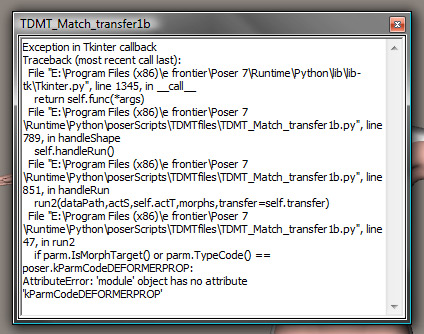
Just for fun, I even put V3 and Antonia into the main runtime of P7. Still no change :(
I hope you can help, as I've got quite a boo-boo-spank-baby of a V3 character just dyin' to try out Antonia's body!!!
Should it matter, I'm running Shitsta(vista) on a Q6700 quad-core with 4 gigs of ram and a nVidia 8800GT.
-------------------------------------------------------------------------------------------------------------
AMD FX-9590 4.7ghz 8-core, 32gb of RAM, Win7 64bit, nVidia GeForce GTX 760
PoserPro2012, Photoshop CS4 and Magix Music Maker
--------------------------------------------------------------
...and when the day is dawning...I have to say goodbye...a last look back into...your broken eyes.
Umm. That's odd. What version of Poser 7 are you running? Perhaps that was added in one of the P7 service releases.
I'm checking the PoserPython docs....
===========================sigline======================================================
Cage can be an opinionated jerk who posts without thinking. He apologizes for this. He's honestly not trying to be a turkeyhead.
Cage had some freebies, compatible with Poser 11 and below. His Python scripts were saved at archive.org, along with the rest of the Morphography site, where they were hosted.

I've changed line 47:
if parm.IsMorphTarget() or parm.TypeCode() == 49: #poser.kParmCodeDEFORMERPROP:
I'm running Poser 7 version 7.0.4.220. The line causes no problems for me, but your error suggests that your P7 doesn't like the way the typecode is called, for some reason. I've replaced the constant name with the numerical value for the same parameter.
I'll have to figure out why it's doing that.... :unsure:
===========================sigline======================================================
Cage can be an opinionated jerk who posts without thinking. He apologizes for this. He's honestly not trying to be a turkeyhead.
Cage had some freebies, compatible with Poser 11 and below. His Python scripts were saved at archive.org, along with the rest of the Morphography site, where they were hosted.
v7.0.1.109 listed under "About Poser"
I 'think' that's the latest version. Could be wrong...
I'll give it a go. Thanks!!
-------------------------------------------------------------------------------------------------------------
AMD FX-9590 4.7ghz 8-core, 32gb of RAM, Win7 64bit, nVidia GeForce GTX 760
PoserPro2012, Photoshop CS4 and Magix Music Maker
--------------------------------------------------------------
...and when the day is dawning...I have to say goodbye...a last look back into...your broken eyes.
It looks like you probably need to install one or more Poser 7 service releases from the SM website.
But it's good to know that this can cause an error. Apparently early versions of P7 didn't tolerate calling parameter typecodes that way. :( Thank you for notifying me.
Let me know what happens. :D I'll check in after a sleep cycle.
===========================sigline======================================================
Cage can be an opinionated jerk who posts without thinking. He apologizes for this. He's honestly not trying to be a turkeyhead.
Cage had some freebies, compatible with Poser 11 and below. His Python scripts were saved at archive.org, along with the rest of the Morphography site, where they were hosted.
Well, no error this time but, the script didn't change anything :(
It says that it transferred shape of Figure 1 Head to Head (V3 to Antonia) in 0 mins, 0 secs.
Thanks for trying (and quickly too)!
I'll go see what SR's I might have missed (could swear I had all 600 of em) ;)
Have a good night and a pleasant tomorrow!
-------------------------------------------------------------------------------------------------------------
AMD FX-9590 4.7ghz 8-core, 32gb of RAM, Win7 64bit, nVidia GeForce GTX 760
PoserPro2012, Photoshop CS4 and Magix Music Maker
--------------------------------------------------------------
...and when the day is dawning...I have to say goodbye...a last look back into...your broken eyes.
First up - I'm a retard!
Second up - It really helps to dial in a 1 on the new head shape morph on Antonia that this script makes!! ............IT WORRRRRRKKSSSSS!!!!!!!!
Third up - It really, really helps to pay closer attention to SM's update page!!!
I'll fiddle, faddle and fart around with this some more tomorrow (later today). At first go, the smoother settings need some tinkering with. Mainly around the nose, ears and neck.
I'll post results after some shut-eye!!
Cage is NOT a turkeyhead!!!!
-------------------------------------------------------------------------------------------------------------
AMD FX-9590 4.7ghz 8-core, 32gb of RAM, Win7 64bit, nVidia GeForce GTX 760
PoserPro2012, Photoshop CS4 and Magix Music Maker
--------------------------------------------------------------
...and when the day is dawning...I have to say goodbye...a last look back into...your broken eyes.

Privacy Notice
This site uses cookies to deliver the best experience. Our own cookies make user accounts and other features possible. Third-party cookies are used to display relevant ads and to analyze how Renderosity is used. By using our site, you acknowledge that you have read and understood our Terms of Service, including our Cookie Policy and our Privacy Policy.
Hmmm, Ok.
I was thinking using the matched UV as a bridge between two sets of meshes might help, but in fact it is introducing more problems into the equation owing to the anomalies ( such as edges ) created when mapping a 2D UV onto a three dimensional surface.
If people had flat heads it would make life much simpler lol.
Cheers
Ian