
Renderosity Forums / Poser - OFFICIAL
Welcome to the Poser - OFFICIAL Forum
Forum Moderators: RedPhantom Forum Coordinators: Anim8dtoon
Poser - OFFICIAL F.A.Q (Last Updated: 2026 Jul 12 2:15 pm)

Subject: Antonia - Opinions?

Quote - Thanks, odf!
Interesting that extracting out of the cr2 seems to alleviate some problems, although those upper arms are still quite twisted when raised that high. But I've been fighting Poser the past few days, so who knows?
Poser has a remarkable talent at messing things up.
I've made some changes to the shoulder JCMs which might help with the raised arms. But I haven't tried it with Antonio yet because as usual I'm doing my development on the low-res version.
Loosely related:
I'm only now beginning to understand proper arm posing. The crawling pose I put in the preview is horrible when you look at the shoulder region. That's because with the arm straight forward one hits gimbal lock and when one then tries to use z-rotate (bend) to move the arm up and down, it gets horribly twisted.
A way to fix this is to use the collar twist to move the arm up and down when it's in a forward position (which might be anatomically more correct anyway) and also helping the forward movement of the arm by y-rotating the collar. Which means I have to take a closer look at the collar bends to make them behave properly. phantom3D made inclusion/exclusion spheres for the collar twist, for which I am incredibly grateful, because I never realized it was useful and probably wouldn't have bothered. But the twist bar is too short as it is, so I will lengthen it. Then I'll have a closer look at the other collar rotations and see if they need adjustments and/or JCMs.
But even though realistic shoulder movement is not easy in a 3d figure, I don't expect anything as hard as the hip/thigh stuff. I think I'm really starting to see things coming together here.
I think it will be really important to make an extensive collection of partial poses for Antonia that show how to achieve certain things properly.
-- I'm not mad at you, just Westphalian.


@MikeJ,
Excellent job of the "eye close morphs". I have started working on the eye sockets myself, and am beginning to appreciate the difficulties involved, particularly regarding the lashes (I may have more to say about that shortly).
@Laurie,
Your are doing some really grate stuff here. My (hopefully constructive) criticism on the last image you posted is that the nose bridge is too thick for my taste (my own morph posted recently, goes too far the other way and the bridge is too thin). I also feel that the area just above the lips bends too sharply, and could perhaps be pulled out a bit. With those two reservations, I think it is a really beautiful face.
I am totally besotted with your morph from page 112. Have you posted it the the developers site? It's hard to tell what is what there because of the lack of thumbnails.
Believable3D,
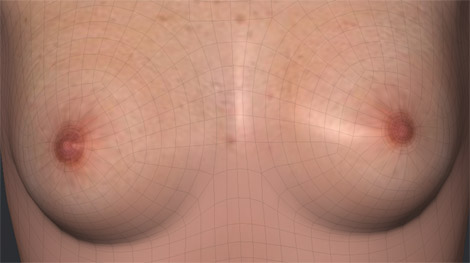
Your Antonio seems to be progressing well. A coule of observations, I think that "man boobs" for want of a better word, tend to be more square (flat, what ever) on the underside, and a bit higher on the chest. Only a personal opinion, but I think these changes would improve Antonio. Also the size of the areola (which is probably a function of the texture map) does not help, as male areola tend to be smaller.
@Phantom3D,
A big very big thanks for posting the "Antonia-114SubGroups.zip" It inspired me to take things a step further. As a result, I hope to have something to contribute soon.

@lesbently
All the morphs I've done so far (save the newest ones I've been working on) are at the developers site. For the images, I just mix those morphs up a bit. As for the between the nose, I'm sure not everyone would like that, but I'm sure just as many will...that's why I keep all the different morphs separate - so that folks can create their own faces ;o). I have a few saved as face poses, but I'm not gonna make too many of those simply because I'd rather people create their own and have their own face that they like.
And the face I posted on page 112? Well, I did just happen to save that one as a face pose :o).
Laurie
@LaurieA,
I understand what you are saying, and totally approve. I have not downloaded any morphs for Antonia yet, as I'm too busy on my own Antonia projects, and don't want to be distracted quite yet. If I have other morphs to tweak, it will distract me and make me lazy. But I do so like your morph from page 112!

Thank you, Les. :-)
Yeah, those lashes have been giving me fits. It wouldn't be so bad if the end points were welded to the eyelids, but they're each a separate mesh - all four of them.
On the bright side, eyelid and eyelash morphs are probably the most tedious and time-consuming and aggravating morphs anyone can set out to do, so once those are down, everything else is downhill coasting from there. ;-)
Quote - Ooh, nice Laurie, thanks! :-)
I'll have a new hair model for her sometime soon, if you're interested in making a texture and trans for that then. :-)
Maybe not "soon" but some time this week.
As long as you UV map it...lol. I'm gonna send all my stuff that needs mapping to you from now on...lmao.
Laurie
Well that's what I do. The way I finally settled on doing it, that is, and things went better after I started doing it that way.
Mostly it was the seemingly endless trial and error that was getting to me. I've always avoided morphing eyes for that reason. Very very tedious.
But I'm past that now and have a system down finally, so future eye morphs will be a whole lot easier.
Les: I agree with both your points 100%. I tried to do both of those things (square the bottom of the breasts and shrink the areolae), but my abilities with the Poser morph brush haven't been up to that task. Not yet, at least. I was finding that difficult enough in Argile; the morphing tool is even more foreign to me.
In truth though - as you noted, the areola issue is at least partially a texture matter; areolae tend to be different sizes on different textures (not sure if it's supposed to be that way, but it is that way in reality for the products I've used)... so if people do male textures, I'm sure they'll make the areolae smaller. I've just been using Saint Fox's Toni texture, which obviously wasn't intended as a male map.
______________
Hardware: AMD Ryzen 9 3900X/MSI MAG570 Tomahawk X570/Zotac Geforce GTX 1650 Super 4GB/32GB OLOy RAM
Software: Windows 10 Professional/Poser Pro 11/Photoshop/Postworkshop 3
Content Advisory! This message contains nudity
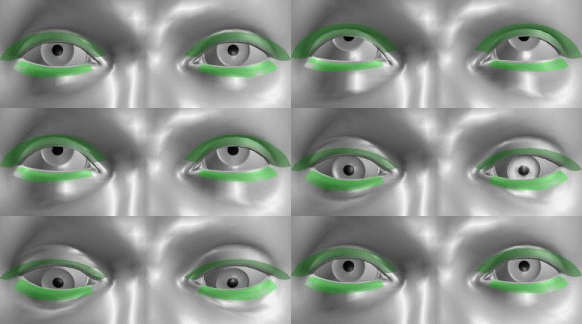
By default the lids are not slaved as strongly to the eyes as in V4, but as an innovation I have included a "LidSynch_Off_On" dial in the Body where you can adjust the strength of the slaving, or turn it off. A REM pose is also included.
In the above image I have made the lashes (green) semitransparent to show the lids underneath.
lesbentley: that's sounds excellent. I particularly like the idea of adding a control for the strength of the effect. But maybe we need one of those for bother the upper and lower lids?
In your example I find that the upper lid motion is not strong enough. In order to keep the same perceived state of awakeness/alertness, the distance between the pupil and the edge of upper lid should stay the same. On the other hand, I'd have to verify it, but my feeling is that the movement of the lower lid should be very, very subtle. It seems too strong in your example.
-- I'm not mad at you, just Westphalian.
@odf,
Yes it would be much better with separate morphs for the upper and lower lid. In my morph everything moves by about the same amount. I made the morphs (one for the lids and one for lashes) by rotating a magnet. I'm not sure my magnet wheedling skills are up to doing separate morphs for the upper and lower lids, and my modelling skills never got much beyond making a cube.
lesbentley: No problem. I can steal MikeJ's morph for the upper lid and LaurieA's for the lower lid to include in the main CR2 (supposed I have their permission to do that) and hook them up. That gives me a chance to play with something other than valueOpDeltaAdd for a change. :laugh:
-- I'm not mad at you, just Westphalian.
Quote - lesbentley: No problem. I can steal MikeJ's morph for the upper lid and LaurieA's for the lower lid to include in the main CR2 (supposed I have their permission to do that) and hook them up. That gives me a chance to play with something other than valueOpDeltaAdd for a change. :laugh:
As far as I'm concerned odf, you can do whatever you want with anything I upload ;o).
Laurie
@odf
Of course, that's fine with me. As Laurie says, anything I upload is free for any one of you guys, and anyone else you invite to the dev site, to use in any way. :-)
In my eye morphs, the lower lid moves up slightly. In reality, when you close an eye, the upper lid does most of the action, but the lower lid moves slightly too.
BTW, those morphs were designed as "close only". They don't work well in reverse, to open the eyes wider. I had overlooked the need for that, but it's easy enough to do something about. I'll make some Open Wide morphs here shortly.
Edit:
Hmmm.. I may be wrong about that, thinking about it. I know the squint morphs work on the lower lids too, but the Close morphs may not. I have so many damn versions, I've forgotten what does what. I have about 40 Lightwave and Modo files that are various stages of eye motion. ;-)
I think today would be a good day to refine them some more.
MikeJ: Actually, it might be good to have a close morph that only moves the upper lids. If I close my eyes, my upper lids go down while my lower lids go up a little. But if I look down, my upper lids go down while my lower lids go down a little. So it would be cleaner and more useful to have separate morphs for the upper and lower lids.
Ha, I'm so glad Wings3D has the 'save incrementally' command. That makes it very easy to keep track of different versions. I have a thousand different Antonia meshes on my hard disk, all neatly numbered so I know exactly which came after which. :laugh:
-- I'm not mad at you, just Westphalian.
Ah I see what you're saying 'bout the eye morphs.
Yeah, LW and Modo both have "save incremental", which is what I use. I meant I have probably about 40 base files, such as files that have different mapping and group selections to make things easier, files that start with half a squint or half a close, files that have morph targets in them themselves, to return to the beginning or reach a certain point.
I'm usually far neater than that, but I was in such a hurry I threw all my conventions out the window and quickly got swamped. ;-)
So I can't tell if "Antonia_Face_EyeClose[remapped]_R_03v001.lwo" is the same as "Antonia_Face_EyeClose[remapped]_R_03v001.lxo" and also equates to the MT in Poser, "EyeClose_R_03", for example.
I've learned my lesson there though... now. ;-)
Content Advisory! This message contains nudity
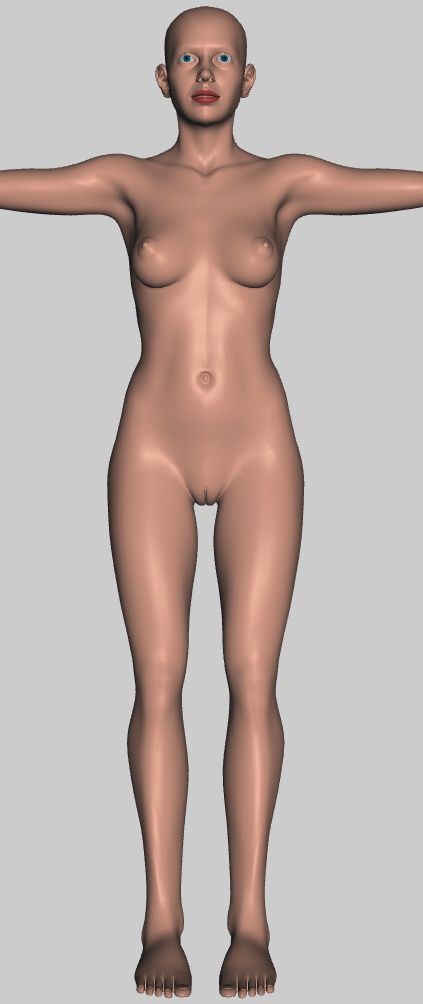
Guess which number this is...
-- I'm not mad at you, just Westphalian.
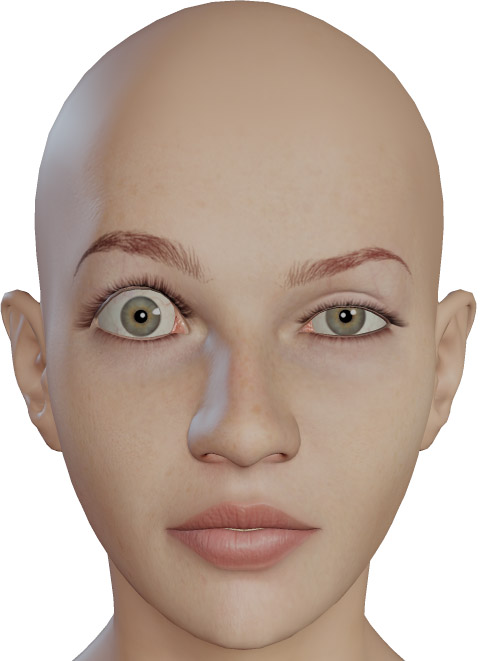
Quote - No I meant wide, wide, not just opened fully. I'm probably looking at it wrong, and thinking of "eyes open wide" in terms of a shock or surprise expression.
I guess that means you'd prefer the brow motion separate.
I tend to think separating things out whenever it makes sense is better. But it's entirely up to you.
See, I have a fairly complete plan for what Antonia's expression rig will be like. I'll use any existing morphs I can, but I'll probably change most of them anyway, and do a fair bit from scratch. So you should really decide what you want and regard my comments as well-meant critique, not instructions. 
-- I'm not mad at you, just Westphalian.

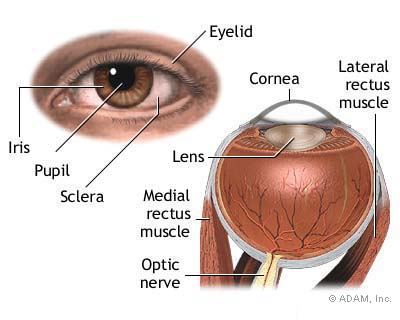
Looking at this image, I'd say... probably?
Looks about right. I'd say having an actual lens in there might help with realism, but would really require correct refraction to make a difference in a render.
More eye anatomy pics:
images.google.com/images
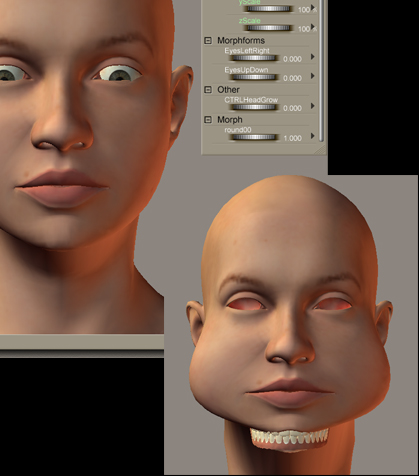

Quote - Before I get too far with this, I wonder if I should include morphing the brows along with opening the eyes? What do you think?
This is one morph, for the right eye, with the brow up too. It's not possible to open your eyes wide without affecting the brow, but I don't know if I should have them separated or not.
Not sure I understand.
The idea of the big eyes was to give the fae figures or alien figures bigger eyes...not what wr can do in the mirror! :)
I use the big/no eye .obj morph for V2 and it gives great big eyes. Also on V2 there is an alien eye (big eye) morph dial that does the same thing and i never noticed any eyebrows moving or anything.....!?
Quote -
Not sure I understand.
The idea of the big eyes was to give the fae figures or alien figures bigger eyes...not what wr can do in the mirror! :)
I use the big/no eye .obj morph for V2 and it gives great big eyes. Also on V2 there is an alien eye (big eye) morph dial that does the same thing and i never noticed any eyebrows moving or anything.....!?
Well I'm working more on standard motion morphs, not specialty morphs yet.
I had so much trouble with eye morphs until I got a system down, that it really set me back for working on anything else. Plus, others here are working on expression morphs too, so I kinda put it on the backburner.
But as for keeping them separate, you can open an upper lid, then raise a brow, open the lower lid, squeeze a cheek some...anything like that. And then save it out as a face pose .fc2 file, or make a FBM out of it. So it makes sense to do evrything separately.
OTOH, if your morph has all the above in it, but you want, say, a little more or less eyebrow raise, you'll need a separate morph for that anyway, so you're better off having everything separated.
Quote - they are still objs to that you need to load as morph targets. I was waiting for new antonia to learn to make the injs. i will put some of them up on the dev site.
Oh, I think I understand why they don't work. The position of the head changed, so the morphs will move the head when you try to load them from the obj files now. If you want to make inj poses for those morphs, you need to use the old Antonia, but after you've made them, they should load into the new Antonia without trouble.
I'll try to have a look at your morphs tonight and see if I can turn them into pmds for you.
-- I'm not mad at you, just Westphalian.
Quote -
Not sure I understand.
The idea of the big eyes was to give the fae figures or alien figures bigger eyes...not what wr can do in the mirror! :)
I use the big/no eye .obj morph for V2 and it gives great big eyes. Also on V2 there is an alien eye (big eye) morph dial that does the same thing and i never noticed any eyebrows moving or anything.....!?
@Shante,
I think I misunderstood what you were saying the first time.
If you have a morph that "gives great big eyes", something must be moving. At least the surrounding lids would have to, to accommodate the larger eyes. But you mentioned the brows. Yeah, I'd imagine the brows wouldn't have to move, but then again the "great big eyes" is a cosmetic morph, not an expression morph.
Now what I was talking about earlier - if you had an "eyes open wide" morph that was intended as part of an overall shock or surprise face expression, you would not have to have the brows move, but since the brows are an important part of conveying an expression such as shock, surprise, or horror, you'd need a separate one for that. Or a combination.
I think I remember you asking about a big eye or an anime eye morph earlier, and I guess that's what you're talking about, but earlier we were just discussing overall, basic eyelid motion. That's why Olaf corrected me when I said you can't open your eyes wide without moving your brows.
Turns out you can. Well, maybe he can do it easier than I can, but I finally managed it myself. It felt kinda weird though. ;-)
MikeJ: Or more to the point, a morph to open the upper lids wider without moving the brow would be useful in another context, namely when the eye looks up and the lid follows that motion. I'm not advocating to dissect all morphs into their smallest possible components, just to factor out what could be reused.
Also, it's probably best not to mix expression with shaping morphs. I could make a 'wide mouth' morph that doesn't influence the cheeks and use that both for new face shapes and as a component for a smile. But that would require either a complicated, somewhat awkward rig or a lot of work from the user. In a similar spirit, it's probably better to handle the 'big eyes' shape morph and the 'eyes wide open' expression morph separately.
This is not in disagreement with anything that's been said, just a clarification of my way of thinking. :laugh:
-- I'm not mad at you, just Westphalian.
I agree.
I didn't get any chance to work further on the open eye morphs today, but am planning on getting at it tomorrow. Too many other distractions today.
I'd love to know how those morphs work for opening the eyes and moving the eyeballs at the same time - eye motion controlled by a head morph that is, such as what V4 has.
I'm afraid I never became a Poser technician... now I wish I'd been learning some of this stuff along the way.
Quote - ... I'd love to know how those morphs work for opening the eyes and moving the eyeballs at the same time - eye motion controlled by a head morph that is, such as what V4 has.
I'm afraid I never became a Poser technician... now I wish I'd been learning some of this stuff along the way.
Same here and I'd like to know that little trick too ;o).
Laurie
Quote - I'd love to know how those morphs work for opening the eyes and moving the eyeballs at the same time - eye motion controlled by a head morph that is, such as what V4 has.
In the case of my crappy "LidSynch-01_LB.pz2" it is a simple JCM (Joint Controled Morph). You just put slaving code in the in the targetGeom (morph) channels to tell them which channel to slave to, e.g:
                        valueOpDeltaAdd
                                Figure
                                rEye
                                xrot
                        <span style="color:rgb(0,204,255);">deltaAddDelta 0.033000</span>
The code goes under the "interpStyleLocked" line in the appropriate actor. If you are coding directly into a cr2 use the actor number, eg:
                                Figure <span style="color:rgb(255,0,0);">1</span>
                                rEye<span style="color:rgb(255,0,0);">:1</span>
If the code is going in a pz2, leave the numbers out. You can also do it the other way round "MCJ", and have the morph control the movement of a joint. Say a morph moves the eye sockets forwards, you could add slaving code to the 'ztran' channels in the eyes, so that the eyes move forwards as the morph is expressed. The tricky part is getting the 'deltaAddDelta' value (control ratio) right. For more info see:
http://www.rbtwhiz.com/rbtwhiz_ERC.html
Also see the following thread, look for the post "The Monster Eyes Problem (part 1)." about 3 posts down on the linked page. Note that the examples from that thread use "leftEye" and "rightEye" most recent figures including Antonia use "lEye" and "rEye".
Quote - > Quote - they are still objs to that you need to load as morph targets. I was waiting for new antonia to learn to make the injs. i will put some of them up on the dev site.
Oh, I think I understand why they don't work. The position of the head changed, so the morphs will move the head when you try to load them from the obj files now. If you want to make inj poses for those morphs, you need to use the old Antonia, but after you've made them, they should load into the new Antonia without trouble.
I'll try to have a look at your morphs tonight and see if I can turn them into pmds for you.
Awsome I guess then it is time to try that pmd tutorial someone linked. Wensday maybe when i have off. Any programs that would do the work for me that are free or reasonable?
aella: BinaryMorphEditor by Dimension3D is really useful and not super-expensive. You can also create PMDs directly from Poser. But, as lesbentley has pointed out, you need to load your morphs into a clean Antonia with no morphs, not even JCMs, for that to work.
Speaking of which:
Since I Python code for manipulating CR2 files programmatically now, maybe it's time to put it to good use. Here are a few things I could do with that that might be useful:
1) Remove all morph channels or just the deltas (see above).
- Add a number of blank channels to every actor.
3) Remove a specified bone and all its descendants.
...
(Any other ideas?)
So maybe from the next preview on, I could just run a number of scripts like that on every new version of Antonia to make some custom CR2s for developers to use(*). Sound good?
(*) More adventurous souls who don't fear the command line could of course install a standalone Python on their machines and run the scripts themselves.
-- I'm not mad at you, just Westphalian.
Quote -
So maybe from the next preview on, I could just run a number of scripts like that on every new version of Antonia to make some custom CR2s for developers to use(*). Sound good?
Sounds good to me. I couldn't think of anything to add to that list - net yet at least, not until I know more about why I might need certain things like the above.

Privacy Notice
This site uses cookies to deliver the best experience. Our own cookies make user accounts and other features possible. Third-party cookies are used to display relevant ads and to analyze how Renderosity is used. By using our site, you acknowledge that you have read and understood our Terms of Service, including our Cookie Policy and our Privacy Policy.
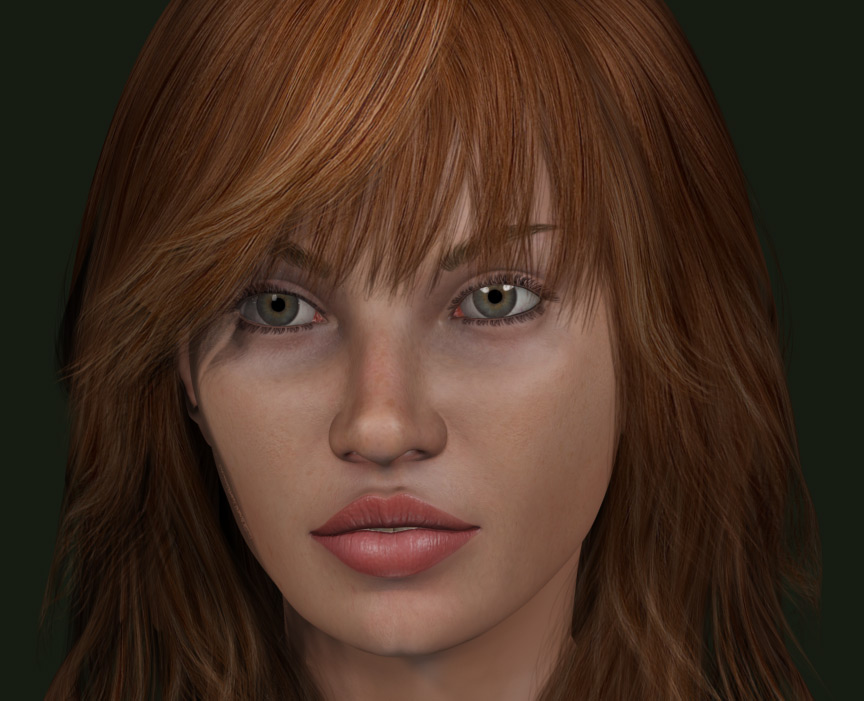
K. Here's the "new" girl ;o).For those that are thinking..."Hmmm...she looks like Vicky"...I actually don't think she does. However, we know the Poser community and that she'll never get the support she deserves if we can't manage to make her look like, well, anybody ;o).
BTW, I hope someone's working on full body morphs. I don't do so well at those yet.
Hope ya like. She's a mix of a bunch of different morphs I've created so far...
Laurie