
Renderosity Forums / Blender
Welcome to the Blender Forum
Forum Moderators: Lobo3433 Forum Coordinators: bwsupport
Blender F.A.Q (Last Updated: 2026 Feb 20 11:33 pm)
Welcome to the Blender Forum!
Your place to learn about Blender, ask questions,
exchange ideas, and interact with the other Blender users!
Gallery | Freestuff | Tutorials
Visit the Renderosity MarketPlace. Your source for digital art content!


Subject: jagged edges in edit mode version 2.45???

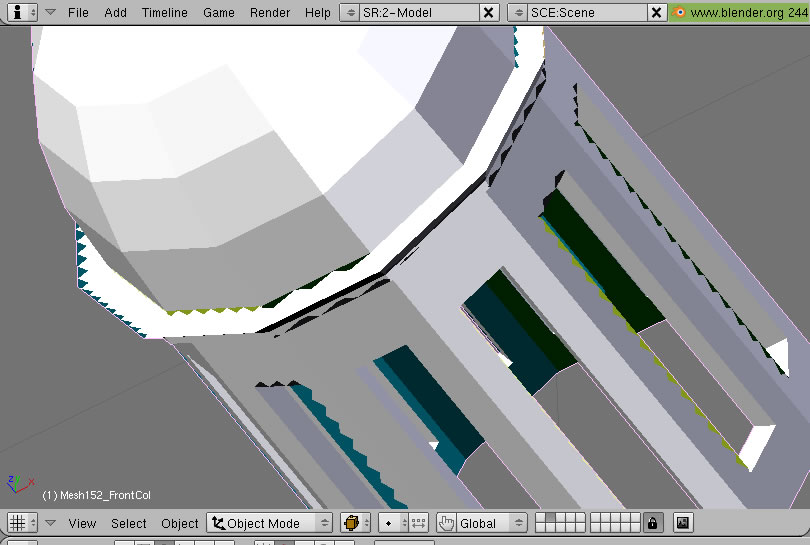
first time i notice this btw I have a ati readeon card.
for
some free stuff i made
and
for almost daily fotos

those are straight lines between vertex the jagged edges are only in the display and move around when I turn the view around .
for
some free stuff i made
and
for almost daily fotos


Well, as I can see there's nothing wrong with your model. It's clean and neat. I also have ati but this image is from PC that has some intel onboard card. Display is ok on both of them so only thing that I can think of is that you try to update your drivers.

P.S. Only thing that pokes my eyes in your model is that loose vert and edge that goes from top of that dome down to it's base :)

I have no problem with it too.
Are you using Windows?
I used to have an ATI Radeon, I have to turn of the hardware acceleration in Windows for Blender. You may find my posting in http://blenderartists.org/forum/ about that.
There is another way, but it simply uses the MS OpenGL driver instead of the ATI OpenGL driver. You can find the DLL from Microsoft site and drop it in you Blender directory. Blender will use it instead of using the one installed with your ATI video card. With that, it is not necessary to turn off the hardware acceleration.
I would like to suggest that you turn of the hardware acceleration in Windows and try again. If it is OK, then take the next step.
thx for the responses i think ill try the MS OpenGL driver .
for
some free stuff i made
and
for almost daily fotos

Privacy Notice
This site uses cookies to deliver the best experience. Our own cookies make user accounts and other features possible. Third-party cookies are used to display relevant ads and to analyze how Renderosity is used. By using our site, you acknowledge that you have read and understood our Terms of Service, including our Cookie Policy and our Privacy Policy.
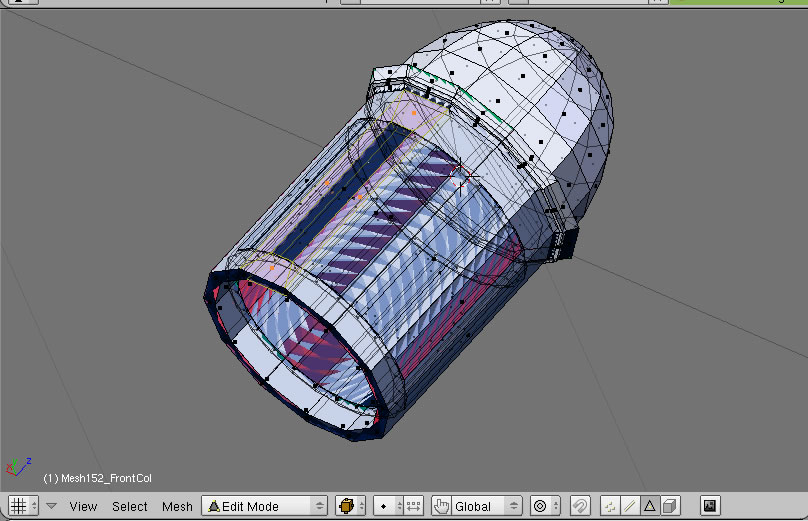
I get a strange pattern of jagged edges while editing makes it very hard to see what im doing looks like the fill routine is cutting too much corners? any solution?for some free stuff i made
and for almost daily fotos