
Renderosity Forums / Poser - OFFICIAL
Welcome to the Poser - OFFICIAL Forum
Forum Moderators: RedPhantom Forum Coordinators: Anim8dtoon
Poser - OFFICIAL F.A.Q (Last Updated: 2026 Apr 29 4:52 pm)

Subject: Help with Dynamic Cape

- 1
- 2

That's going to happen, it's what real cloth does. You're going to need to add some wind or the cloth will simply hang down and eventually flatten out.
Check this out:
http://www.philc.net/tutorial6.htm
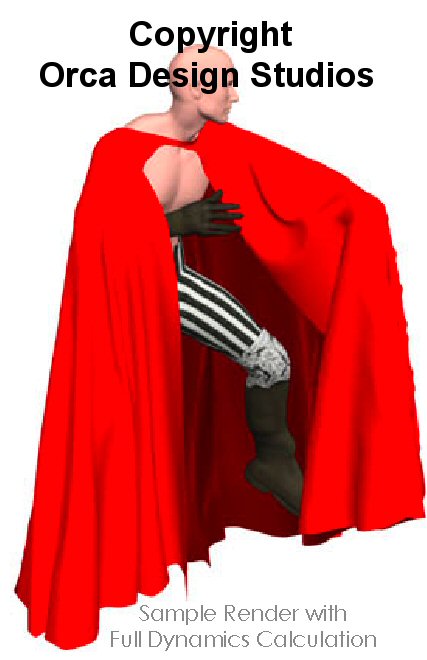
According to the picture in the PDF instructions file, the cape is supposed to follow the pose. See attached screenshot
I don't want the cape flying around. I just want it to look like it fits with the figure's pose instead of having it always fall down in the shap/pose/drape at the top.
"It is good to see ourselves as
others see us. Try as we may, we are never
able to know ourselves fully as we
are, especially the evil side of us.
This we can do only if we are not
angry with our critics but will take in good
heart whatever they might have to
say." - Ghandi

Can you please show an example of the problem you're talking about? The first image you posted, the cape appears to me to be in the correct drape.
Note that the simulation length has to be as long as whatever animation your scene is ... e.g. if you animate out to frame 180, and your simulation runs 1-30, the simulation will not continue to update past frame 30, which means your figure will "walk out" of the cape after frame 30. Cloth room won't make your cape into a conforming prop, so any time you adjust the pose of the figure at all you have to re-run the entire simulation.
PS: Dynamic clothing isn't tied to a specific figure other than the initial shape it has before it starts to drape, so don't worry about any M3/V3 "differences". You could apply your cape to really any item in Poser e.g. a box and it will still behave like a hunk of cloth.


Ergh, I hate problems with dynamic cloth and hair.
I have this cape, but I'm at work right now, so I can't run a test.
Here is what I know that might help.
1 - when your character is in the first frame (zero pose), make sure no part of the cape is intesecting the character.
2 - instead of choosing "ignore head collisions" acutally go through the little higharchy list and make certain neck is not ignored and head is ignored ('ignore head collision' might include ignoring the neck, thus the cape would go through it)
3 - before draping, but after parenting, do a little test, spin the character around a bit (chest side to side, rotate the yaxis, twist the neck) and see if the cape follows. This is a trouble shooting step, but i once had a dress that after parenting didn't respond to the character's movement. Not knowing what to do, I started a new scene with a blank character (no morphs) and tried a little experiment. It worked, so I rebuilt the scene fom scratch and had not problem. I concluded that somehow my saved scene was corrupted. (btw, this has happened witha few things since upgrading to P6, problems I never had with P5)
Damn, I have a few more pointers, but without Poser infront of me, I can't remember the settings. I'll see if I can add more thoughts tomorrow.
Let us know if you make any progress. There has to be some dynamic clothe gurus around here.
Good luck
Oh, I think I see part of your problem: When your character turns, especially if she turns very fast, the cloth will skid off of her skin and tend to not turn with her. Solution is to set a Constrained Group of a couple of vertices around her neck, to force the neck of the cape to turn with her neck and make the whole cape twist.
Parenting a dynamic cloth item to anything will not affect how it behaves in cloth simulation one bit, FYI.

Where is that cape available? It looks kinda neat.
FREEBIES! | My Gallery | My Store | My FB | Tumblr |
You just can't put the words "Poserites" and "happy" in the same sentence - didn't you know that? LaurieA
Using Poser since 2002. Currently at Version 11.1 - Win 10.
I'll make you a freebie for nothing, that's pretty easy actually. It's just a high-rez square with a couple of cut-outs.
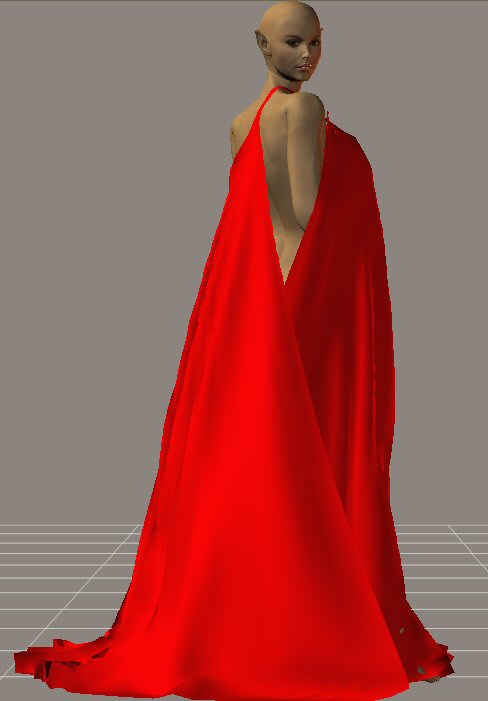
As you can see the neck opening of the cape always seems to face the front instead of following the figure. In this case the figure is facing away from the camera yet the cape neckline opening faces the front instead of being in front of the figure.
When you wear a cloak or cape, when you turn around the cape or cloak should also turn with you. It shouldn't stay still while your body turns so that it ends up on you backwards if you have your back towards the camera.
I don't know how to get this cape to follow the pose of the figure :( The figure turns but the cape isn't.
Quote - This may be grasping at straws, but have you double checked to make sure that every body part on the figure has collision detection on? I've had trouble with that in the past, where some parts have the flag un-checked, and the cloth drapes funny.
Yes, I have the entire figure selected to collide against, as well as the ground. The head isn't involved so I checked off "ignore head collision" but all of the rest of the body parts are selected.
"It is good to see ourselves as
others see us. Try as we may, we are never
able to know ourselves fully as we
are, especially the evil side of us.
This we can do only if we are not
angry with our critics but will take in good
heart whatever they might have to
say." - Ghandi
Quote - Solution is to set a Constrained Group of a couple of vertices around her neck, to force the neck of the cape to turn with her neck and make the whole cape twist.
Without being able to try it for myself right now, I'd concur with pjz99's advice to constrain around the neck hole of the cape; otherwise it won't know to turn with the figure. It doesn't have any constrained vertices set up by default. The other option would be to turn the cape manually before simulating, so the front is facing in the right direction.
Quote - > Quote - Solution is to set a Constrained Group of a couple of vertices around her neck, to force the neck of the cape to turn with her neck and make the whole cape twist.
Without being able to try it for myself right now, I'd concur with pjz99's advice to constrain around the neck hole of the cape; otherwise it won't know to turn with the figure. It doesn't have any constrained vertices set up by default. The other option would be to turn the cape manually before simulating, so the front is facing in the right direction.
How do you do the constrain group? I've never done that before.
"It is good to see ourselves as
others see us. Try as we may, we are never
able to know ourselves fully as we
are, especially the evil side of us.
This we can do only if we are not
angry with our critics but will take in good
heart whatever they might have to
say." - Ghandi
What you do is, in the cloth room with your particular cloth sim selected in 1. and the particular cloth item selected in 2. look at section 3. and locate "Edit Constrained Group". Click that.
This opens a little child window called Group Editor (Vertex). Everything in the scene will turn BLACK, to help you locate exactly which vertices you pick. It is a little confusing if you don't expect it. Two buttons at the top of the window are + and -. Those are selection modes (add and remove).
All you need to do is draw a small window around the neckline of the cape, which will select some vertices out of the cape (they're show up as little red dots). You only need a couple (really only one, but it may look like there's a nail through the cloth holding it to your figure). If you grab too many and end up with a lot of red dots, click the - button, and draw another window over what you want to remove, and give it another try.
Once you have a few vertices selected, close the Group Editor (Vertex) window with the top-right square button. When you run the simulation, the points you picked will drape like any other, but when they collide against anything you have the cloth set to collide against, they will stick. As your simulation continues, if your figure moves around the scene, the constrained group will follow the figure, and will pull the cloth along with it. So if you set a constrained group of a couple of spots around the neck, this has the effect of keeping the neck of the cape oriented to your figure; as she jumps forward or bends over, the neck of the cape will stick to the point they first intersected like they are glued there, but all the other vertices of the cloth will flow and collide like you would expect.
Be aware that if you remove and re-add simulations when trying to learn this, I have seen that constrained groups will persist even though you'd think they should not. That has burned me a few times.
Be advised you may want to set stretch resistance pretty high to keep the neck of the cape from loosening up a whole lot.
ps actually you probably want to ignore head collisions, as that can make the cloth kink up around the head in a really nasty way.
Here's a sample I threw together with settings:
Err, well, I am not cool enough to attach a pic I guess, let me find some place to stash it.
Bastard Photobucket de-rezzed it:
http://s106.photobucket.com/albums/m275/Front_Loaded/?action=view¤t=Tableclothgirl.jpg
That hadn't occurred to me but it seems like that would be more trouble than it's worth? Constrained groups are pretty simple to set up and understand - I would think that you'd get into magnets strictly for deforming the cloth, although I'm pretty noob and maybe it's actually easier in practice than I think it is.
Quote - What you do is, in the cloth room with your particular cloth sim selected in 1. and the particular cloth item selected in 2. look at section 3. and locate "Edit Constrained Group". Click that.
This opens a little child window called Group Editor (Vertex). Everything in the scene will turn BLACK, to help you locate exactly which vertices you pick. It is a little confusing if you don't expect it. Two buttons at the top of the window are + and -. Those are selection modes (add and remove).
All you need to do is draw a small window around the neckline of the cape, which will select some vertices out of the cape (they're show up as little red dots). You only need a couple (really only one, but it may look like there's a nail through the cloth holding it to your figure). If you grab too many and end up with a lot of red dots, click the - button, and draw another window over what you want to remove, and give it another try.
Once you have a few vertices selected, close the Group Editor (Vertex) window with the top-right square button. When you run the simulation, the points you picked will drape like any other, but when they collide against anything you have the cloth set to collide against, they will stick. As your simulation continues, if your figure moves around the scene, the constrained group will follow the figure, and will pull the cloth along with it. So if you set a constrained group of a couple of spots around the neck, this has the effect of keeping the neck of the cape oriented to your figure; as she jumps forward or bends over, the neck of the cape will stick to the point they first intersected like they are glued there, but all the other vertices of the cloth will flow and collide like you would expect.
Be aware that if you remove and re-add simulations when trying to learn this, I have seen that constrained groups will persist even though you'd think they should not. That has burned me a few times.
Thanks for that. I'll try it this evening after dinner.
"It is good to see ourselves as
others see us. Try as we may, we are never
able to know ourselves fully as we
are, especially the evil side of us.
This we can do only if we are not
angry with our critics but will take in good
heart whatever they might have to
say." - Ghandi
Quote - I remeber reading somewhere once that you could use magnets to help keep parts of dynamic clothing in place or some such.
You know I thought about that some more, and actually I think using magnets AFTER simulating the cloth would be quite useful for tweaking the mesh into a different shape manually, once the simulation is complete. Since you don't really have any control over what will happen during the cloth sim other than praying to whatever deity you think will help you the most, and hitting the cancel button, I am going to investigate that and see how much it can help me, I'm glad you brought that up.

pjz wrote:
"Parenting a dynamic cloth item to anything will not affect how it behaves in cloth simulation one bit, FYI."
Errm.. actually it does affect it in certain circumstances (eg, if "shrink-fitting" a cloth to a morphed/scaled figure - the cloth expands with the figure as opposed to being "pushed out" via the cloth-sim..). But that's another situation.
Acadia, I've just played with that cloak (downloaded it about an hour ago) and I know exactly what your problem is and how to fix it.
A total explanation is beyond my powers of concentration right now (too many beers), but the concept of constraining is the way to go...
BTW, that cloak is very poly-heavy, it takes over 60 frames for it to settle, even in a simple setup.
However, the basic concept is:
- Load figure. Zero, then bend the arms down (from the shoulders)so that they're at least 45 degrees down from horizontal (so as not to waste steps later).
- Load cloak. Ensure it fits around the neck properly. (Since it's parented it might be wrongly positioned, especially in the Y direction).
- Run a sim. 30 frames is more than enough. DONT set any "Drape" frames (if they go wrong they can't be deleted. Also uncheck "Start from zero pose" - you're not at zero pose). Cancel the sim (if you're impatient) once the cloak has settled around the neck.
- Exit the cloth room, and in the pose room find the frame where the cloth has settled on the shoulders.
- (This bit is 'cos I find the cloth room grouping tool rather hard to work with..-and the resulting groups don't save in .obj files..)
With the cloak selected, open the group editor (thats the tool that looks like a little box with a dot in the middle). Hit "new group", call it something like "constrained", and select couple of facets at the top of the cloak, on the neckline on either side of the neck. Then hit "Assign Material" (in the geometry section). You should now have a new material group added to the cloak. Why? - read on... - Export (just) the cloak at this frame as a wavefront.obj. Call it something sensible, like "CloakWithHope". Uncheck everything on the export, but DO check "include existing groups". This will save the cloak partially "draped" and with the "constrained" area still intact.
- SAVE! (just in case anything goes wrong later..) It might be best to xit and restart Poser here, just to free up memory...
8.. Return to frame 1. Delete the cloak. Load the saved .obj file - all options unchecked. It should fit exactly.
And now for the fun bit....
9.Go to frame (I would suggest for this item, at least frame 20) and set your final pose. Including the turning. It might be well worth your while extending the anim to say 60 frames (don't forget to do it in both the animation and the cloth sim) and set your pose frame to 40 or later.
-
After having clothified and collided your cloak, click on the "Edit Constrained" button. In the dialogue that pops up, hit "Add Material", then select the "Constrained" group you added earlier. You should see a few red dots in the area where to added the "constrained" material group in step 5. Close dialogue.
-
Check every thing is ready and right. Figure posed correctly in frame 1 (arms down)? Figure posed correctly in frame 20+? Nothing intersecting?
-
Hit Calculate! Go make coffee. Take dog for walk. Come back before coffee boils over Drink coffee. (Alternatively, become navel-oriented and watch the sim, slow frame-by-frame).
Hope that helps...(Sheesh... I need another beer...)
Cheers,
Diolma
(Apologies if I gt anything wrong - I'm not at my best right now..)
Quote - pjz wrote:
"Parenting a dynamic cloth item to anything will not affect how it behaves in cloth simulation one bit, FYI."Errm.. actually it does affect it in certain circumstances (eg, if "shrink-fitting" a cloth to a morphed/scaled figure - the cloth expands with the figure as opposed to being "pushed out" via the cloth-sim..). But that's another situation.
That surprises me but it makes sense in concept. I can't quite visualize what that would really look like but I'll try it and see what comes out. Thanks for correcting me there.
Hi, pjz99:-)
"Shrink-wrapping" is a technique to fit a clothing to a figure it wasn't intended for. (Not neccesarily the best technique, but one of them..)
Try the following:
Load Judy. Load one of the P5's kiddies clothing. Create a key-frame at around frame 20 for Judy.
Reset to frame 1 and scale Judy (mainly in X & Y) so that she fits within the clothing (no poke-through). Doesn't matter if the result looks ridiculous - you may even have to apply extra scaling to individual parts, just get everything inside the clothing at frame 1.
Ensure that the cloth is not parented.
Set drape frames to 0.
(It's probably best to use the anim editor to set all frames to linear, or use break spline in the "posed" image to avoid interpolation overruns..)
Run the sim, and watch how the figure, as it resizes to its proper proportions, "pushes" out the cloth. (You may need kill the elasticity if there's thin straps around).
Now return to frame 1 and parent the cloth to the figure. Delete the original sim and run a new one. Watch the difference...
(I hope there's a difference 'cos otherwise I've been missing something spectacularly...)
Cheers,
Diolma
I think I see what you mean, that's a good trick for resizing cloth items as well. Thanks.

I shouldn't give away my secrets, but that's what I'm doing with a lot of models these days. Cloth-room for shrink-wrap....also Cloth-room to create drapery folds. Something that could help a lot; take out that figure's rotation. There's no reason to rotate body or hips as part of the cloth sim. If you have to turn the character for the final picture, turn her AFTER the sim is completed.
Well, doesn't that depend on what you want - if you WANT to make the cape twist, then that works, although I would expect you wouldn't want the figure parented in that case?
Just updating with with a fix recommended by Orca Designs.
The problem is apparently because in my example, the figure is turning to the side. The cape was created the cape without any constrained groups in order to make it useable for any figure. This means the cape can slide on the figure if the figure turns too much. The solution is to make the neck area of the cape a constrained group. That should keep the neck in position so that the front of the cape will turn with the figure.
Which is pretty much what was suggested earlier in this thread :)
I never did manage to get it to work so I gave up on it and went with a different cape. I'm down, but not defeated and will one day revisit this cape and see if I can get it to work.
"It is good to see ourselves as
others see us. Try as we may, we are never
able to know ourselves fully as we
are, especially the evil side of us.
This we can do only if we are not
angry with our critics but will take in good
heart whatever they might have to
say." - Ghandi
Quote - Just updating with with a fix recommended by Orca Designs.
The problem is apparently because in my example, the figure is turning to the side. The cape was created the cape without any constrained groups in order to make it useable for any figure. This means the cape can slide on the figure if the figure turns too much. The solution is to make the neck area of the cape a constrained group. That should keep the neck in position so that the front of the cape will turn with the figure.
Which is pretty much what was suggested earlier in this thread :)
I never did manage to get it to work so I gave up on it and went with a different cape. I'm down, but not defeated and will one day revisit this cape and see if I can get it to work.
what cape?

That's a shame Acadia because it's a great cape - once you get to grips with it.
I've used it for a number of images, but this is the only one I've posted here:
http://www.renderosity.com/mod/gallery/index.php?image_id=1413775
The Cloth Room isn't the most user-friendly room in Poser, but once the penny drops you'll find you can't live without it!
I'd love to know what the 'other' cape is you're now using too! :)
If we can hit that bullseye, the rest of the dominos will fall like a house of cards...checkmate!
Quote - ]what cape?
Sorry, this one :)
http://www.renderosity.com/mod/freestuff/index.php?user_id=89871
"It is good to see ourselves as
others see us. Try as we may, we are never
able to know ourselves fully as we
are, especially the evil side of us.
This we can do only if we are not
angry with our critics but will take in good
heart whatever they might have to
say." - Ghandi
Quote - The Cloth Room isn't the most user-friendly room in Poser, but once the penny drops you'll find you can't live without it!
I'd love to know what the 'other' cape is you're now using too! :)
I love the cloth room and most of the time I can get through it without difficulty. However, this cape is certainly more than a challenge.
I can't remember which cape I ended up using. I think it might have been part of an outfit by BVH. Not dynamic though.
"It is good to see ourselves as
others see us. Try as we may, we are never
able to know ourselves fully as we
are, especially the evil side of us.
This we can do only if we are not
angry with our critics but will take in good
heart whatever they might have to
say." - Ghandi
Quote - > Quote - ]what cape?
Sorry, this one :)
http://www.renderosity.com/mod/freestuff/index.php?user_id=89871
looks the same cape.
It is :)
This is the thread I linked you to from inside your thread about your cape problems. I recognized the cape from your screenshots. So I thought you would be interested in learning the fix for the cape falling off of the figure when the figure turns.
"It is good to see ourselves as
others see us. Try as we may, we are never
able to know ourselves fully as we
are, especially the evil side of us.
This we can do only if we are not
angry with our critics but will take in good
heart whatever they might have to
say." - Ghandi
Quote - i noticed that the constrained group on the orca cape doesnt work. has anyone else having those problems?
constrained group is when hte cape sticks on the object. it doesnt work.
pjz99 provided instructions on fixing the adding a constrained group on the first page of this thread. Here is the post on how you do it.
Quote - What you do is, in the cloth room with your particular cloth sim selected in 1. and the particular cloth item selected in 2. look at section 3. and locate "Edit Constrained Group". Click that.
This opens a little child window called Group Editor (Vertex). Everything in the scene will turn BLACK, to help you locate exactly which vertices you pick. It is a little confusing if you don't expect it. Two buttons at the top of the window are + and -. Those are selection modes (add and remove).
All you need to do is draw a small window around the neckline of the cape, which will select some vertices out of the cape (they're show up as little red dots). You only need a couple (really only one, but it may look like there's a nail through the cloth holding it to your figure). If you grab too many and end up with a lot of red dots, click the - button, and draw another window over what you want to remove, and give it another try.
Once you have a few vertices selected, close the Group Editor (Vertex) window with the top-right square button. When you run the simulation, the points you picked will drape like any other, but when they collide against anything you have the cloth set to collide against, they will stick. As your simulation continues, if your figure moves around the scene, the constrained group will follow the figure, and will pull the cloth along with it. So if you set a constrained group of a couple of spots around the neck, this has the effect of keeping the neck of the cape oriented to your figure; as she jumps forward or bends over, the neck of the cape will stick to the point they first intersected like they are glued there, but all the other vertices of the cloth will flow and collide like you would expect.
Be aware that if you remove and re-add simulations when trying to learn this, I have seen that constrained groups will persist even though you'd think they should not. That has burned me a few times.
"It is good to see ourselves as
others see us. Try as we may, we are never
able to know ourselves fully as we
are, especially the evil side of us.
This we can do only if we are not
angry with our critics but will take in good
heart whatever they might have to
say." - Ghandi

Quote - i dont understand what you mean when you say that i have to parent it?
Pardon my stepping in late here but this might be of help.
"Parenting" is a way of attaching one 3d object to another so that when the parent moves, the "child" will move with it. In a standard figure hierarchy, the hip is a parent of the abdomen, which is in turn a parent of the chest etc.
In Poser, to parent an object to another, you do this either in the Properties panel or the Object menu from the main menu at the top.
Select the cape, then in the Properties panel click "Set Parent" - or in the Object menu choose "Change Parent"
Either of these will open up a window you can scroll through the objects in the scene. Scroll down and find the "Neck" or "Chest" of the figure and select that as the Parent for the cape.
Hey! His nose is dry! ... Someone should lick it, just in case. - Diego
You don't parent dynamic clothing props.
Ice-boy, this cape is not the easiest thing to work with, in fact it's probably the most difficult dynamic item that I've run across so far.
Can I suggest abandoning this cape and finding something easier to work with for the time being until you get more experience in Poser and the cloth room?
"It is good to see ourselves as
others see us. Try as we may, we are never
able to know ourselves fully as we
are, especially the evil side of us.
This we can do only if we are not
angry with our critics but will take in good
heart whatever they might have to
say." - Ghandi
Quote - You don't parent dynamic clothing props.
Ice-boy, this cape is not the easiest thing to work with, in fact it's probably the most difficult dynamic item that I've run across so far.
Can I suggest abandoning this cape and finding something easier to work with for the time being until you get more experience in Poser and the cloth room?
i will try another cape. it is really very hard..
thanks anyway. :)
but i still have a question. i now used soft decorated groups. and it is like constrained. it sticks to the object.
is it the same?


- 1
- 2

Privacy Notice
This site uses cookies to deliver the best experience. Our own cookies make user accounts and other features possible. Third-party cookies are used to display relevant ads and to analyze how Renderosity is used. By using our site, you acknowledge that you have read and understood our Terms of Service, including our Cookie Policy and our Privacy Policy.
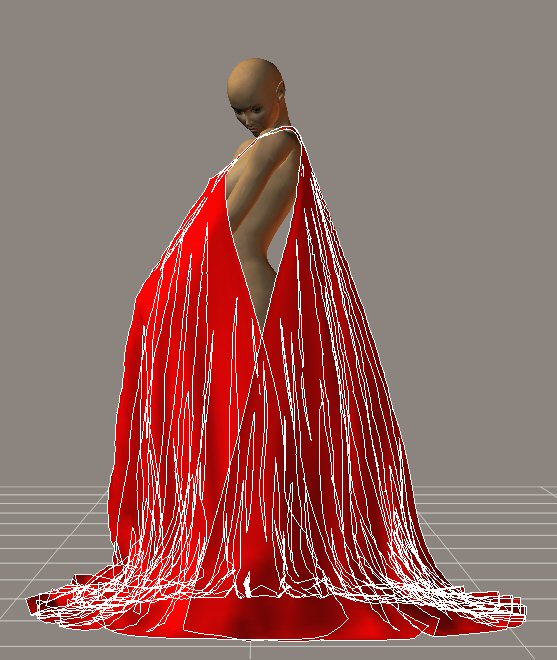
Has anyone used this dynamic cape with any success? I'm having a wicked time with it.It doesn't matter what pose I put the figure in, the cape always ends up like in the screenshot.
I set the figure's pose at frame 15 of 30.
I go back to frame 1
Go to Cloth Room and start a new simulation.
Set self collision.
Start draping at frame zero
I clothify the cape and pick the figure and ground to collide against.
I ignore head collisions
Calculate Simulation.
And every single time I get the above.
I thought it was because the cape is for M3 and I'm using it on V3. So I changed the object parent to V3's neck and that didn't help. The above is the result of that...which is the same as the result of not having changed the parent.
Any tips please?
EDIT: oops, sorry about the lines in it. I didn't realize that the cape was the active item when I took the screenshot.
"It is good to see ourselves as others see us. Try as we may, we are never
able to know ourselves fully as we are, especially the evil side of us.
This we can do only if we are not angry with our critics but will take in good
heart whatever they might have to say." - Ghandi