
Renderosity Forums / Carrara
Welcome to the Carrara Forum
Forum Coordinators: Kalypso, Anim8dtoon
Carrara F.A.Q (Last Updated: 2026 Jul 30 8:26 pm)
Visit the Carrara Gallery here.

Subject: A plethora of questions about special effects in C5Pro...


I don't claim to be an "expert", by any means but I can help point you to info that will answer your fifth and sixth questions. Thomas has a nice tutorial over at Polyloop on using the surface replicator to spread mass amounts of replicated trees over a landscape. http://forums.polyloop.net/carrara-tutorials/4317-c5-surface-replicator-dream-island.html
Mark Bremmer discussed that particular problem with displacement mapping in the following thread- http://www.renderosity.com/mod/forumpro/showthread.php?message_id=2600184&ebot_calc_page#message_2600184

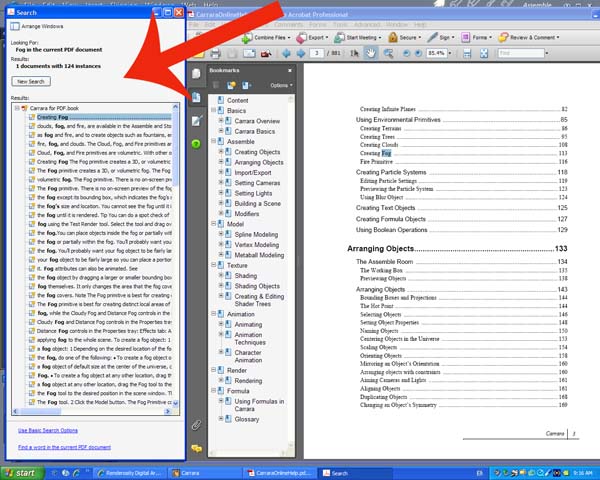
I suggest most of the questions you raised would, mostly, be answered buy the reference to Help.
Help really is good in Carrara I find. With the exception of some of the good things which came with the 5.1 update.
bwtr

Quote - Also, I would like to know if its possible to render a seperate distance mask, one that I could manipulate in a 2d program, rather than use the depth of field feature w/ the camera. Far too many times does my focus area gets blurred, Id like a little more control, dont quite get the look I want when done inside C5pro...
Under the render settings you can choose the image/movie output file format under the tab marked "Output". If you choose the Photoshop option from the drop-down box you can then select from the "G-Buffers" menu things like surface coordinates or 3D position that will show up as separate channels in programs like Photoshop or The Gimp.

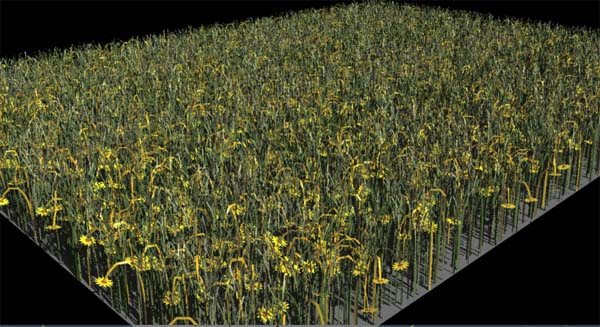
I think the replicator would work nicely for grass. You could fashion a few 'clumps' of grass, enough to break up any sense of monotony, then replicate them in mass to populate a field.
You could try Anything Grows; but I don't think it would be practical for a huge amount of grass.
The volume clouds should be interacting with a scene when you make them. I personally think the shadows look better when the cloud's opacity is set low. If you are using Skylight check the 'add skylight' attribute. And 'participate in global illumination' to have the cloud interact with the scene's GI.
You could try a 'basic shape' and play with the threshold to try to get a single volume cloud to look like many clouds; but I think making individual volumes works better over all. It would depend on your needs.
Friends don't let friends use booleans.
Thank you all for your advice and suggestions. Actually, the surface rep tut will help heal plenty of my wounds (thats an AWESOME tutorial btw). That will help w/ grass, trees, and even ground fog I suppose.
I dont find that the help guide does much in the way of practical applications of things. Its great for getting a basic understanding of the terms of features, but its only through discussion and visual guides do I ever get anything. I know what fog is, how to edit it, and have a basic understanding of the controls, but thats it. C5 is so huge, with so many options, you can sit around all day experimenting, which I am fond of, but sometimes you -dont- want to fly blind and its good to get input from other users... A PDF doesnt compare to the forums :)
I suppose its hard for all of us filling that huge gaping hole that is the sky (I look in the galleries often :P). I am getting rather tired of plopping in some wall or pre-rendered background. Would much rather have a sky that looks "real"... I know C5 can do it, Im in the learning process, its ok :P
So whats the deal w/ fire?!?
There are 3 kinds of people in the
world. Those that can count, and those that can't..
Particles could be another possibilty to check out in your quest for realistic fire. There might be a preset you can alter to taste. You can have both fire and smoke "emitters". I don't know if the particles can be pre-rolled to start before the first frame of an animation, but it would be fairly simple to set up a time line, arrange several fire and smoke emitters and then scrub the timeline to the point where the preview shows that everything is emitting and then render just that frame, or the whole animation if you want.
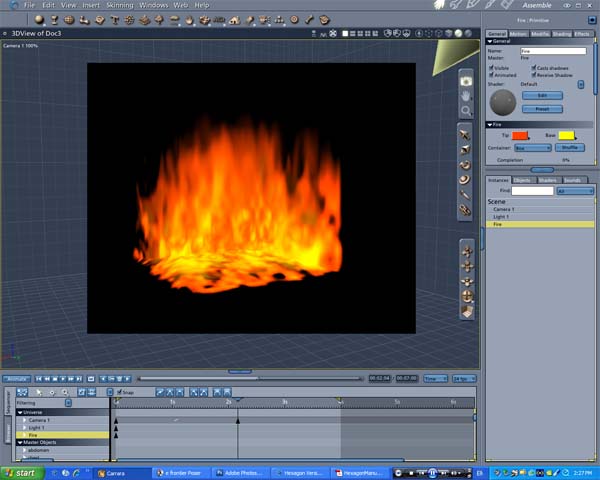
I find that Carrara's fire objects are somewhat limited; you're right, there's just the box, cylinder and sphere. Not terribly useful if you want to set a car or bridge or house aflame.
I actually use a separate program to simulate fire when I need it. Or if photorealism is necessary, I'll use an actual video source of flame with an alpha channel mapped onto a 2D plane inside the Carrara scene.
I havne't played with particles in Carrara much, but they can be very powerful in other programs, so I'd guess they have a lot of potential in C5P.
HTH.
Dex
Yes, the default fire I find to be VERY limiting bwtr... Ive scoped the galleries for fire renders, but havent seen anything that resembles the effect Im going for...
As far as Anything Grows, Im really trying hard to stay within C5Pro, w/o the need for anything el$e :P The surface replicator, just on my 1st few test runs, proved VERY promising, Ill keep pushing that.
I still would like to see some examples of skies and atmosphere renders that use volumetric cloud and fog effects, Im not getting the hang of adjusting the settings to those...
Again, thanks guys, its really appreciated!
There are 3 kinds of people in the
world. Those that can count, and those that can't..
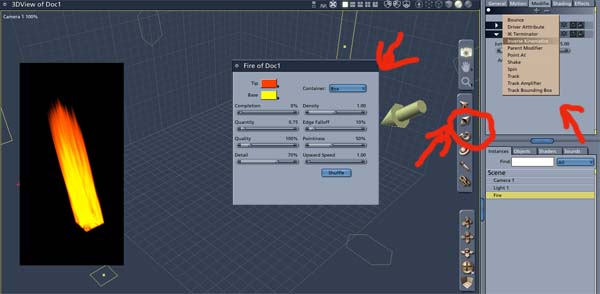
Have a look at this particle tute. Between that and what you can do with the fire (see image),
what more does one really need?
bwtr

Privacy Notice
This site uses cookies to deliver the best experience. Our own cookies make user accounts and other features possible. Third-party cookies are used to display relevant ads and to analyze how Renderosity is used. By using our site, you acknowledge that you have read and understood our Terms of Service, including our Cookie Policy and our Privacy Policy.
Hello all, and yes, I have MANY questions (fog, clouds, fire, atmosphere, depth of field, etc :P), I hope it isnt overwhelming for just 1 thread...
My 1st question (or area I need help in rather :P) is about using the fog object. It comes in rather small, and I want to know if the fog object is meant to be scales to cover a large area, or rather made into something of clumps of clones of smaller fog objects... Im trying to use HDR lighting and atmospheric effects, but am having "much" trouble... Sky and background settings render too faint, and Id prefer a volumetric "look" to interact w/ the other scene elements...
Secondly, Id like to have a better understanding of volume clouds for the sky..... Again, is it a matter of clumping and dispersing clones of cloud objects across your sky?!? How would one "fill" the sky w/ volume clouds so that they interact w/ the atmosphere and scene objects?!?
The third area I need help in is FIRE!!! What is the best way to set objects on fire?!? Are we only limited to using a box, sphere or cylinder for fire objects?!? Is there such a thing as a fire "shader" that can be applied to objects?!? Any tips for realistic fire would be greatly appreciated :)
Also, I would like to know if its possible to render a seperate distance mask, one that I could manipulate in a 2d program, rather than use the depth of field feature w/ the camera. Far too many times does my focus area gets blurred, Id like a little more control, dont quite get the look I want when done inside C5pro...
How come the default setting for hdr's imported into C5pro are flipped?!?
Thanks :)
There are 3 kinds of people in the world. Those that can count, and those that can't..