
Renderosity Forums / Carrara
Welcome to the Carrara Forum
Forum Coordinators: Kalypso, Anim8dtoon
Carrara F.A.Q (Last Updated: 2026 Jul 30 8:26 pm)
Visit the Carrara Gallery here.

Subject: question about reflections


the 2 planes are spaced a bit more to make the effect more appearent
basicly i'm splitting the usual mirror design of 1 plane, into 2, trying to add a bit of "depth" to it, which you can notice in most any mirror, having reflection on the "back" plane, and rest of highlights/spec/etc on the "front" plane,which i should also add reflection to, but that comes later if i can fix this :)
problem is trhe "front" plane gets effects on them, then the "back" plane sees those when its raytracing the reflection, which i want it to not see them, and ignore the front plane totally
in poser i could make the plane "not visible" to any raytracing, but in carrara no such feature?

He's trying to model a mirror the way that real mirrors are made. Sounds like a cool challenge. I don't know if anyone has ever modeled a mirror that included depth. I'm sure it can be done. I've modeled eyeballs that produce red-eye when light is shown into them using Carrara. So anything is possible.
www.youtube.com/user/ShawnDriscollCG
same basic idea applies to glass windows, 2 planes representing the 2 surfaces, which today i just found is causing reflections to once again not work out right, since both planes on the glass have "glass" type shader, including reflections.
con - reflections on both surfaces causes reflection wars, causing them to show reflections of eachother, along with screwing up lighting on them
pro - nice place to use SSS when double planes, and if refraction is set right, makes it look a lot more like windows :)
still need to fix reflections though -_-

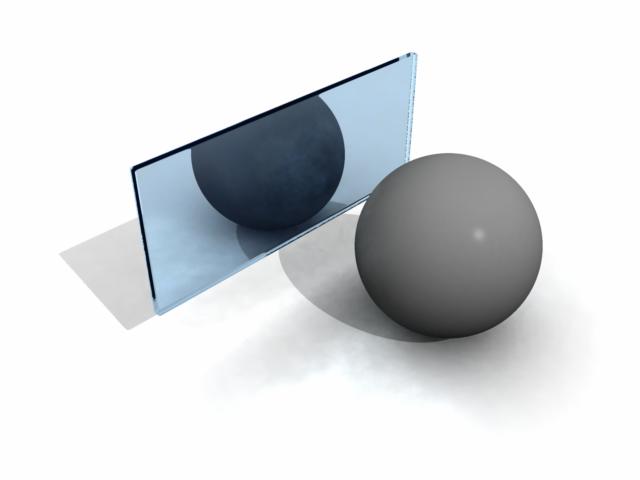
hmm i dont see the same flaw in the reflections, and only real difference is the normals would be pointing opposite directions, while in mine, they both face 'forward" towards the ball, odd how things work now
and yes i know both have reflections in the real world, but was no point to use the front one when other things didnt work right :) as for the edges, the frame of the mirror covers them in my model, so was no point to having them either
thanks for the solution though :) reversing the back normal works :D

Privacy Notice
This site uses cookies to deliver the best experience. Our own cookies make user accounts and other features possible. Third-party cookies are used to display relevant ads and to analyze how Renderosity is used. By using our site, you acknowledge that you have read and understood our Terms of Service, including our Cookie Policy and our Privacy Policy.
trying to create an effect from mirrors
i have 2 planes, slightly apart, the "back" one is the reflection, no other effects
the 2nd, the "front" plane, has the rest, highlight/shine/etc, shadows off for both
problem is the reflectiion is "running into" the shine on the front plane
don't want it to see that shine when reflections are calculated, solution?