Filter: Safe | Tue, Jul 14, 8:37 AM CDT

Renderosity Forums / Carrara


Welcome to the Carrara Forum

Forum Coordinators: Kalypso, Anim8dtoon

Carrara F.A.Q (Last Updated: 2026 Jul 11 2:50 am)


Visit the Carrara Gallery here.

Carrara Free Stuff here.

 
Visit the Renderosity MarketPlace - Your source for digital art content!


Subject: Can't UNDO spot light pivot


ShawnDriscoll ( ) posted Wed, 08 March 2006 at 12:36 AM · edited Tue, 14 July 2026 at 8:36 AM

file_331951.jpg

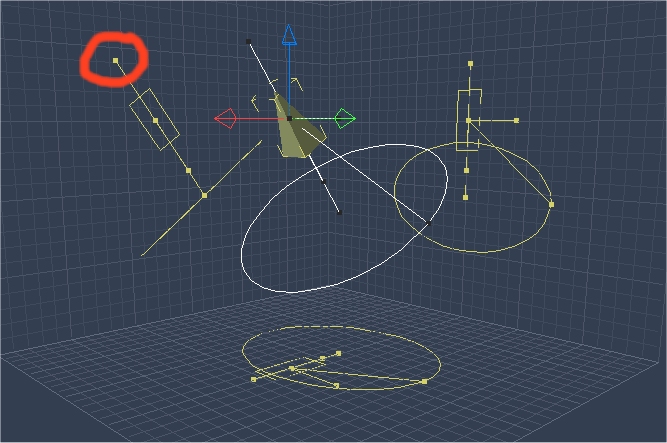
In Carrara Pro 5.05, I move a spot light by dragging the point (circled). But I can't UNDO the move. Has anyone reported this bug to Eovia yet? Is it already known from previous versions?

www.youtube.com/user/ShawnDriscollCG


Kixum ( ) posted Wed, 08 March 2006 at 6:08 AM

I can't undo it either. I have no experience from previous versions. -Kix

-Kix


bluetone ( ) posted Wed, 08 March 2006 at 9:37 AM

Report it.


MarkBremmer ( ) posted Wed, 08 March 2006 at 12:55 PM

Missed that one. I always use the keyboard shortcut widget instead...


ShawnDriscoll ( ) posted Wed, 08 March 2006 at 1:22 PM

Kixum, can you report it please. I burned my bridges with Eovia long ago. They ignore any errors I report to them.

www.youtube.com/user/ShawnDriscollCG


Kixum ( ) posted Wed, 08 March 2006 at 8:16 PM

Ya, I'm starting to put a grocery list of interface issues I'm finding. Just little things all over the place. -Kix

-Kix


ren_mem ( ) posted Wed, 08 March 2006 at 10:15 PM

Yeah, it don't work.Charles was asking about how things were going for people on yahoo. Sounded like they were hoping to not need any more patches.

No need to think outside the box....
    Just make it invisible.


nomuse ( ) posted Thu, 09 March 2006 at 2:54 PM

I just had a distant light freeze myself. Set it to "point at." That didn't work at all (despite the nice new drop-down menu). Disabled "point at" but now the light could not be pivoted at all. I deleted it and put a new one in...and made sure NOT to try "point at."


bluetone ( ) posted Thu, 09 March 2006 at 3:42 PM

Distant lights don't have a normal 'direction' to 'Point at' with. They only have an angle dimension. That may be why they can't 'Point at' something. Just my 2 cents...


MarkBremmer ( ) posted Thu, 09 March 2006 at 3:44 PM

Actually, the point at modifier is working on my system with Distant Lights. Hmmmmmmm.


Privacy Notice

This site uses cookies to deliver the best experience. Our own cookies make user accounts and other features possible. Third-party cookies are used to display relevant ads and to analyze how Renderosity is used. By using our site, you acknowledge that you have read and understood our Terms of Service, including our Cookie Policy and our Privacy Policy.