Filter: Safe | Tue, Jul 14, 3:07 AM CDT

Renderosity Forums / Carrara


Welcome to the Carrara Forum

Forum Coordinators: Kalypso, Anim8dtoon

Carrara F.A.Q (Last Updated: 2026 Jul 11 2:50 am)


Visit the Carrara Gallery here.

Carrara Free Stuff here.

 
Visit the Renderosity MarketPlace - Your source for digital art content!


Subject: Shader help, anyone?


SmallFry ( ) posted Thu, 02 February 2006 at 3:50 PM · edited Tue, 14 July 2026 at 1:47 AM

I'm looking for help in creating a masked shader effect. It's to simulate 2 shaders on one object. There would be a base shader, then a second masked shader which would allow portions of the base the come through. A black-&-white mask would determine which parts of the base come through and which are used for the second shader. Anyone have any ideas? Thanks!


falconperigot ( ) posted Thu, 02 February 2006 at 4:11 PM

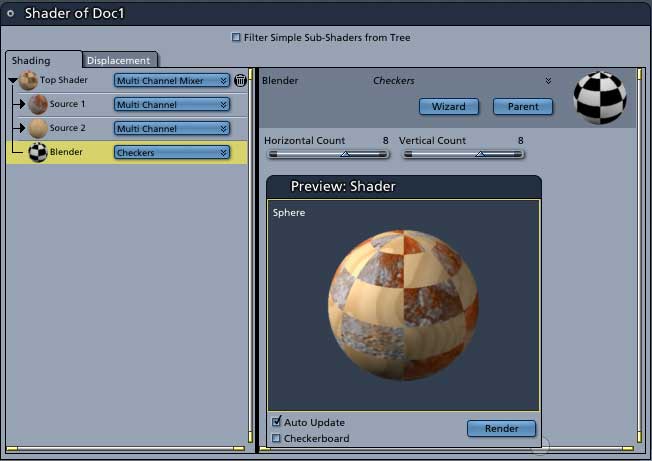
From the Top Shader choose Complex Shaders>MultiChannel Mixer. Then set one Source for one shader and the second Source to the other. Stick your texture map or whatever in the Blender. That's it.


MarkBremmer ( ) posted Thu, 02 February 2006 at 4:19 PM

file_323623.jpg

This should do it... You can use any black and white or grayscale image to do the mixing. And, to make matters more interesting, you can have multi-channel mixers inside of each other. Kind of makes the imagination wander a little. :D Mark


ren_mem ( ) posted Thu, 02 February 2006 at 5:18 PM

The texture channels are amazing.Spend some time on the operators...they are you friends:) I just wish I had a brush.

No need to think outside the box....
    Just make it invisible.


Privacy Notice

This site uses cookies to deliver the best experience. Our own cookies make user accounts and other features possible. Third-party cookies are used to display relevant ads and to analyze how Renderosity is used. By using our site, you acknowledge that you have read and understood our Terms of Service, including our Cookie Policy and our Privacy Policy.