
SmallFry opened this issue on Feb 02, 2006 · 4 posts
SmallFry posted Thu, 02 February 2006 at 3:50 PM
I'm looking for help in creating a masked shader effect. It's to simulate 2 shaders on one object. There would be a base shader, then a second masked shader which would allow portions of the base the come through. A black-&-white mask would determine which parts of the base come through and which are used for the second shader. Anyone have any ideas? Thanks!

falconperigot posted Thu, 02 February 2006 at 4:11 PM
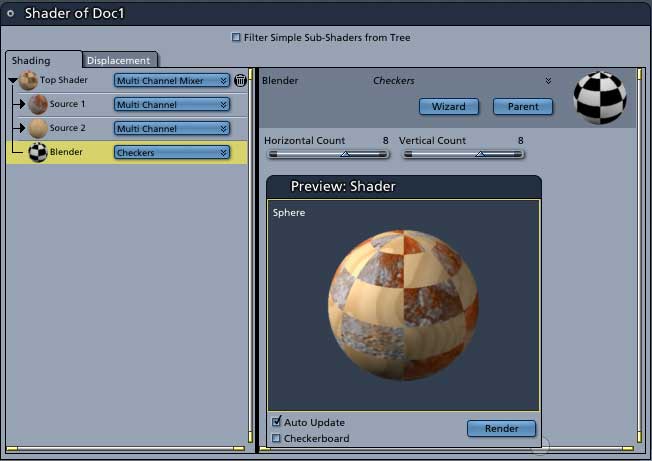
From the Top Shader choose Complex Shaders>MultiChannel Mixer. Then set one Source for one shader and the second Source to the other. Stick your texture map or whatever in the Blender. That's it.

MarkBremmer posted Thu, 02 February 2006 at 4:19 PM

ren_mem posted Thu, 02 February 2006 at 5:18 PM
The texture channels are amazing.Spend some time on the operators...they are you friends:) I just wish I had a brush.
No need to think outside the box....
Just make it
invisible.