
Renderosity Forums / Carrara
Welcome to the Carrara Forum
Forum Coordinators: Kalypso, Anim8dtoon
Carrara F.A.Q (Last Updated: 2026 Jul 11 2:50 am)
Visit the Carrara Gallery here.

Subject: Skylight through transparency?


In your render settings, is Light Through Transparency checked? If so, you may have to fudge with the shaders for the hair and lashes by adjusting their alpha and/or transparency channels.
www.youtube.com/user/ShawnDriscollCG
Did both. I could lessen the problem, but not make it go away. The thing that helped most was using Shader Ops to push the transmap a bit. As checks I tried dialing all the light settings up to maximum. Got a ten-hour test render for my pains...but the problem was still there. So pixel size, shadow size, quality, photon count ain't it. I'm doing a test now to see if I can run skylight down and indirect up to lessen the problem. It is so painfully obvious I don't see any way to fix up the face (say, with a little light) without making it obvious I've done so.
Hrm. Even turning off "cast shadows" didn't do it. It's basically not a shadow...it's that skylight (and, seemingly, indirect light originating from the sky dome and bouncing off a bounce sheet), will not pass through transparency. It could be it will happen if there is enough space between transparency and object (I recall trouble with Poser eyes before on this account). Alpha channel won't fix it any more than any other materials setting. As a double-check I disabled skylight and tried a couple ordinary lights. All of these operated normally, and didn't create dark blotches below the transparency. This is very annoying. It basically blocks me from using the most attractive lighting options in Carrara on imported Poser figures.


we dont need "transmaps" to see through object in real life so who needs strict laws of physics in CG renderss??? ;-) besides alot of poser is about idealized fantasy however if you really REALLLY need to see sagging breasts hanging down to a womans kneecaps please visit your nearest retirement home and leer to your hearts content LOL!!! P.S.nomuse i hope you get your problem sorted i switched to CP4 for better lighting options for my poser scenes as well
Well...I am pretty unhappy now. I recall being told the solution CSP4 offered was alpha channels. Transposer does indeed apply alpha channels for the transmapped objects. In distant, spot, or bulb renders the transmapped lashes and hair work perfectly. In skylight or indirect light they don't work at all -- they appear to be completely opaque to the light. I've turned on and off every function I can think of here. Well...I'm gonna light-lab this with a transmapped grill and a plane, and see if I learn anything.
Just installed the 4.1 updater, and it appears after a quick light-lab the results are now useable. The results are, however, absurd. I'll have to run a more complete light lab to create a full truth-table, but what appears to be the new behavior in 4.1 (OSX), is that objects either DO inhibit passage of skylight, or do NOT. I've placed the transmap both in transparency channel and in alpha channel, and in both cases the object became invisible to the skylight -- regardless of it's own visibility. I'm working now to see if this behavior translates to a Poser import. So far, I've discovered Transposer uses neither alpha nor transparency channel per se, instead creating a mixer between two multi-channel shaders -- one with transparency on, the other not.
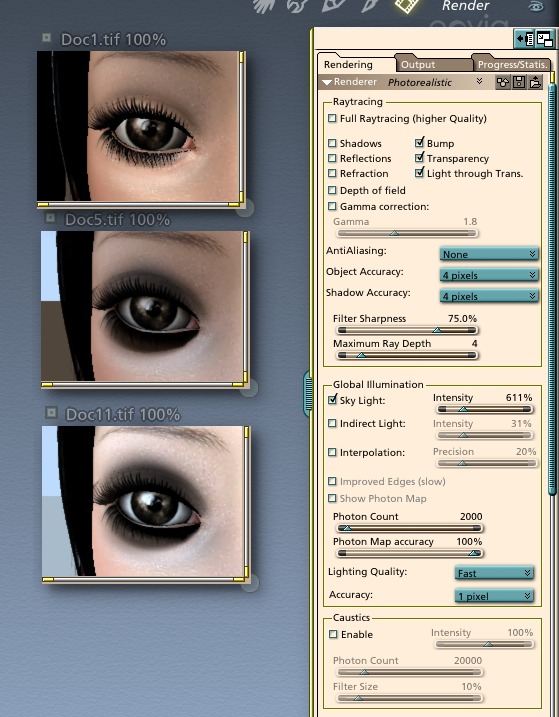
Top render is with a single Distant Light, all default settings.
Middle render is with the Distant Light set to invisible and "Sky Light" enabled in the Global Illumination box. Notice the dark eyes. In fact, the outline of the actual eyelash mesh is quite obvious, and that is what appears to be casting a shadow. I did a couple of renders with no transmap at all and the lashes set to 100% transparency for the same effect.
Lower render is best result after ten hours of work. Notice the render settings. Setting the engine to tens of thousands of photons, changing the photon map, including indirect light, clicking and unclicking "light through" or "shadows," setting quality to highest or lowest -- none made a significant diference to the shadows.
The lower, incidently, is with the TransPoser-created channels tossed and a new shader that uses alpha channel with the transmap below a Shader Ops filter. Of course "no light interactions when fully transparent" is checked.
She has black eyes, but I'm the one who's ready to cry.
Sorry....that was the FIRST thing I tried. I ran the lighting all the way up to "Best", at 1-pixel accuracy, 50,000 photons, 100% photon map, Full raytracing. 0.5 pixel shadow....pretty much the top of every slider on the panel. Made essentially no difference. The shadows were nicely rendered. This ain't in my imagination. I don't know what is the difference between the results I'm getting and the results others are reporting, but I'm getting pretty tired of people repeating the obvious.
Mm. Thanks for the offer. I'd prefer to recreate the behavior with another prop, tho (I did the light lab with a pair of planes, one with a simple map containing one black spot I made in GraphicConverter) -- the meshes I'm using are of course DAZ property and all that rot. Just to make sure I did it right the first time (and the fourth, and the eighth) I'm rendering one more test shot with everything but total photons cranked up to the top of the slider. Looks to be another four hours before THAT finishes! Meantime I have a solution that will work for at least this image, perhaps others. Render twice, combine in PhotoShop, use alpha channel to reveal the spot-lit render only where it is needed to clean up eyelashes, hairline, and other problems with the GI render. Oh...I tried another cute trick in the interim. Scaled the entire scene 100x. It changed a bit, but the black shadows didn't move enough to notice.

Privacy Notice
This site uses cookies to deliver the best experience. Our own cookies make user accounts and other features possible. Third-party cookies are used to display relevant ads and to analyze how Renderosity is used. By using our site, you acknowledge that you have read and understood our Terms of Service, including our Cookie Policy and our Privacy Policy.
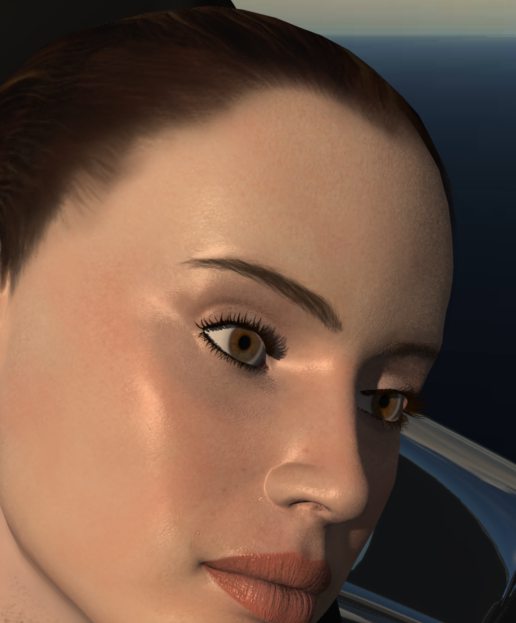
I remember having a problem before -- Carrara 2, at least -- in getting skylight to go through a transmapped object. It appears that Carrara Pro 4 still has a problem with this...I've got a Poser import rendered with skylight only and her eyelashes are casting big solid shadows on her face (and there is a nasty shadow line from the transmapped hair as well). Is there a solution to this? Adding a light to fix this problem is not optimal for this image but I'll do it if I have to.